Docker packages a program and everything it needs into an image, and runs that image as an isolated process called a container that shares the host's kernel. Interviews test four things, the four sections of this page: the basics (images, containers, containers vs virtual machines, registries), writing Dockerfiles (layers, the build cache, CMD vs ENTRYPOINT, multi-stage builds), running containers (volumes, networks, ports, restart policies, health checks, Compose), and security and production (non-root users, secrets, image scanning, Docker vs Kubernetes).
Save your progress and get the interview checklist PDF
System Design Interview Cheat Sheet: the 7 interview stages, the 10 points a scorecard grades, 12 classic systems. 18 pages. Free with an account.
Here are 31 Docker interview questions with short answers in simple English, for freshers up to senior engineers. Each answer follows the official Docker documentation, the one code example was run before it was written down, and every answer links to the course lesson that teaches the idea behind it.
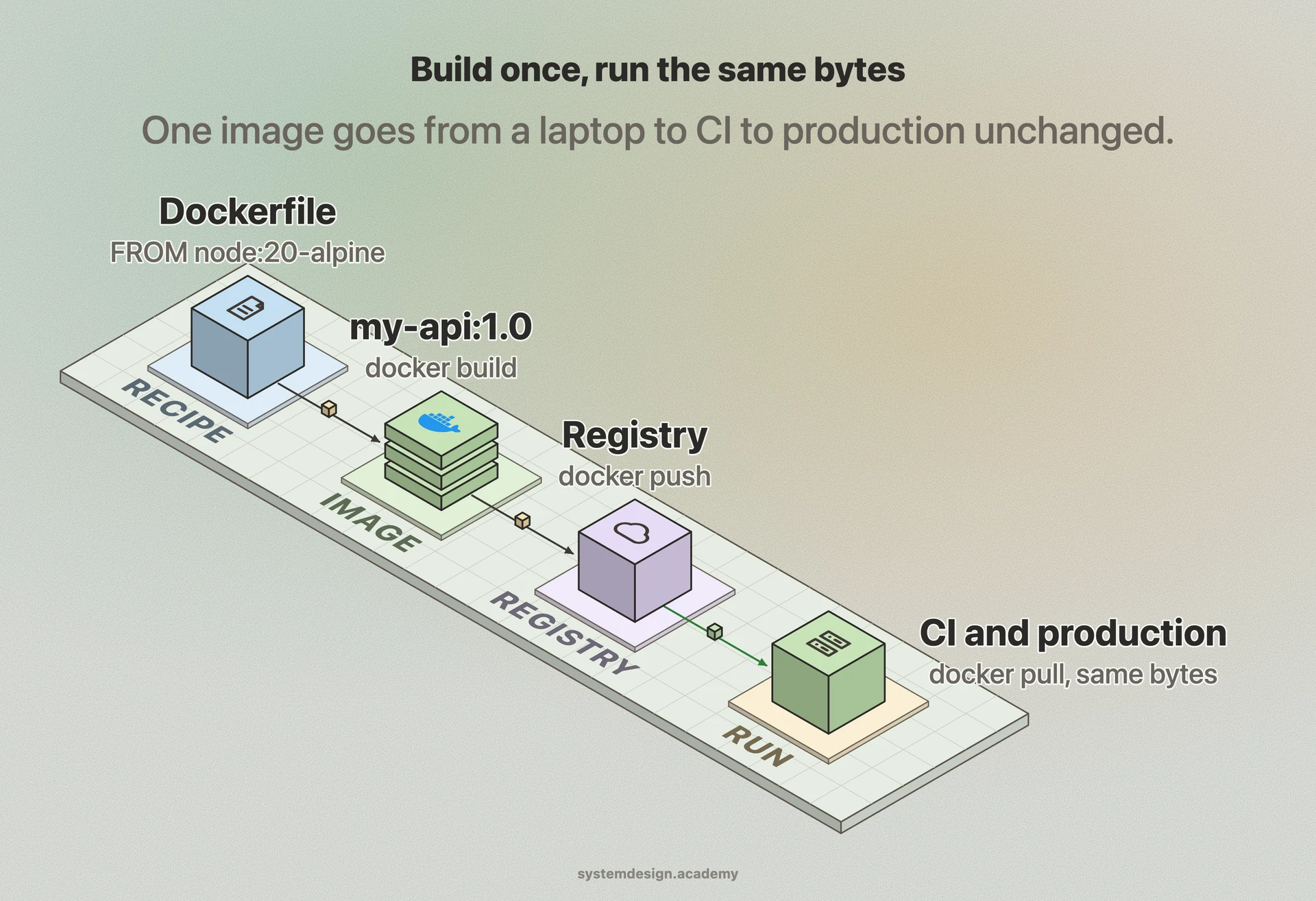
One image, built once, runs the same everywhereThe Dockerfile is the recipe, the image is the result, and the registry is where it is stored. Every machine that pulls the same tag or digest runs exactly the same files, which is the whole point of a container.
One image, built once, runs the same everywhereThe Dockerfile is the recipe, the image is the result, and the registry is where it is stored. Every machine that pulls the same tag or digest runs exactly the same files, which is the whole point of a container.
How to answer a Docker question
Say what happens at build time and what happens at run time, because many questions mix the two. ARG is build time, ENV is both. EXPOSE documents a port, -p publishes it. A layer is fixed once built, a container's writes go to its own layer. Then give the command or Dockerfile line you would actually write.
This page is the free part.
The course goes deeper on Docker
₹1,111 in India/$25 everywhere elseonce, for the whole course
The System Design course covers Docker across a run of lessons, not one page. These 4 alone are about 64 minutes of step-by-step reading, every one with a quiz.
Start here if you are a fresher. These questions check that you know what a container is and the words Docker uses.
What is Docker, in simple words?
Docker is a tool for packaging a program together with everything it needs to run, its libraries, runtime and files, into one unit called an image, and for running that image as a container. The same image runs the same way on a laptop, in CI and on a production server.
That removes the classic problem of "it works on my machine". The machine no longer needs the right version of Python or Node installed; the image brings its own.
What is the difference between an image and a container?
An image is a read-only template: a stack of filesystem layers plus settings such as which command to run. A container is a running instance of an image. Docker adds a thin writable layer on top of the image for that one container and starts its process.
You can start many containers from one image. Each gets its own writable layer, so changes inside one container do not affect the image or the others. When the container is removed, its writable layer is removed too.
How is a container different from a virtual machine?
A virtual machine runs a whole guest operating system with its own kernel on top of a hypervisor. A container is just a process on the host that shares the host's kernel. The kernel isolates it with namespaces, which give it its own view of processes, network, mounts and host name, and control groups (cgroups), which limit how much CPU and memory it can use.
So containers start in about the time it takes to start the process and use far less memory than a VM. The trade-off is weaker isolation: every container shares one kernel, so a kernel bug can affect all of them. That is why Docker Desktop on a Mac or Windows machine runs a small Linux VM to host Linux containers.
What are the parts of Docker: the client, the daemon, containerd and runc?
The docker command is a client. It sends requests over a REST API to the Docker daemon, dockerd, which manages images, containers, networks and volumes. dockerd hands the job of running containers to containerd, which in turn uses a low-level runtime, runc by default, to create the container with namespaces and cgroups.
This split is why Kubernetes can run Docker-built images without Docker: it talks to containerd or CRI-O directly, and the image format is an open standard.
What is a registry, and what is the difference between a tag and a digest?
A registry stores and serves images. Docker Hub is the public default; teams also use private registries from their cloud provider. docker push uploads an image and docker pull downloads it.
A tag such as my-api:1.4 is a name that can be moved to point at a different image later. A digest such as my-api@sha256:... is the hash of the image content, so it can never point at anything else. For production, a fixed version tag or a digest is safer than latest, which is only the tag Docker uses when you give none. It does not mean newest.
The Open Container Initiative (OCI) is an open project that publishes standards for containers: an image spec for how images are laid out, a runtime spec for how a container is started, and a distribution spec for how registries serve images.
Because Docker builds OCI images, the same image can be run by containerd, CRI-O, Podman or any other runtime that follows the standard. You are not locked into one tool.
Most practical Docker questions are about writing a good Dockerfile. Know what each instruction does and how the cache works.
What is a Dockerfile? Name the common instructions.
A Dockerfile is a text file of instructions that docker build follows to make an image. FROM picks the base image. WORKDIR sets the folder later steps run in. COPY copies files from your project into the image. RUN runs a command at build time, such as installing packages. ENV sets an environment variable. EXPOSE documents a port. USER sets which user runs the process. CMD and ENTRYPOINT say what runs when a container starts.
RUN, COPY and ADD change the filesystem and add layers. Instructions such as CMD, ENV and WORKDIR mostly record settings in the image's config.
An image is a stack of read-only layers. Each layer holds the file changes made by one build step. When a container runs, the layers are combined with a union filesystem into one view, and the container's writes go to its own thin writable layer on top. Changing a file from a lower layer copies it up into the writable layer first, which is called copy-on-write.
Layers are shared. Ten images built on the same base store and download that base once. One catch: deleting a file in a later step does not make the image smaller, because the file still sits in the earlier layer. Install and clean up in the same RUN step.
How does the Docker build cache work, and how do you order a Dockerfile to use it?
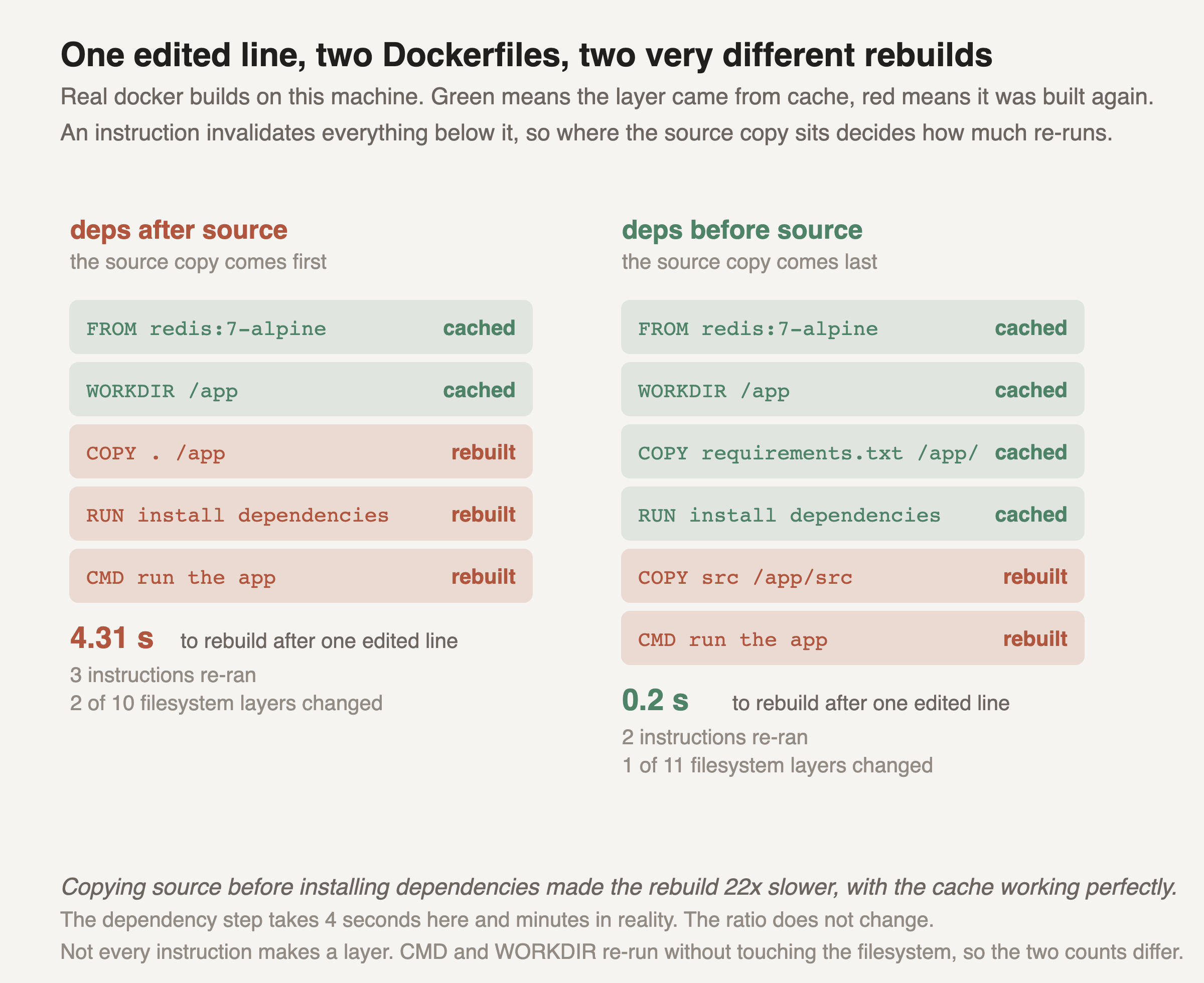
Docker reuses a step's result from cache if the step and its inputs have not changed. For COPY and ADD the inputs are the files' contents. Once one step has to run again, every step after it runs again too.
So put the things that change least at the top. Copy the dependency list, such as package.json or requirements.txt, install dependencies, and only then copy the rest of the source. An everyday code change then skips the slow install. The figure below is a real build where getting this order wrong made a rebuild 22 times slower.
Where the source copy sits decides how much rebuildsA change invalidates the cache for that step and every step after it. Copy the dependency list and install dependencies first, then copy the code, and an everyday code change skips the slow install.
What is the difference between CMD and ENTRYPOINT?
ENTRYPOINT is the program the container always runs. CMD gives default arguments. When both are set in exec form, the container runs ENTRYPOINT followed by CMD. Arguments you add to docker run replace CMD but are appended to ENTRYPOINT. To replace ENTRYPOINT itself you need the --entrypoint flag.
With only CMD and no ENTRYPOINT, CMD is the whole command and docker run arguments replace all of it. The pattern ENTRYPOINT for the program and CMD for its default flags gives users a sensible default that is easy to change.
# Dockerfile
FROM alpine:3.20
ENTRYPOINT ["echo", "hello"]
CMD ["world"]

$ docker run --rm sda-ep-demo
hello world
$ docker run --rm sda-ep-demo team
hello team
Run on Docker 29.7.2. The argument team replaced CMD and was appended to ENTRYPOINT.
What is the difference between shell form and exec form, and why does it matter for stopping a container?
Exec form is a JSON list, CMD ["node", "server.js"]. It runs the program directly. Shell form is a plain string, CMD node server.js, and Docker runs it through /bin/sh -c.
The Dockerfile reference warns that with shell form the shell does not pass signals, so your program is not process 1 and does not receive the SIGTERM that docker stop sends. It cannot shut down cleanly and is killed with SIGKILL when the grace period ends. Use exec form for CMD and ENTRYPOINT.
COPY copies files and folders from the build context, or from another build stage, into the image. ADD does that too, and also can fetch a remote URL or a Git repository, and automatically extracts a local tar archive into the destination.
Because ADD does those extra things quietly, prefer COPY unless you need one of them. A file that you did not expect to be unpacked, or a URL fetched with no checksum, is harder to review.
What is the difference between ARG and ENV? Can you pass a password with them?
ARG is a build-time variable. You set it with docker build --build-arg, and it is not kept in the final container. ENV sets an environment variable that is stored in the image and is present in every container started from it.
Do not pass secrets with either. ENV values are saved in the image, and the docs say build arguments are visible in docker history. For a secret needed during the build, such as a token to download private packages, use a build secret: RUN --mount=type=secret mounts it for that one step only, and it is never written to a layer.
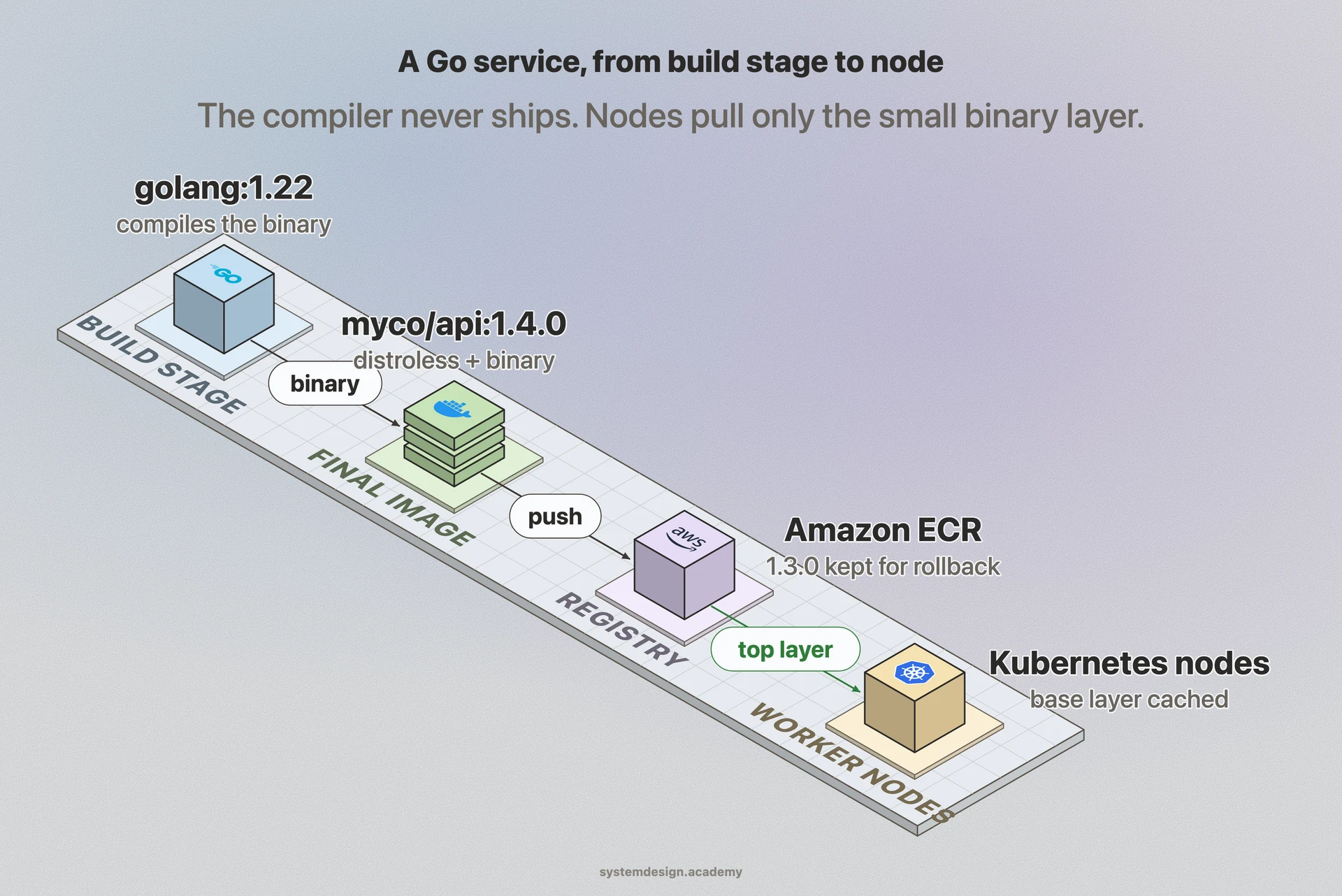
A Dockerfile with more than one FROM. Each FROM starts a new stage. The first stage has the full toolchain and builds the program. The final stage starts from a small base image and copies only the built result from the earlier stage with COPY --from=<stage>.
The compilers, source code and build tools stay in the build stage and are not in the image you ship. The result is smaller, faster to pull and has fewer packages that could carry vulnerabilities.
A multi-stage build ships the program, not the compilerThe first stage has the full toolchain and compiles the program. The final stage starts from a small base and copies in only the result, so the image you ship is smaller and has less in it to attack.
When you run docker build, the files in the folder you point at, called the build context, are sent to the builder. A .dockerignore file lists files and folders to leave out, using patterns like .gitignore.
Leave out node_modules, .git, build output, logs and any .env file. That keeps builds faster, stops a COPY . from changing the cache key because of junk files, and stops secrets from ending up inside an image.
Start from a small base such as an alpine, slim or distroless image. Use a multi-stage build so the build tools stay behind. Install only what the program needs, and clean package caches in the same RUN step that created them. Use .dockerignore so stray files are not copied in.
Smaller is not only about disk. A smaller image pulls faster when a new server starts, which matters during autoscaling, and has fewer packages for a scanner to flag.
3. Running containers: storage, networking and lifecycle
These questions check that you can run containers correctly, keep their data and connect them to each other.
What is the difference between a volume, a bind mount and a tmpfs mount?
Data written inside a container's writable layer is lost when the container is removed. A volume is storage that Docker creates and manages, kept separately from any container, so it survives the container. It is the normal choice for database data.
A bind mount maps a folder from the host into the container, which is handy in development to see code changes live, but it ties the container to that host's folder layout. A tmpfs mount, on Linux, lives only in memory and disappears when the container stops, which suits temporary sensitive files.
bridge is the default: containers get a private network on the host. host removes the network isolation, so the container uses the host's network directly. none gives the container no network at all. overlay connects containers on different hosts, used with Docker Swarm.
One detail interviewers like: on a user-defined bridge network, containers can reach each other by name, such as http://db:5432, because Docker provides DNS for them. On the default bridge network they cannot, and you would need IP addresses. So create a network for your app.
What is the difference between EXPOSE and publishing a port with -p?
EXPOSE in a Dockerfile only documents which port the program listens on. The Dockerfile reference says plainly that it does not publish the port.
Publishing happens at run time: docker run -p 8080:80 forwards port 8080 on the host to port 80 in the container. Without an address it listens on all of the host's network interfaces; -p 127.0.0.1:8080:80 limits it to the host itself.
no is the default: the container is not restarted. on-failure restarts it only when it exits with a non-zero code, optionally up to a maximum number of tries. always restarts it whenever it stops, and also when the Docker daemon starts. unless-stopped is like always, except a container you stopped by hand stays stopped after the daemon restarts.
A restart policy reacts to the process exiting. It does not restart a container that is running but unhealthy.
HEALTHCHECK tells Docker how to test whether the program inside is working, usually with a small command such as a curl to a health URL. Docker runs it every 30 seconds by default, with a 30 second timeout, and marks the container unhealthy after 3 failures in a row. The status shows in docker ps.
On its own, Docker Engine only reports the status; it does not replace an unhealthy container. Compose can wait for a healthy container before starting another, and Docker Swarm replaces unhealthy tasks. Kubernetes ignores HEALTHCHECK and uses its own liveness and readiness probes.
Docker sends SIGTERM to the main process in the container, which is process 1 inside it. If the process has not exited when the grace period ends, 10 seconds by default for Linux containers, Docker sends SIGKILL, which cannot be caught.
So the program should handle SIGTERM: stop taking new work, finish what it is doing and exit. If your program is process 1 and starts child processes, running with docker run --init adds a tiny init process that forwards signals and cleans up finished children.
What is Docker Compose, and does depends_on wait for a database to be ready?
Compose runs a multi-container app from one file, compose.yaml, which lists the services, their images, ports, volumes and networks. docker compose up starts them all on a shared network where they find each other by service name.
By default depends_on only waits for the other container to start, not for the program inside to be ready. To wait for readiness, give the database a healthcheck and use depends_on with condition: service_healthy. The app should still retry its connection, because a database can also go away later.
How do you see a container's logs and get a shell inside it?
docker logs <container> shows what the main process wrote to standard output and standard error, and -f follows it live. That is why a containerised app should log to standard output rather than to a file inside the container.
docker exec -it <container> sh starts a new shell process inside the running container, which is how you look around while debugging. docker inspect shows its full config, mounts, network addresses and state, including the exit code of a container that stopped.
Senior questions are about running containers safely and at scale. Each answer here is something you would check in a real review.
Why should a container not run as root?
By default the process in a container runs as root. Namespaces limit what it can see, but it shares the host kernel, so if an attacker breaks out of the container through a bug, being root makes the damage much worse.
Create a user in the Dockerfile and switch to it with USER. Also drop Linux capabilities the program does not need, make the filesystem read-only where you can, and never mount the Docker socket into a container unless you accept that it can control the whole host.
How should a container get its passwords and API keys?
Not baked into the image. Anyone who can pull the image can read every layer. Give secrets at run time instead: from a secrets manager, from an orchestrator's secret store mounted as a file, or as environment variables set at start time.
Files are often safer than environment variables, because environment variables are easy to leak into logs, crash reports and docker inspect output. For build-time secrets use a build secret mount, as covered under ARG and ENV.
Use small, trusted base images, pin them to a version or digest, and scan images for known vulnerabilities in CI before they are pushed. Rebuild images regularly so base image security fixes are picked up, rather than patching running containers by hand.
Treat images as immutable: a change means a new image with a new tag, built and tested the same way. Then what runs in production is exactly what passed the tests, and rolling back is just running the previous tag.
With flags such as docker run --memory=512m --cpus=1.5. Docker applies them through cgroups. A container that goes over its memory limit can be killed by the kernel's out-of-memory killer, and docker inspect then shows OOMKilled as true. A CPU limit does not kill; the container is slowed down instead.
Without limits, one runaway container can starve every other container on the host. In Kubernetes the same idea appears as requests and limits on each container.
What is the difference between Docker and Kubernetes?
Docker builds images and runs containers on one machine. Kubernetes runs containers across many machines: it decides where each one runs, restarts and replaces them, gives them stable network names, scales them and rolls out new versions.
They are used together. You build the image with Docker, push it to a registry, and Kubernetes pulls and runs it with a runtime such as containerd. Docker Swarm is Docker's own simpler orchestrator, but Kubernetes is the one most teams run.
A container starts and exits immediately. How do you debug it?
Run docker ps -a to see it with its exit code, then docker logs <container> to read what it printed before it stopped. docker inspect shows the exact command it ran and the exit code. Exit code 137 means it was killed with SIGKILL, often from running out of memory.
A common cause is that the main process finished: a container lives only as long as its main process. A server started in the background, or a CMD that runs a script which returns, makes the container exit at once. Run the program in the foreground as the main process.
How would you design a build and release pipeline around Docker images?
Build one image per commit in CI, tag it with the commit hash or version, run the tests against that image, and push it to a registry. Promote the same image from staging to production by its tag or digest. Never rebuild it per environment; pass environment differences in as config at run time.
Scan it before it is pushed, keep old tags so a rollback is a redeploy of the previous one, and let an orchestrator roll it out with health checks so a bad image stops the rollout instead of taking the service down.
The interviewer's follow-up is "have you actually built this?" What would you say?
Memorised answers fall apart at the second question. The lessons below teach the parts behind the answers, starting with "Containerization", so you can explain why and not only what.
The lessons that teach the next part
Packaging applications with their dependencies into isolated, portable units that run anywhere.
Every answer on this page comes from our System Design course: 770 lessons on databases, caching, scaling, messaging and reliability, each drawn step by step. You learn why the answer is right, which is what an interviewer checks with the second question. 18 lessons are free to read, with no card needed.
These questions are a start. The interview asks more.
Get all 200 questions in the System Design and Distributed Systems pack
Each question has why it is asked, a full answer, what the interviewer listens for, the follow-ups, the common mistakes and a diagram (268 diagrams in all). A PDF you keep, junior to staff level.
It covers deployment pipelines, immutable releases, health checks and the infrastructure questions that sit on top of containers.
India: UPI, cards or netbanking through Razorpay. Elsewhere: card or PayPal. Download at once from My packs.
NEWSystem Design Hands-On
Included in the System Design course: real systems, built live
Postgres Sharding: Complete Hands-On (PgBouncer + Citus). 2 h 36 min and 20 chapters: one PostgreSQL loaded until it breaks, then four shards behind a router you write, PgBouncer and Citus, with the 139-page slide deck. The first 15 minutes are free to watch.