Horizontal Pod Autoscaler
A K8s controller that automatically scales the number of pods based on CPU utilization, memory usage, or custom metrics. The Kubernetes equivalent of auto-scaling groups.
What is Horizontal Pod Autoscaler?
In short
The Horizontal Pod Autoscaler (HPA) is a Kubernetes controller that automatically changes how many replica pods a workload runs, scaling the count up or down based on observed metrics like CPU utilization, memory usage, or custom application metrics. It adds pods when load rises and removes them when load falls, so a Deployment matches demand without a human editing the replica count.
What it actually is
The HPA is one of the built-in controllers that runs inside the Kubernetes control plane, specifically inside the kube-controller-manager. You create an HorizontalPodAutoscaler object, point it at a workload (a Deployment, ReplicaSet, or StatefulSet), and tell it a target, for example keep average CPU at 60 percent across all pods, with a minimum of 2 replicas and a maximum of 20.
It is called horizontal scaling because it changes the number of pods, not the size of each pod. That is the opposite of the Vertical Pod Autoscaler (VPA), which changes the CPU and memory requests of a single pod. HPA gives you more identical copies; VPA gives you bigger copies.
The shortDefinition is right that it is the Kubernetes equivalent of an AWS Auto Scaling Group, but the level it works at is different. HPA scales pods inside a cluster. It does not add machines. When HPA wants more pods than the cluster has room for, a separate component (Cluster Autoscaler or Karpenter) adds nodes.
How it works under the hood
HPA runs a control loop on a fixed interval, every 15 seconds by default (set with --horizontal-pod-autoscaler-sync-period). On each tick it reads the current metric for the target pods, then computes a desired replica count with a simple ratio: desiredReplicas = ceil(currentReplicas * currentMetricValue / targetMetricValue). If average CPU is 90 percent and your target is 60 percent with 4 pods running, it wants ceil(4 * 90 / 60) = 6 pods.
To get those metrics, HPA queries the Kubernetes metrics APIs, not the pods directly. CPU and memory come from the metrics.k8s.io API, which is served by metrics-server (you must install it; it is not bundled). Custom and external metrics come from custom.metrics.k8s.io and external.metrics.k8s.io, usually backed by an adapter such as the Prometheus Adapter or KEDA.
Two safeguards stop it from thrashing. A tolerance (10 percent by default) means HPA ignores changes inside the dead band, so a target of 60 percent will not scale when CPU is 63 percent. Stabilization and scaling-policy rules slow down scale-down, with a 5 minute scale-down stabilization window by default, so a brief dip in traffic does not immediately kill pods you will need again a minute later.
When to use it and the trade-offs
HPA fits stateless, horizontally scalable workloads where load varies over time: web servers, API backends, queue consumers, anything where adding identical replicas spreads the work. It does not fit singleton workloads or anything that cannot run as multiple copies, and you should not point HPA and VPA at the same CPU or memory metric at once because they fight each other.
The biggest practical limit is reaction time. HPA reacts to metrics it can already see, so by the time CPU is high, users are already feeling it, and new pods still need time to schedule and warm up. For sharp traffic spikes, scale on a leading signal like queue depth or requests per second rather than CPU, and keep min replicas high enough to absorb the first burst.
Tuning matters. Set CPU and memory requests on your pods, because utilization is measured as a percentage of the request; with no request, percentage-based HPA cannot work. Pick a target that leaves headroom (60 to 70 percent CPU is common), set max high enough that you do not hit the ceiling during real peaks, and confirm Cluster Autoscaler or Karpenter can supply nodes, otherwise HPA will create pods that sit Pending forever.
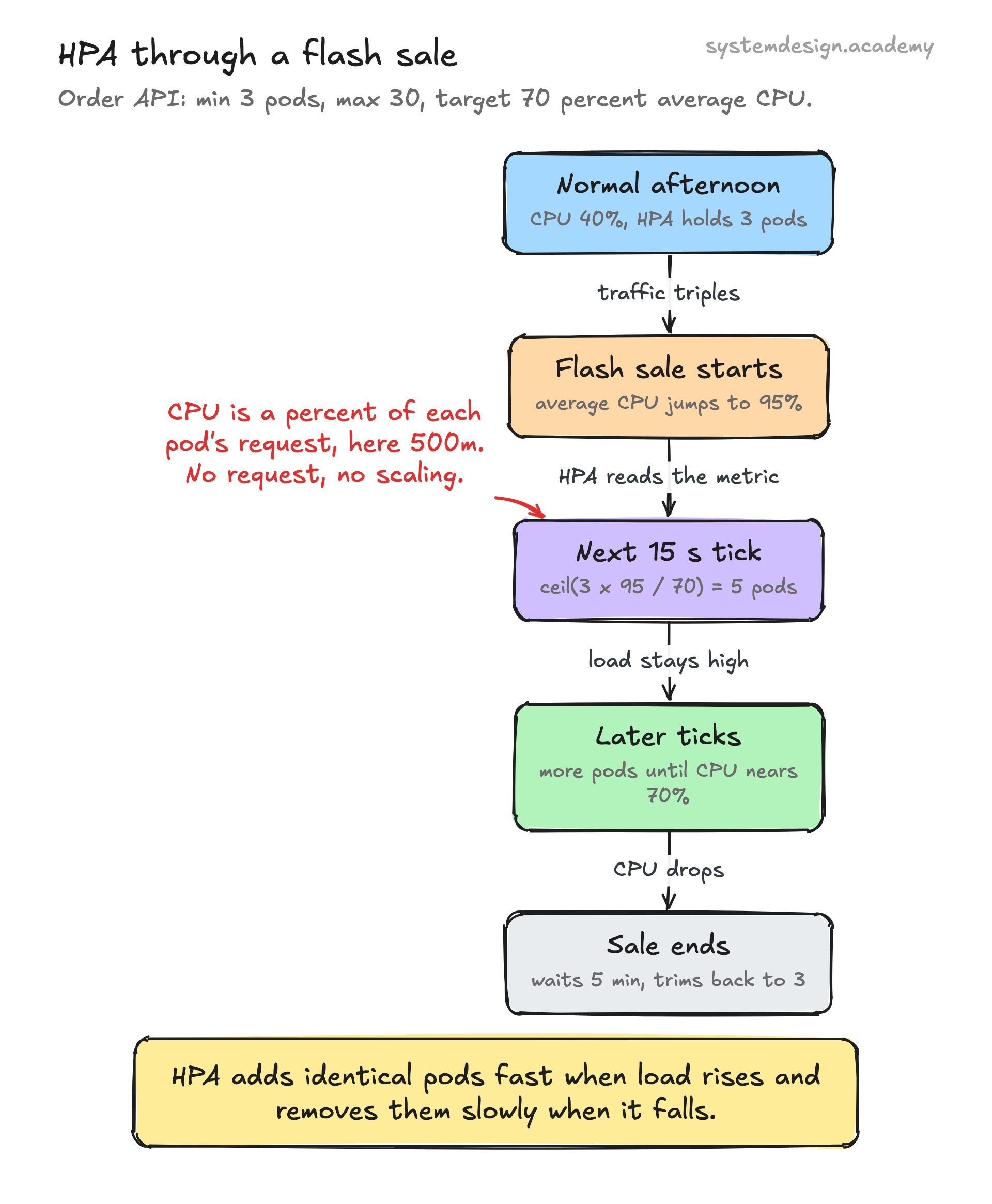
A concrete example
Say you run an order API as a Deployment with 3 pods, each requesting 500m CPU. You apply an HPA with minReplicas 3, maxReplicas 30, and a target of 70 percent average CPU. During a normal afternoon the pods sit at 40 percent CPU, so HPA holds at 3 replicas.
A flash sale starts. Traffic triples, average CPU jumps to 95 percent. On its next 15 second tick HPA computes ceil(3 * 95 / 70) = 5, then on later ticks keeps climbing toward maxReplicas as load stays high, eventually settling around the count that holds CPU near 70 percent. When the sale ends and CPU drops, HPA waits out the 5 minute scale-down window and then gradually trims back toward 3.
In the v2 API you can combine signals: scale on whichever of average CPU, average memory, or a custom metric (like requests-per-second from Prometheus) demands the most replicas. HPA always picks the highest of the candidate counts, so the busiest dimension wins.
Where it is used in production
Kubernetes
HPA is a native part of upstream Kubernetes; the autoscaling/v2 API ships in every modern cluster.
Amazon EKS
Runs HPA alongside metrics-server and pairs it with Cluster Autoscaler or Karpenter to add EC2 nodes when pods cannot be scheduled.
Google GKE
Ships metrics-server enabled by default and adds Multidimensional Pod Autoscaling and a custom metrics Stackdriver adapter on top of standard HPA.
KEDA
A CNCF project that extends HPA with event-driven external metrics, letting you scale on Kafka lag, queue length, or HTTP rate, including scale-to-zero.
Frequently asked questions
- What is the difference between HPA and the Cluster Autoscaler?
- HPA changes the number of pods for a workload inside the cluster. The Cluster Autoscaler (or Karpenter) changes the number of nodes (machines) in the cluster. They work together: HPA asks for more pods, and if there is no room, the Cluster Autoscaler adds nodes so those pods can be scheduled.
- What is the difference between HPA and VPA?
- HPA scales out by adding more identical pods (horizontal). VPA scales up by increasing the CPU and memory requests of each pod (vertical). Do not target the same CPU or memory metric with both at once, because they will fight over the same signal.
- Why is my HPA showing unknown for the metric?
- Almost always the metrics pipeline is missing. For CPU and memory you need metrics-server installed and your pods need resource requests set, since utilization is a percentage of the request. For custom metrics you need an adapter like the Prometheus Adapter or KEDA exposing the custom.metrics.k8s.io API.
- How fast does HPA react to a traffic spike?
- HPA checks metrics every 15 seconds by default and only acts on what it already measures, so there is built-in lag, plus the time to schedule and warm up new pods. For sharp spikes, scale on a leading signal like queue depth or requests per second instead of CPU, and keep minReplicas high enough to absorb the first burst.
- Can HPA scale a workload down to zero pods?
- Standard HPA cannot; its minReplicas must be at least 1. Scale-to-zero needs an event-driven layer such as KEDA or Knative, which can bring a workload up from zero when an event arrives and back down to zero when idle.
Learn Horizontal Pod Autoscaler hands-on
This page explains the idea. The full lesson lets you step through the ring as servers join and leave, read the implementation, and check yourself with a quiz. It is one of 760+ lessons in the System Design Masterclass, from your first API call to distributed consensus. Eleven Foundation lessons are free, no signup. Lifetime access is ₹499 in India or $7.99 worldwide, one payment, no subscription.
See also
Related glossary terms you might want to look up next.
Auto Scaling
Automatically adding or removing compute instances based on current demand. Scales out during traffic spikes and scales in during quiet periods to save cost.
Kubernetes Deployment
A K8s resource that manages rolling updates and rollbacks for a set of pods. You declare the desired state and K8s converges to it.
Kubernetes
An orchestration platform that automates deploying, scaling, and managing containerized applications. K8s is the operating system for your cloud.
Docker
A platform for packaging applications into lightweight, portable containers. 'Works on my machine' becomes 'works everywhere.'
Container
A lightweight, isolated environment that packages an application with its dependencies. Shares the host OS kernel, unlike VMs. Starts in milliseconds.
Kubernetes Pod
The smallest deployable unit in Kubernetes: one or more containers sharing network and storage. Pods are ephemeral; if one dies, K8s creates a replacement.