free exercise · worked answer · real lab output
Which LLMs fit on an RTX 4090 with 24 GB of VRAM?
What fits in 24 GB with llama.cpp and vLLM, checked against our own RTX 4090 runs and vLLM's start-up log.
The scenario
Your team has one RTX 4090, either in a workstation under a desk or rented on RunPod for $0.34 an hour. A colleague wants to try a coding assistant and a document chatbot on it, and asks the question everyone asks first: what is the biggest model this card can run, and how long can the conversations be?
You will try two engines. llama.cpp runs the compressed GGUF files most people download. vLLM is the server you would put behind a real application, and it usually runs models in their full 16-bit form.
Your task: list which of these fit entirely on the card at 8,192 and at 32,768 tokens: Qwen3-8B, gpt-oss-20b, Mistral Small 24B, Qwen3-14B, Qwen3-32B and Llama 3.3 70B. Then say whether vLLM can serve Qwen3-8B in BF16, and for how many tokens.
Words this exercise uses
- VRAM
- The GPU's own memory. The model and its KV cache must fit in it to run at full speed.
- BF16
- The 16-bit number format most models are published in: 2 bytes for each weight, the full quality of the release.
- GGUF and Q4_K_M
- GGUF is the file format llama.cpp loads. Q4_K_M stores the weights in a little under 5 bits each, so the file is about a third of the BF16 size.
- KV cache
- While a model reads a conversation, it keeps two short lists of numbers, a key and a value, for every token in every layer. Together they are the KV cache. It grows with every token and sits in the same memory as the model.
- nvidia-smi
- NVIDIA's command-line tool that shows each GPU, its memory and what is using it.
Show a hint
Start from what the card really reports, not the 24 GB on the box: nvidia-smi shows the total in MiB. Then, for each model, add the file size, the KV cache for the conversation and a little working space.
For vLLM, remember that it only uses 92% of the card by default, and that whatever is left after the weights and its working space becomes the KV cache.
Show the worked answer
Step 1. Read the real size of the card
An RTX 4090 is sold as a 24 GB card. Here is what our rented one reported:
$ nvidia-smi
+-----------------------------------------------------------------------------------------+
| NVIDIA-SMI 595.91.07              Driver Version: 595.91.07      CUDA Version: 13.2     |
|=========================================+========================+======================|
|   0  NVIDIA GeForce RTX 4090        On  |   00000000:C3:00.0 Off |                  Off |
|  0%   28C    P8             14W /  450W |       1MiB /  24564MiB |      0%      Default |
+-----------------------------------------------------------------------------------------+
Our RTX 4090 on RunPod, 13 November 2026 (rows trimmed to the GPU line).
The "24 GB" on the box is really 24 GiB of memory chips, 24,576 MiB. nvidia-smi shows 12 MiB less, 24,564 MiB, because the driver keeps a little for itself. In the decimal gigabytes that file sizes use, that is 25.76 GB, the number we compare with below.
Step 2. Add the file, the KV cache and the working space
The KV cache for one token is 2 x layers x KV heads x head size x 2 bytes. Qwen3-32B has 64 layers, 8 KV heads and a head size of 128 in its config.json:
Qwen3-32B Q4_K_M at 8,192 tokens = 19.76 GB file + 2.15 GB KV + 1.50 GB working space = 23.41 GB, under 25.76 GB
Qwen3-32B Q4_K_M at 32,768 tokens = 19.76 GB + 8.59 GB + 1.50 GB = 29.85 GB, over
the longest conversation that fits = (25.76 GB - 19.76 GB - 1.50 GB) / 262,144 bytes = about 17,100 tokens
The 1.5 GB of working space is our allowance for the CUDA runtime and llama.cpp's buffers. It is not a measured number; llama.cpp prints its real buffers when it loads a model, so check that line before you trust a tight fit.
| Model and file | File | KV per token | 8K / 32K tokens | Longest conversation that fits (or the model's own limit) |
|---|---|---|---|---|
| Qwen3-8B Qwen3-8B-Q8_0.gguf | 8.71 GB | 144 KiB | fits / fits | 40,960, the model's own limit |
| gpt-oss-20b gpt-oss-20b-MXFP4.gguf | 12.11 GB | 24 KiB | fits / fits | 131,072, the model's own limit |
| Mistral Small 24B Mistral-Small-24B-Instruct-2501-Q4_K_M.gguf | 14.33 GB | 160 KiB | fits / fits | 32,768, the model's own limit |
| Qwen3-14B Qwen3-14B-Q8_0.gguf | 15.70 GB | 160 KiB | fits / fits | 40,960, the model's own limit |
| Mistral Small 24B Mistral-Small-24B-Instruct-2501-Q6_K.gguf | 19.35 GB | 160 KiB | fits / does not fit | 29,976 |
| Qwen3-32B Qwen3-32B-Q4_K_M.gguf | 19.76 GB | 256 KiB | fits / does not fit | 17,147 |
| Llama 3.3 70B Llama-3.3-70B-Instruct-Q3_K_M.gguf | 34.27 GB | 320 KiB | does not fit / does not fit | none |
| Llama 3.3 70B Llama-3.3-70B-Instruct-Q4_K_M.gguf | 42.52 GB | 320 KiB | does not fit / does not fit | none |
Llama 3.3 70B does not fit in any common form: the 4-bit file is 42.52 GB and even the 3-bit file is 34.27 GB, both larger than the whole card. llama.cpp can keep some of its layers in the computer's main memory, but each token then waits on that slower memory, so plan on a second GPU or a 48 GB card instead.
Step 3. Check the speed you will get
We measured Qwen3-8B in 4-bit on this card. It wrote 164 tokens a second and read a 512-token prompt at about 12,000 tokens a second:
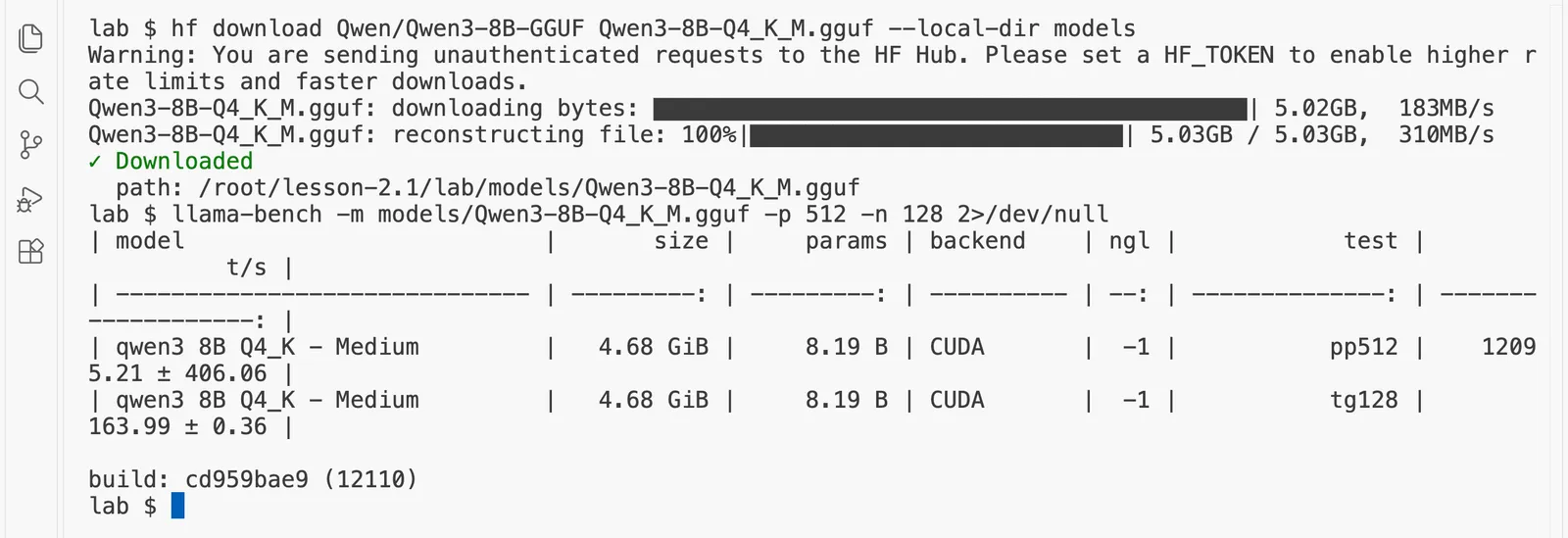
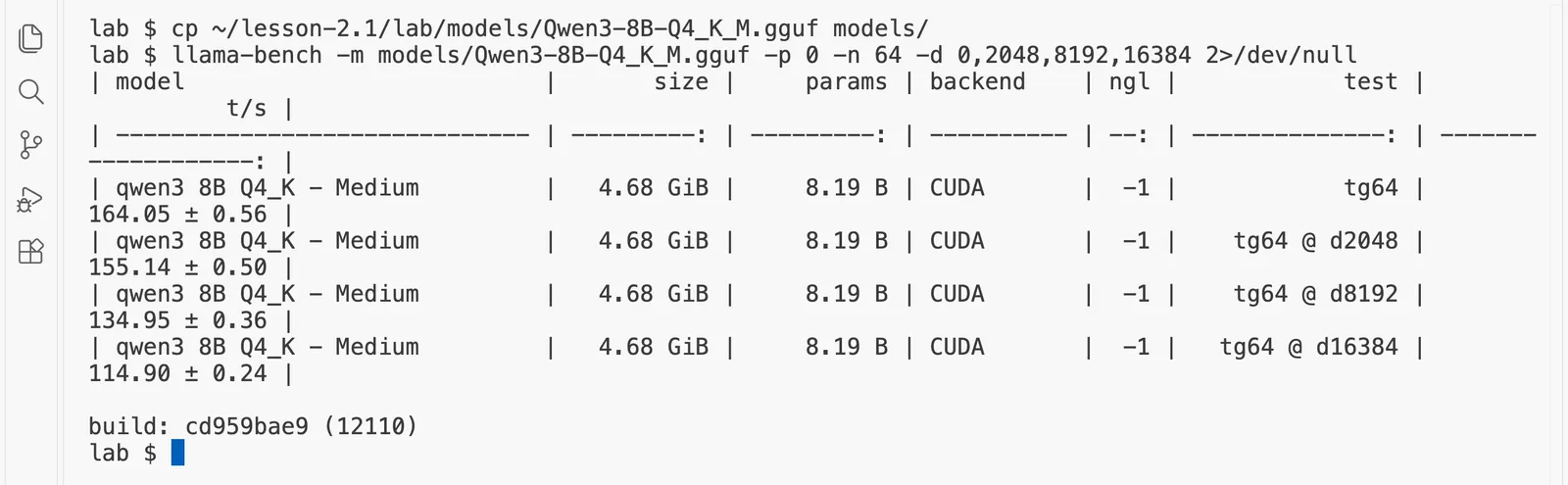
Writing a token reads the whole file once, so 164 tokens a second x 5.03 GB = 824 GB a second, 82% of the card's rated 1,008 GB/s. The same share gives an estimate for the bigger files: 0.82 x 1,008 / 19.76 = about 42 tokens a second for Qwen3-32B Q4_K_M, still faster than anyone reads. The speed falls as the conversation grows, because the KV cache is read too:
Step 4. Serve Qwen3-8B in BF16 with vLLM
In 16-bit, Qwen3-8B's weights are 8.19 billion x 2 bytes, about 16.4 GB. vLLM uses 92% of the card by default, takes out the weights and its own working space (the temporary numbers of a running batch, and the recorded GPU programs it reuses to start each step quickly), and turns the rest into KV cache. We started it with vllm serve Qwen/Qwen3-8B --max-model-len 32768 and read its log:
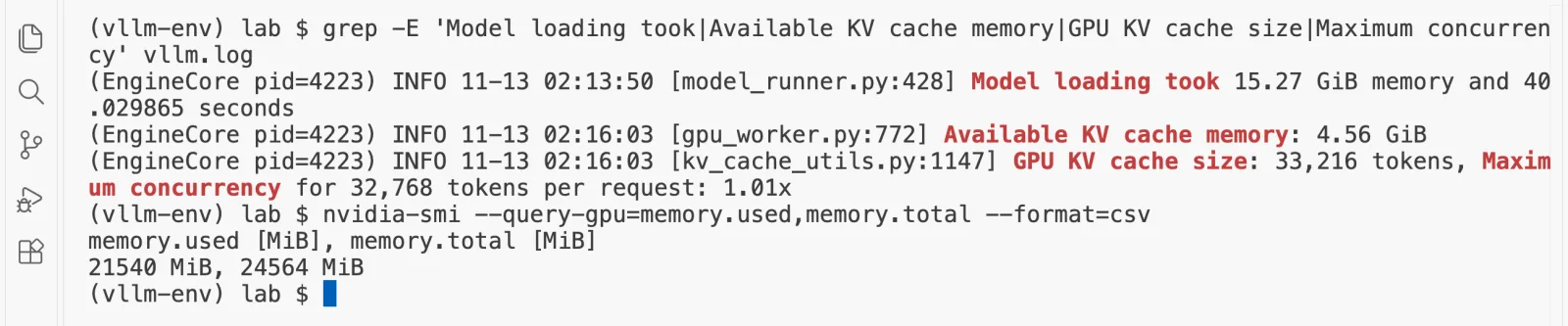
weights 15.27 GiB + KV cache 4.56 GiB = 19.83 GiB, so vLLM kept about 2.24 GiB for its own working space
KV per token = 2 x 36 layers x 8 x 128 x 2 = 147,456 bytes = 144 KiB
4.56 GiB / 144 KiB = about 33,200 tokens; vLLM printed 33,216
So one card serves Qwen3-8B in BF16 to one person with a 32,768-token conversation, or to about 16 people with 2,000 tokens each. Qwen3-14B in BF16 is 14,768,307,200 parameters x 2 bytes, about 29.5 GB, and does not fit; for it, use an 8-bit or 4-bit checkpoint.
Step 5. Check it in the calculator
The calculator below is set to Qwen3-8B in BF16 on an RTX 4090 with one 32,768-token conversation. It assumes 2 GiB of working space where vLLM used about 2.24, so it allows a little more cache than vLLM did. Change the model or the format to test your own plan, or open the full GPU memory calculator.
Will this model fit on this GPU?
GPU memory calculatorA model on a GPU needs room for three things: its weights, the KV cache that holds every conversation, and some working space. Change the numbers and watch the card fill up.
Pick a GPU. Each card shows how many of it this setup needs.
Yes. It fits on one RTX 4090, with room for 1 people at 32,768 tokens each.
One RTX 4090
Sold as a 24 GB card. The driver reports 24 GiB, and vLLM uses 22.1 GiB of it.
- weights 15.3 GiB
- KV cache 4.5 GiB
- working space 2.0 GiB
- free 331 MiB
The weights
15.3 GiB
8.2 billion numbers
KV cache for each token
144 KiB
147,456 bytes
KV cache for each person
4.5 GiB
32,768 tokens
KV cache for everyone
4.5 GiB
1 person
KV cache per token = 2 (a key and a value) x layers x KV heads x head size x bytes
= 2 x 36 layers x 8 KV heads x 128 head size x 2 bytes = 147,456 bytes per token
Weights = 8,190,735,360 parameters x 2 bytes = 15.3 GiB
Usable on one card = 0.92 x 24 GiB = 22.1 GiB (a 24 GB card is 22.4 GiB on paper; the driver reports 24 GiB)
The assumptions behind these numbers
- Memory on this page is in GiB (1 GiB is 1,073,741,824 bytes), the unit nvidia-smi and vLLM's log use. GPUs are sold in decimal GB, so a 48 GB card holds 48 billion bytes, which is 44.7 GiB. The card names keep the GB they are sold by.
- vLLM uses 92% of a GPU's memory by default (gpu-memory-utilization 0.92 in vLLM 0.33.0). The card sizes are what the driver usually reports, a little under the datasheet number on some cards.
- The working space is a flat guess you can change. vLLM measures the real number when it starts and prints how many tokens of KV cache it could make room for: trust that line over this page.
- More than one GPU means tensor parallelism inside one machine of up to 8 GPUs, then pipeline parallelism across machines. The number of GPUs must divide the model's 32 attention heads. The time GPUs spend talking to each other is not counted here.
- 8-bit and 4-bit formats keep the embedding table and output head in BF16, as AWQ, GPTQ and FP8 checkpoints do. 4-bit files also store a scale for every group of weights, a few percent more than shown.
- Model sizes come from each model's config.json on Hugging Face, and GPU sizes from NVIDIA's datasheets, both read on 13 November 2026.
Checked against vLLM: with 4 GiB set aside for the cache, this formula gives Qwen3-0.6B room for 37,449 tokens. vLLM 0.33 printed 37,440 on a rented RTX 4090 on 13 November 2026, which is that number rounded down to 2,340 whole blocks of 16 tokens.
The answer. At 8,192 tokens everything in the list fits except Llama 3.3 70B. At 32,768 tokens, Qwen3-8B, gpt-oss-20b, Mistral Small 24B in 4-bit and Qwen3-14B in 8-bit still fit; Qwen3-32B in 4-bit tops out at about 17,100 tokens, and Mistral Small 24B in 6-bit at about 30,000. With vLLM in BF16, Qwen3-8B fits with 33,216 tokens of KV cache, as measured.
The same sums for Apple machines are in the Mac exercise, and what this card costs per million tokens is worked out in the cost exercise.
Questions people ask
What is the biggest LLM that fits on an RTX 4090?
A dense model of about 32 billion parameters in 4-bit. Qwen3-32B Q4_K_M is 19.8 GB and fits in the card's 24,564 MiB with room for about 17,000 tokens of conversation. Mistral Small 24B fits in 4-bit with room for 32,768 tokens, and gpt-oss-20b fits with its whole 131,072-token context.
Can an RTX 4090 run Llama 70B?
Not on the GPU alone. The 4-bit file of Llama 3.3 70B is 42.5 GB and even the 3-bit file is 34.3 GB, both larger than the card's 25.8 GB. llama.cpp can keep some layers in the computer's main memory, but every token then waits on the slower system memory, so it becomes several times slower.
Can I run an 8B model in full 16-bit on a 4090?
Yes, for one or a few people. On our RTX 4090, vLLM loaded Qwen3-8B in BF16 in 15.27 GiB and had 4.56 GiB left for the KV cache, which holds 33,216 tokens: one conversation of 32,768 tokens, or about 16 conversations of 2,000 tokens.
How fast is an 8B model on an RTX 4090?
On our RunPod RTX 4090, llama.cpp wrote 164 tokens a second with Qwen3-8B in 4-bit and read a 512-token prompt at about 12,000 tokens a second. With 16,384 tokens already in the conversation it still wrote 115 tokens a second.
Why does vLLM show less free memory than the card has?
vLLM uses 92% of the GPU's memory by default, then takes out the weights and its own working space for activations and CUDA graphs. What is left becomes the KV cache. Its start-up log prints the result as GPU KV cache size in tokens.
Where every number comes from
- Our RTX 4090 on RunPod, 13 Nov 2026: nvidia-smi 24564 MiB; llama-bench Qwen3-8B Q4_K_M 163.99 tokens a second (tg128) and 12,095 (pp512), 114.90 at a depth of 16,384; vLLM Qwen3-8B BF16 with --max-model-len 32768: model loading 15.27 GiB, KV cache 4.56 GiB, 33,216 tokens
- NVIDIA Ada Lovelace architecture whitepaper, RTX 4090: 24 GB GDDR6X, 1,008 GB/s, read 13 Nov 2026
- Hugging Face file sizes of the GGUF files: Qwen/Qwen3-8B-GGUF, Qwen/Qwen3-14B-GGUF, Qwen/Qwen3-32B-GGUF, ggml-org/gpt-oss-20b-GGUF, ggml-org/gpt-oss-120b-GGUF, bartowski/Llama-3.3-70B-Instruct-GGUF, bartowski/Mistral-Small-24B-Instruct-2501-GGUF, read through the Hugging Face API on 13 Nov 2026
- Each model's config.json on Hugging Face (layers, KV heads, head size), read 13 Nov 2026
- vLLM 0.33.0 source, vllm/config/cache.py: gpu_memory_utilization defaults to 0.92
- RunPod GPU price list: RTX 4090 at $0.34 an hour (community cloud) and $0.89 (secure cloud), L40S $0.79 and $1.09, H100 $2.69 and $4.39, read 13 Nov 2026
This exercise comes from the course Hands-On Inference Engineering, where each step is done on a real GPU and explained line by line. More exercises like it: Which LLMs fit on a Mac; Users per GPU on an L40S or H100; Self-hosted LLM cost compared with an API; Tensor vs pipeline parallelism for 70B. Or see every free exercise.