free exercise · worked answer · real lab output
How many users can one L40S or H100 serve with Llama 3.1 8B or 70B?
Memory sets how many conversations fit at once; speed sets how many feel quick. Worked for Llama 3.1 8B and 70B on L40S and H100.
The scenario
Your company wants to run its own chat assistant for staff instead of paying for an API. The plan is Llama 3.1 8B Instruct for everyday questions, and Llama 3.1 70B Instruct if the 8B model is not good enough. The cloud offers two kinds of GPU: the NVIDIA L40S with 48 GB, and the H100 SXM with 80 GB.
A typical request in your logs is a 3,072-token prompt (the question plus some retrieved documents) and a 1,024-token answer, so each conversation needs 4,096 tokens. You will serve it with vLLM on its default settings.
Your task: for each model on each GPU, how many conversations can be answered at the same time, and how fast does each person see the words appear? Then explain how that turns into a number of staff.
Words this exercise uses
- KV cache
- While a model reads a conversation, it keeps two short lists of numbers, a key and a value, for every token in every layer. Together they are the KV cache. It grows with every token and sits in the same memory as the model.
- BF16 and FP8
- Number formats for the weights: BF16 uses 2 bytes for each weight, FP8 uses 1 byte, so FP8 halves the memory at a small cost in quality.
- Batch
- The conversations a GPU works on in the same step. A bigger batch shares each read of the weights between more people.
- Roofline estimate
- A best-case speed: the time to read the needed bytes from memory or to do the sums, whichever is slower. Real servers are slower than this.
Show a hint
There are two limits. Memory decides how many conversations fit at once: whatever is left after the weights and the working space holds the KV cache, and each conversation needs its own. Speed decides how many fit before each person's answer becomes too slow, because the GPU shares one read of the weights across the whole batch.
Work out the memory limit first. Llama 3.1 8B has 32 layers, 8 KV heads and a head size of 128; Llama 3.1 70B has 80 layers, 8 KV heads and a head size of 128.
Show the worked answer
Step 1. Work out the KV cache for one conversation
x 4,096 tokens = 0.50 GiB for each conversation
Llama 3.1 70B: 2 x 80 x 8 x 128 x 2 = 327,680 bytes = 320 KiB a token
x 4,096 tokens = 1.25 GiB for each conversation
Step 2. Find the memory left for the cache on each GPU
vLLM uses 92% of a GPU's memory by default. nvidia-smi typically reports about 45 GiB on an L40S (sold as 48 GB) and 79.6GiB on an H100 (sold as 80 GB); the driver keeps a little back, and on the L40S so does error correction. From that we take the weights and 2 GiB of working space, our starting guess, close to the 2.24 GiB vLLM kept on our own RTX 4090. The 8B model's weights are 8,030,261,248 parameters x 2 bytes = 14.96 GiB.
24.44 GiB / 0.50 GiB per conversation = 48 conversations at once
H100: 0.92 x 79.6 GiB = 73.23 GiB; minus 14.96 GiB and 2 GiB = 56.27 GiB
56.27 GiB / 0.50 GiB = 112 conversations at once
Llama 3.1 70B in BF16 has 131.42 GiB of weights, more than any single one of these GPUs. Split across two H100s, each holds 65.71 GiB, which leaves only 5.52 GiB per GPU for the cache: room for 8 conversations. The model's 8 KV heads are split between the GPUs, so each GPU holds half of every conversation's cache:
4 x H100: 73.23 GiB - 32.85 GiB - 2 GiB = 38.38 GiB per GPU; x 4 GPUs / 1.25 GiB = 122 conversations
Here the weights are in GiB, the binary unit vLLM's log uses: 131.42 GiB is the same amount as 141.1 GB.
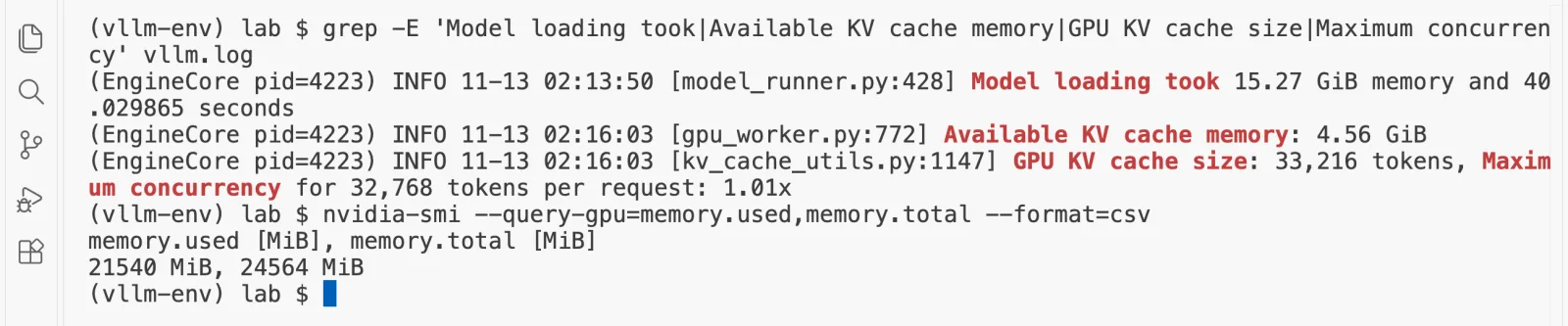
vLLM does this sum for you when it starts, and prints it. On our RTX 4090, serving Qwen3-8B in BF16, it printed 33,216 tokens of KV cache and a maximum concurrency of 1.01 for 32,768-token requests:
Step 3. Check how fast each person's answer is written
Memory is only the first limit. Writing one token for everyone in the batch reads all the weights once, plus every conversation's cache, so each extra person slows everyone down a little. A roofline estimate takes whichever is slower, reading those bytes or doing the sums, assuming the GPU reaches 85% of its rated memory speed and half of its rated compute. For one person on the L40S, the 8B model reads about 16.1 GB of weights a token at 0.85 x 864 GB/s, about 22 ms, plus a little more for the cache, so about 44 tokens a second. It gives:
Llama 3.1 8B on one H100: 162.1 tokens a second for one person, 39.0 each with 112 at once
These are estimates, not measurements. We have not run Llama 3.1 on an L40S or an H100. On our RTX 4090 the same estimate gave 140 tokens a second for Qwen3-8B in 4-bit where we measured 164, and on our laptop it was too hopeful for long conversations, so run vllm bench serve with your own prompts before you buy. We set a target of at least 20 tokens a second for each person, comfortably faster than people read. The last column shows how many fit at once with that target:
| Plan | Fit by memory | Tokens a second, 1 person (est.) | Each, at the memory limit (est.) | At once with 20+ tokens a second |
|---|---|---|---|---|
| Llama 3.1 8B, BF16, 1 x L40S | 48 | 41.8 | 17.9 | 39 |
| Llama 3.1 8B, BF16, 1 x H100 | 112 | 162.1 | 39.0 | 112 |
| Llama 3.1 8B, FP8, 1 x L40S | 61 | 72.4 | 18.3 | 54 |
| Llama 3.1 70B, BF16, 2 x H100 | 8 | 37.7 | 35.6 | 8 |
| Llama 3.1 70B, BF16, 4 x H100 | 122 | 75.3 | 37.7 | 122 |
| Llama 3.1 70B, FP8, 2 x H100 | 59 | 72.6 | 37.8 | 59 |
| Llama 3.1 70B, BF16, 4 x L40S | 20 | 19.4 | 16.8 | 0 |
| Llama 3.1 70B, FP8, 4 x L40S | 71 | 37.4 | 17.7 | 55 |
The pattern is the useful part. On the H100 the 8B model runs out of memory long before it runs out of speed. On the L40S both limits arrive together, because it reads its memory at 864 GB/s against the H100's 3,350 GB/s. The four L40S plans for 70B also leave out the time the cards spend swapping partial results over PCIe, which the parallelism exercise explains, so treat them as the most hopeful rows in the table.
Step 4. Turn conversations at once into staff
"At once" means answers being written in the same second. Staff spend most of their time reading, not waiting. Little's law connects the two: the requests in progress equal the rate at which they arrive times the time each one takes. Use the time one answer takes and how often each person asks:
if each person asks once every 5 minutes (300 seconds), one slot serves 300 / 57 = about 5.2 people
48 slots x 5.2 = about 252 people asking at that rate
Treat that as a ceiling, not a plan. At that number every slot is busy all the time, so any burst makes people queue, and the sum leaves out the time to read each 3,072-token prompt. Plan to run at 70 to 80% of it, about 176 to 201 people, and size for your busiest hour, because everyone asks at 10 in the morning.
Step 5. Try other plans in the calculator
The calculator is set to Llama 3.1 8B in BF16 on an L40S with 48 conversations of 4,096 tokens. Switch the GPU to the H100, or the model to Llama 3.1 70B, and read how many people fit. The full tool is the free GPU memory calculator.
Will this model fit on this GPU?
GPU memory calculatorA model on a GPU needs room for three things: its weights, the KV cache that holds every conversation, and some working space. Change the numbers and watch the card fill up.
Pick a GPU. Each card shows how many of it this setup needs.
Yes. It fits on one NVIDIA L40S, with room for 48 people at 4,096 tokens each.
One NVIDIA L40S
Sold as a 48 GB card. The driver reports 45 GiB, and vLLM uses 41.4 GiB of it.
- weights 15.0 GiB
- KV cache 24.0 GiB
- working space 2.0 GiB
- free 453 MiB
The weights
15.0 GiB
8.0 billion numbers
KV cache for each token
128 KiB
131,072 bytes
KV cache for each person
512 MiB
4,096 tokens
KV cache for everyone
24.0 GiB
48 people
KV cache per token = 2 (a key and a value) x layers x KV heads x head size x bytes
= 2 x 32 layers x 8 KV heads x 128 head size x 2 bytes = 131,072 bytes per token
Weights = 8,030,261,248 parameters x 2 bytes = 15.0 GiB
Usable on one card = 0.92 x 45 GiB = 41.4 GiB (a 48 GB card is 44.7 GiB on paper; the driver reports 45 GiB)
The assumptions behind these numbers
- Memory on this page is in GiB (1 GiB is 1,073,741,824 bytes), the unit nvidia-smi and vLLM's log use. GPUs are sold in decimal GB, so a 48 GB card holds 48 billion bytes, which is 44.7 GiB. The card names keep the GB they are sold by.
- vLLM uses 92% of a GPU's memory by default (gpu-memory-utilization 0.92 in vLLM 0.33.0). The card sizes are what the driver usually reports, a little under the datasheet number on some cards.
- The working space is a flat guess you can change. vLLM measures the real number when it starts and prints how many tokens of KV cache it could make room for: trust that line over this page.
- More than one GPU means tensor parallelism inside one machine of up to 8 GPUs, then pipeline parallelism across machines. The number of GPUs must divide the model's 32 attention heads. The time GPUs spend talking to each other is not counted here.
- 8-bit and 4-bit formats keep the embedding table and output head in BF16, as AWQ, GPTQ and FP8 checkpoints do. 4-bit files also store a scale for every group of weights, a few percent more than shown.
- Model sizes come from each model's config.json on Hugging Face, and GPU sizes from NVIDIA's datasheets, both read on 13 November 2026.
Checked against vLLM: with 4 GiB set aside for the cache, this formula gives Qwen3-0.6B room for 37,449 tokens. vLLM 0.33 printed 37,440 on a rented RTX 4090 on 13 November 2026, which is that number rounded down to 2,340 whole blocks of 16 tokens.
The answer, by memory. Llama 3.1 8B in BF16: about 48 conversations of 4,096 tokens on one L40S and about 112 on one H100. Llama 3.1 70B: about 8 on two H100s in BF16, 59 in FP8, and 122 on four H100s in BF16. Speed is the second check, and it is the binding one on the L40S. At one question every five minutes, each conversation slot on a full L40S serves at most about 5 people; plan for 70 to 80% of that.
Questions people ask
How many concurrent users can an H100 serve with Llama 3.1 8B?
By memory, about 112 conversations of 4,096 tokens each at once in BF16 with vLLM's defaults. The roofline estimate then gives each person about 41 tokens a second at that batch, which is still quick. Measure it with a benchmark before you rely on it.
How many users can an L40S serve with Llama 3.1 8B?
By memory, about 48 conversations of 4,096 tokens at once in BF16. At 48 people the estimated speed for each falls to about 19 tokens a second, so the L40S runs out of speed at about the same point it runs out of memory.
How many GPUs does Llama 3.1 70B need?
In BF16 its weights are 141 GB. Two H100s hold them with room for only about 8 conversations of 4,096 tokens; four H100s hold about 122. In FP8, two H100s hold about 59. On L40S cards it needs four in BF16, which leaves room for about 20.
Is concurrent users the same as daily users?
No. Concurrent means conversations being written at the same moment. If each answer takes 20 seconds and each person asks one question every 5 minutes, one slot serves about 15 people. The real number depends on your traffic, so measure it.
Where does vLLM tell me how many users fit?
In its start-up log. The line GPU KV cache size gives the tokens that fit, and Maximum concurrency for N tokens per request divides that by your --max-model-len. On our RTX 4090 with Qwen3-8B it printed 33,216 tokens and 1.01x for 32,768 tokens per request.
Where every number comes from
- Each model's config.json on Hugging Face (layers, KV heads, head size), read 13 Nov 2026
- NVIDIA L40S product page: 48 GB, 864 GB/s, PCIe Gen4 x16 at 64 GB/s both ways, read 13 Nov 2026
- NVIDIA H100 product page: H100 SXM 80 GB, 3.35 TB/s, NVLink 900 GB/s, read 13 Nov 2026
- vLLM 0.33.0 source, vllm/config/cache.py: gpu_memory_utilization defaults to 0.92
- Our RTX 4090 on RunPod, 13 Nov 2026: nvidia-smi 24564 MiB; llama-bench Qwen3-8B Q4_K_M 163.99 tokens a second (tg128) and 12,095 (pp512), 114.90 at a depth of 16,384; vLLM Qwen3-8B BF16 with --max-model-len 32768: model loading 15.27 GiB, KV cache 4.56 GiB, 33,216 tokens
- vLLM documentation, Parallelism and Scaling: when to use tensor and pipeline parallelism, and the L40S advice, read 13 Nov 2026
This exercise comes from the course Hands-On Inference Engineering, where each step is done on a real GPU and explained line by line. More exercises like it: Which LLMs fit on a Mac; Which LLMs fit on an RTX 4090; Self-hosted LLM cost compared with an API; Tensor vs pipeline parallelism for 70B. Or see every free exercise.