 systemdesign.academy
a hands-on course, every number measured on a rented GPU
Hands-On Inference Engineering: Serve LLMs on GPUs with vLLM and SGLang
- vLLM and SGLang
- a rented RTX 4090
- the KV cache
- prefill and decode
- ₹4,444 or $149, lifetime access
- early access: 15 of 75 pages ready
Learn why a language model answers slowly and costs so much to run, and how to make it fast and cheap. Every idea is worked out on paper first, then measured on a real NVIDIA GPU that you rent by the hour.
One payment, lifetime access. It rises to ₹9,999 or $249 once every part is released, and everything published later is included.
Early access: 15 of the 75 pages are ready to read today. New pages are added as they are finished, and you get each one the day it is published, at no extra cost. The price rises to ₹9,999 or $249 when the course is complete.
 Written by Roni Das. Every number on this page comes from a recorded run, and each one says when it was measured.
- measured on
- an NVIDIA RTX 4090 rented on RunPod, 13 November 2026
- model
- Qwen3-0.6B with llama.cpp
- reading the prompt
- 35,796 tokens a second
- writing the answer
- 642 tokens a second
- 32 people at once
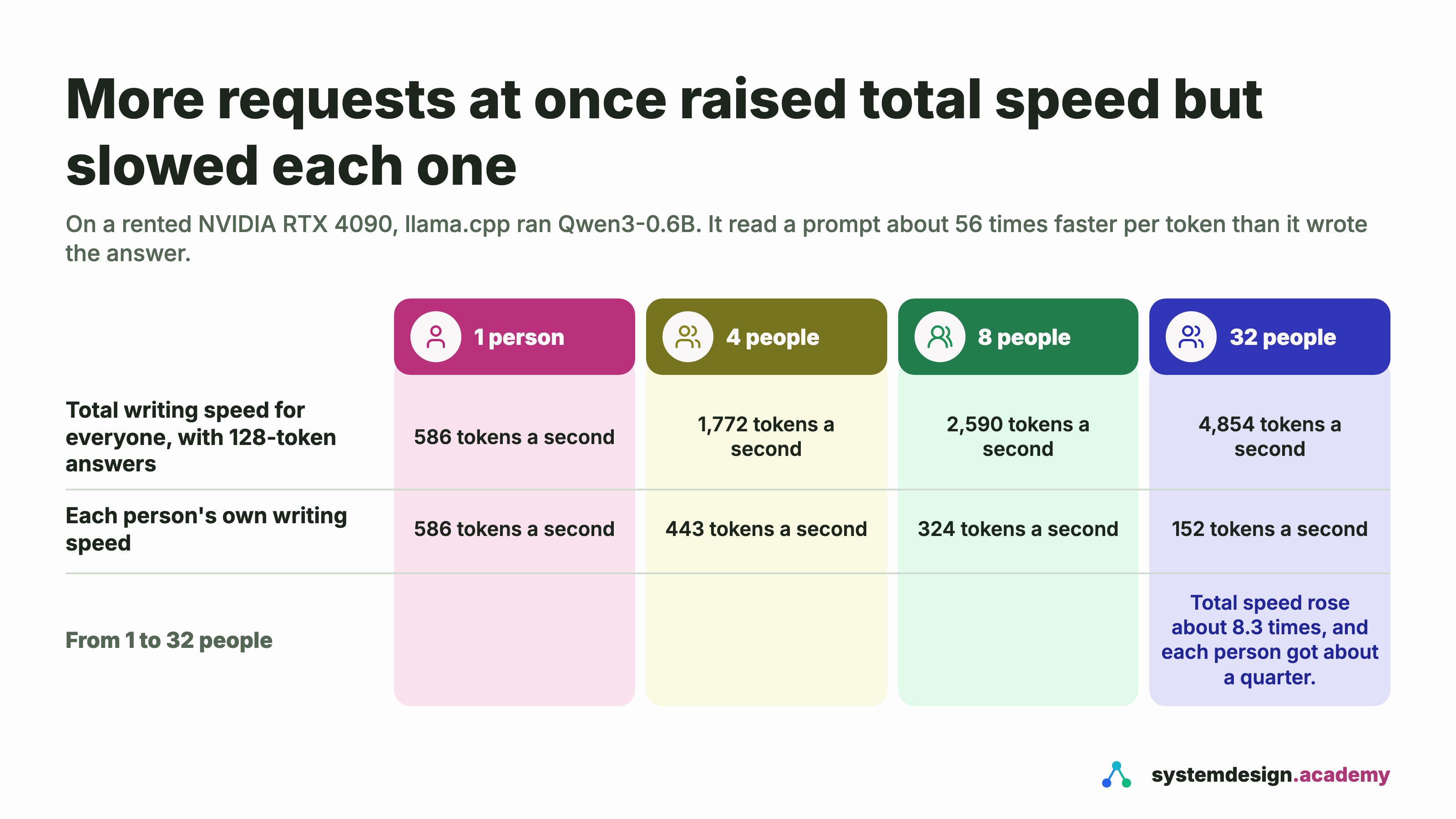
- 8.3 times as many tokens in total, each person about a quarter of the speed
six tools · every formula shown
Work out the numbers yourself: memory, speed, cost, paging, batching and guessing ahead
These are the sums the course teaches, as tools you can play with now. Model sizes come from each model's real config file, GPU numbers from NVIDIA's datasheets, and prices from RunPod, AWS and Google Cloud, all read on 13 November 2026. Each tool states its assumptions under its result.
- token
- A small piece of text, about three quarters of a word. Speeds and prices are counted in tokens.
- prefill
- The model reading your whole prompt at once, before the first word of the answer.
- decode
- The model writing the answer, one token at a time.
- KV cache
- The notes the model keeps on every token so far, so it never reads the conversation twice.
- BF16, FP8, INT4
- Ways to store each of the model's numbers in 2 bytes, 1 byte or half a byte.
GPU memory for the weights and the KV cache. The tool loads as you reach it.
This tool also has its own page: gpu-memory-calculator, which you can bookmark or share.
Try a free exercise first
Each one is a real situation with a hint and a full worked answer, built from the same GPU runs as the course.
- Which LLMs can I run on a Mac with 36, 48 or 128 GB of memory?
- Which LLMs fit on an RTX 4090 with 24 GB of VRAM?
- How many users can one L40S or H100 serve with Llama 3.1 8B or 70B?
- What does 1 million tokens cost to self-host on RunPod compared with an API?
- Tensor parallelism vs pipeline parallelism for a 70B model: which one, and why?
What we measured on a rented GPU: a model reads about 56 times faster than it writes, and batching trades each person's speed for the total
On an RTX 4090 we rented by the hour, a small model read a question about 56 times faster per token than it wrote the answer. When 32 people used it at once, it wrote about 8.3 times more in total, but each person waited about four times longer for each word. Most of inference engineering is about that trade-off. You measure it yourself in the free page "Prefill and decode", on a rented GPU that costs well under a dollar for that page.


What you build in this course, from one rented GPU to a cluster of GPUs
The course starts on one rented GPU, moves to two, and ends with a small cluster. You rent each GPU only while a lab runs and switch it off at the end, so you pay for minutes, not months.
- A model running on a rented GPU, with every step timed, so you see where the time goes before you change anything.
- A vLLM server on a rented GPU, with each important setting changed and its effect measured.
- A smaller, faster model, made smaller with quantization and faster with speculative decoding, with the quality checked.
- A fair benchmark of vLLM against SGLang, on the same model, the same GPU and the same workload, with the results written down even where they surprise us.
- One model split across two GPUs, with the speed-up and the cost of the communication between them measured.
- A routing layer with llm-d on Kubernetes, that sends each request to the server that already has its work cached, first free on a local cluster with simulated GPUs, then on real GPUs.
- A dashboard, a load test and a cost report, and a capstone where you serve a real model and prove its cost per million tokens.
What you leave the course with
- A model service you planned on paper, served yourself, load-tested and costed, in your own repository.
- The working knowledge an inference engineer uses every day: memory sizing, the KV cache, batching, quantization and routing.
- Answers to common inference engineer interview questions, backed by numbers you measured yourself.
your path through the course
From your first model on a rented GPU to a measured service on a cluster
The course climbs one step at a time. Each step below is a real part of the course, with its page count, and the last part is a capstone you can show in an interview.
- Part 1Inference from zero8 pages
- Part 2The maths of one request10 pages
- vLLMPart 3vLLM in depth11 pages
- Part 4Smaller and faster models7 pages
- SGLangPart 5SGLang10 pages
- x2Part 6Many GPUs7 pages
- llm-dPart 7Serving at scale with Kubernetes and llm-d8 pages
- You are an inference engineerMeasure, watch, pay and prove it: 11 pages, ending in a capstone service you plan, run and cost.
What the GPU labs cost you, and how to keep it low
Every page that measures something runs on a GPU you rent by the hour, and the Kubernetes routing pages run free on a local cluster first. The free page "Before you start" shows you how to rent one and switch it off, and the course page "Renting a GPU without a surprise bill" shows how to keep spending inside the credit you add, warns you about storage left running, and shows how to ask AWS for GPU access on your first day, because a new AWS account starts with none.
- An RTX 4090 cost $0.34 an hour on RunPod's community cloud and $0.89 on its secure cloud when we checked on 13 November 2026.
- At the prices we read that day, we estimate all the GPU labs together at about $10 to $30, depending on where you rent and how often you repeat a run.
- The three free hands-on pages need about an hour and a half of one rented RTX 4090 between them: about $1 to $2 on secure cloud, or under $1 on community cloud when a card is free.
- Every GPU lab ends with a step that switches the GPU off, so nothing is left running by accident.
- A local Kubernetes clusterthe cluster pages, on your own computer$05 pages
- One rented GPUan RTX 4090 on RunPod, priced by the hour$0.34 to $0.89 an hour40 pages, including three of the four free ones
- Two rented GPUsfor splitting one model across GPUs$0.68 to $1.78 an hour5 pages
- A small GKE clustertwo L4 GPUs, for the autoscaling pagedeleted when you finish1 page
Why the cost of AI is mostly the cost of answering questions
Hands-On Inference Engineering is a self-paced, hands-on course by Roni Das on systemdesign.academy. It teaches you how to run large language models on GPUs quickly and cheaply. It starts from zero: what a model is, what a token is and what a GPU does. Then it builds up to serving real models with vLLM and SGLang, splitting a model across GPUs, and routing many servers with llm-d on Kubernetes. Every idea is worked out on paper first and then measured on real hardware, and the course ends with a model you serve yourself at a cost per million tokens you measured. It is for developers who know Python and the command line. No AI or GPU experience is needed.
A model is trained once, but it answers questions millions of times a day, and every answer runs on a GPU that costs money by the hour. Companies that serve their own models need people who can get more answers out of each GPU hour. This course teaches that job from the first idea.
The job is mostly about two numbers: how long a person waits for the first word, and how many answers each GPU hour produces. They pull against each other, and every setting in a serving engine moves one of them. So the course never asks you to trust a setting: you change it, measure both numbers, and write down what happened.
The contents of Inference Engineering, part by part, and which pages will be free
The course is laid out like a book: 75 pages, made of 3 opening pages and 8 parts. Pick a part, then open any page to see what it teaches and where its lab runs.
The 4 free pages
- Introduction: what this course buildsfree, read now
- Before you startfree, read now
- Prefill and decodefree, read now
- The KV cachefree, read now
How the course is released. The course is released part by part, in book order. 15 of its 75 pages are published so far, and every new page appears here as soon as it is out, at no extra cost to anyone who has bought the course.
Models, tokens, transformers and GPUs in plain words, then your first model on a rented GPU, first with llama.cpp and then with vLLM.
A model as a function with billions of learned numbers, what training does, and what inference means: using those numbers to answer.
Where the lab runs: one rented GPU
Open this pageTurning text into tokens with a real tokenizer, counting them, and why every price and speed in this course is measured in tokens.
Where the lab runs: one rented GPU
Open this pageThe loop at the heart of every answer: read everything so far, pick the next token, add it, repeat, and why that loop decides the speed.
Where the lab runs: one rented GPU
Open this pageWhat happens in one layer, what attention does, and which parts of the model are large, so the later maths has something to stand on.
Where the lab runs: one rented GPU
Open this pageThousands of small cores, fast memory beside them, and the two numbers on a GPU data sheet that matter most for inference: memory size and memory speed.
Where the lab runs: one rented GPU
Open this pageTraining happens once, answering happens millions of times a day; the cost of one answer worked out from a GPU's hourly price.
Where the lab runs: one rented GPU
Open this pageServing Qwen3-8B with llama-server on an RTX 4090 and timing every part of one answer as it streams in, from the first word to the last.
Where the lab runs: one rented GPU
Open this pageInstalling vLLM, starting it with one command, calling it with the OpenAI Python library, and watching it serve 64 people at once on one RTX 4090.
Where the lab runs: one rented GPU
Open this page
Who this inference engineering course is for, and what you should know before you start
- Software, backend and platform engineers who want to own model serving instead of calling a hosted API they cannot see inside
- Machine learning engineers who train models and now need to serve them fast and at a known cost
- Anyone preparing for inference engineer interviews who wants to answer with numbers they measured, not numbers they memorised
Before you start, you should know
- Python: you can write small programs
- The command line: you are at home in a terminal
- Git basics: clone, commit, push
You do not need to know
- AI or machine learning: Part 1 starts from what a model is
- GPUs or CUDA: the course explains a GPU when you first need one, and never asks you to write a kernel
- Kubernetes: Part 7 starts from a plain deployment on a local cluster
Roni Das writes the System Design Masterclass and the AI Engineering course on systemdesign.academy, 989 lessons in all, as well as AIOps on AWS and two full-length handbooks on freeCodeCamp. Every run, screenshot and number in each published page comes from a real run, and each page says when it was recorded.
How the course is delivered: written pages, measured runs, and a check after each idea
A written page for every lesson
Each page starts with a real problem, explains why it matters, works the idea out on paper with a diagram, and then measures it.
Real runs and code you can download
What you see on the page comes from a real run on real hardware, with its date. Each page with code comes with a zip.
Where each lab runs, stated up front
Every page says whether it runs on one rented GPU, two, or a free local cluster, and what it costs, so you know before you start.
Versions checked against the docs
vLLM 0.33, SGLang 0.5.23 and llm-d 1.0 were checked on 12 November 2026, and every page is checked again before it is published.
The early-access price of Inference Engineering, and why it is lower now
The course is released part by part, so it sells at an early-access price today. Once every part is released, the price rises to ₹9,999 or $249. If you buy now, you pay once and get every part as it comes out, at no extra cost.
Early access: 15 of the 75 pages are ready to read today. New pages are added as they are finished, and you get each one the day it is published, at no extra cost. The price rises to ₹9,999 or $249 when the course is complete.
Not sure yet? Read the free pages first.
See every page in the contentssystemdesign.academy
receipt · Inference Engineering
- 75 pages in 8 parts
- included
- Parts published later
- included
- Code zips
- included
- Full price, later
- ₹9,999 or $249
- You save today
- ₹5,555 or $100
Total, one payment₹4,444 or $149
lifetime access
Buy early accessIn India you pay in rupees through Razorpay, by UPI, card or netbanking. Outside India you pay in US dollars by card through Razorpay, or with PayPal.
Questions people ask before buying the Inference Engineering course
What do I need to know before I start this inference engineering course?
You should know Python, the terminal and Git basics. You do not need to know AI, GPUs or Kubernetes: the course explains each one when you first need it, and Part 1 starts from what a model is.
Are all the parts of Inference Engineering available on the day I buy?
No. The course has 75 pages. The course is released part by part, in book order. 15 of its 75 pages are published so far, and every new page appears here as soon as it is out, at no extra cost to anyone who has bought the course. That is why it sells at an early-access price, ₹4,444 in India or $149 elsewhere, which rises to ₹9,999 or $249 once every part is released. Everything published later is included in the one payment.
Do I need my own GPU to take this course?
No. You rent a GPU by the hour only while a lab runs, and the course shows you how to do it safely, with credit you add in advance, auto-pay left off, and a step that switches the GPU off. The Kubernetes routing pages start free on a local cluster with simulated GPUs.
How much will renting GPUs cost me?
At RunPod's community price on 13 November 2026, $0.34 an hour for an RTX 4090, we estimate about $10 to $30 for the whole course, depending on how often you repeat a run. Community cards are often taken; on the secure cloud, at $0.89 an hour, it costs about two and a half times as much.
Which versions does the course teach?
vLLM 0.33, SGLang 0.5.23 and llm-d 1.0, checked against the official docs on 12 November 2026. Every page is checked against the official docs again before it is published, and pages are updated when an important setting changes.
How is this different from the inference track in AI Engineering?
The AI Engineering course has a shorter inference track. This course goes much deeper, is fully hands-on, and has its own price.
Is Inference Engineering a video course or a text course?
It is a written course, laid out like a book of parts and pages. Every page is a written lesson with real screenshots from real runs, a diagram for each idea and a short knowledge check, and each page with code comes with a zip of that code. If videos are added to the pages later, they are included at no extra cost.
Is Inference Engineering included in the System Design, AI Engineering or AIOps courses?
No. It is its own course with its own price. Buying it gives lifetime access to all of its pages and code, including every part published later.
How do I pay for Inference Engineering?
In India you pay in rupees through Razorpay, by UPI, card or netbanking. Everywhere else you pay in US dollars by card through Razorpay, or with PayPal. The course unlocks on your account as soon as the payment is confirmed.