Microsoft 365 outage, 12 November 2026: why Outlook and Exchange went down, and what else broke
On 12 November 2026 at 16:17 UTC (21:47 in India) users began losing access to their Outlook mail in Exchange Online, the Microsoft service that stores and delivers Outlook mail, calendars and contacts. Twelve hours later it was still not fully fixed. Microsoft listed 18 other services as affected, from Teams calendars to Copilot and Intune. This page explains what Microsoft has said so far, what broke and what kept working, what you can do while it lasts, and why an outage like this goes on for so long. I also tested Microsoft's servers from India while it was happening.
This explainer covers one piece of news. The System Design course teaches how systems like this work, step by step.
Every lesson in both courses has an AI tutor beside it. It reads the same lesson you are reading and answers your questions from it. Try the tutor
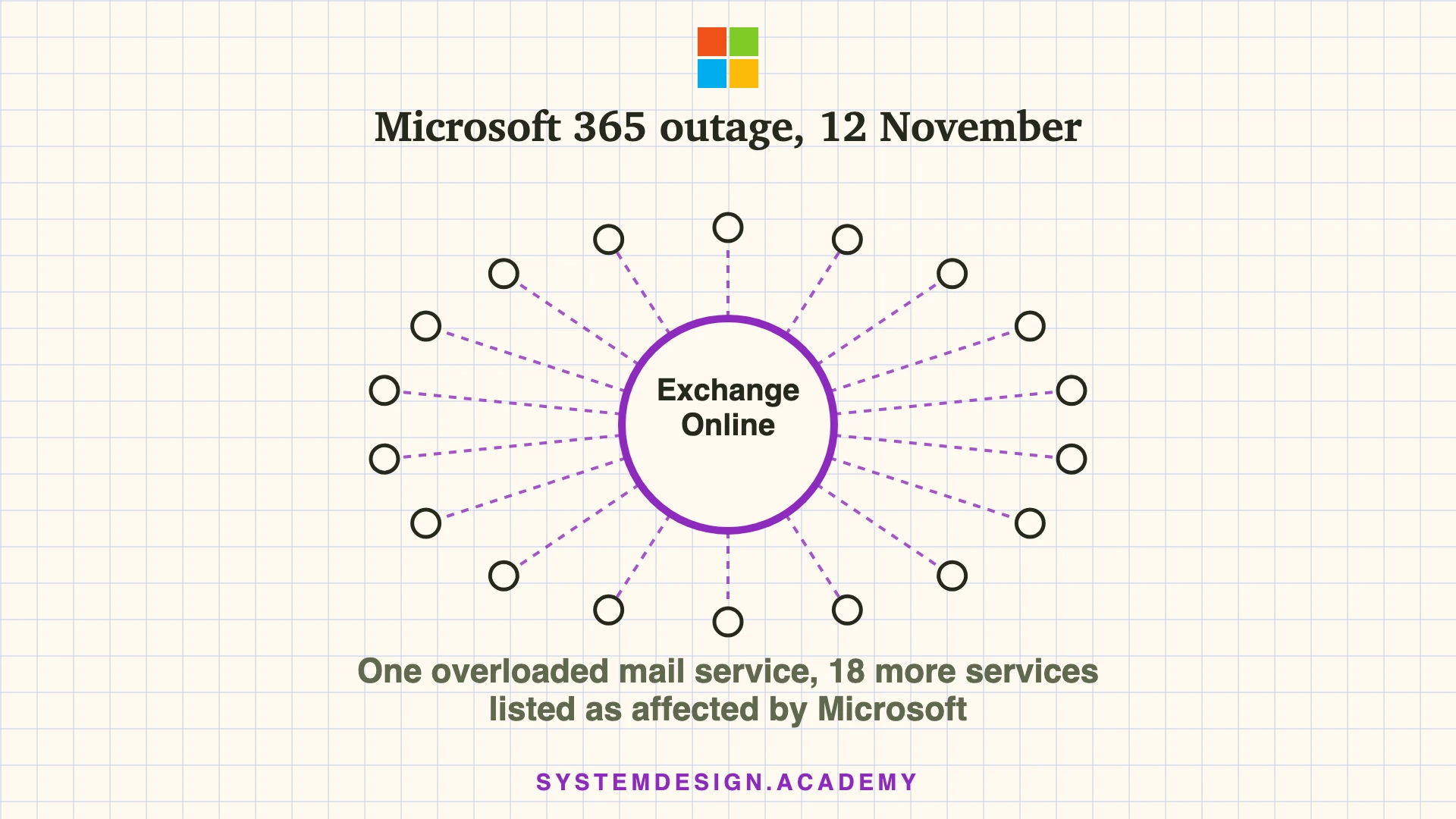
One overloaded mail service, 18 more services listed as affected
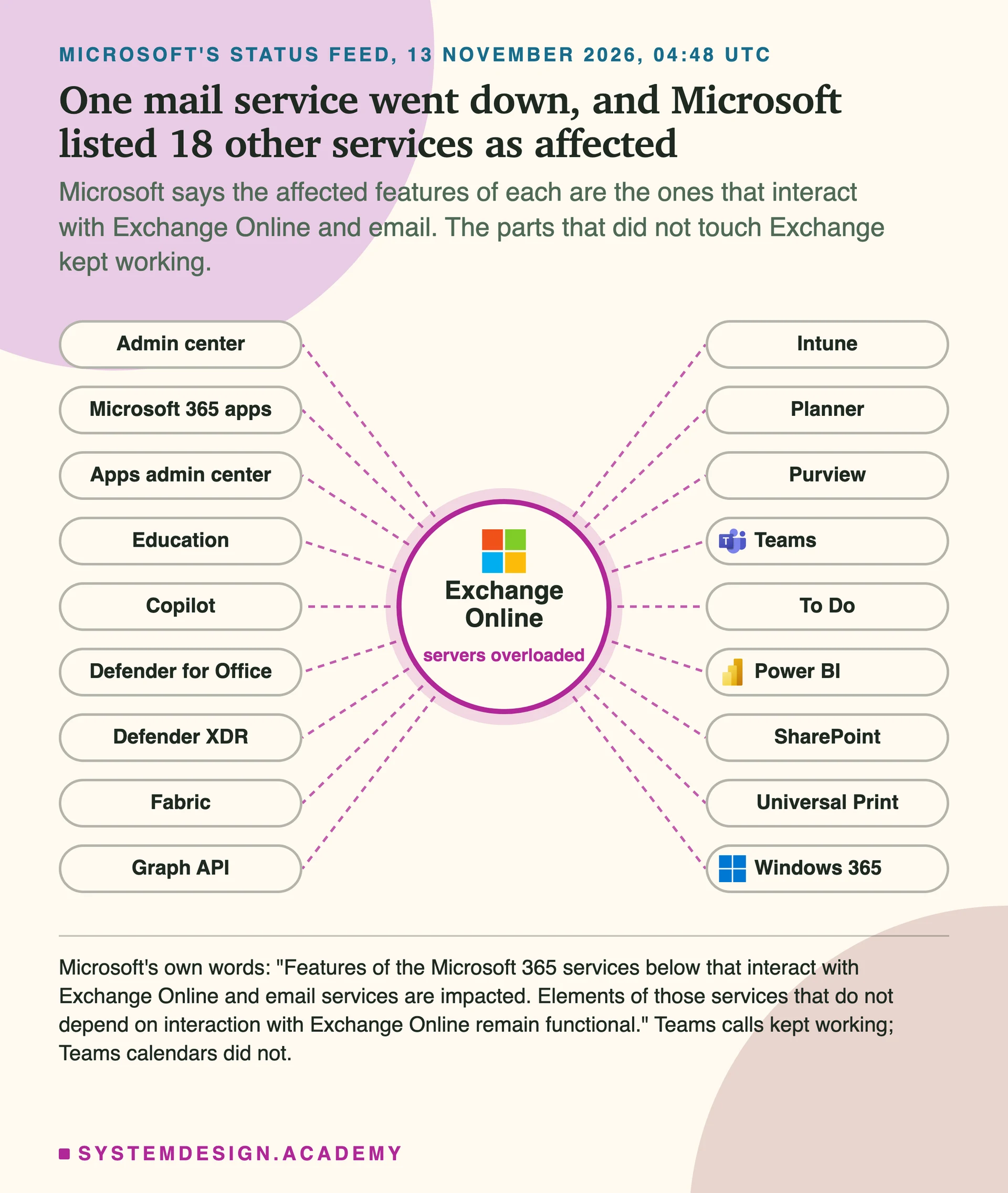
The 18 come from Microsoft's own status feed on the morning of 13 November (UTC). Microsoft says the affected features of each are the ones that interact with Exchange Online and email services.
1Status when this page was last checked (05:50 UTC, 13 November 2026): not fixed. Microsoft still lists it as a service degradation. Its latest update, posted at 05:46 UTC, says it is still working to find the cause of a surge of traffic to its backend servers and to repair them, and that it will publish a Post-Incident Report once the problem is mitigated. This page will be updated when Microsoft reports it fixed.
2The outage began at 16:17 UTC on 12 November 2026 (21:47 in India), under Microsoft incident EX1550543. Users could not reach their mailboxes through Outlook on the web, Outlook on a computer, phone mail apps or programs that read mail through Microsoft's web API. Microsoft also said email delivery may be delayed. It has not published a root cause.
3Exchange Online stores the mail, calendars and contacts that many Microsoft 365 services read. So Microsoft also listed 18 other services, including Teams, Copilot, SharePoint, Intune, Purview, Planner and the Graph API. Microsoft said only the features that interact with Exchange were affected: most of Teams, including calls, meetings and chats, kept working, while Teams calendars and meeting invites failed.
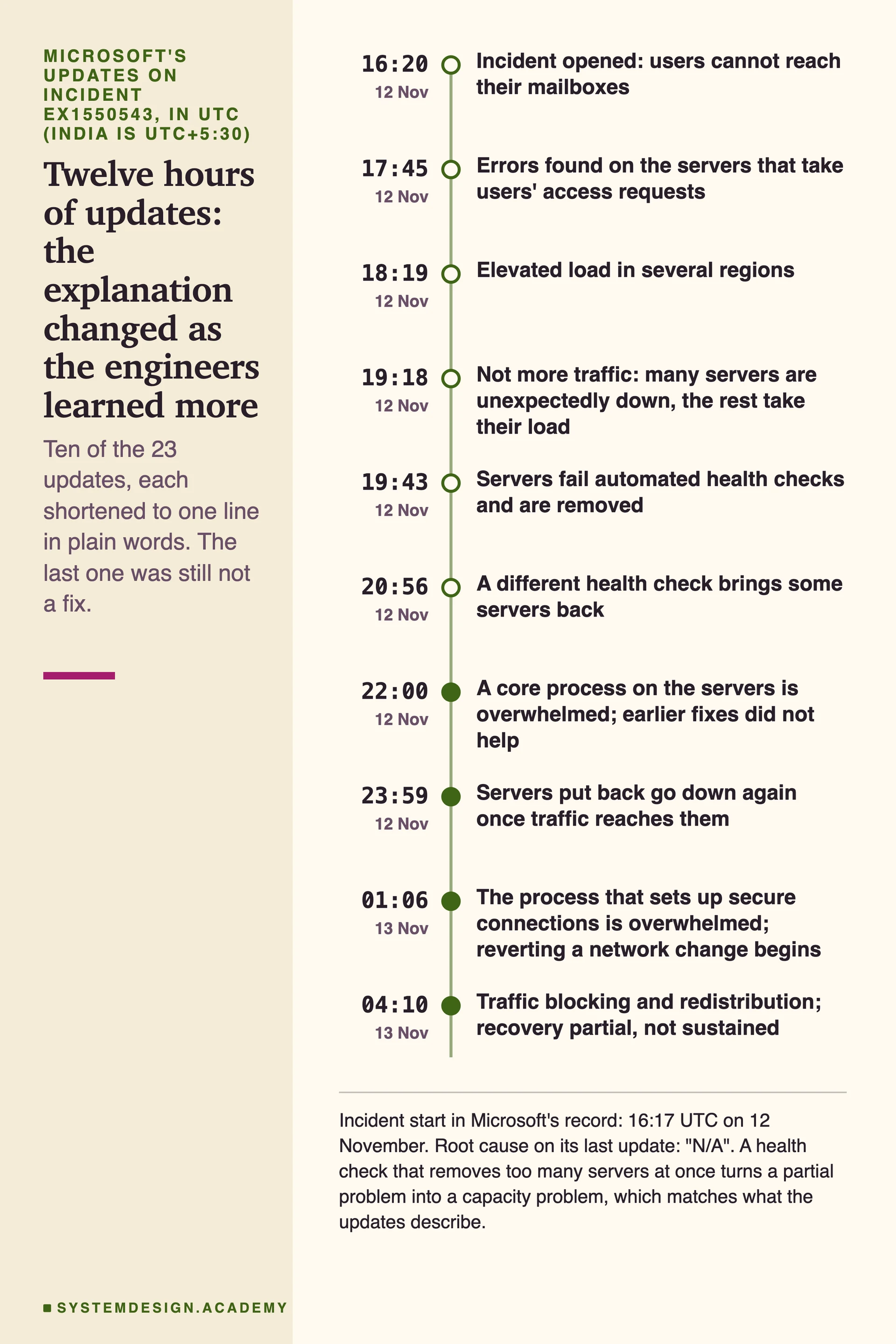
4Microsoft's explanation changed as it learned more. First it reported elevated load. Then it said traffic had not grown: servers were failing their automated health checks and dropping out, so the rest carried their load. Later it found that a process that sets up secure connections was overwhelmed, and that servers it put back went down again once traffic reached them.
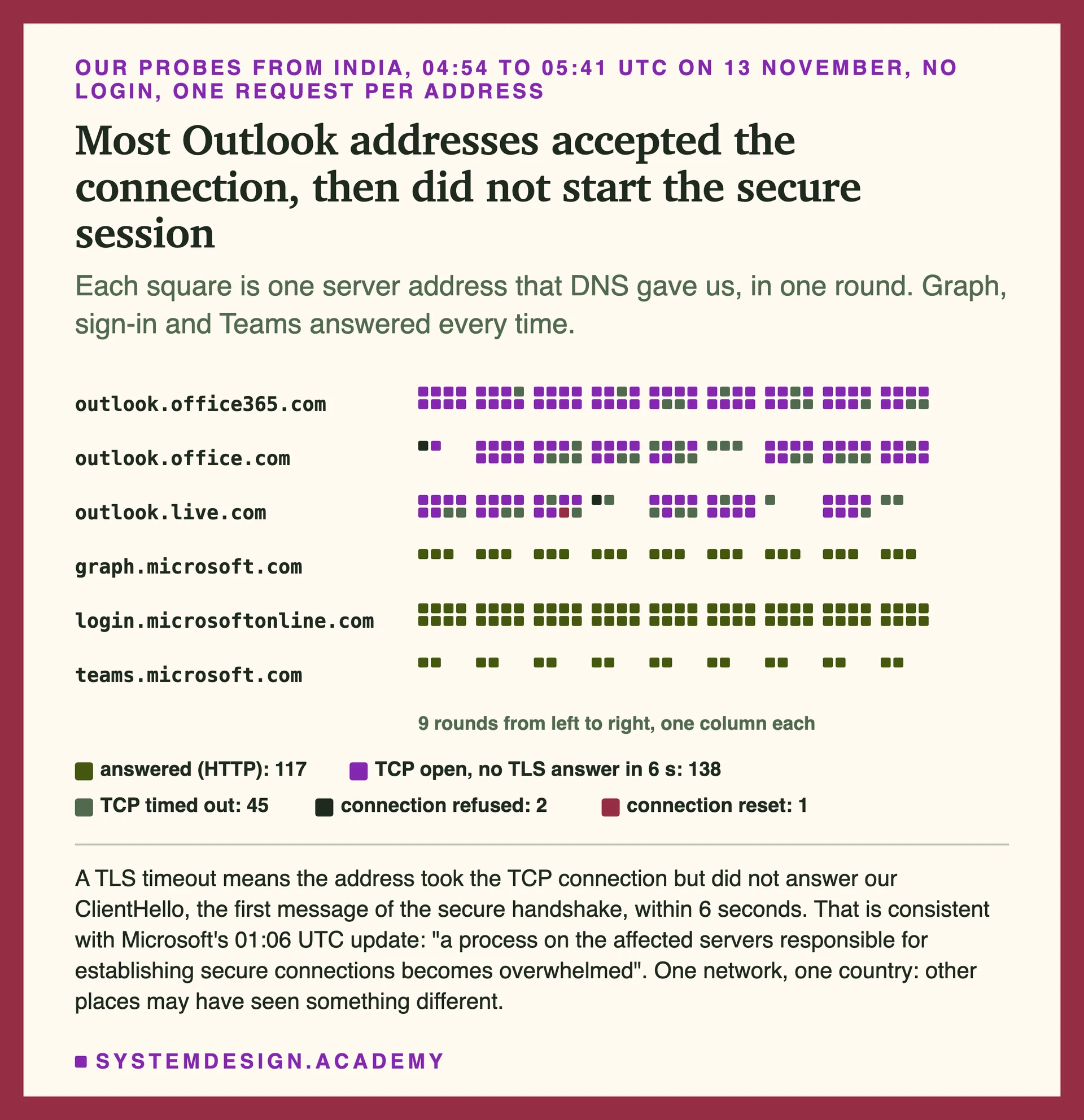
5I probed Microsoft's servers from India while the outage was on. Most Outlook addresses accepted the first network connection (TCP) and then did not finish the TLS handshake, the step that sets up the secure, encrypted session; a few refused or timed out earlier. Graph, sign-in and Teams answered normally. That is consistent with what Microsoft described.
6The engineering lesson is not "Microsoft made a mistake". It is how a partial failure can become a long one: health checks remove too many servers, the rest overload, extra traffic piles up, and servers that come back fall over again. A common cure is to turn some traffic away on purpose and bring it back slowly, which is part of what Microsoft did.
Started
12 Nov 2026, 16:17 UTC (21:47 IST)
Incidents
EX1550543, MO1550821
Main service
Exchange Online
Also affected
18 services listed by Microsoft
Root cause
Not published yet
Last checked
05:50 UTC, 13 Nov
This page is the free part.
The course goes deeper on reliability: health checks, retries, load shedding and blast radius
₹1,111 in India/$25 everywhere elseonce, for the whole course
The System Design course covers reliability: health checks, retries, load shedding and blast radius across a run of lessons, not one page. These 4 alone are about 130 minutes of step-by-step reading, every one with a quiz.
“We've determined that the elevated load isn't driven by an overall increase in traffic, but by a large number of servers being unexpectedly unavailable, which is shifting load onto the remaining infrastructure.”
Microsoft, Exchange Online incident EX1550543, update at 19:18 UTC on 12 November 2026
On Thursday 12 November 2026, at 16:17 UTC, Microsoft opened incident EX1550543: users may be unable to connect to their mailboxes in Exchange Online through multiple connection methods. In India it was 21:47; on the US East Coast, 11:17 in the morning. The connection methods it named are the ones nearly everybody uses: Outlook in a browser, Outlook installed on a computer (which talks to Exchange with Microsoft's own MAPI protocol), the mail apps on phones (which use Exchange ActiveSync) and programs that read mail through Microsoft's web API (REST).
Two hours later, at 18:26 UTC, Microsoft opened a second notice, MO1550821, for the rest of Microsoft 365. By the morning of 13 November that notice listed 18 services besides Exchange Online, and Microsoft's status page for consumers said Outlook.com, OneDrive, OneNote, To Do, Teams and Microsoft 365 for the web were affected for personal accounts too.
Microsoft posted 23 updates on the Exchange incident in its first twelve hours. It paused all deployments and configuration changes, moved traffic between regions, restarted and rebuilt servers, tried a different health check, began reverting a recent network change (still not fully applied at 05:00 UTC on 13 November) and started blocking some traffic on purpose. At 03:34 UTC on 13 November it said there was "no indication this is the result of malicious activity". When I last checked, at 05:50 UTC on 13 November, it was still listed as a service degradation. Microsoft had not published a root cause and said it would give full details in a Post-Incident Report once the problem is mitigated.
2
What you can do while it lasts
If you are a user or the person who looks after Microsoft 365 at your company, these are the practical steps, based on what Microsoft has said is and is not affected.
Use Teams chat and calls for urgent messages. Microsoft said most of Teams' core functions, including calls, meetings, group chats and channel messages, were not affected. Teams calendars, scheduling and meeting invites were, because they read from Exchange.
Do not reinstall Outlook or reset your profile. The problem is on Microsoft's servers, not your computer or phone. Leave Outlook open; it reconnects by itself when service returns. Microsoft said users may see a gradual recovery as their apps reconnect.
Expect late mail. Microsoft said email delivery may be delayed and has not reported lost mail. If something is urgent, send it another way. If a sender gets a bounce message, ask them to send again later.
Admins: follow EX1550543 and MO1550821. These are the two incidents in Service health in the Microsoft 365 admin center. The public page status.cloud.microsoft shows a shorter version for anyone without admin access.
Admins: pause jobs that keep retrying. Sync tools, scripts and apps that call Microsoft Graph for mail or calendars may time out and retry. Pausing them stops them adding load and filling your logs with errors.
3
Why one mail service took 18 others with it
Exchange Online is where Microsoft 365 keeps every user's mail, calendar and contacts. Many other services call Exchange when they need that data. Teams asks Exchange for your calendar when you schedule a meeting. Copilot asks it for your email when you ask a question about your inbox. Microsoft Graph, the API that thousands of company apps use, passes mail and calendar requests through to Exchange. Defender for Office 365 checks mail and links that flow through Exchange.
So when Exchange stopped answering, every feature that needed it failed too, and Microsoft listed them service by service. The useful detail is in what kept working. Microsoft wrote that most of Teams' core functions, including calls, meetings, group chats and channel messages, were not affected, and that files stored directly in SharePoint still opened. Those features do not need Exchange. Engineers call the set of things that break when one part fails its blast radius, and this outage drew it clearly.
That is the first design lesson. A service that many others depend on needs the strongest protection against overload, because its failure is everyone's failure. And each service that depends on it should be built so that the parts which do not need it keep working. Teams' core chat and calls kept working because they do not need Exchange; the chat features that do, such as adding people to new chats, failed. Build your own features so the same holds for them.
Microsoft listed 18 services whose features that interact with Exchange Online were affected
The list is parsed from Microsoft's status feed on 13 November 2026. Only the features of each service that call Exchange were affected, in Microsoft's own words.
Twelve hours of updates, and what they tell an engineer
At 18:19 UTC Microsoft reported elevated load across several regions. At 19:18 it corrected itself: traffic had not grown, but many servers were unexpectedly unavailable, so the rest carried their load. At 19:43 it found why they were unavailable: they were failing automated health checks and being taken out of service, possibly because of a recent change to the part that processes those checks. At 20:56 a different health check method brought some servers back.
Then it got harder. At 22:00 Microsoft said its actions had "not provided the anticipated relief" and that a core process on the servers was overwhelmed. At 23:59 it said servers it had returned to service "can become unresponsive again once they begin receiving traffic". At 01:06 on 13 November it named the process: the one "responsible for establishing secure connections". The same update said it was reverting a recent network configuration change that correlated with the start of the outage. At 19:57 Microsoft had said it had not found a recent change that lined up with the start of impact, though at 20:56 it was investigating a few configuration updates.
By 04:10 Microsoft was "adjusting traffic protocols, redistributing traffic, and applying strategic traffic blocking measures", with partial recovery that was not lasting. At 04:57 it added that its own routing services were sending a surge of calls to the backend servers, partly because of the traffic moves it had made during the event.
Here is how those updates fit together, as an engineer would read them. A health check is a small test a load balancer runs against each server, such as "answer this request within two seconds". A server that fails is taken out of rotation so users are not sent to a broken machine. That is good when one server is sick. It is dangerous when the check itself is wrong, or when servers fail it only because they are busy: each server removed pushes more load onto the rest, they get slower, and they fail the check too. Microsoft's 19:57 update says it took steps "to prevent additional servers from being removed from service", which is exactly the brake on that loop.
Microsoft has not said this was the cause, and its final report may say something different. But several of its steps, stopping removals, bringing servers back slowly and limiting and blocking traffic, are the textbook answer to this kind of loop.
What Microsoft said the problem was, update by update
Ten of the 23 updates on EX1550543, shortened to one line each. Microsoft records the impact as starting at 16:17 and posted its first update at 16:20. The full text is Microsoft's Service Health record, which the University of Pennsylvania mail team republishes with UTC times.
Both courses together: ₹1,999 in India / $49 elsewhere, lifetime access.
System Design and AI Engineering in one payment. Bought one by one: ₹1,111 + ₹1,333 = ₹2,444, so you save ₹445.Bought one by one: $25 + $35 = $60, so you save $11.
My hands-on: what Microsoft's servers did when I connected
While the outage was still on, I probed Microsoft's servers from a home internet connection in India. No account and no password: I sent only the connection handshake and, where that succeeded, one anonymous request with no login, the same thing a browser sends before it shows a login page. I did it in two ways.
First, one host at a time, I checked two steps separately. Step one is the TCP connection, the basic "can I reach you" handshake. Step two is the TLS handshake, where the client says hello and the server must answer (its ServerHello, then its certificate) before the client can send any request. For outlook.office365.com, TCP opened and the TLS handshake did not finish in 15 seconds. For graph.microsoft.com, both finished in under a third of a second.
Second, in nine rounds (a short first run, then eight rounds with a four-minute pause between them), I asked DNS for every address of six Microsoft hosts and tried each address in turn: TCP, then TLS, then one plain request with no login. Over nine rounds, from 04:54 to 05:41 UTC (10:24 to 11:11 in India), DNS gave me more than 40 different addresses for each of the three Outlook hosts, and not one of 186 attempts got as far as an HTTP reply: 138 took the TCP connection and then did not finish the TLS handshake within 6 seconds, 45 did not even open TCP within 6 seconds, 2 refused the connection and 1 reset it. Graph, Microsoft sign-in and Teams answered all 117 of their 117 attempts.
What does that tell us? A server that accepts TCP but never answers the TLS hello is alive enough for its operating system to take the connection, but the program that should do the secure handshake is not getting to it. That is consistent with what Microsoft described at 01:06 UTC, though from outside I cannot see which machine stalled: "a process on the affected servers responsible for establishing secure connections becomes overwhelmed, causing the servers to stop processing requests". A load balancer that only checks whether TCP opens would still call these servers healthy.
What we measured: 13 November 2026, 04:54 to 05:41 UTC, from one home internet connection in India, on a Mac with Python 3 (standard library only), curl and nc. No account and no credentials; one anonymous GET per address, sent only after a completed TLS handshake. 9 rounds, 303 attempts, 6-second timeouts. Raw results in data/ip-probes.jsonl.
$ ./handshake_check.sh
== outlook.office365.com (40.104.146.194)  05:03:21Z
   TCP connect to 40.104.146.194:443: open
   TLS done after 0.000000s, HTTP 000, total 15.069710s
   curl exit 28: TLS handshake did not finish in 15 s
== graph.microsoft.com (20.190.175.24)  05:03:36Z
   TCP connect to 20.190.175.24:443: open
   TLS done after 0.171402s, HTTP 301, total 0.273097s

$ python3 probe_ips.py data/ip-probes.jsonl 18 240   # stopped after 8 rounds; one earlier single-round run makes 9
$ python3 summarize_probes.py
9 rounds, 04:54 to 05:41 UTC, 13 Nov
  outlook.office365.com          72 attempts,  46 addresses: tls-timeout 61, tcp-timeout 11
  outlook.office.com             61 attempts,  47 addresses: tls-timeout 41, tcp-timeout 19, refused 1
  outlook.live.com               53 attempts,  41 addresses: tls-timeout 36, tcp-timeout 15, reset 1, refused 1
  graph.microsoft.com            27 attempts,   6 addresses: http-301 27
  login.microsoftonline.com      72 attempts,  20 addresses: http-302 72
  teams.microsoft.com            18 attempts,   2 addresses: http-302 18
Real output of handshake_check.sh and a summary of probe_ips.py, run from India on 13 November 2026. A TLS time of 0 and HTTP 000 mean the TLS handshake never completed and no HTTP reply came back; curl exit 28 means it gave up after 15 seconds. Both scripts are in scripts/labs/microsoft-365-outage and send no credentials and no data.
Most Outlook addresses took the connection and then did not start the secure session
Each square is one address DNS returned for that host in one round. One home connection in India, so people elsewhere may have reached healthier servers.
Want to design services that shed load instead of falling over, and recover once the cause is gone?Start with System Design.
start here
System Design Masterclass
Health checks, retry and backoff patterns, load shedding, bulkheads, circuit breakers, graceful degradation and incident management, each as its own lesson with diagrams and a quiz.
770 lessons, beginner to principal
107 real interview systems taken apart step by step
An AI tutor beside every lesson that answers and draws
Why an overloaded service can stay down after the first cause is fixed
“When these factors are combined, an overload creates its own feedback loop that results in overload as a steady state.”
Amazon, "Using load shedding to avoid overload", Amazon Builders' Library
The hardest line in Microsoft's updates is the one from 23:59 UTC: servers put back into service went down again once traffic reached them. One pattern that fits this is what researchers call a metastable failure: a system that stays broken on its own, even after whatever broke it has gone away. Microsoft has not said this is what happened, and its later updates suggest the trigger may still have been present. In a metastable failure the first trigger, whatever it was, knocks capacity down. Then the system's own reactions keep it down: users and apps retry, the retries add load, the overloaded servers waste time on requests that time out, and they complete less real work than before. Removing the trigger does not help, because the extra load is now coming from the outage itself.
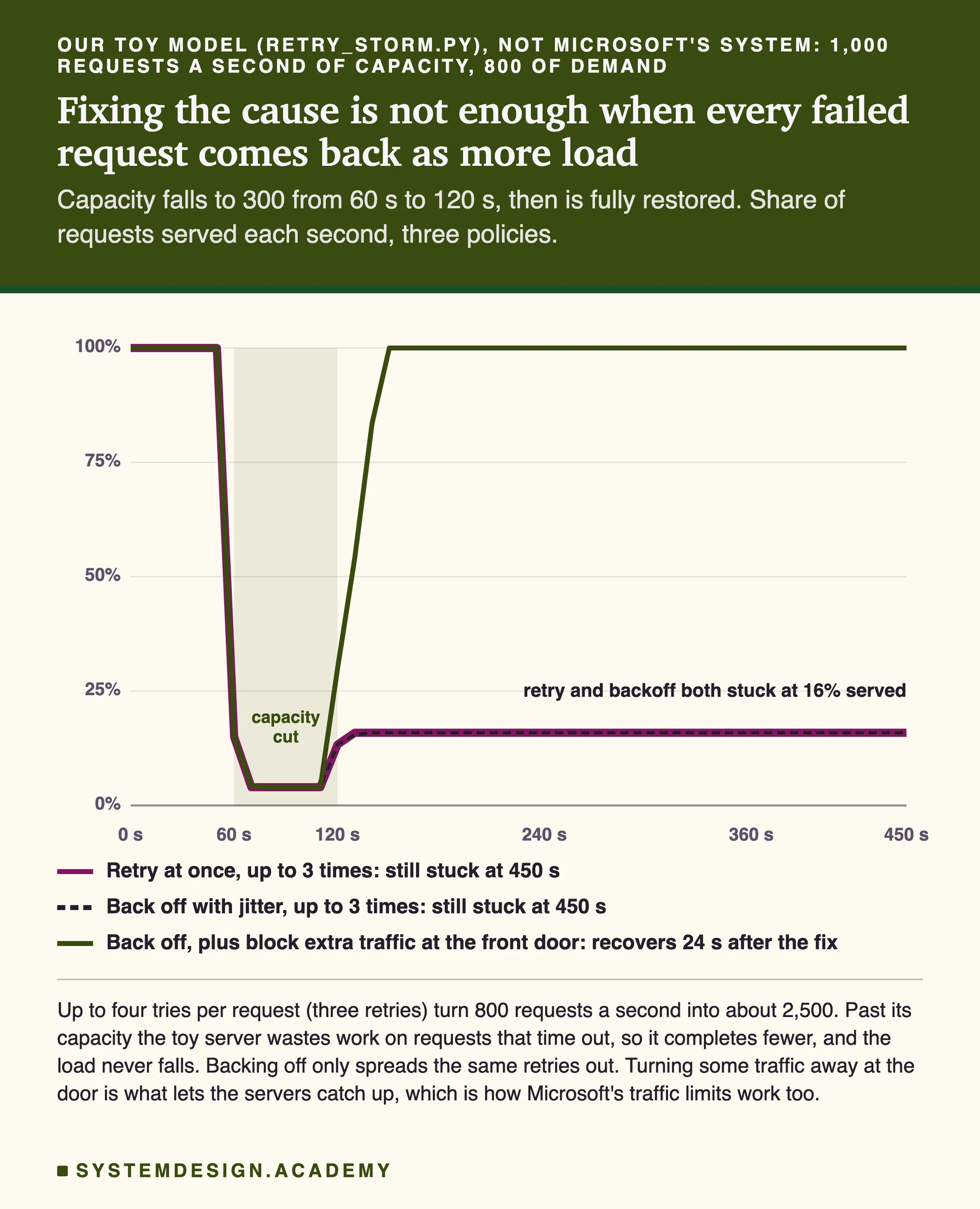
To make this concrete I wrote a small model in Python, retry_storm.py. It is not Microsoft's system; the numbers are mine. One backend can serve 1,000 requests a second, users send 800, and every failed request is retried up to three times, so each request can be tried four times in all. Past its capacity the server wastes work on requests that time out, so it completes fewer of them as the load grows, which is how real overloaded servers behave. For one minute I cut capacity to 300, then restored it fully.
With plain retries the server never recovers in the 15 minutes the model runs: up to four tries per request turn 800 requests a second into about 2,500, and the server serves only about 16% of them for good. With exponential backoff and jitter, where clients wait a growing, randomised time before retrying (the model spreads those retries evenly over each window, the average effect of random jitter), it is stuck at the same level in this model, because almost every request was failing, so the same number of retries still arrived, just spread out. Only when the front door also turns away everything above 900 requests a second, at once and cheaply, does the server catch up: it is back to serving everything 24 seconds after capacity returns.
Backoff still matters: it stops retries from all arriving in the same second and gives a recovering server room. In this model, where users keep arriving and each failed request is retried a fixed number of times, backoff only delays the same retries. Real clients that wait for an answer, or that keep a retry budget, help more, but backoff on its own is not guaranteed to bring the load under capacity. Something has to say no. That is load shedding: reject work early and cheaply, before the server spends effort on it, so the work it does accept finishes. Microsoft's step of limiting which traffic reached the affected servers, and bringing it back gradually, works the same way; Microsoft said it did this to find out whether one type of request was contributing and to restore service step by step.
In our toy model, only turning traffic away lets the server recover
Output of retry_storm.py, a deterministic model with numbers I chose. Backoff alone did not help here because nearly every request was failing, so the same number of retries arrived either way.
How to design your own service so this does not take you down
You probably do not run anything as large as Exchange Online. But you almost certainly depend on something like it, and you run services that others depend on. These are the safeguards this outage argues for, in the order I would add them.
Never let health checks remove most of your servers. Set a limit, for example: never take more than a third of a pool out of rotation because of failed checks. If more than that fails at once, the check or a shared dependency is the likely problem, not the servers. Some load balancers do this by failing open: below a minimum share of healthy servers they ignore the checks and use every server (Envoy calls it the panic threshold; AWS target groups have minimum healthy settings).
Check the real path, but keep the check cheap. A check that only opens TCP would have called Microsoft's stuck servers healthy. A check that runs a full mailbox query will fail on busy servers and remove them. Test the step users need (here, completing the TLS handshake), and keep it light.
Shed load at the front door. Give each server a limit on concurrent work and reject anything above it at once with a clear "try later" (HTTP 503 with Retry-After). A fast rejection costs little; a slow timeout costs a full request of work. Shed before the expensive step: if setting up connections is what overloads, as Microsoft described here, limit new connections at the edge before the TLS handshake, not after it.
Cap retries in every client you own. Use exponential backoff with jitter, and a retry budget: stop retrying when, say, more than 10% of recent calls are already retries. Three retries at every layer of a deep call chain multiply load many times over.
Bring capacity back slowly. When servers return, admit a small share of traffic first and raise it step by step. Every client reconnecting at once is a second outage. Microsoft did this in specific locations, starting with a narrower set of connections.
Contain the blast radius in your own product. If your app reads mail or calendars through Microsoft Graph, decide now what the screen shows when that call fails: a cached copy, a short message, or the rest of the page without that panel. Teams' core chat and calls kept running while Teams calendars failed, because they do not need Exchange; aim for the same split in your product.
Freeze changes during an incident. Microsoft paused all deployments and configuration changes about three hours in. Make that an automatic step in your incident process, so nobody changes two things at once while you are still learning what broke.
Each of these is a lesson in the System Design course: health checks, retry patterns, load shedding, bulkheads, graceful degradation and incident management, with the diagrams and the trade-offs.
Microsoft's updates are quoted from two places: its public status feeds at status.cloud.microsoft, which I saved every five minutes from 04:48 UTC on 13 November, and its Service Health record for EX1550543 and MO1550821, which the University of Pennsylvania's mail team republishes word for word with UTC times. The admin center itself needs a work account, so I could not read it directly. I did not use news reports for any fact on this page.
The probes are real but narrow: one home connection in India, six hosts, no login. They show what Microsoft's servers did for that network at that time; people elsewhere may have been sent to healthier servers. The retry model is a model with numbers I chose, written to explain the mechanism, not to reproduce Microsoft's system. Microsoft had not published a root cause or a final report when I wrote this, and its own explanation changed during the day. I will update this page when it does.
if this explainer was useful
Want to design services that shed load instead of falling over, and recover once the cause is gone?Start with System Design.
start here
System Design Masterclass
Health checks, retry and backoff patterns, load shedding, bulkheads, circuit breakers, graceful degradation and incident management, each as its own lesson with diagrams and a quiz.
770 lessons, beginner to principal
107 real interview systems taken apart step by step
An AI tutor beside every lesson that answers and draws
The interview in seven stages, the numbers worth knowing by heart, and twelve classic systems on one page each, every line linked to the lesson it comes from.
where to go from here
Pick the next step that fits you.
self-paced course
System Design course
Learn how real systems are built and scaled, from your first database to a staff-level design interview.
Both courses together: ₹1,999 in India / $49 elsewhere, lifetime access.
System Design and AI Engineering in one payment. Bought one by one: ₹1,111 + ₹1,333 = ₹2,444, so you save ₹445.Bought one by one: $25 + $35 = $60, so you save $11.
How do I keep my own service from staying down after the first cause is gone?
Stop the loop that keeps it down. Limit how many servers a failing health check may remove, reject extra work at the front door at once instead of letting it time out (engineers call this load shedding), cap retries in every client with backoff and a retry budget, and bring traffic back in small steps. In our toy model, plain retries and even backoff stayed stuck at 16% served after capacity returned; turning away load above 90% of capacity recovered in 24 seconds.
Google: Tells its engineers that overloaded servers should fail early and cheaply, and that retries and failing health checks can turn one slow part into a cascading failure. Google SRE book: Addressing Cascading Failures
Microsoft: During this outage, Microsoft took steps to stop more servers being removed from service, limited which types of traffic reached the affected servers and brought traffic back gradually. Microsoft 365 incident EX1550543, Service Health text
Build it yourself: what you would have to solve
A health check that removes busy servers pushes their load onto the rest until they fail too. Decide what to test and how many servers a check may take out.
Up to three retries per request turned 800 requests a second into about 2,500 in our model. Add backoff, jitter and a retry budget to every client you own.
Microsoft said servers in the Exchange Online service, which holds Outlook mail and calendars, were failing their health checks and dropping out of service, which overloaded the rest. Later it said a process that sets up secure connections on those servers was overwhelmed. It had not published a final root cause by 13 November.
When did the Microsoft 365 outage start?
At 16:17 UTC on 12 November 2026, which is 21:47 in India and 11:17 in the morning on the US East Coast, according to Microsoft's record for incident EX1550543.
Which Microsoft services were affected?
Exchange Online first, and then 18 more that Microsoft listed under MO1550821: the Microsoft 365 admin center, Microsoft 365 apps, the Apps admin center, Education, Copilot, Defender for Office 365, Defender XDR, Fabric, Graph, Intune, Planner, Purview, Teams, To Do, Power BI, SharePoint Online, Universal Print and Windows 365. Only their features that use Exchange data were affected.
Did Microsoft Teams work during the outage?
Mostly. Microsoft said Teams calls, meetings, group chats and channel messages were not affected. Features that need Exchange, such as calendars, meeting invites and scheduling, failed.
Was the Microsoft outage a cyberattack?
Microsoft said at 03:34 UTC on 13 November that there was no indication it was the result of malicious activity.
Why did it take so long to fix?
Because servers that Microsoft returned to service became unresponsive again once traffic reached them. Microsoft also reported a surge of calls from its own routing services, partly caused by its traffic moves. In overloads like this, retries and reconnecting clients often add load too, which is why Microsoft limited and blocked traffic and brought servers back gradually.
What is load shedding?
Rejecting some requests on purpose, early and cheaply, when a service is past its capacity, so the requests it does accept finish. It stops an overloaded service from wasting its work on requests that would time out anyway.
Sources
What this explainer is based on, so you can check it.
This explainer sits on top of our System Design course: 770 lessons on databases, caching, scaling, messaging and reliability, each drawn step by step. 18 lessons are free to read, with no card needed.
course 1
System Design Masterclass
From absolute beginner to principal engineer, drawn step by step.
Get all 200 questions in the System Design and Distributed Systems pack
Each question has why it is asked, a full answer, what the interviewer listens for, the follow-ups, the common mistakes and a diagram (268 diagrams in all). A PDF you keep, junior to staff level.