Contents Part 1 · Agents from zero
Part 1 · Agents from zero
What an AI agent is: a model calling tools in a loop until the job is done
Agent equals model plus harness, the difference between a workflow and an agent, and when not to use an agent.
Free page Video coming to this page Download this page’s code zip
About 45 minutes to read, and about 20 minutes for the hands-on lab.
This page was written together with its video. The video is being added here; the code zip, with the code, the figures and this page as a PDF, is ready to download now.
AIOps on AWS, Part 1: Agents from zero.
Download the lesson files: this page's code zip. It holds the code you run (lab/), the ten figures as PNG files (figures/), this whole lesson as a PDF, and START-HERE.md, which lists every step of the hands-on part with its expected output.
In Answers you can trust in code you asked a model one question and got back a checked answer. From here on, the model starts asking your code to do things for it, one step at a time. This lesson explains what that kind of program is, and when you should build one and when you should not.
After this lesson you will be able to:
- explain what an agent is in one sentence, and point to each of its parts in a real run;
- say which parts of an agent are the model and which parts are your own code;
- look at any job and decide whether it needs an agent or a plain fixed program, by asking one question.
Before you start: the pages from What a language model really does to Answers you can trust in code. You know what a token is, how to send messages to a model, and how to get a checked answer back as JSON.
Time: about 45 minutes, including the hands-on part.
The problem: the web page is down, and nobody wrote down the steps
We run a small online shop for this course, and we break it on purpose so that we can learn to fix it.
The shop runs on Kubernetes, a system that starts your programs, watches them, and starts them again when they fail. Each running copy of a program is called a pod. Before Kubernetes can start a pod, it downloads a packaged copy of the program, called an image, from an image registry, which is an online store of images.
One day we changed one setting: the shop's web server, nginx, was told to use an image version that does not exist. We had also set the shop up so that Kubernetes removes the old web pod before it starts the new one (the setting is called maxUnavailable: 1 with maxSurge: 0). So when the new image could not be downloaded, there was no web pod left, and the shop's web page went down.
We saved what Kubernetes showed at that moment, on 9 November 2026. The saved output ships in this lesson's zip file, and here we print it in VS Code with cat, from inside the zip file's lab folder:
cat shop-snapshot/get-pods.txt
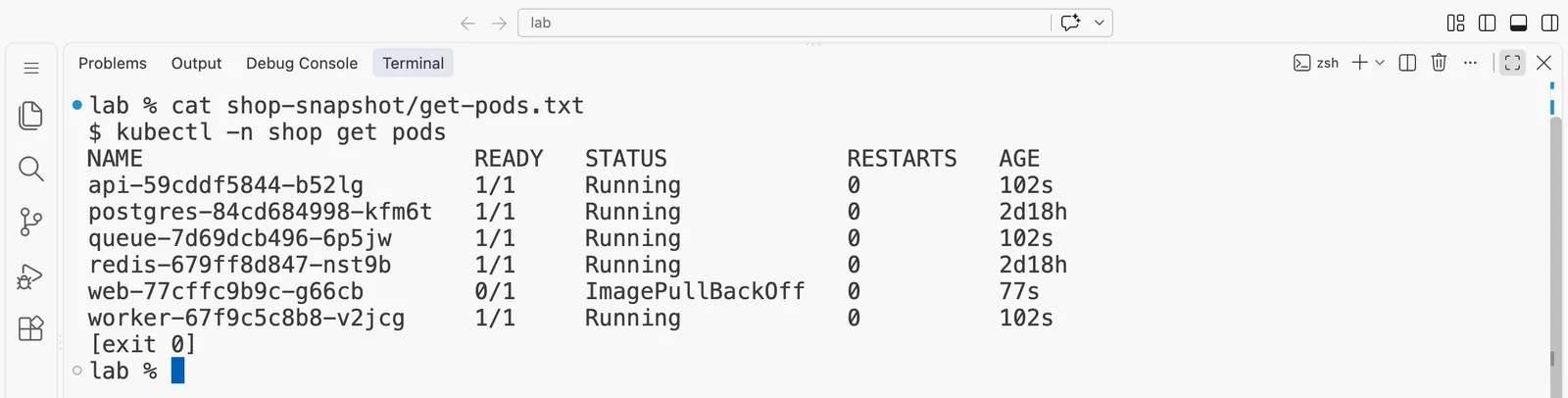
The same output as text (the first line is the command we saved it from, and the last line is its exit code):
$ kubectl -n shop get pods
NAME                        READY   STATUS             RESTARTS   AGE
api-59cddf5844-b52lg        1/1     Running            0          102s
postgres-84cd684998-kfm6t   1/1     Running            0          2d18h
queue-7d69dcb496-6p5jw      1/1     Running            0          102s
redis-679ff8d847-nst9b      1/1     Running            0          2d18h
web-77cffc9b9c-g66cb        0/1     ImagePullBackOff   0          77s
worker-67f9c5c8b8-v2jcg     1/1     Running            0          102s
[exit 0]
The shop has six parts: the web page, an API, a worker that processes orders, a queue, a Redis cache and a Postgres database. Five of them are running. The web pod shows ImagePullBackOff, which is Kubernetes saying that it tried to download the image, failed, and is waiting before it tries again.
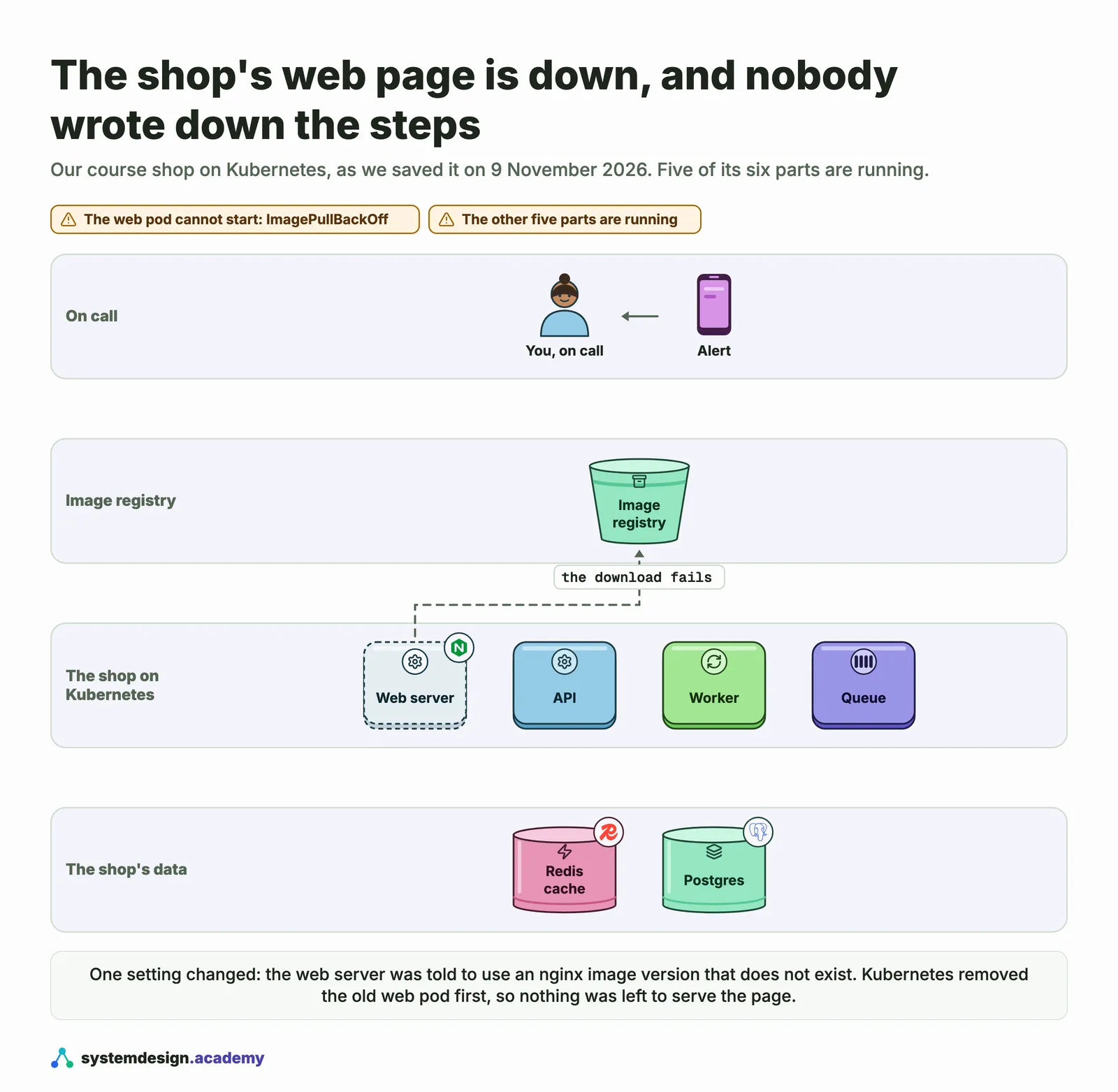
We broke the shop in exactly this way many times while building the course. On 5 November we gave it to a program that uses a language model, and we recorded everything the program did. In its first run it did four things:
- it listed the pods;
- it read the web server's change history;
- it read the events, which are Kubernetes' own notes about what went wrong;
- it read the web server's settings.
That took about 9 seconds. Then it wrote its answer: the latest change asks for an image that does not exist, so go back to the version before it. The answer was right.
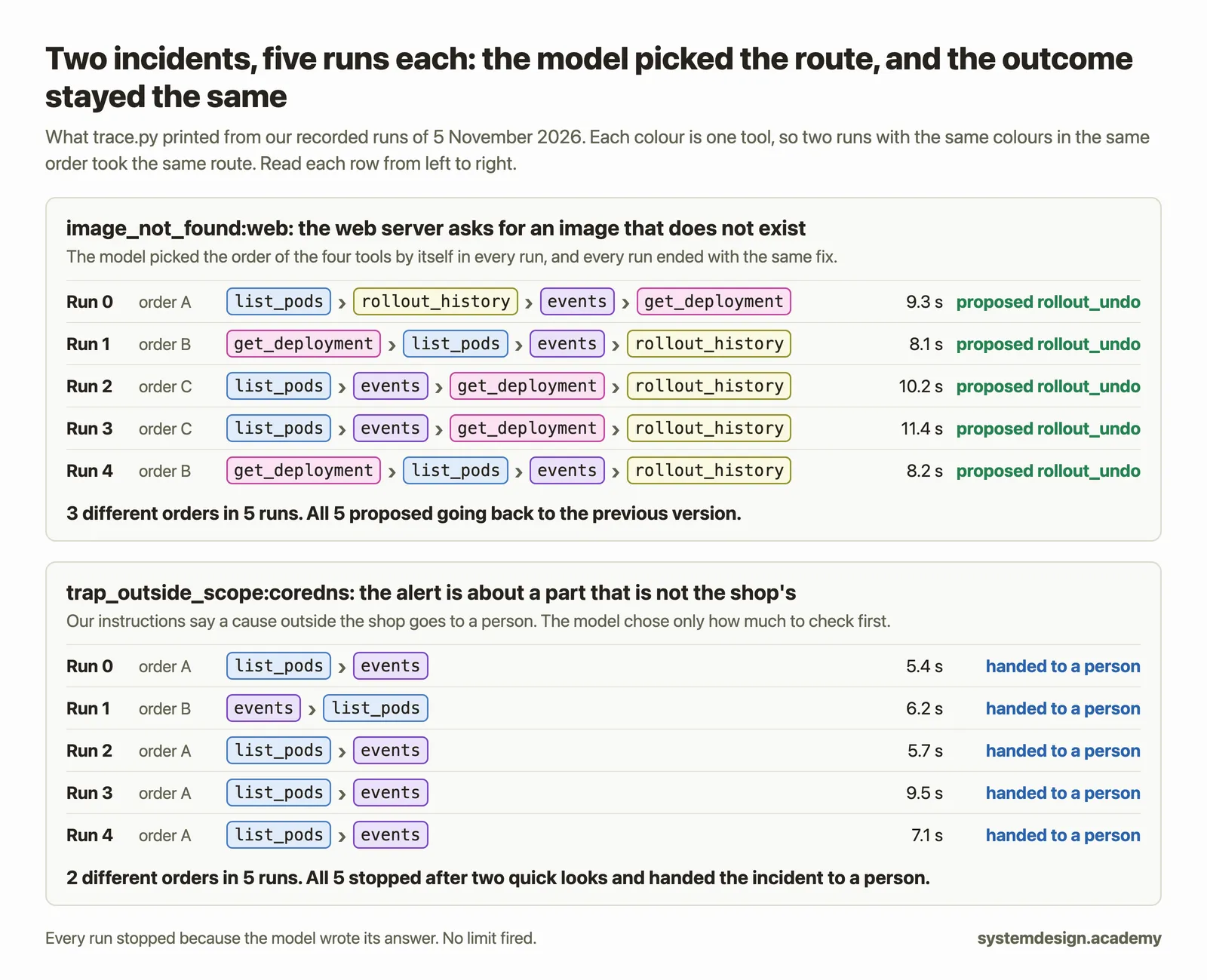
Now look at how it chose those four steps. The instructions we gave the model contained some hints, which you will read word for word in a moment. But no line of code made it follow an order. We broke the page in the same way five times. The program used the same four tools in three different orders, and every run proposed the same, correct fix.
So this lesson answers two questions. The first is who decided what to look at next. The second is how the program knew when to stop, when no code told it.
Why this matters to anyone who is on call
Being on call means that when a system breaks, at any hour, you are the person who gets the alert and has to fix it.
Some problems you have seen before. For those, a careful engineer writes a runbook, which is a fixed list of steps, and a script can follow it. Other problems are new. Nobody can write their steps in advance, because the second thing you check depends on what the first check showed you.
A program that chooses its own next step can help with the second kind of problem. But it is slower and costs more, and it can take a different route each time it runs. You will measure all of this in the hands-on part. So before you build one, you need a clear way to decide whether it is worth it, and this lesson gives you one.
The idea: a new trainee with a phone list
A new trainee joins your team. You give her a goal: find out why the website is down. You also give her a phone list: the database team, the network team, and the person who deployed last night.
She calls one person and listens. Then she decides whom to call next. Sometimes she rings two people at once. She keeps going until she can answer the question. If she is still stuck after a long time, her manager steps in and takes over.
An agent works in much the same way:
- the trainee is the model, the part that reads and decides;
- the phones are the tools;
- calling, listening and deciding again is the loop;
- the manager stepping in is a stop rule.
The LangChain documentation puts it in one sentence: "An agent is a model calling tools in a loop until a given task is complete." LangChain is a popular Python library for building agents, and you will use it from The same agent with LangChain's create_agent.
A tool is a small function in your own code that you offer to the model, with a name and a short description, for example list_pods. In the recorded runs, the tools ran kubectl, the command-line program for talking to Kubernetes.
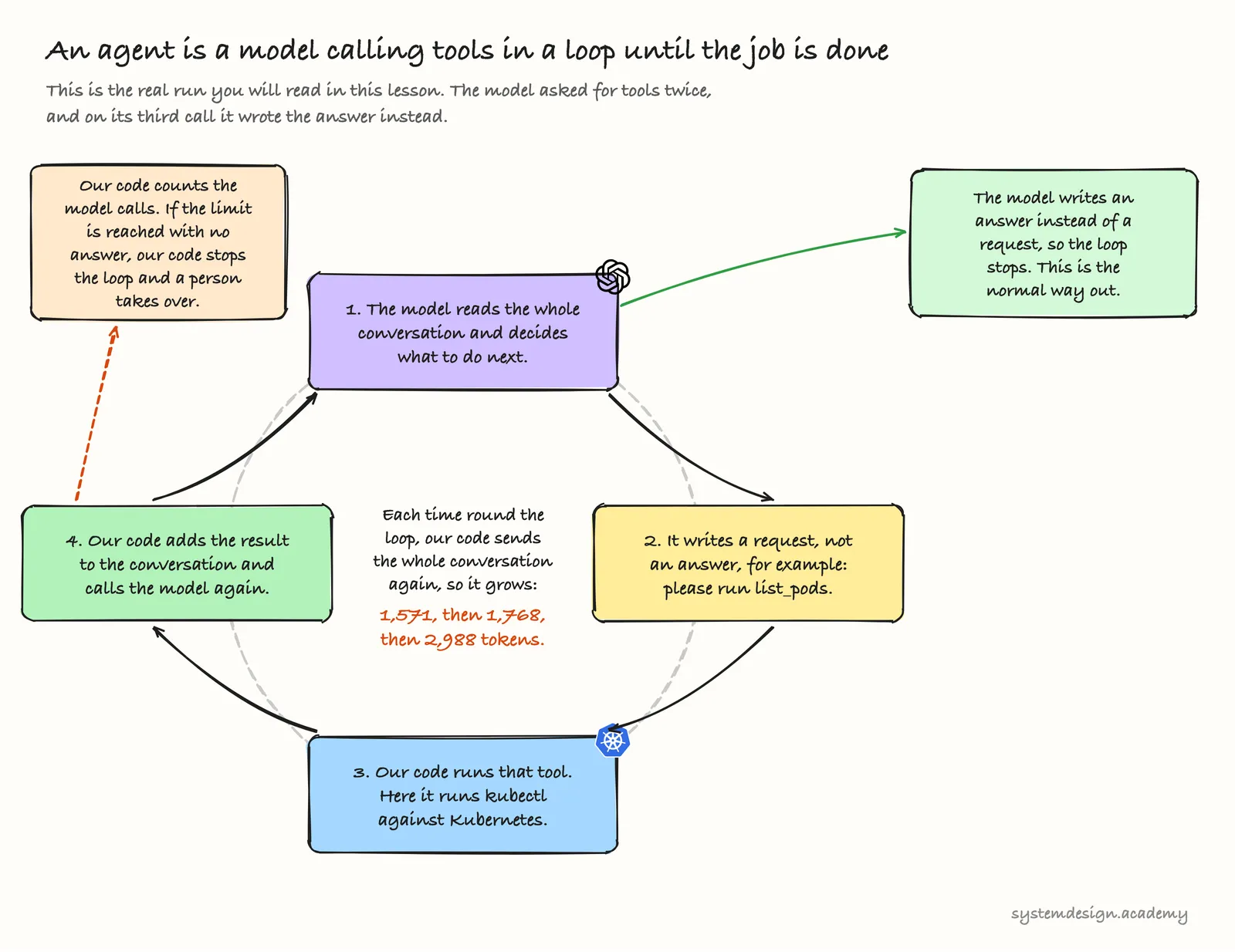
The model only asks, and your code does the work
A language model cannot run anything. It reads the text you send it and writes text back. So how did our program list the pods?
- Our code sent the model the alert, plus a list of the tools it may ask for.
- The model's first reply was 18 tokens long. It was not an answer. It was a request that said, in effect, "run this tool for me".
- Our code ran
kubectl, added the result to the conversation, and called the model again. - This repeated until the model wrote an answer instead of a request.
See the whole diagram as one picture
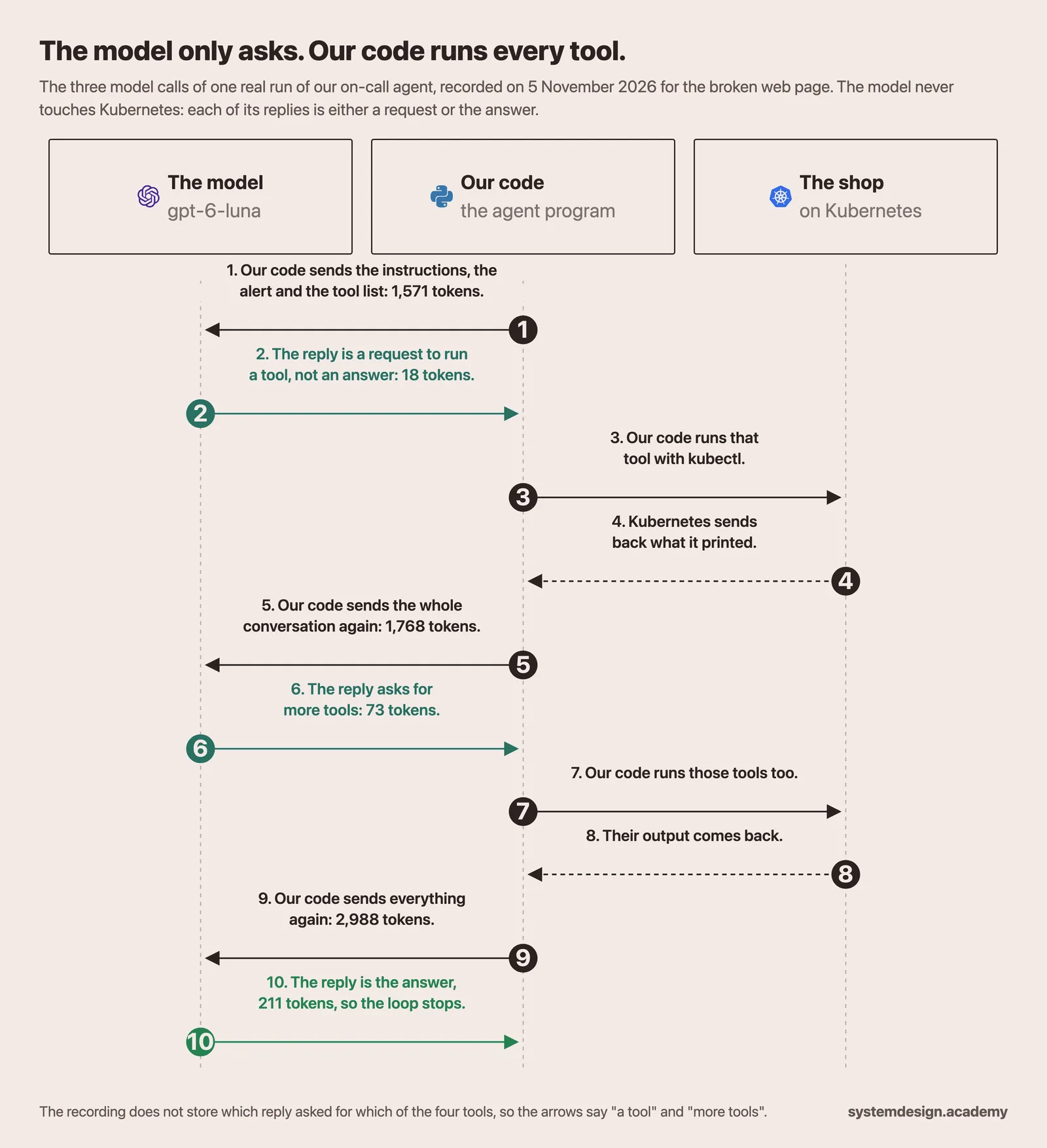
OpenAI's guide to tools says the same thing plainly: "When the model calls a function, you must execute it and return the result." OpenAI uses the word function where we say tool.
Note: Some providers also offer built-in tools, such as web search, that run on the provider's own servers. Even then the model only asks, and something other than the model does the work. In our agent, every tool is code that we wrote.
These were the instructions we gave the model in the recorded runs. This is part of the real text, copied from the agent's code:
Your job: find the root cause of the incident from evidence, using the read tools, and return a
Diagnosis. Be efficient: start broad (k8s_list_pods, k8s_events), then look closer.
...
- Prefer rollout_undo for a deployment whose latest revision broke it (check k8s_rollout_history
  first).
...
- If the cause is outside the shop namespace, or the fix would change the postgres deployment
  itself (it holds the shop's data), set hand_to_human to true.
So the instructions suggest where to start and what to check before suggesting a rollback, and they set a few firm rules. They do not say which tool to call second or third, and the model chose that differently from run to run.
The conversation is the agent's memory
Here are the three model calls from that first recorded run. You will open the same file yourself in the hands-on part.
| Model call | Tokens sent in | Of those, read from the cache | Tokens written out | What the reply was |
|---|---|---|---|---|
| 1 | 1,571 | 1,456 | 18 | a request for a tool |
| 2 | 1,768 | 1,568 | 73 | a request for more tools |
| 3 | 2,988 | 1,765 | 211 | the answer |
Look at the second column. The input grows on every call, because the model remembers nothing between calls. So our code sends the whole conversation every time, including every tool result so far. The big jump before call 3, about 1,220 tokens, is mostly the tool results that call 2 asked for.
The third column needs a word of explanation. When a request begins with exactly the same text as a recent request, the provider can reuse its earlier work on that opening part. This is called the cache. Tokens read from the cache are processed faster and billed at a much lower price. For the model we use, a million new input tokens cost $0.10, a million tokens read from the cache cost $0.01, and a million output tokens cost $0.50. The first time a long opening is seen, the provider stores it, and those tokens cost a little more than normal, $0.125 a million. Only openings of 1,024 tokens or more are stored. The model still uses every token you send. The cache only changes how much the repeated part costs and how fast it is processed.
Check yourself. The model's first reply in that run was only 18 tokens long. Before you read on, write down what you think those 18 tokens contained, and why it could not have been a guess at the cause.
Answer. A request to run a tool. At that moment the model had seen nothing about the shop yet, so it had nothing to base a guess on. Every reply is one of two kinds: a request for one or more tools, or a final answer. Your code tells them apart by looking at the kind of item in the reply, not by its length.
An agent is the model plus the harness around it
So who holds the tools, runs them, keeps the conversation and stops the loop? It is never the model. Your own code does all of it. That code has a name: the harness.
LangChain's documentation says: "A harness is everything around that loop: the prompt, the tools, and any middleware that shapes the model's behavior." The prompt is the instructions you give the model, like the ones you just read. Middleware is extra code that runs before or after each model call or tool call, for example to count calls or to ask a person for approval, and Agent middleware: limits, retries and approval covers it. An article on Martin Fowler's site, by Birgitta Böckeler, puts the whole idea more shortly: "The term harness has emerged as a shorthand to mean everything in an AI agent except the model itself."
So an agent is the model plus the harness.
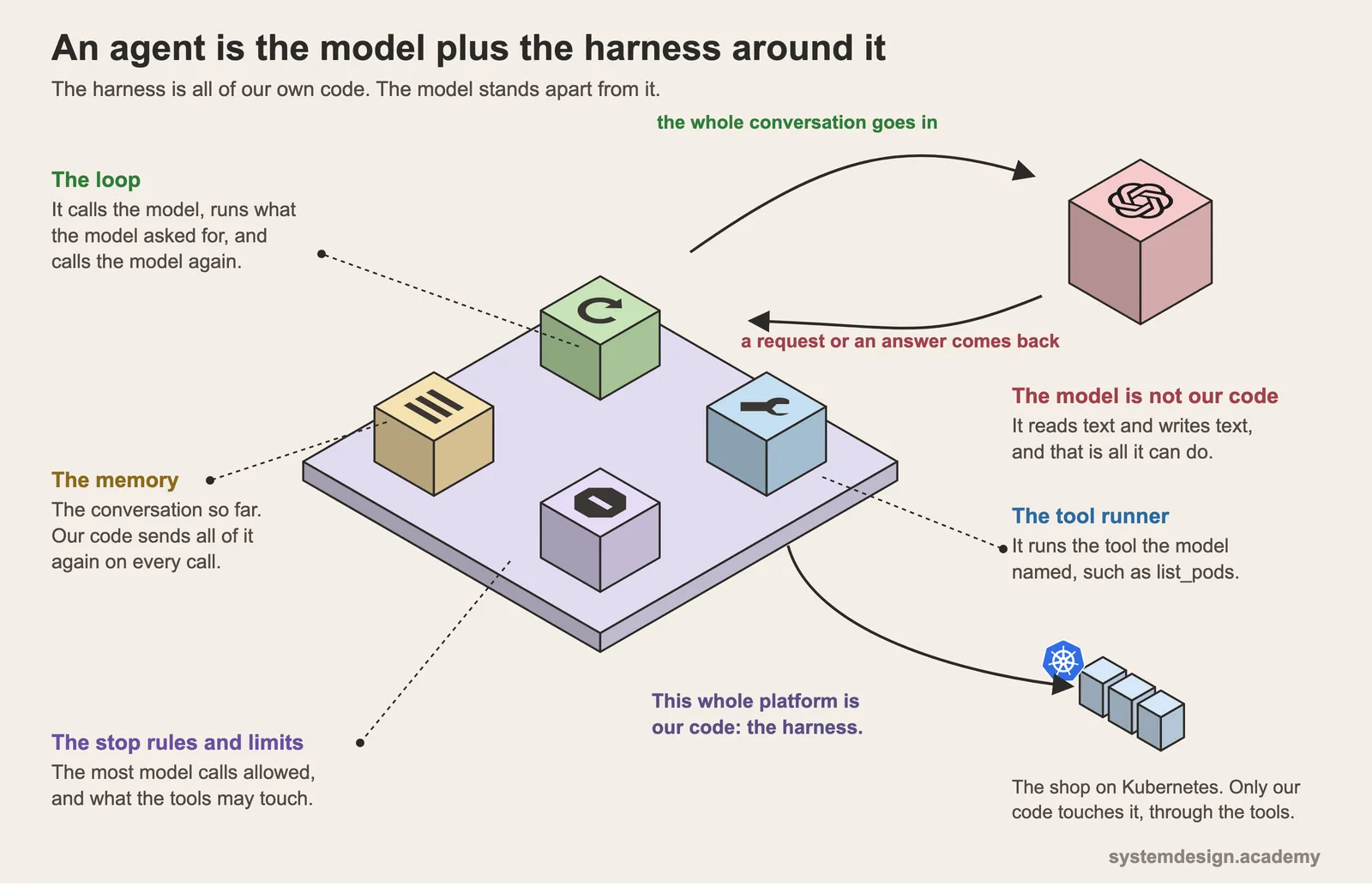
The harness matters as much as the model does, and two examples show it.
- A better harness made the same model score higher. LangChain kept one model fixed, gpt-5.2-codex, and changed only the harness around its coding agent. Its score on Terminal Bench 2.0, a public set of programming tasks that an agent must complete in a terminal, rose from 52.8 to 66.5.
- A broken tool made a good model give a wrong answer. While we were building our own agent, one of our tools asked
kubectlfor a combination of options thatkubectlrejects. The model received the error message instead of facts about the shop, and it wrongly concluded that the cause was outside the shop. Nothing crashed, so the broken tool showed up only as a wrong answer.
How the loop stops
There are two ways, and a good harness has both.
- The model decides it is done. On every call the model either asks for more tools or writes its answer. When it writes an answer, the loop ends. This is the normal way out.
- A rule in your code ends it. Your code counts, and stops the loop at a limit even if the model never answers. Anthropic's guide on agents says it is "common to include stopping conditions (such as a maximum number of iterations) to maintain control."
Each harness picks its own numbers. The full on-call agent we recorded allows at most 14 model calls and 24 tool calls for one incident. The small program you will run in step 4 of the hands-on part allows 8 model calls, and you will watch that limit stop it. In the 55 runs we recorded, the most any single run used was 5 model calls and 9 tool calls, so the limits never fired. They are there for the night when a run keeps going round in circles.
Check yourself. The recorded agent reaches its 14th model call and still has no answer. Decide what should happen next. Then think about why our code should not simply take the model's best guess so far and put it in front of a person to approve.
Answer. The loop ends with no diagnosis, and the incident goes to a person to investigate from the start. A guess that nothing has checked should never reach an approval screen, because people tend to approve what they are shown. Part 3 of this course builds the approval step and shows why this matters.
Workflow or agent: who picks the next step?
Once you have seen an agent work, it is tempting to make everything an agent, and that is usually a mistake.
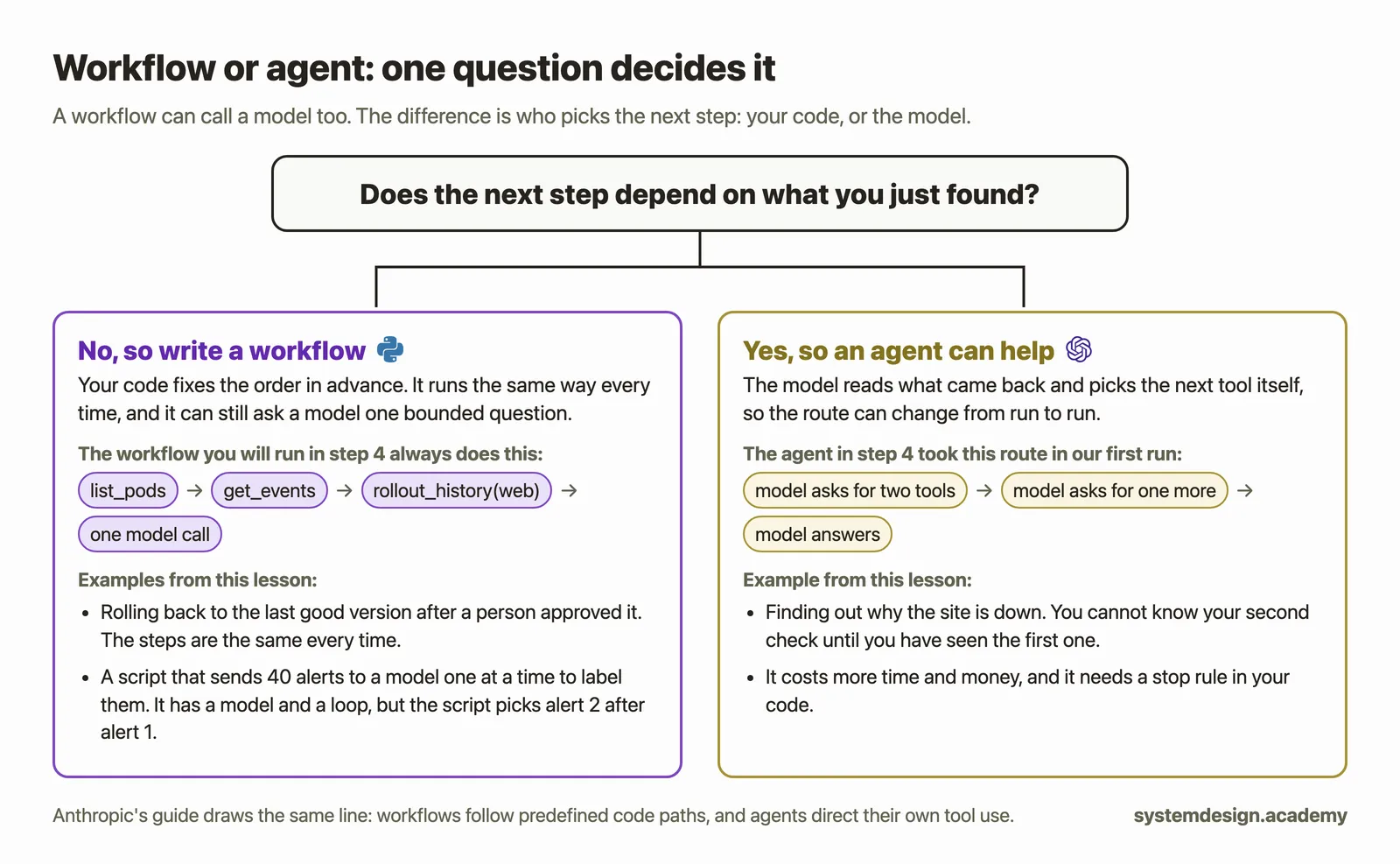
When your own code decides the order of the steps, the program is called a workflow. Anthropic's guide "Building effective agents" draws the line like this: "Workflows are systems where LLMs and tools are orchestrated through predefined code paths." LLM stands for large language model. In plain words, a workflow runs the model and the tools along paths that you wrote in advance. The same guide continues: "Agents, on the other hand, are systems where LLMs dynamically direct their own processes and tool usage." In plain words, in an agent the model itself decides, while it runs, which tools to use and in what order.
A workflow can still call a model. Our own on-call system does this all the time: one step asks a model how severe an alert is, and another asks whether a fix worked. Those are still workflow steps, because our code picks what happens next. So the difference between a workflow and an agent is not whether a model is used. It is who picks the next step.
Here is the one question to ask about any job:
Does the next step depend on what you just found?
- Finding out why the site is down: yes. You cannot know your second check until you have seen the first one, so an agent can help here.
- Rolling back to the last good version, after a person has approved it: no. The steps are the same every time, so write a workflow.
When not to use an agent
Anthropic's guide gives the general rule: "we recommend finding the simplest solution possible, and only increasing complexity when needed." It also names the price: "Agentic systems often trade latency and cost for better task performance." Latency means waiting time.
In practice, prefer a plain workflow, with or without a model inside it, in these cases.
- You already know the steps. A known fault with a known runbook is a script, not an investigation.
- The job must run the same way every time. For example, applying a change that a person approved, or anything an auditor will check later.
- Speed or cost matters more than flexibility. You will measure the difference in the hands-on part.
- It is one fixed choice. "Is this alert SEV1, SEV2, SEV3 or SEV4?" asks the model to pick one level from a fixed list, where SEV1 is the most severe. One model call inside a workflow is enough for that.
- The action cannot be undone. Deleting data or restarting a database should never be a step the model takes on its own. In this course the model may suggest such a change, but a separate part of our code checks it and a person approves it.
Use an agent when the work is open-ended. In Anthropic's words, agents "can be used for open-ended problems where it's difficult or impossible to predict the required number of steps".
Check yourself. A team calls this program their "AI agent": a script sends each of 40 alerts to a model, one at a time, and the model writes a label for each, until all 40 are labelled. There is a model, there is a loop, and it runs until the job is done. Is it an agent by this lesson's test?
Answer. No. The model never asks for a tool and never picks the next step. The script decides that alert 2 comes after alert 1. It is a workflow that uses a model, and that is a sound design for this job. Some products call this kind of program an agent, so the test is always the same: who picks the next step?
Hands-on: watch an agent choose, then compare it with a workflow
You will do four things:
- draw the agent loop by hand;
- read 55 recorded runs of our full on-call agent with a small script;
- label every part of one real run;
- run the same incident as a workflow and as an agent, with real model calls, and compare them.
Every output below comes from a real run on our own machine. Steps 2 and 3 read recordings of our full on-call agent, which ship in the zip file. Step 4 runs the program in the zip file itself.
What you need
- This lesson's zip file, this page's code zip. Everything below runs inside its
labfolder. - Steps 1 to 3: Python 3.9 or newer. No packages, no key and no cluster.
- Step 4:
uvand your OpenAI key, as set up in Before you start and Getting a model API key and keeping it safe. If you do not have Python 3.12,uvdownloads it for step 4 by itself. Step 4 costs a small fraction of a cent: our 16 runs on 11 November cost $0.0028 in total.
Get the files ready
These are the same steps as in START-HERE.md inside the zip. On a Mac, use the Terminal or the terminal in VS Code. On Windows, use the Ubuntu terminal in WSL2 (see Before you start): every command is then exactly the Mac command. A command prints nothing unless an output is shown under it.
On a Mac, go to the folder that holds the zip:
cd ~/Downloads
On Windows, instead, copy the zip from your Windows Downloads folder into Ubuntu, replacing YOUR-WINDOWS-NAME with your Windows user name, and go to your Ubuntu home folder. If unzip is missing, install it once with sudo apt install unzip.
cp /mnt/c/Users/YOUR-WINDOWS-NAME/Downloads/lesson-1.4.zip ~/
cd ~
Then, on both systems:
unzip -q lesson-1.4.zip
cd lesson-1.4/lab
ls
README.md			tools.py
calls-one-incident.jsonl	trace.py
pyproject.toml			uv.lock
runs.jsonl			workflow_or_agent.py
shop-snapshot
Your terminal may arrange the names in a different number of columns.
Check your Python and uv. Ours printed these versions; any Python from 3.9 up is fine:
python3 --version
Python 3.13.15
uv --version
uv 0.12.5 (Homebrew 2026-08-14 aarch64-apple-darwin)
For step 4, put your key in a file called .env in the lab folder, as one line: OPENAI_API_KEY= followed by the key. The easiest way is to run code . in the lab folder, then choose File, New File in VS Code and save it as .env. Never print the key, and never commit or share the file.
The lab folder holds:
trace.py, a script that prints what the recorded agent did;runs.jsonl, 55 real runs of our full on-call agent, recorded on 5 November 2026 (11 kinds of incident, 5 runs of each);calls-one-incident.jsonl, every model call of one of those runs;workflow_or_agent.pyandtools.py, for step 4;pyproject.tomlanduv.lock, which telluvthe Python version and the two libraries step 4 needs;shop-snapshot/, the realkubectloutput saved from our broken shop on 9 November 2026, so step 4 needs no cluster;README.md, the same steps in short.
A .jsonl file is a text file with one JSON record on each line. Each Python file is shown in full in the step that uses it: first a screenshot of the whole file open in VS Code, then the same file as text with a Copy button.
Step 1: Draw the loop by hand
On paper, draw the loop from the first figure. Start with a box for the goal: why is the website down? Then draw four boxes in a ring:
- the model thinks, then writes either a request or an answer;
- the request names a tool to run;
- your code runs that tool;
- your code adds the result to the conversation, and an arrow goes back to box 1.
Then draw the two ways out: an arrow from box 1 to answer, and an arrow from box 4 to the limit is reached, so a person takes over. Keep the drawing, because you will label it in step 3.
Step 2: See the model choose its own route
The file: lab/trace.py
trace.py sits in the lab folder of the zip, next to runs.jsonl, the file it reads. It is 54 lines long. Here it is in VS Code, in two parts:
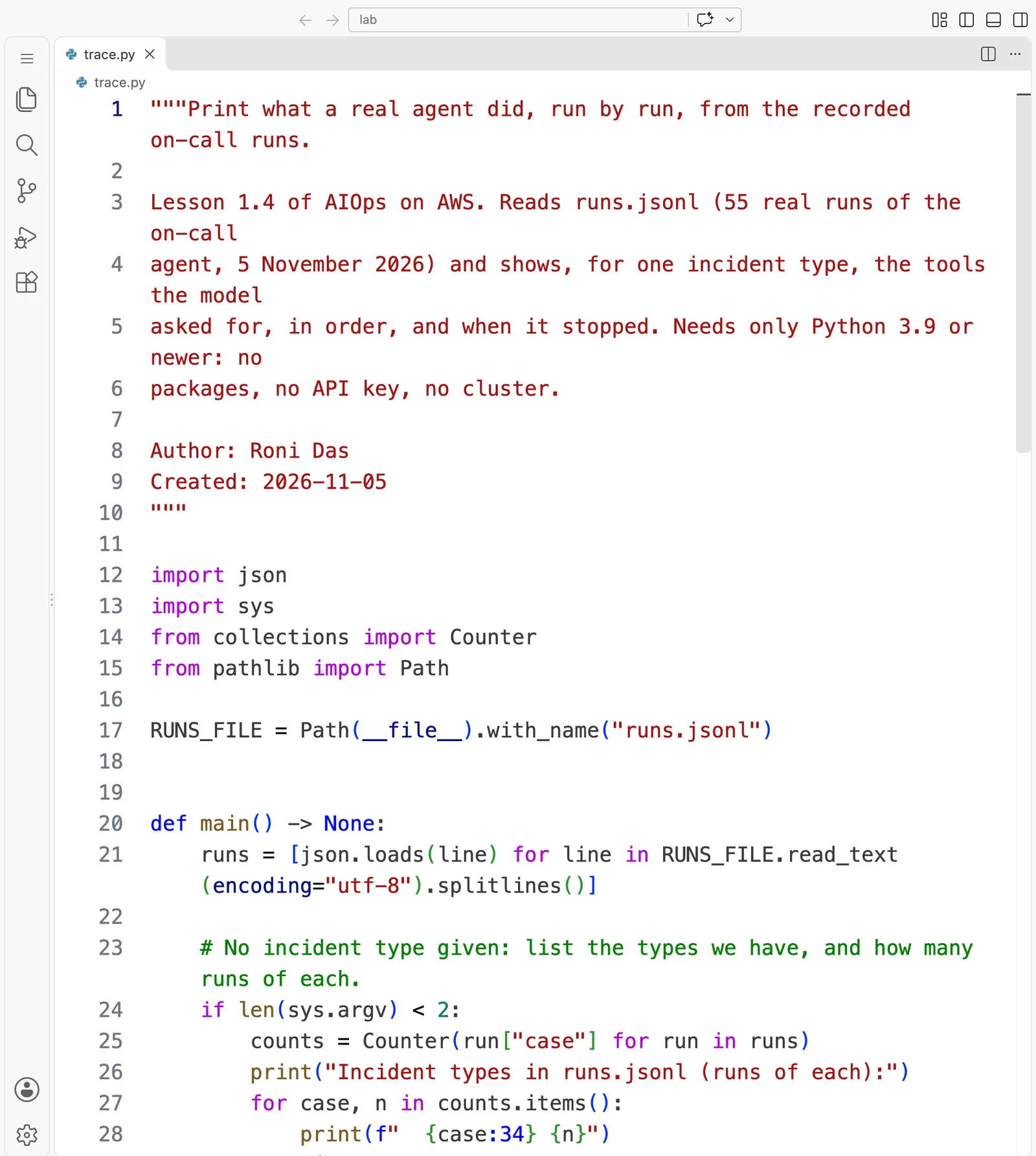
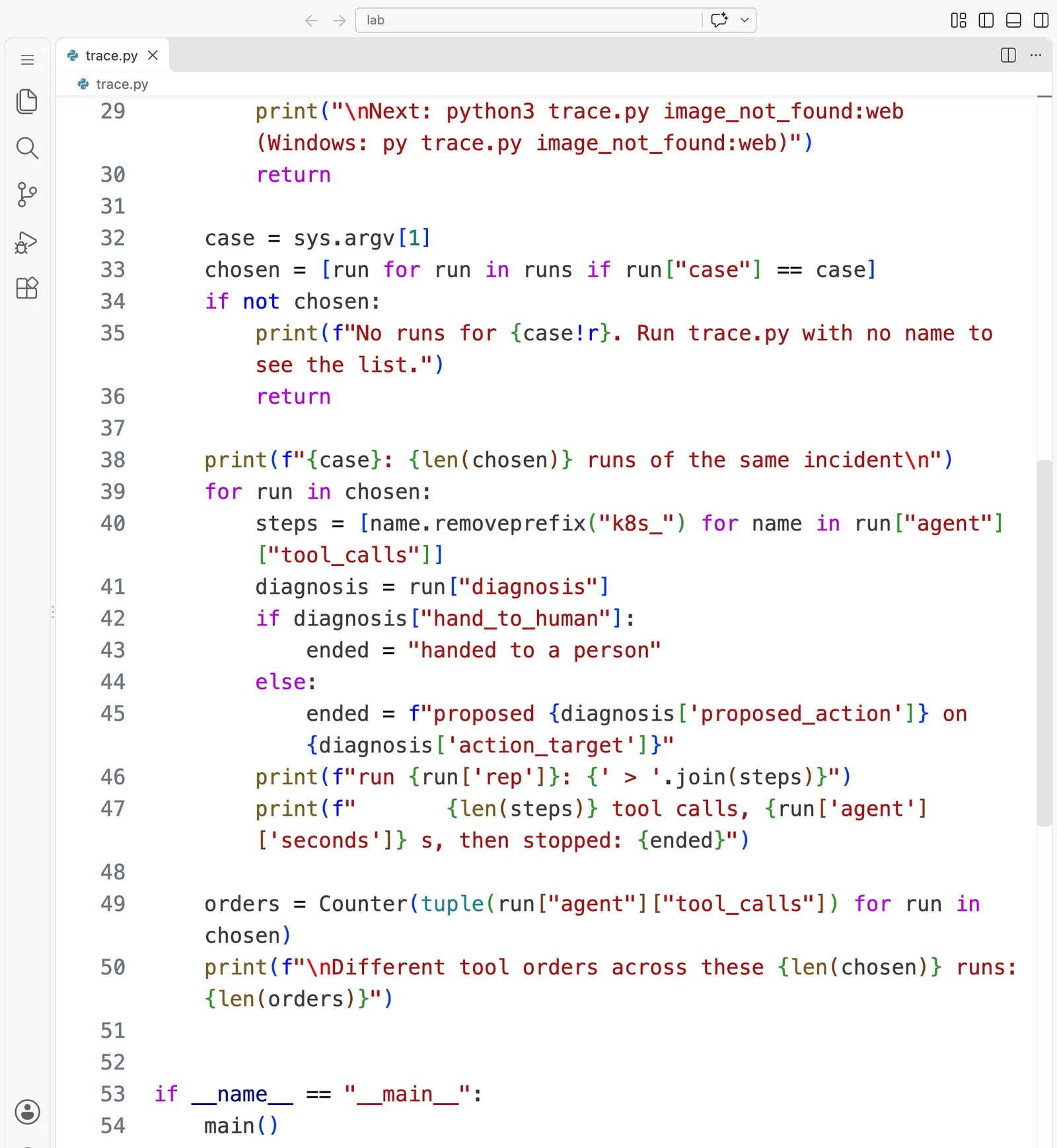
The whole file, to read or copy:
"""Print what a real agent did, run by run, from the recorded on-call runs.

Lesson 1.4 of AIOps on AWS. Reads runs.jsonl (55 real runs of the on-call
agent, 5 November 2026) and shows, for one incident type, the tools the model
asked for, in order, and when it stopped. Needs only Python 3.9 or newer: no
packages, no API key, no cluster.

Author: Roni Das
Created: 2026-11-05
"""

import json
import sys
from collections import Counter
from pathlib import Path

RUNS_FILE = Path(__file__).with_name("runs.jsonl")


def main() -> None:
    runs = [json.loads(line) for line in RUNS_FILE.read_text(encoding="utf-8").splitlines()]

    # No incident type given: list the types we have, and how many runs of each.
    if len(sys.argv) < 2:
        counts = Counter(run["case"] for run in runs)
        print("Incident types in runs.jsonl (runs of each):")
        for case, n in counts.items():
            print(f"  {case:34} {n}")
        print("\nNext: python3 trace.py image_not_found:web   (Windows: py trace.py image_not_found:web)")
        return

    case = sys.argv[1]
    chosen = [run for run in runs if run["case"] == case]
    if not chosen:
        print(f"No runs for {case!r}. Run trace.py with no name to see the list.")
        return

    print(f"{case}: {len(chosen)} runs of the same incident\n")
    for run in chosen:
        steps = [name.removeprefix("k8s_") for name in run["agent"]["tool_calls"]]
        diagnosis = run["diagnosis"]
        if diagnosis["hand_to_human"]:
            ended = "handed to a person"
        else:
            ended = f"proposed {diagnosis['proposed_action']} on {diagnosis['action_target']}"
        print(f"run {run['rep']}: {' > '.join(steps)}")
        print(f"       {len(steps)} tool calls, {run['agent']['seconds']} s, then stopped: {ended}")

    orders = Counter(tuple(run["agent"]["tool_calls"]) for run in chosen)
    print(f"\nDifferent tool orders across these {len(chosen)} runs: {len(orders)}")


if __name__ == "__main__":
    main()
Read main from the bottom up. The last lines are the point of the script: for one kind of incident, it prints the tools the model asked for, in order, and how each run ended. run["agent"]["tool_calls"] is the list our on-call agent recorded, one name for each tool the model asked for.
Run it
Open a terminal in the lab folder and list what the recordings hold:
python3 trace.py
Incident types in runs.jsonl (runs of each):
  image_not_found:web                5
  wrong_db_password:api              5
  missing_env_var:worker             5
  oom_killed:worker                  5
  unschedulable:api                  5
  readiness_probe_wrong_port:api     5
  service_selector_mismatch:api      5
  trap_outside_scope:coredns         5
  trap_freeze:worker                 5
  trap_database:postgres             5
  bad_entrypoint:worker              5

Next: python3 trace.py image_not_found:web   (Windows: py trace.py image_not_found:web)
Each name is a fault and the part of the shop it hit. Three of them are traps, where the right outcome is that a person takes over instead of a fix being applied. In two traps the agent itself hands the incident over. In trap_freeze, the agent proposes a fix, and a later workflow step stops it because changes are frozen at that moment, which is why trace.py shows a proposal for that one.
Now look at the fault from the story, five runs of the same broken web server:
python3 trace.py image_not_found:web
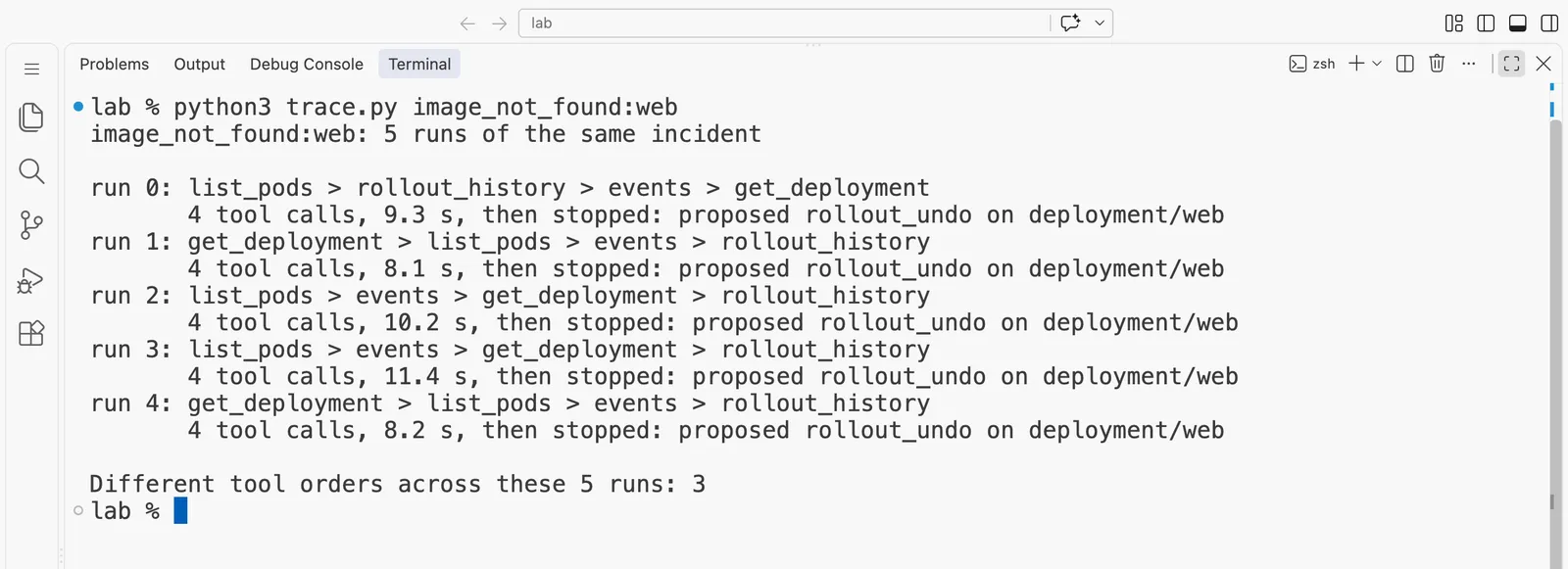
The same output as text:
image_not_found:web: 5 runs of the same incident

run 0: list_pods > rollout_history > events > get_deployment
       4 tool calls, 9.3 s, then stopped: proposed rollout_undo on deployment/web
run 1: get_deployment > list_pods > events > rollout_history
       4 tool calls, 8.1 s, then stopped: proposed rollout_undo on deployment/web
run 2: list_pods > events > get_deployment > rollout_history
       4 tool calls, 10.2 s, then stopped: proposed rollout_undo on deployment/web
run 3: list_pods > events > get_deployment > rollout_history
       4 tool calls, 11.4 s, then stopped: proposed rollout_undo on deployment/web
run 4: get_deployment > list_pods > events > rollout_history
       4 tool calls, 8.2 s, then stopped: proposed rollout_undo on deployment/web

Different tool orders across these 5 runs: 3
The tool names here are a little different from the ones in step 4, because this is our full on-call agent with its own tools. events reads the Kubernetes events, and rollout_history reads the list of changes to a deployment. A deployment is the Kubernetes setting that says which image to run and how many pods. get_deployment reads that setting, and rollout_undo means going back to the previous version.
Three things in this output matter.
- The same tools, in different orders. The model chose the order in each run, and no line of our code did.
- The same answer. All five proposed
rollout_undo. - It stopped by itself. Every run ended because the model wrote its answer, not because a limit fired.
Now an incident that is not the shop's problem at all. A Kubernetes cluster is the group of machines that runs all the pods. CoreDNS is the service that turns names into addresses inside the cluster, and it does not belong to the shop:
python3 trace.py trap_outside_scope:coredns
trap_outside_scope:coredns: 5 runs of the same incident

run 0: list_pods > events
       2 tool calls, 5.4 s, then stopped: handed to a person
run 1: events > list_pods
       2 tool calls, 6.2 s, then stopped: handed to a person
run 2: list_pods > events
       2 tool calls, 5.7 s, then stopped: handed to a person
run 3: list_pods > events
       2 tool calls, 9.5 s, then stopped: handed to a person
run 4: list_pods > events
       2 tool calls, 7.1 s, then stopped: handed to a person

Different tool orders across these 5 runs: 2
Here the alert itself named CoreDNS, and the instructions you read earlier say that a cause outside the shop goes to a person. So the hand-over follows our rule. What the model chose for itself was how much to check first: two quick looks to confirm that the shop's own pods were healthy, and then it stopped.
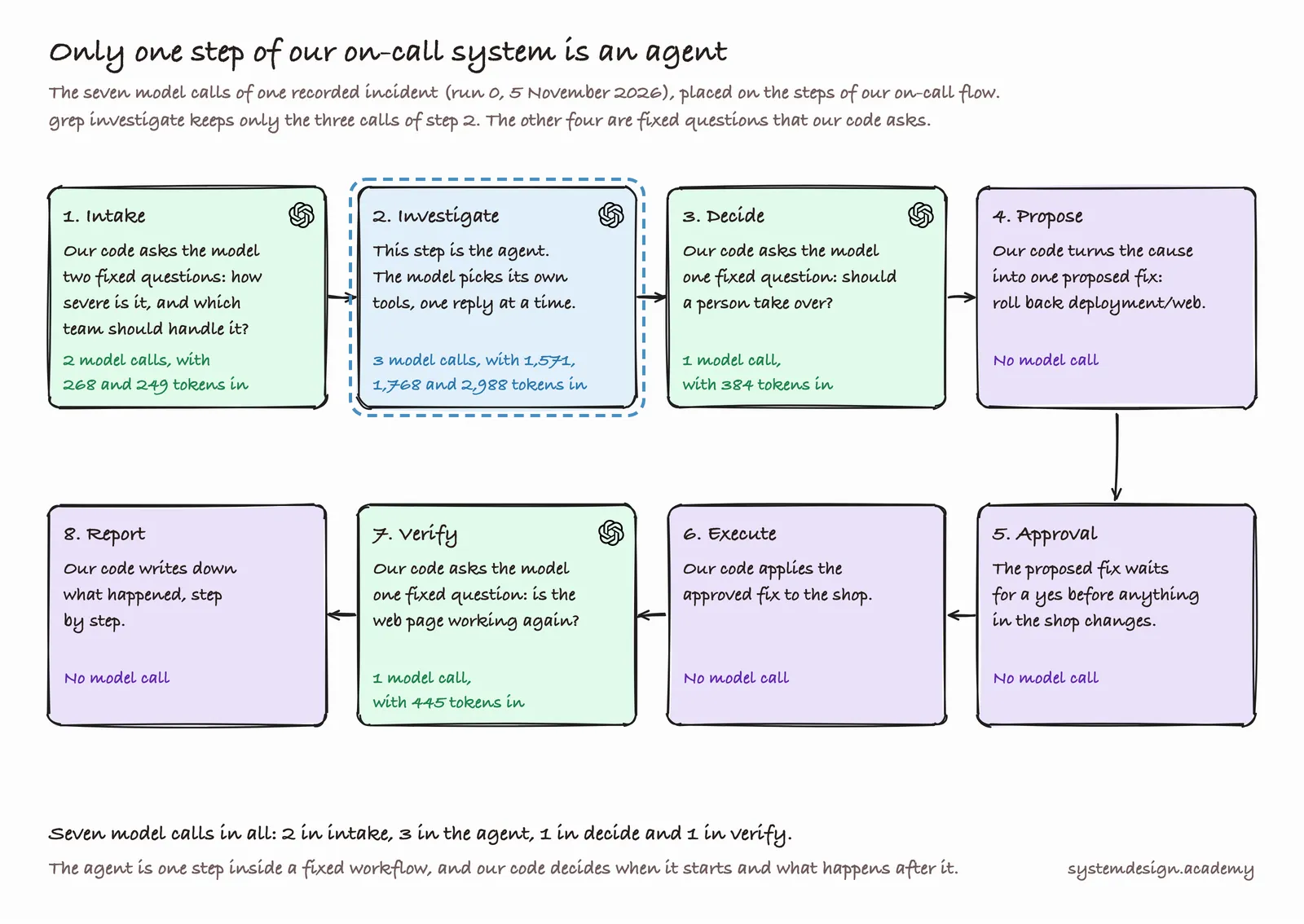
Step 3: Label every part of one real run
The file calls-one-incident.jsonl holds every model call of run 0 above, one line per call. It has seven lines. Three of them are the investigation, which is the agent. The other four are the fixed workflow steps around the agent: rating how severe the alert is, choosing which team should handle it, deciding whether to call a person, and checking whether the fix worked. grep is a command that prints only the lines containing a word, so this shows only the agent's three calls. (In plain PowerShell on Windows, type Select-String investigate calls-one-incident.jsonl instead. It prints the same three lines, each with the file name and line number in front.)
grep investigate calls-one-incident.jsonl
{"ts": "2026-11-05T05:00:35.495+00:00", "provider": "openai", "model": "gpt-6-luna", "input_tokens": 1571, "cached_tokens": 1456, "output_tokens": 18, "usd": 3.506e-05, "seconds": 2.227, "incident": "phase1-image_not_found-web-gpt-6-luna-openai-decisions-r0-1793854804", "step": "investigate", "prices_read_on": "2026-11-05", "run": "phase1", "case": "image_not_found:web", "trial_model": "gpt-6-luna", "decider": "openai-decisions", "rep": 0}
{"ts": "2026-11-05T05:00:37.936+00:00", "provider": "openai", "model": "gpt-6-luna", "input_tokens": 1768, "cached_tokens": 1568, "output_tokens": 73, "usd": 7.218e-05, "seconds": 2.308, "incident": "phase1-image_not_found-web-gpt-6-luna-openai-decisions-r0-1793854804", "step": "investigate", "prices_read_on": "2026-11-05", "run": "phase1", "case": "image_not_found:web", "trial_model": "gpt-6-luna", "decider": "openai-decisions", "rep": 0}
{"ts": "2026-11-05T05:00:42.529+00:00", "provider": "openai", "model": "gpt-6-luna", "input_tokens": 2988, "cached_tokens": 1765, "output_tokens": 211, "usd": 0.00024545, "seconds": 4.214, "incident": "phase1-image_not_found-web-gpt-6-luna-openai-decisions-r0-1793854804", "step": "investigate", "prices_read_on": "2026-11-05", "run": "phase1", "case": "image_not_found:web", "trial_model": "gpt-6-luna", "decider": "openai-decisions", "rep": 0}
The lines are long, so you may find it easier to open the file in VS Code. For this lesson, read only four fields in each line: model, input_tokens, cached_tokens and output_tokens. The other fields are labels our test runs used to keep track of things, and you can ignore them for now.
Now write these labels on your loop drawing from step 1:
- Model: gpt-6-luna, called 3 times.
- Tools: list_pods, rollout_history, events and get_deployment. Our code ran them, never the model.
- Loop: call 1 asked for a tool (18 tokens out), call 2 asked for more tools (73 tokens out), and call 3 answered (211 tokens out).
- Memory: the input grows from 1,571 to 1,768 to 2,988 tokens, because every call carries the whole conversation so far.
- Stop rules: the model answered on call 3, far below the limit of 14.
- Harness: draw one circle around everything except the model.
See the whole diagram as one picture
Note: Four tools in three model calls means that at least one reply asked for more than one tool at once, like the trainee ringing two people at the same time. OpenAI's guide says "The model may choose to call multiple functions in a single turn." The recording does not store which reply asked for which tool. Judging by the sizes, 18 tokens is about the size of one short request, so call 2 most likely asked for the other three.
Step 4: The same incident as a workflow and as an agent
Now you will run real model calls. The program workflow_or_agent.py investigates the same broken shop in two ways, using the same three read-only tools from tools.py. In this lab the tools do not run kubectl against a live cluster. They return the real kubectl output that we saved from the broken shop, so you need no cluster and every student sees the same shop.
- workflow: our code runs
list_pods, thenget_events, thenrollout_historyfor the web server, always in that order. Then it asks the model once: here is everything, what is the cause and the fix? - agent: the model gets the three tools and picks what to run, one reply at a time, until it answers or reaches the limit of 8 model calls.
Both designs get the same instructions, which you can read at the top of the file:
RULES = ("You are the on-call engineer for a small online shop on Kubernetes. "
         "In two sentences, say what caused the problem and what fix you recommend.")
ALERT = "The shop's web page is down. Find out why."
The agent's instructions add three words, "Use the tools.", so that it knows it may ask for them. The workflow reads the web server's history because the alert says the web page is down, so our code knows which part to look at. Everything else is the same: the model, the alert, the tools and the saved shop.
The program is two files in the lab folder of the zip: tools.py holds the three tools, and workflow_or_agent.py holds the two designs. A third file, pyproject.toml, tells uv what to install. Here is each one in full.
The file: lab/tools.py
57 lines, in two parts. The top half is the three tools, which are plain Python functions. The bottom half is what the model is told about them.
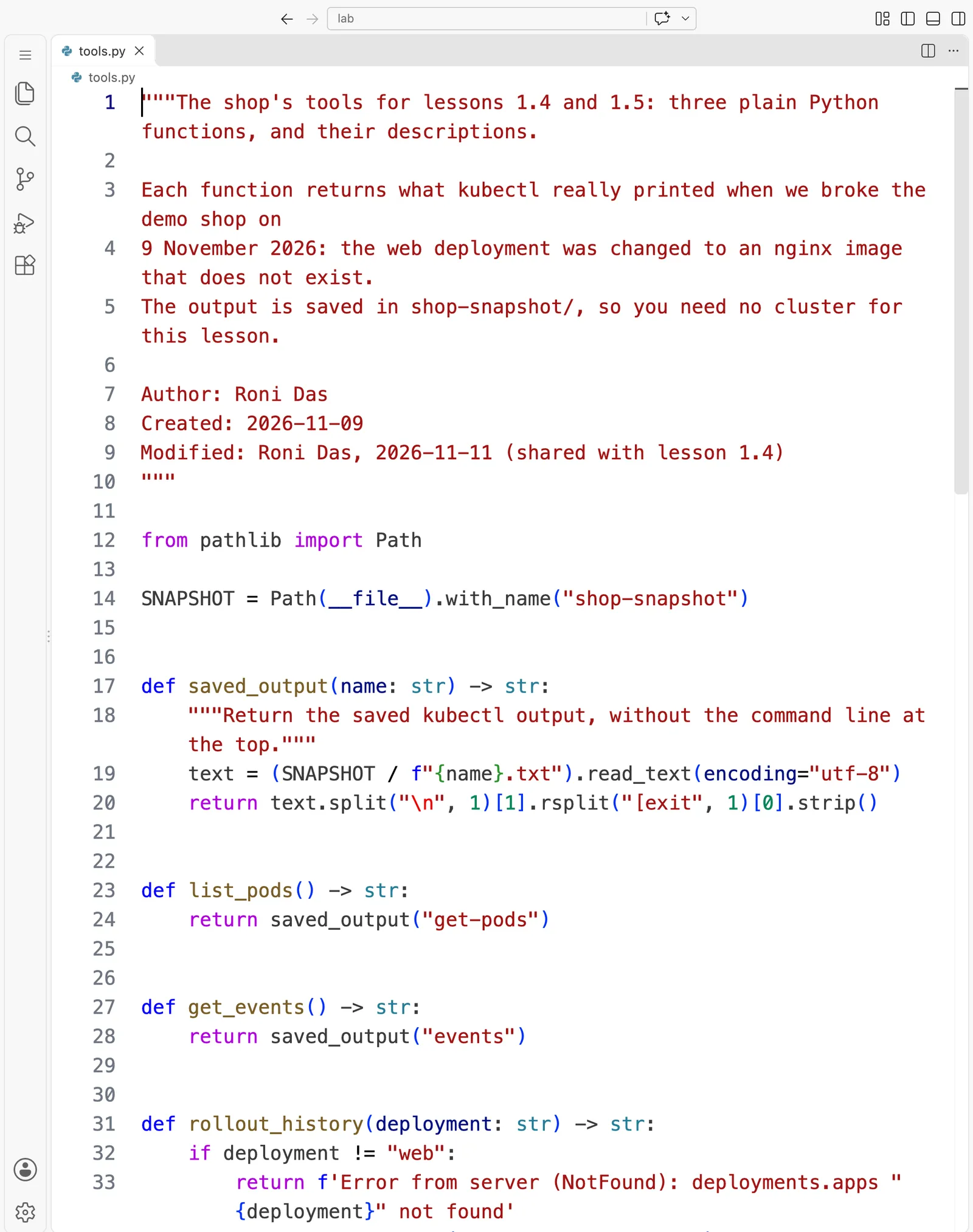
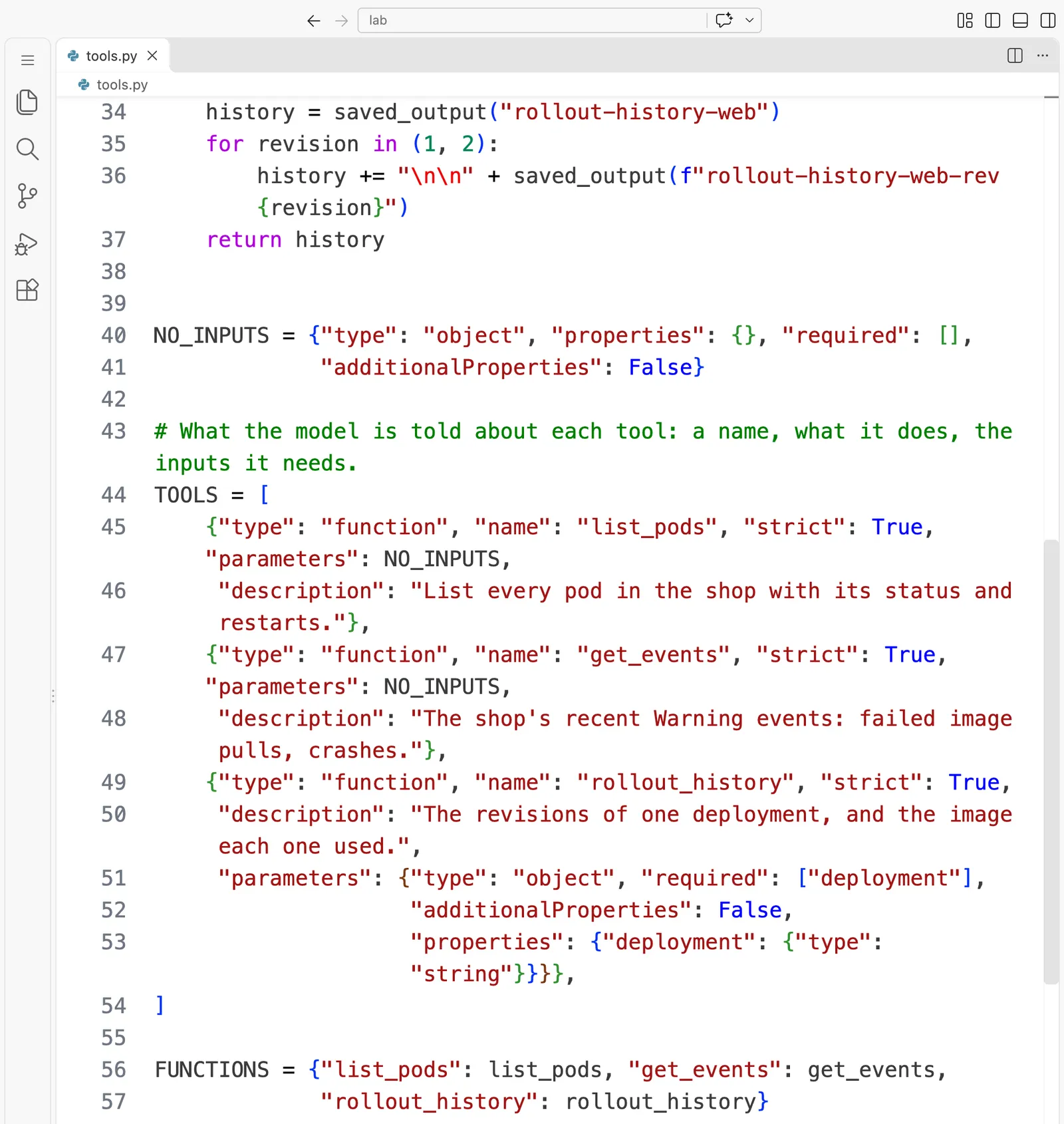
The whole file, to read or copy:
"""The shop's tools for lessons 1.4 and 1.5: three plain Python functions, and their descriptions.

Each function returns what kubectl really printed when we broke the demo shop on
9 November 2026: the web deployment was changed to an nginx image that does not exist.
The output is saved in shop-snapshot/, so you need no cluster for this lesson.

Author: Roni Das
Created: 2026-11-09
Modified: Roni Das, 2026-11-11 (shared with lesson 1.4)
"""

from pathlib import Path

SNAPSHOT = Path(__file__).with_name("shop-snapshot")


def saved_output(name: str) -> str:
    """Return the saved kubectl output, without the command line at the top."""
    text = (SNAPSHOT / f"{name}.txt").read_text(encoding="utf-8")
    return text.split("\n", 1)[1].rsplit("[exit", 1)[0].strip()


def list_pods() -> str:
    return saved_output("get-pods")


def get_events() -> str:
    return saved_output("events")


def rollout_history(deployment: str) -> str:
    if deployment != "web":
        return f'Error from server (NotFound): deployments.apps "{deployment}" not found'
    history = saved_output("rollout-history-web")
    for revision in (1, 2):
        history += "\n\n" + saved_output(f"rollout-history-web-rev{revision}")
    return history


NO_INPUTS = {"type": "object", "properties": {}, "required": [],
             "additionalProperties": False}

# What the model is told about each tool: a name, what it does, the inputs it needs.
TOOLS = [
    {"type": "function", "name": "list_pods", "strict": True, "parameters": NO_INPUTS,
     "description": "List every pod in the shop with its status and restarts."},
    {"type": "function", "name": "get_events", "strict": True, "parameters": NO_INPUTS,
     "description": "The shop's recent Warning events: failed image pulls, crashes."},
    {"type": "function", "name": "rollout_history", "strict": True,
     "description": "The revisions of one deployment, and the image each one used.",
     "parameters": {"type": "object", "required": ["deployment"],
                    "additionalProperties": False,
                    "properties": {"deployment": {"type": "string"}}}},
]

FUNCTIONS = {"list_pods": list_pods, "get_events": get_events,
             "rollout_history": rollout_history}
Two things to notice. The model never sees the Python functions, only the TOOLS list: a name, a description and the inputs. And FUNCTIONS is how our code finds the function when the model names a tool.
The file: lab/workflow_or_agent.py
121 lines, in five parts.
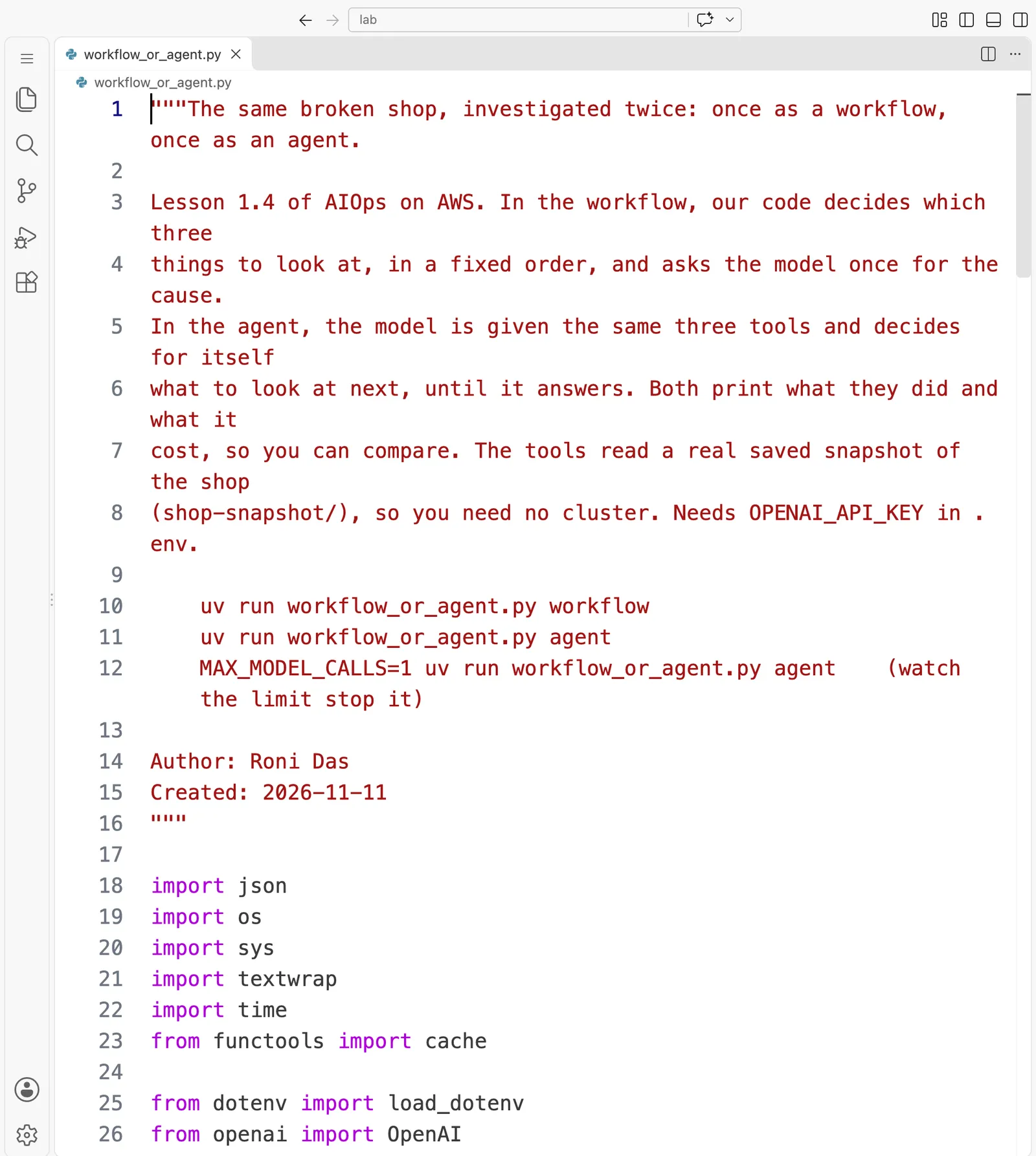
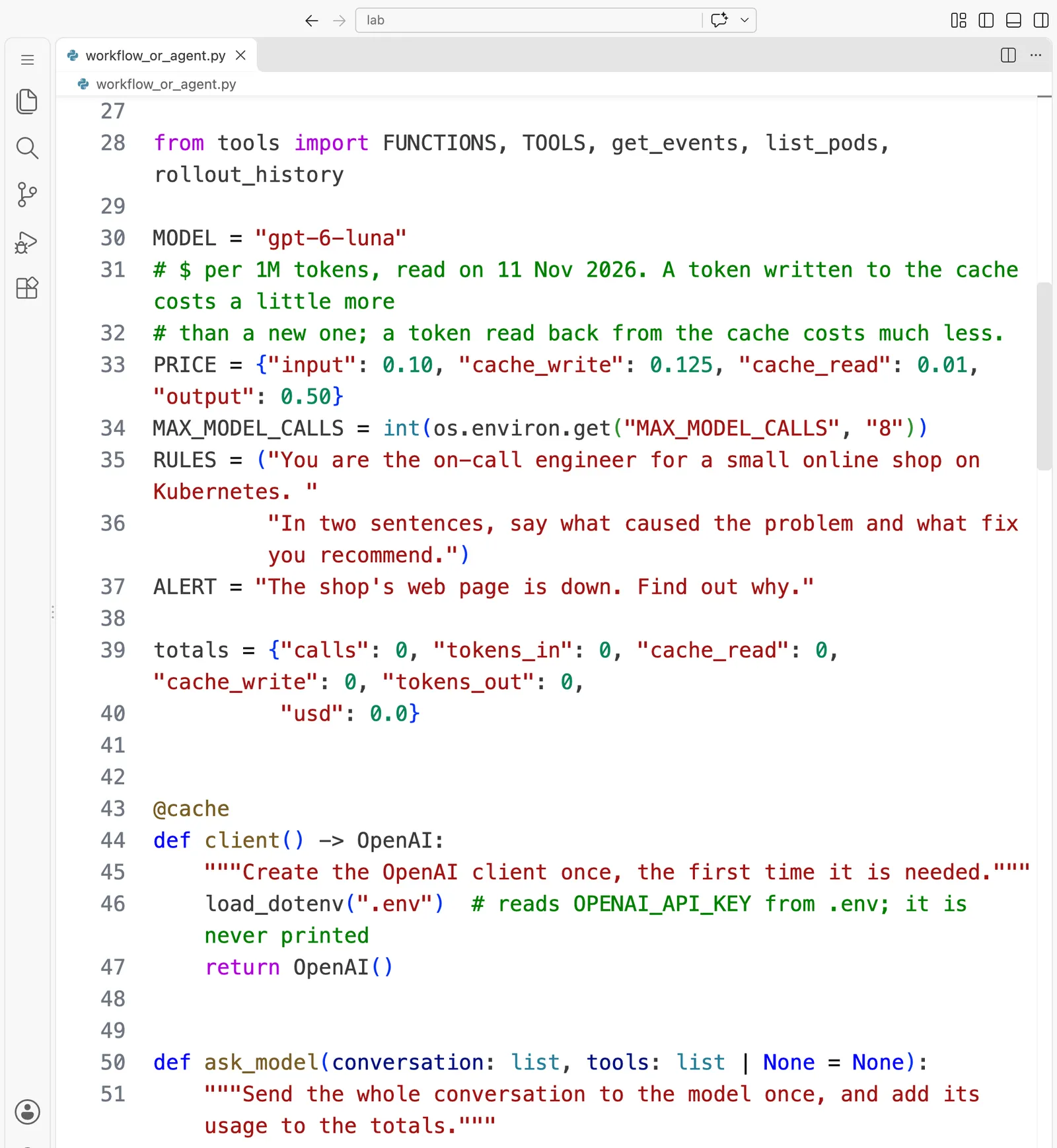
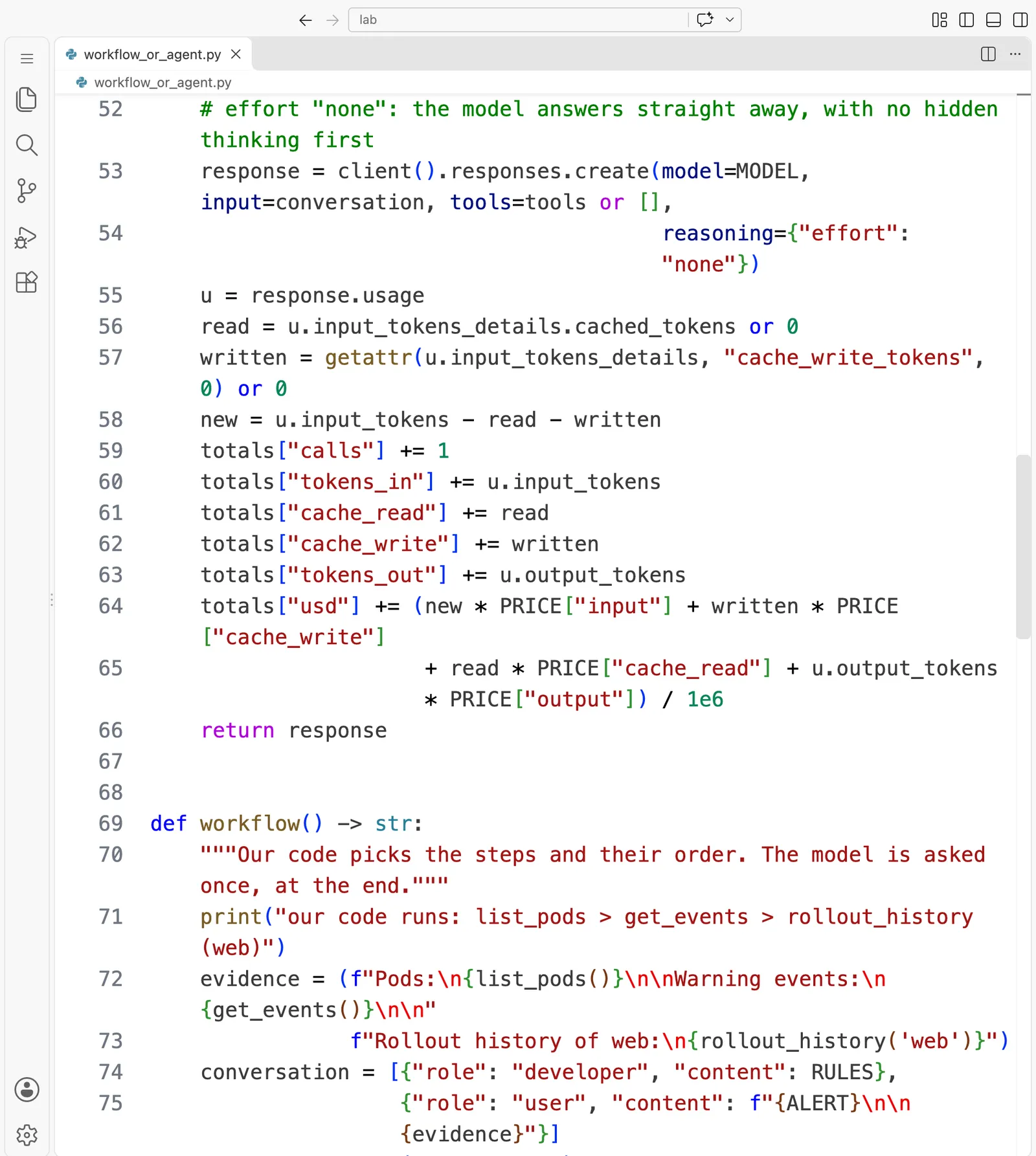
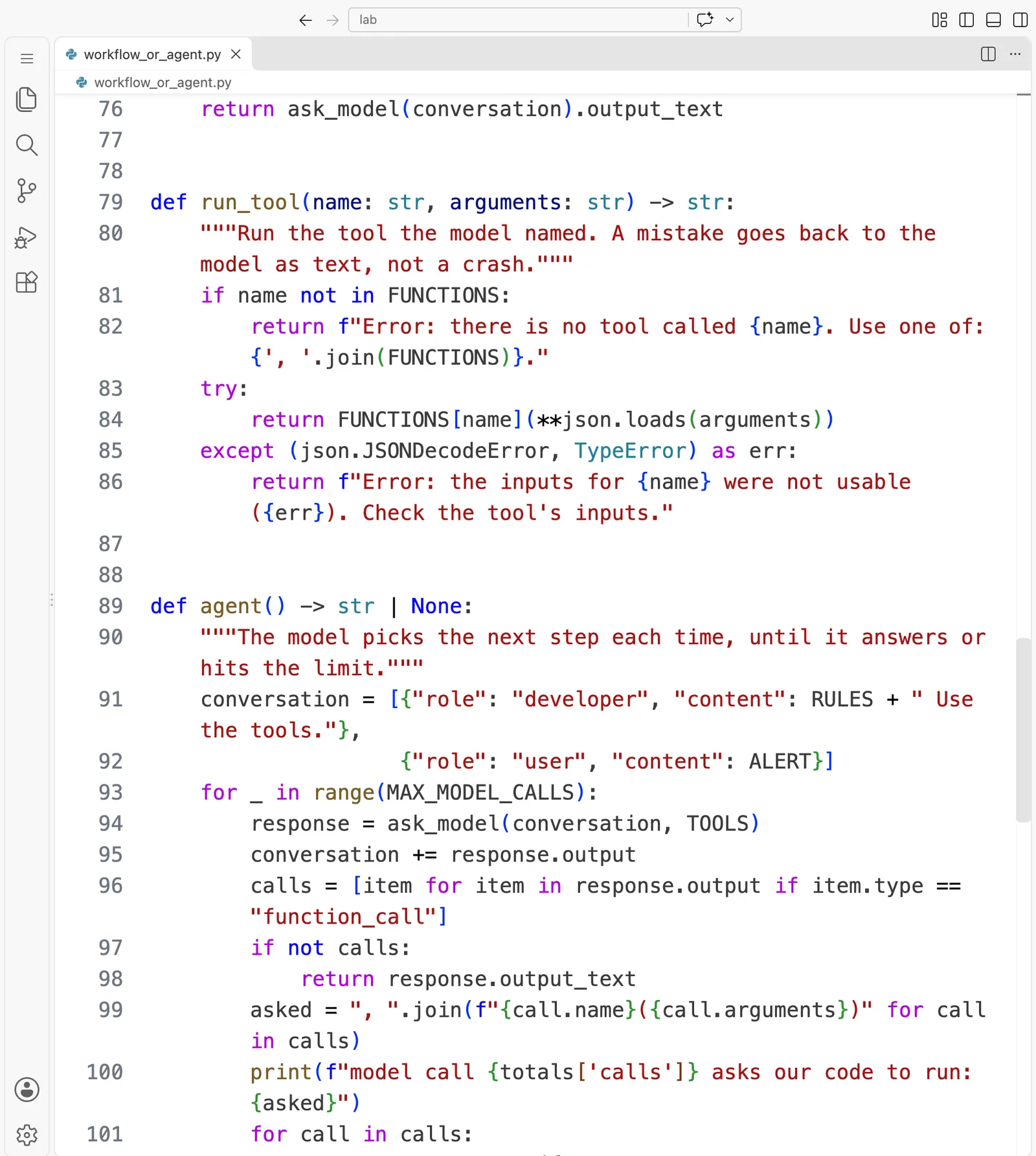
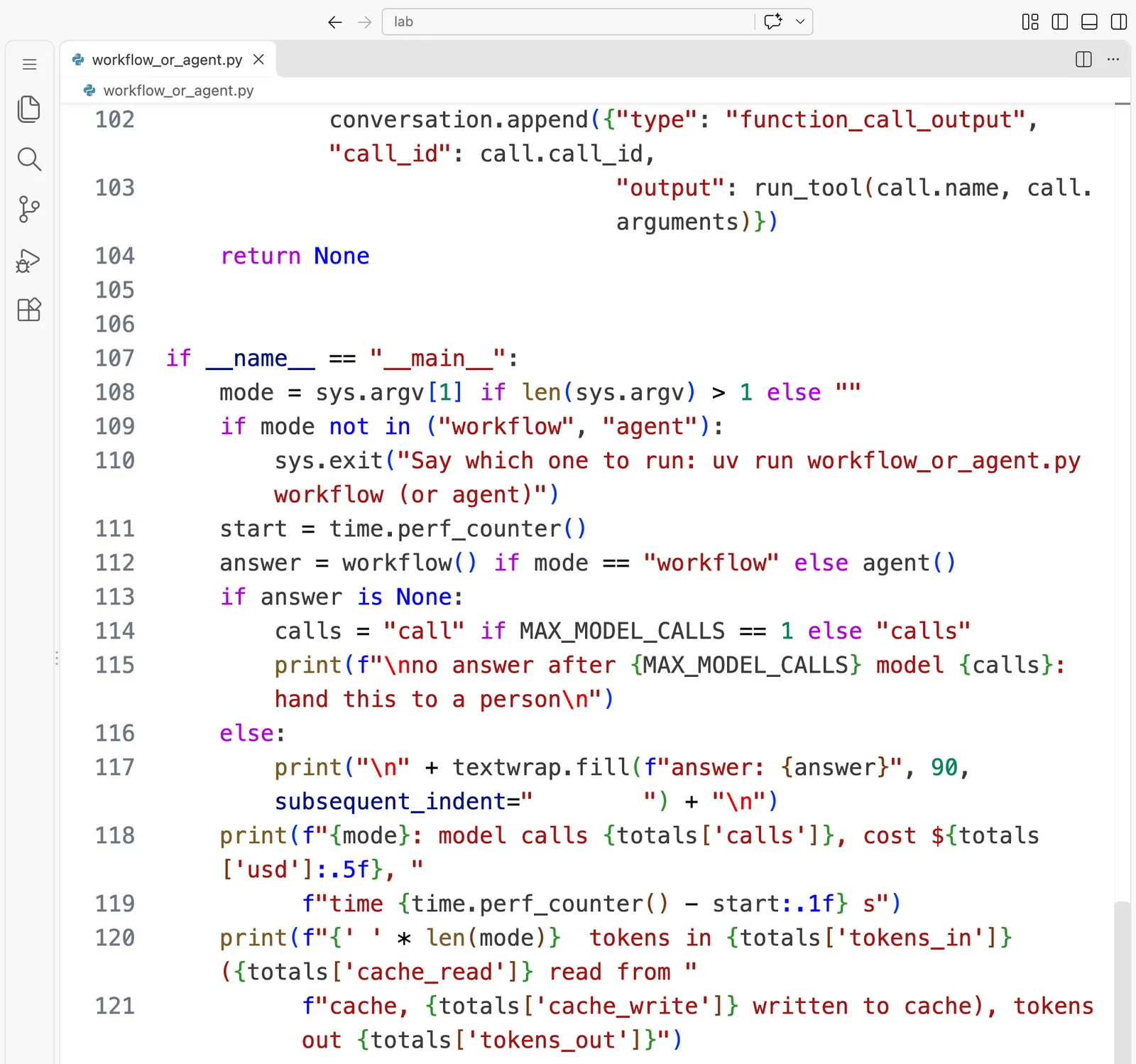
The whole file, to read or copy:
"""The same broken shop, investigated twice: once as a workflow, once as an agent.

Lesson 1.4 of AIOps on AWS. In the workflow, our code decides which three
things to look at, in a fixed order, and asks the model once for the cause.
In the agent, the model is given the same three tools and decides for itself
what to look at next, until it answers. Both print what they did and what it
cost, so you can compare. The tools read a real saved snapshot of the shop
(shop-snapshot/), so you need no cluster. Needs OPENAI_API_KEY in .env.

    uv run workflow_or_agent.py workflow
    uv run workflow_or_agent.py agent
    MAX_MODEL_CALLS=1 uv run workflow_or_agent.py agent    (watch the limit stop it)

Author: Roni Das
Created: 2026-11-11
"""

import json
import os
import sys
import textwrap
import time
from functools import cache

from dotenv import load_dotenv
from openai import OpenAI

from tools import FUNCTIONS, TOOLS, get_events, list_pods, rollout_history

MODEL = "gpt-6-luna"
# $ per 1M tokens, read on 11 Nov 2026. A token written to the cache costs a little more
# than a new one; a token read back from the cache costs much less.
PRICE = {"input": 0.10, "cache_write": 0.125, "cache_read": 0.01, "output": 0.50}
MAX_MODEL_CALLS = int(os.environ.get("MAX_MODEL_CALLS", "8"))
RULES = ("You are the on-call engineer for a small online shop on Kubernetes. "
         "In two sentences, say what caused the problem and what fix you recommend.")
ALERT = "The shop's web page is down. Find out why."

totals = {"calls": 0, "tokens_in": 0, "cache_read": 0, "cache_write": 0, "tokens_out": 0,
          "usd": 0.0}


@cache
def client() -> OpenAI:
    """Create the OpenAI client once, the first time it is needed."""
    load_dotenv(".env")  # reads OPENAI_API_KEY from .env; it is never printed
    return OpenAI()


def ask_model(conversation: list, tools: list | None = None):
    """Send the whole conversation to the model once, and add its usage to the totals."""
    # effort "none": the model answers straight away, with no hidden thinking first
    response = client().responses.create(model=MODEL, input=conversation, tools=tools or [],
                                         reasoning={"effort": "none"})
    u = response.usage
    read = u.input_tokens_details.cached_tokens or 0
    written = getattr(u.input_tokens_details, "cache_write_tokens", 0) or 0
    new = u.input_tokens - read - written
    totals["calls"] += 1
    totals["tokens_in"] += u.input_tokens
    totals["cache_read"] += read
    totals["cache_write"] += written
    totals["tokens_out"] += u.output_tokens
    totals["usd"] += (new * PRICE["input"] + written * PRICE["cache_write"]
                      + read * PRICE["cache_read"] + u.output_tokens * PRICE["output"]) / 1e6
    return response


def workflow() -> str:
    """Our code picks the steps and their order. The model is asked once, at the end."""
    print("our code runs: list_pods > get_events > rollout_history(web)")
    evidence = (f"Pods:\n{list_pods()}\n\nWarning events:\n{get_events()}\n\n"
                f"Rollout history of web:\n{rollout_history('web')}")
    conversation = [{"role": "developer", "content": RULES},
                    {"role": "user", "content": f"{ALERT}\n\n{evidence}"}]
    return ask_model(conversation).output_text


def run_tool(name: str, arguments: str) -> str:
    """Run the tool the model named. A mistake goes back to the model as text, not a crash."""
    if name not in FUNCTIONS:
        return f"Error: there is no tool called {name}. Use one of: {', '.join(FUNCTIONS)}."
    try:
        return FUNCTIONS[name](**json.loads(arguments))
    except (json.JSONDecodeError, TypeError) as err:
        return f"Error: the inputs for {name} were not usable ({err}). Check the tool's inputs."


def agent() -> str | None:
    """The model picks the next step each time, until it answers or hits the limit."""
    conversation = [{"role": "developer", "content": RULES + " Use the tools."},
                    {"role": "user", "content": ALERT}]
    for _ in range(MAX_MODEL_CALLS):
        response = ask_model(conversation, TOOLS)
        conversation += response.output
        calls = [item for item in response.output if item.type == "function_call"]
        if not calls:
            return response.output_text
        asked = ", ".join(f"{call.name}({call.arguments})" for call in calls)
        print(f"model call {totals['calls']} asks our code to run: {asked}")
        for call in calls:
            conversation.append({"type": "function_call_output", "call_id": call.call_id,
                                 "output": run_tool(call.name, call.arguments)})
    return None


if __name__ == "__main__":
    mode = sys.argv[1] if len(sys.argv) > 1 else ""
    if mode not in ("workflow", "agent"):
        sys.exit("Say which one to run: uv run workflow_or_agent.py workflow (or agent)")
    start = time.perf_counter()
    answer = workflow() if mode == "workflow" else agent()
    if answer is None:
        calls = "call" if MAX_MODEL_CALLS == 1 else "calls"
        print(f"\nno answer after {MAX_MODEL_CALLS} model {calls}: hand this to a person\n")
    else:
        print("\n" + textwrap.fill(f"answer: {answer}", 90, subsequent_indent="        ") + "\n")
    print(f"{mode}: model calls {totals['calls']}, cost ${totals['usd']:.5f}, "
          f"time {time.perf_counter() - start:.1f} s")
    print(f"{' ' * len(mode)}  tokens in {totals['tokens_in']} ({totals['cache_read']} read from "
          f"cache, {totals['cache_write']} written to cache), tokens out {totals['tokens_out']}")
The file: lab/pyproject.toml
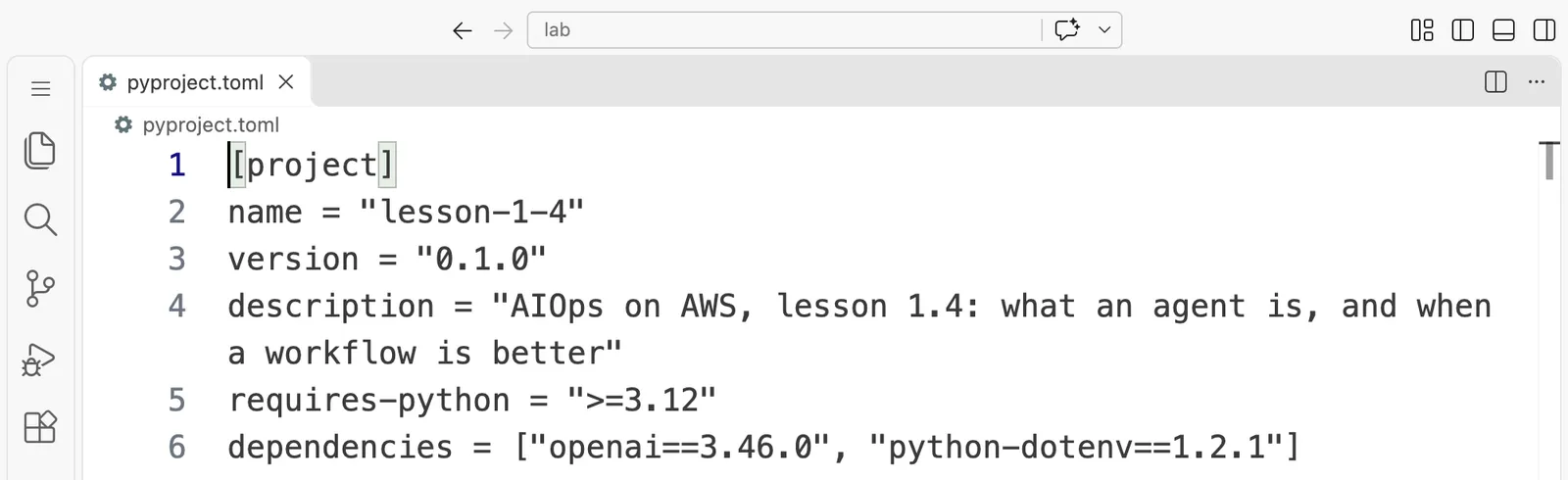
[project]
name = "lesson-1-4"
version = "0.1.0"
description = "AIOps on AWS, lesson 1.4: what an agent is, and when a workflow is better"
requires-python = ">=3.12"
dependencies = ["openai==3.46.0", "python-dotenv==1.2.1"]
uv run reads this file, makes a private Python environment in a hidden .venv folder the first time, and installs exactly these two libraries into it. uv.lock, next to it, pins the exact versions of everything they need in turn, so your run uses the same libraries as ours.
If some of these lines are new to you, that is fine. The pages from One agent loop, step by step to Write the agent loop yourself go through a loop like this one slowly, line by line, and you will write one yourself. For today, read the agent function once (lines 89 to 104, in parts 4 and 5) and match it to the ring in the first figure:
ask_model(conversation, TOOLS)sends the whole conversation and the descriptions of the three tools. This is step 1 of the ring.ask_model, higher up in the file, also adds up the tokens and the cost of every call.conversation += response.outputkeeps the model's reply in the memory.if not calls: return response.output_textis the normal way out: a reply with no tool request is the answer.- The inner
for call in calls:loop is steps 3 and 4 of the ring:run_toolruns each tool the model named, and the output is added to the conversation. If the model names a tool that does not exist, or gives inputs that do not fit,run_toolsends back an error message as text, so the loop does not crash. return Noneis the second way out: the limit was reached with no answer.
Check yourself. Before you run it, write down two predictions: the number of model calls the workflow will make, and the tools you expect the agent to ask for in its first reply.
Now run both designs, one after the other. First the workflow:
uv run workflow_or_agent.py workflow
The very first time, uv prints three extra lines before the program starts, because it is setting up the private environment. Ours were:
Using CPython 3.12.14
Creating virtual environment at: .venv
Installed 15 packages in 78ms
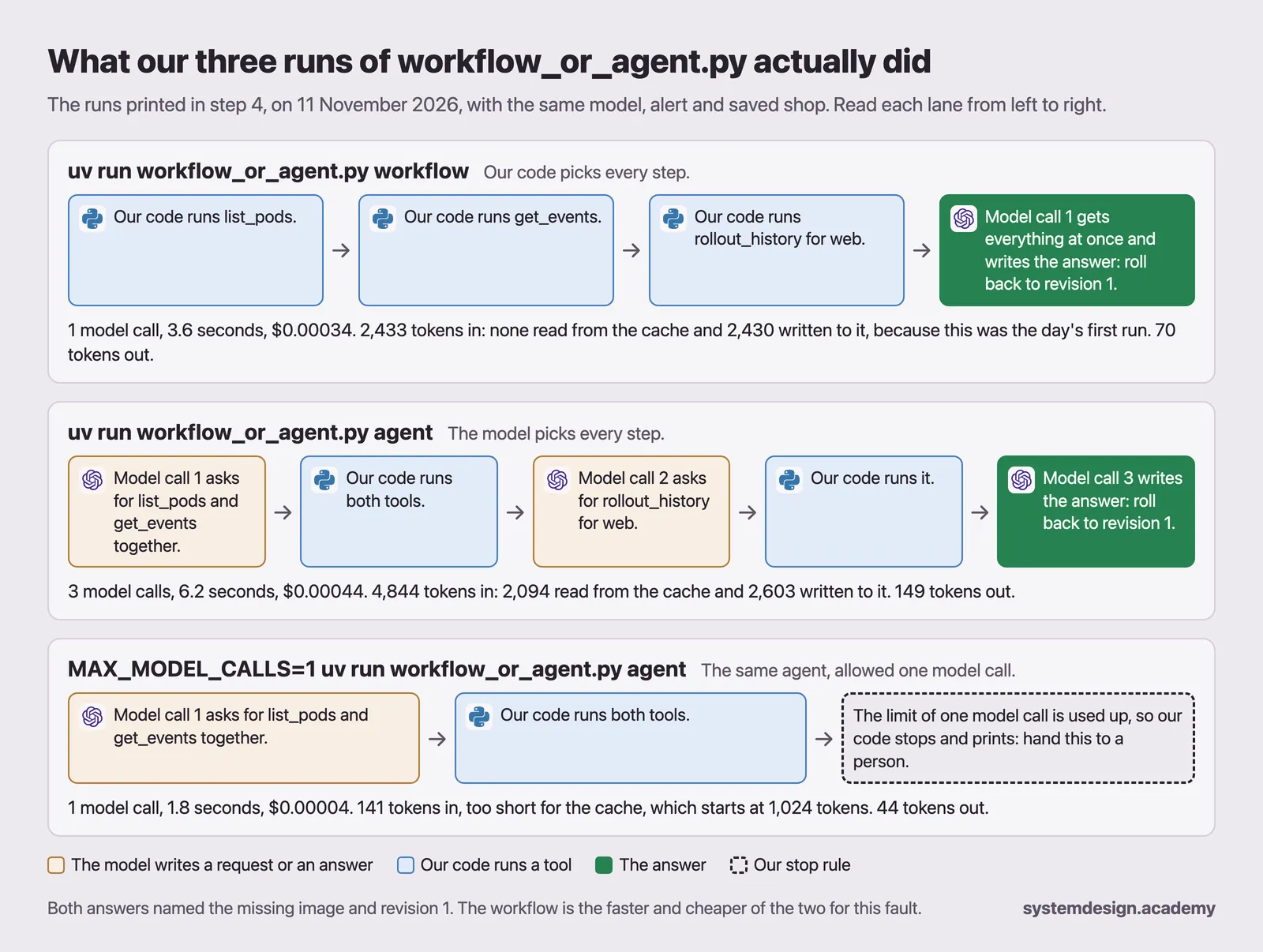
Then the program prints its route, the answer and the cost. This is our real run:
our code runs: list_pods > get_events > rollout_history(web)

answer: The web page is down because the latest web deployment uses the nonexistent image
        `nginx:1.29.99-alpine`, so its pods are stuck in `ImagePullBackOff`. Roll back the
        web deployment to revision 1 (`nginx:1.29-alpine`) or update it to a valid image
        tag.

workflow: model calls 1, cost $0.00034, time 3.6 s
          tokens in 2433 (0 read from cache, 2430 written to cache), tokens out 70
Then the agent:
uv run workflow_or_agent.py agent
model call 1 asks our code to run: list_pods({}), get_events({})
model call 2 asks our code to run: rollout_history({"deployment":"web"})

answer: The web page is down because web deployment revision 2 references
        `nginx:1.29.99-alpine`, which does not exist, so its pod is stuck in
        `ImagePullBackOff`; revision 1 used `nginx:1.29-alpine`. Roll back the web
        deployment to revision 1, or update it to a verified available image, and confirm
        the web pod becomes Ready.

agent: model calls 3, cost $0.00044, time 6.2 s
       tokens in 4844 (2094 read from cache, 2603 written to cache), tokens out 149
We ran the two on one command line, joined with ;, in VS Code's terminal, and the two outputs above are that run, copied as text.
Compare it with your predictions. The workflow made one model call, as it always will. The agent's first reply asked for two tools at once, the pods and the events. After reading them, it asked for the change history, and its third reply was the answer. That is why its summary says 3 model calls but shows only two "asks" lines. Both answers found the missing image and recommended going back to revision 1.
Look at the costs too. This workflow run cost $0.00034, because it was the first run that day: almost all of its 2,433 input tokens were written to the cache, at the slightly higher price. Every later workflow run read the same tokens back from the cache and cost $0.00006.
Your answers will be worded differently, and your agent may take a different route. One run proves very little, so we ran the workflow six times and the agent ten times on 11 November 2026, all with the code in your zip file. Every run is saved in the course files:
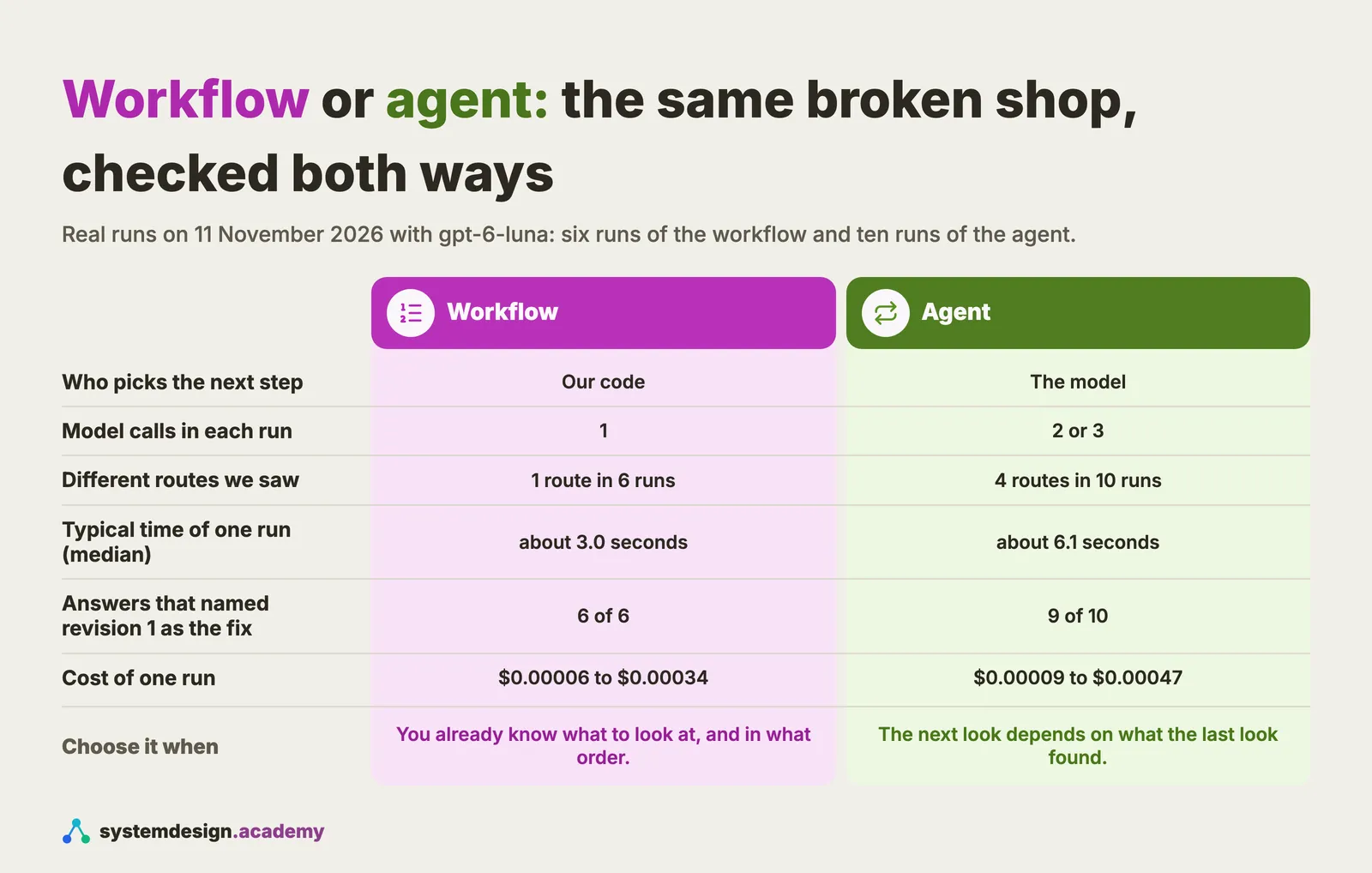
The median is the middle value when you sort the runs from fastest to slowest, so it shows a typical run without being pulled up by one slow run.
The table hides two details that are worth seeing. In one agent run, the model asked for list_pods on its own first, and then asked for it again together with the other two tools, so it paid for the same look twice. And in the one agent run that did not name revision 1, the model answered straight after the pods and the events, without reading the change history. It still found the missing image, but it could only say "roll back to the previous working image", not which one that was.
So, for this fault, which design is better? For an image that cannot be downloaded, you already know the three things to check. A workflow is about twice as fast, never wastes a call, and gives the same complete answer every time, so write it as a runbook.
When would the agent earn its extra cost, then? Look back at the list in step 2. With one set of instructions and one set of tools, our full on-call agent handled eight different kinds of fault, from a wrong database password to a program that ran out of memory, and named the exact cause in all 40 of those runs. A workflow would need a separate runbook for each of the eight.
Be careful not to read too much into that 40 out of 40, though. We tuned those instructions while testing on these same eight faults, and the instructions even name the fix to prefer for some of them. So the result shows that one investigator can cover many known faults. It does not show how the agent does on a fault nobody has seen yet. Part 3 of this course tests exactly that, with new and harder faults.
Try it: Watch the second way out happen. This command allows only one model call for this one run (in plain PowerShell, type
$env:MAX_MODEL_CALLS=1; uv run workflow_or_agent.py agent):
MAX_MODEL_CALLS=1 uv run workflow_or_agent.py agent
Our run printed this:
model call 1 asks our code to run: list_pods({}), get_events({})

no answer after 1 model call: hand this to a person

agent: model calls 1, cost $0.00004, time 1.8 s
       tokens in 141 (0 read from cache, 0 written to cache), tokens out 44
The model asked for two tools, our code ran out of allowed calls before it could ask again, and the program stopped and said so. Notice the 141 tokens in: the first call of the agent is short, because it holds only the instructions, the alert and the tool descriptions. That is also why the agent's first call is never read from the cache: it is shorter than the 1,024 tokens the cache needs.
Try it: Run
uv run workflow_or_agent.py agentthree more times and write down the route each run takes. Then run the workflow three times and do the same. Count the different routes in each design. Each run costs well under a tenth of a cent.
Windows notes
- The simplest path is the Ubuntu terminal in WSL2 (see Before you start). There, every command in this lesson is exactly the Mac command.
- In plain PowerShell, use
pyinstead ofpython3, for examplepy trace.py image_not_found:web. Ifpyis missing, install Python from python.org and tick "Add python.exe to PATH". - If typing
pythonopens the Microsoft Store, that is a Windows shortcut, not Python. Usepy, or turn the shortcut off in Settings, Apps, Advanced app settings, App execution aliases. - Instead of
grep, PowerShell hasSelect-String investigate calls-one-incident.jsonl. Or open the file in VS Code. uv run workflow_or_agent.py workflowanduv run workflow_or_agent.py agentare typed the same way in PowerShell.- In PowerShell, set the limit for one run like this:
$env:MAX_MODEL_CALLS=1; uv run workflow_or_agent.py agent, and clear it afterwards withRemove-Item Env:MAX_MODEL_CALLS.
Troubleshooting
| What you see | Why it happens | What to do |
|---|---|---|
No runs for 'image_not_found'. Run trace.py with no name to see the list. | The name needs the part of the shop too. | Run python3 trace.py image_not_found:web. |
FileNotFoundError: [Errno 2] No such file or directory: '.../runs.jsonl' | trace.py was copied without its data file. | Keep trace.py and runs.jsonl in the same folder. |
AttributeError: 'str' object has no attribute 'removeprefix' | Your Python is older than 3.9. | Install a current Python, and check with python3 --version. |
Say which one to run: uv run workflow_or_agent.py workflow (or agent) | You ran the program without saying which design to use. | Add workflow or agent at the end of the command. |
openai.OpenAIError: Missing credentials. Please pass an `api_key`, ... | The program cannot find your key. | Put OPENAI_API_KEY=... in a file called .env inside the lab folder, and run the command from that folder. |
command not found: uv | uv is not installed. | Install it as in Before you start. |
unzip: command not found (Ubuntu) | Ubuntu does not always include it. | Run sudo apt install unzip. |
Knowledge check
Answer all five questions before you read the answers below them.
1. Your team's chatbot answers questions about the shop. For every question, a script first searches the help pages, then sends the question and the three best pages to a model, and the model writes the reply. Is the chatbot an agent?
- A. Yes, because a model writes every reply on its own.
- B. Yes, because it uses a tool, the help-page search, before it answers.
- C. No, because the script always runs the search first and the model never picks a step.
- D. No, because an agent has to run in a loop at least three times.
2. In the step 4 screenshot, the agent made three model calls and sent 4,844 input tokens in total, while the workflow sent 2,433 in its one call. Why does the agent send so much input?
- A. The model's own hidden thinking from earlier calls is sent back as input on every call.
- B. Every call sends the whole conversation again, including earlier replies and tool results.
- C. The tool descriptions grow longer each time a tool has been used once.
- D. Tokens written to the cache are counted a second time when they are read back.
3. An agent is right on most incidents, but on one kind it keeps blaming the wrong service. What should you check first?
- A. What the tools actually return for that incident, by running them yourself.
- B. Whether a bigger model reasons better about this kind of incident.
- C. Whether the agent should be allowed more model calls before it stops.
- D. Whether adding an example of that incident to the instructions fixes it.
4. Which of these jobs should be a workflow, not an agent?
- A. A disk on one machine is full, and nobody knows yet what is filling it.
- B. Forty alerts fired at once, and you must find which one is the real cause.
- C. An order shows as paid but never shipped, and you must trace where it stopped.
- D. A deploy failed its health check, and you must roll back to the last good version.
5. Try it. Run this command (in plain PowerShell: py trace.py trap_database:postgres). Here the shop's own database is broken. What do the five runs show? Its real output is printed with the answer below.
python3 trace.py trap_database:postgres
- A. Between 5 and 9 tool calls, the same route in four of the five runs, and every run handed to a person.
- B. Between 5 and 9 tool calls, a different route in every run, and every run handed to a person.
- C. Between 5 and 9 tool calls, a different route in every run, and two runs proposed a fix to the database.
- D. Exactly 6 tool calls in every run, a different route in every run, and every run handed to a person.
Answers
1. C. Searching first and then answering is a fixed order that the script decides. The model never asks for a tool and never chooses what happens next, so this is a workflow that uses a model, which is a common and sensible design for a help bot. People often pick B, because a search really is a tool. But here the script calls it every time, before the model is even asked. In an agent, the model decides whether and when to call it.
2. B. The model remembers nothing between calls, so the harness sends the whole conversation every time: the instructions, the alert, every earlier reply and every tool result. Three calls means the opening of the conversation is sent three times. Option A is a common guess, because models can think before they reply. But our program turns that thinking off (reasoning={"effort": "none"} in ask_model), so there is no hidden thinking to send back. What grows is the conversation itself. Option D is wrong because the cache changes the price of tokens, not how many there are.
3. A. The model can only reason about what the tools hand back, so look at that before you change anything. In our own build, a broken tool returned an error message instead of facts, and the model drew a confident wrong conclusion from it. B and D are tempting because they feel like reasoning fixes. But they are changes made before you know the cause. A bigger model might notice the error, but the real fix is the tool. LangChain's result points the same way: with the model fixed, a better harness alone raised the score from 52.8 to 66.5.
4. D. Rolling back to the last good version is the same steps every time, so you can write them in advance. The other three are investigations: in each one, you cannot know your second check until you see the result of the first. A full disk can sound routine, but which folder to open next depends on what the first look shows you.
5. B. Here is the real output:
trap_database:postgres: 5 runs of the same incident

run 0: list_pods > events > pod_logs > get_deployment > pod_logs > get_deployment
       6 tool calls, 11.8 s, then stopped: handed to a person
run 1: list_pods > events > pod_logs > pod_logs > rollout_history > get_deployment > rollout_history > get_deployment > db_password_check
       9 tool calls, 13.7 s, then stopped: handed to a person
run 2: list_pods > events > get_deployment > pod_logs > get_deployment > pod_logs
       6 tool calls, 11.8 s, then stopped: handed to a person
run 3: list_pods > events > get_deployment > get_deployment > pod_logs > pod_logs > db_password_check
       7 tool calls, 12.8 s, then stopped: handed to a person
run 4: list_pods > events > get_deployment > get_deployment > pod_logs
       5 tool calls, 10.5 s, then stopped: handed to a person

Different tool orders across these 5 runs: 5
Five runs, five routes, 5 to 9 tool calls, and every run handed it to a person. Be careful about what this shows. The instructions you read earlier say that any change to the database, which holds the shop's data, must go to a person. So the hand-over itself follows a rule we wrote. What the model decided on its own was the route it took to understand the problem first, and that was different every time.
Going deeper, for working engineers and staff engineers
You can skip this section and lose nothing you need for One agent loop, step by step.
Parallel tool calls change what "order" means. When one reply asks for several tools, the order inside that reply is partly just the order of the list in that reply. The point still holds: no code chose which tools to call or how to group them. You can turn this off with parallel_tool_calls=False on the OpenAI API, as One agent loop, step by step does, at the cost of more model calls.
The two limits in the recorded agent behave differently. It was built with LangChain middleware: ModelCallLimitMiddleware(run_limit=14, exit_behavior="end") ends the loop, while ToolCallLimitMiddleware(run_limit=24) keeps LangChain's default exit_behavior="continue", which refuses further tools but lets the model carry on and answer. An investigation that ends with no diagnosis is sent to a person by the flow around it. Agent middleware: limits, retries and approval covers middleware in detail.
Only one step of our on-call system is an agent. The full flow is a fixed LangGraph graph: intake, investigate, decide, propose, approval, execute, verify, report. Only investigate lets the model pick its next step. Intake asks a model two bounded questions (how severe, and which team), decide asks one (should a person take over), and verify asks one (is it fixed). Those are workflow steps that use a model. In the recorded runs they used the OpenAI Decisions API, which returns a probability for every possible answer. Decision models for fixed choices explains when that is useful, and why the probability is never a safety control.
The cache is about identical openings. Caching works on the longest exact match between the start of a new request and a recent one, and only from 1,024 tokens up. In our runs, the agent run that asked for all three tools in its first reply produced a conversation that no earlier run had sent, so its second call had nothing to match and was written to the cache in full. The usage object reports both numbers: input_tokens_details.cached_tokens for tokens read and cache_write_tokens for tokens written, and ask_model prices each one. Cost logs that ignore cache writes undercount the first run of every new prompt.
Server-side state does not change the bill. Some APIs can keep the conversation for you, for example previous_response_id in OpenAI's Responses API. You send fewer bytes, but the model still processes the whole conversation, and you are still billed for it as input. "The model remembers nothing between calls" is a statement about the model. Where the bytes are stored is a separate question.
Variation is a testing problem, not only a cost. Four routes in ten runs means one passing run tells you little. Part 3 of this course runs every fault five times and reports how often the agent succeeds, not whether it succeeded once.
A bigger model did not help on these easy faults. In the 5 November recordings, a larger model, gpt-6.1-sol, found the same causes as gpt-6-luna on the practice faults, at about 17 times the cost per incident by our own cost log. Each practice fault has one clear cause, so this says nothing yet about hard incidents.
Safety comes from what the agent is able to do. The recorded investigation can see write tools such as k8s_rollout_undo, because real toolkits have them. Every call to one is paused, and even an approved pause is refused, because the investigation never holds the approval token that our executor requires. Part 3 builds this. A check written in our code blocks a write every time. The model choosing not to write during our tests is only something we observed, and it could change with the next model or the next prompt.
Words from this lesson
| Word | What it means |
|---|---|
| agent | a model calling tools in a loop until the job is done; the model picks the next step |
| tool | a function in your own code that you offer to the model, with a name and a description |
| loop | ask the model, run what it asked for, add the result to the conversation, and ask again |
| conversation | every message so far, sent to the model again on every call; it is the agent's memory |
| harness | everything in an agent except the model: the loop, the tools, the memory, the stop rules and the limits on what the tools may touch |
| stop rule | a limit in your code that ends the loop even if the model never answers |
| workflow | a program in which your code decides the order of the steps, even if some steps call a model |
| cache | the provider's store of recent request openings; tokens read from it cost much less, and tokens written to it cost a little more |
| image | a packaged copy of a program that Kubernetes downloads before it can start a pod |
What to keep
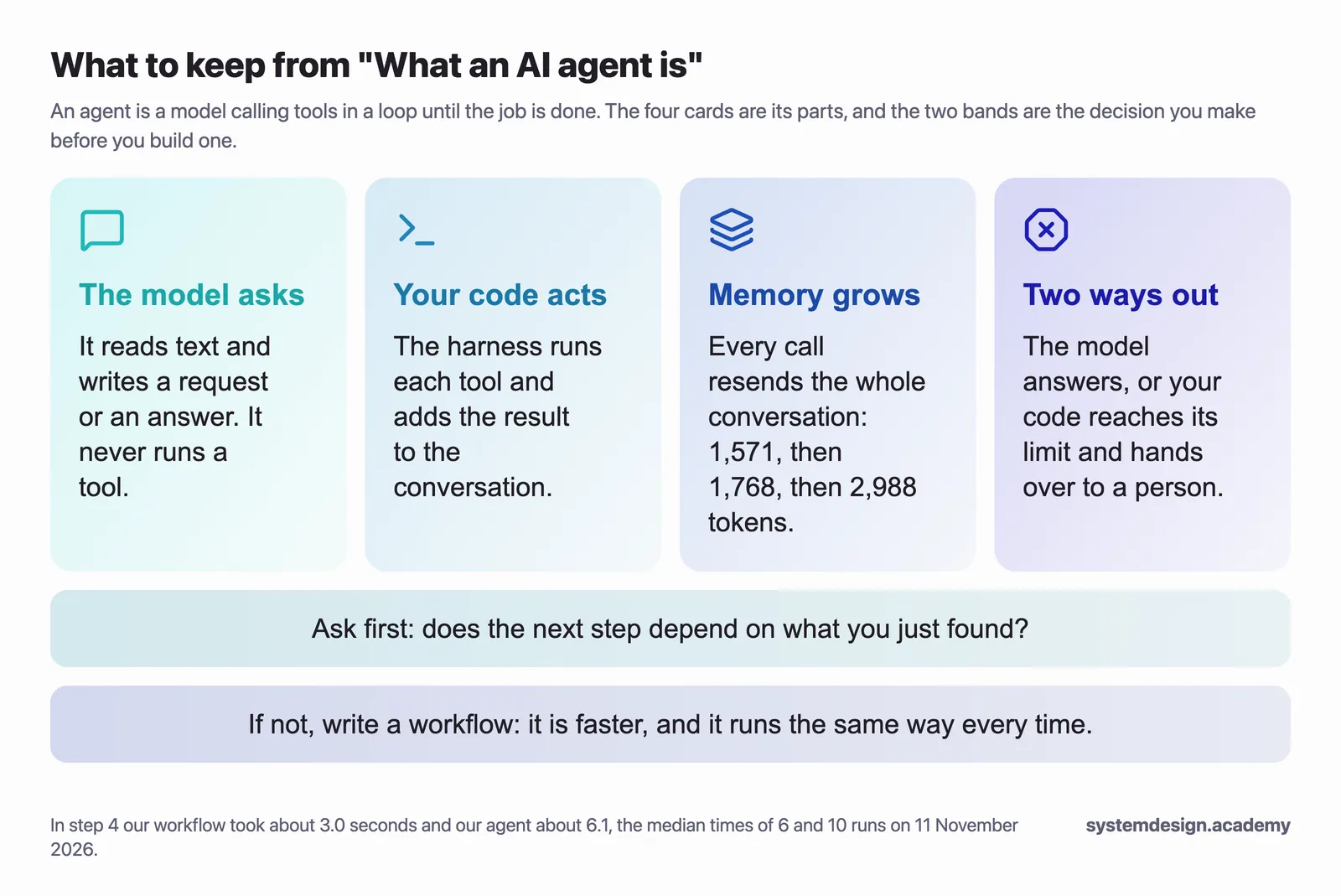
An agent is a model calling tools in a loop until the job is done. The model only reads and writes text. Your code, the harness, runs the tools, keeps the conversation and decides when the loop must stop. Before you build one, ask one question: does the next step depend on what you just found? If it does not, write a workflow, which will be faster, cheaper and the same every time.
In One agent loop, step by step we slow one agent loop right down and print every message that goes to the model and comes back.
Download the lesson files: this page's code zip. It holds the code you run (lab/), the ten figures as PNG files (figures/), this whole lesson as a PDF, and START-HERE.md, which lists every step of the hands-on part with its expected output.
Sources
All pages were opened on 11 November 2026. The full list, with the exact sentences quoted, is in sources.md.
- LangChain, "Agents": https://docs.langchain.com/oss/python/langchain/agents
- Anthropic, "Building effective agents" (19 December 2024; the page notes that much of the tooling landscape it describes has changed since): https://www.anthropic.com/engineering/building-effective-agents
- OpenAI, "Function calling": https://developers.openai.com/api/docs/guides/function-calling
- OpenAI, "Prompt caching": https://developers.openai.com/api/docs/guides/prompt-caching
- OpenAI, "Pricing" (gpt-6-luna): https://developers.openai.com/api/docs/pricing
- Birgitta Böckeler, "Harness engineering for coding agent users", martinfowler.com (2 April 2026): https://martinfowler.com/articles/harness-engineering.html
- Vivek Trivedy, LangChain, "Improving Deep Agents with harness engineering" (17 February 2026): https://www.langchain.com/blog/improving-deep-agents-with-harness-engineering
- Our own runs:
lab/runs.jsonlandlab/calls-one-incident.jsonl(5 November 2026), and 16 runs ofworkflow_or_agent.py(11 November 2026).