Contents Part 2 · The maths of one request
Part 2 · The maths of one request
The KV cache: the model's memory of the conversation, and how big it gets
Why the model keeps notes on every earlier token, how to work out their size from a model's config file, why long chats slow down, and the cache budget vLLM prints for Qwen3-8B on a 24 GB GPU.
Free page Code zip with this page
About 34 minutes to read, and about 35 minutes for the hands-on lab.
Your progress0 of 6 checks answered right
It fills only when a prediction matches the measured result. Reading a page does not move it. It is kept in this browser.
Download the page's files: lesson-2.4.zip. It holds the code you run (lab/), the page's diagrams as PNG files (figures/), this whole page as a PDF, and START-HERE.md, which lists every step of the hands-on part with its expected output.
This page is free. Its hands-on part runs on an NVIDIA RTX 4090 that you rent by the hour on RunPod, as "Before you start" showed. You will work out the size of a model's KV cache from its configuration file and check your sum against what a real server reserves on the GPU. Then you will watch the cache save the second turn of a conversation from being read again, and measure how a long conversation slows the writing down. Finally you will read the memory budget that vLLM, a widely used serving engine, works out for a model of 8 billion numbers on this same GPU.
After this page you will be able to:
- explain in plain words what the KV cache is, and why every model server keeps one;
- work out how many bytes the cache needs for each token, from a model's
config.json, and check the answer against a real server; - say why a second turn of a chat can start much faster than the first;
- explain why long conversations write more slowly, and why the cache, not the model, is often what limits how many people one GPU can serve.
Before you start: finish "Before you start". Read "Prefill and decode" first if you can: this page builds on its two halves.
Time: about 60 to 90 minutes, most of it waiting for the vLLM install and a 16 GB download in the last step.
Cost: plan on 45 to 60 minutes of pod time, most of it in the last step, which installs vLLM (several gigabytes) and downloads a 16 GB model. The pod bills for as long as it exists, including while you read. At the $0.89 an hour we paid on RunPod's secure cloud on 13 November 2026 that is about 67 to 89 cents, and at $0.34 an hour on the community cloud, when a card is free, about 26 to 34 cents.
The problem: the chat that gets slower, and the server that runs out of room
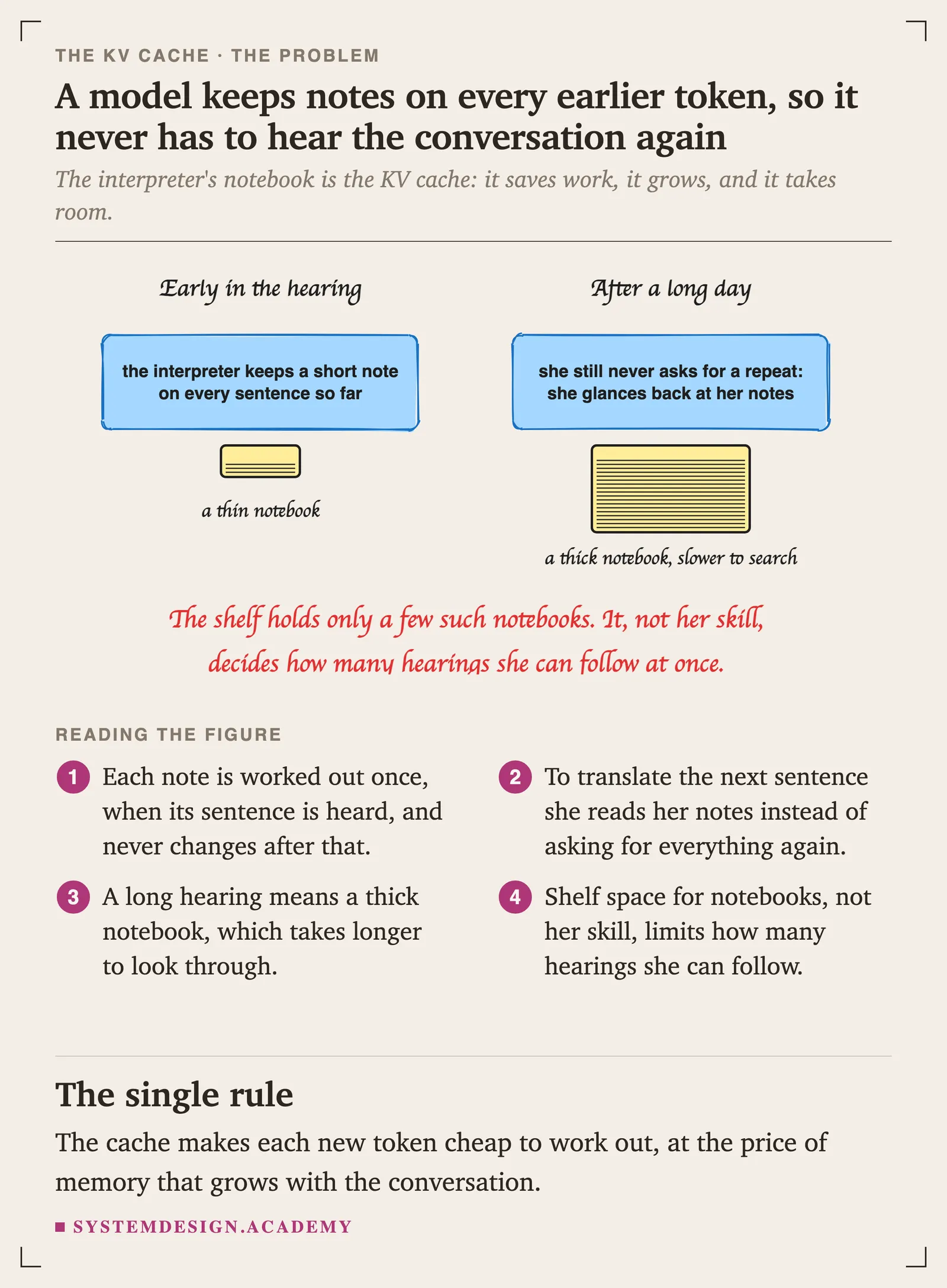
You run a chat assistant on one GPU. Two things puzzle you. First, a customer who has been chatting for an hour says the answers are coming more slowly than they did at the start, although nothing else changed. Second, the server's dashboard says the GPU's memory is almost full, yet the model file is only a fraction of that memory. Something else is filling it, and it grows with every conversation.
Both puzzles have the same answer. To write each new token, the model needs to look back at every token before it. Rather than work those out again every time, it keeps notes on each one. Those notes are the KV cache, and this page measures how big they get and what they cost.
Why the KV cache decides speed and how many people fit
- It is what makes decode possible at a sensible speed. Without the notes, writing the hundredth token would mean reading the whole conversation again from the start, and every answer would get slower and slower with each word.
- It is what decides how many people fit on a GPU. The model's weights are a fixed size. The notes grow with every token of every conversation the server holds. On a busy server, the room left for notes, not the model, decides how many people fit; with a small model or long conversations, the notes can take more memory than the weights.
- Every serving engine is built around managing it. vLLM's best-known idea, PagedAttention, is a way to store these notes without wasting memory; prefix caching reuses them across requests; and many of the settings you change in Part 3 decide how much memory they may use.
The idea: notes on every token, kept so they are never worked out twice
What the model needs to look back at
"Prefill and decode" showed that the model writes one token per pass through its layers. Inside each layer there is a step called attention, in which the token being worked on looks back at every earlier token in the conversation and decides which of them matter for what comes next. That looking back is what lets a model keep track of a long question, or remember a name from twenty lines earlier.
To look back, each layer needs two small lists of numbers for every earlier token: a key, which describes what the token is about, so that later tokens can find it, and a value, which carries what the token has to contribute once it is found. (The full story of attention is on the page "Inside a transformer, in plain words". For this page, keys and values are simply "the notes each layer keeps on each token".) The token being worked on also makes a third list, its query, which it compares with every earlier key to decide where to look. Earlier tokens never need their queries again, so only keys and values are kept.
Without notes, and with them
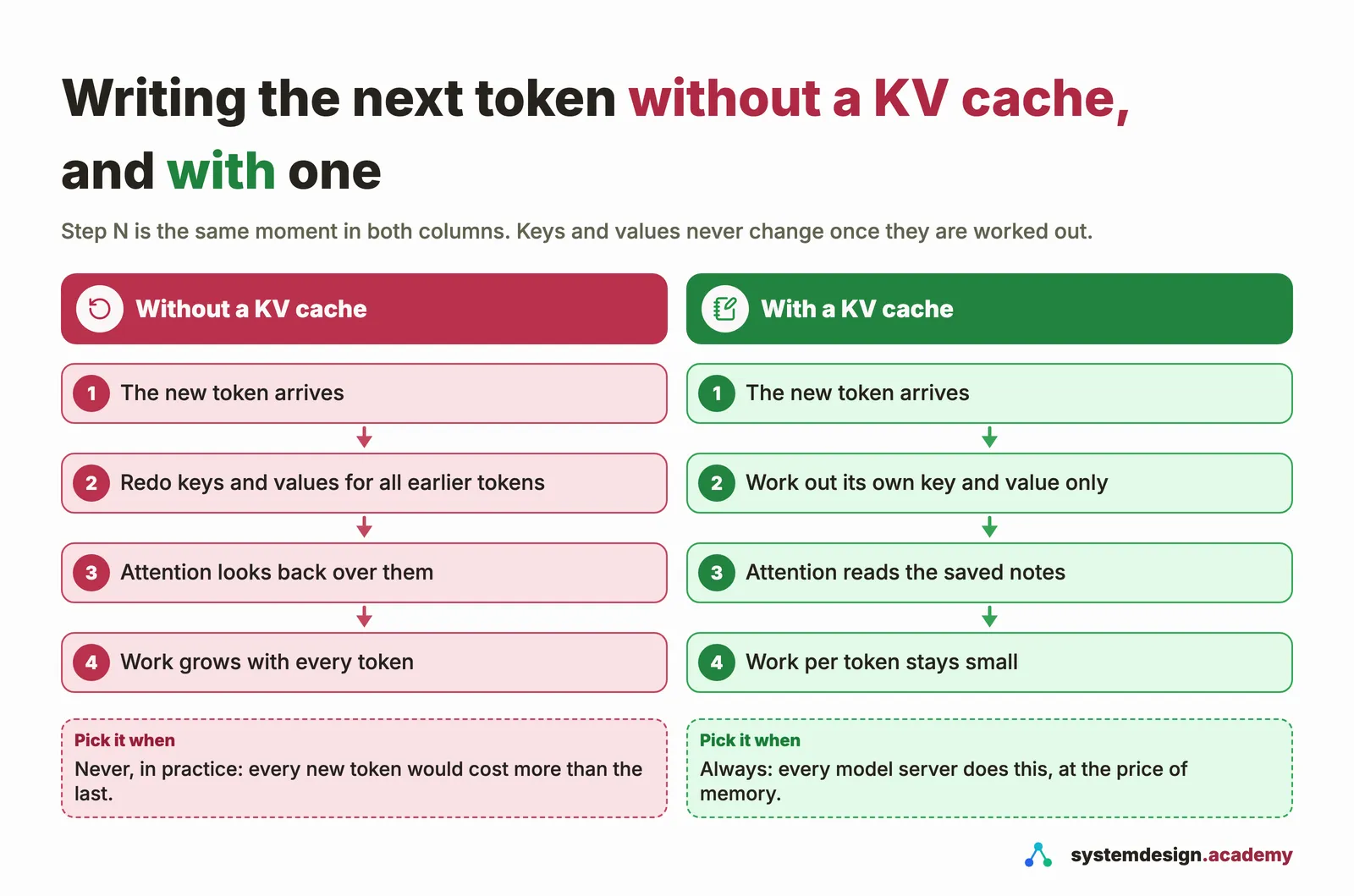
A token's key and value in a layer never change once they are worked out: the earlier tokens are fixed. So there are two ways to write the next token.
- Without a cache, the model would work out the keys and values of every earlier token again, in every layer, for every new token. The work for each new token would grow with the length of the conversation, and the hundredth token would cost far more than the first.
- With a cache, the model works out each token's keys and values once, keeps them in memory, and for each new token works out only that token's own key and value, adding them to the notes. Looking back then means reading the saved notes, not redoing the work.
Every model server keeps this cache. Prefill fills it with the question's notes in one pass; each turn of decode adds one token's notes and reads all the others.
How big the notes are, worked out on paper
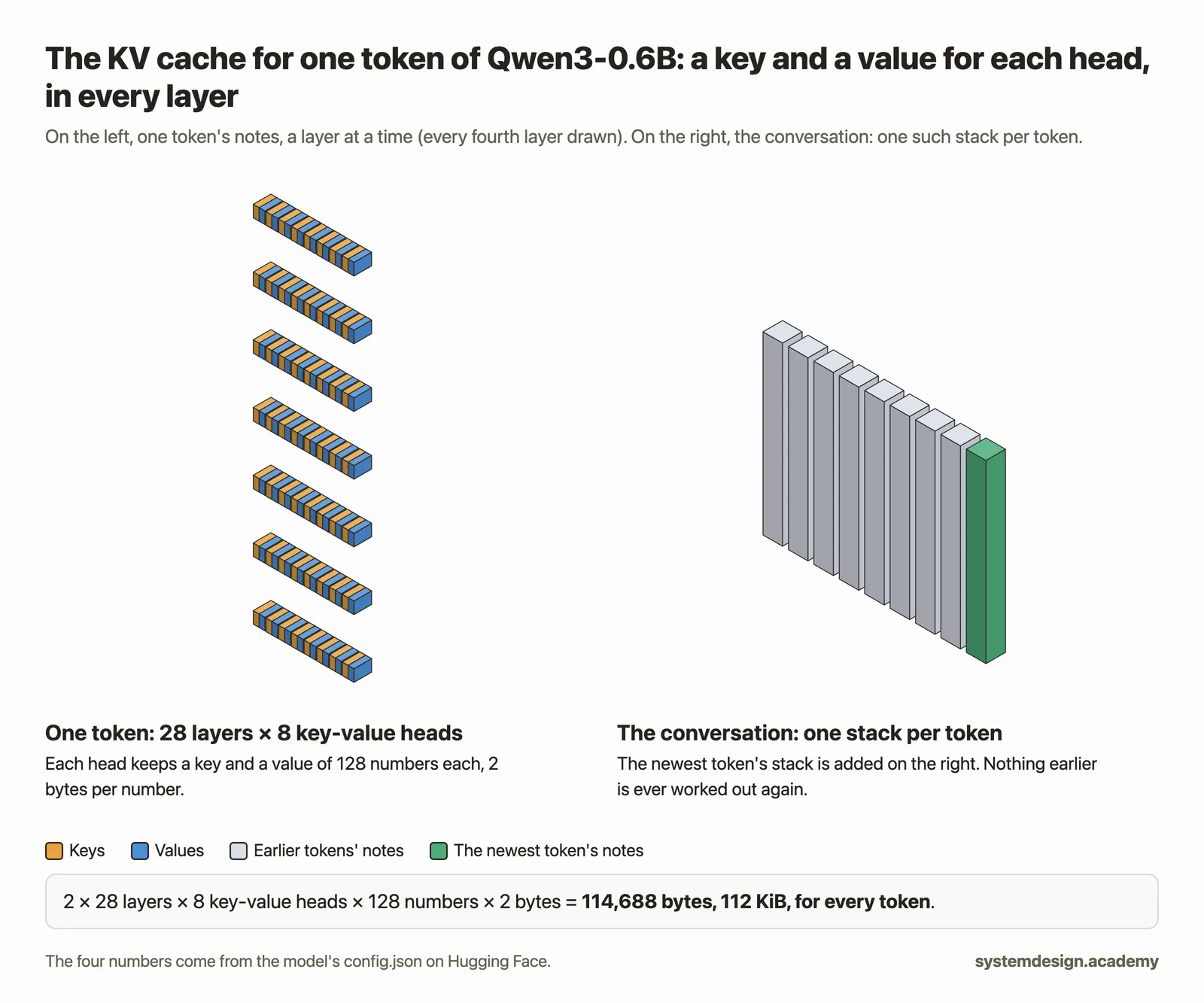
The size of the notes for one token follows from four facts about the model:
- layers: the notes are kept in every layer;
- key-value heads: each layer splits its attention into several heads, which look back for different kinds of thing, and each head keeps its own key and value (in many newer models, several heads share one key and value; more on that in a moment);
- head size: how many numbers are in each key and each value;
- bytes per number: 2 bytes in the usual 16-bit form (FP16 or BF16, two common 16-bit number formats).
So for every token:
notes per token = 2 (a key and a value) × layers × key-value heads × head size × 2 bytes
and for a whole conversation, multiply by the number of tokens. The first three facts are in the model's config.json file on Hugging Face, under the names num_hidden_layers, num_key_value_heads and head_dim. The fourth, 2 bytes, comes from the number format the server keeps the cache in: 16 bits unless you choose otherwise. You do the sum in step 1 below, and then check it against a real server.
Why newer models share their keys and values
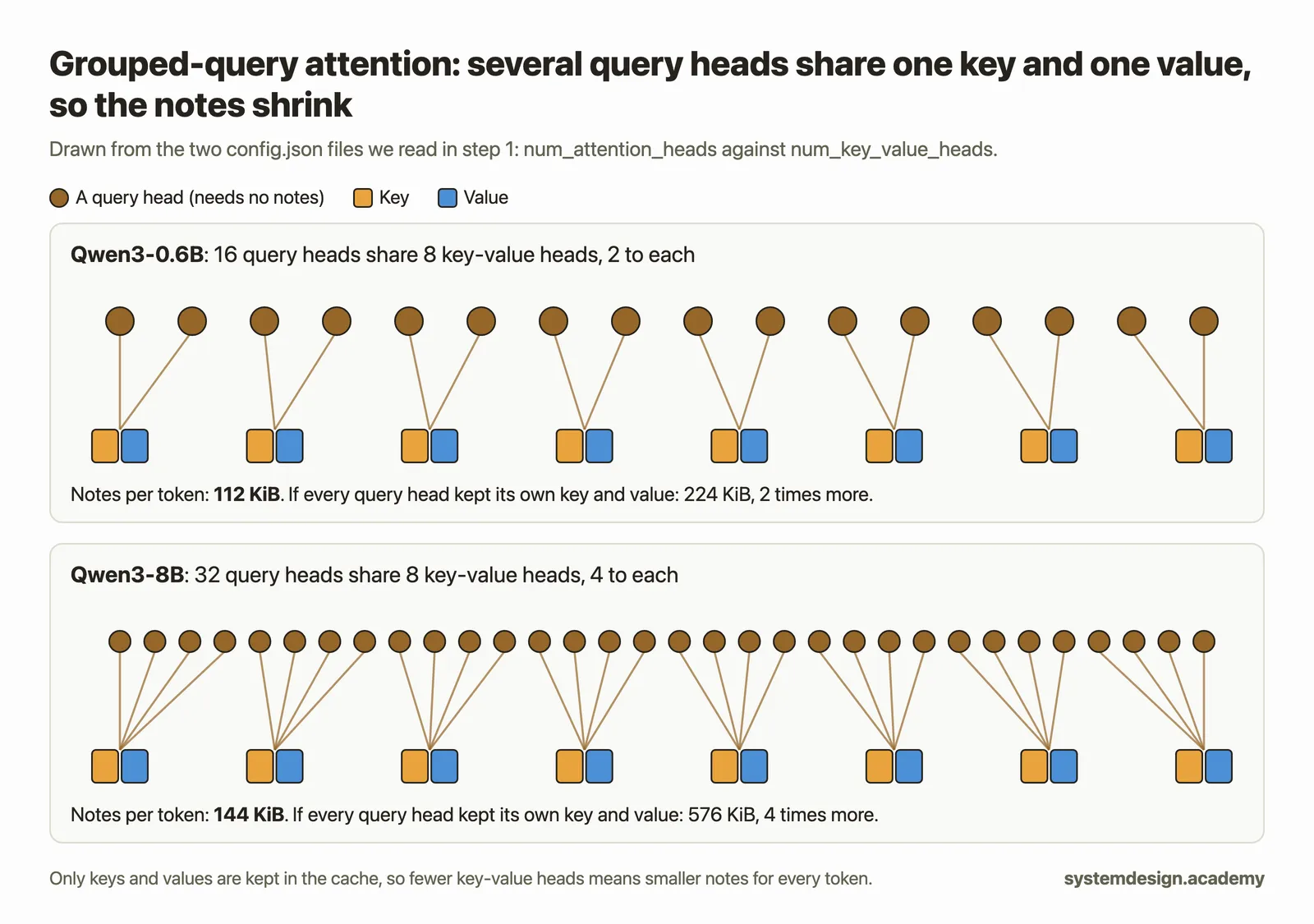
Older models gave every attention head its own key and value. Many newer ones, including Qwen3, use grouped-query attention: several heads share one key and one value, which cuts the notes by the size of the group. The config shows it as num_key_value_heads being smaller than num_attention_heads. You will see the saving in your own numbers. The page "Why newer models need a smaller cache" compares the different ways of doing this.
Hands-on: size the cache, check it, and watch it work
After getting the files ready, you will do seven steps:
- work out the cache size per token for Qwen3-0.6B and Qwen3-8B with
kv_size.py, from theirconfig.jsonfiles; - start llama-server and check our sum against the memory it actually reserves;
- run a two-turn conversation with
two_turns.pyand see how much reading the cache saves; - start the server with eight times more room, and check the sum again;
- measure how writing slows down as the conversation grows;
- measure the same slowdown on the bigger model, Qwen3-8B;
- start vLLM with Qwen3-8B and read the memory budget it prints for the cache.
Note: How we made the outputs and pictures. You do not need to do any of this. On 13 November 2026 we rented one NVIDIA GeForce RTX 4090 (24 GB) on RunPod's secure cloud, set it up exactly as "Before you start" shows, and connected to it with
sshfrom VS Code's terminal on our own computer. We had done "Prefill and decode" on the same pod just before, so both model files were already there. A small script typed each command and pressed Enter, with the prompt shortened tolab $; those are the terminal screenshots. The same session was recorded word for word with the standardscripttool, and the text under each command comes from that recording, with only the colour codes removed. Pictures were only cropped, never edited.
What you need
- This page's zip file, lesson-2.4.zip. Everything below runs inside its
labfolder. - A running RunPod pod with one RTX 4090, set up as in "Before you start": llama.cpp for CUDA, uv, the
hfcommand and the small model in~/inference-lab/models. If you terminated your pod, rent a new one and repeat steps 5 to 9 of "Before you start", which takes about two minutes. - About 30 GB of free disk on the pod for the last step, which the 50 GB container disk has.
Note: No GPU yet? Steps 1 to 6 also run on an ordinary computer's processor with llama.cpp installed by
brew install llama.cpporwinget install llama.cpp, for nothing; the cache sizes match ours exactly, because they are arithmetic, but the speeds will be far lower and will not match. Step 7 needs the GPU.
Get the files ready
These are the same steps as in START-HERE.md inside the zip. Type them in the terminal that is connected to your pod. A command prints nothing unless an output is shown under it.
cd ~
curl -sLO https://www.systemdesign.academy/inference-eng/downloads/lesson-2.4.zip
unzip -q lesson-2.4.zip
cd lesson-2.4/lab
ls
README.md kv_size.py pyproject.toml two_turns.py uv.lock
The lab folder holds:
kv_size.py, which reads a model'sconfig.jsonand works out the cache size;two_turns.py, which runs a two-turn conversation against the server and prints how much the cache saved;pyproject.tomlanduv.lock, which telluvwhich Python to use (both programs need nothing beyond Python itself);README.md, the same steps in short, and.gitignore, which tells Git to skip the model files.
pyproject.toml is 6 lines long. Here it is in VS Code:
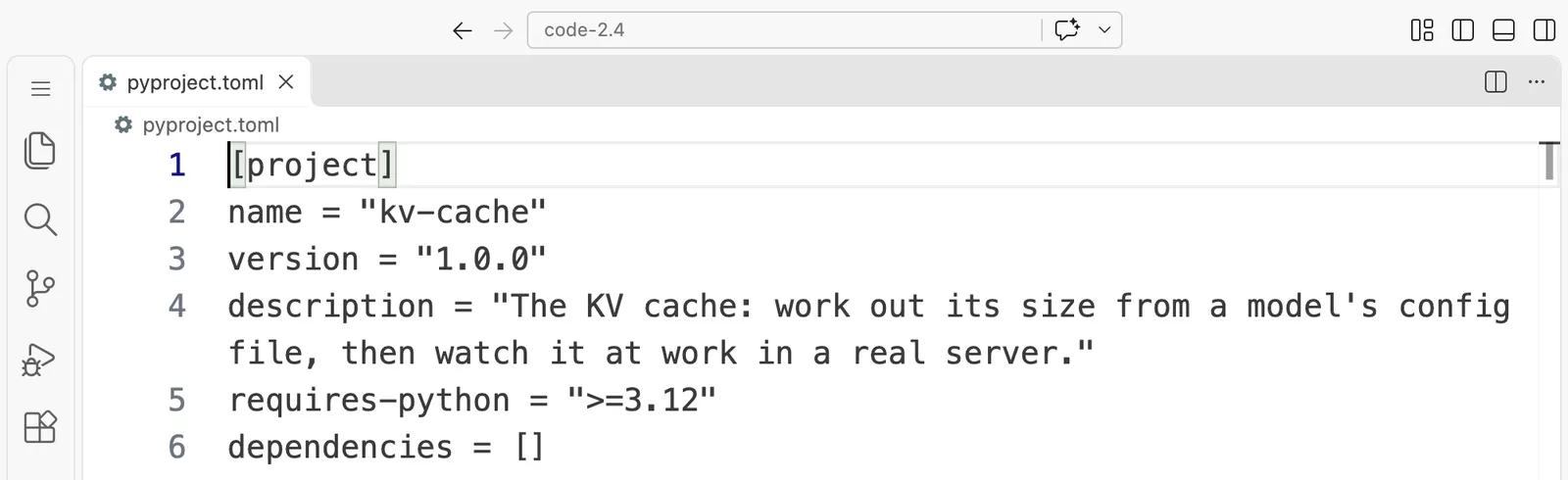
[project]
name = "kv-cache"
version = "1.0.0"
description = "The KV cache: work out its size from a model's config file, then watch it at work in a real server."
requires-python = ">=3.12"
dependencies = []
Each program is shown in full below: first screenshots of the whole file in VS Code, then the same file as text with a Copy button.
Step 1: Work out the cache size from the config file
First, download only the small config.json file of each model. It is a few hundred bytes, not the model:
hf download Qwen/Qwen3-0.6B config.json --local-dir configs/qwen3-0.6b
Warning: You are sending unauthenticated requests to the HF Hub. Please set a HF_TOKEN to enable higher rate limits and faster downloads.
config.json: 100%|█████████████████████████████████████████████████████| 726/726 [00:00<00:00, 1.99MB/s]
✓ Downloaded
  path: /root/lesson-2.4/lab/configs/qwen3-0.6b/config.json
Here is the program that does the sum. It reads the four facts from the file, multiplies them as in the formula above, and prints the size for one token and for conversations of several lengths. If the model shares keys and values between heads, it also prints what the notes would cost without sharing.
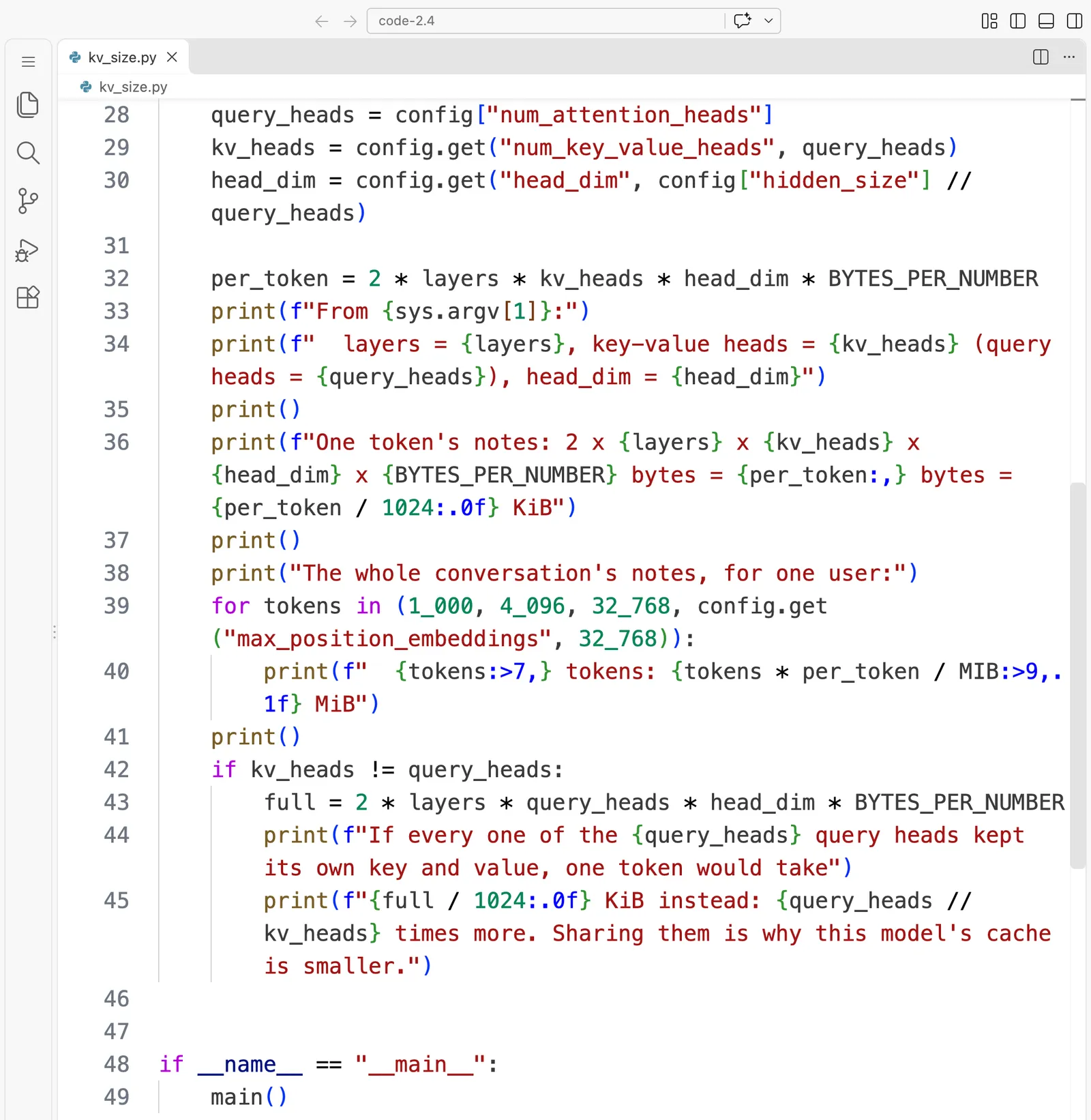
kv_size.py is 49 lines long. Here it is in VS Code, in 2 parts:
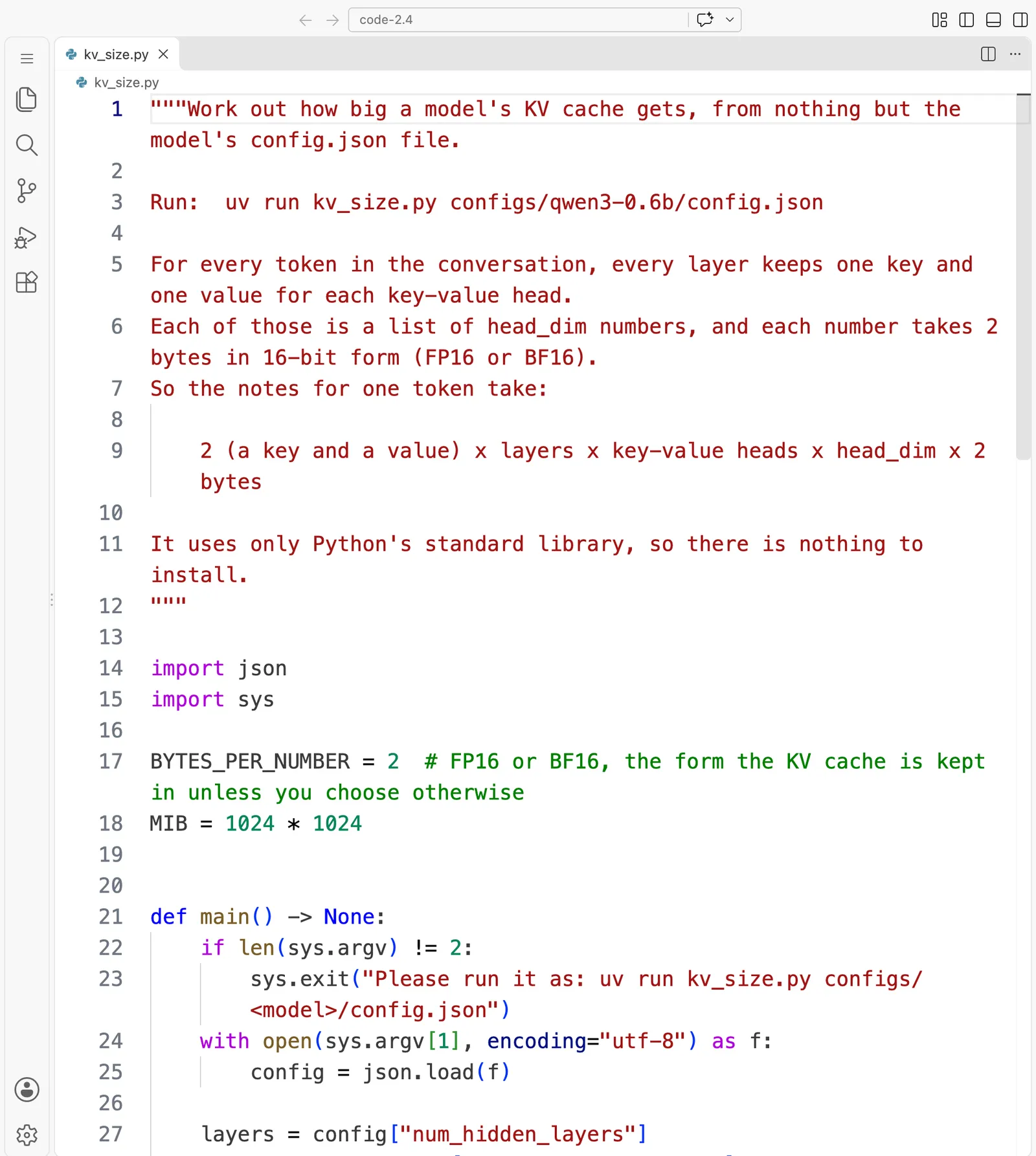
"""Work out how big a model's KV cache gets, from nothing but the model's config.json file.

Run:  uv run kv_size.py configs/qwen3-0.6b/config.json

For every token in the conversation, every layer keeps one key and one value for each key-value head.
Each of those is a list of head_dim numbers, and each number takes 2 bytes in 16-bit form (FP16 or BF16).
So the notes for one token take:

    2 (a key and a value) x layers x key-value heads x head_dim x 2 bytes

It uses only Python's standard library, so there is nothing to install.
"""

import json
import sys

BYTES_PER_NUMBER = 2  # FP16 or BF16, the form the KV cache is kept in unless you choose otherwise
MIB = 1024 * 1024


def main() -> None:
    if len(sys.argv) != 2:
        sys.exit("Please run it as: uv run kv_size.py configs/<model>/config.json")
    with open(sys.argv[1], encoding="utf-8") as f:
        config = json.load(f)

    layers = config["num_hidden_layers"]
    query_heads = config["num_attention_heads"]
    kv_heads = config.get("num_key_value_heads", query_heads)
    head_dim = config.get("head_dim", config["hidden_size"] // query_heads)

    per_token = 2 * layers * kv_heads * head_dim * BYTES_PER_NUMBER
    print(f"From {sys.argv[1]}:")
    print(f"  layers = {layers}, key-value heads = {kv_heads} (query heads = {query_heads}), head_dim = {head_dim}")
    print()
    print(f"One token's notes: 2 x {layers} x {kv_heads} x {head_dim} x {BYTES_PER_NUMBER} bytes = {per_token:,} bytes = {per_token / 1024:.0f} KiB")
    print()
    print("The whole conversation's notes, for one user:")
    for tokens in (1_000, 4_096, 32_768, config.get("max_position_embeddings", 32_768)):
        print(f"  {tokens:>7,} tokens: {tokens * per_token / MIB:>9,.1f} MiB")
    print()
    if kv_heads != query_heads:
        full = 2 * layers * query_heads * head_dim * BYTES_PER_NUMBER
        print(f"If every one of the {query_heads} query heads kept its own key and value, one token would take")
        print(f"{full / 1024:.0f} KiB instead: {query_heads // kv_heads} times more. Sharing them is why this model's cache is smaller.")


if __name__ == "__main__":
    main()
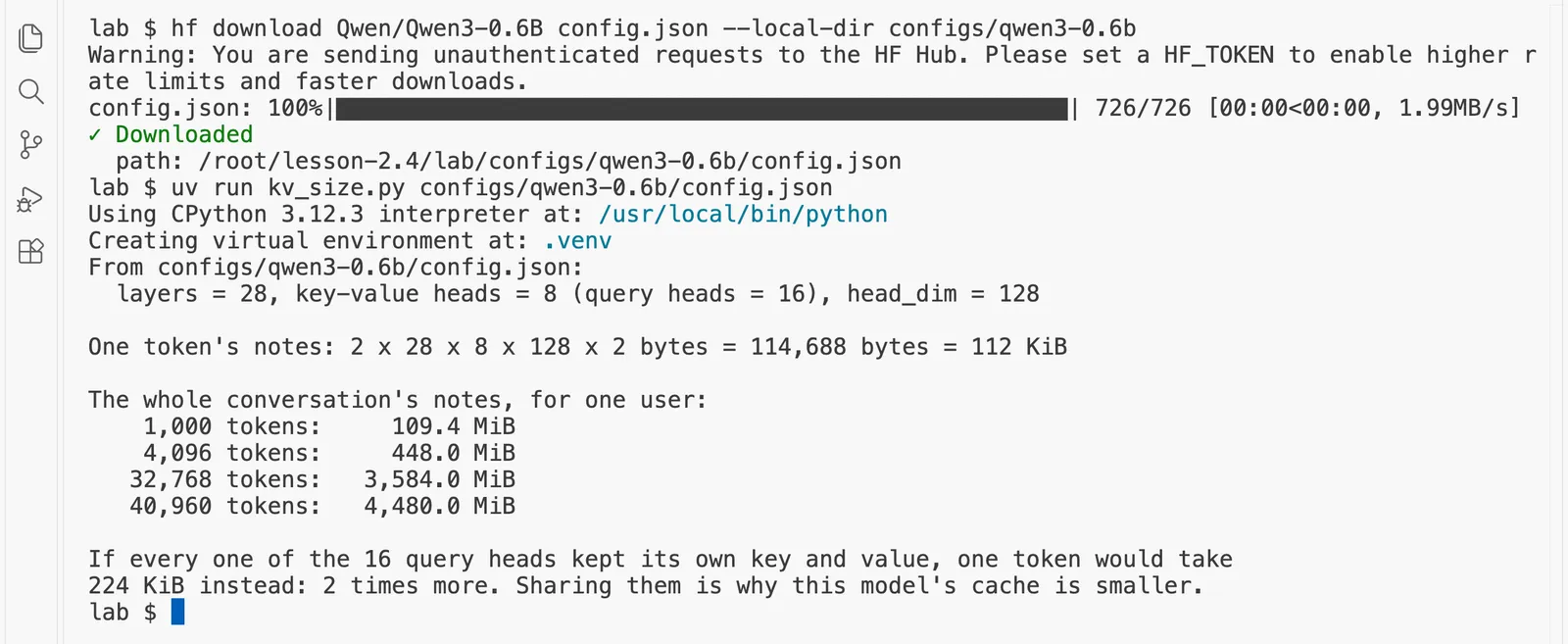
uv run kv_size.py configs/qwen3-0.6b/config.json
Using CPython 3.12.3 interpreter at: /usr/local/bin/python
Creating virtual environment at: .venv
From configs/qwen3-0.6b/config.json:
  layers = 28, key-value heads = 8 (query heads = 16), head_dim = 128

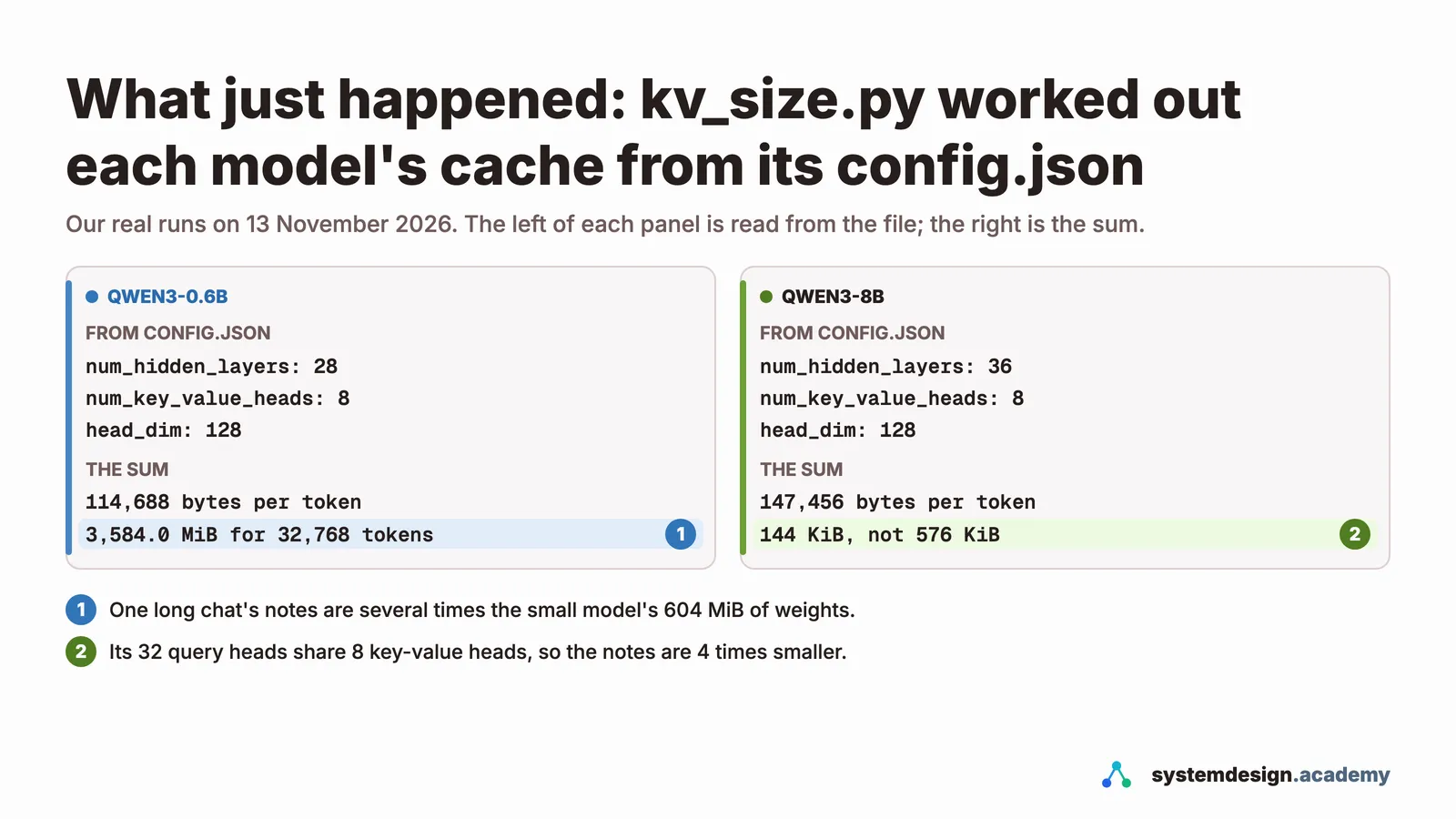
One token's notes: 2 x 28 x 8 x 128 x 2 bytes = 114,688 bytes = 112 KiB

The whole conversation's notes, for one user:
    1,000 tokens:     109.4 MiB
    4,096 tokens:     448.0 MiB
   32,768 tokens:   3,584.0 MiB
   40,960 tokens:   4,480.0 MiB

If every one of the 16 query heads kept its own key and value, one token would take
224 KiB instead: 2 times more. Sharing them is why this model's cache is smaller.
Read it slowly:
- Qwen3-0.6B has 28 layers, 8 key-value heads and a head size of 128.
- So every token's notes take 2 × 28 × 8 × 128 × 2 = 114,688 bytes, 112 KiB.
- A conversation of 4,096 tokens needs 448.0 MiB (a MiB, a mebibyte, is 1,048,576 bytes), and one of 32,768 tokens needs 3,584.0 MiB. Compare that with the model's own numbers, which take 604 MiB: a single long conversation needs several times more memory for its notes than the model needs for its weights.
- The model has 16 query heads but only 8 key-value heads, so pairs of heads share their notes. Without that sharing, each token would need 224 KiB, twice as much.
Now the bigger model, the one the GPU pages of this course use:
hf download Qwen/Qwen3-8B config.json --local-dir configs/qwen3-8b
Warning: You are sending unauthenticated requests to the HF Hub. Please set a HF_TOKEN to enable higher rate limits and faster downloads.
config.json: 100%|█████████████████████████████████████████████████████| 728/728 [00:00<00:00, 2.69MB/s]
✓ Downloaded
  path: /root/lesson-2.4/lab/configs/qwen3-8b/config.json
uv run kv_size.py configs/qwen3-8b/config.json
From configs/qwen3-8b/config.json:
  layers = 36, key-value heads = 8 (query heads = 32), head_dim = 128

One token's notes: 2 x 36 x 8 x 128 x 2 bytes = 147,456 bytes = 144 KiB

The whole conversation's notes, for one user:
    1,000 tokens:     140.6 MiB
    4,096 tokens:     576.0 MiB
   32,768 tokens:   4,608.0 MiB
   40,960 tokens:   5,760.0 MiB

If every one of the 32 query heads kept its own key and value, one token would take
576 KiB instead: 4 times more. Sharing them is why this model's cache is smaller.
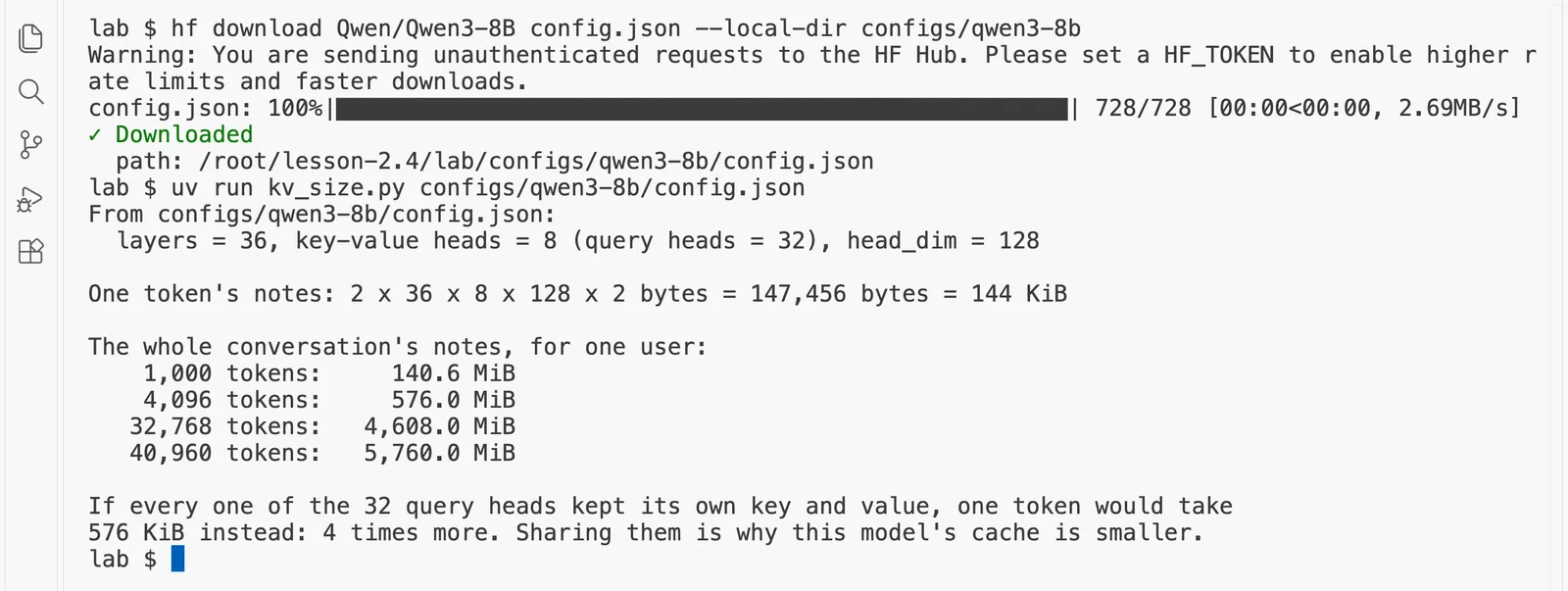
Qwen3-8B has more layers (36), so its notes are 144 KiB per token, and a conversation of 32,768 tokens needs 4,608.0 MiB, about 4.5 GiB (a GiB, a gibibyte, is 1,024 MiB, about 1.07 GB). Its 32 query heads share 8 key-value heads in groups of four, so without sharing the notes would be 576 KiB per token: four times more.
Step 2: Check the sum against a real server
A sum on paper is only a prediction. First put the small model in a models folder here. If this pod still has the folder from "Before you start", copy it:
mkdir -p models && cp ~/inference-lab/models/Qwen3-0.6B-Q8_0.gguf models/
If that says No such file, download it instead (about 640 MB):
hf download Qwen/Qwen3-0.6B-GGUF Qwen3-0.6B-Q8_0.gguf --local-dir models
Now start llama-server with room for 4,096 tokens, and ask it to write a detailed log, so that it reports the memory it reserves for the cache:
llama-server -m models/Qwen3-0.6B-Q8_0.gguf -c 4096 --port 8080 --reasoning off -lv 4 > server.log 2>&1 &
[1] 1954
The new setting is -lv 4, which raises the log's level of detail so that it includes the cache's size. Wait a few seconds, then check the server is ready:
curl -s http://127.0.0.1:8080/health
{"status":"ok"}
Now find the line where the server reports the cache it reserved:
grep 'llama_kv_cache: size' server.log
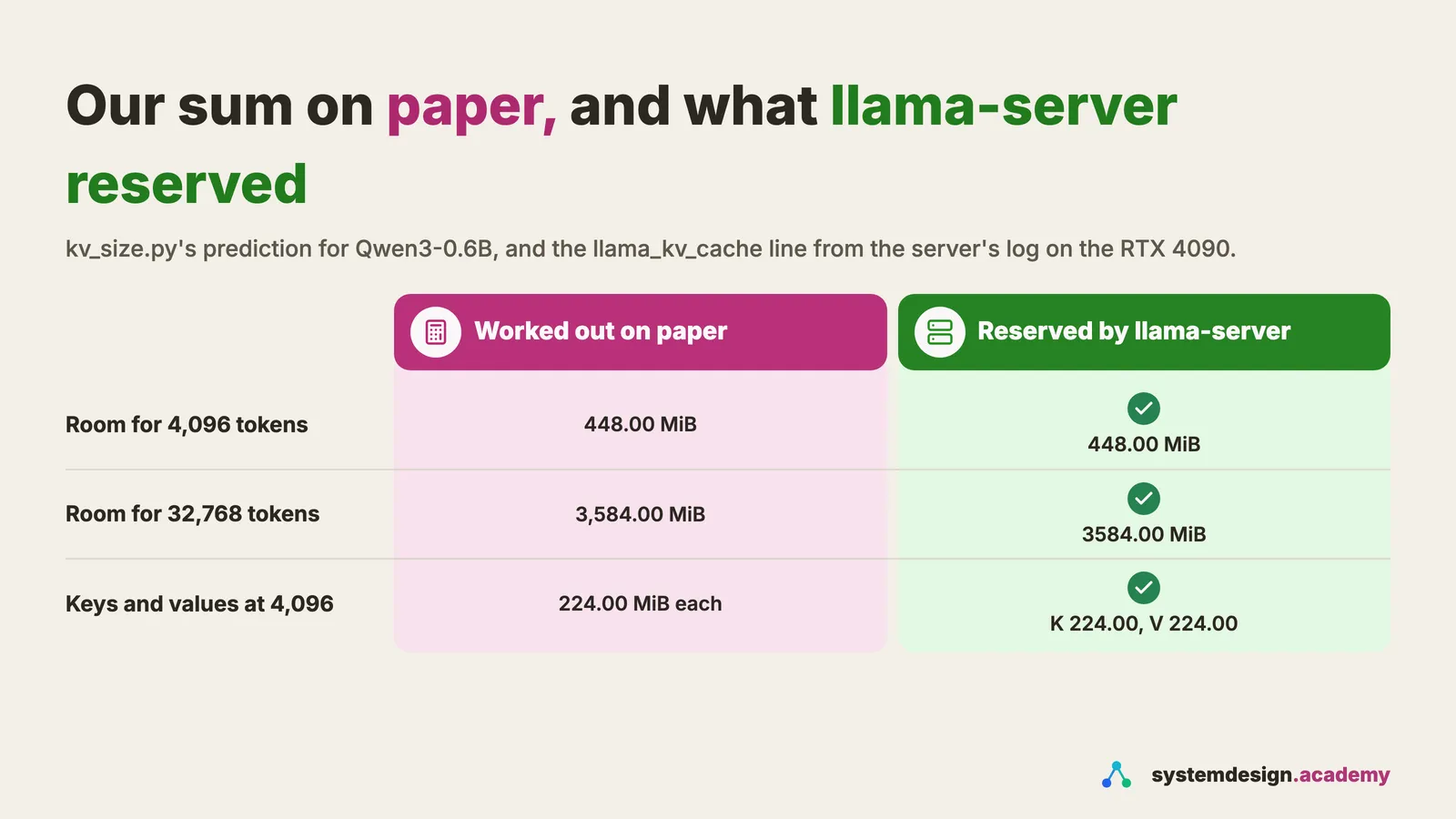
0.01.300.206 I llama_kv_cache: size = 448.00 MiB ( 4096 cells, 28 layers, 4/1 seqs), K (f16): 224.00 MiB, V (f16): 224.00 MiB

The server reserved 448.00 MiB for 4096 tokens, which it calls cells, across 28 layers: 224.00 MiB for the keys (K) and 224.00 MiB for the values (V). Our sum on paper said 448.00 MiB. It matches exactly, down to the last mebibyte, because the server stores the notes on the GPU in the same 16-bit form our sum assumed: f16 in the log. llama.cpp keeps the cache in 16 bits even though this model file stores its weights in about 8.5 bits, so the 2 bytes in the formula still apply.
Two other details in the line are worth knowing. The server reserves the whole cache at start-up, before anyone asks anything, so the memory is taken even when it is empty. And 4/1 seqs means the room for 4,096 tokens is shared by up to four conversations at once, the server's four slots for parallel requests.
Predict, then measure
Turn 2 of a chat sends the whole conversation again, 2,524 tokens in all. How many of them do you expect the server to read fresh?
The measured result appears once you lock in. Only your first answer counts toward your progress.
Step 3: Watch the cache save a second turn
Now a real conversation. Every chat app works the same way: for each new turn it sends the whole conversation so far, with the new question at the end, because the model itself remembers nothing between requests. The program sends a shipping log of eighty lines and a question, then sends the whole thing again with the model's answer and a follow-up question added:
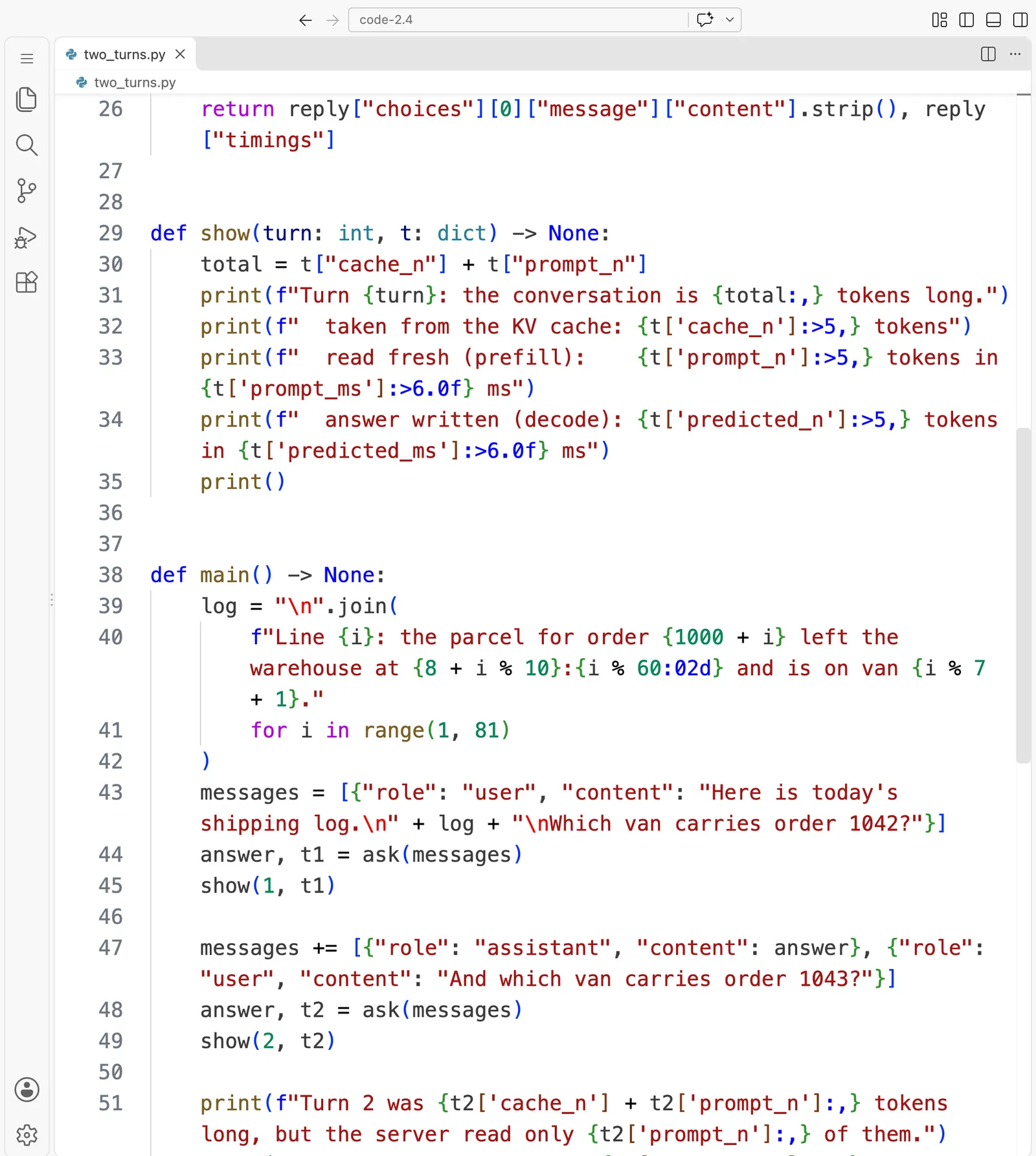
two_turns.py is 56 lines long. Here it is in VS Code, in 3 parts:
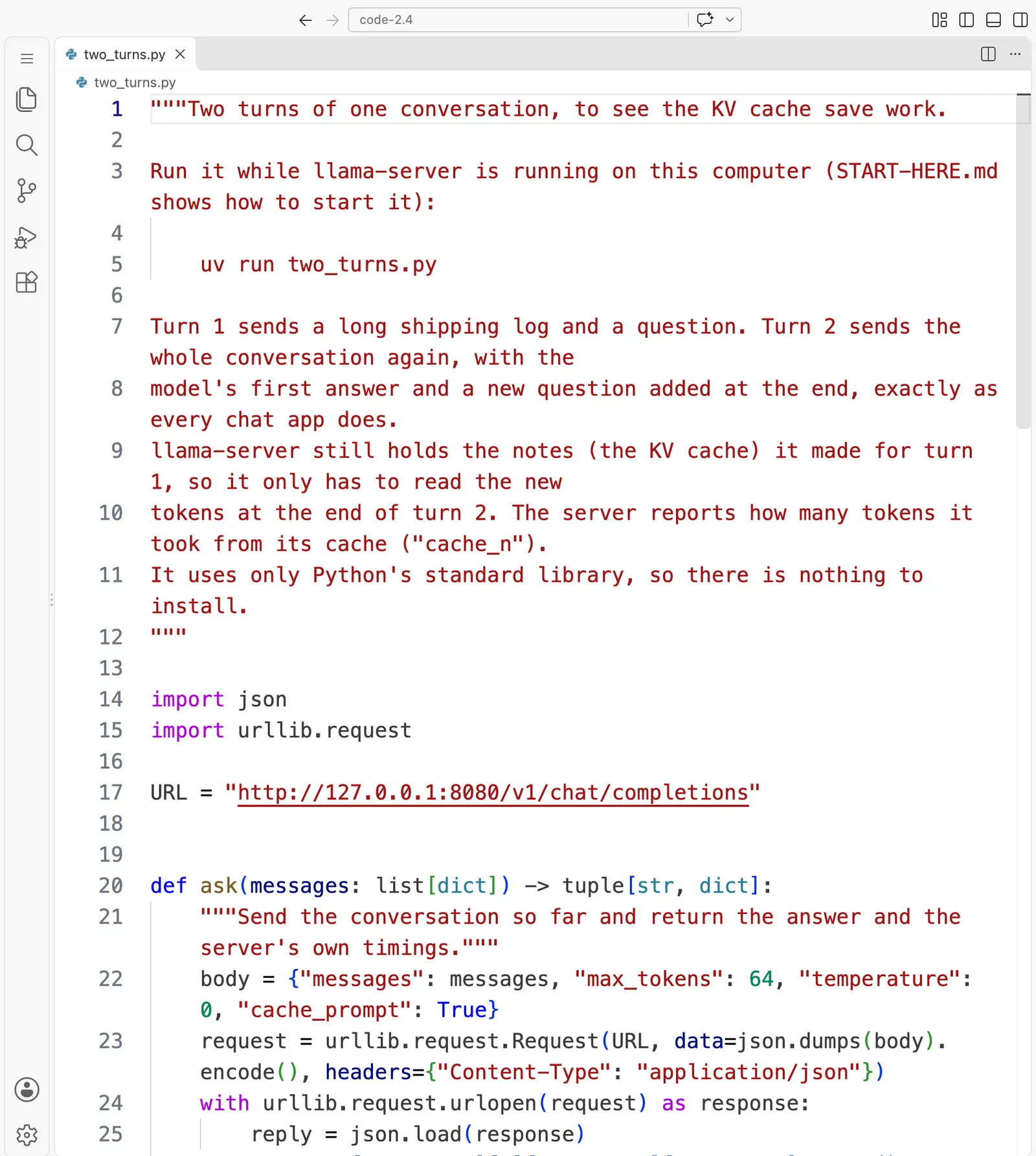
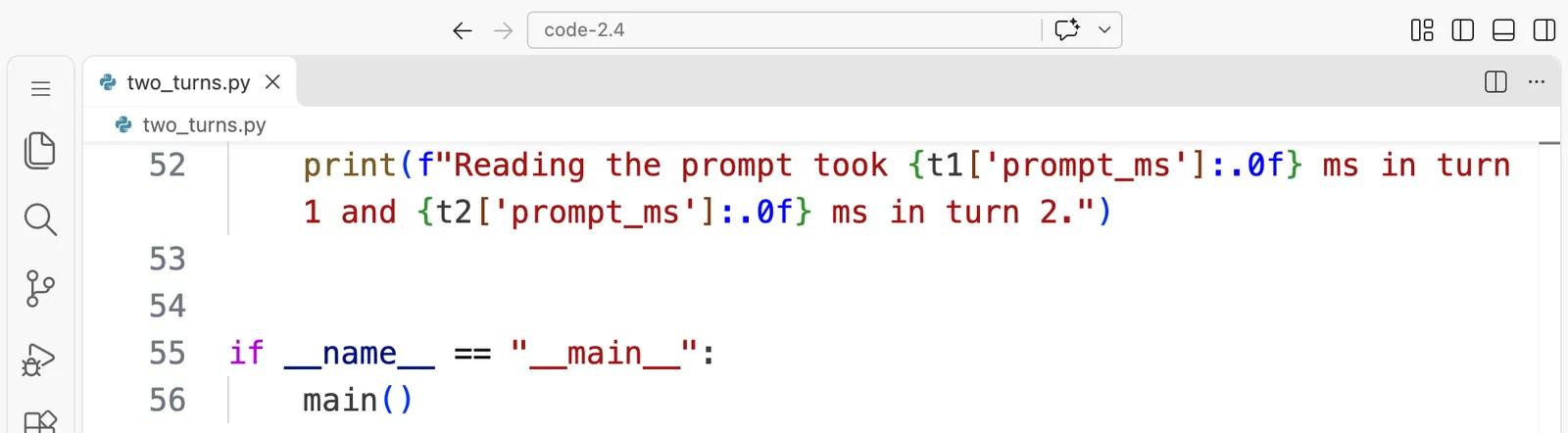
"""Two turns of one conversation, to see the KV cache save work.

Run it while llama-server is running on this computer (START-HERE.md shows how to start it):

    uv run two_turns.py

Turn 1 sends a long shipping log and a question. Turn 2 sends the whole conversation again, with the
model's first answer and a new question added at the end, exactly as every chat app does.
llama-server still holds the notes (the KV cache) it made for turn 1, so it only has to read the new
tokens at the end of turn 2. The server reports how many tokens it took from its cache ("cache_n").
It uses only Python's standard library, so there is nothing to install.
"""

import json
import urllib.request

URL = "http://127.0.0.1:8080/v1/chat/completions"


def ask(messages: list[dict]) -> tuple[str, dict]:
    """Send the conversation so far and return the answer and the server's own timings."""
    body = {"messages": messages, "max_tokens": 64, "temperature": 0, "cache_prompt": True}
    request = urllib.request.Request(URL, data=json.dumps(body).encode(), headers={"Content-Type": "application/json"})
    with urllib.request.urlopen(request) as response:
        reply = json.load(response)
    return reply["choices"][0]["message"]["content"].strip(), reply["timings"]


def show(turn: int, t: dict) -> None:
    total = t["cache_n"] + t["prompt_n"]
    print(f"Turn {turn}: the conversation is {total:,} tokens long.")
    print(f"  taken from the KV cache: {t['cache_n']:>5,} tokens")
    print(f"  read fresh (prefill):    {t['prompt_n']:>5,} tokens in {t['prompt_ms']:>6.0f} ms")
    print(f"  answer written (decode): {t['predicted_n']:>5,} tokens in {t['predicted_ms']:>6.0f} ms")
    print()


def main() -> None:
    log = "\n".join(
        f"Line {i}: the parcel for order {1000 + i} left the warehouse at {8 + i % 10}:{i % 60:02d} and is on van {i % 7 + 1}."
        for i in range(1, 81)
    )
    messages = [{"role": "user", "content": "Here is today's shipping log.\n" + log + "\nWhich van carries order 1042?"}]
    answer, t1 = ask(messages)
    show(1, t1)

    messages += [{"role": "assistant", "content": answer}, {"role": "user", "content": "And which van carries order 1043?"}]
    answer, t2 = ask(messages)
    show(2, t2)

    print(f"Turn 2 was {t2['cache_n'] + t2['prompt_n']:,} tokens long, but the server read only {t2['prompt_n']:,} of them.")
    print(f"Reading the prompt took {t1['prompt_ms']:.0f} ms in turn 1 and {t2['prompt_ms']:.0f} ms in turn 2.")


if __name__ == "__main__":
    main()
This time "cache_prompt": True, the server's default, lets the server keep the notes from turn 1 and reuse them for turn 2 wherever the two prompts start with exactly the same tokens.
uv run two_turns.py
Turn 1: the conversation is 2,484 tokens long.
  taken from the KV cache:     0 tokens
  read fresh (prefill):    2,484 tokens in     94 ms
  answer written (decode):    20 tokens in     54 ms

Turn 2: the conversation is 2,524 tokens long.
  taken from the KV cache: 2,480 tokens
  read fresh (prefill):       44 tokens in      6 ms
  answer written (decode):    20 tokens in     49 ms

Turn 2 was 2,524 tokens long, but the server read only 44 of them.
Reading the prompt took 94 ms in turn 1 and 6 ms in turn 2.
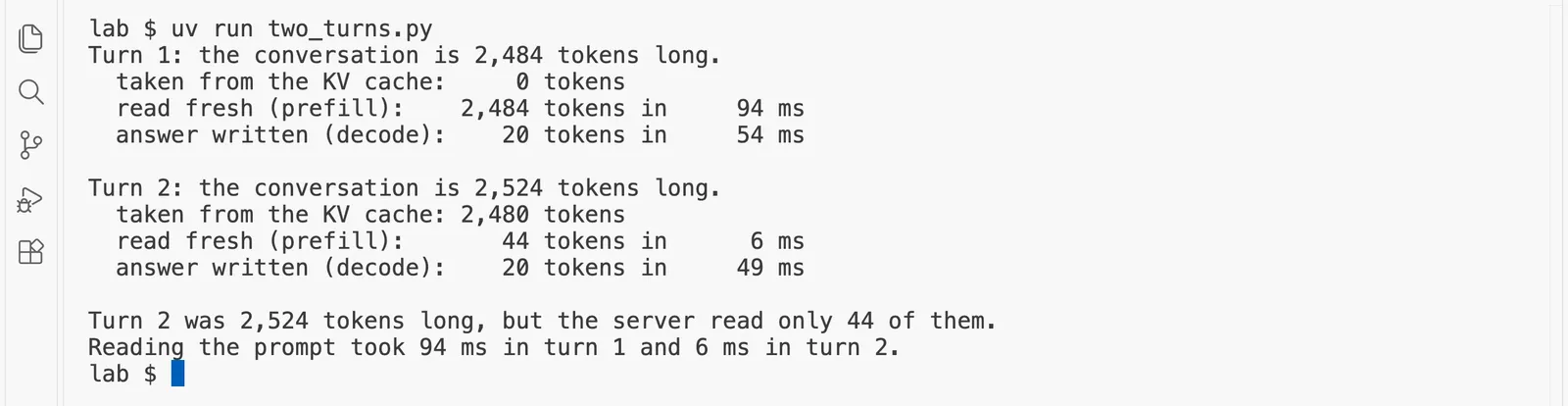
Read the two turns side by side:
- Turn 1 was 2,484 tokens, none of them in the cache yet. The server read all 2,484 in 94 milliseconds.
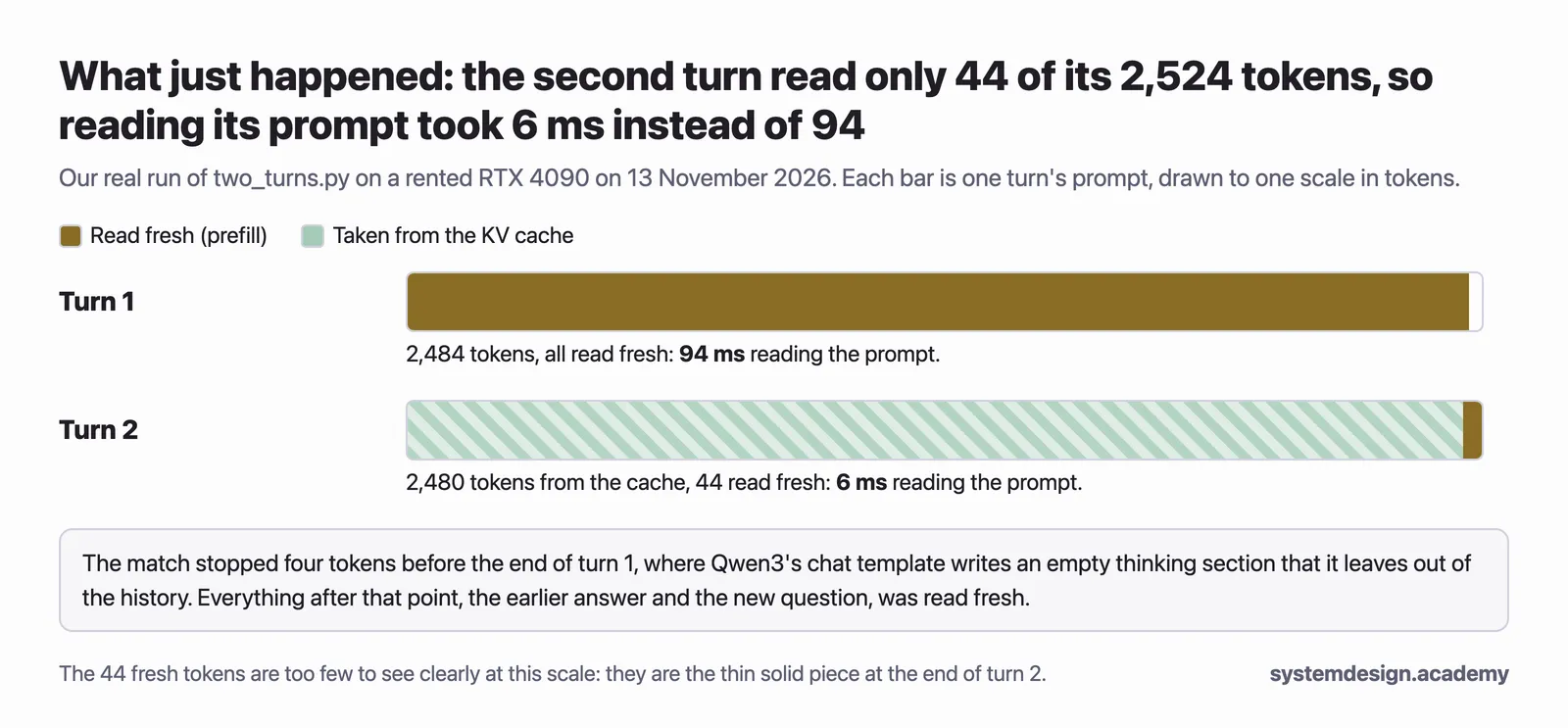
- Turn 2 was a little longer, 2,524 tokens, because it carried the answer and the follow-up. But the server took 2,480 tokens' notes straight from the cache and read only 44 fresh, in 6 milliseconds instead of 94: about a 16th of the time.
Why 44 and not just the few tokens of the new question? The server can reuse notes only for the tokens at the start of the prompt that are exactly the same as last time. At the end of turn 1, Qwen3's chat template adds four tokens that mark an empty thinking section before the answer, because we switched thinking off. When the template writes that same answer back into the history for turn 2, it leaves those four tokens out. So the match stops four tokens early, at 2,480, and the server reads the model's answer and the new question fresh. That is a small, real example of a rule you will meet again in "Prefix caching": the cache helps only when the prompt starts with exactly the same tokens.
If you want to try knowledge check question 3, do it now, before you stop this server. Then stop the server before the next step. The shell may print a line saying the job is done or terminated:
kill %1
Step 4: Give the server eight times more room
What happens to memory if you want longer conversations? Start the server again with room for 32,768 tokens, and read the same line:
llama-server -m models/Qwen3-0.6B-Q8_0.gguf -c 32768 --port 8080 --reasoning off -lv 4 > server-32k.log 2>&1 &
[1] 2069
curl -s http://127.0.0.1:8080/health
{"status":"ok"}
grep 'llama_kv_cache: size' server-32k.log
0.00.904.294 I llama_kv_cache: size = 3584.00 MiB ( 32768 cells, 28 layers, 4/1 seqs), K (f16): 1792.00 MiB, V (f16): 1792.00 MiB
kill %1
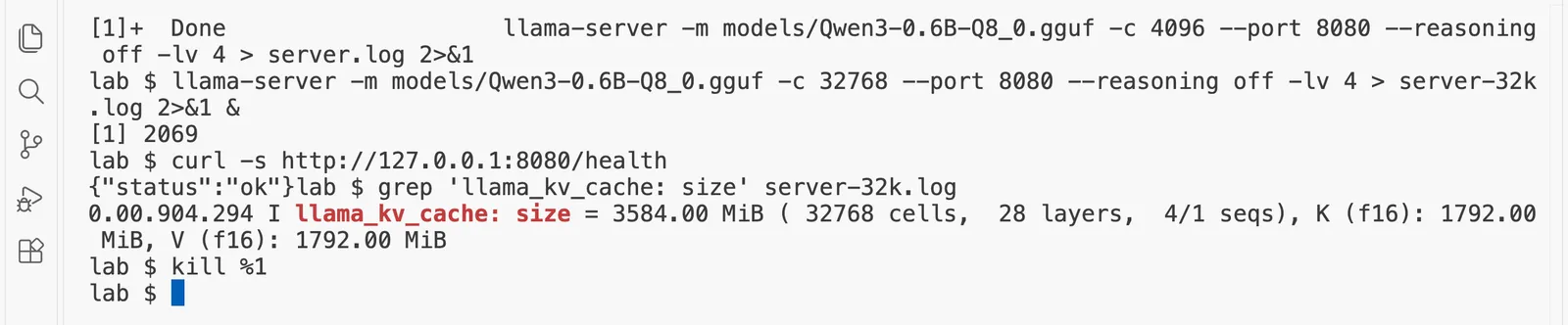
The server reserved 3584.00 MiB, exactly the 3,584.0 MiB that kv_size.py predicted and exactly eight times as much as with room for 4,096 tokens. The cache grows in a straight line with the number of tokens you make room for. Nothing else about the model changed: the weights are still 604 MiB.
Predict, then measure
With 16,384 tokens already in the conversation, how do you expect the small model's writing speed to change?
The measured result appears once you lock in. Only your first answer counts toward your progress.
Step 5: Measure how a long conversation slows the writing
The cache saves work, but reading it is not free. For every new token, attention reads the notes of every earlier token, so the longer the conversation, the more notes each turn of decode has to read. llama-bench can measure the writing speed with a given number of tokens already in the cache, its depth:
llama-bench -m models/Qwen3-0.6B-Q8_0.gguf -p 0 -n 64 -d 0,2048,8192,16384 2>/dev/null
The settings mean: no separate reading test (-p 0); write 64 tokens (-n 64); and do it with 0, 2,048, 8,192 and 16,384 tokens already in the cache (-d). This takes a minute or two, because llama-bench first fills the cache to each depth.
| model                          |       size |     params | backend    | ngl |            test |                  t/s |
| ------------------------------ | ---------: | ---------: | ---------- | --: | --------------: | -------------------: |
| qwen3 0.6B Q8_0                | 604.15 MiB |   596.05 M | CUDA       |  -1 |            tg64 |       639.36 ± 19.76 |
| qwen3 0.6B Q8_0                | 604.15 MiB |   596.05 M | CUDA       |  -1 |    tg64 @ d2048 |        553.15 ± 5.89 |
| qwen3 0.6B Q8_0                | 604.15 MiB |   596.05 M | CUDA       |  -1 |    tg64 @ d8192 |        389.02 ± 2.37 |
| qwen3 0.6B Q8_0                | 604.15 MiB |   596.05 M | CUDA       |  -1 |   tg64 @ d16384 |        277.77 ± 1.30 |

build: cd959bae9 (12110)
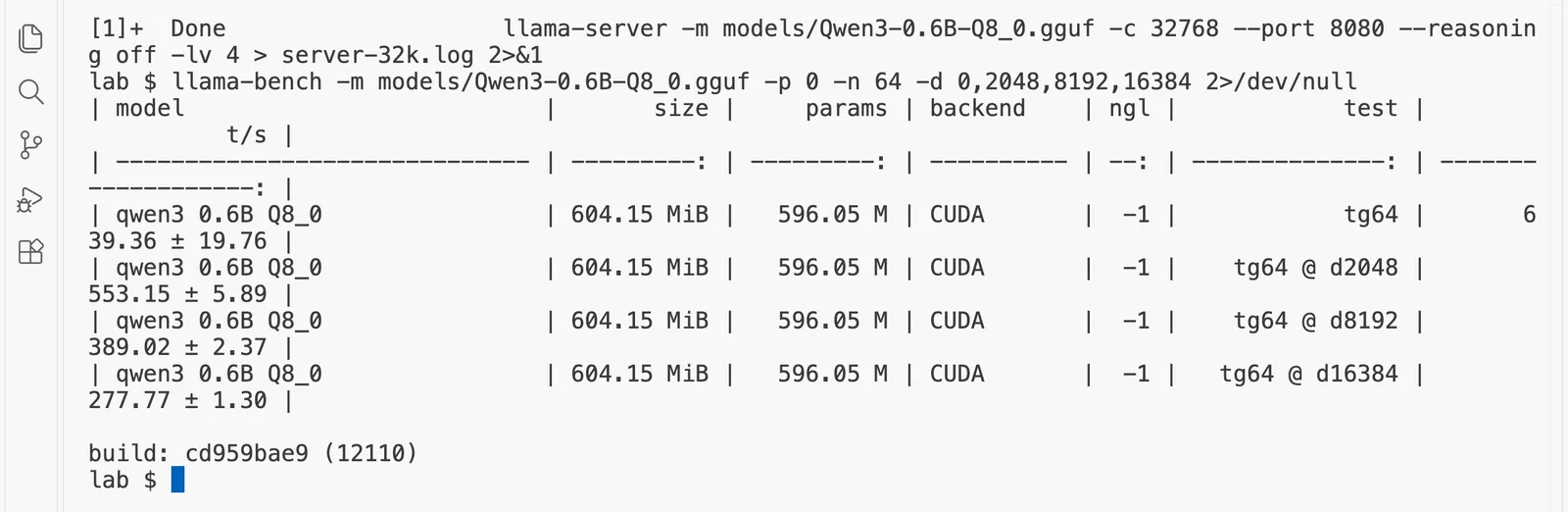
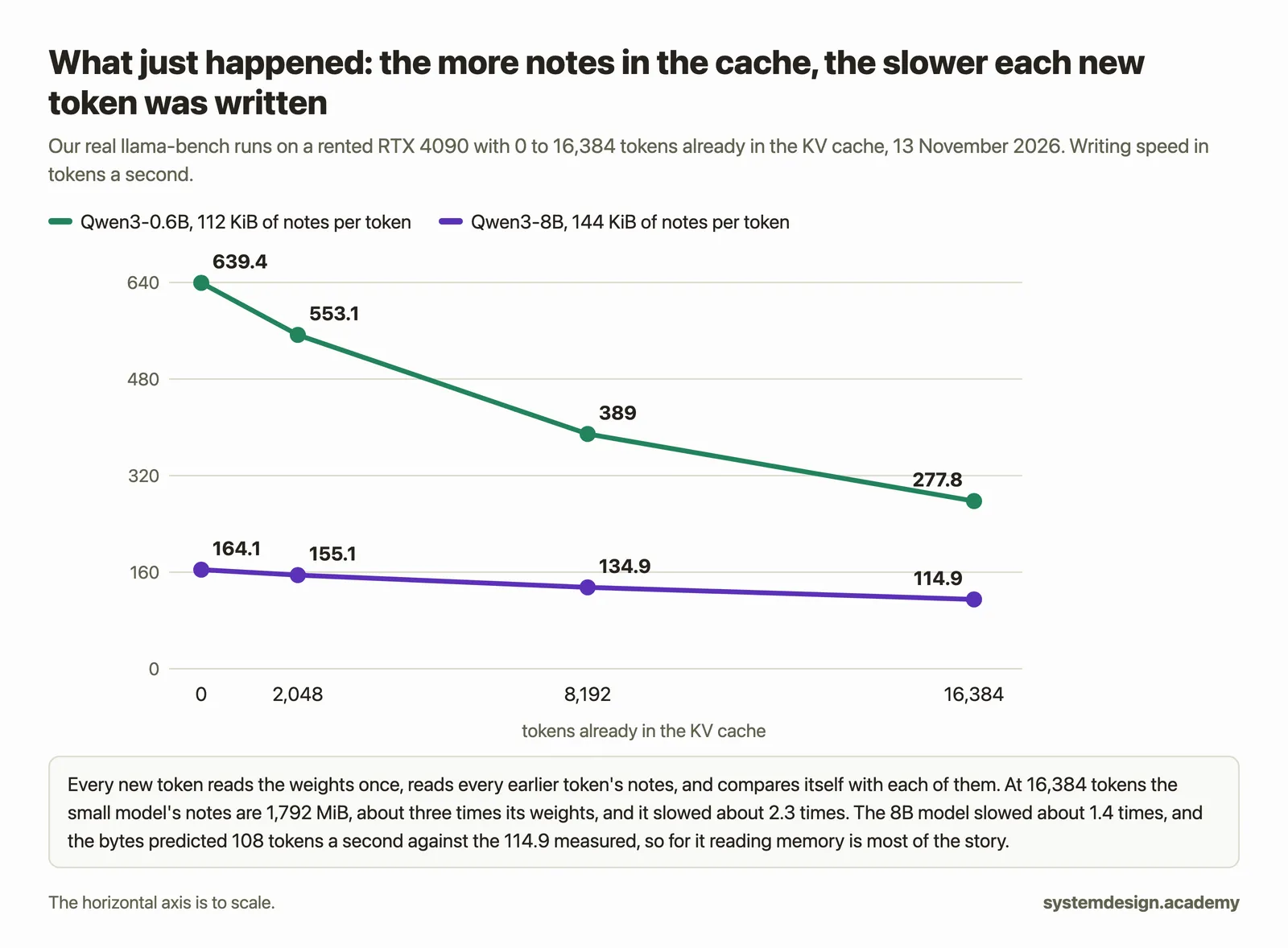
With an empty cache the small model wrote 639.4 tokens a second. With 16,384 tokens already in the conversation it wrote 277.8: about 2.3 times slower. At that depth the notes are 1,792 MiB, about three times the size of the model's own weights, and every new token has to read all of them as well as the weights. That is the customer's "it got slower after an hour" from the start of this page.
Step 6: The same slowdown on the bigger model
If you did "Prefill and decode" on this same pod, the Qwen3-8B file is already there, and you can copy it:
cp ~/lesson-2.1/lab/models/Qwen3-8B-Q4_K_M.gguf models/
If that says No such file, download it instead (about 5 GB, under a minute on a pod):
hf download Qwen/Qwen3-8B-GGUF Qwen3-8B-Q4_K_M.gguf --local-dir models
llama-bench -m models/Qwen3-8B-Q4_K_M.gguf -p 0 -n 64 -d 0,2048,8192,16384 2>/dev/null
| model                          |       size |     params | backend    | ngl |            test |                  t/s |
| ------------------------------ | ---------: | ---------: | ---------- | --: | --------------: | -------------------: |
| qwen3 8B Q4_K - Medium         |   4.68 GiB |     8.19 B | CUDA       |  -1 |            tg64 |        164.05 ± 0.56 |
| qwen3 8B Q4_K - Medium         |   4.68 GiB |     8.19 B | CUDA       |  -1 |    tg64 @ d2048 |        155.14 ± 0.50 |
| qwen3 8B Q4_K - Medium         |   4.68 GiB |     8.19 B | CUDA       |  -1 |    tg64 @ d8192 |        134.95 ± 0.36 |
| qwen3 8B Q4_K - Medium         |   4.68 GiB |     8.19 B | CUDA       |  -1 |   tg64 @ d16384 |        114.90 ± 0.24 |

build: cd959bae9 (12110)
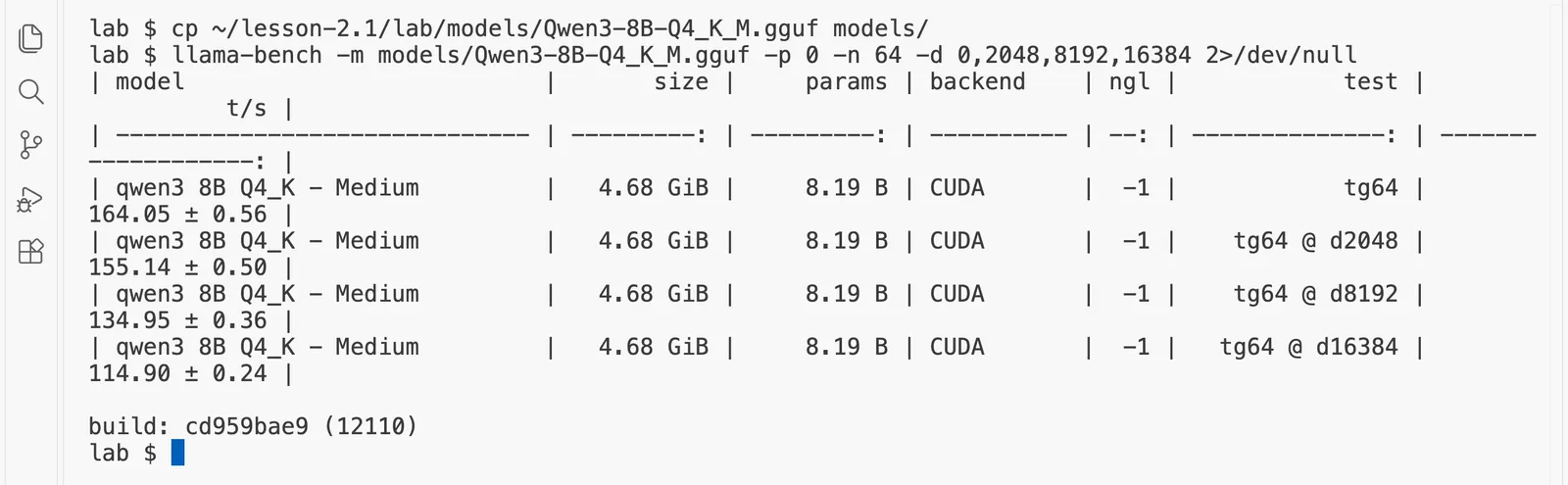
The 8B model fell from 164.1 to 114.9 tokens a second, about 1.4 times slower. Here the bytes tell almost the whole story, and you can check it on paper. With an empty cache, each new token reads about 4.68 GB of weights: the whole 5.03 GB file except the table that turns tokens into numbers, of which only one row is read, as "Prefill and decode" worked out. At 16,384 tokens it also reads 2,304 MiB of notes, so each token reads about half as much again. If writing were limited only by reading memory, the speed would fall in the same proportion, from 164.1 to about 108 tokens a second. The GPU measured 114.9: the sum on paper is within about 6% of the measurement.
The small model did not follow the same sum. On bytes alone it should have fallen to about 161 tokens a second, and it fell only to 277.8. The reason is that a model this small does not keep the RTX 4090's memory busy even with an empty cache: 639.4 tokens a second of 604 MiB each is about 405 GB a second, only about 40% of what the card can read. Much of each step is fixed work that does not depend on bytes, such as starting the GPU's small programs one after another, so the extra notes cost less than their size suggests. The 8B model reads about 767 GB a second with an empty cache, about 76% of the card's limit, so for it the bytes are what count. On every engine, the work per token grows with the conversation, which is why long chats get slower.
Step 7: Read the memory budget vLLM works out for the cache
Now put the two facts together on a real serving engine. vLLM is a widely used serving engine to serve models to many people, and most of this course is about it. When it starts, it loads the model's weights, measures how much working space it needs, and gives everything that is left of its share of the GPU to the KV cache. Then it prints that budget in its log. Here we read it for Qwen3-8B in its full 16-bit form, which is about 16.4 GB of weights on a GPU of 24 GB.
First make a separate Python environment for vLLM, so it cannot clash with anything else on the pod, and install vLLM 0.33.0 into it. The install downloads several gigabytes. On our pod it took about 25 minutes, because the download from the Python package index ran at only about 5 MB a second that morning; on a faster day it takes a few minutes. It ends with a long list of installed packages, each line starting with +:
uv venv --python 3.12 ~/vllm-env
Using CPython 3.12.3 interpreter at: /usr/local/bin/python
Creating virtual environment at: /root/vllm-env
Activate with: source /root/vllm-env/bin/activate
source ~/vllm-env/bin/activate
uv pip install vllm==0.33.0
The prompt now starts with (vllm-env), which tells you the environment is active. Start vLLM in the background with Qwen3-8B. If your connection to the pod drops while vLLM is starting, the server usually stops with it: reconnect, run cd ~/lesson-2.4/lab and source ~/vllm-env/bin/activate, and start it again; it reuses what it already downloaded. The first start downloads the model, about 16 GB, from Hugging Face, and then prepares the GPU, so it takes a few minutes. --max-model-len 32768 caps each conversation at 32,768 tokens:
vllm serve Qwen/Qwen3-8B --max-model-len 32768 > vllm.log 2>&1 &
[1] 4034
This line waits until the server answers its health address, checking every five seconds, and then prints ready. It normally takes 3 to 10 minutes. If it has not printed ready after 15 minutes, press Control and C and run tail -n 30 vllm.log to see why vLLM stopped:
until curl -s -o /dev/null http://127.0.0.1:8000/health; do sleep 5; done; echo ready
ready
Now read the three lines that matter from vLLM's log, and ask nvidia-smi how full the GPU is:
grep -E 'Model loading took|Available KV cache memory|GPU KV cache size|Maximum concurrency' vllm.log
(EngineCore pid=4223) INFO 11-13 02:13:50 [model_runner.py:428] Model loading took 15.27 GiB memory and 40.029865 seconds
(EngineCore pid=4223) INFO 11-13 02:16:03 [gpu_worker.py:772] Available KV cache memory: 4.56 GiB
(EngineCore pid=4223) INFO 11-13 02:16:03 [kv_cache_utils.py:1147] GPU KV cache size: 33,216 tokens, Maximum concurrency for 32,768 tokens per request: 1.01x
nvidia-smi --query-gpu=memory.used,memory.total --format=csv
memory.used [MiB], memory.total [MiB]
21540 MiB, 24564 MiB
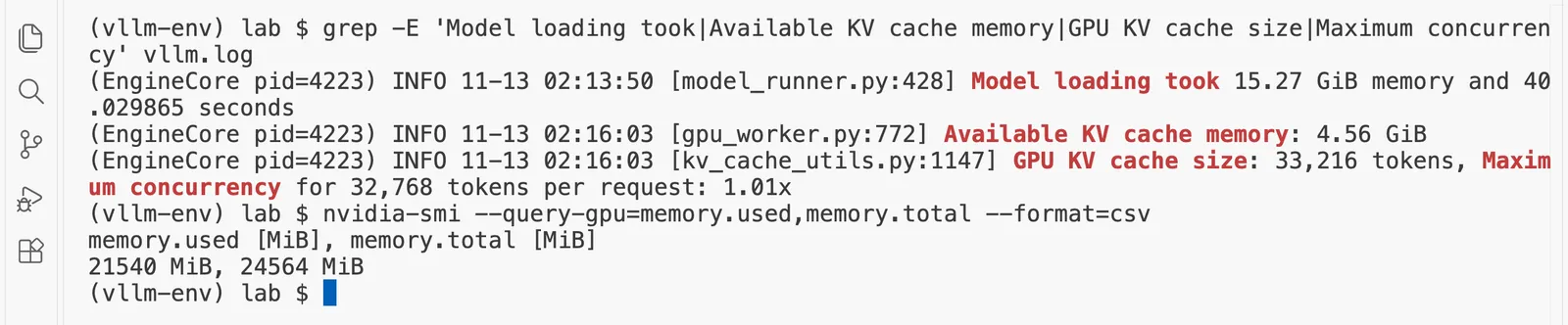
Read the lines from top to bottom:
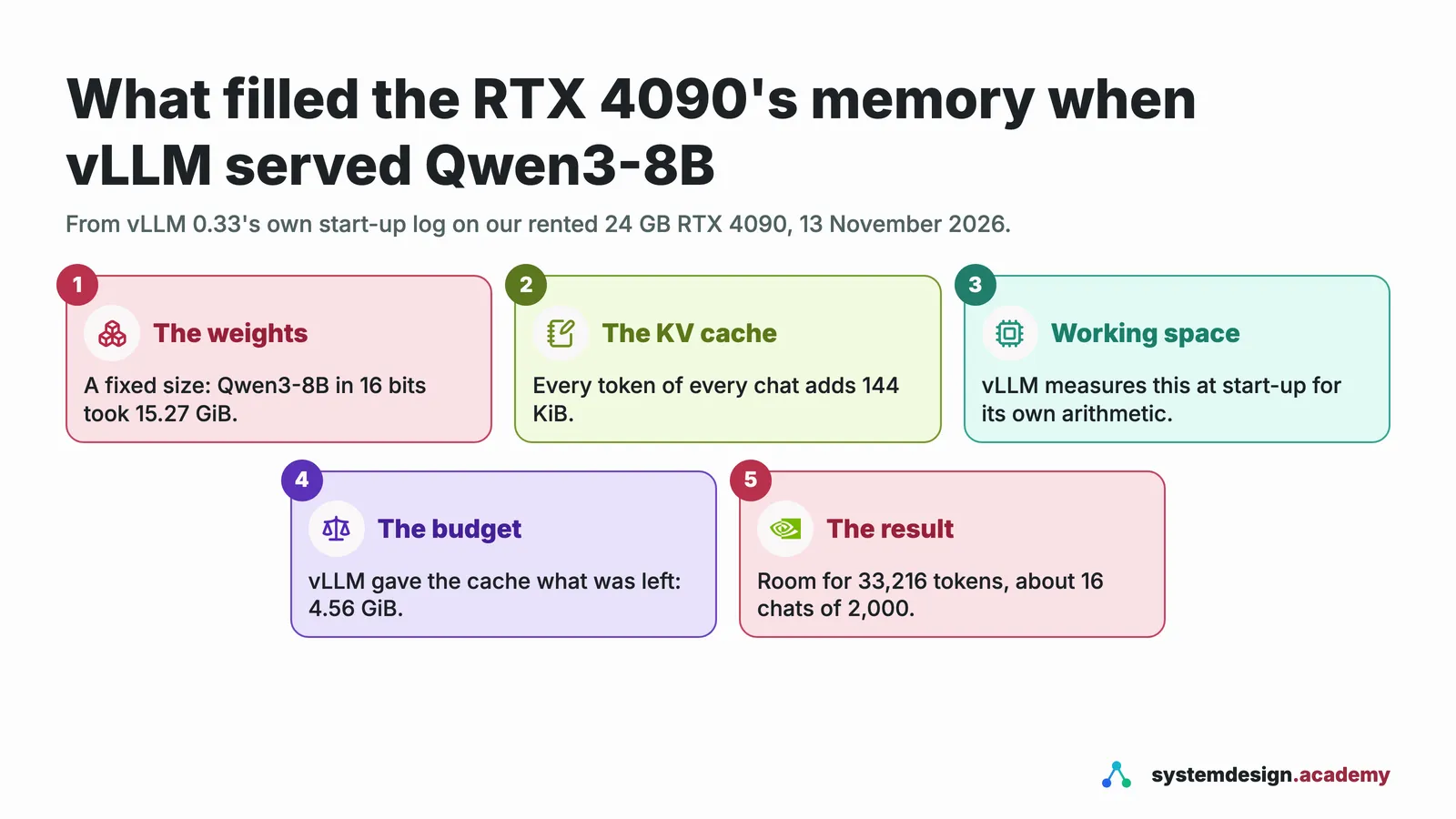
- The weights took 15.27 GiB. That is the 16.4 GB of Qwen3-8B in 16 bits, counted in the binary units the log uses: a GiB, a gibibyte, is 1,024 MiB, about 1.07 GB.
- 4.56 GiB was left for the KV cache. vLLM aims to use 92% of the 23.52 GiB the GPU reports to it, 21.64 GiB. From that it takes off the weights and the working space it measured when it started (its own arithmetic and the prepared steps it calls CUDA graphs, together about 1.8 GiB here), and gives the rest to the notes.
- The cache holds 33,216 tokens. Check it with this page's sum: 33,216 tokens at 147,456 bytes each is about 4.9 GB, which is the 4.56 GiB above. vLLM keeps the notes in blocks of 16 tokens, here 2,076 of them.
- Maximum concurrency 1.01x means that only about one conversation of the full 32,768 tokens fits at a time. Shorter conversations fit in greater numbers: a conversation of 2,000 tokens needs 125 blocks, so 16 of them fit at once.
nvidia-smisays 21540 MiB of 24564 MiB is in use, because vLLM reserved its share of the GPU the moment it started, as llama-server did in step 2. (21540 MiB is about 21.0 GiB, a little under vLLM's 21.64 GiB target, a gap that vLLM's log does not explain line by line.)
So on a 24 GB GPU, the weights of a model of 8 billion numbers fit comfortably, and the notes, not the model, decide how many people can be served at once. That is the reason this course spends whole pages on storing the notes cleverly ("PagedAttention"), storing them in fewer bits ("Quantizing the KV cache"), and choosing how much room to give them ("Sizing GPU memory").
Stop vLLM before you leave the pod:
kill %1
Switch the GPU off
You have finished the free pages' hands-on work. Type exit to leave the pod, then in RunPod's "Pods" page choose "Stop" and "Terminate", and check that no pods are listed. The pod, the models and vLLM are deleted with it, and every charge ends.
If something goes wrong
grepprints nothing. Check that you started the server with-lv 4; without it, the log does not include the cache's size. Then run thegrepagain after the health check says ok.Connection refusedfromtwo_turns.py. The server is not running or not ready; run the health check until it says ok.- Turn 1 already shows tokens taken from the cache. You ran
two_turns.pybefore on the same server, so its notes were still there. Stop the server withkill %1, start it again, and run the program once. (That is the cache doing its job.) uv pip install vllmseems stuck. It downloads several gigabytes; a slow moment on the network can make it crawl for a while. Leave it running; if it fails, run the same command again, and it reuses everything already downloaded.- vLLM stops with
Free memory on device cuda:0 (21.54/23.52 GiB) on startup is less than desired GPU memory utilization. Another program still holds part of the GPU. It happened to us, because a llama-server from an earlier try was still running and holding 1,532 MiB.nvidia-smi --query-compute-apps=pid,process_name,used_memory --format=csvlists what holds memory; stop it withpkill llama-serverand start vLLM again. - vLLM stops with an error about
max_model_len. Keep--max-model-len 32768: the model's own limit, 40,960 tokens, needs more cache than this GPU has left after the weights.
Questions people ask
- What is the KV cache in a large language model?
The KV cache is the set of notes a model keeps on every earlier token of a conversation: a key and a value in every layer, worked out once and kept in GPU memory. Without it, the model would work them out again for every new token it writes. Every model server keeps one, and the room left for it decides how many conversations one GPU can hold at once. For Qwen3-0.6B the notes take 112 KiB per token, so one conversation of 32,768 tokens needs 3,584.0 MiB, about six times the model's 604 MiB of weights.
- How do you calculate the KV cache size per token?
Multiply 2 (a key and a value) by the number of layers, the number of key-value heads, the head size and the bytes per number, all of which are in the model's
config.json. For Qwen3-8B that is 2 × 36 × 8 × 128 × 2 bytes = 147,456 bytes, 144 KiB, for every token. On our RTX 4090, llama-server reserved exactly the 448.00 MiB this formula predicts for 4,096 tokens of Qwen3-0.6B.- How much GPU memory does the KV cache use for Qwen3-8B?
144 KiB for every token, so a conversation of 32,768 tokens needs 4,608.0 MiB, about 4.5 GiB. On a 24 GB RTX 4090, vLLM 0.33 loaded Qwen3-8B's 16-bit weights in 15.27 GiB and set aside 4.56 GiB for the cache, which it reported as room for 33,216 tokens.
- Why do long conversations make an LLM answer more slowly?
For every new token, attention reads the notes of every earlier token as well as the model's weights, so the longer the conversation, the more there is to read. On our RTX 4090, Qwen3-8B wrote 164.1 tokens a second with an empty cache and 114.9 tokens a second with 16,384 tokens already in it.
- How many users can one 24 GB GPU serve with vLLM?
It depends on how long their conversations are, because each conversation needs its own KV cache. For Qwen3-8B in 16 bits on an RTX 4090, vLLM had room for 33,216 tokens of cache: about 16 conversations of 2,000 tokens each at once, but only about one conversation of the full 32,768 tokens it was started with (vLLM reported a maximum concurrency of 1.01). Storing the weights or the cache in fewer bits makes room for more.
Knowledge check
Answer all five questions before you read the answers below them.
1. What does the KV cache hold?
- A. The model's weights, copied closer to the GPU.
- B. A key and a value for every earlier token, in every layer, kept so they are not worked out again.
- C. The finished answers to earlier questions, so they can be sent again.
- D. The tokenizer's list of known pieces.
2. A model's config.json says: 32 layers, 8 key-value heads, head size 128. In 16 bits, how big are its notes for one token?
- A. 2 × 32 × 8 × 128 × 2 = 131,072 bytes, 128 KiB.
- B. 32 × 8 × 128 = 32,768 bytes.
- C. 2 × 32 × 128 × 2 = 16,384 bytes, because heads do not matter.
- D. It cannot be worked out without running the model.
3. Try it. Do this straight after step 3, before you stop that server: run two_turns.py a second time, without restarting the server. If you already stopped it, start it again as in step 2 and run the program twice. What do you expect turn 1 to show this time?
- A. The same as before: all 2,484 tokens read fresh.
- B. Almost all of its tokens taken from the cache, because the server still holds the notes of the same log from the first run.
- C. An error, because the cache is full.
- D. Zero tokens, because the server refuses repeated questions.
4. In step 5, the small model wrote 639.4 tokens a second with an empty cache and 277.8 with 16,384 tokens in it. Why?
- A. The model's weights grow as the conversation grows.
- B. The server deletes old notes and works them out again.
- C. Every new token has to read the notes of every earlier token, and at 16,384 tokens those notes are larger than the weights.
- D. llama-bench slows down on purpose to imitate a busy server.
5. A 24 GB GPU holds Qwen3-8B's 16.4 GB of weights comfortably. Why might it still serve only a few people at once?
- A. Because the GPU can only run one request at a time.
- B. Because 16-bit numbers are too slow for more than one user.
- C. Because the weights are copied once for every user.
- D. Because each person's conversation needs its own KV cache, 144 KiB per token, and only a few gigabytes are left for all of them.
Answers
1. B. For every earlier token, each layer keeps a key, which lets later tokens find it, and a value, which carries what it contributes. They never change once worked out, so the server keeps them. A is tempting because the cache sits in GPU memory too, but the weights are a separate, fixed block. C mixes it up with caching answers, which a model server does not do. D is the tokenizer's list, which is part of the model file.
2. A. A key and a value (2) for each of 32 layers, 8 key-value heads and 128 numbers, at 2 bytes each: 131,072 bytes, 128 KiB per token. B forgets both the factor of 2 for key and value and the 2 bytes per number. C leaves out the heads, which each keep their own notes. D is wrong, and step 2 showed a real server agreeing with this sum exactly.
3. B. The server still holds the notes from the last run's conversation, and turn 1 starts with exactly the same tokens, so it takes almost all of them from the cache and reads only a few fresh; when we tried it on a fresh server on the same GPU, the first run's turn 1 read all 2,484 tokens in 64 milliseconds, and the second run's turn 1 took 2,480 of them from the cache and read only 4 fresh. The 64 milliseconds differ from step 3's 94 because it was a different server start; compare the token counts, not the times. A is what happens after a restart, as on the first run. C and D are not things the cache does: when it is full, a server drops old notes to make room, and repeated questions are welcome.
4. C. Each turn of decode reads the weights once and every earlier token's notes once. At 16,384 tokens the small model's notes are 1,792 MiB, larger than its 604 MiB of weights, so there is much more to read per token. A is wrong: the weights never change. B is the opposite of what a cache does. D has no basis: llama-bench measures, it does not imitate.
5. D. The weights are loaded once and shared by everyone, but each conversation's notes are its own. On our RTX 4090, after the weights and the engine's working space, vLLM had 4.56 GiB left for notes, room for 33,216 tokens for everyone together. A is wrong: "Prefill and decode" showed batching many people at once. C is wrong: weights are shared. B has no basis.
Going deeper, for working engineers and staff engineers
You can skip this section and lose nothing you need for the next page.
- Why only keys and values, never queries. Attention compares the current token's query with every earlier token's key. Only the current token ever needs a query, so there is nothing to cache for earlier ones. That asymmetry is the whole reason it is called the KV cache.
- Reserved at start-up. llama-server reserved the full 448.00 MiB the moment it started, and vLLM reserved its whole budget in step 7, which is why
nvidia-smishowed the GPU almost full before anyone had asked anything. vLLM sizes that budget from--gpu-memory-utilization(0.92 of the card by default in vLLM 0.33) minus the weights and working space, and stores the notes in small fixed-size blocks so that no conversation reserves space it does not use. "PagedAttention" and "vLLM memory settings" measure both. - The cache in fewer bits. Storing keys and values in 8 bits instead of 16 halves the cache and roughly doubles the conversations that fit, with a quality cost that has to be measured. vLLM's
--kv-cache-dtypesets this; "Quantizing the KV cache" does it on a real GPU. - Reuse across requests. Step 3 reused notes within one conversation on one server. Engines do the same across different users who share a beginning, such as a long system prompt: vLLM calls it automatic prefix caching and turns it on by default in vLLM 0.33, SGLang builds a tree of shared prefixes called RadixAttention, and llm-d prefers to send each request to a server that is likely to hold its prefix already, weighed against how busy each server is. Each has a page in this course.
- Sliding windows and latent attention. Some models limit how far back some layers look, or compress keys and values into a smaller shared form before caching them. Both change the formula on this page, and both are visible in
config.json. "Why newer models need a smaller cache" reads them from real configs.
Words from this page
- KV cache: the keys and values a model keeps for every earlier token in every layer, so they are worked out only once.
- Attention: the step in each layer where the current token looks back at earlier tokens to decide which matter.
- Key: the part of a token's notes that lets later tokens find it.
- Value: the part of a token's notes that carries what it contributes once found.
- Attention head: one of several parallel looks back in each layer, each with its own query.
- Grouped-query attention: several query heads sharing one key and one value, which makes the cache smaller.
- Depth: how many tokens are already in the cache when the next token is written.
- Slot: one conversation's share of a server's cache; llama-server had four.
What to remember from this page
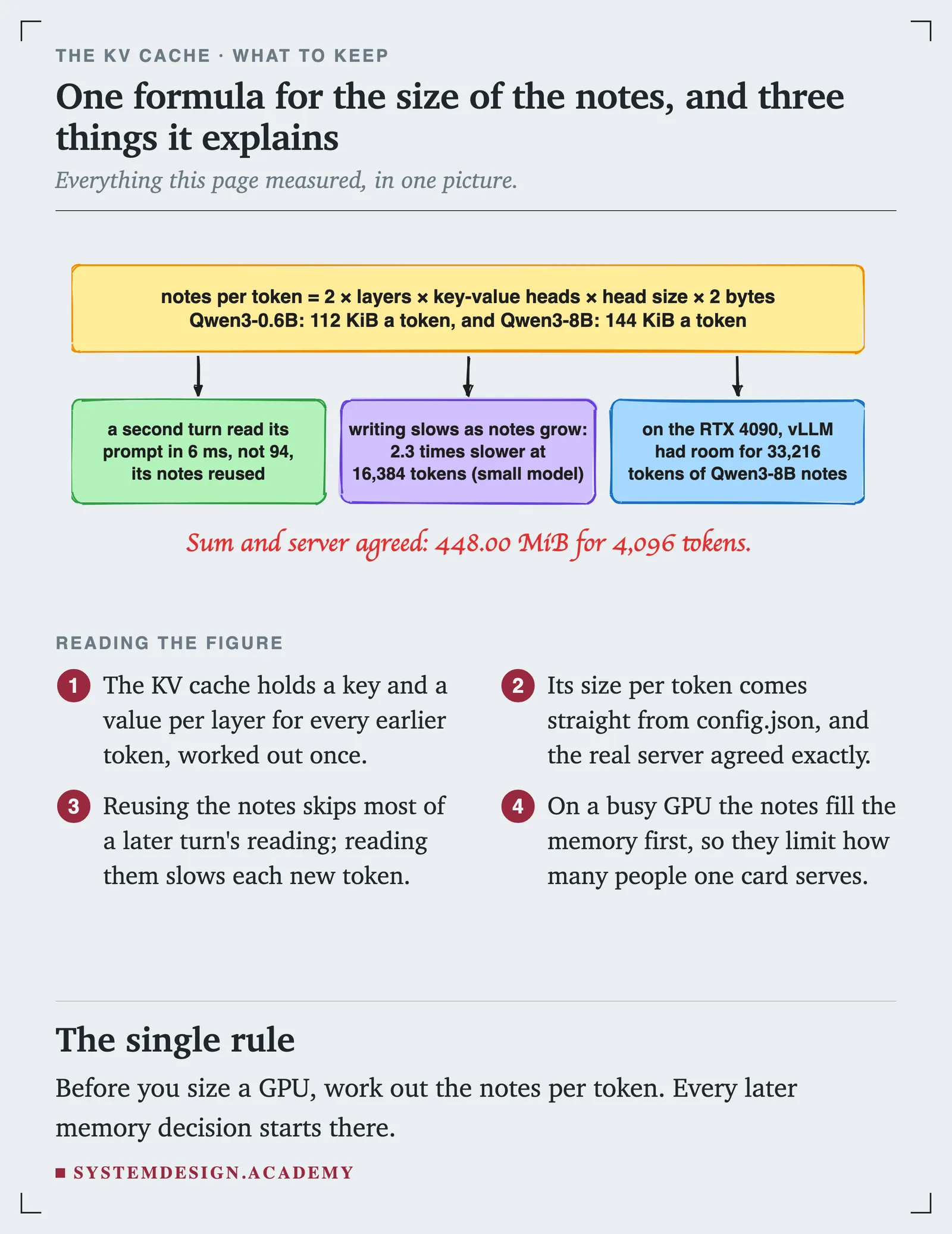
- The KV cache is the model's notes on every earlier token: a key and a value per layer, worked out once and kept.
- Its size per token is 2 × layers × key-value heads × head size × bytes, all read from
config.json. Our sum matched the real server exactly: 448.00 MiB for 4,096 tokens of Qwen3-0.6B. - Reusing the notes let the second turn of a conversation read its prompt in about a 16th of the time.
- Reading the notes is not free: the longer the conversation, the slower each new token. For Qwen3-8B on the RTX 4090, the slowdown matched the extra bytes almost exactly.
- On a 24 GB GPU, vLLM gave Qwen3-8B's notes 4.56 GiB, room for 33,216 tokens. The notes, not the weights, decide how many people fit.
Next: the free pages end here. In the course, the next pages are "Sizing GPU memory", which works out step 7's budget on paper before vLLM prints it and changes the settings that move it, and "Why newer models need a smaller cache".
Download the page's files: lesson-2.4.zip.
Sources
Checked on 13 November 2026.
- Our own run on a RunPod pod with one NVIDIA GeForce RTX 4090 (24 GB), secure cloud, $0.89 an hour, llama.cpp build 12110 for CUDA 12.8 and vLLM 0.33.0. The recording is in this page's run folder.
- RunPod pricing, RTX 4090 at $0.34 an hour on community cloud and $0.89 on secure cloud, read on 13 November 2026: https://www.runpod.io/pricing
- NVIDIA Ada GPU architecture whitepaper, appendix: GeForce RTX 4090 memory bandwidth 1,008 GB a second: https://images.nvidia.com/aem-dam/Solutions/geforce/ada/nvidia-ada-gpu-architecture.pdf
- Qwen3-0.6B
config.json(28 layers, 8 key-value heads, 16 attention heads, head size 128): https://huggingface.co/Qwen/Qwen3-0.6B/blob/main/config.json - Qwen3-8B
config.json(36 layers, 8 key-value heads, 32 attention heads, head size 128): https://huggingface.co/Qwen/Qwen3-8B/blob/main/config.json - llama.cpp server documentation, for
cache_prompt, the timings it returns (cache_n,prompt_n) and the/apply-templateendpoint we used to read Qwen3's chat template: https://github.com/ggml-org/llama.cpp/blob/master/tools/server/README.md - vLLM documentation, "Optimization and Tuning", for how vLLM sizes its KV cache from
gpu_memory_utilization: https://docs.vllm.ai/en/latest/configuration/optimization.html - vLLM design documentation, "Paged Attention": https://docs.vllm.ai/en/latest/design/paged_attention.html