Contents Part 2 · The maths of one request
Part 2 · The maths of one request
Prefill and decode: the two halves of every request, measured on a rented GPU
Reading the question all at once is fast; writing the answer one token at a time is slow. Measured on a rented RTX 4090: the same GPU read a prompt about 56 times faster per token than it wrote the answer.
Free page Code zip with this page
About 32 minutes to read, and about 35 minutes for the hands-on lab.
Your progress0 of 6 checks answered right
It fills only when a prediction matches the measured result. Reading a page does not move it. It is kept in this browser.
Download the page's files: lesson-2.1.zip. It holds the code you run (lab/), the page's diagrams as PNG files (figures/), this whole page as a PDF, and START-HERE.md, which lists every step of the hands-on part with its expected output.
This page is free. Its hands-on part runs on an NVIDIA RTX 4090 that you rent by the hour on RunPod, as "Before you start" showed. You will time a model reading a question and writing an answer, measure the two halves separately, and see with your own numbers why model servers are built around this split.
After this page you will be able to:
- explain in plain words what prefill and decode are, and why one is much faster per token than the other;
- say which half decides how long the first word takes, and which half decides how fast the rest arrive;
- measure both halves on a rented GPU with a short Python program and with
llama-bench; - explain why serving many people at once makes the total writing speed rise while each person's own speed falls.
Before you start: finish "Before you start", so that you know how to rent a GPU on RunPod, set it up with llama.cpp, uv and the hf command, and switch it off. Reading "Introduction: what this course builds" first helps, because it explains what a token is.
Time: about 45 minutes.
Cost: the commands themselves take only a few minutes on the GPU, but the pod bills for as long as it exists, including while you read. Plan on 20 to 30 minutes of pod time: at the $0.89 an hour we paid on RunPod's secure cloud on 13 November 2026 that is about 30 to 45 cents, and at $0.34 an hour on the community cloud, when a card is free, about 11 to 17 cents.
The problem: a long question, and a long wait for the first word
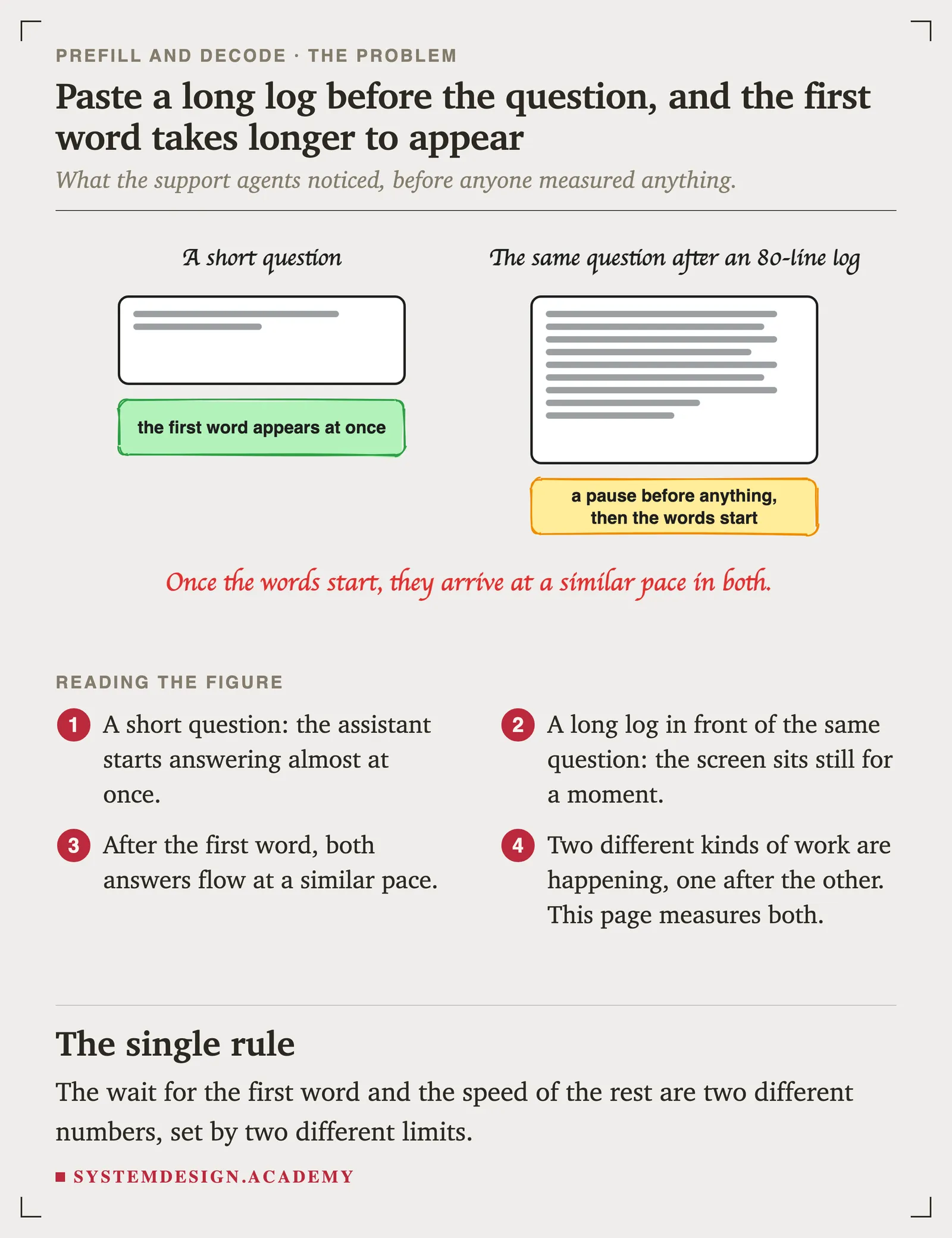
Imagine you look after the chat assistant that a delivery company's support team uses. When an agent types a short question, such as "a parcel left the warehouse this morning, what can the customer learn from that?", the first word appears almost at once. When the same agent pastes today's shipping log of eighty lines first and then asks the same question, the screen sits still for a moment before anything appears; on a busy server running a large model, that moment stretches to seconds. Then, once the words start, they arrive at much the same pace as before.
The agents notice, and they ask you why. The answer is not "the model is slow". The model is doing two quite different kinds of work, one after the other, and they are limited by two different parts of the GPU. This page measures both of them.
Why the two halves matter to users and to cost
- Users feel the two halves separately. The wait before the first word is set by the first half; the speed of the rest is set by the second half. Serving teams track both, under the names time to first token and time per output token, and promise targets for each.
- Each half is limited by something different. The first half is limited by how fast the chip can do arithmetic, which engineers call compute-bound. The second half is limited by how fast it can read its memory, which they call memory-bound. Speeding up the wrong one changes nothing the user can see.
- Every serving trick in this course comes from this split. Serving many people at once, splitting a long prompt into chunks, keeping notes between turns, and even running the two halves on different GPUs all exist because of it. The vLLM documentation describes its chunked prefill feature as "better balancing compute-bound (prefill) and memory-bound (decode) operations". This page explains what that sentence means.
The idea: one walk through the model reads the whole question, but writes only one token
A librarian who must walk every shelf
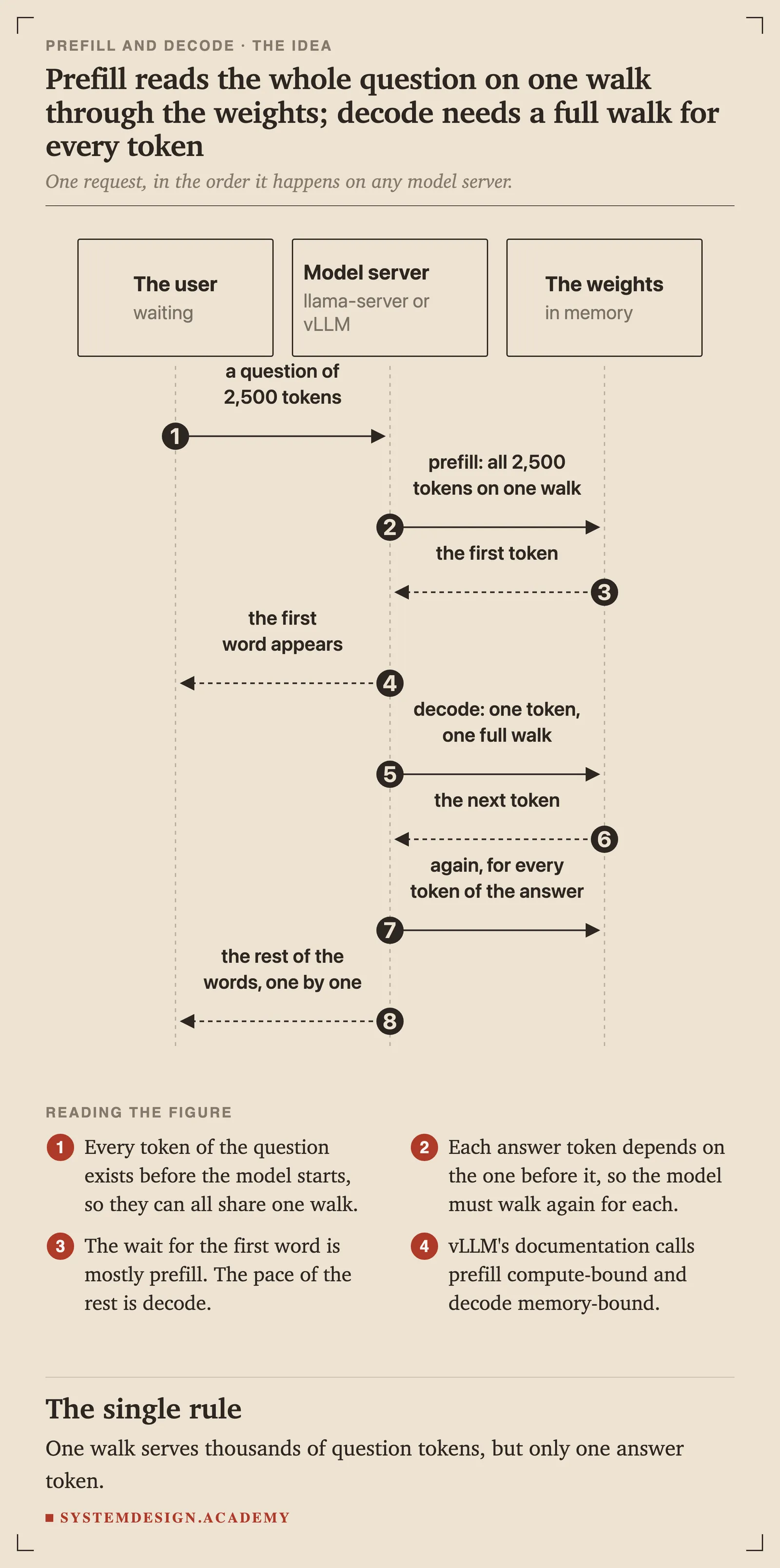
Picture a librarian who answers questions in a very particular way. To work out anything at all, she must walk past every shelf in a large library, from the first to the last, and at each shelf she does a little arithmetic with what is written there. The shelves are the model's numbers, its weights, and there are hundreds of millions of them. The walk is reading those numbers from memory.
Now she gets a question that is 2,500 tokens long.
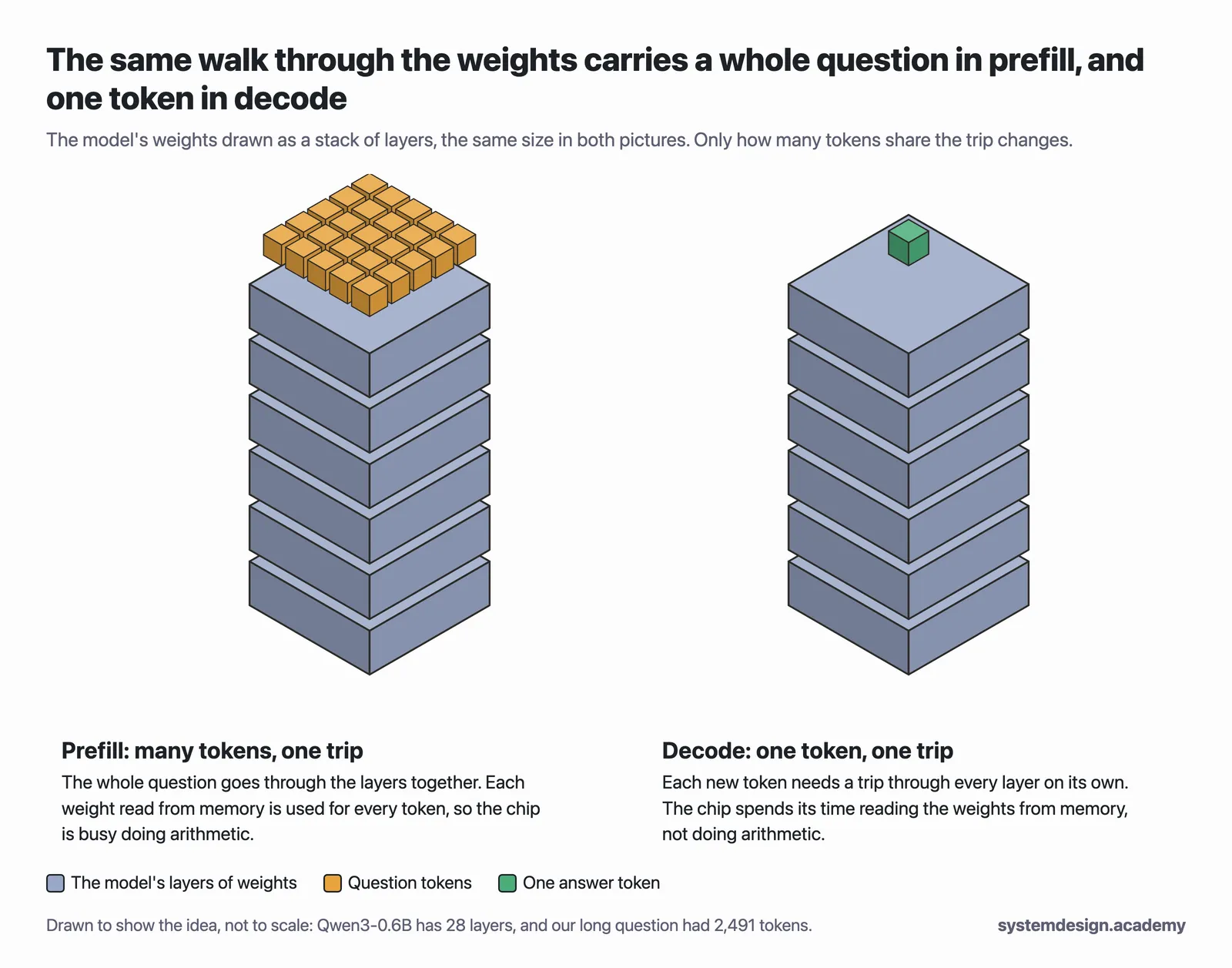
- Reading the question. She already has all 2,500 tokens on her desk. So she carries all of them on one walk: at each shelf she does the arithmetic for every token of the question at once, then moves on. One walk, and the whole question is read. This is prefill.
- Writing the answer. Now she must write the answer, and each new token depends on the token before it. She cannot work out the second word until she knows the first. So she walks every shelf to produce one token, writes it down, and walks every shelf again for the next. One walk per token. This is decode.
The walk is the slow part. In prefill, the cost of one walk is shared by thousands of tokens, so each token is cheap, and the limit becomes how fast she can do the arithmetic. In decode, the whole cost of a walk is paid for a single token, so the limit is how fast she can walk, which on a chip means how fast it can read its memory.
Why the model cannot write several tokens at once
It is tempting to ask: why not work out the next ten tokens in one walk, as prefill does? Because the model writes in a loop, where each turn reads everything so far, including the token it just wrote, to choose the next one. Token 2 depends on token 1, and token 3 on both. Until token 1 exists, there is nothing to compute token 2 from. The question was different: all of its tokens existed before the model started, so it could read them together.
Two numbers the user feels
- Time to first token, often written TTFT, is how long the user waits before the first word appears. It is mostly prefill: the longer the question, the longer the wait.
- Time per output token, often written TPOT, is how long each later token takes. It is decode, and it depends far less on the question's length than the wait for the first word does, though it still grows when the conversation gets very long; the page "The KV cache" measures that.
The page "The latency numbers that matter" adds the rest of the family and percentiles, which say how slow the slowest requests were. For now these two are enough.
Hands-on: measure both halves on a rented GPU
After getting the files ready, you will do seven steps:
- start a model server, llama-server, with the small model;
- time a short question with
time_request.py; - time a long question, and compare;
- measure both halves with
llama-bench, llama.cpp's own speed test, on the GPU; - measure them again on the pod's processor alone, with the GPU left out;
- take a first look at what happens when many people ask at once;
- run the same speed test on a bigger model, Qwen3-8B, which fits easily in the GPU's 24 GB.
Note: How we made the outputs and pictures. You do not need to do any of this. On 13 November 2026 we rented one NVIDIA GeForce RTX 4090 (24 GB) on RunPod's secure cloud, set it up exactly as "Before you start" shows, and connected to it with
sshfrom VS Code's terminal on our own computer. A small script typed each command and pressed Enter, with the prompt shortened tolab $; those are the terminal screenshots. The same session was recorded word for word with the standardscripttool, and the text under each command comes from that recording, with only the colour codes removed. We downloaded the zip from this page's own link, as you will. Pictures were only cropped, never edited.
What you need
- This page's zip file, lesson-2.1.zip. Everything below runs inside its
labfolder. - A running RunPod pod with one RTX 4090, set up as in "Before you start": llama.cpp for CUDA, uv, the
hfcommand and the small model in~/inference-lab/models. If you terminated your pod, rent a new one and repeat steps 5 to 9 of "Before you start", which takes about two minutes. - About 6 GB of free disk on the pod. The pod's 50 GB working disk, which RunPod calls the container disk, has many times that.
Note: No GPU yet? Every command on this page also runs on an ordinary computer's processor with llama.cpp installed by
brew install llama.cpporwinget install llama.cpp, for nothing. Your numbers will be far lower than ours and will not match them, because the course's measurements come from the rented GPU; use it only to practise the commands.
Get the files ready
These are the same steps as in START-HERE.md inside the zip. Type them in the terminal that is connected to your pod, not on your own computer. A command prints nothing unless an output is shown under it.
Download this page's zip straight onto the pod, unpack it, and go into its lab folder:
cd ~
curl -sLO https://www.systemdesign.academy/inference-eng/downloads/lesson-2.1.zip
unzip -q lesson-2.1.zip
cd lesson-2.1/lab
ls
README.md pyproject.toml time_request.py uv.lock
The lab folder holds:
time_request.py, which sends one question to the model server and times both halves;pyproject.tomlanduv.lock, which telluvwhich Python to use (the program needs nothing beyond Python itself);README.md, the same steps in short;.gitignore, hidden byls, which tells Git to skip the model files and Python's working folders.
pyproject.toml is 6 lines long. Here it is in VS Code:
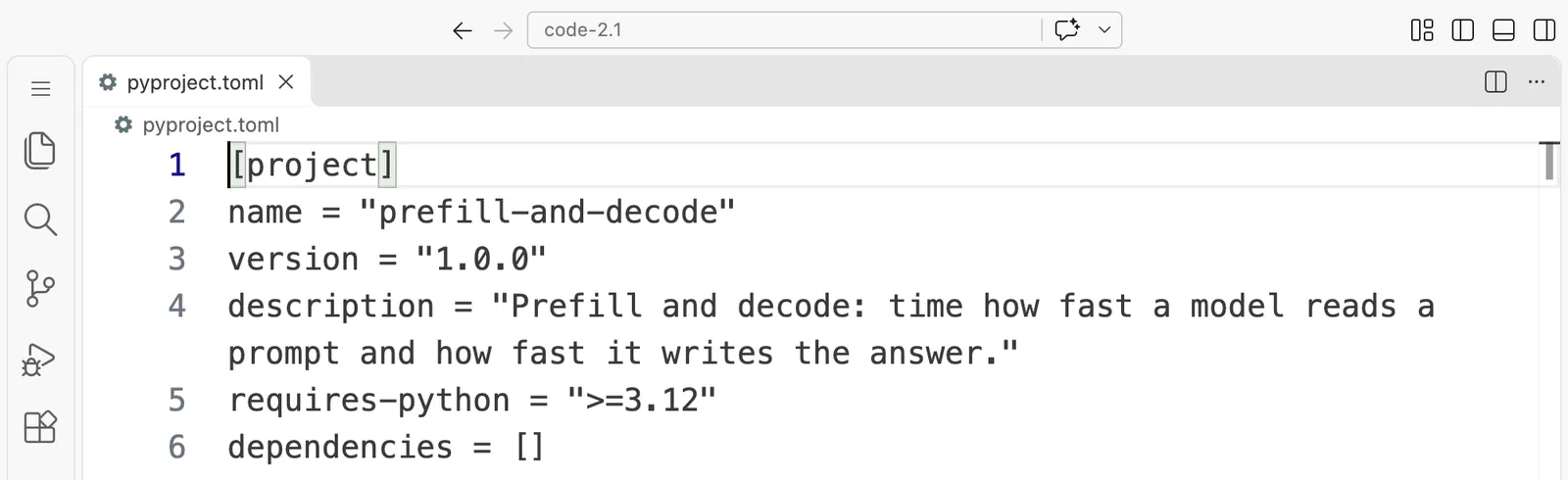
[project]
name = "prefill-and-decode"
version = "1.0.0"
description = "Prefill and decode: time how fast a model reads a prompt and how fast it writes the answer."
requires-python = ">=3.12"
dependencies = []
Now put the small model in a models folder here. If you did "Before you start" on this same pod, you already have it, and you can copy it instead of downloading it again:
mkdir -p models && cp ~/inference-lab/models/Qwen3-0.6B-Q8_0.gguf models/
If that says No such file, this pod does not have the folder from "Before you start"; that is fine. Download the model instead, which takes a few seconds on a pod:
hf download Qwen/Qwen3-0.6B-GGUF Qwen3-0.6B-Q8_0.gguf --local-dir models
Step 1: Start the model server
llama-server -m models/Qwen3-0.6B-Q8_0.gguf -c 4096 --port 8080 --reasoning off > server.log 2>&1 &
[1] 1709
This starts llama-server in the background (the & at the end) and sends its messages to the file server.log, so the terminal stays free. The settings mean: load this model file; keep room for conversations of up to 4,096 tokens (-c 4096); listen on port 8080; and switch off Qwen3's "thinking out loud", so answers stay short. The line it prints, [1] and a number, is the shell telling you the job number and process number of the server.
Wait a few seconds for the model to load, then ask the server whether it is ready:
curl -s http://127.0.0.1:8080/health
{"status":"ok"}
If it prints nothing at all, or {"error":{"code":503,"message":"Loading model"..., wait a few more seconds and run it again; if it never says ok, read the end of the server's log with tail server.log. Your prompt may appear on the same line, straight after {"status":"ok"}: that only means the reply had no line break at its end.
Now check that the model really is on the GPU. NVIDIA's nvidia-smi can print just the three facts we want:
nvidia-smi --query-gpu=name,memory.used,memory.total --format=csv
name, memory.used [MiB], memory.total [MiB]
NVIDIA GeForce RTX 4090, 1534 MiB, 24564 MiB

The GPU now holds 1534 MiB of its 24564 MiB. That is the model's 604 MiB of weights, the room the server keeps for conversations, and its working space. Everything the server does from here happens on the GPU.
Step 2: Time a short question
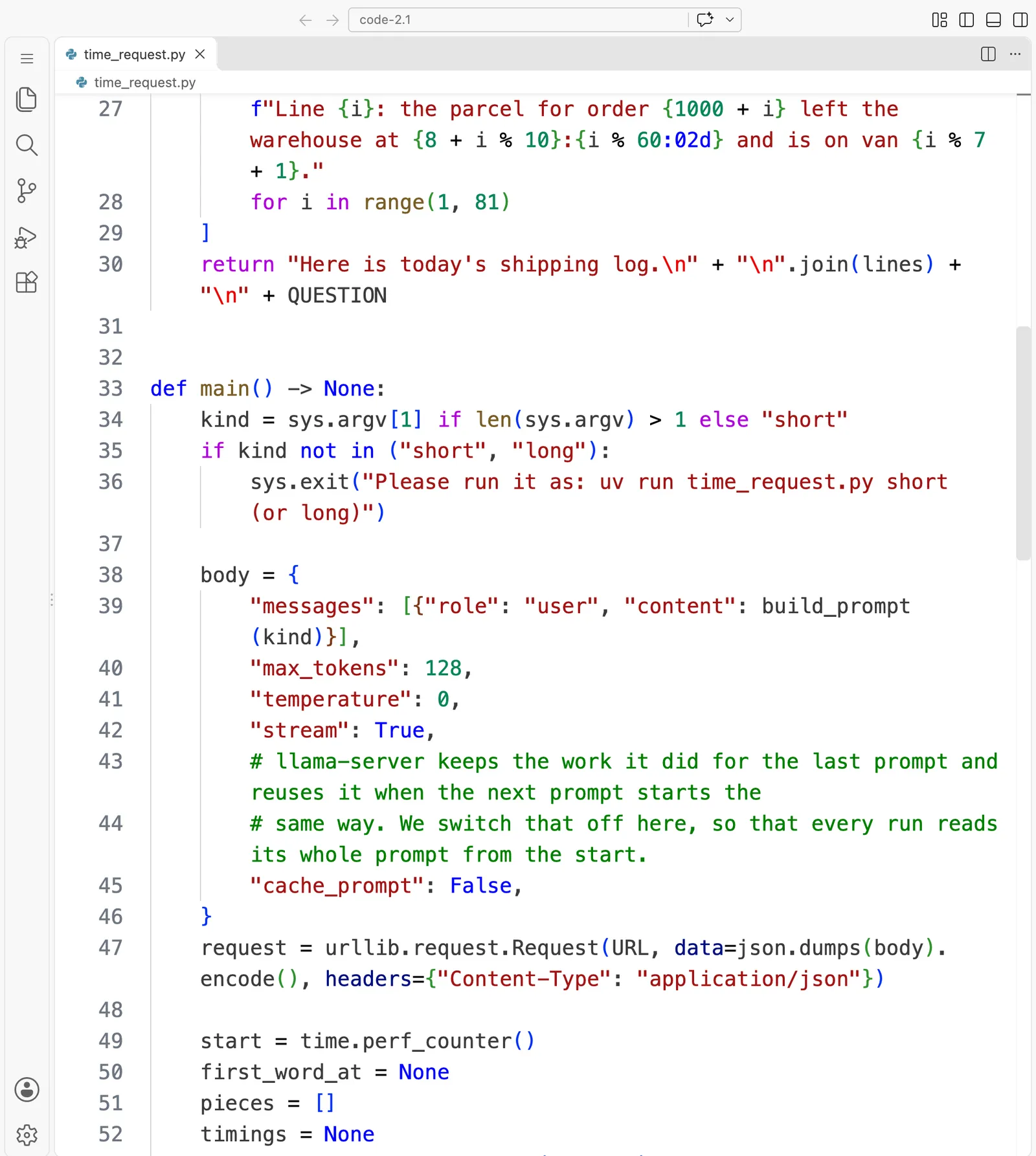
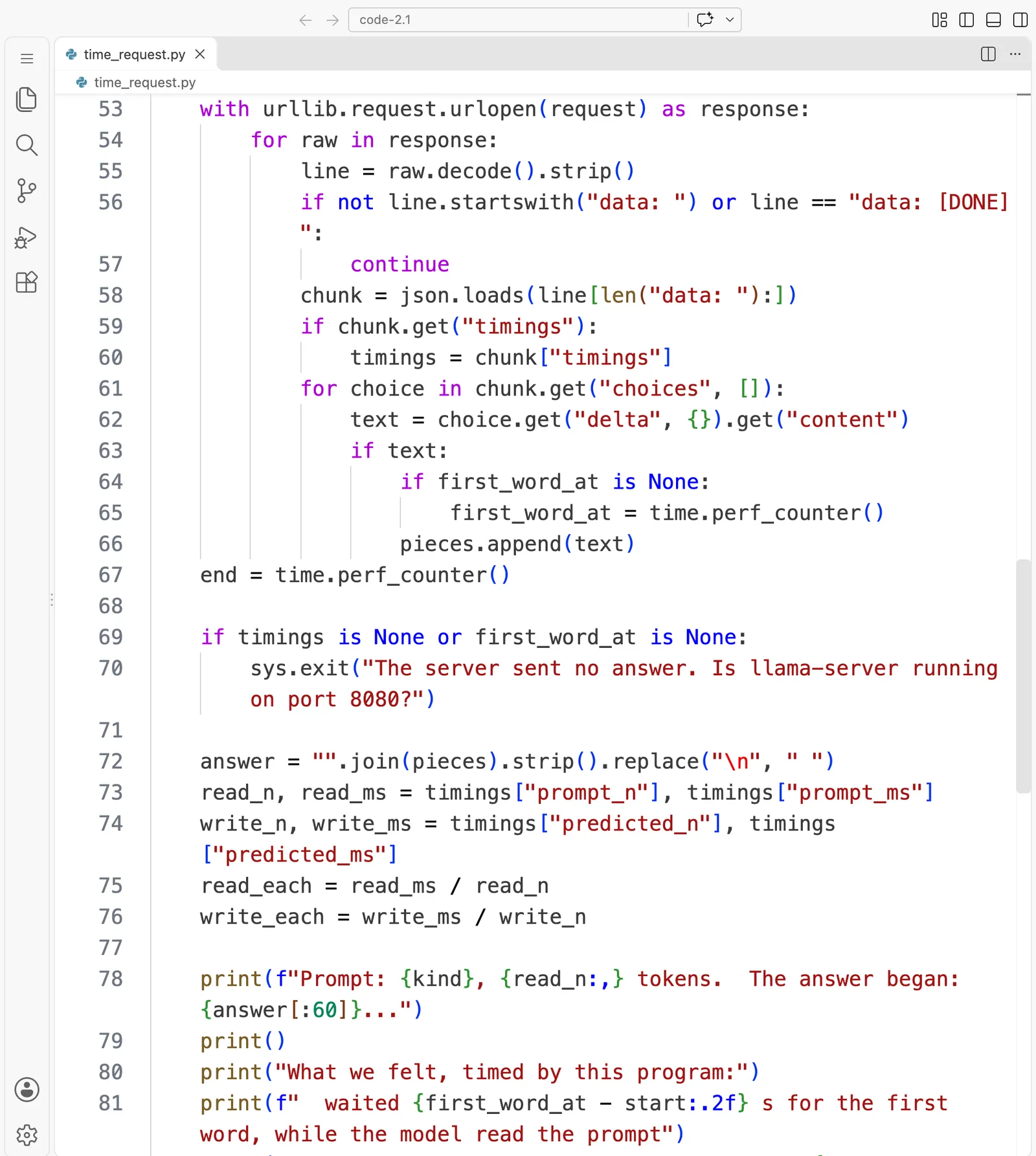
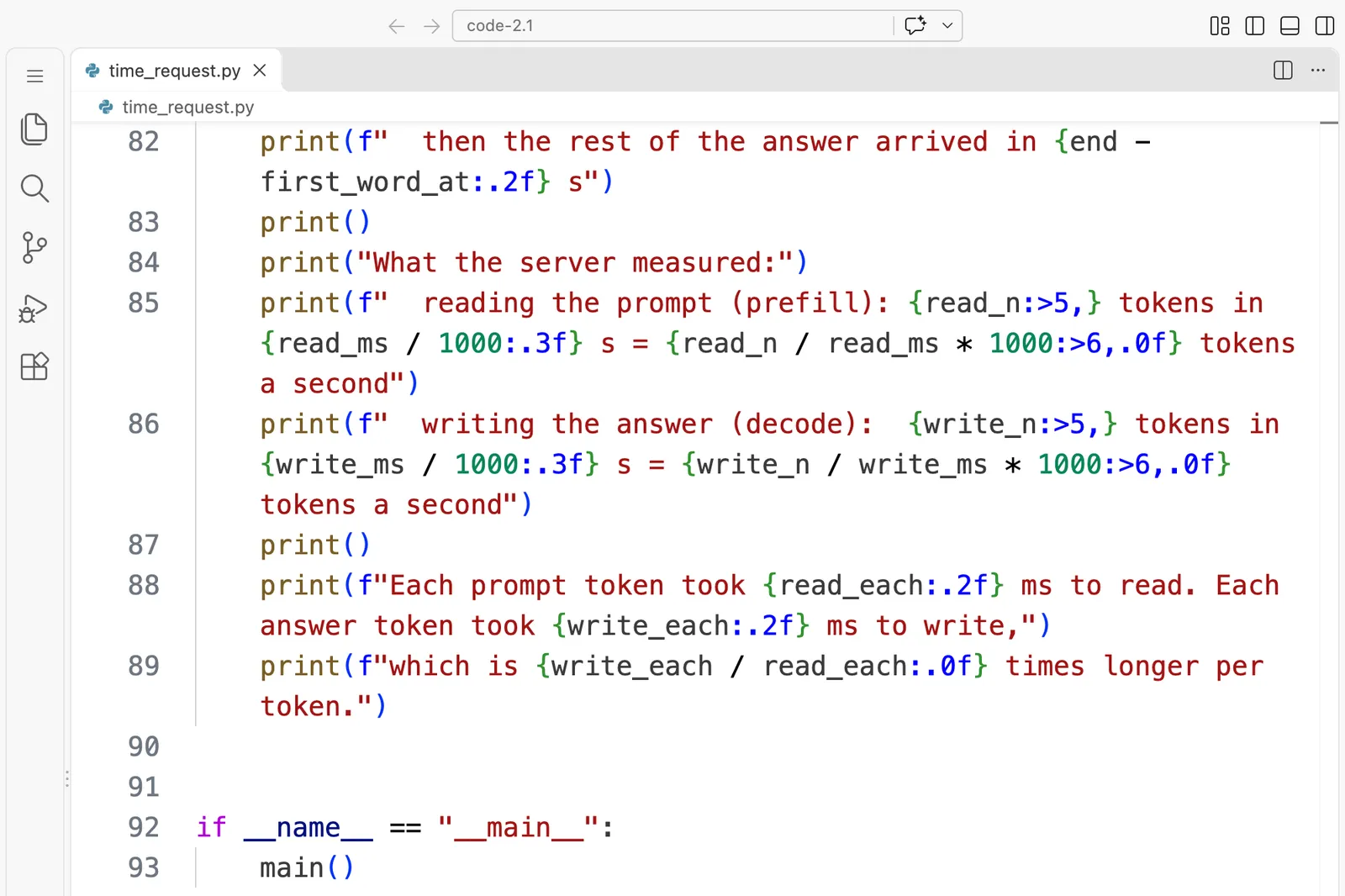
Here is the program. It builds a question, sends it to the server with streaming switched on, so the answer arrives token by token as it is written, and measures two things on its side: how long it waited for the first word, and how long the rest took. At the end it prints the server's own timings for the two halves, which the server includes in its last message.
time_request.py is 93 lines long. Here it is in VS Code, in 4 parts:
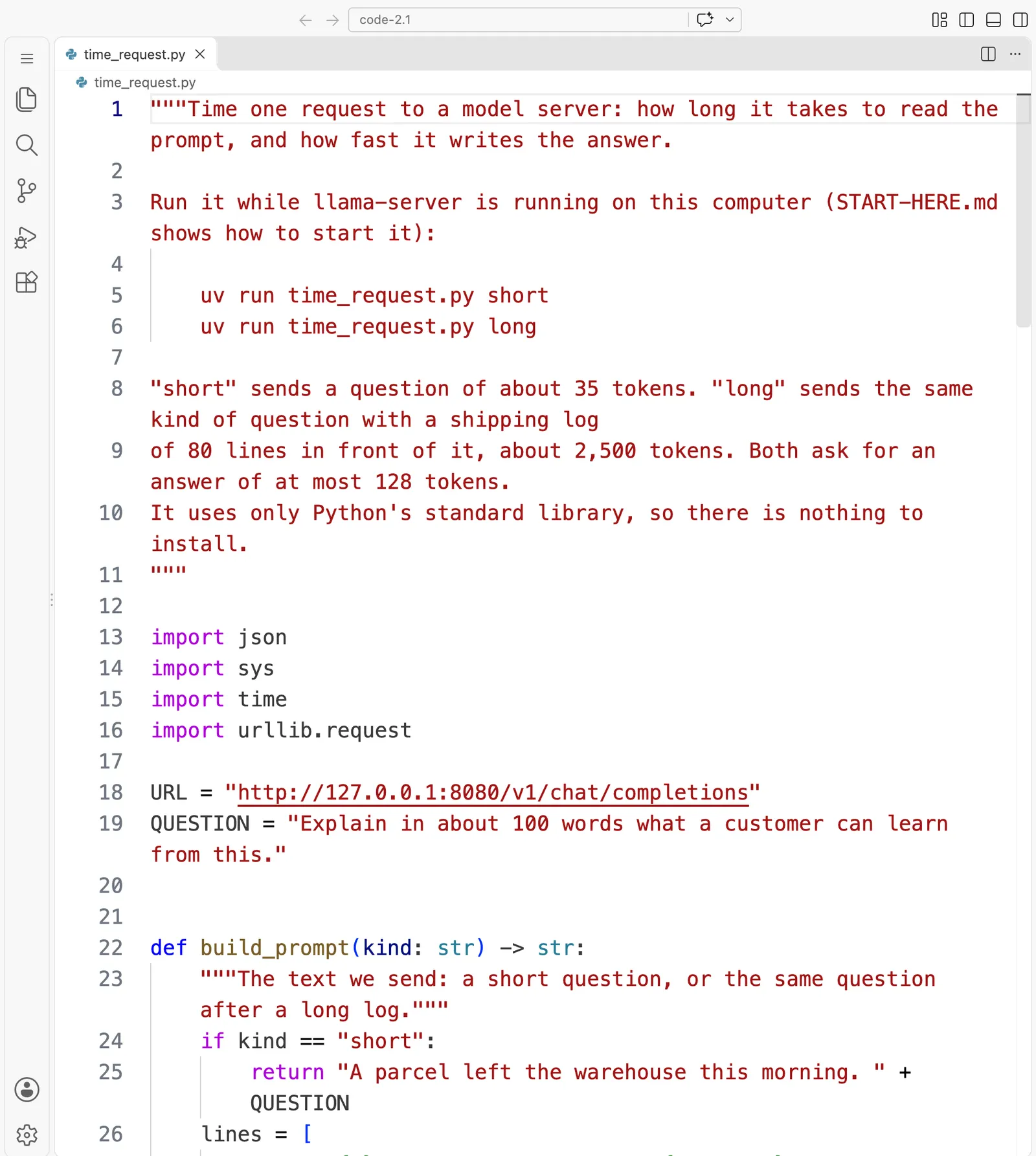
"""Time one request to a model server: how long it takes to read the prompt, and how fast it writes the answer.

Run it while llama-server is running on this computer (START-HERE.md shows how to start it):

    uv run time_request.py short
    uv run time_request.py long

"short" sends a question of about 35 tokens. "long" sends the same kind of question with a shipping log
of 80 lines in front of it, about 2,500 tokens. Both ask for an answer of at most 128 tokens.
It uses only Python's standard library, so there is nothing to install.
"""

import json
import sys
import time
import urllib.request

URL = "http://127.0.0.1:8080/v1/chat/completions"
QUESTION = "Explain in about 100 words what a customer can learn from this."


def build_prompt(kind: str) -> str:
    """The text we send: a short question, or the same question after a long log."""
    if kind == "short":
        return "A parcel left the warehouse this morning. " + QUESTION
    lines = [
        f"Line {i}: the parcel for order {1000 + i} left the warehouse at {8 + i % 10}:{i % 60:02d} and is on van {i % 7 + 1}."
        for i in range(1, 81)
    ]
    return "Here is today's shipping log.\n" + "\n".join(lines) + "\n" + QUESTION


def main() -> None:
    kind = sys.argv[1] if len(sys.argv) > 1 else "short"
    if kind not in ("short", "long"):
        sys.exit("Please run it as: uv run time_request.py short   (or long)")

    body = {
        "messages": [{"role": "user", "content": build_prompt(kind)}],
        "max_tokens": 128,
        "temperature": 0,
        "stream": True,
        # llama-server keeps the work it did for the last prompt and reuses it when the next prompt starts the
        # same way. We switch that off here, so that every run reads its whole prompt from the start.
        "cache_prompt": False,
    }
    request = urllib.request.Request(URL, data=json.dumps(body).encode(), headers={"Content-Type": "application/json"})

    start = time.perf_counter()
    first_word_at = None
    pieces = []
    timings = None
    with urllib.request.urlopen(request) as response:
        for raw in response:
            line = raw.decode().strip()
            if not line.startswith("data: ") or line == "data: [DONE]":
                continue
            chunk = json.loads(line[len("data: "):])
            if chunk.get("timings"):
                timings = chunk["timings"]
            for choice in chunk.get("choices", []):
                text = choice.get("delta", {}).get("content")
                if text:
                    if first_word_at is None:
                        first_word_at = time.perf_counter()
                    pieces.append(text)
    end = time.perf_counter()

    if timings is None or first_word_at is None:
        sys.exit("The server sent no answer. Is llama-server running on port 8080?")

    answer = "".join(pieces).strip().replace("\n", " ")
    read_n, read_ms = timings["prompt_n"], timings["prompt_ms"]
    write_n, write_ms = timings["predicted_n"], timings["predicted_ms"]
    read_each = read_ms / read_n
    write_each = write_ms / write_n

    print(f"Prompt: {kind}, {read_n:,} tokens.  The answer began: {answer[:60]}...")
    print()
    print("What we felt, timed by this program:")
    print(f"  waited {first_word_at - start:.2f} s for the first word, while the model read the prompt")
    print(f"  then the rest of the answer arrived in {end - first_word_at:.2f} s")
    print()
    print("What the server measured:")
    print(f"  reading the prompt (prefill): {read_n:>5,} tokens in {read_ms / 1000:.3f} s = {read_n / read_ms * 1000:>6,.0f} tokens a second")
    print(f"  writing the answer (decode):  {write_n:>5,} tokens in {write_ms / 1000:.3f} s = {write_n / write_ms * 1000:>6,.0f} tokens a second")
    print()
    print(f"Each prompt token took {read_each:.2f} ms to read. Each answer token took {write_each:.2f} ms to write,")
    print(f"which is {write_each / read_each:.0f} times longer per token.")


if __name__ == "__main__":
    main()
Three details are worth knowing before you run it:
"temperature": 0makes the model always pick its most likely next token, so your answer should start the same way as ours."cache_prompt": Falseasks llama-server not to reuse work from the previous question. Without it, the long question's second run would skip most of its reading, and you would be timing the cache. The page "The KV cache" uses that cache on purpose.- The program uses only Python's standard library, so
uv runsimply starts it with the Python versionpyproject.tomlasks for.
Now run it with a short question:
uv run time_request.py short
Using CPython 3.12.3 interpreter at: /usr/local/bin/python
Creating virtual environment at: .venv
Prompt: short, 36 tokens.  The answer began: A customer can learn that the parcel was delivered this morn...

What we felt, timed by this program:
  waited 0.07 s for the first word, while the model read the prompt
  then the rest of the answer arrived in 0.15 s

What the server measured:
  reading the prompt (prefill):    36 tokens in 0.038 s =    938 tokens a second
  writing the answer (decode):     63 tokens in 0.148 s =    427 tokens a second

Each prompt token took 1.07 ms to read. Each answer token took 2.34 ms to write,
which is 2 times longer per token.
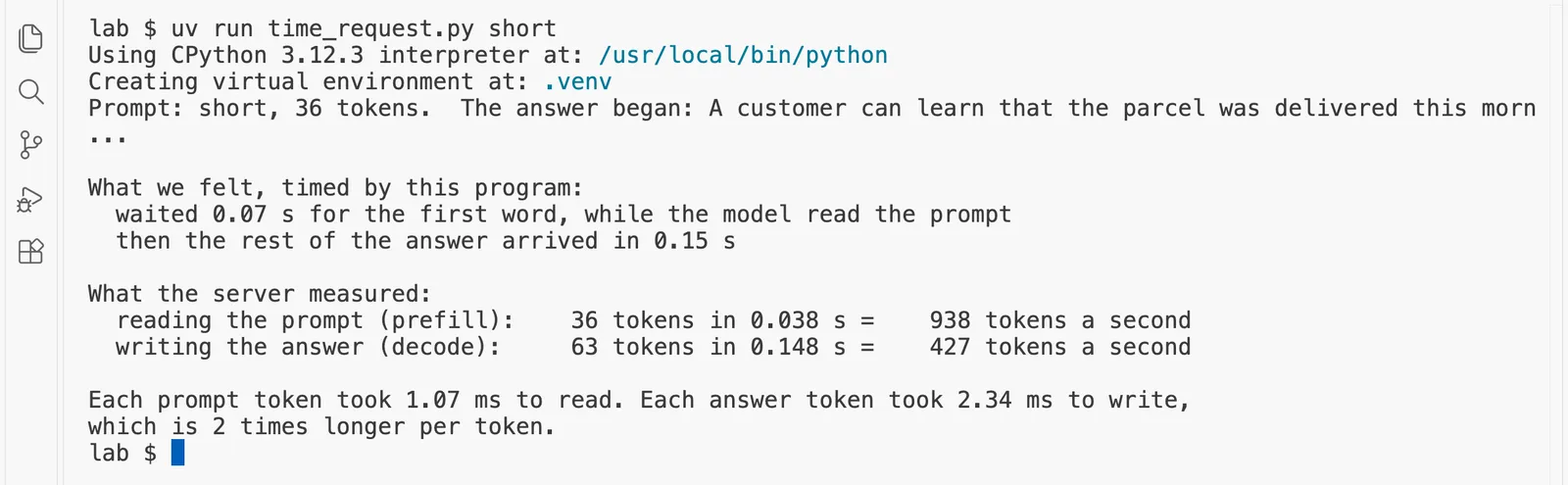
The first two lines from uv appear only the first time, while it creates a small environment for the program. Then read the rest:
- The question was 36 tokens. The server read them in 0.038 seconds, about 1.07 milliseconds each.
- It wrote 63 answer tokens in 0.148 seconds, about 2.34 milliseconds each.
- So each answer token took about 2 times longer than each question token, on the same GPU, a moment apart.
With a question this short, the wait for the first word was only 0.07 seconds, and only about half of it, 0.038 seconds, was the model reading; the rest was the first writing step and the request's trip through the server. Thirty-six tokens are far too few to keep an RTX 4090 busy, which is why reading and writing look so close here. The long question shows the real gap.
Step 3: Time a long question
The long question is the same question with the shipping log of eighty lines in front of it:
uv run time_request.py long
Prompt: long, 2,491 tokens.  The answer began: From the shipping log, you can see that each parcel is assig...

What we felt, timed by this program:
  waited 0.12 s for the first word, while the model read the prompt
  then the rest of the answer arrived in 0.16 s

What the server measured:
  reading the prompt (prefill): 2,491 tokens in 0.067 s = 37,023 tokens a second
  writing the answer (decode):     69 tokens in 0.162 s =    427 tokens a second

Each prompt token took 0.03 ms to read. Each answer token took 2.34 ms to write,
which is 87 times longer per token.
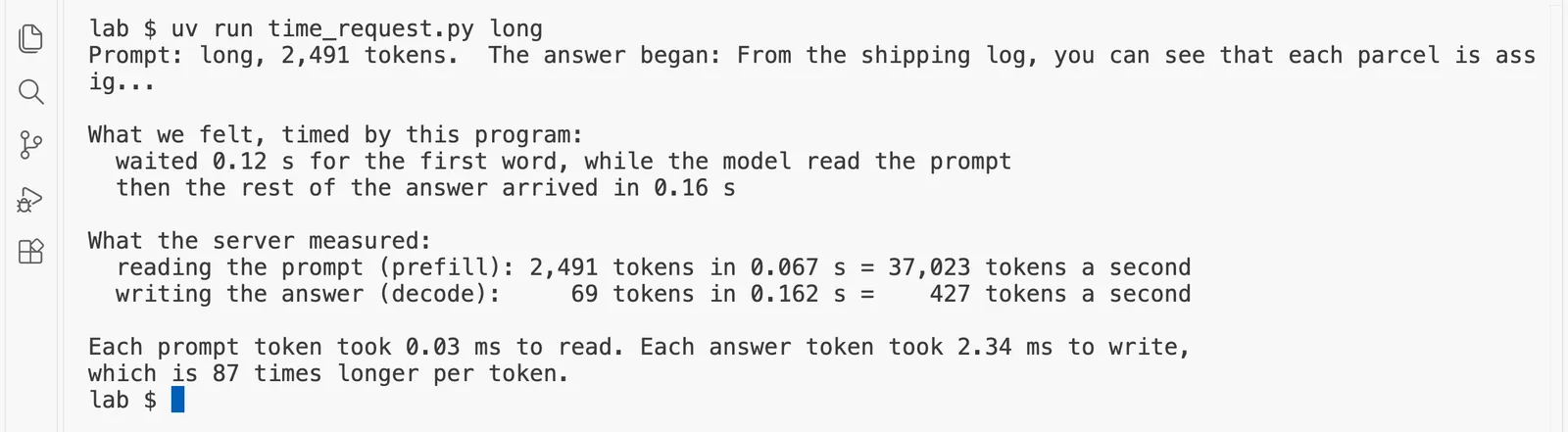
Now compare the two runs.
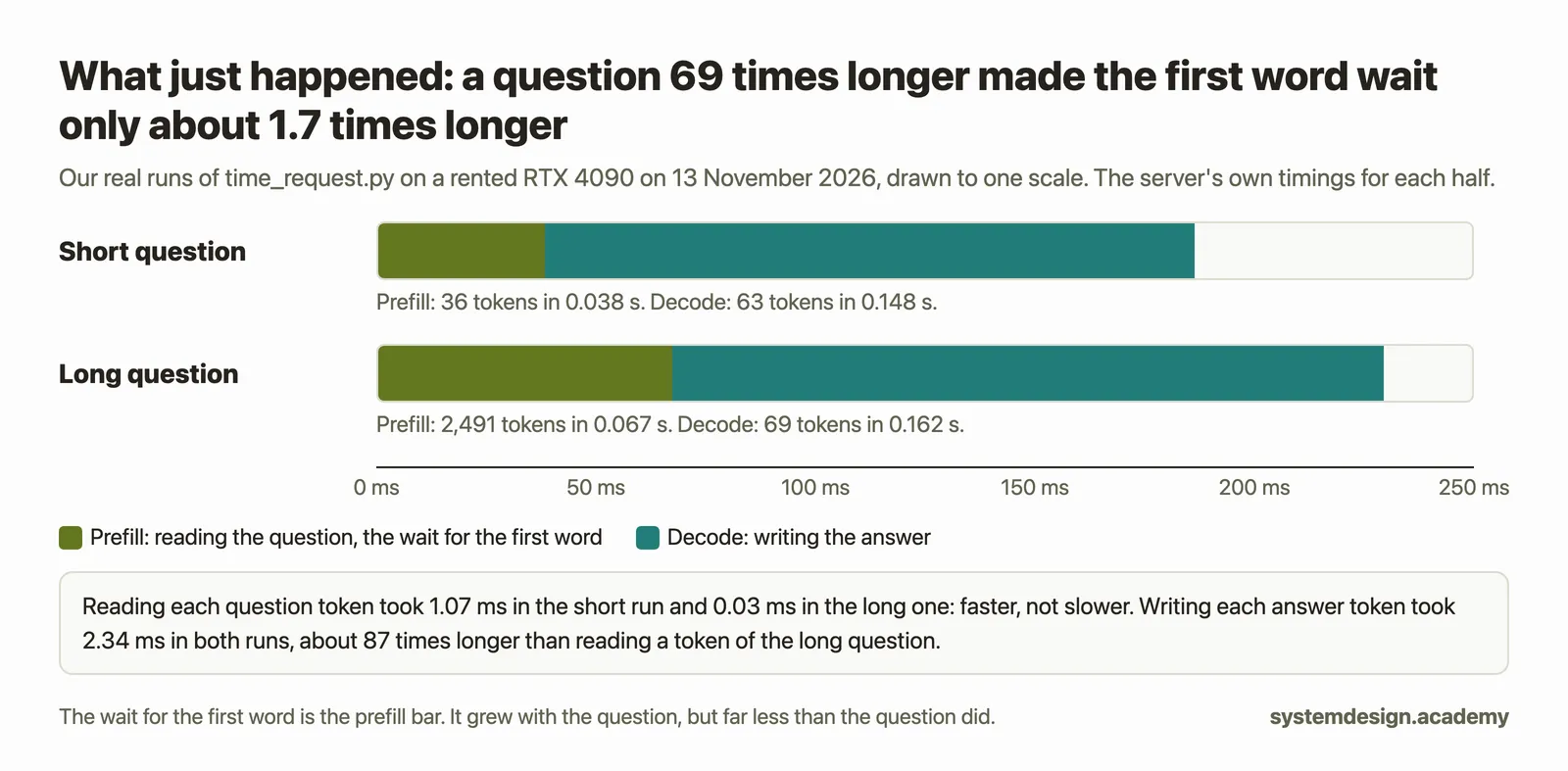
- The question was about 69 times longer, but the wait for the first word grew only about 1.7 times, from 0.07 to 0.12 seconds. The server read all 2,491 tokens in 0.067 seconds. That is prefill, and it is the delay the support agents complained about; on this small model and this GPU it is still short, and with a model a hundred times larger it grows to the seconds they saw.
- Reading each token did not get slower; it got much faster: 1.07 milliseconds each for the short question, 0.03 for the long one. With more tokens sharing each walk through the weights, the GPU's arithmetic units were kept busy instead of waiting, so each token cost far less.
- Writing each answer token stayed far slower than reading: about 87 times slower per token for the long question, 2.34 milliseconds for each answer token against 0.03 for each question token. Writing took the same 2.34 milliseconds a token in both runs: a conversation of 2,500 tokens is still too short to slow this small model down on this GPU. The page "The KV cache" measures where that starts to change.
When you are done with the server, stop it, so the speed tests below have the GPU to themselves:
kill %1
%1 means "job number 1 in this terminal", the server you started in the background. If your terminal says no such job, you started the server in a different terminal window; run pkill llama-server instead.
Predict, then measure
llama-bench now times the small model reading a 256-token prompt and writing 128 tokens on the RTX 4090. How do the two speeds per token compare?
The measured result appears once you lock in. Only your first answer counts toward your progress.
Step 4: Measure both halves with llama-bench
time_request.py measured one real request, with all the small costs a real request has. llama-bench measures the two halves on their own, many times over, and reports the average and the spread:
llama-bench -m models/Qwen3-0.6B-Q8_0.gguf -p 256 -n 128 2>/dev/null
The settings mean: test the reading speed with a prompt of 256 tokens (-p 256), and the writing speed with an answer of 128 tokens (-n 128). Each test runs five times. The 2>/dev/null at the end hides the start-up messages llama.cpp prints about the GPU, so only the table is left.
| model                          |       size |     params | backend    | ngl |            test |                  t/s |
| ------------------------------ | ---------: | ---------: | ---------- | --: | --------------: | -------------------: |
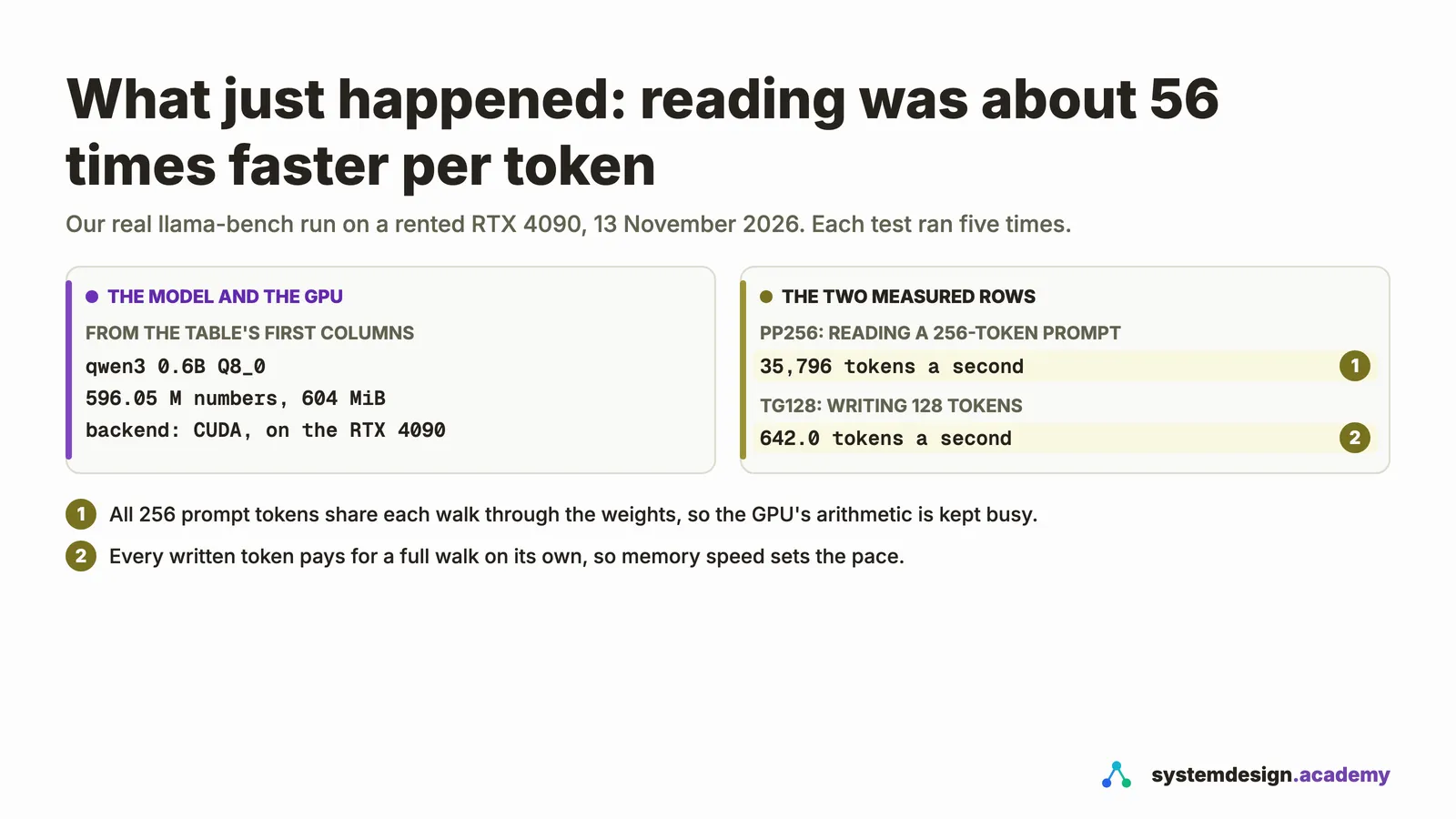
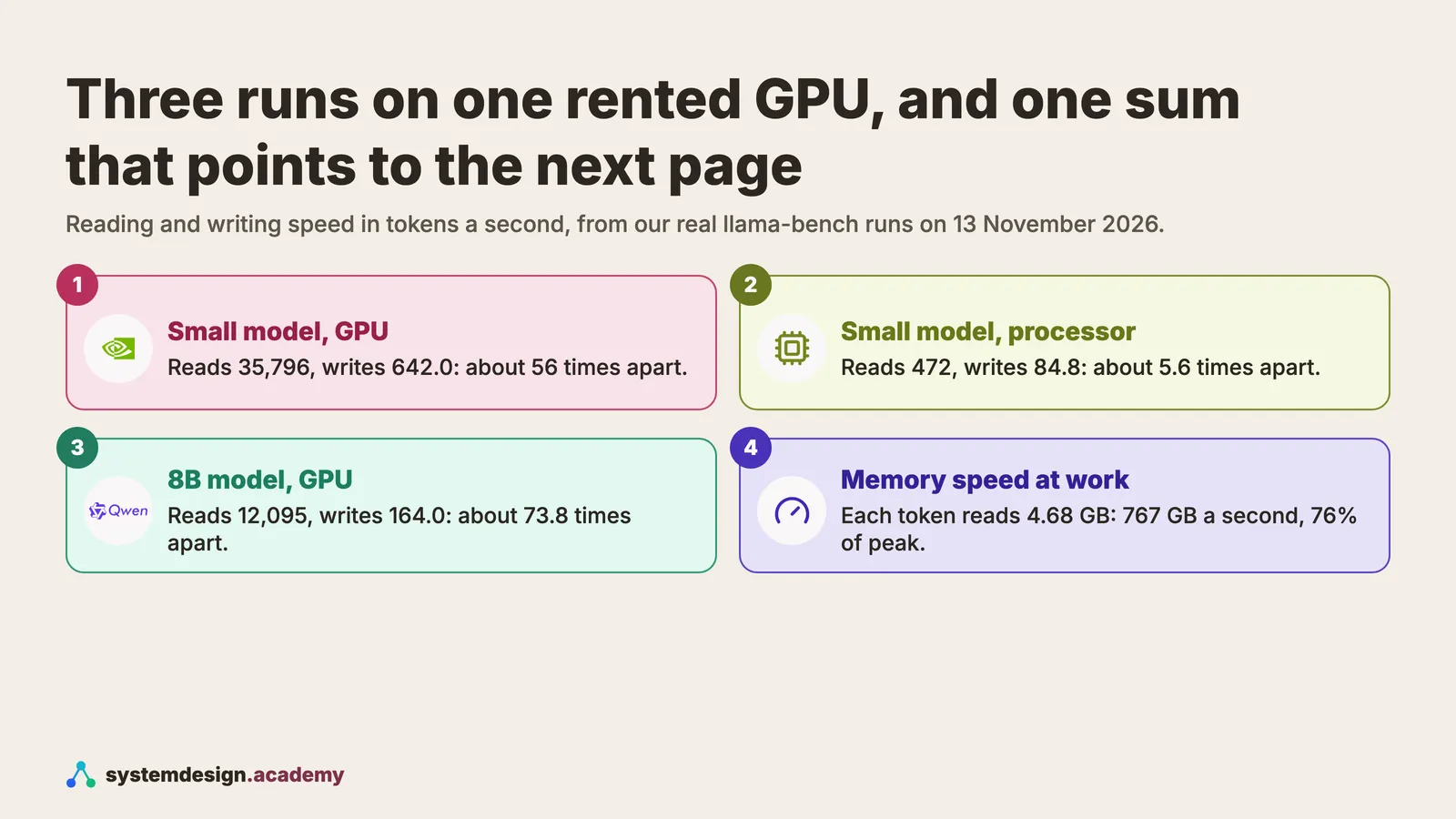
| qwen3 0.6B Q8_0                | 604.15 MiB |   596.05 M | CUDA       |  -1 |           pp256 |   35795.52 ± 7784.54 |
| qwen3 0.6B Q8_0                | 604.15 MiB |   596.05 M | CUDA       |  -1 |           tg128 |       641.99 ± 10.19 |

build: cd959bae9 (12110)
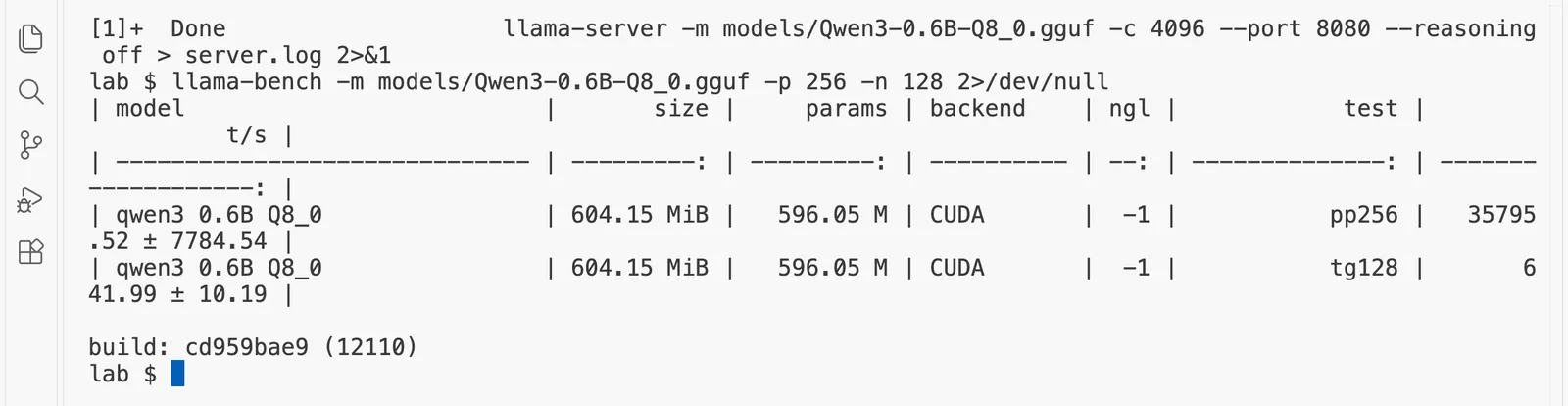
The table has one row per test:
pp256is prompt processing with 256 tokens: prefill. Ours read 35,796 tokens a second.tg128is text generation of 128 tokens: decode. Ours wrote 642.0 tokens a second.- The number after
±is how much the five runs varied. Reading varied by about a fifth here, because 256 tokens are read in about seven thousandths of a second, so tiny delays matter; writing hardly varied at all.
So on the RTX 4090, the model read about 56 times faster per token than it wrote. Most people expect the opposite, and you have just measured it yourself. The size and params columns are worth a look too: the model has 596.05 M numbers (596 million), and they take 604 MiB of its 610 MiB file; the rest is the tokenizer's list of pieces and the model's settings.
Step 5: Measure them again on the processor alone
Now run the same test with the GPU left out, so everything runs on the pod's processor cores:
llama-bench -m models/Qwen3-0.6B-Q8_0.gguf -p 256 -n 128 -ngl 0 -nopo 1 -t 12 2>/dev/null
Before you copy the command, change 12 after -t to your own pod's number of virtual processors, which RunPod's page for your pod shows as "vCPU".
-ngl 0 puts none of the model's layers on the GPU, and -nopo 1 stops llama.cpp from sending the big reading step to the GPU anyway, which it otherwise does to help. -t 12 uses 12 processor threads, because our pod had 12 vCPUs. Without -t, llama.cpp counts every core of the whole server machine, which other people's pods share, and starts far too many threads. In the table, the backend column still says CUDA, because it names how llama.cpp was built; the ngl column, 0 here, shows that no layer ran on the GPU.
| model                          |       size |     params | backend    | ngl | threads | nopo |            test |                  t/s |
| ------------------------------ | ---------: | ---------: | ---------- | --: | ------: | ---: | --------------: | -------------------: |
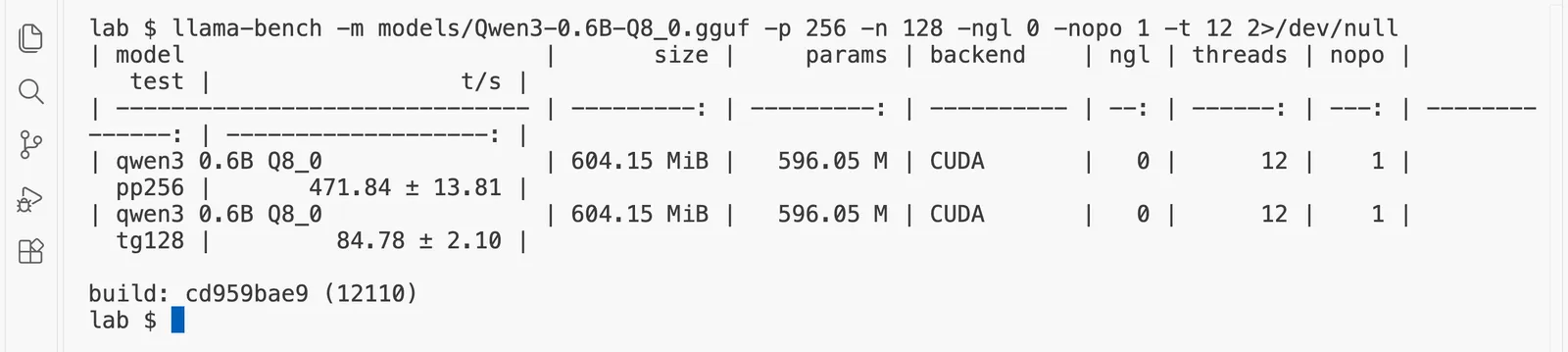
| qwen3 0.6B Q8_0                | 604.15 MiB |   596.05 M | CUDA       |   0 |      12 |    1 |           pp256 |       471.84 ± 13.81 |
| qwen3 0.6B Q8_0                | 604.15 MiB |   596.05 M | CUDA       |   0 |      12 |    1 |           tg128 |         84.78 ± 2.10 |

build: cd959bae9 (12110)
Compare it with the GPU run:
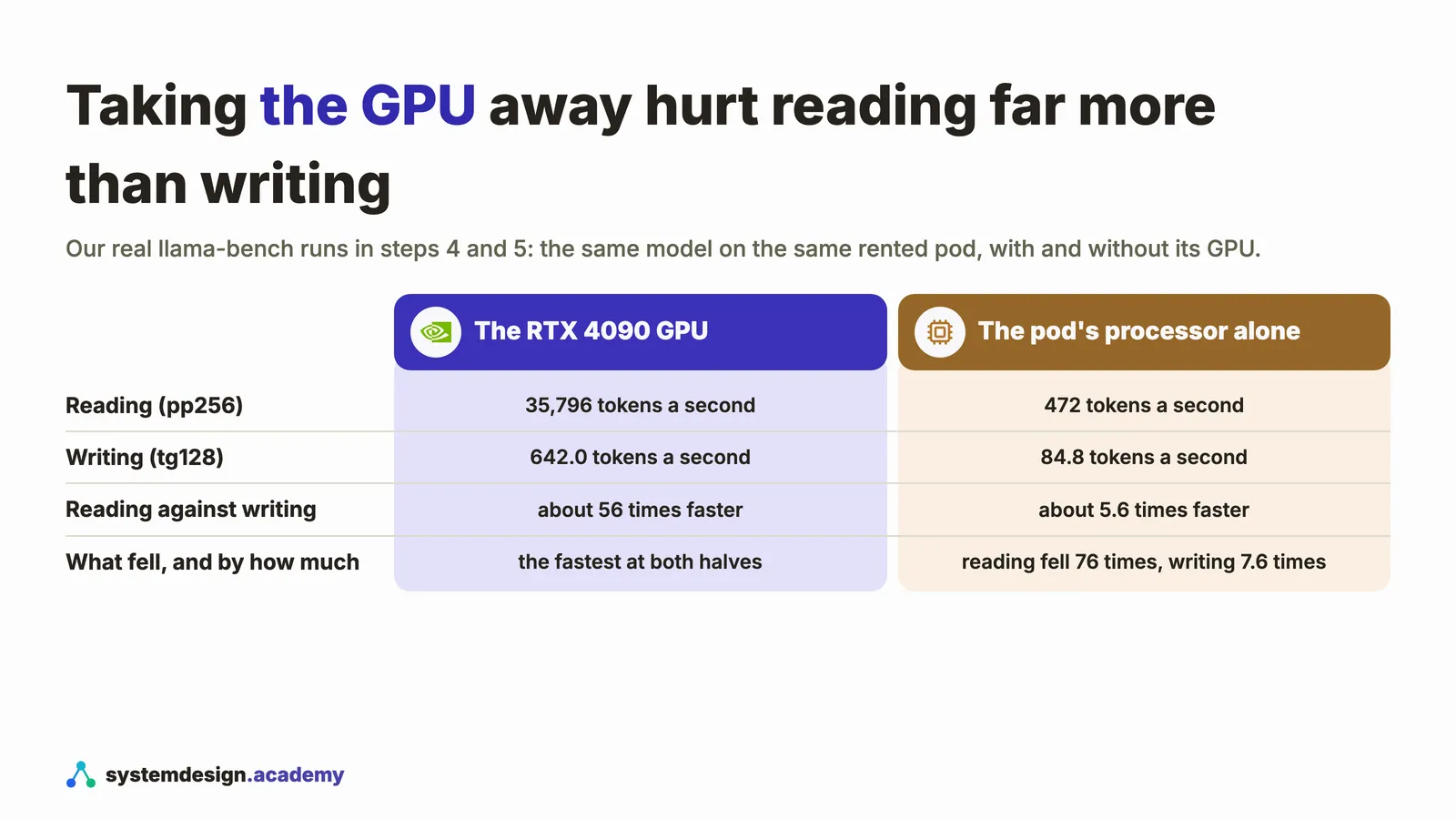
- Reading fell about 76 times, from 35,796 to 472 tokens a second. Reading is limited by arithmetic, and the GPU does far more arithmetic per second than the processor's cores.
- Writing fell much less, about 7.6 times, from 642.0 to 84.8 tokens a second. On the processor, writing waits on the pod's ordinary memory, which is much slower than the GPU's own memory, so it did fall; but it fell about ten times less than reading did.
- So the gap between the halves shrank from about 56 times to about 5.6 times.
On the GPU, a model this small does not even keep the memory busy: 642.0 tokens a second of 604 MiB each is about 407 GB a second, about 40% of what the card can read, because each step also has fixed costs that do not depend on size. Step 7 shows the memory limit cleanly, with a bigger model.
This is strong evidence that the two halves are limited by different things. Take away arithmetic power, and the half that needs arithmetic suffers most. It is also why GPUs, with their enormous arithmetic power, make the gap between prefill and decode so wide.
Predict, then measure
Now 32 people share the GPU instead of one. What happens to the total writing speed, and to each person's own speed?
The measured result appears once you lock in. Only your first answer counts toward your progress.
Step 6: A first look at many people at once
If decode spends its time walking the shelves for a single token, an obvious idea follows: take several people's next tokens on the same walk. That is batching, and llama-batched-bench measures it. It gives several people the same size of question and answer at once and reports the totals:
llama-batched-bench -m models/Qwen3-0.6B-Q8_0.gguf -c 16384 -npp 256 -ntg 128 -npl 1,4,8,32 2>/dev/null
The settings mean: each person sends a 256-token question (-npp 256) and gets a 128-token answer (-ntg 128); try 1, 4, 8 and 32 people at once (-npl 1,4,8,32); and keep room for all of their conversations together (-c 16384).
llama_batched_bench: n_kv_max = 16384, n_batch = 2048, n_ubatch = 512, flash_attn = -1, is_pp_shared = 0, is_tg_separate = 0, n_gpu_layers = -1, n_threads = 48, n_threads_batch = 48

|    PP |     TG |    B |   N_KV |   T_PP s | S_PP t/s |   T_TG s | S_TG t/s |      T s |    S t/s |
|-------|--------|------|--------|----------|----------|----------|----------|----------|----------|
|   256 |    128 |    1 |    384 |    0.033 |  7713.17 |    0.218 |   586.10 |    0.252 |  1526.35 |
|   256 |    128 |    4 |   1536 |    0.019 | 53026.77 |    0.289 |  1772.08 |    0.308 |  4983.18 |
|   256 |    128 |    8 |   3072 |    0.038 | 53591.52 |    0.395 |  2589.63 |    0.434 |  7084.23 |
|   256 |    128 |   32 |  12288 |    0.127 | 64543.07 |    0.844 |  4853.91 |    0.971 | 12657.88 |
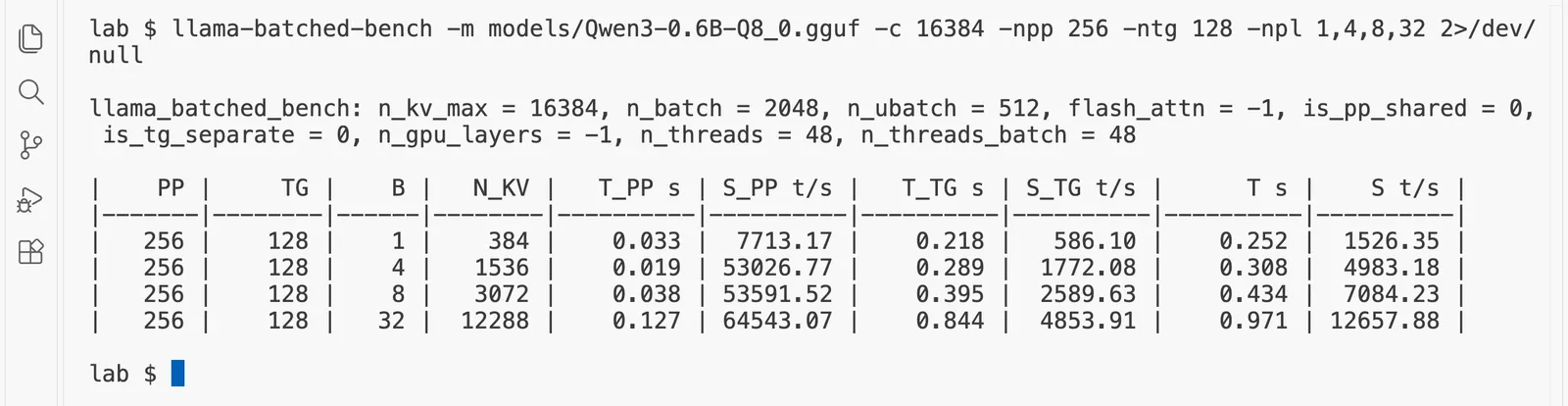
The columns to read are B, the number of people at once, and S_TG t/s, the total writing speed for all of them together.
- With 1 person, the GPU wrote 586 tokens a second.
- With 32 people, it wrote 4,854 tokens a second in total: about 8.3 times more, on the same GPU.
- But each person's own speed fell, to 4,854 ÷ 32 = about 152 tokens a second, about 3.9 times slower than when they had the GPU to themselves.
(One person wrote 586 tokens a second here and 642.0 in step 4. The two tools time slightly different jobs, so compare rows inside one table, not numbers across tools.)
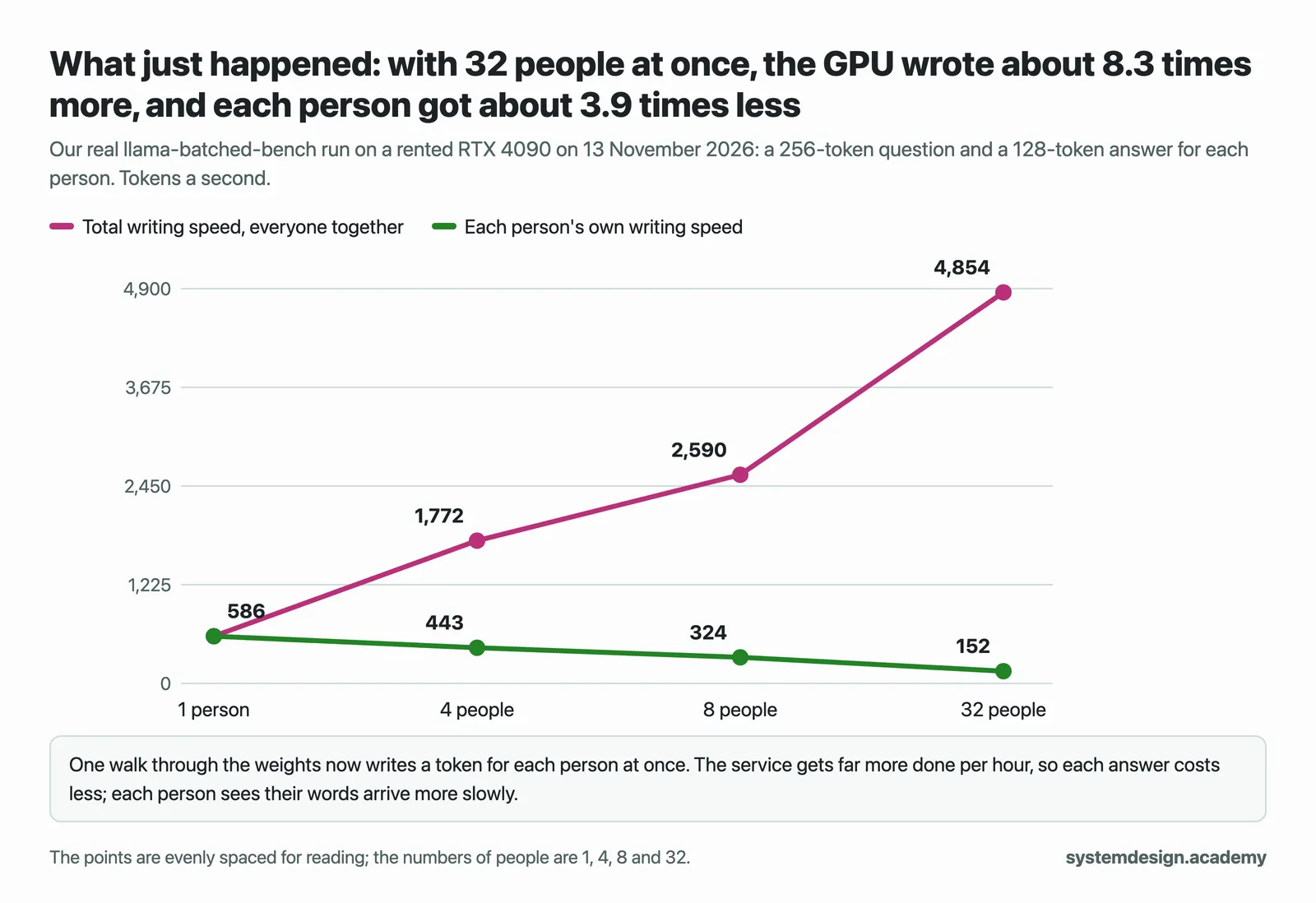
That is the central trade-off of serving, and it comes straight from the two halves. Decode left the GPU's arithmetic mostly idle while it walked the memory, so sharing one walk among many people is almost free at first. The service gets much more done per hour, and since a GPU is rented by the hour, the cost of each answer falls. The cost is that each person waits longer for each word. How to choose the right balance is the subject of "Batching: serving many people at once"; how a server like vLLM does it continuously, adding and removing people between steps, is the subject of "The vLLM scheduler".
Step 7: The same test on a bigger model
Qwen3-8B has about 8 billion numbers, nearly fourteen times as many as the small model; this copy stores each in about 4.9 bits on average (the Q4_K_M format, which mixes 4-bit and 6-bit blocks), so the file is 4.68 GiB. On a pod the download takes under a minute:
hf download Qwen/Qwen3-8B-GGUF Qwen3-8B-Q4_K_M.gguf --local-dir models
Warning: You are sending unauthenticated requests to the HF Hub. Please set a HF_TOKEN to enable higher rate limits and faster downloads.

Qwen3-8B-Q4_K_M.gguf: downloading bytes:                                            |  648kB
Qwen3-8B-Q4_K_M.gguf: downloading bytes:                                            | 8.32MB,  215kB/s
Qwen3-8B-Q4_K_M.gguf: downloading bytes: ██▊                                        |  322MB, 27.5MB/s
Qwen3-8B-Q4_K_M.gguf: downloading bytes: ███████████▍                               | 1.34GB,  106MB/s
Qwen3-8B-Q4_K_M.gguf: downloading bytes: █████████████████████▊                     | 2.55GB,  181MB/s
Qwen3-8B-Q4_K_M.gguf: reconstructing file:  13%|███▍                       |  650MB / 5.03GB, 6.20MB/s
Qwen3-8B-Q4_K_M.gguf: downloading bytes: ███████████████████████                    | 2.70GB,  190MB/s
Qwen3-8B-Q4_K_M.gguf: downloading bytes: ███████████████████████████████▏           | 3.65GB,  247MB/s
Qwen3-8B-Q4_K_M.gguf: downloading bytes: ████████████████████████████████████████▋  | 4.76GB,  275MB/s
Qwen3-8B-Q4_K_M.gguf: downloading bytes: ██████████████████████████████████████████▍| 4.96GB,  209MB/s
Qwen3-8B-Q4_K_M.gguf: downloading bytes: ██████████████████████████████████████████▋| 4.99GB,  197MB/s
Qwen3-8B-Q4_K_M.gguf: downloading bytes: ██████████████████████████████████████████▋| 5.00GB,  194MB/s
Qwen3-8B-Q4_K_M.gguf: downloading bytes: ██████████████████████████████████████████▉| 5.02GB,  185MB/s
Qwen3-8B-Q4_K_M.gguf: downloading bytes: ███████████████████████████████████████████| 5.02GB,  183MB/s
Qwen3-8B-Q4_K_M.gguf: reconstructing file: 100%|███████████████████████████| 5.03GB / 5.03GB,  310MB/s
✓ Downloaded
  path: /root/lesson-2.1/lab/models/Qwen3-8B-Q4_K_M.gguf
llama-bench -m models/Qwen3-8B-Q4_K_M.gguf -p 512 -n 128 2>/dev/null
| model                          |       size |     params | backend    | ngl |            test |                  t/s |
| ------------------------------ | ---------: | ---------: | ---------- | --: | --------------: | -------------------: |
| qwen3 8B Q4_K - Medium         |   4.68 GiB |     8.19 B | CUDA       |  -1 |           pp512 |    12095.21 ± 406.06 |
| qwen3 8B Q4_K - Medium         |   4.68 GiB |     8.19 B | CUDA       |  -1 |           tg128 |        163.99 ± 0.36 |

build: cd959bae9 (12110)
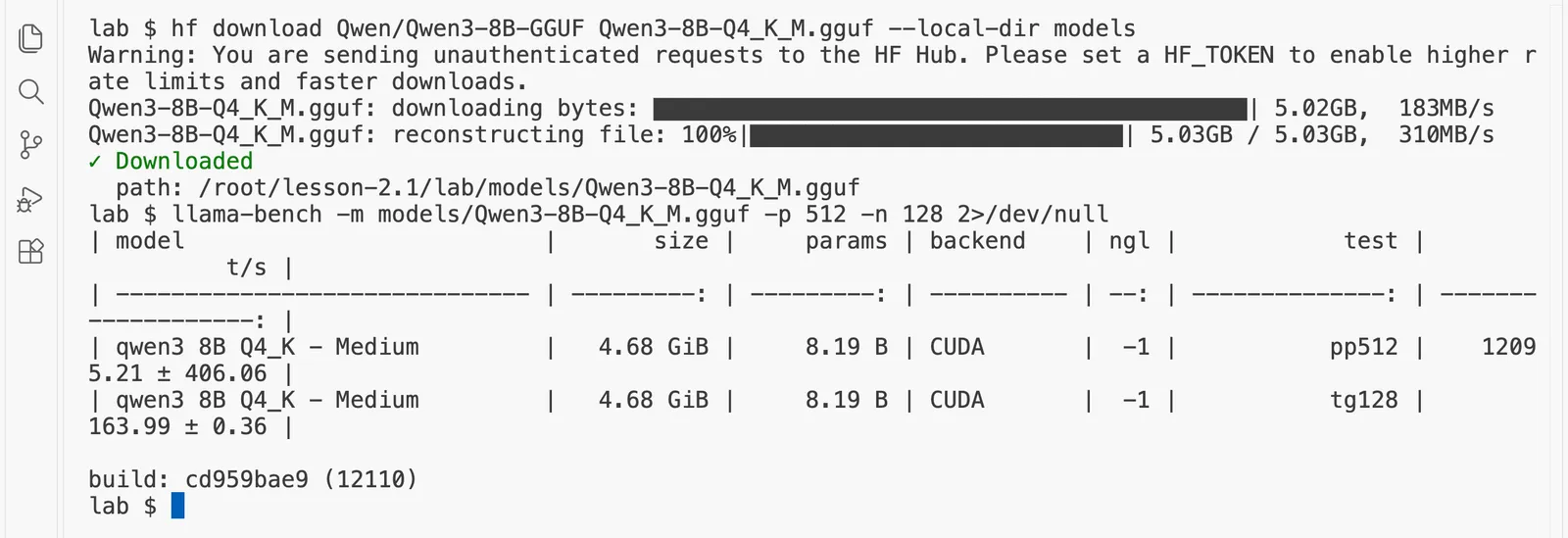
The bigger model read 12,095 tokens a second and wrote 164.0 tokens a second, so reading was about 73.8 times faster per token. Both halves are slower than with the small model, because every walk passes many more shelves.
Here is a sum that points to the next page. Every token written means one walk through almost all of the file's 5.03 GB. (llama-bench's table shows the same file as 4.68 GiB: a GiB, a gibibyte, is 1,073,741,824 bytes, a little more than a billion.) Not quite all: the table that turns tokens into numbers takes 0.35 GB of the file, and only one row of it is read for each token. So each token reads about 4.68 GB, which only happens to look like the 4.68 GiB above, and at 164.0 tokens a second the GPU read about 767 GB of weights every second. NVIDIA's own specification gives the RTX 4090's memory speed as 1,008 GB a second. So while writing, the GPU was reading its memory at about 76% of the fastest it can. Writing is limited by memory speed, and you have just measured it with arithmetic you could do on paper. "Why writing is limited by memory speed" takes this further.
Switch the GPU off
If you want to try knowledge check question 3, do it now, before you switch off. Keep the pod only if you are going straight on to "The KV cache": it uses the same tools and both model files. If you are taking a break, switch it off now; stopping a pod wipes its disk anyway, so there is nothing to save by leaving it. Type exit to leave the pod, then in RunPod's "Pods" page choose "Stop" and then "Terminate", and check that no pods are listed. A pod keeps billing every second until it is stopped.
If something goes wrong
Connection refusedfromtime_request.pyorcurl. The server is not running or not ready yet. Runcurl -s http://127.0.0.1:8080/healthuntil it says ok. If it never does, read the end ofserver.logwithtail server.log.address already in use. Another server is already on port 8080, perhaps from an earlier try. Stop it withpkill llama-serverand start again.- Your numbers are much lower than ours. Check that
nvidia-sminames the GPU you expected, and thatllama-benchprintsCUDAin its backend column; if it does not, the CUDA build of llama.cpp is not the one on your path. A different GPU, such as an L4, gives different numbers. What should still hold is the pattern: reading many times faster than writing per token. - The processor test in step 5 is extremely slow. You probably left out
-twith your pod's vCPU count, so llama.cpp started a thread for every core of the whole server machine. llama-batched-benchfails with an error about memory. Use fewer people:-npl 1,4,8.unzipsaysEnd-of-central-directory signature not found. The download did not bring the zip, often because the address was mistyped. Open the link at the top of this page in your browser to check it, then run thecurlcommand again.unzip: command not found. Install it withapt-get update && apt-get install -y unzip.
Questions people ask
- What is the difference between prefill and decode in LLM inference?
Prefill is the first half of a request, where the model reads every token of the question in one pass through its weights. Decode is the second half, where it writes the answer one token per pass, because each new token depends on the one before it. On a rented RTX 4090, Qwen3-0.6B read a 256-token prompt at 35,796 tokens a second and wrote at 642.0 tokens a second, about 56 times slower per token.
- Why is decode slower than prefill?
Every pass through the model reads all of its weights from the GPU's memory. In prefill that one read is shared by every token of the question, so the GPU's arithmetic stays busy; in decode the whole read is paid for a single token, so the GPU spends its time waiting for memory. With Qwen3-8B on an RTX 4090, writing 164.0 tokens a second meant reading about 767 GB of weights a second, about 76% of the card's rated 1,008 GB a second.
- What is time to first token (TTFT)?
Time to first token is how long a user waits after sending a question before the first word of the answer appears. It is prefill, plus a small fixed cost for handling the request and writing the first token, so it grows with the length of the question. In our runs on an RTX 4090, a 36-token question waited 0.07 seconds for its first word, and the same question after a 2,491-token log waited 0.12 seconds.
- How does batching increase LLM throughput?
Batching puts several people's next tokens into the same pass through the weights, so one read of the weights produces a token for each of them. On an RTX 4090, Qwen3-0.6B wrote 586 tokens a second for one person and 4,854 tokens a second in total for 32 people at once, about 8.3 times more. Each person's own speed fell to about 152 tokens a second, so a service has to choose a balance.
- How fast does an RTX 4090 run an 8B language model?
With llama.cpp and Qwen3-8B stored in about 4.9 bits a number (the 4.68 GiB
Q4_K_Mfile), our rented RTX 4090 read a 512-token prompt at 12,095 tokens a second and wrote at 164.0 tokens a second for one person. The writing speed is set mainly by the card's memory speed, so a larger file, such as the same model in 16 bits, writes more slowly.
Knowledge check
Answer all five questions before you read the answers below them.
1. A user pastes a 3,000-token document and asks for a one-line summary. Most of their waiting time is spent in which half, and why?
- A. Decode, because writing is always the slow half.
- B. Prefill, because there are 3,000 tokens to read and only a few to write.
- C. Neither: the network takes most of the time.
- D. Both equally, because prefill and decode always take the same time.
2. Why can the model read all the question's tokens on one walk through its weights, but write only one token per walk?
- A. Because reading is done by the processor and writing by the GPU.
- B. Because the model reads faster than it can type.
- C. Because the question's tokens all exist before it starts, while each new answer token depends on the one before it.
- D. Because llama-server limits the answer to one token per request.
3. Try it. Start the server again, as in step 1, and run step 3 once more, noting the wait for the first word. Then change one number in time_request.py, "max_tokens": 128 to "max_tokens": 32; on the pod, this command does it: sed -i 's/"max_tokens": 128/"max_tokens": 32/' time_request.py. Run uv run time_request.py long again. Do this before you switch the GPU off. What do you expect to happen to the wait for the first word?
- A. It stays about the same, because the first word waits for prefill, and the question did not change.
- B. It falls to about a quarter, because the answer is a quarter as long.
- C. It doubles, because the server has less time to prepare.
- D. It disappears, because a short answer needs no prefill.
4. In step 5, leaving the GPU out made reading about 76 times slower, but writing only about 7.6 times slower, from 642.0 to 84.8 tokens a second. What does that show?
- A. The processor is broken for reading.
- B. Writing does not use the model's weights.
- C. llama-bench measures writing wrongly on the processor.
- D. Reading is limited mainly by arithmetic, and writing mainly by reading memory, so taking the GPU's arithmetic away hurts reading most.
5. With 32 people at once, our RTX 4090 wrote about 8.3 times more tokens a second in total, but each person's speed fell about 3.9 times. Which statement is right?
- A. Batching is always bad, because every person gets slower.
- B. Batching is free: everyone gets the same speed as when alone.
- C. Batching raises the total work done per hour, which lowers the cost of each answer, but each person waits longer for each word, so a service has to choose a balance.
- D. Batching only helps prefill, never decode.
Answers
1. B. The document has 3,000 tokens to read and the answer only a dozen or so to write. Prefill reads all 3,000 in one pass, which is fast per token but still takes the longest here, because there are so many. A is the tempting one, because decode is slower per token; but a one-line answer has very few tokens. C is wrong for our setup, where the program and the server ran on the same pod, so nothing crossed a network. D is wrong: the split depends on how many tokens are on each side.
2. C. The question is complete before the model starts, so all its tokens can share one walk. The answer is written in a loop where each new token is chosen by reading everything so far, including the token just written; until that token exists, there is nothing to compute the next one from. A is wrong: in step 4 both halves ran on the GPU. B restates the effect, not the cause. D is wrong: one request asks for many tokens, written one per walk.
3. A. The wait for the first word is prefill, which reads the same 2,500 or so tokens whatever the answer's length. Only the time after the first word gets shorter, because there are fewer tokens to write. When we tried it on the same RTX 4090, on one warm server, the first word waited 0.08 seconds with 128 and 0.09 seconds with 32, while the rest of the answer took 0.15 seconds and then 0.07 seconds. B is the tempting one, because the whole request does finish sooner; but the part before the first word does not change. C and D have no basis: prefill always happens, and the answer's length does not reach back into it. Change the number back to 128 when you are done, with sed -i 's/"max_tokens": 32/"max_tokens": 128/' time_request.py.
4. D. Taking away the GPU's arithmetic power hurt the half that needs arithmetic, reading, far more than writing. Writing also lost the GPU's fast memory, so it fell too, but about ten times less than reading. A and C are guesses that the measurement is wrong; it is not, and the pattern matches what the vLLM documentation calls compute-bound prefill and memory-bound decode. B is wrong: every written token reads all the weights.
5. C. One walk through the weights now produces a token for each of 32 people, so the GPU does far more useful work per second; a GPU rented by the hour then costs less per answer. But each walk is longer, because it carries 32 people's work, so each person sees their words arrive more slowly. A and B each see only one side of that trade. D is wrong: in step 6 it was the writing speed that rose.
Going deeper, for working engineers and staff engineers
You can skip this section and lose nothing you need for the next page.
- Arithmetic intensity. The exact name for what the librarian story describes is arithmetic intensity: how many operations the GPU does for each byte it reads from memory. In decode with one person, every weight read from memory is used for about one multiply and one add, which is far below what any modern GPU needs to keep its arithmetic units busy. In prefill, each weight is used once for every prompt token in the batch, so the intensity grows with the prompt length until the GPU runs out of arithmetic. "When a GPU waits for memory and when it waits for maths" draws this as a roofline, a chart of the two limits.
- The ratio belongs to the GPU, the model and the number format. The RTX 4090's datasheet gives about 165 trillion 16-bit operations a second on its tensor cores, the units built for this arithmetic, against 1,008 GB a second of memory speed, about 164 operations for every byte, and four times as many 8-bit operations. llama.cpp works on 8-bit and 4-bit weights with 8-bit arithmetic where it can, so on these runs the 16-bit figure is not the ceiling: the 8B model's 12,095 prompt tokens a second is about 198 trillion operations a second. An H100 has more of everything, in a different proportion, so its gap between prefill and decode is different again. That is why every GPU page in this course measures on the GPU it names, rather than carrying numbers across.
- Prefill is not free at scale. With long prompts and many users, prefill becomes the bottleneck instead, and a long prompt arriving in the middle of others' answers can stall their decode. vLLM's chunked prefill, on by default in vLLM 0.33, splits long prompts and mixes them with decode steps, and its documentation says the scheduler "prioritizes decode requests". "Chunked prefill" measures that, and "Separating prefill and decode" goes one step further, onto different GPUs.
- Measure what you will serve.
llama-benchmeasures each half alone, with no queue, no network and no chat template.time_request.pymeasured one real request end to end, and its numbers differed fromllama-bench's. Both are true; they answer different questions. Part 8 turns this into a habit.
Words from this page
- Prefill: the first half of a request, where the model reads all the question's tokens in one pass through its weights.
- Decode: the second half, where the model writes the answer one token per pass through its weights.
- Weights: the model's learned numbers, which every pass reads from memory.
- Compute-bound: limited by how fast the GPU can do arithmetic. Prefill is compute-bound once the prompt is a few hundred tokens or more.
- Memory-bound: limited by how fast the GPU can read its memory. Decode is memory-bound.
- Time to first token (TTFT): how long the user waits for the first word; mostly prefill.
- Time per output token (TPOT): how long each later token takes; decode.
- Batching: serving several people's tokens on the same pass through the weights.
What to remember from this page
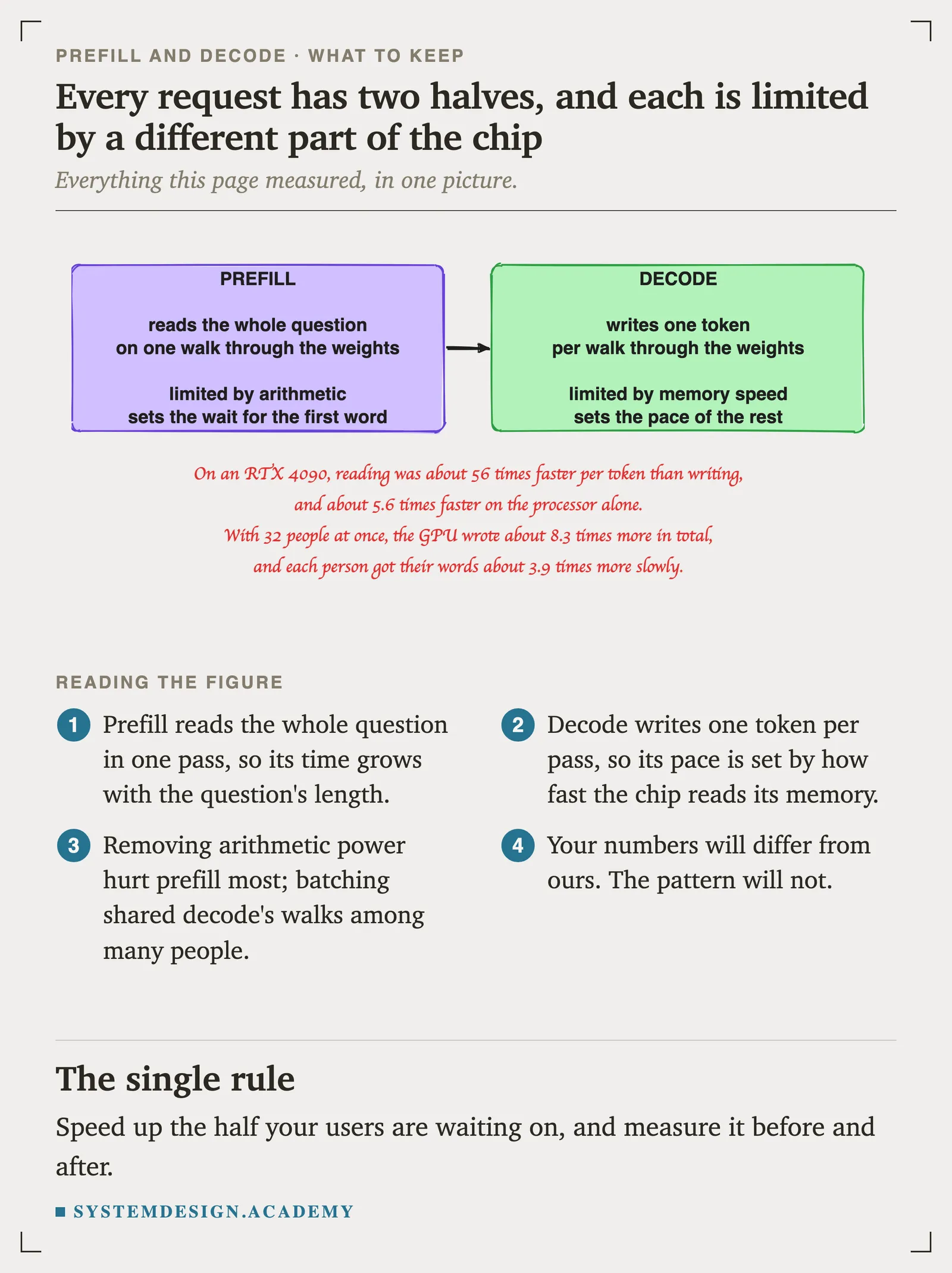
- Every request has two halves. Prefill reads the whole question in one pass; decode writes the answer one token per pass.
- Prefill is limited by arithmetic and decides the wait for the first word. Decode is limited by memory speed and decides how fast the rest arrive.
- On a rented RTX 4090, reading was about 56 times faster per token than writing. Your number will differ a little; the pattern will not.
- Batching shares decode's walks among many people: more total work per hour and a lower cost per answer, at the price of each person's speed.
Next: "The KV cache" explains the notes a model keeps on every token so that decode does not have to re-read the whole conversation, how big those notes get, and why long chats slow down.
Download the page's files: lesson-2.1.zip.
Sources
Checked on 13 November 2026.
- Our own run on a RunPod pod with one NVIDIA GeForce RTX 4090 (24 GB) and 12 virtual processor cores, secure cloud, $0.89 an hour, llama.cpp build 12110 for CUDA 12.8. The recording is in this page's run folder.
- vLLM documentation, "Optimization and Tuning", chunked prefill: "better balancing compute-bound (prefill) and memory-bound (decode) operations" and "the scheduling policy prioritizes decode requests": https://docs.vllm.ai/en/latest/configuration/optimization.html
- llama.cpp server documentation, for
/health, the chat endpoint, streaming,cache_promptand the timings it returns: https://github.com/ggml-org/llama.cpp/blob/master/tools/server/README.md - NVIDIA Ada GPU architecture whitepaper, appendix: GeForce RTX 4090 memory bandwidth 1,008 GB a second and 165.2 dense 16-bit tensor TFLOPS with FP32 accumulate: https://images.nvidia.com/aem-dam/Solutions/geforce/ada/nvidia-ada-gpu-architecture.pdf
- RunPod pricing, RTX 4090 at $0.34 an hour on community cloud and $0.89 on secure cloud, read on 13 November 2026: https://www.runpod.io/pricing
- Qwen3-0.6B and Qwen3-8B GGUF files on Hugging Face, Apache 2.0: https://huggingface.co/Qwen/Qwen3-0.6B-GGUF and https://huggingface.co/Qwen/Qwen3-8B-GGUF