May we use cookies so Meta, Google, LinkedIn and ChatGPT see your visit and we learn which ads work? PrivacyMay we use cookies to see which pages help, and let Meta, Google, LinkedIn and ChatGPT see your visit, so we know which of our ads work? That way we spend less on ads that do not work. We do not sell your data, and the site works the same if you decline. You can change your answer at any time under Cookie settings at the foot of the page. Privacy policy
Loading...
System Design and AI Engineering, by Roni Das. 989 interactive lessons in two courses.: 770 in System Design and 219 in AI Engineering.
RabbitMQ is a message broker: producers publish to exchanges, bindings copy each message into matching queues, and consumers take messages and acknowledge them. Interviews test five areas, the five sections of this page: exchanges and routing (direct, topic, fanout, headers), reliability (acks, prefetch, durable queues, persistent messages, publisher confirms), failures (dead-letter exchanges, poison messages, retries, ordering), high availability (quorum queues, streams, RabbitMQ vs Kafka) and scenario questions. There are 23 questions below.
Save your progress and get the interview checklist PDF
System Design Interview Cheat Sheet: the 7 interview stages, the 10 points a scorecard grades, 12 classic systems. 18 pages. Free with an account.
Here are 23 RabbitMQ interview questions with short answers in simple English, for freshers up to senior engineers. Each answer follows the rabbitmq.com documentation and links to the lesson in the System Design course that teaches the idea behind it.
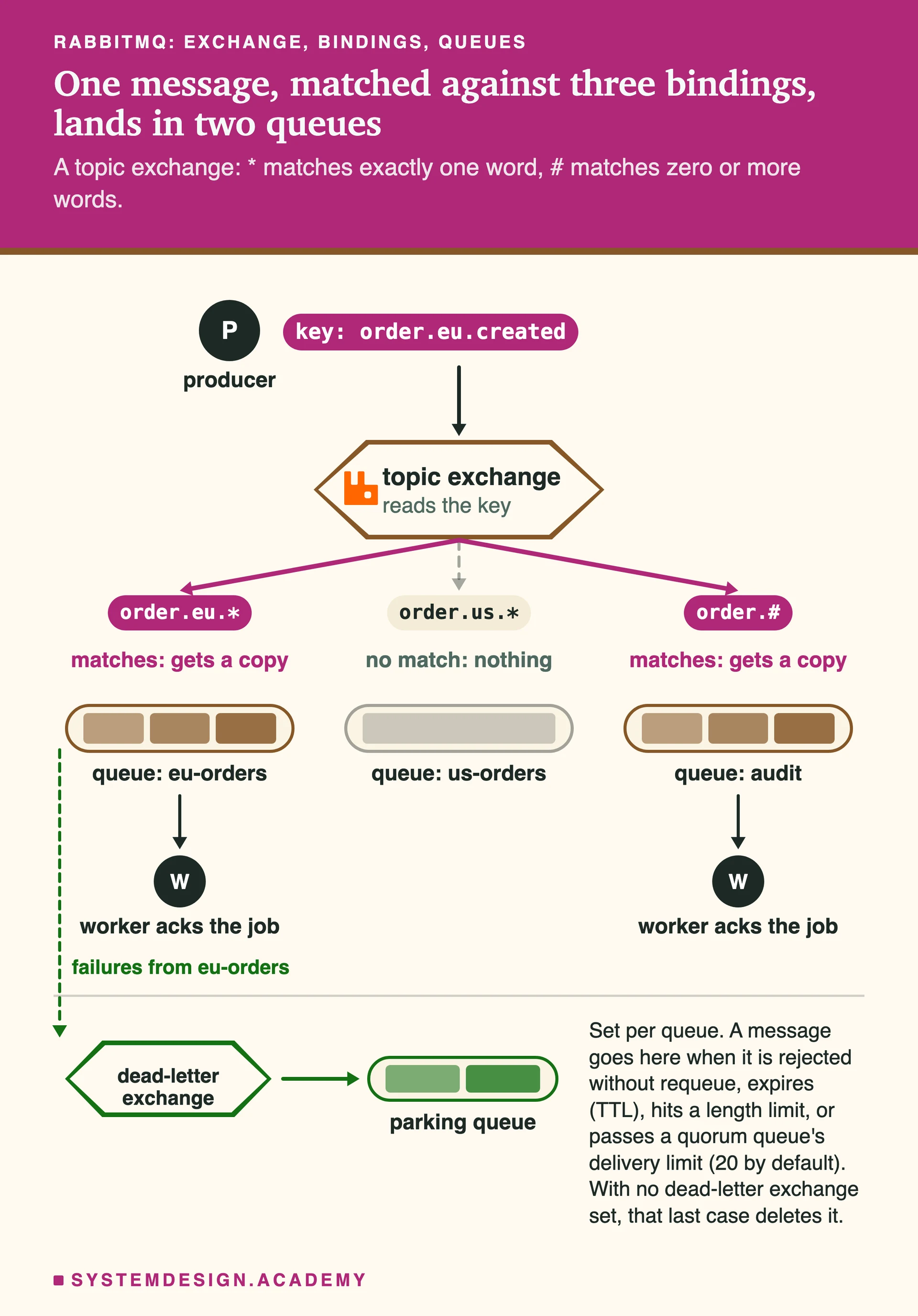
One message, matched against three bindings on a topic exchange, lands in two queues.Producers never write to a queue directly. They publish to an exchange, and the exchange copies the message into every queue whose binding matches the routing key. Messages that fail can be sent on to a dead-letter exchange.
One message, matched against three bindings on a topic exchange, lands in two queues.Producers never write to a queue directly. They publish to an exchange, and the exchange copies the message into every queue whose binding matches the routing key. Messages that fail can be sent on to a dead-letter exchange.
How to answer a RabbitMQ question
Trace the message: which exchange it is published to, which binding sends it to which queue, how the consumer acknowledges it and what happens if any step fails. Most answers come back to one fact: RabbitMQ gives at-least-once delivery when you use manual acks and confirms, so the consumer must handle duplicates.
This page is the free part.
The course goes deeper on RabbitMQ
₹1,111 in India/$35 everywhere elseonce, for the whole course
The System Design course covers RabbitMQ across a run of lessons, not one page. These 4 alone are about 72 minutes of step-by-step reading, every one with a quiz.
Freshers start here. These questions check that you know how a message travels from a producer to a consumer.
What is RabbitMQ, and why would you use it?
RabbitMQ is a message broker. One program, the producer, hands it a message, and RabbitMQ stores it in a queue until another program, the consumer, takes it and confirms it is done. The two programs never talk to each other directly, so they do not need to be running at the same time or at the same speed.
People use it to move slow work out of a web request (sending emails, resizing images), to spread jobs across many workers, to route events to the services that care about them, and to absorb bursts of traffic. It speaks AMQP 0-9-1 as its main protocol and supports others such as MQTT and STOMP.
A producer never publishes to a queue directly. It publishes to an exchange, along with a routing key, which is a short string such as order.eu.created. A queue is where messages wait for consumers. A binding is a rule that connects an exchange to a queue, often with a pattern to match against the routing key.
When a message arrives, the exchange looks at its bindings and puts a copy into every queue that matches. That separation is the core idea of RabbitMQ: producers decide what a message is, and the bindings decide who gets it, so you can add a new consumer without changing the producer.
Direct sends a message to queues whose binding key exactly equals the routing key. Fanout sends a copy to every bound queue and ignores the routing key. Topic matches the routing key, split into words by dots, against binding patterns where * matches exactly one word and # matches zero or more words, so order.# matches order.eu.created. Headers routes on message header values instead of the routing key; the x-match argument says whether any one header must match or all of them.
In the figure above, a topic exchange sends order.eu.created to the eu-orders queue and the audit queue, but not to us-orders. Use direct for simple job routing, fanout for broadcasting, topic for events many services filter differently, and headers when the routing depends on several attributes.
It is a direct exchange with an empty name. Every queue you declare is automatically bound to it with the queue's own name as the binding key. So publishing to the default exchange with routing key emails puts the message straight into the queue called emails.
That is why simple tutorials seem to publish to a queue by name. Under the hood the message still goes through an exchange, which keeps the model the same for every case.
By default it is dropped, silently. The documentation says an unroutable message is either dropped or returned to the publisher, depending on what the publisher set: with the mandatory flag, the broker sends it back to the producer, which can log it or retry.
Another option is an alternate exchange: you configure the exchange so anything it cannot route goes to a second exchange, usually bound to a queue you watch. Either way, decide on purpose, because silent drops are a common cause of lost messages in new systems.
What is the difference between a connection and a channel?
A connection is a long-lived TCP connection between your application and the broker. A channel is a lightweight virtual connection inside it, so one TCP connection can carry many channels at once. Publishing, consuming and acknowledging all happen on a channel.
Open one connection per process and use channels for separate threads or tasks, rather than opening many TCP connections. Two details matter: delivery tags, the numbers used to acknowledge a message, belong to one channel, so you must ack on the channel that received it; and closing a connection closes all its channels.
Most RabbitMQ questions are really about one thing: how to make sure a message is neither lost nor processed in a way you did not expect.
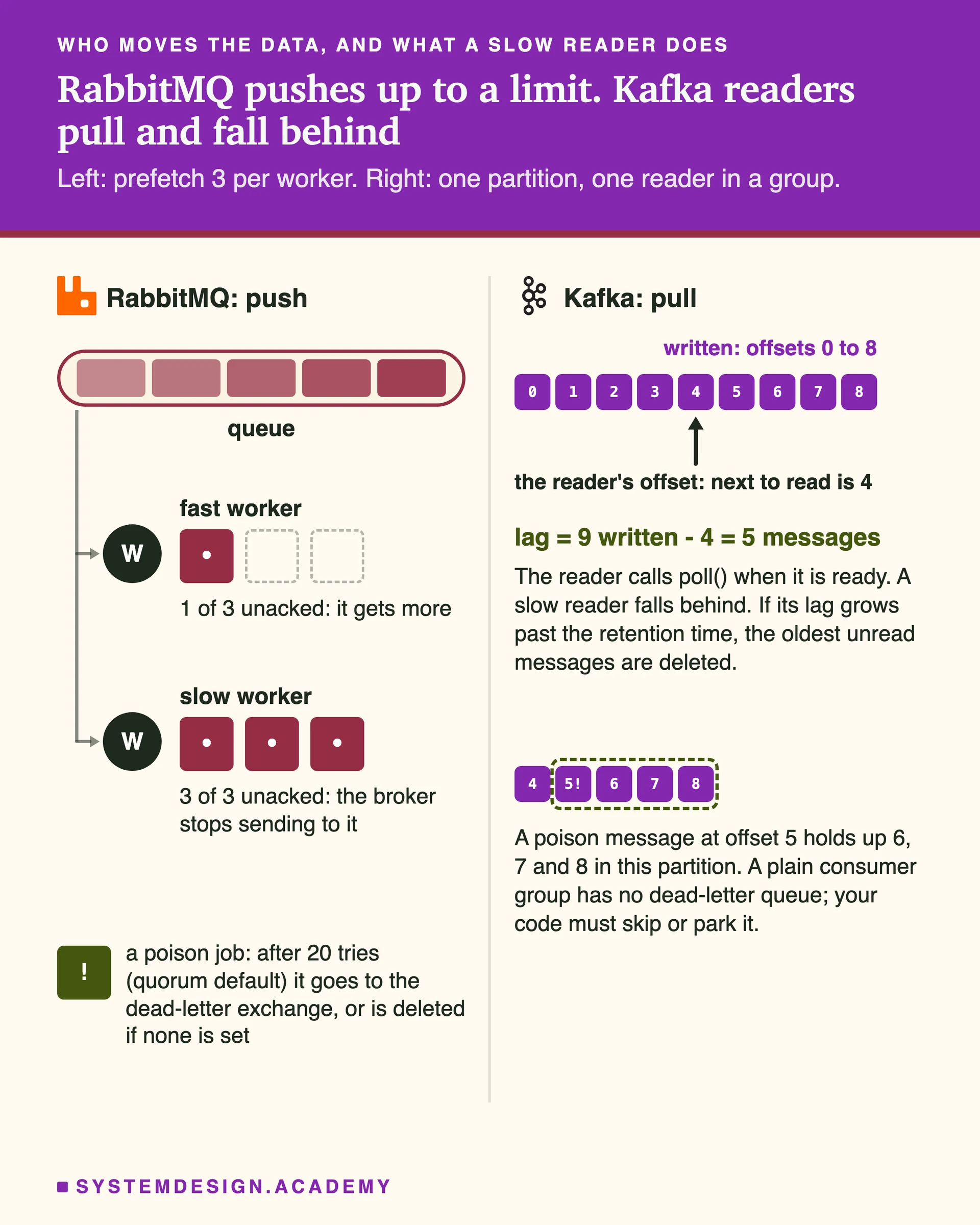
RabbitMQ pushes messages to each consumer up to its prefetch limit, while Kafka consumers pull and can fall behind.Prefetch caps how many unacknowledged messages one consumer may hold, so a slow consumer stops receiving and the fast one takes the work. Kafka has no such push: each reader moves its own offset.
In automatic ack mode, RabbitMQ considers a message done the moment it sends it, so if the consumer crashes while working, the message is lost. The documentation calls this unsafe for many workloads. In manual mode, the consumer sends basic.ack after it has finished the work, and only then does the broker delete the message.
If a consumer's channel or connection closes with unacked messages, RabbitMQ puts them back in the queue and delivers them again, marked as redelivered. A consumer can also say no: basic.nack or basic.reject with requeue true puts the message back, and with requeue false sends it to the dead-letter exchange if there is one, or discards it.
What is prefetch (basic.qos), and how do you choose it?
Prefetch is the maximum number of unacknowledged messages RabbitMQ will push to a consumer on a channel. Once a consumer holds that many, the broker stops sending to it until it acks some. Zero means no limit, which can flood a consumer with the whole queue.
A prefetch of 1 is the most conservative: each worker gets one job at a time, so long jobs spread evenly, but throughput suffers from the wait between jobs. The documentation says values from 100 to 300 usually give the best throughput. Pick low values for slow, uneven jobs and higher ones for many quick messages, and measure.
How do you make sure messages survive a broker restart?
You need two things. The queue must be durable, meaning its definition is kept on disk and recovered on restart. And each message must be published as persistent, with delivery mode set to persistent. The documentation is clear that messages published as transient are discarded during recovery, even if they sat in a durable queue.
Even then, a single node can fail for good, so for important data use a replicated queue type, a quorum queue, and turn on publisher confirms so the producer knows the broker really has the message.
Publishing is fire and forget by default: the producer does not learn whether the broker stored the message. With publisher confirms turned on for a channel, the broker sends an ack back for each message once it has taken responsibility for it. For a persistent message in a durable queue that means it was written to disk; for a quorum queue it means a majority of replicas accepted it.
If the broker cannot handle a message it sends a nack, and if the connection drops before a confirm arrives, the producer does not know and should publish again. That makes the producer side at-least-once, so consumers must cope with duplicates.
No. With manual acks and publisher confirms it gives at-least-once delivery: a message is not lost, but it can arrive twice, for example when a consumer finishes the work and crashes before its ack reaches the broker, or when a producer resends after a lost confirm.
Exactly-once processing has to be built in the consumer. Make the work idempotent, meaning doing it twice has the same effect as once, for example by giving each message a unique ID and recording processed IDs in the same database transaction as the work. On the producer side, the transactional outbox pattern avoids losing a message when the database write and the publish must both happen.
What happens if a consumer holds a message for a very long time without acking it?
RabbitMQ has a delivery acknowledgement timeout, set by consumer_timeout, and the documentation gives the default as 30 minutes (from RabbitMQ 4.3 it is enforced only on quorum queues). When it is passed, the unacked messages go back to the queue for redelivery and the consumer is cancelled, or its channel closed.
So a job that legitimately takes longer than the timeout will be processed twice. Either raise the timeout for that queue, break the job into smaller steps, or ack early and track progress somewhere durable, knowing that acking early means a crash can lose the job.
Every queue eventually meets a message that cannot be processed. These questions check what you do with it.
What is a dead-letter exchange?
A dead-letter exchange (DLX) is an ordinary exchange that a queue sends its failed messages to. A message is dead-lettered when a consumer rejects or nacks it without requeue, when it expires because of a message TTL, when the queue is over its length limit, or when it is returned to a quorum queue more times than the delivery limit.
You set it with a policy (the key dead-letter-exchange) or the x-dead-letter-exchange queue argument; the documentation recommends policies because they can be changed without redeploying. The message gets an x-death header that records why and where it died, which is useful when you inspect the dead-letter queue later.
What is a poison message, and how do you stop it from blocking a queue?
A poison message is one that always makes the consumer fail, for example because it is malformed. If the consumer requeues it every time, it comes back again and again and wastes the workers. Quorum queues count redeliveries, exposed in the x-delivery-count header, and since RabbitMQ 4.0 the default delivery limit is 20: past that, the message is dead-lettered if a DLX is set, or dropped if not.
So always configure a DLX for queues that matter, alert on messages arriving in it, and give someone a way to inspect, fix and replay them. Do not requeue forever on errors that will never succeed, such as a validation failure.
A common pattern uses dead-lettering and TTL. The consumer rejects the failed message into a retry queue that has a message TTL, say a few seconds, and no consumers. When the TTL expires, the message is dead-lettered back to the main exchange and tried again. Several retry queues with growing TTLs give you backoff.
Count the attempts, using the x-death header or your own header, and after the last one send the message to a parking queue for a human. Some teams use the delayed message exchange plugin instead, but the TTL pattern needs no plugin.
A queue is first in, first out. But order to the consumer is not guaranteed in every case: with several consumers on one queue each processes its own messages at its own pace, a requeued message can come back after newer ones, and message priorities deliver higher priority first.
If order matters for, say, one customer's events, make sure all their messages go to one queue with one active consumer. The single active consumer feature lets several consumers register but only one receive at a time, with automatic failover to the next.
Senior questions turn to what survives a node failure and which queue type fits which job.
What are classic queues, quorum queues and streams?
Classic queues are the original type, stored on one node. Their old replication feature, mirroring, was removed in RabbitMQ 4.0, so a classic queue is not replicated. Quorum queues are replicated across several nodes using the Raft consensus algorithm and are built for data safety; they are always durable. Streams are a replicated, append-only log that consumers read without removing messages.
Use quorum queues for work that must not be lost, classic queues for temporary or easily rebuilt data, and streams when many consumers must read the same messages or replay old ones.
How do quorum queues work, and how many nodes do they need?
Each quorum queue has a leader and followers on different nodes. A write is confirmed once a majority of the members, (N/2)+1, have it, and if the leader's node fails, the remaining members elect a new leader using Raft. The default group size is 3, which the documentation calls the practical minimum for high availability, and it recommends an odd number of members.
With 3 members the queue survives losing 1; with 5, losing 2. If a majority is lost, for example in a network split, the minority side stops accepting work rather than risk two leaders, which is the safe choice.
When would you use a RabbitMQ stream instead of a queue?
When reading should not remove the message. A stream keeps an append-only log, and each consumer chooses where to start with the x-stream-offset argument: first, last, next, a numeric offset or a timestamp. The documentation lists four use cases: large fan-outs, replaying old messages, high throughput and large backlogs.
Retention is by size (max-length-bytes) or age (max-age), not by consumption. Super streams split one large stream into several partitions to scale out. If you find yourself wanting replay and long retention everywhere, compare it with Kafka too.
RabbitMQ is a broker with smart routing: exchanges and bindings decide which queue gets what, it pushes messages to consumers up to their prefetch, and a message is normally deleted once acked. It suits task queues, per-message acks, retries and dead letters, and complex routing. Kafka is a distributed log: messages stay for a retention period, consumers pull and track their own offset, and order is kept per partition.
Pick Kafka for event streams many teams read, replay, analytics pipelines and very high throughput with long retention. Pick RabbitMQ for jobs and commands where each message is handled once by a worker and routing rules matter. The comparison page goes through both side by side.
These ask you to use RabbitMQ to solve a real problem. Name the exchange, queue and settings, then the trade-off.
Design a background job system for sending emails with RabbitMQ.
The web app publishes a job to a direct exchange with routing key email, bound to a durable quorum queue. Several worker processes consume from it with manual acks and a modest prefetch, so jobs spread across them and a crashed worker's jobs are redelivered. Publisher confirms tell the web app the job was stored.
Failures go to a retry queue with a TTL and then to a dead-letter queue after a few attempts. Because delivery is at-least-once, each job carries an ID and the worker records sent IDs, so a redelivered job does not send the same email twice.
How do you do request and reply (RPC) over RabbitMQ?
The client creates a reply queue, often an exclusive one that is deleted when its connection closes, and publishes the request with two properties: reply_to, the name of that queue, and correlation_id, a unique ID for the request. The server processes it and publishes the answer to the reply_to queue with the same correlation_id.
The client matches replies to requests by correlation_id and needs a timeout, because the server may never answer. Use it when you need asynchronous request and reply through a broker, but remember that a plain HTTP or gRPC call is simpler when the caller waits anyway.
A queue keeps growing and consumers cannot keep up. What do you do?
First find out why: check the publish rate against the ack rate, the number of consumers, unacked counts per consumer and whether the same messages keep coming back, which points to a poison message. Then fix the cause: add consumers (competing consumers scale until the downstream system becomes the limit), raise prefetch if consumers are idle between messages, and speed up the slow step.
Protect the broker meanwhile, because a huge backlog costs memory and disk: set a max length or a TTL with a dead-letter exchange on queues where old messages are worthless, and slow producers down if the work cannot be dropped.
Every answer on this page comes from our System Design course: 770 lessons on databases, caching, scaling, messaging and reliability, each drawn step by step. You learn why the answer is right, which is what an interviewer checks with the second question. 18 lessons are free to read, with no card needed.
These questions are a start. The interview asks more.
Get all 200 questions in the System Design and Distributed Systems pack
Each question has why it is asked, a full answer, what the interviewer listens for, the follow-ups, the common mistakes and a diagram (268 diagrams in all). A PDF you keep, junior to staff level.
It covers message queues, delivery guarantees, idempotent consumers, dead-letter queues and Kafka vs RabbitMQ trade-offs.
Pay by UPI, cards or netbanking through Razorpay. Pay by card or PayPal, in US dollars. Download at once from My packs.
NEWSystem Design Hands-On
Included in the System Design course: real systems, built live
Postgres Sharding: Complete Hands-On (PgBouncer + Citus). 2 h 36 min and 20 chapters: one PostgreSQL loaded until it breaks, then four shards behind a router you write, PgBouncer and Citus, with the 139-page slide deck. The first 15 minutes are free to watch.