KV Cache Size: the Formula, and How Much GPU Memory Each User Needs
What is the KV cache size formula?
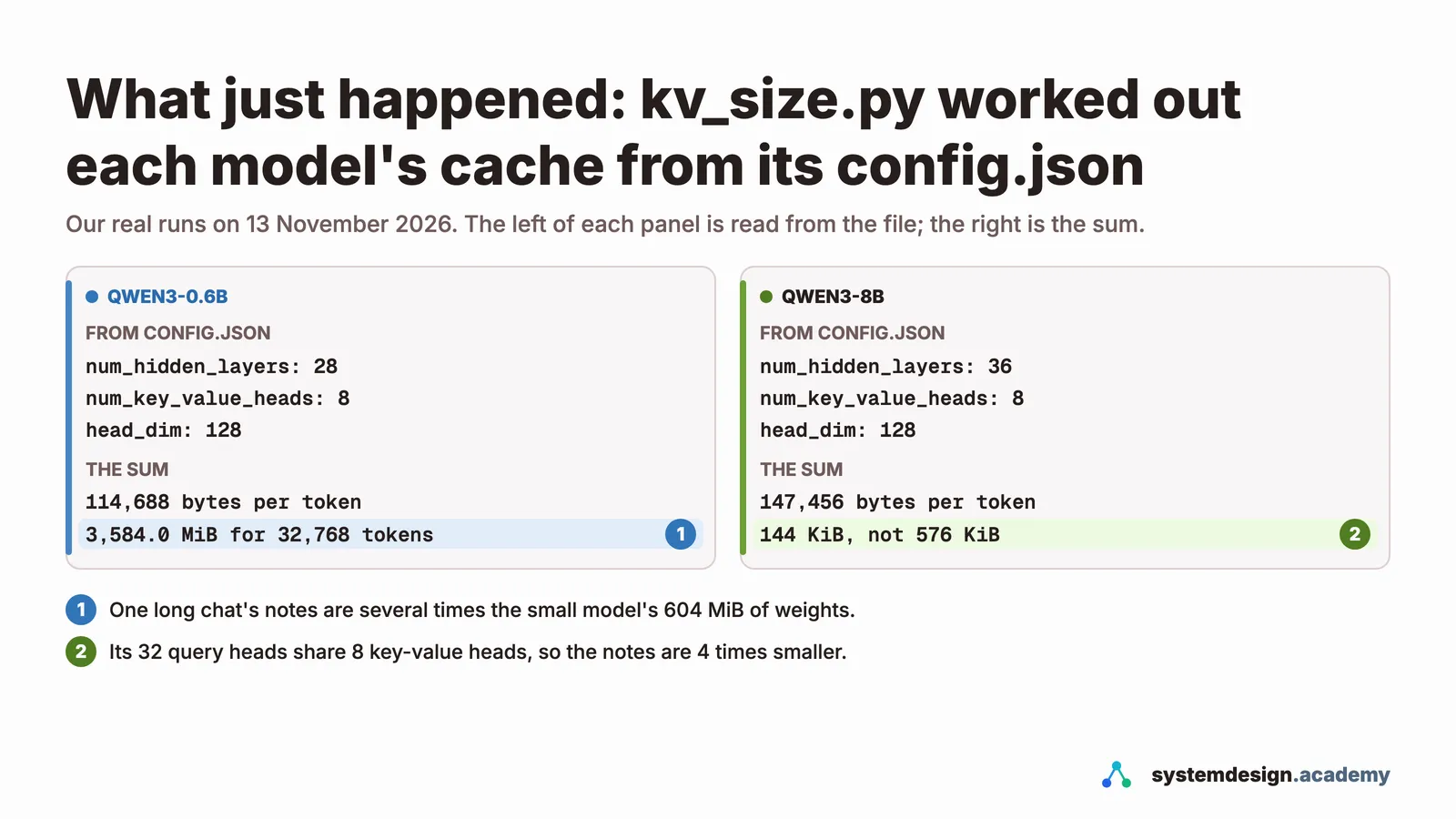
KV cache per token = 2 × layers × key-value heads × head size × bytes per number, all read from the model's config.json. For Qwen3-8B that is 2 × 36 × 8 × 128 × 2 = 147,456 bytes, 144 KiB a token, so a 32,768-token conversation needs about 4.5 GiB. On a 24 GB RTX 4090, vLLM had 4.56 GiB left for the cache after the weights, room for 33,216 tokens: about 16 conversations of 2,000 tokens at once.
Save your progress and get the AI Engineering cheat sheet PDF
This page works out the KV cache sum the way an engineer needs it: from the model's config file to the memory each conversation takes, and then to how many people one GPU can serve. It answers 16 questions, and every measured number comes from a rented RTX 4090 in our Hands-On Inference Engineering course.

16 questions · 4 sections · answers from the course
These answers come from our course Hands-On Inference Engineering: Serve LLMs on GPUs with vLLM and SGLang: 43 lessons ready so far, each one run and measured on a rented NVIDIA GPU. The first lessons are free to read, with no card needed.
The short version
Work in tokens. Find the bytes one token costs from config.json, see how much memory is left after the weights and working space, divide to get the tokens that fit, and divide again by the length of a typical conversation. Use num_key_value_heads, not the number of attention heads, and check your answer against the cache size the server prints when it starts.
If this helped, the full hands-on course goes much deeper.
In the course you rent an RTX 4090, work out the cache for Qwen3-8B on paper, start vLLM and check your sum against the budget it prints, then fill the cache with real users and watch what happens when it runs out.
1. The formula, worked out on real models
The KV cache is the set of notes a model keeps on every earlier token: a key and a value in every layer, worked out once and kept in GPU memory so they never have to be worked out again. Its size follows from five numbers in the model's own config file.
What is the KV cache, in plain words?
When a model writes a new token, the attention step in every layer looks back at all the earlier tokens. To do that it needs a key and a value for each of them: the key lets the new token find an earlier one, and the value is what the earlier token hands over once found. Working these out again for every new token would waste most of the GPU's time, so the server keeps them. That store is the KV cache.
It grows by one entry for every token of every conversation. That is why it, and not the model itself, usually decides how many people one GPU can serve at the same moment.
What is the KV cache size formula?
Bytes per token = 2 × layers × key-value heads × head size × bytes per number. The 2 is there because every layer keeps both a key and a value. All four other numbers are in the model's config.json on Hugging Face: num_hidden_layers, num_key_value_heads, head_dim, and the data type, which is 2 bytes for the usual 16-bit formats.
Then multiply by the number of tokens you want to keep. For a whole server, that is every token of every conversation it holds at once.
How big is the KV cache for an 8B model such as Qwen3-8B?
Qwen3-8B has 36 layers, 8 key-value heads and a head size of 128, stored in 2 bytes a number. So each token needs 2 × 36 × 8 × 128 × 2 = 147,456 bytes, which is 144 KiB. A conversation of 32,768 tokens therefore needs 4,608 MiB, about 4.5 GiB, on top of the model's weights.
What we measured: On a rented RTX 4090, vLLM 0.33 loaded Qwen3-8B's 16-bit weights in 15.27 GiB and set aside 4.56 GiB for the cache, which it reported as room for 33,216 tokens.
Can the cache be bigger than the model itself?
Yes, and for small models it often is. Qwen3-0.6B has 28 layers, 8 key-value heads and a head size of 128, so it keeps 112 KiB for every token. One conversation of 32,768 tokens then needs 3,584 MiB of notes, about six times the model's 604 MiB of weights.
Does the formula match what a real server reserves?
It matched exactly in our run. That is worth checking once yourself, because it tells you the sum is not a rough guide but the real thing the server does.
What we measured: llama-server on our RTX 4090 reserved 448.00 MiB for 4,096 tokens of Qwen3-0.6B, which is exactly 4,096 × 112 KiB.
2. From bytes per token to users per GPU
The question behind every KV cache sum is a capacity question: how many conversations fit on this card at once? It is two divisions, and the server prints the first one for you.
How much GPU memory does each user need?
Multiply the bytes per token by the length of that user's conversation, counting the question, the earlier turns and the answer being written. For Qwen3-8B at 144 KiB a token, a conversation of 2,000 tokens needs about 281 MiB, and one of 32,768 tokens needs about 4.5 GiB.
So the honest answer to "how much memory per user" is always "how long are their conversations?" Ten short support chats can cost less than one person pasting a long document.
How many users can one 24 GB GPU serve?
Divide the cache vLLM reports at start-up by the tokens one conversation holds. For Qwen3-8B in 16 bits on an RTX 4090, the cache held 33,216 tokens: enough for about one conversation of 32,768 tokens, 8 of 4,000 or 16 of 2,000, if they all reach full length together.
vLLM will start more people than that when their questions are short, and pause some of them later if their answers grow and the cache runs out. The sum gives you the safe number, not a hard limit.
What we measured: In the course's crowd test, 64 conversations of about 340 tokens filled 66.8% of that cache. 160 filled it completely, and vLLM paused and resumed requests 64 times, but every answer still came back complete.
Why is the cache only 4.56 GiB on a 24 GB card?
Because the cache gets what is left after everything else. The RTX 4090 reports 23.52 GiB to programs. vLLM takes 92% of it by default, 21.64 GiB. From that it pays for the weights, 15.27 GiB, and its working space, about 1.8 GiB on a first start. The 4.56 GiB that remains becomes the KV cache.
That is why a small change in the share changes the cache a lot: at 80% the cache in lesson 2.5 fell to 1.74 GiB, because the weights take the same room whatever the share.
What does "Maximum concurrency" in vLLM's log mean?
It is the cache size divided by the longest conversation the server allows (--max-model-len). With a limit of 32,768 tokens and room for 33,216, our server said 1.01x. It is a worst case, the number of full-length conversations that fit, not a limit on how many people vLLM will serve.
Why does vLLM count the cache in blocks of 16 tokens?
vLLM stores the cache in small pages of 16 tokens, taken from a shared pool only as a conversation grows. This is PagedAttention. It means a conversation wastes at most part of its last page, instead of reserving room for the longest conversation it might ever have. For Qwen3-8B one page is 16 × 144 KiB = 2.25 MiB, and our 4.56 GiB cache was 2,076 pages.
If this helped, the full hands-on course goes much deeper.
In the course you rent an RTX 4090, work out the cache for Qwen3-8B on paper, start vLLM and check your sum against the budget it prints, then fill the cache with real users and watch what happens when it runs out.
3. What a bigger cache costs in speed
The cache is not only a memory question. Every new token has to read it, so it also sets how fast a long conversation can go.
Why do long conversations make the model answer more slowly?
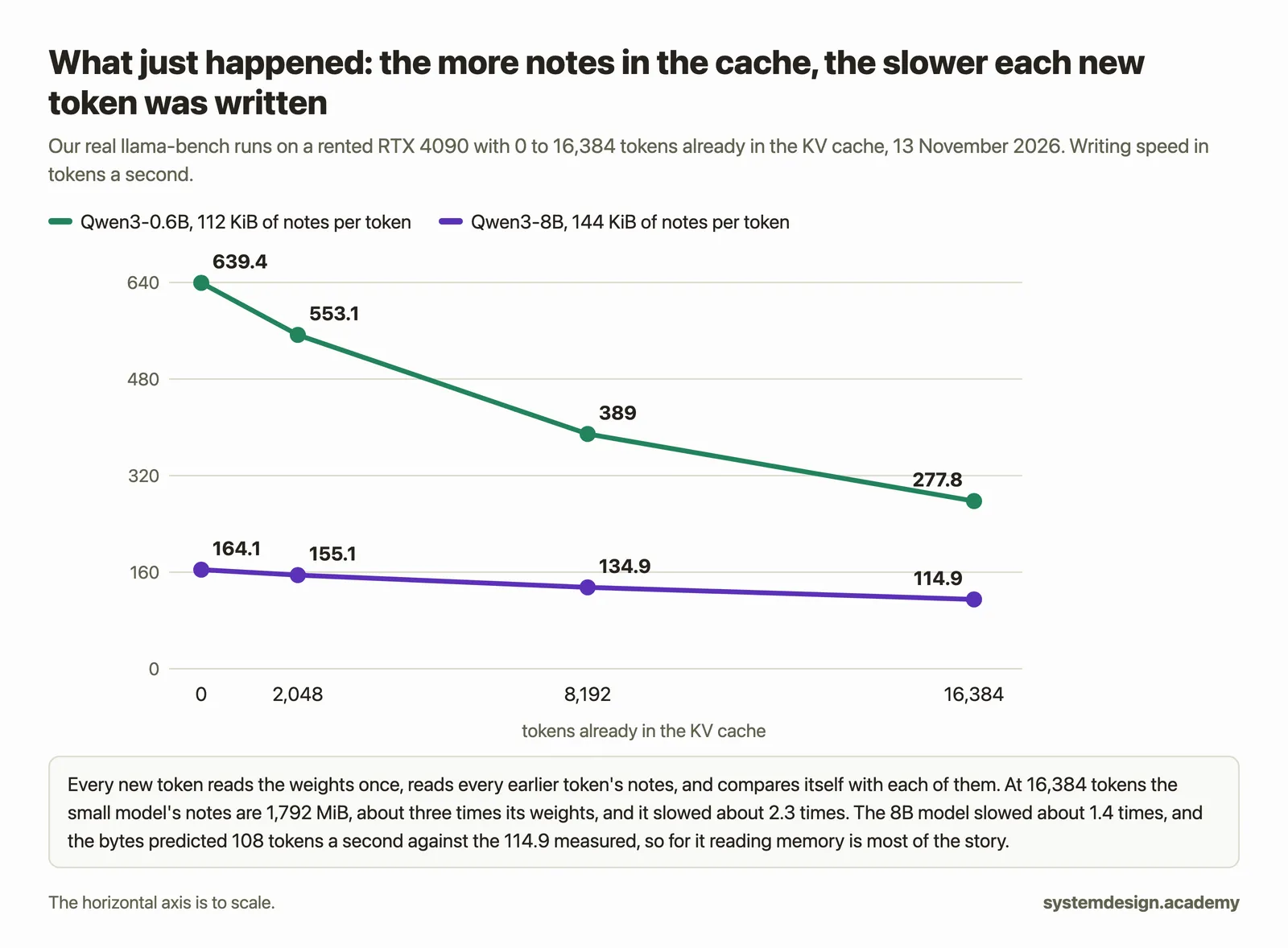
To write each new token, attention reads the notes of every earlier token as well as the model's weights. A longer conversation means more notes to read for every single token, and writing is limited by how fast the GPU's memory can deliver bytes.
What we measured: On our RTX 4090, Qwen3-8B wrote 164.1 tokens a second with an empty cache and 114.9 tokens a second with 16,384 tokens already in it.
Does keeping the cache make the second turn of a chat faster?
Yes, because the earlier turns do not have to be read again. In the course's run, the second turn of a conversation reused the notes of 2,480 of its 2,524 prompt tokens, and reading its prompt took 6 ms instead of the 94 ms the first turn needed.
4. Making the cache smaller
There are two kinds of saving. One is chosen when the model is designed; the other is a setting you can change on your own server tonight.
How does grouped-query attention shrink the KV cache?
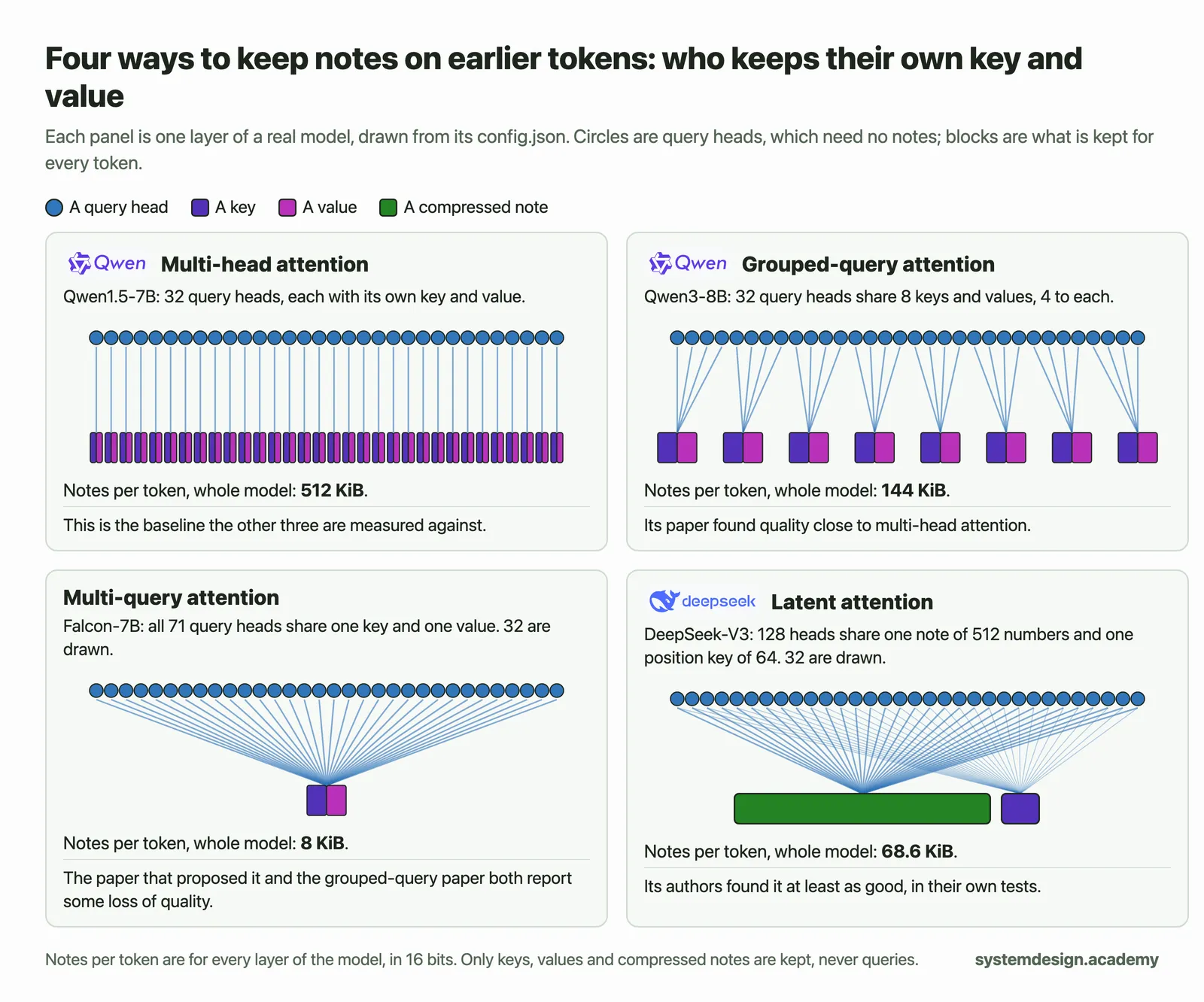
In grouped-query attention, several query heads share one key and one value. Only keys and values are kept in the cache, so it shrinks by the size of each group: num_attention_heads divided by num_key_value_heads in config.json. Qwen3-8B has 32 query heads in groups of 4, so it keeps 144 KiB per token instead of 576 KiB.
Read num_key_value_heads, not num_attention_heads, when you do the sum. Using the wrong one is the most common mistake in KV cache answers, and it makes the result four or eight times too big.
What we measured: The same 4.56 GiB that held 33,216 tokens of Qwen3-8B would hold only 8,304 if every head kept its own key and value.
Does an FP8 KV cache double the number of users?
Nearly. --kv-cache-dtype fp8 stores each number in 1 byte instead of 2, so Qwen3-8B needs 73,728 bytes a token instead of 147,456. The numbers are kept more coarsely, so check the quality of the answers on your own test questions before you keep it.
What we measured: On our RTX 4090 the cache held 59,856 tokens instead of 33,216, 1.80 times as many and not quite 2, because that start needed 0.45 GiB more working space.
Do smaller weights help the cache too?
Yes, directly. Whatever the weights stop using, the cache gets. The 8-bit copy of Qwen3-8B took 8.9 GiB instead of 15.27 GiB, and its cache held 79,184 tokens, 2.38 times as many as the 16-bit model on the same card.
Does a shorter --max-model-len make the cache bigger?
No. It only changes the check vLLM makes at start-up: that one conversation of that length fits. If the full length does not fit, vLLM refuses to start and names the longest length that would. Lowering it lets the server start, but the cache stays the same size.
Where to go next
If this helped, the full hands-on course goes much deeper.
In the course you rent an RTX 4090, work out the cache for Qwen3-8B on paper, start vLLM and check your sum against the budget it prints, then fill the cache with real users and watch what happens when it runs out.
Every number on this page comes from Hands-On Inference Engineering: Serve LLMs on GPUs with vLLM and SGLang, where you rent the GPU yourself, run each command and compare your numbers with ours. Start with the free introduction and the free lessons on prefill and decode and the KV cache. If you are also preparing for interviews, the two big courses together and the Inference Engineering interview pack are below.

These questions are a start. The interview asks more.
Get all 120 questions in the Inference Engineering pack
Each question has why it is asked, a full answer, what the interviewer listens for, the follow-ups, the common mistakes and a diagram (141 diagrams in all). A PDF you keep, junior to staff level.
Pay by UPI, cards or netbanking through Razorpay. Pay by card or PayPal, in US dollars. Download at once from My packs.