Quantization Interview Questions for LLMs, Answered With Real GPU Numbers
What is LLM quantization, in one paragraph?
Quantization stores a model's numbers in fewer bits, usually 8 or 4 instead of 16. The weights take half or a quarter of the memory, which leaves more room for the KV cache and so for more people at once, and writing gets faster when few people are served because there are fewer bytes to read. On a 24 GB RTX 4090, Qwen3-8B in FP8 left room for 79,184 tokens of conversation against 33,216 in 16 bits. The cost is some loss of precision, so the answers must be tested after quantizing.
Save your progress and get the AI Engineering cheat sheet PDF
Quantization comes up in nearly every inference and AI infrastructure interview, and most answers stop at "it makes the model smaller". These 16 questions go further: why it speeds up writing, which formats run on which GPUs, where the saved memory goes, and how you prove the answers are still good. Each comes with numbers we measured with vLLM on rented NVIDIA GPUs.

16 questions · 4 sections · answers from the course
These answers come from our course Hands-On Inference Engineering: Serve LLMs on GPUs with vLLM and SGLang: 43 lessons ready so far, each one run and measured on a rented NVIDIA GPU. The first lessons are free to read, with no card needed.
How to answer a quantization question well
Say what gets smaller (the weights, the activations, or the KV cache), what that buys (memory first, speed second), and what it costs (precision, and on some GPUs no speed-up for heavy loads). Then name the check: the same test questions through both models. Interviewers trust an answer that ends with how you would prove it more than one that ends with a format name.
If this helped, the full hands-on course goes much deeper.
In Hands-On Inference Engineering you serve the same model in 16 bits and in FP8 on a rented GPU, read vLLM's memory budget for each, and measure how many more people fit and how much faster the words come.
1. The basics: what quantization is and why it helps
Start with what is being made smaller and why that helps at all. Interviewers often stop people here, because the reason it makes writing faster is not obvious.
What is quantization in LLMs?
Quantization means storing a model's numbers in fewer bits, for example 8 or 4 bits each instead of the 16 most models are published with. The weights, the numbers the model learned in training, then take half or a quarter of the GPU's memory. That leaves more room for conversations and, when few people are served, makes each token faster to write.
The cost is some loss of precision, which may change the model's answers. So quantization is always two steps: make the smaller copy, then check that its answers are still good enough for your task.
What are BF16, FP8, INT8 and INT4?
They are number formats. BF16, bfloat16, is the 16-bit format most models use: 2 bytes a number, with the range of a 32-bit number but only two to three significant digits. FP8 is an 8-bit floating-point format, 1 byte a number. INT8 and INT4 store whole numbers in 8 or 4 bits, and a separate number called a scale turns them back into values close to the originals.
Fewer bits means fewer bytes to store and to read, and a coarser grid of values the model's numbers are rounded to.
Why does quantization make writing faster?
Because writing an answer is limited by memory speed. Each new token reads every weight from the GPU's memory once and does very little arithmetic with it, so the time per token is mostly the time to move the bytes. Half the bytes means close to half the time, for one person or a few.
With large batches the picture changes. The GPU is then busier with arithmetic, and the extra work of unpacking small numbers back into larger ones can cancel part of the gain. A good answer says when it helps, not just that it does.
What we measured: On an NVIDIA L4 serving Qwen3-8B to one person with vLLM, a token took 60.8 ms in BF16 and 34.6 ms in FP8.
What is a scale, and why do methods differ in how many they keep?
A scale is the number that a group of small stored values is multiplied by to get back close to the original values. Methods differ in how big that group is: one scale for a whole weight table, one per output channel (one row of the table's results), one per block of 32 or 128 numbers, or one per token for activations. Smaller groups follow the real values more closely and cost a little more memory and work.
2. Methods and the words around them
The second part of the round is vocabulary. Each of these words names a real choice, and the follow-up question is usually which one you would pick and why.
What is the difference between weight-only quantization and W8A8?
Activations are the numbers that flow from one layer to the next while the model works. Weight-only quantization shrinks only the weights and keeps activations in 16 bits, so the weights are unpacked back to 16 bits for the arithmetic. W8A8 means 8-bit weights and 8-bit activations, so the arithmetic itself runs in 8 bits. W4A16 means 4-bit weights and 16-bit activations.
Weight-only saves memory and speeds up memory-bound writing on almost any recent GPU. Doing the arithmetic in 8 bits as well needs a GPU with that kind of arithmetic.
What are AWQ and GPTQ?
Both are ways to make a 4-bit copy of a model before it is published, and both use calibration, a step that runs sample text through the model to choose good scales. AWQ protects the weights that matter most for the model's activations. GPTQ rounds the weights one column at a time and corrects the error in the columns that remain. In vLLM both run through fast kernels called Marlin, NVIDIA kernels for small weights with 16-bit activations.
vLLM's own documentation now points away from the AutoAWQ library and towards LLM Compressor, vLLM's own quantization library, for making new checkpoints.
Should you quantize while loading, or use a quantized checkpoint?
A checkpoint is the set of weight files a model is published as. A quantized checkpoint was converted before upload, usually with calibration, and needs nothing at start-up. Online quantization converts the 16-bit weights while the server loads them, with no calibration: quicker to try, less careful. A good default is to try the published quantized checkpoint first, such as Qwen/Qwen3-8B-FP8, and use online quantization for a quick experiment.
In vLLM the checkpoint wins: if its config.json names a method, vLLM uses it, and a different --quantization setting stops the start with an error.
What are MXFP4 and NVFP4?
They are 4-bit floating-point formats with a shared scale for a small block of numbers: one scale for every 32 numbers in MXFP4, and one for every 16 in NVIDIA's NVFP4. OpenAI's gpt-oss models are published in MXFP4. Native 4-bit floating-point arithmetic needs NVIDIA's newest Blackwell generation; on older cards vLLM runs these formats weight-only.
What we measured: gpt-oss-120b as published, in MXFP4, fitted on one A100 80 GB card with vLLM: 66.14 GiB of weights and 4.6 GiB of KV cache, with 32 people getting a word every 29 ms.
3. What quantization did on real GPUs
Numbers from a real run are what separate a memorised answer from an engineer's answer. These come from vLLM 0.33.0 on rented GPUs.
How much memory does an 8-bit model save, and where does it go?
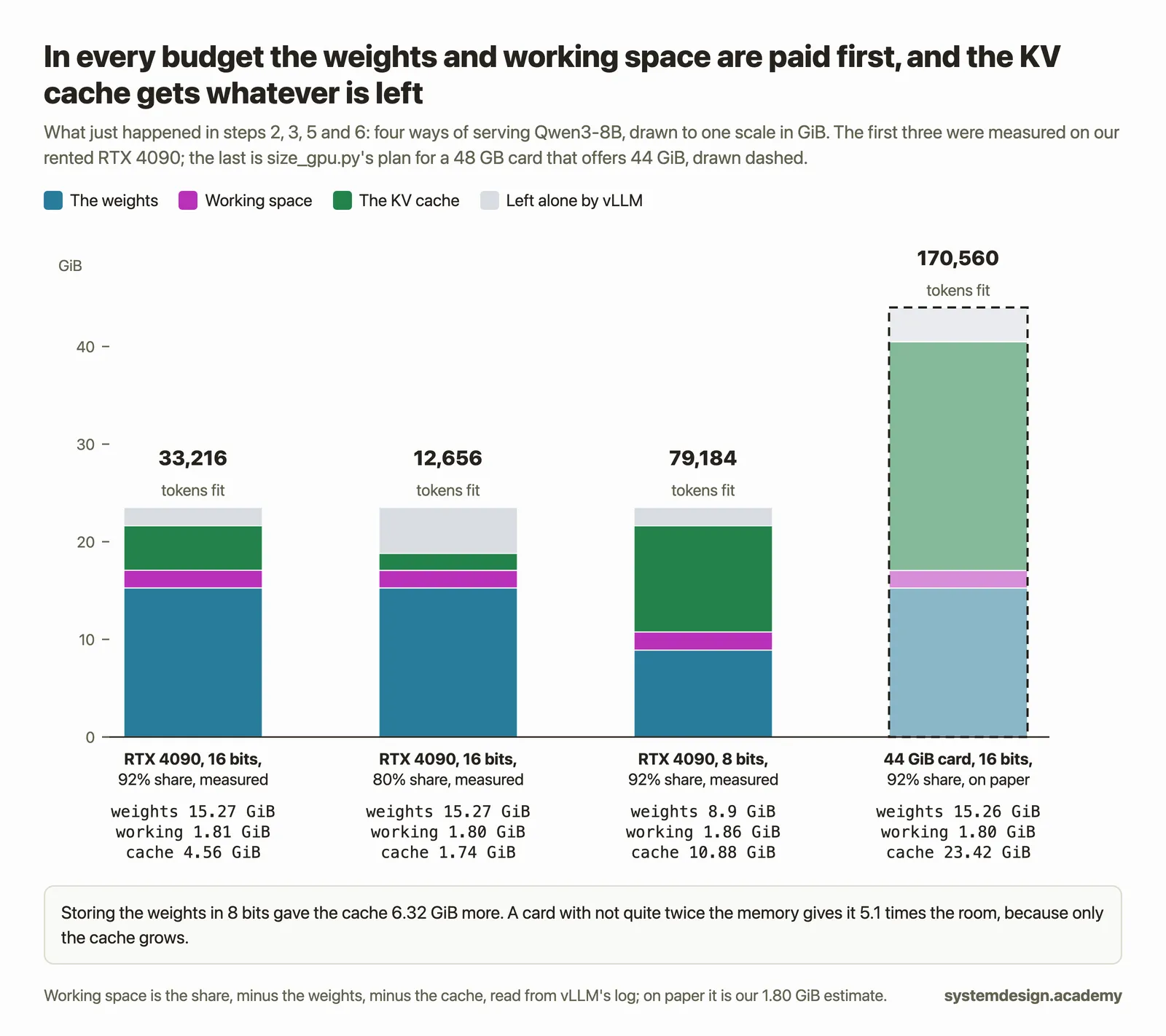
Almost all of the saving goes to the KV cache, the notes the model keeps on every token of every conversation. The serving engine pays for the weights and its working space first and gives everything left to the cache, so every GiB taken off the weights is a GiB more for conversations. That usually matters more than the speed gain, because the cache decides how many people fit.
What we measured: On a 24 GB RTX 4090, Qwen3-8B's weights took 15.27 GiB in 16 bits and 8.9 GiB in FP8. The KV cache grew from 4.56 to 10.88 GiB, room for 79,184 tokens instead of 33,216, 2.38 times as many.
Can quantization let one GPU serve more people at once?
Yes, and this is often the real reason to do it. More cache room means more conversations fit before the server has to pause anyone, so the waits for the first word stay short at a load where the 16-bit model would already be queueing people.
What we measured: Llama 3.1 8B on one RTX 4090 with 50 people at once: in FP8 the cache had room for 72.7 conversations of 1,280 tokens, words came every 30 ms, and the median first word took 0.53 s. In BF16 there was room for 32.2, words came every 36 ms, and the median first word took 2.4 s.
Does FP8 work on every GPU?
It loads on many, but the arithmetic runs in 8 bits only on newer ones. Per the LLM Compressor documentation that vLLM's reference cites, FP8 arithmetic needs compute capability 8.9 or newer, which is NVIDIA's Ada generation (RTX 4090, L4, L40S) and later, such as Hopper (H100). Older cards, including the A100 (Ampere, 8.0), keep the FP8 weights in memory but run weight-only through FP8 Marlin kernels, doing the arithmetic in 16 bits.
So FP8 on an A100 saves memory and helps a lone writer, but when many long prompts are read at once, the 16-bit arithmetic becomes the limit.
What we measured: Qwen3-32B in FP8 with 20 people reading 2,048-token prompts: the A100 80 GB, running weight-only, took 57 ms a word; an H100 took 28.5 ms. Even the L4, an Ada card, ran Qwen's block FP8 checkpoint weight-only through Marlin in our run, and it still sped up: with 4 people, 66.7 ms a word in BF16 against 37.9 ms in FP8.
What does an FP8 KV cache do?
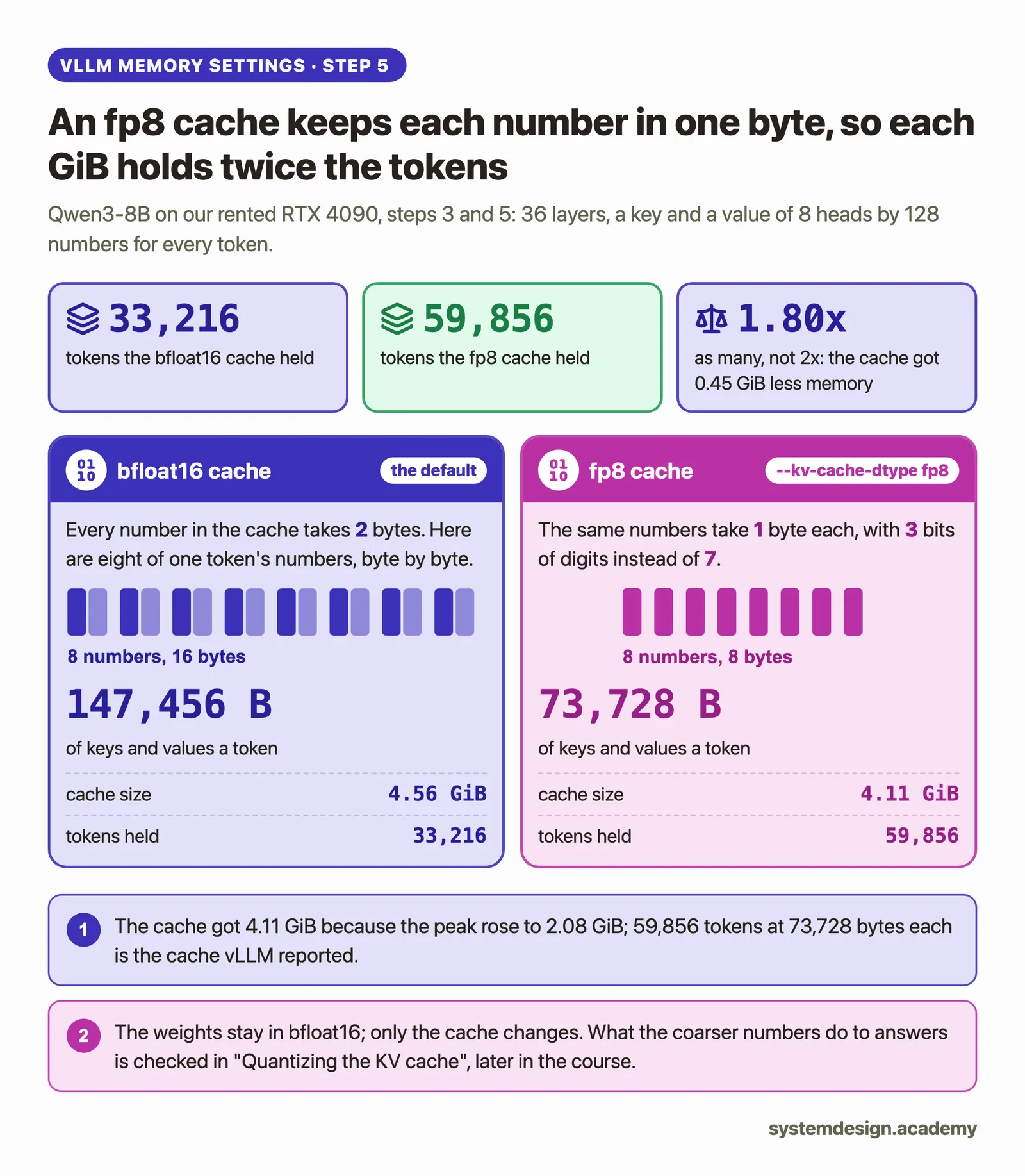
It stores the conversation notes in 8 bits instead of 16, so each token takes half the bytes and nearly twice as many tokens fit. It is a separate setting from the weights: an FP8 checkpoint leaves the cache in 16 bits unless you ask, and an 8-bit cache does nothing to the weights. On a plain 16-bit checkpoint vLLM uses scales of 1.0 for the cache, which its own guide calls no calibration, so check answers on long conversations.
What we measured: With --kv-cache-dtype fp8, Qwen3-8B's notes went from 147,456 to 73,728 bytes a token, and the cache held 59,856 tokens instead of 33,216, 1.80 times as many, because that start needed 0.45 GiB more working space.
If this helped, the full hands-on course goes much deeper.
In Hands-On Inference Engineering you serve the same model in 16 bits and in FP8 on a rented GPU, read vLLM's memory budget for each, and measure how many more people fit and how much faster the words come.
4. In vLLM, and proving quality survived
The last questions are practical: how you turn it on, what can go wrong, and how you know the smaller model is still good.
How do you serve a quantized model in vLLM?
For a quantized checkpoint you usually give no flag at all, because the checkpoint's config.json names its method in a quantization_config entry and vLLM reads it: vllm serve Qwen/Qwen3-8B-FP8. For a 16-bit checkpoint, an online method name makes vLLM quantize while loading, such as --quantization fp8_per_tensor. The KV cache is set separately with --kv-cache-dtype fp8.
Which quantization methods does vLLM accept?
vLLM 0.33.0 accepts exactly 30 method names in its source, from awq and gptq to fp8, compressed-tensors, modelopt_fp4 and mxfp4. Two names from older guides are not among them: bitsandbytes and gguf, so a command copied from an old page with --quantization bitsandbytes ends at start-up with "Unknown quantization method". Check the list in the version you run before copying a command.
How do you check that quality survived quantization?
Run the same test questions through the original and the quantized model and compare the answers on what matters for your task, not on a general benchmark alone. Include the hard cases: long conversations, numbers, code and other languages if your users send them. Only keep the smaller model if it passes the same bar the original passed.
If one part hurts quality, you can keep it in 16 bits. In vLLM, --quantization-config can leave chosen layers unquantized, and --kv-cache-dtype-skip-layers keeps chosen layers' cache in 16 bits, at the cost of some of the memory saving.
In a design interview, when would you choose to quantize?
When memory is what limits you: the model does not fit, or it fits but leaves too little KV cache for the people you must serve at once. Quantizing the weights is often cheaper than a second GPU, and it helps a lone writer's speed too. Say which format your GPU can compute in, say that you would test answer quality before and after, and say what you would do if quality dropped: try a more careful method, keep sensitive layers in 16 bits, or buy the memory instead.
What we measured: Qwen3-8B for 12 people with 4,096-token conversations on one RTX 4090: in BF16 the cache had room for 8 such conversations, which is not enough; in FP8 it had room for 19.3, and 12 people got a word every 19.5 ms.
Where to go next
If this helped, the full hands-on course goes much deeper.
In Hands-On Inference Engineering you serve the same model in 16 bits and in FP8 on a rented GPU, read vLLM's memory budget for each, and measure how many more people fit and how much faster the words come.
Every number on this page comes from Hands-On Inference Engineering: Serve LLMs on GPUs with vLLM and SGLang, where you rent the GPU yourself, run each command and compare your numbers with ours. Start with the free introduction and the free lessons on prefill and decode and the KV cache. If you are also preparing for interviews, the two big courses together and the Inference Engineering interview pack are below.

These questions are a start. The interview asks more.
Get all 120 questions in the Inference Engineering pack
Each question has why it is asked, a full answer, what the interviewer listens for, the follow-ups, the common mistakes and a diagram (141 diagrams in all). A PDF you keep, junior to staff level.
Pay by UPI, cards or netbanking through Razorpay. Pay by card or PayPal, in US dollars. Download at once from My packs.