LLM Inference Interview Questions, Answered With Measured Numbers
What do LLM inference interview questions cover?
They cover how a request is served: prefill reads the question and decode writes the answer one token at a time, decode is limited by memory speed, the KV cache decides how many people fit on a GPU, batching trades each person's speed for total output, and latency is judged by TTFT, TPOT and p99 rather than averages. The last part is the techniques: quantization, speculative decoding, prefix caching and splitting a model across GPUs, each with what it costs.
Save your progress and get the AI Engineering cheat sheet PDF
These are the 19 questions an inference engineer or AI infrastructure interview usually asks about serving a language model, from the two halves of a request to splitting a model across GPUs. Each answer is short enough to say out loud, and each comes with a number we measured on a rented NVIDIA GPU, because a real number is what makes an interviewer believe you have done the work.

19 questions · 4 sections · answers from the course
These answers come from our course Hands-On Inference Engineering: Serve LLMs on GPUs with vLLM and SGLang: 43 lessons ready so far, each one run and measured on a rented NVIDIA GPU. The first lessons are free to read, with no card needed.
How to answer an inference question well
Start with the mechanism in one sentence, then give one number you would expect, then say what the choice trades. For example: batching shares one read of the weights among many people, so 32 people can get about 20 times the total output of one person, at the cost of each person's speed. Interviewers listen for the trade-off more than for the definition, and they ask the second question to see whether you have measured it yourself.
If this helped, the full hands-on course goes much deeper.
In Hands-On Inference Engineering you rent an NVIDIA GPU, serve real models with vLLM, and measure every number on this page yourself, so in the interview you can say what you saw rather than what you read.
1. The two halves of one request
Almost every inference interview opens with one request. If you can say where its time goes, the harder questions follow naturally.
What are prefill and decode, and why does the difference matter?
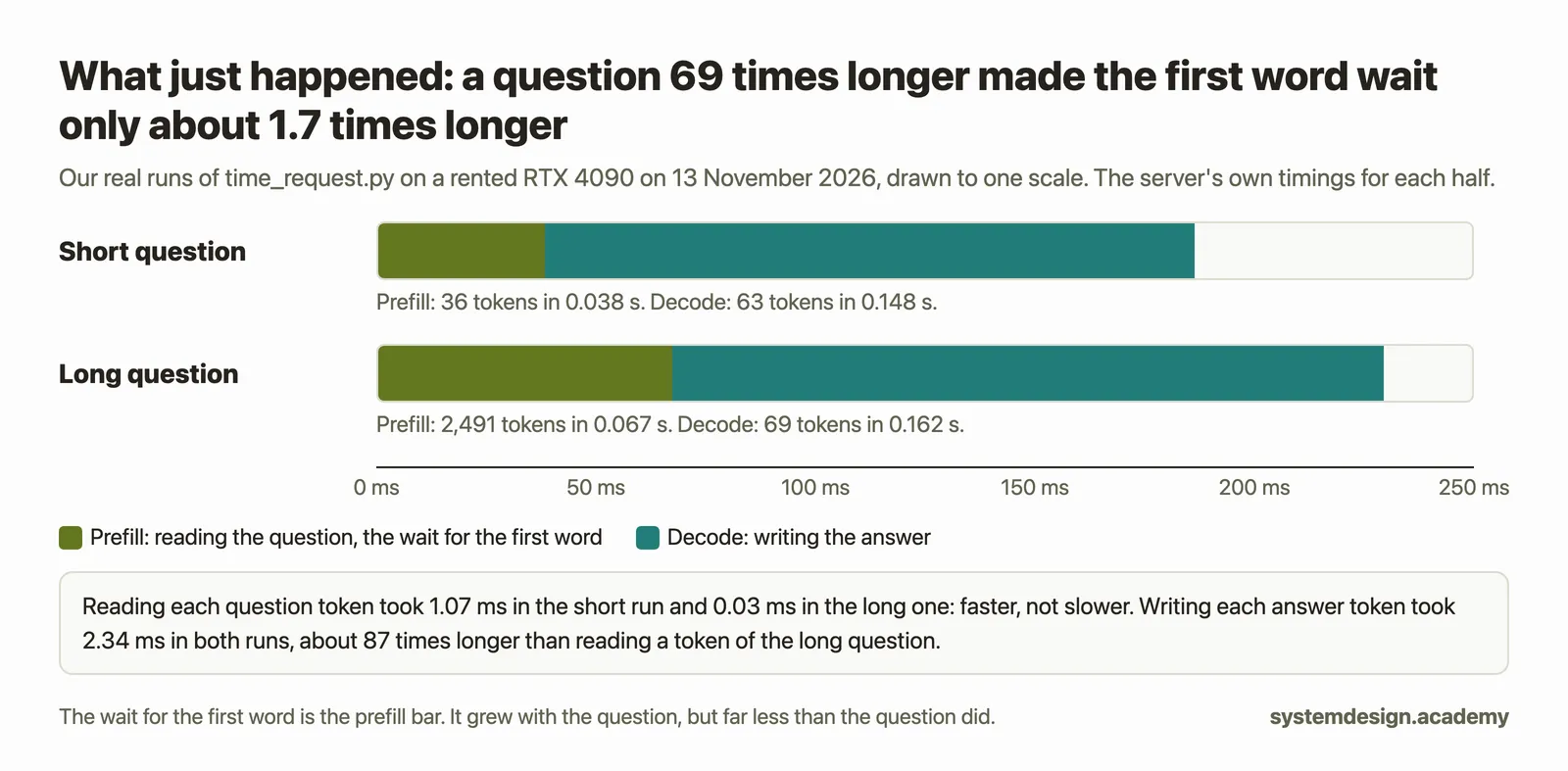
Every request to a language model has two halves. In prefill, the model reads all the tokens of the question in one pass through its weights. In decode, it writes the answer one token per pass, because each new token depends on the one before it. A token is a small piece of text, often a word or part of one.
The difference matters because the two halves are limited by different things and felt differently by the user. Prefill decides how long they wait for the first word. Decode decides how fast the rest of the words arrive. Most tuning choices help one half and can hurt the other.
What we measured: On a rented RTX 4090, the small model Qwen3-0.6B read a 256-token prompt at 35,796 tokens a second and wrote at 642.0 tokens a second, about 56 times slower per token.
Is LLM inference compute-bound or memory-bound?
It depends on which half you mean, and saying so is the answer interviewers want. Decode is memory-bound when only a few people share each step: writing one token reads every weight from the GPU's memory but uses each weight for only one multiply and one add, so the arithmetic finishes early and waits for the next bytes. Prefill is compute-bound: one read of the weights is shared by every token of the question, so the arithmetic stays busy.
A useful way to say it is arithmetic intensity, the number of operations a job does for every byte it reads. A GPU has a ridge point where its memory limit and its arithmetic limit meet. Jobs below that point wait for memory; jobs above it wait for maths.
What we measured: Qwen3-8B on the RTX 4090 wrote at about 3.2 operations per byte, far below the card's ridge point of about 164, and reached 76% of its memory ceiling. Reading a 512-token prompt, the same model did about 1,660 operations per byte.
Lesson: When a GPU waits for memory and when it waits for maths
How would you estimate the fastest a GPU can write for one person?
Divide the GPU's memory speed by the bytes the model reads for each token. Writing one token for one person reads nearly all of the weights once, so a model twice as big writes about half as fast, and a card with twice the memory speed writes about twice as fast. The arithmetic figure on the data sheet hardly matters for this number.
This is a ceiling, not a promise. Real engines reach a large share of it but never all of it, and the notes kept for a long conversation add more bytes to read for every token.
What we measured: For Qwen3-8B in a 4-bit file, about 4.67 GB is read for each token, so the RTX 4090's rated 1,008 GB a second allows at most 216 tokens a second. llama-bench measured 164.68 tokens a second.
What decides time to first token?
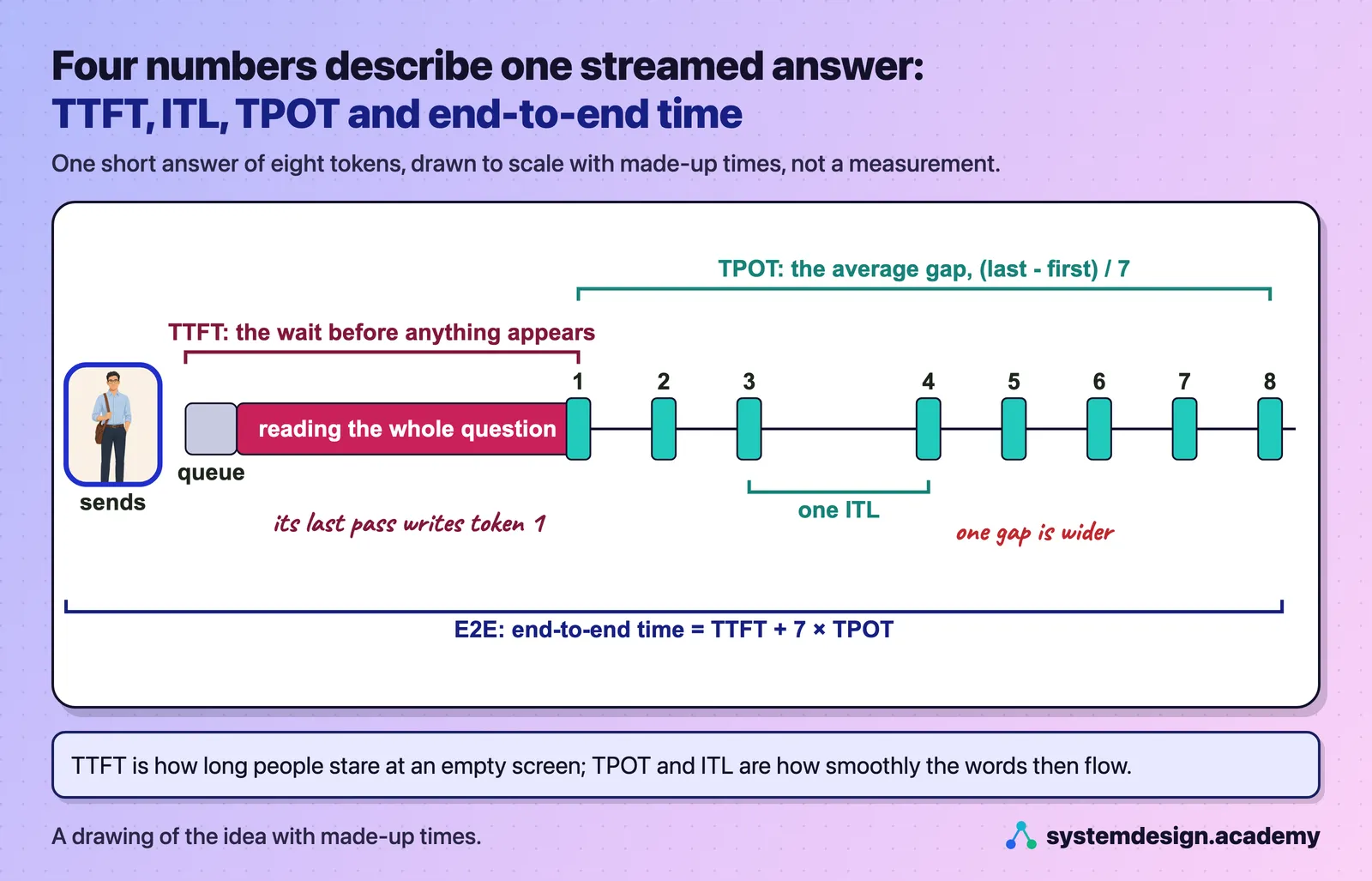
Time to first token, TTFT, is how long a user waits after sending a question before the first word appears. It is the time spent waiting in the server's queue, plus the prefill of the whole question, plus a small fixed cost for handling the request. So it grows with the length of the question and, on a busy server, with the queue.
That is why a long pasted document makes the first word slower, and why a crowded server makes everyone's first word slower even when their questions are short.
What we measured: On our RTX 4090, a 36-token question waited 0.07 seconds for its first word, and the same question after a 2,491-token log waited 0.12 seconds. With Qwen3-8B, the median TTFT was 76.0 ms with one person asking and 439.4 ms with 16 people at once.
2. Memory: the KV cache and how many people fit
The second favourite topic is memory, because GPU memory, not the GPU's speed, usually decides how many people one card can serve.
What is the KV cache, and how do you work out its size?
The KV cache is the set of notes a model keeps on every earlier token of a conversation: a key and a value in every layer, worked out once and kept in GPU memory so they are never worked out again. Without it, the model would redo that work for every token it writes.
Its size per token is 2 (a key and a value) times the number of layers, times the number of key-value heads, times the head size, times the bytes per number. All of these are in the model's config.json file.
What we measured: For Qwen3-8B that is 2 × 36 × 8 × 128 × 2 bytes = 147,456 bytes, 144 KiB for every token. On our RTX 4090, llama-server reserved exactly the 448.00 MiB the same formula predicts for 4,096 tokens of Qwen3-0.6B.
How many concurrent users can one GPU serve?
Work it out from memory. Take the GPU's memory that the serving engine may use, subtract the weights and the engine's working space, and what is left is the KV cache. Divide that by the bytes one token needs, and you have the tokens that fit. Divide by the length of one conversation, and you have how many conversations fit at full length.
Then say the honest part: the answer depends on how long the conversations are, and a promised speed per user can lower it further.
What we measured: Qwen3-8B in 16 bits on a 24 GB RTX 4090: 15.27 GiB of weights, about 1.8 GiB of working space, and 4.56 GiB left for the cache, room for 33,216 tokens. That is about one conversation of 32,768 tokens, or 16 of 2,000 tokens.
What problem does PagedAttention solve?
If a server reserved room for the longest possible conversation for every request, most of that room would sit empty, because most conversations are short. PagedAttention stores each conversation's keys and values in small pages of a fixed number of tokens, taken from a shared pool only as the conversation grows. A block table records which pages belong to which conversation, in what order, wherever they sit in memory.
So a conversation wastes at most part of its last page. It was introduced in the 2023 paper "Efficient Memory Management for Large Language Model Serving with PagedAttention", which is the paper behind vLLM.
What we measured: On our RTX 4090 with Qwen3-8B, vLLM made 2,076 pages of 16 tokens, 2.25 MiB each. One 32,768-token reservation would have taken 2,048 of them; instead 64 conversations of about 340 tokens ran at once with the cache at most 66.8% full.
What happens when the KV cache is full?
New requests wait in the queue. When a running request needs a new page and none is free, the server preempts a request: it pauses it, frees its pages, puts it back in the queue, and later reads its text again to rebuild its notes. Every answer still comes back complete, only later.
A few preemptions at a peak are normal. Preemptions all the time mean the server needs more cache room, fewer people per GPU, or a smaller model or cache format.
What we measured: When 160 people asked at once, the cache filled to 100.0%, with 64 preemptions and up to 62 requests waiting. Every answer came back with all its tokens, at 21.9 tokens a second each instead of 43.4 with 64 people.
3. Batching, latency and cost
This is the part of the round where interviewers check whether you understand the trade-off at the heart of serving: more total output against a slower experience for each person.
Why does batching make LLM serving faster and cheaper?
Because decode waits on memory. When several people's next tokens go into the same step, one read of the weights writes a token for each of them, so the GPU's idle arithmetic turns into more answers for little extra time. The total output rises steeply while each person slows down only a little, until memory or arithmetic runs out.
Cheaper follows directly, because a GPU is paid by the hour. More tokens from the same hour means a lower cost per token.
What we measured: With vLLM and Qwen3-8B on an RTX 4090, 32 people at once wrote 20.2 times as much in total as one person, while each person's own speed fell from 58.1 to 39.9 tokens a second.
What is continuous batching?
In a simple batch, a group of requests starts together and the next group waits until the longest answer in the group is finished, so places sit empty while short answers are done. Continuous batching decides the batch afresh at every step: a finished request leaves and a waiting one joins between any two steps, as long as its notes fit in the KV cache.
Every modern serving engine works this way. It is the reason the GPU stays busy even when answer lengths are very different.
What we measured: The same 48 answers took 24.33 seconds in fixed waves of 12 and 16.83 seconds with continuous batching, 12 at a time, on our RTX 4090.
What is the difference between TPOT and inter-token latency?
Time per output token, TPOT, is one number per answer: the time from the first token to the last, divided by the tokens after the first. It is the average gap of that answer. Inter-token latency, ITL, keeps every single gap between two tokens, so a long pause in the middle of an answer shows up instead of being averaged away.
Their medians are usually close. Their slow ends are not, and the slow end is what a user notices as the text freezing.
What we measured: With 16 people at once, the median TPOT was 22.8 ms and the median ITL 20.0 ms, but the p99 ITL was 162.0 ms and the slowest gap 201.1 ms, which no TPOT showed.
Why report p99 latency instead of the average?
The p99 is the value that 99 in 100 requests are at or below, so it describes the unlucky users rather than the typical one. An average mixes fast and slow answers and lands where few people actually are. Report the median for the typical person and the p90 or p99 for the unlucky ones, and always say how many requests a percentile came from, because with a few dozen requests the p99 is simply the slowest one.
What we measured: With 16 people at once, the mean wait for the first word was 612.1 ms, the median 439.4 ms, and the slowest 1 in 10 waited 1,364.4 ms or more.
What is goodput, and why is it better than tokens per second?
Goodput is the number of requests a second that met their speed targets, such as a first token within 2 seconds. Raw tokens per second counts every token, including tokens from requests that waited so long the user gave up. A server pushed past its limit can show high total tokens per second and still fail most of its users, and goodput is the number that catches that.
How do you work out the cost per million tokens of a self-hosted model?
Divide the GPU's price per hour by the tokens it writes in an hour, then multiply by a million. The tokens per hour must be measured on that GPU, with that model, at the number of people you really expect, because batching changes the answer more than anything else.
Then add what the simple sum leaves out: reading the questions, hours when the GPU is idle or half full, and everything around the GPU. The simple sum is the best case.
What we measured: On the same rented RTX 4090, Qwen3-8B wrote 161 tokens a second for one person and 2,179 for 32 people at once, so each token cost about 13.5 times less at 32 people, while each person's answer took about 2.4 times longer.
If this helped, the full hands-on course goes much deeper.
In Hands-On Inference Engineering you rent an NVIDIA GPU, serve real models with vLLM, and measure every number on this page yourself, so in the interview you can say what you saw rather than what you read.
4. Making a model faster, smaller or bigger than one GPU
The last part of the round is usually a list of techniques. The strong answer names what each one trades, with a number.
What does quantization buy you, and what does it cost?
Quantization stores a model's numbers in fewer bits, for example 8 instead of 16. The weights then take half the memory, which leaves more room for the KV cache and so for more people, and each token is written faster when few people are served, because there are fewer bytes to read. The cost is some loss of precision, which may change answers, so quality must be tested after the change.
The KV cache can be quantized separately from the weights, and it is a separate setting with its own quality check.
What we measured: Qwen3-8B in 8 bits took 8.9 GiB of weights instead of 15.27 GiB on our RTX 4090, and its cache held 79,184 tokens instead of 33,216, 2.38 times as many.
How does speculative decoding speed up writing?
A fast guesser proposes several tokens ahead, and the large model checks all of them in one pass. Checking several tokens costs about the same as writing one, because decode is limited by reading the weights, so every accepted guess is a token for free. If a guess is wrong, the model keeps the tokens up to that point and writes the correct next one itself, so the answer is the same as without guessing.
It helps most when few people are being served and the GPU's arithmetic is idle. On a busy server that arithmetic is already in use, so the gain shrinks. The guesser can be a small draft model, or simply text matching earlier text, called n-gram guessing.
What we measured: Llama 3.1 70B in FP8 on one H100, rewriting a code file: 26.7 ms a word without guessing, 7.3 ms with n-gram guessing 4 tokens ahead, 3.65 times faster, with 1,892 of 2,684 guesses accepted (70.5%).
When do you split a model across GPUs, and how?
For one of two reasons: the model does not fit on one card, or it fits but is too slow. Tensor parallelism splits each layer's large tables across several GPUs, so every GPU does part of every layer and they exchange results at every step. That needs a fast link between the cards, such as NVLink; over a slower link like PCIe the talking can eat the gain. The other splits are by layers (pipeline parallelism) or by running more full copies (data parallelism).
What we measured: Llama 3.1 70B in FP8 on one H100 loaded 67.7 GiB and left 0.07 GiB for the KV cache, so the server refused to start. On two A100 80 GB cards with NVLink and tensor parallelism 2, each card held 33.89 GiB, the cache had 37.48 GiB, and 16 people got a word every 48 ms.
What is prefix caching, and what breaks it?
Prefix caching keeps the KV cache pages of earlier requests and reuses them when a new request starts with exactly the same tokens, so that beginning is not read again. A support bot whose every request starts with the same long system message reads it once. The match runs from the first token and stops at the first page that differs, so anything that changes near the start, such as a timestamp or a user's name, breaks it for the rest of the prompt.
What we measured: Eight questions behind the same 2,958-token beginning found 87% of their prompt tokens in the cache, and their first word came after about 46 ms instead of 326 ms. A clock time at the start of the system message cut the hit rate to 0%; the same line at the end gave 86%.
Why do other users' answers freeze when someone sends a very long prompt?
Because the model runs in steps and a step cannot be interrupted. If one step reads a whole long prompt, every answer being written waits until that step ends. Chunked prefill reads the long prompt over several steps, in pieces that fit beside one token for every answer being written, so nobody freezes for long. The size of the pieces is set by the step's token budget.
What we measured: With a budget of 16,384 tokens, a 12,563-token question was read in one step and eight other answers stopped for up to 1,499 ms. At the default 2,048 it was read in 7 pieces and the longest stop was 300 ms.
Where to go next
If this helped, the full hands-on course goes much deeper.
In Hands-On Inference Engineering you rent an NVIDIA GPU, serve real models with vLLM, and measure every number on this page yourself, so in the interview you can say what you saw rather than what you read.
Every number on this page comes from Hands-On Inference Engineering: Serve LLMs on GPUs with vLLM and SGLang, where you rent the GPU yourself, run each command and compare your numbers with ours. Start with the free introduction and the free lessons on prefill and decode and the KV cache. If you are also preparing for interviews, the two big courses together and the Inference Engineering interview pack are below.

These questions are a start. The interview asks more.
Get all 150 questions in the AI Engineering (LLM applications) pack
Each question has why it is asked, a full answer, what the interviewer listens for, the follow-ups, the common mistakes and a diagram (180 diagrams in all). A PDF you keep, junior to staff level.
Pay by UPI, cards or netbanking through Razorpay. Pay by card or PayPal, in US dollars. Download at once from My packs.