LLM Tokens per Second: Throughput vs Latency, Measured on a Real GPU
What is tokens per second, and why does it differ between people and servers?
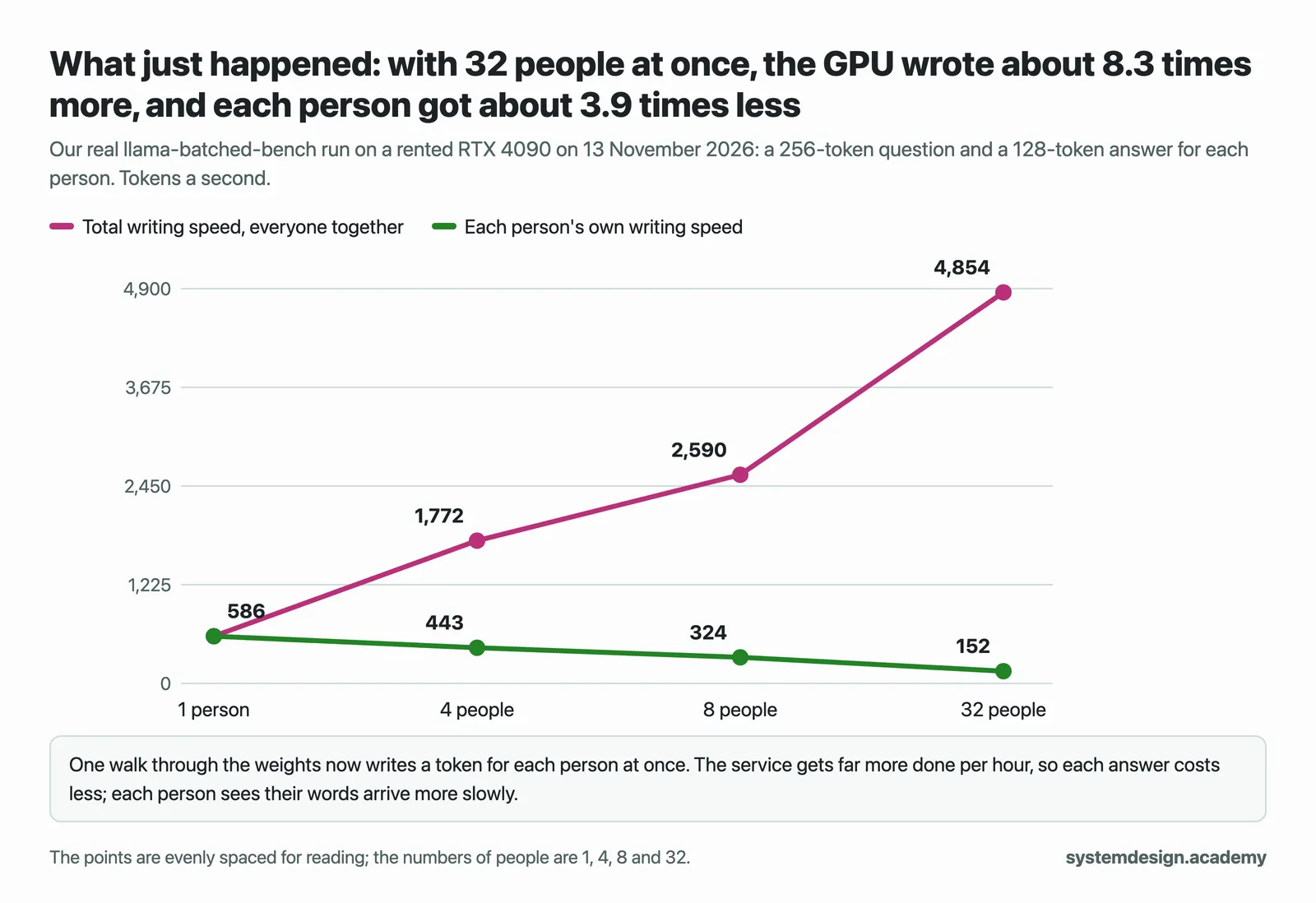
Tokens per second is how fast a model writes its answer, counted in tokens, the small pieces of text a model works in. One person alone gets the fastest speed, but the GPU is mostly idle. Serving many people at once shares each read of the weights, so the server's total rises steeply while each person slows down: on one rented RTX 4090, one person got 359 tokens a second and 64 people got 12,087 in total, about 189 each.
Save your progress and get the AI Engineering cheat sheet PDF
This guide explains tokens per second the way you would explain it to a colleague: what is being counted, why the speed one person sees and the total speed of the server move in opposite directions, and what actually limits both. It answers 16 questions, each with numbers we measured on a rented NVIDIA GPU.

16 questions · 4 sections · answers from the course
These answers come from our course Hands-On Inference Engineering: Serve LLMs on GPUs with vLLM and SGLang: 43 lessons ready so far, each one run and measured on a rented NVIDIA GPU. The first lessons are free to read, with no card needed.
The short version
Always ask two things about a tokens-per-second figure: is it one person's speed or the server's total, and how many people were being served. Writing speed is limited by how fast the GPU reads the weights from memory, so smaller weights and faster memory help. Total speed rises as more people share the GPU, until the KV cache fills and people start waiting.
If this helped, the full hands-on course goes much deeper.
In Hands-On Inference Engineering you serve a model with vLLM on a rented GPU and run your own sweep from one person to 64, measuring total speed, each person's speed and the slowest waits, so you can find the right load for a real service.
1. What tokens per second means
Tokens per second sounds like one number. It is really several, and most confusion about LLM speed comes from mixing them up.
What does tokens per second mean for an LLM?
It is how many tokens a model reads or writes each second. A token is a small piece of text that a model reads and writes: often a whole common word with its space, sometimes part of a word, a digit or a punctuation mark. Every speed, limit and price in serving is counted in tokens.
There are two different speeds inside every request. Reading the question, called prefill, happens all at once and is very fast per token. Writing the answer, called decode, happens one token at a time and is much slower per token. When people say a model runs at so many tokens per second, they nearly always mean the writing speed.
What we measured: On a rented RTX 4090, Qwen3-8B in llama.cpp read a 512-token prompt at 12,095 tokens a second and wrote at 164.0 tokens a second for one person.
How do tokens per second and milliseconds per token relate?
They are the same speed written two ways: divide 1,000 by the tokens per second to get milliseconds per token. Engineers who serve many people tend to use milliseconds per token, because a promise to users is usually written as a gap, such as a word at least every 50 ms. People comparing local models tend to use tokens per second.
What we measured: Qwen3-8B in llama.cpp wrote a 165-token answer at 152.3 tokens a second on our RTX 4090, which is about 6.6 milliseconds a token.
How many tokens per second is fast enough?
For a person reading a streamed answer, anything comfortably faster than they read feels instant once the text has started. Above that point, extra writing speed matters less than the wait for the first word, which is a separate number. For a program that reads the whole answer before doing anything, such as an agent or a batch job, total time matters, so writing speed matters all the way up.
So the honest answer is a pair of targets, not one number: a first word within some time and a gap between words below some time, for the number of people you expect at once.
Why is reading the prompt so much faster than writing the answer?
Every pass through the model reads all of its weights from the GPU's memory. In prefill, that one read is shared by every token of the question, so the GPU's arithmetic stays busy. In decode, the whole read is paid for one token, so the GPU spends most of its time waiting for memory.
What we measured: Qwen3-0.6B on the RTX 4090 read a 256-token prompt at 35,796 tokens a second and wrote at 642.0 tokens a second, about 56 times slower per token.
2. Throughput vs latency: the trade-off
A served model has two audiences. The person asking cares about latency, how long they wait. The team paying for the GPU cares about throughput, how much the GPU produces. Batching moves both at once, in opposite directions.
What is the difference between throughput and latency for an LLM?
Throughput is the whole server's output: the answer tokens written each second for everyone together. Latency is what one person feels: the wait for the first word, and the gap between words after it. A server can have high throughput and poor latency at the same time, for example when it is crowded with people who each get their words slowly.
That is why a single tokens-per-second figure is never enough. Ask whether it is per person or in total, and how many people were being served when it was measured.
What we measured: With vLLM serving Qwen3-0.6B on one RTX 4090, one person alone got 359 tokens a second, and 64 people at once got 12,087 tokens a second in total, about 189 each.
Why does serving more people at once raise total tokens per second?
Because writing waits on memory, not on arithmetic. When several people's next tokens go into the same step, one read of the weights writes a token for each of them. The extra people cost very little extra time, so the total grows quickly while each person slows down only a little.
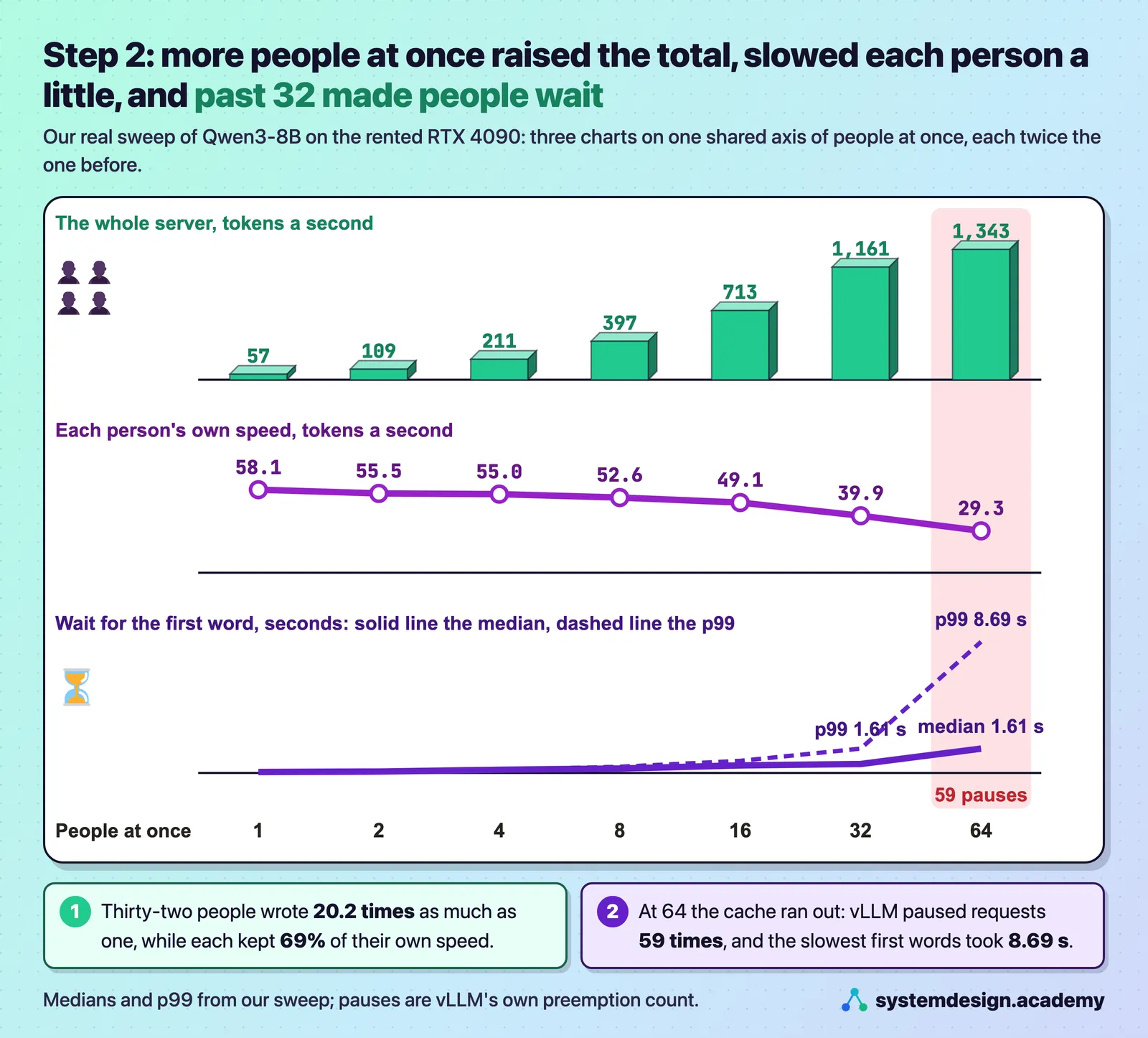
What we measured: With vLLM and Qwen3-8B on an RTX 4090, 32 people at once wrote 1,161 tokens a second in total, 20.2 times as much as one person, while each person's own speed fell from 58.1 to 39.9 tokens a second.
Why does throughput stop rising when I add more users?
Usually because the KV cache is full. The KV cache holds notes on every token of every conversation, and when it runs out of room the server pauses some people, frees their notes and works them out again later, which costs time and writes nothing new. The arithmetic also stops being free once long questions are read in the same steps.
Past that point, adding people mostly adds waiting. The total barely moves while the slowest first words get much slower.
What we measured: Going from 32 to 64 people on our RTX 4090 raised the total by only 16%, from 1,161 to 1,343 tokens a second. Each person fell to 29.3 tokens a second, the p99 wait for the first word reached 8.69 seconds, and vLLM paused requests 59 times at 64 people and never below.
How do I choose how many people to serve at once on one GPU?
Start from a promise, not from the biggest total. Write down the slowest first word and the slowest gap between words you will accept, then raise the number of people until one of those promises breaks, using questions and answers of your real lengths. That number of people is your capacity. The measure that matches this is goodput: the requests a second that met their speed targets.
The KV cache gives you an upper bound before you test. Divide the tokens of cache the server reports at start-up by the length of one conversation.
What we measured: For Qwen3-8B on an RTX 4090, vLLM reported 33,216 tokens of cache. With conversations of 768 tokens that is about 43 at once, and the runs agreed: 32 people ran with no pauses, 64 did not.
If this helped, the full hands-on course goes much deeper.
In Hands-On Inference Engineering you serve a model with vLLM on a rented GPU and run your own sweep from one person to 64, measuring total speed, each person's speed and the slowest waits, so you can find the right load for a real service.
3. What sets the speed
Once you know that writing waits on memory, most speed questions answer themselves: fewer bytes to read, or faster memory, means more tokens per second.
Why does memory speed matter more than GPU compute for tokens per second?
Writing one token for one person reads nearly every weight once, but uses each weight for only one multiply and one add. The arithmetic is done long before the next bytes arrive. So the fastest one person can be served is roughly the GPU's memory speed divided by the bytes read for each token, and the arithmetic figure on the data sheet hardly enters into it.
What we measured: Qwen3-8B in a 4-bit file reads about 4.67 GB for each token, so the RTX 4090's rated 1,008 GB a second allows at most 216 tokens a second. llama-bench measured 164.68, and in another run 164.0 tokens a second meant reading about 767 GB a second, about 76% of the rating.
Does a smaller or quantized model give more tokens per second?
Yes, when few people are served, because there are fewer bytes to read for each token. Quantization, storing the weights in fewer bits such as 8 instead of 16, does the same thing for the same model. With large batches the extra work of unpacking small numbers can cancel part of the gain, and the answers must be checked, because fewer bits can change them.
What we measured: On an NVIDIA L4, Qwen3-8B with one person wrote a token every 60.8 ms in 16 bits and every 34.6 ms in 8-bit FP8, measured with vLLM.
Why do tokens per second fall as the conversation gets longer?
For every new token, attention reads the notes of every earlier token, the KV cache, as well as the weights. The longer the conversation, the more notes there are to read for each new token, so each token takes a little longer to write.
What we measured: Qwen3-8B on our RTX 4090 wrote 164.1 tokens a second with an empty cache and 114.9 tokens a second with 16,384 tokens already in it.
Why does CPU offloading make tokens per second collapse?
Offloading keeps part of the weights in the computer's ordinary memory instead of on the GPU. Those weights must then cross the link between the computer and the GPU, called PCIe, for every token, and that link is far slower than the GPU's own memory. It makes a model fit, but only where speed does not matter.
What we measured: Moving 6.02 GiB of Qwen3-8B's weights off the RTX 4090 with vLLM's --cpu-offload-gb 6 dropped one person's speed from 56.4 to 2.6 tokens a second, about 22 times slower.
4. Measuring tokens per second honestly
Two people can measure the same server and get very different numbers. These are the habits that make a speed figure mean something.
How do I measure tokens per second for a served model?
Ask the server to stream the answer and note the time each piece arrives. The wait until the first piece is the time to first token, TTFT. The time from the first token to the last, divided by the tokens after the first, is the time per output token, TPOT, the average gap of that answer. Measuring the two separately tells you whether a slow answer is a reading problem or a writing problem.
For a whole server, vLLM ships a benchmark, vllm bench serve, which reports throughput, TTFT, TPOT and the gaps between tokens, with medians and 99th percentiles. Check that it reports no failed requests.
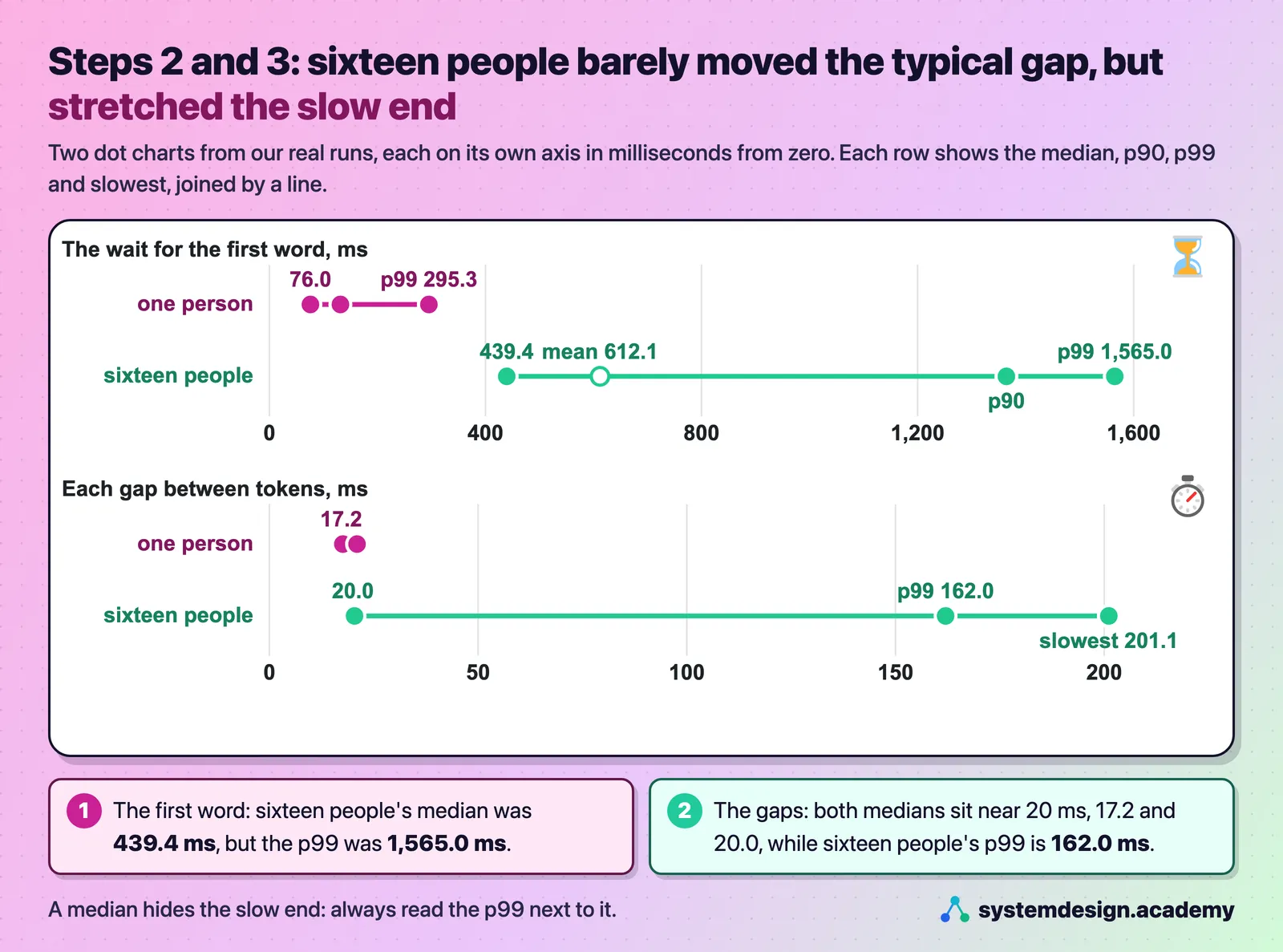
What we measured: One person on our RTX 4090 waited 76.0 ms for the first word from Qwen3-8B and then got a token every 17.1 ms.
Why look at percentiles and not average tokens per second?
An average mixes fast and slow moments and hides the pauses people actually notice. The median tells you what a typical person felt; the p90 and p99 tell you what the unlucky ones felt. Always say how many requests a percentile came from, because with a few dozen answers the p99 is simply the slowest one.
What we measured: With 16 people at once, the median gap between words was 20.0 ms, but the p99 gap was 162.0 ms and the slowest 201.1 ms.
Why must a speed test use fresh prompts?
Because serving engines keep the notes of prompts they have already read and reuse them when a new request starts the same way. vLLM does this by default, and calls it prefix caching. A test that repeats the same questions measures that cache, not the GPU, and flatters the result. Give every run its own questions, and check that vLLM's vllm:prefix_cache_hits_total counter stays at 0.
How do tokens per second turn into a cost per token?
Divide the GPU's price for an hour by the tokens it writes in that hour, and multiply by a million to get the cost per million tokens. The tokens per hour must be the total for the number of people you really serve, which is why throughput, not one person's speed, decides the cost.
What we measured: Qwen3-8B on the same RTX 4090 wrote 161 tokens a second for one person and 2,179 for 32 at once, so each token cost about 13.5 times less at 32 people, while each answer took about 2.4 times longer.
Where to go next
If this helped, the full hands-on course goes much deeper.
In Hands-On Inference Engineering you serve a model with vLLM on a rented GPU and run your own sweep from one person to 64, measuring total speed, each person's speed and the slowest waits, so you can find the right load for a real service.
Every number on this page comes from Hands-On Inference Engineering: Serve LLMs on GPUs with vLLM and SGLang, where you rent the GPU yourself, run each command and compare your numbers with ours. Start with the free introduction and the free lessons on prefill and decode and the KV cache. If you are also preparing for interviews, the two big courses together and the Inference Engineering interview pack are below.

These questions are a start. The interview asks more.
Get all 120 questions in the Inference Engineering pack
Each question has why it is asked, a full answer, what the interviewer listens for, the follow-ups, the common mistakes and a diagram (141 diagrams in all). A PDF you keep, junior to staff level.
Pay by UPI, cards or netbanking through Razorpay. Pay by card or PayPal, in US dollars. Download at once from My packs.