How Much GPU Memory Does an LLM Need? 8B on One Card, 70B on Two
How much GPU memory does an LLM need?
Roughly 2 bytes per parameter in 16 bits for the weights, plus a couple of GiB of working space, plus the KV cache, which grows with every user and every token. On a 24 GB RTX 4090, Qwen3-8B's weights took 15.27 GiB, and vLLM had 4.56 GiB left for conversations, room for 33,216 tokens. Llama 3.1 70B in 8 bits did not fit one 80 GB H100 with any room for users, but ran well on two A100 80 GB cards joined by NVLink.
Save your progress and get the AI Engineering cheat sheet PDF
This guide works out how much GPU memory a language model needs, using real starts of vLLM on rented GPUs instead of rules of thumb. It answers 17 questions, from an 8B model on one 24 GB card to a 70B model split across two A100s, and each answer links to the lesson the number comes from.

17 questions · 4 sections · answers from the course
These answers come from our course Hands-On Inference Engineering: Serve LLMs on GPUs with vLLM and SGLang: 43 lessons ready so far, each one run and measured on a rented NVIDIA GPU. The first lessons are free to read, with no card needed.
The short version
Count three things: the weights, the working space and the KV cache. The first two are fixed, so subtract them from the share of the card your server uses, and whatever is left is the room for conversations. Divide that by the notes one token needs and by the length of your users' conversations, and you know how many people fit. When nothing is left, use fewer bits or more GPUs.
If this helped, the full hands-on course goes much deeper.
In the course you rent the GPU yourself, start vLLM with real models, read its memory budget line by line, and change each setting to see how many people fit.
1. The three things that share a GPU's memory
A model being served is not alone on the card. Three things share the memory, and only one of them grows with the number of people you serve.
How much GPU memory does an LLM need?
More than the size of its files. A served model needs room for three things: its weights, which are the numbers it learned in training; some working space for its arithmetic; and the KV cache, which holds notes on every token of every conversation it is answering. The weights and the working space are fixed for a given model and setup. The KV cache grows with every person and every token, so it decides how many people one card can serve.
A quick first estimate for the weights is the number of parameters times the bytes per number: 2 bytes in 16 bits, 1 byte in 8 bits, about half a byte in 4 bits. Then add a couple of GiB of working space, and only then ask how much is left for conversations.
How do I work out the size of the weights?
Multiply the number of parameters by the bytes each one takes. Qwen3-8B has about 8.2 billion parameters, and in 16 bits that is 16.4 GB, which is 15.26 GiB (a GiB is 1,073,741,824 bytes, a little more than a GB, and vLLM counts in GiB).
The sum is close to what the server reports. vLLM's own log counted 15.27 GiB once Qwen3-8B was on the card.
What we measured: Qwen3-8B in 16 bits: 15.26 GiB on paper, 15.27 GiB in vLLM 0.33's start-up log on a rented RTX 4090.
What is the working space, and how big is it?
It is the memory the model needs for its arithmetic, besides the weights and the KV cache. vLLM measures it with a trial run when it starts and sets it aside before it sizes the cache.
It is not one fixed number. On our RTX 4090 with Qwen3-8B it was about 1.8 GiB on a first start, which also compiles the model, and about 1.15 GiB on a later start that reused the compiled program. So read the cache size from vLLM's log on a second start before you plan capacity.
What we measured: Working space for Qwen3-8B on an RTX 4090: about 1.80 GiB on a cold start, about 1.15 GiB on a warm start.
2. Worked example: an 8B model on one 24 GB card
Here is the whole sum for Qwen3-8B in 16 bits on a rented RTX 4090, step by step, checked against vLLM's own start-up log.
Does an 8B model fit on a 24 GB GPU, and how many people can it serve?
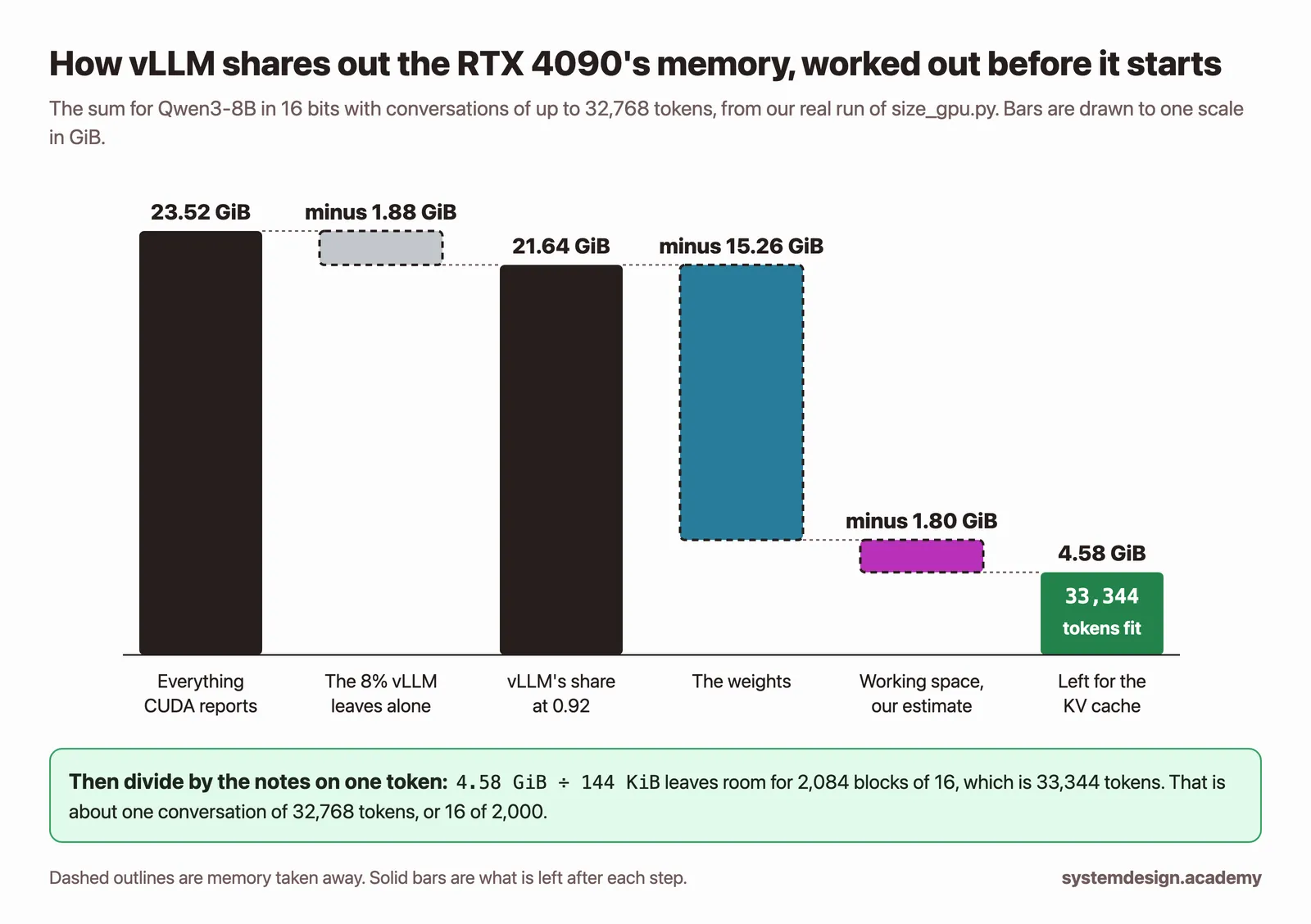
It fits, with modest room for conversations. The card reported 23.52 GiB to vLLM. vLLM uses 92% by default, which is 21.64 GiB. Take away 15.27 GiB of weights and about 1.8 GiB of working space, and the KV cache got 4.56 GiB.
At 144 KiB a token, 4.56 GiB is room for 33,216 tokens, which vLLM keeps as 2,076 pages of 16 tokens each. That is enough for about one conversation of 32,768 tokens, 8 of 4,000 or 16 of 2,000, if they all reach their full length at the same time.
What we measured: vLLM 0.33, Qwen3-8B in 16 bits, RTX 4090: weights 15.27 GiB, KV cache 4.56 GiB, 33,216 tokens in 2,076 pages of 16.
What does gpu-memory-utilization change?
It sets the share of the card vLLM may use, 0.92 by default in vLLM 0.33. The weights and working space take the same room whatever the share, so the whole change comes out of the KV cache.
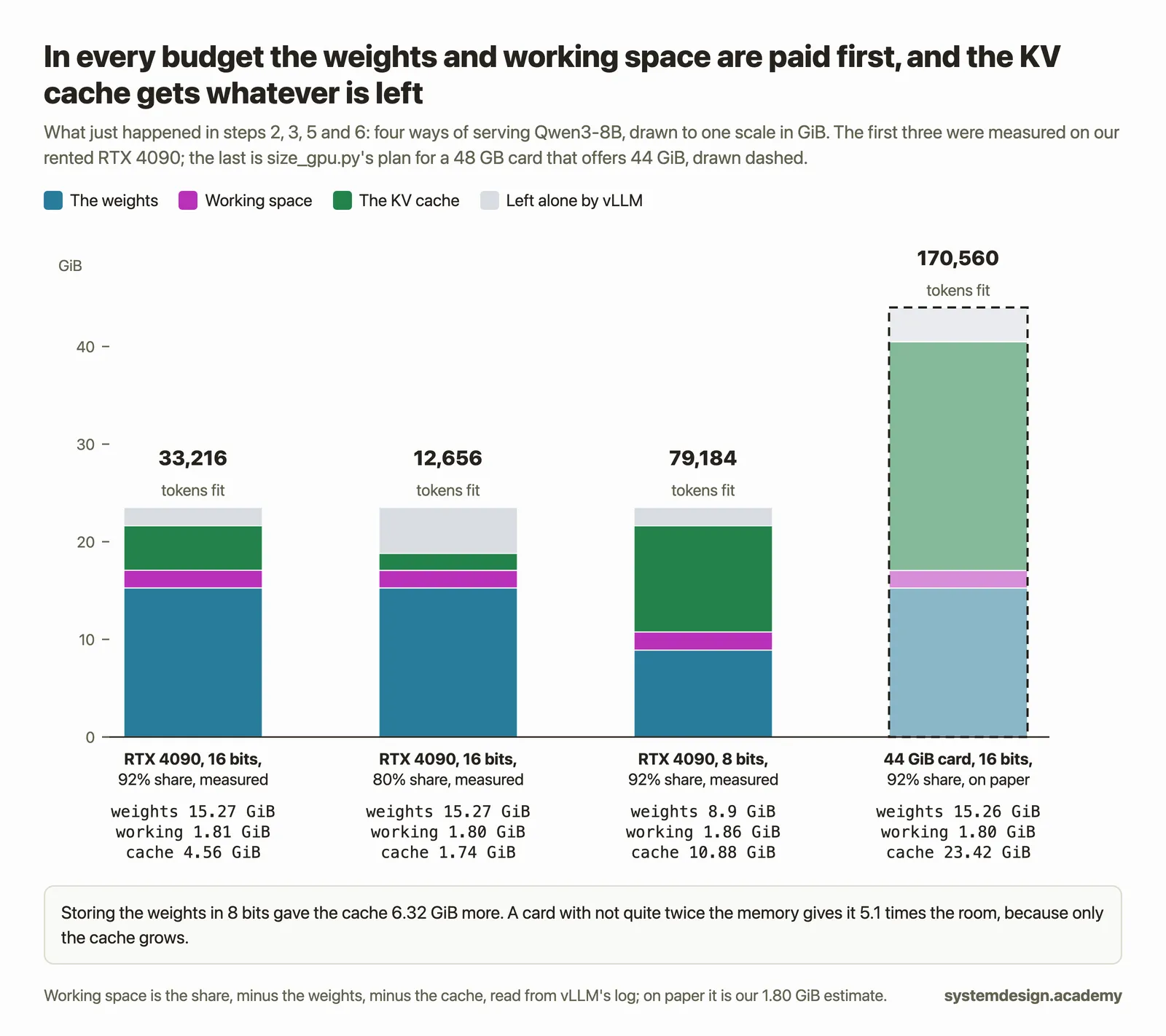
That makes a small change in the share a large change in capacity. On our card, going from 0.92 to 0.80 cut the cache from 4.56 GiB to 1.74 GiB, and the room for conversations from 33,216 tokens to 12,656.
What we measured: Qwen3-8B on an RTX 4090: share 0.92 gave a 4.56 GiB cache, share 0.80 gave 1.74 GiB.
Why does vLLM refuse to start with a long max model length?
At start-up vLLM checks that at least one conversation of the longest allowed length fits in the cache, and refuses to start if it does not. Qwen3-8B allows 40,960 tokens, which needs 5.62 GiB of cache, and our card had 4.56 GiB.
The fix is to start with a shorter --max-model-len, such as 8,192. That does not make the cache any bigger. It only changes the check, and it means no single conversation can grow past that length.
How much room does storing the weights in 8 bits make?
A lot, because whatever the weights give up goes straight to the cache. Qwen3-8B in 8 bits (FP8) took 8.9 GiB instead of 15.27 GiB, and the cache grew to 10.88 GiB, room for 79,184 tokens instead of 33,216, about 2.38 times as many.
Fewer bits can change the quality of the answers, so test the smaller copy on your own questions before you rely on it.
What we measured: Qwen3-8B FP8 on an RTX 4090: weights 8.9 GiB, KV cache 10.88 GiB, 79,184 tokens.
Can I store the KV cache itself in fewer bits?
Yes. With --kv-cache-dtype fp8 each token's notes take half the bytes, 73,728 instead of 147,456 for Qwen3-8B. In our run the cache held 59,856 tokens instead of 33,216, 1.80 times as many rather than 2, because that start needed a little more working space.
The weights stay as they were. Check answer quality on long conversations before you keep it.
What we measured: fp8 KV cache, Qwen3-8B on an RTX 4090: 59,856 tokens against 33,216 with the default 16-bit cache.
If this helped, the full hands-on course goes much deeper.
In the course you rent the GPU yourself, start vLLM with real models, read its memory budget line by line, and change each setting to see how many people fit.
3. Big models: when one card is not enough
For a 70B model the question changes from how many people fit to whether the model fits at all with room for anyone. These runs come from the course's GPU planning game, each one checked on real cards.
Does a 70B model fit on one 80 GB GPU?
Only just, and not usefully. Llama 3.1 70B in 8 bits loaded into 67.7 GiB on one H100 80 GB, which left 0.07 GiB for the KV cache. vLLM refused to start with room for 2,560 tokens, so the card could not hold even one ordinary conversation, let alone sixteen people.
A model that fits is not the same as a model that can serve. Always leave the KV cache enough room for the people you have promised to serve.
What we measured: Llama 3.1 70B FP8 on one H100 80 GB with vLLM 0.33: 67.7 GiB loaded, 0.07 GiB left for the KV cache, refused to start.
How do you serve a 70B model on two A100s?
Split the model across both cards with tensor parallelism, which divides each of the model's large weight tables between the GPUs so that every layer is shared out. In vLLM that is --tensor-parallel-size 2. The two cards talk at every step, so they need a fast link between them; our A100s were joined by NVLink.
Llama 3.1 70B in 8 bits then took 33.89 GiB on each card, and the KV cache got 37.48 GiB in all. Sixteen people at once got a new word every 48 ms each, inside the game's promise of 60 ms.
What we measured: Two A100 80 GB SXM with NVLink, tensor parallel 2, Llama 3.1 70B FP8: 33.89 GiB a card, KV cache 37.48 GiB, 16 people at 48 ms a word, one person 26.5 ms.
Can I split a model across two gaming GPUs the same way?
You can, but it is much slower than it looks on paper. Tensor parallelism makes the GPUs exchange results at every step, and cards like the RTX 4090 talk over PCIe, which moves at most 32 GB a second each way on that card. On NVLink cards such as the A100 80 GB SXM and the H100, the same exchange is fast.
On cards without NVLink it is usually better to run separate copies of a smaller model, one per card, and split the people between them.
How does a 120B model fit on one 80 GB card?
By being stored in very few bits from the start. OpenAI's gpt-oss-120b is published with its expert layers in MXFP4, a 4-bit format with one shared scale for every 32 numbers. On one A100 80 GB it loaded in 66.14 GiB and left 4.6 GiB for the KV cache.
It is also a mixture-of-experts model, where only some groups of weights work on each token, which is why it writes quickly for its size: 32 people at once got a word every 29 ms each in our run.
What we measured: gpt-oss-120b MXFP4 on one A100 80 GB SXM: 66.14 GiB loaded, KV cache 4.6 GiB, 32 people at 29 ms a word.
4. Ways to make room, and what each one costs
When the memory is short, every fix takes something from somewhere else. Here is what each common one costs.
Is CPU offloading a good way to fit a bigger model?
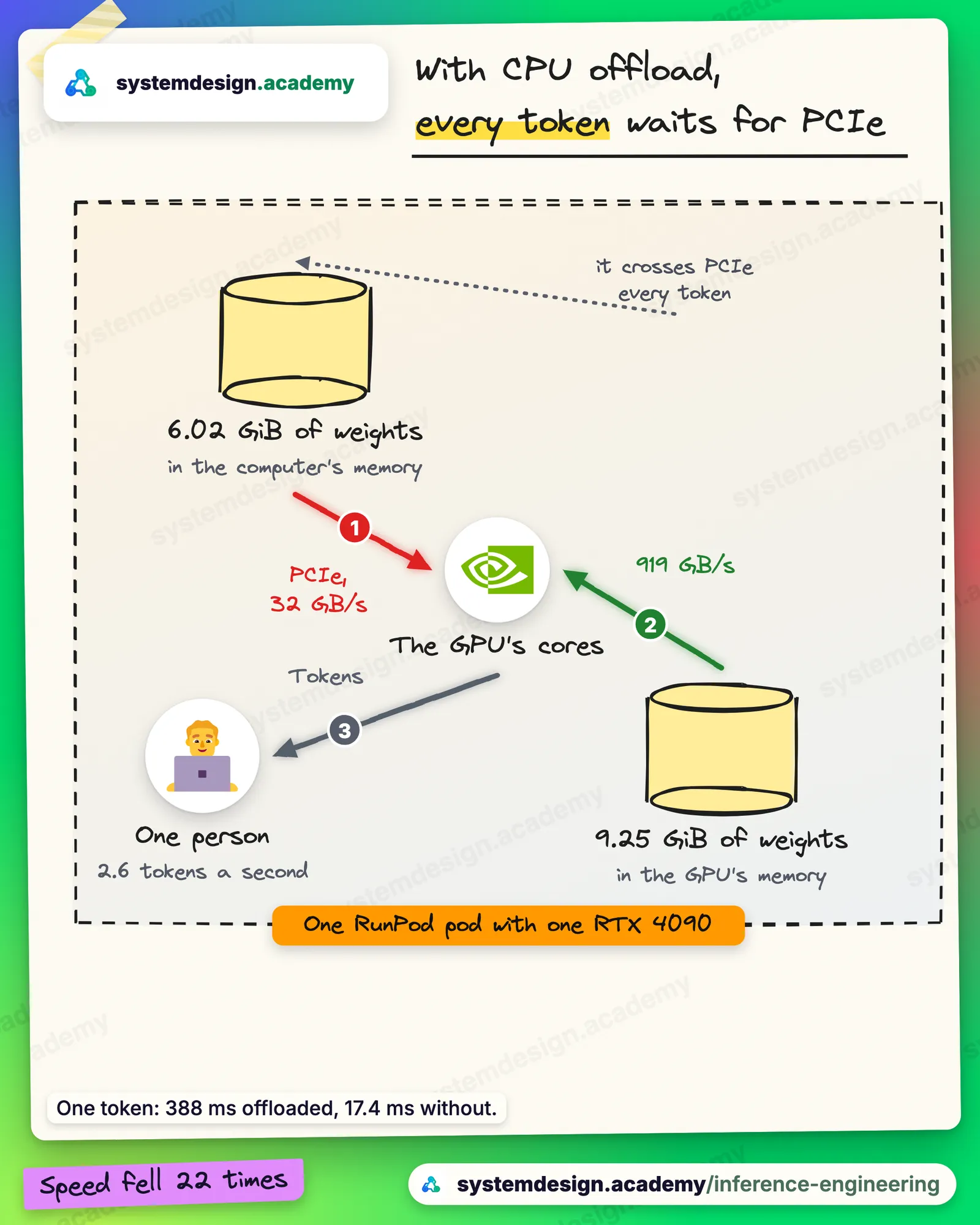
Only when the model will not fit any other way and speed does not matter. --cpu-offload-gb 6 moved 6.02 GiB of Qwen3-8B's weights off our RTX 4090 and grew the cache from 33,216 to 76,912 tokens.
But one person's answer fell from 56.4 to 2.6 tokens a second, about 22 times slower, because the offloaded weights cross the PCIe link for every token.
What we measured: Qwen3-8B on an RTX 4090 with --cpu-offload-gb 6: 2.6 tokens a second against 56.4 without.
Why does a newer model need less memory per user?
Because its attention keeps fewer keys and values. In grouped-query attention several query heads share one key and one value, and only keys and values go in the cache. Qwen3-8B shares each one among 4 heads, so it keeps 144 KiB a token; the older Qwen1.5-7B keeps 512 KiB.
The same memory therefore holds about 3.6 times as many tokens of the newer model, even though it has more parameters. You can check any model by comparing num_key_value_heads with num_attention_heads in its config.json.
Does vLLM waste memory by reserving room for the longest conversation?
No. vLLM stores the cache in pages of 16 tokens, taken one at a time as a conversation grows, so a conversation wastes at most part of its last page. This is called PagedAttention.
On our card, 64 people with conversations of about 340 tokens used only 66.8% of the cache at once, where reserving 32,768 tokens for each of them would have fitted only one.
How do I check the real number for my own model and card?
Start the model with vLLM and read its start-up log. It prints the memory the weights took, the KV cache it set aside, the number of tokens that fit and a maximum concurrency figure, which is how many conversations of the full allowed length would fit at once. Divide the tokens by the length of your own conversations for a realistic count.
For a first estimate before you rent anything, our free GPU memory calculator does the same sum in the browser.
Where to go next
If this helped, the full hands-on course goes much deeper.
In the course you rent the GPU yourself, start vLLM with real models, read its memory budget line by line, and change each setting to see how many people fit.
Every number on this page comes from Hands-On Inference Engineering: Serve LLMs on GPUs with vLLM and SGLang, where you rent the GPU yourself, run each command and compare your numbers with ours. Start with the free introduction and the free lessons on prefill and decode and the KV cache. If you are also preparing for interviews, the two big courses together and the Inference Engineering interview pack are below.

These questions are a start. The interview asks more.
Get all 120 questions in the Inference Engineering pack
Each question has why it is asked, a full answer, what the interviewer listens for, the follow-ups, the common mistakes and a diagram (141 diagrams in all). A PDF you keep, junior to staff level.
Pay by UPI, cards or netbanking through Razorpay. Pay by card or PayPal, in US dollars. Download at once from My packs.