Continuous Batching Explained, With Static Batching Measured Beside It
What is continuous batching?
Continuous batching is a way of serving many requests to a language model where the server decides the batch afresh at every step: a finished request leaves and a waiting one joins at once, so the GPU never waits for the longest answer in a group. vLLM always works this way. On a rented RTX 4090, the same 48 answers took 24.33 seconds in fixed batches of twelve and 16.83 seconds with continuous batching.
Save your progress and get the AI Engineering cheat sheet PDF
This page explains why serving many people at once makes a language model so much cheaper, what goes wrong with a simple batch, and how continuous batching fixes it. It answers 14 questions, with timings we measured ourselves on a rented RTX 4090.

14 questions · 4 sections · answers from the course
These answers come from our course Hands-On Inference Engineering: Serve LLMs on GPUs with vLLM and SGLang: 43 lessons ready so far, each one run and measured on a rented NVIDIA GPU. The first lessons are free to read, with no card needed.
The short version
Writing an answer reads all of the model's weights for every token, so the GPU has arithmetic to spare, and a batch spends it on other people's tokens. A static batch wastes it, because short answers leave their places empty until the longest one ends. Continuous batching refills each place at the very next step. It keeps adding people until the seats, the step budget or the KV cache runs out, and then people wait.
If this helped, the full hands-on course goes much deeper.
In the course you run the same 48 answers in fixed waves and continuously on a rented RTX 4090, sweep from 1 to 64 people, and watch the KV cache fill and vLLM start pausing requests.
1. What batching is, and why it works
Continuous batching is a better way to batch, so start with why batching helps at all. It comes down to how a GPU writes an answer.
What is batching in LLM inference?
Batching means working out the next token for several people in the same step on the GPU. A language model writes one token per pass through its weights, and every pass reads all of those weights from memory. With a batch, that one read writes a token for everyone in it.
Writing tokens is limited by memory speed, not by arithmetic, so the GPU has spare arithmetic to give. That is why extra people in a batch cost each other so little at first.
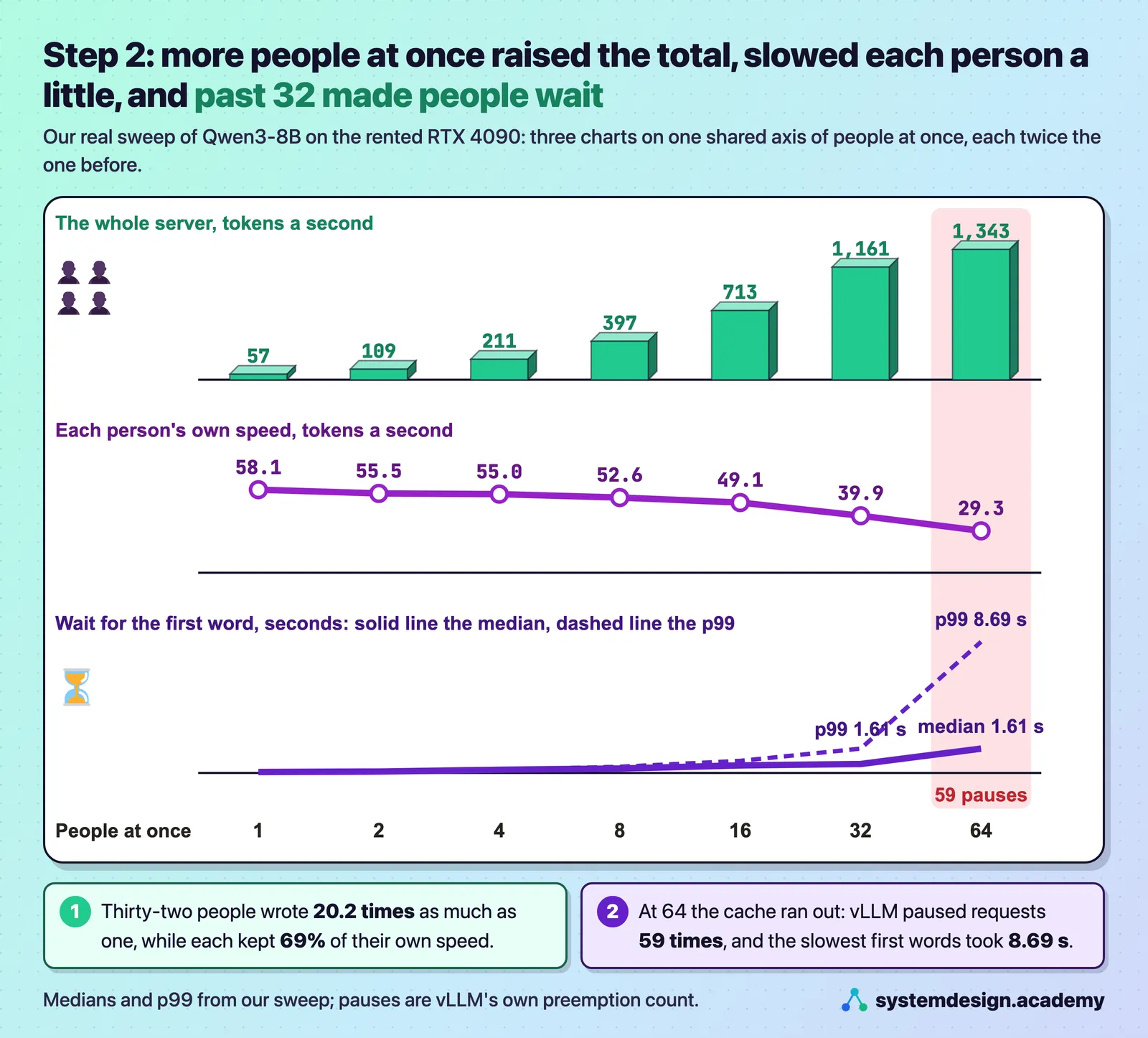
What we measured: With Qwen3-8B on our RTX 4090, one person got 57 tokens a second and 32 people at once got 1,161 in total, 20.2 times as much, while each person's own speed fell only from 58.1 to 39.9 tokens a second.
Why does batching help writing so much more than reading?
A request has two halves. Prefill reads the whole question in one pass, so the GPU's arithmetic is already busy. Decode writes the answer one token per pass, and each pass pays for a full read of the weights to produce a single token, so the arithmetic sits mostly idle. Batching fills that idle arithmetic with other people's tokens.
What we measured: On the same card, Qwen3-0.6B read a 256-token prompt at 35,796 tokens a second and wrote at 642.0 tokens a second, about 56 times slower per token.
Why does batching make each answer cheaper?
A GPU is paid for by the hour. The cost of a token is the price of the hour divided by the tokens written in that hour, so writing more tokens in the same hour makes each one cheaper. The person pays with a little speed: each answer takes longer than it would alone.
What we measured: Qwen3-8B on our RTX 4090 wrote 161 tokens a second for one person and 2,179 for 32 at once, about 13.5 times as many tokens from the same GPU hour, while each person's answer took about 2.4 times longer.
2. Static batching against continuous batching
This is the heart of the page and the question interviewers ask most: what is wrong with a simple batch, and what does continuous batching change?
What is static batching, and what is wrong with it?
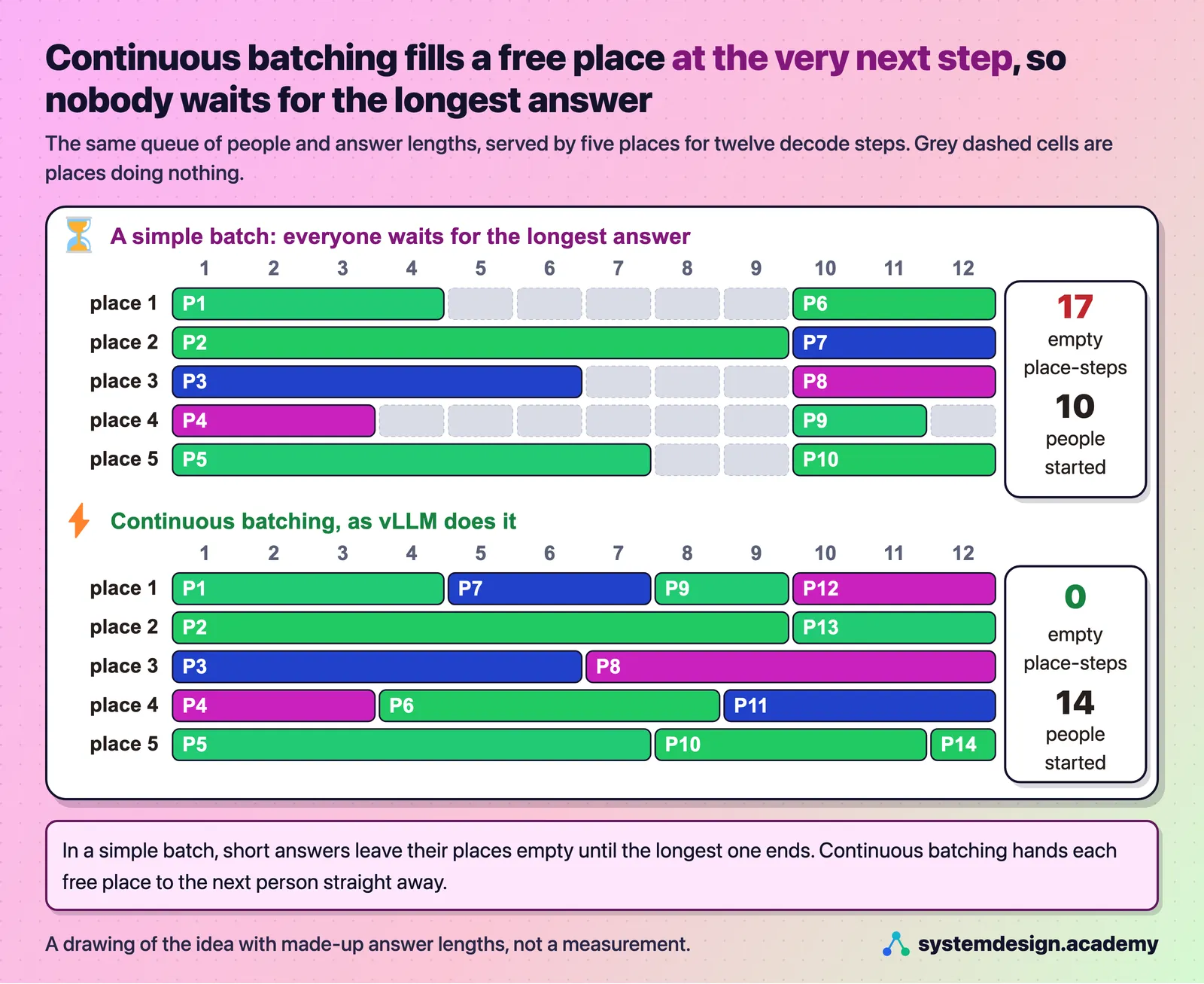
Static batching sends a group of requests through together, and the group finishes only when its slowest member does. Answers have very different lengths, so the places freed by short answers sit empty while the longest one keeps writing, and the people waiting in the queue cannot start until the whole group is done.
It is like a restaurant that seats twelve parties together and seats nobody new until all twelve tables have finished.
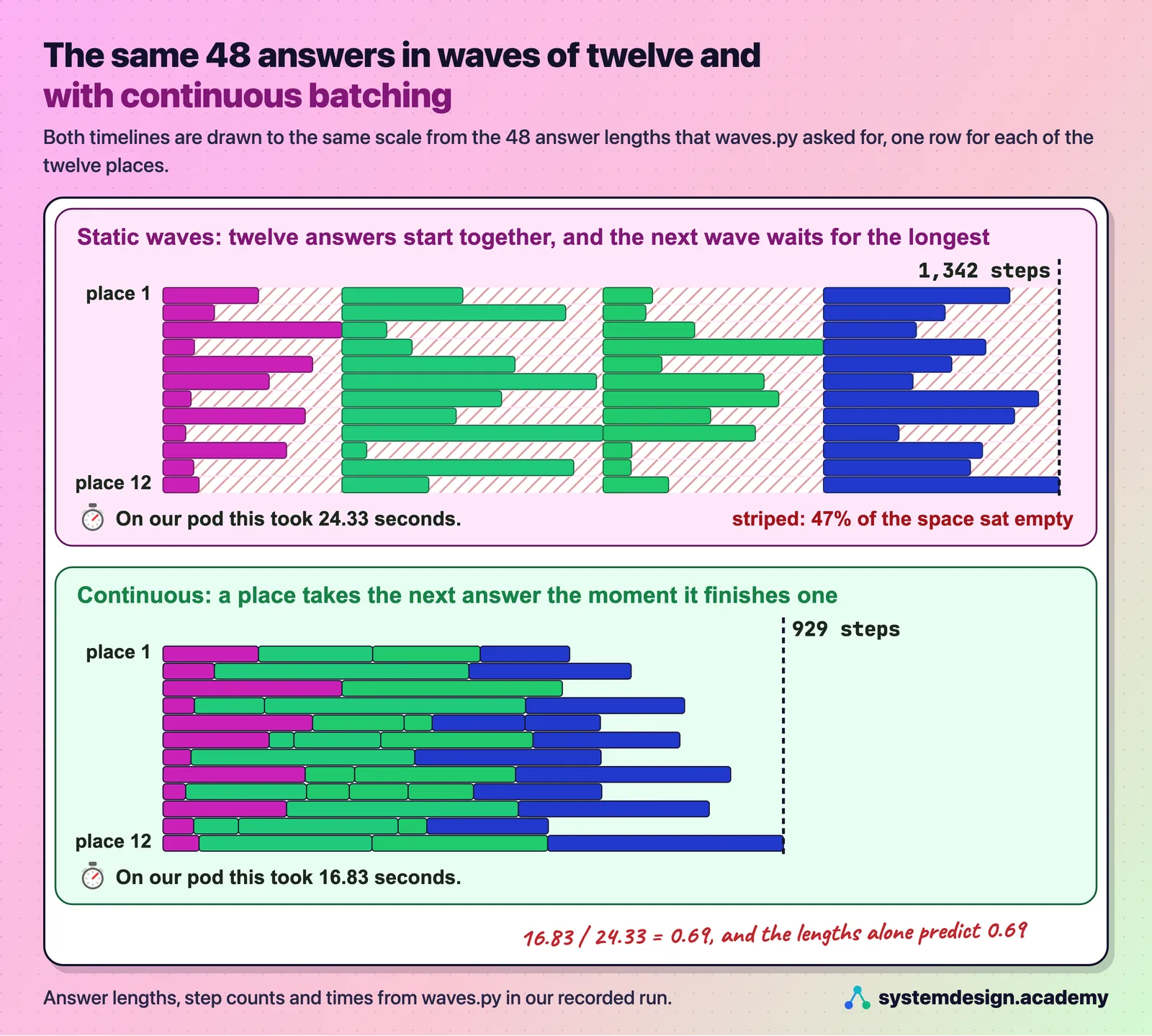
What we measured: In our run of 48 answers in fixed waves of 12, 47% of the space in the batch sat empty, and the run took 24.33 seconds.
What is continuous batching?
Continuous batching decides the batch afresh at every step. Between any two steps, finished requests leave and waiting requests join, as long as their KV cache fits, so the batch stays full and nobody waits for a stranger's long answer. The restaurant seats a new party the moment any table empties.
You will also hear it called iteration-level scheduling, the name it was given in the Orca paper of 2022, because the decision is made at every iteration of the model rather than once per batch.
What we measured: The same 48 answers, 12 at a time, took 16.83 seconds with continuous batching against 24.33 seconds in waves: 929 steps instead of 1,342. The answer lengths alone predicted a ratio of 0.69, and the measured ratio was 0.69.
Does vLLM use continuous batching?
Yes, always. vLLM's scheduler, which runs in its engine core process, decides at every step which conversations the model works on and how many tokens of each. There is no setting to turn it off; the settings only limit how big each step may be.
What we measured: With vLLM on an RTX 4090 and Qwen3-0.6B, one request alone got 359 tokens a second and 64 at once got 12,087 tokens a second in total, about 189 each, with all 64 answers back after 1.06 seconds.
Can a new question be read in the same step as other people's answers are written?
Yes. Each step has a token budget: one token for every conversation writing its answer, plus pieces of new questions being read. With chunked prefill, a long question is read over several steps in pieces that fit what is left of the budget, so one long prompt does not freeze everyone else's answer.
What we measured: A 12,563-token question was read in 7 pieces at vLLM's default budget, and the eight people being answered never paused for more than 300 ms. With a budget of 16,384, it was read in one step and their answers stopped for up to 1,499 ms.
If this helped, the full hands-on course goes much deeper.
In the course you run the same 48 answers in fixed waves and continuously on a rented RTX 4090, sweep from 1 to 64 people, and watch the KV cache fill and vLLM start pausing requests.
3. The limits: seats, step budget and memory
Continuous batching keeps adding people until something runs out. Three things can run out, and each has its own setting in vLLM.
What does max-num-seqs do?
It sets the most conversations that can be running at once, like seats in a room. Requests beyond it wait in a queue even if memory is free. The default for vLLM 0.33's API server is 256, and 1,024 on H100-class cards of 70 GB or more.
Lowering it makes each running person faster and everyone else wait. Use it to protect a speed promise, not as a default.
What we measured: Setting it to 8 cut the time per token from 26.08 to 18.65 ms, but raised the mean wait for the first token from 0.99 to 17.35 seconds and cut throughput 5.1 times.
What does max-num-batched-tokens do?
It is the token budget of one step: the most tokens the model works on at once. The default is 2,048 on GPUs like the RTX 4090 and 8,192 for the API server on H100-class cards. A bigger budget reads long questions in fewer steps, and makes everyone else's words stop for longer while it does.
Lesson: The vLLM scheduler and batching (settings reference)
How many requests can one GPU batch at once?
As many as fit in the KV cache, and fewer if you have promised a speed. Divide the cache size vLLM prints at start-up by the length of one conversation. Past that point the total barely rises and people start to wait.
What we measured: For Qwen3-8B on an RTX 4090, 33,216 tokens of cache divided by 768-token conversations is about 43. In our sweep 32 people ran with no pauses, and 64 raised the total by only 16% while vLLM paused requests 59 times and the p99 wait for the first word reached 8.69 seconds.
What is preemption, and why does it happen?
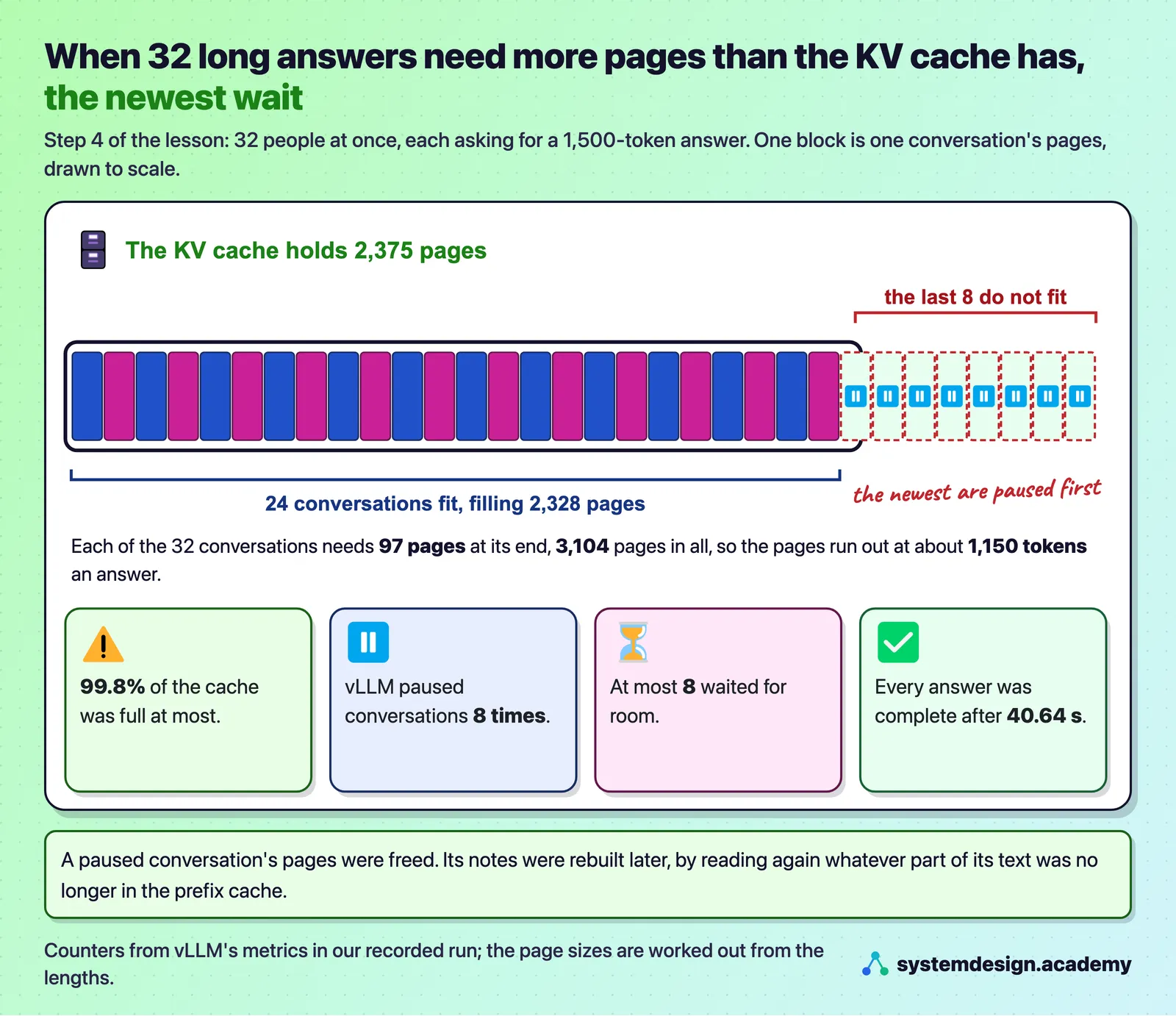
Continuous batching lets people join while their notes fit, but answers keep growing. When a running conversation needs a new page of the KV cache and none is free, vLLM pauses the conversation that started last, frees its pages, puts it at the front of the queue, and later reads its text again to rebuild its notes. Every answer still comes back complete, only later.
What we measured: Thirty-two answers of 1,500 tokens needed 3,104 pages of a cache that had 2,375. vLLM preempted 8 times, and every answer was complete after 40.64 seconds.
How does PagedAttention help continuous batching?
Continuous batching needs memory that can be handed out and given back at any step. PagedAttention stores each conversation's notes in small pages of 16 tokens, taken from a shared pool as it grows, so a newcomer can start the moment a few pages are free and a finished conversation gives its pages straight back.
4. Measuring it honestly
Batching numbers are easy to flatter by accident. Two habits keep them honest.
Why must a batching load test use fresh prompts?
vLLM's prefix cache, on by default, keeps the notes of questions it has already read. A test that sends the same questions again measures the cache, not the batching. Give every run its own made-up questions and check that the vllm:prefix_cache_hits_total counter stays at 0.
Which numbers should you report for a batching test?
The total tokens a second for the server, each person's own speed, and the wait for the first word at the median and at the 99th percentile. The total tells you the cost; each person's speed tells you what users feel; the slow percentile shows the unlucky users that an average hides. Also count preemptions, because they are the first sign the batch is too big.
What we measured: At 64 people on our RTX 4090, the median first word took 1.61 seconds while the p99 took 8.69 seconds.
Where to go next
If this helped, the full hands-on course goes much deeper.
In the course you run the same 48 answers in fixed waves and continuously on a rented RTX 4090, sweep from 1 to 64 people, and watch the KV cache fill and vLLM start pausing requests.
Every number on this page comes from Hands-On Inference Engineering: Serve LLMs on GPUs with vLLM and SGLang, where you rent the GPU yourself, run each command and compare your numbers with ours. Start with the free introduction and the free lessons on prefill and decode and the KV cache. If you are also preparing for interviews, the two big courses together and the Inference Engineering interview pack are below.

These questions are a start. The interview asks more.
Get all 120 questions in the Inference Engineering pack
Each question has why it is asked, a full answer, what the interviewer listens for, the follow-ups, the common mistakes and a diagram (141 diagrams in all). A PDF you keep, junior to staff level.
Pay by UPI, cards or netbanking through Razorpay. Pay by card or PayPal, in US dollars. Download at once from My packs.