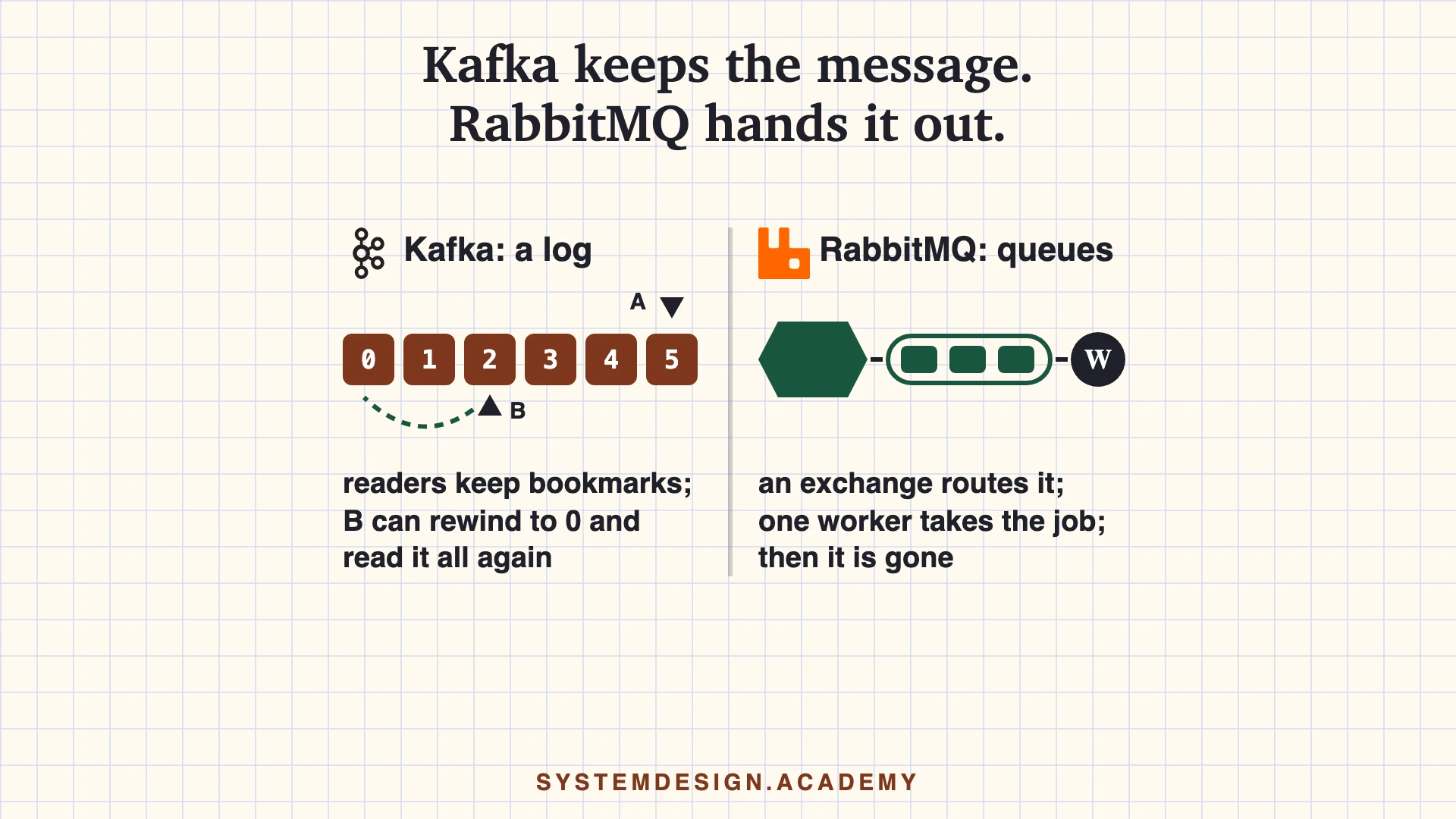
The short answerKafka keeps every message in a log for days, so many programs can read it and read it again later, while RabbitMQ gives each message to one worker as a job and deletes it once the job is done.
Every lesson in both courses has an AI tutor beside it. It reads the same lesson you are reading and answers your questions from it. Try the tutor
This page is the free part.
The course goes deeper on Kafka and RabbitMQ
₹499 in India/$49 everywhere elseonce, for the whole course
The System Design course covers Kafka and RabbitMQ across a run of lessons, not one page. These 4 alone are about 80 minutes of step-by-step reading, every one with a quiz.
The concepts were explained in a clear and structured way, with practical examples that made even complex system design topics easier to understand. I especially liked the focus on real-world architecture, scalability, trade-offs.
The content was well designed, engaging, and highly useful for anyone looking to strengthen their system design skills. Highly recommended for software engineers preparing for system design interviews or wanting to build a stronger foundation in designing scalable systems.
Verified reader · System Design Masterclass · read 69 lessons · all reviews
Writes every message to the end of a log, split into partitions.
Reading does not delete. Messages stay until a time or size limit.
Each group of readers keeps its own bookmark, so it can rewind.
Order is kept inside one partition, not across the whole topic.
vs
RabbitMQ 4.3
RabbitMQ
the post office
Producers send to an exchange. Rules called bindings pick the queues.
Each message in a queue goes to one worker, then it is gone.
Every message is acked on its own, retried or sent to a dead-letter queue.
Quorum queues copy each message to a majority of servers first.
A log you can re-read, and queues that hand out jobsIn Kafka, reading moves a bookmark and the message stays. In RabbitMQ, a worker takes the job and it leaves the queue. Almost every other difference on this page follows from that.
Kafka vs RabbitMQ, side by side
Read across a row to compare one thing. Every word that may be new is explained just below the table.
Kafka compared with RabbitMQ
Aspect
Kafka
RabbitMQ
Core idea
A log. Messages are appended and kept. Readers move a bookmark.
Queues. Messages are routed to queues and removed once a worker acks them.
After a message is read
It stays. Another group can read it, and the same group can rewind.
It is deleted from a queue. (A RabbitMQ stream keeps it, like Kafka.)
How long messages stay
7 days by default (retention.ms). You can keep them longer or forever, or use log compaction to keep the latest value per key.
Until a worker acks it. Streams keep everything unless you set max-age or a size limit.
Routing
The producer picks a topic. The key picks the partition (a hash of the key).
Four main exchange types: direct, topic (with * and # patterns), fanout and headers.
Order
Kept inside one partition. Same key, same partition, same order.
A queue is first in, first out within one priority level (4.3 quorum queues always have priorities), but retries and many workers can mix the order.
Sharing the work
One partition per reader in a group. More readers than partitions sit idle. Share groups (4.2+) remove this limit.
Any number of workers share one queue (competing consumers).
Who moves the data
Readers pull: they ask for the next batch with poll().
The broker pushes to subscribed workers, up to the prefetch limit.
Failed messages
No dead-letter queue in a plain consumer group. Share groups count delivery attempts (5 by default).
Dead-letter exchanges. Quorum queues stop redelivering after 20 attempts by default, and with no dead-letter exchange set, the message is then deleted.
Copies for safety
Leader plus followers. The in-sync replica set (ISR) decides when a write is safe.
Quorum queues use Raft: a write is safe once a majority of members have it. 3 members by default.
Cluster brain
KRaft, a Raft group of controllers. No ZooKeeper since Kafka 4.0.
Khepri, a Raft-based store. The only option since RabbitMQ 4.3.
Protocols
Kafka's own binary protocol over TCP, port 9092.
AMQP 0-9-1 and AMQP 1.0 (built in since 4.0) on port 5672. With the stream plugin on, the RabbitMQ Stream protocol on port 5552.
Versions checked
4.3.1, released 25 June 2026.
4.3.6, released mid-September 2026.
Words on this page, in plain English
Log
A list of messages where new ones are only added at the end. Reading a message does not remove it.
Queue
A waiting line of jobs. One worker takes a job, and then the job is removed from the line.
Worker
A program that takes jobs from a queue and does them, for example resizing a photo.
Message broker
A server that sits between programs and passes messages from the ones that send to the ones that read.
Producer, consumer
A producer is a program that sends messages. A consumer is a program that reads them.
Topic, partition
In Kafka, a topic is a named stream of messages. It is split into partitions, and each partition is one ordered log.
Offset
A message's position number inside a Kafka partition: 0, 1, 2 and so on. A reader's bookmark is an offset.
Consumer group
A team of Kafka readers that share one topic. Each partition goes to exactly one member of the team.
Exchange, binding
In RabbitMQ, producers send to an exchange. A binding is a rule that says which queue gets a copy.
Ack (acknowledgement)
A short reply that says 'I have this message' or 'I finished this job'.
Replica
A copy of the data on another server, so one broken server does not lose messages.
Raft
A set of rules that lets a group of servers agree on one order of writes, as long as most of them are up.
Idempotent
Safe to do twice. Running it a second time changes nothing more than the first time did.
Dead-letter queue
A separate queue where messages that keep failing are put aside, so they do not stop the others.
Quorum queue
A RabbitMQ queue that keeps copies of every message on several servers, using Raft.
Stream (RabbitMQ)
A RabbitMQ log. Like Kafka, it keeps messages after they are read, so readers can read them again.
Prefetch
How many unfinished messages RabbitMQ may give one worker at the same time.
Poison message
A message that makes the reader fail every time it tries to handle it.
Throughput
How many messages a system can move each second.
Careful: 'topic' and 'ack'
A Kafka topic is a stream of messages, but a RabbitMQ 'topic exchange' is a kind of router. And acks=all in Kafka is a producer setting about copies, not a reader's ack.
When to use Kafka, when to use RabbitMQ
Real situations, and the pick we would make in each one.
Pick Kafka
Every purchase event must reach billing, email and the reporting team, and a new team may join next month.
Each team is its own consumer group on one topic. A new group can read everything it missed if two settings allow it. Retention must keep messages long enough (the default is 7 days). And the group must start with auto.offset.reset=earliest, because the default, latest, skips old messages.
Pick RabbitMQ
Resize each uploaded photo once, with retries and a place to put aside the ones that keep failing.
This is what a queue is for: many workers share the jobs, each job is acked, and a dead-letter exchange holds the failures.
Pick Kafka
You shipped a bug that handled yesterday's events wrongly.
Fix the code, move the group's bookmark back to yesterday, and read the same events again. A queue has already deleted them.
Pick RabbitMQ
Route 'order.eu.created' to one team and every 'order.*.cancelled' to another.
A topic exchange matches routing keys with patterns. In Kafka you would need separate topics or filter in every reader.
Pick Kafka
Feed a database change log (CDC) into a search index and a data lake.
Change logs are streams that several systems read. Kafka keeps the history, and log compaction keeps the latest row per key.
Pick Both
Charge a card or send an SMS that must never run twice, triggered by events.
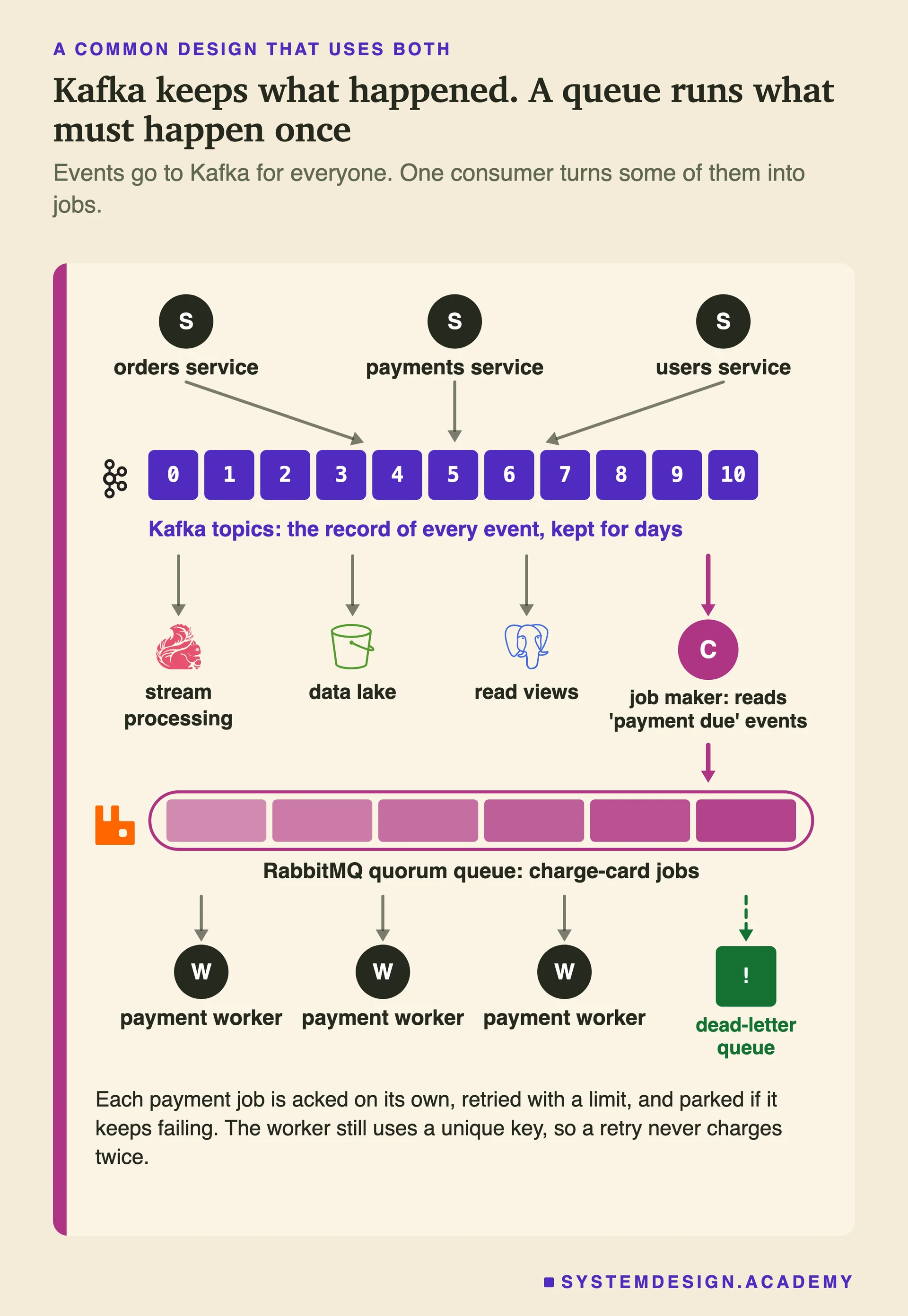
Kafka carries the event. A small program turns it into one job on a RabbitMQ queue, where acks and retries give control over that single action. That program should first publish the job and wait for RabbitMQ's publisher confirm (a reply saying the broker has the message), and only then save its Kafka offset, so a crash makes a repeat, never a loss. Repeats will happen, so the job must be idempotent. (If you only need a work queue on top of Kafka, Kafka 4.2+ share groups may be enough.)
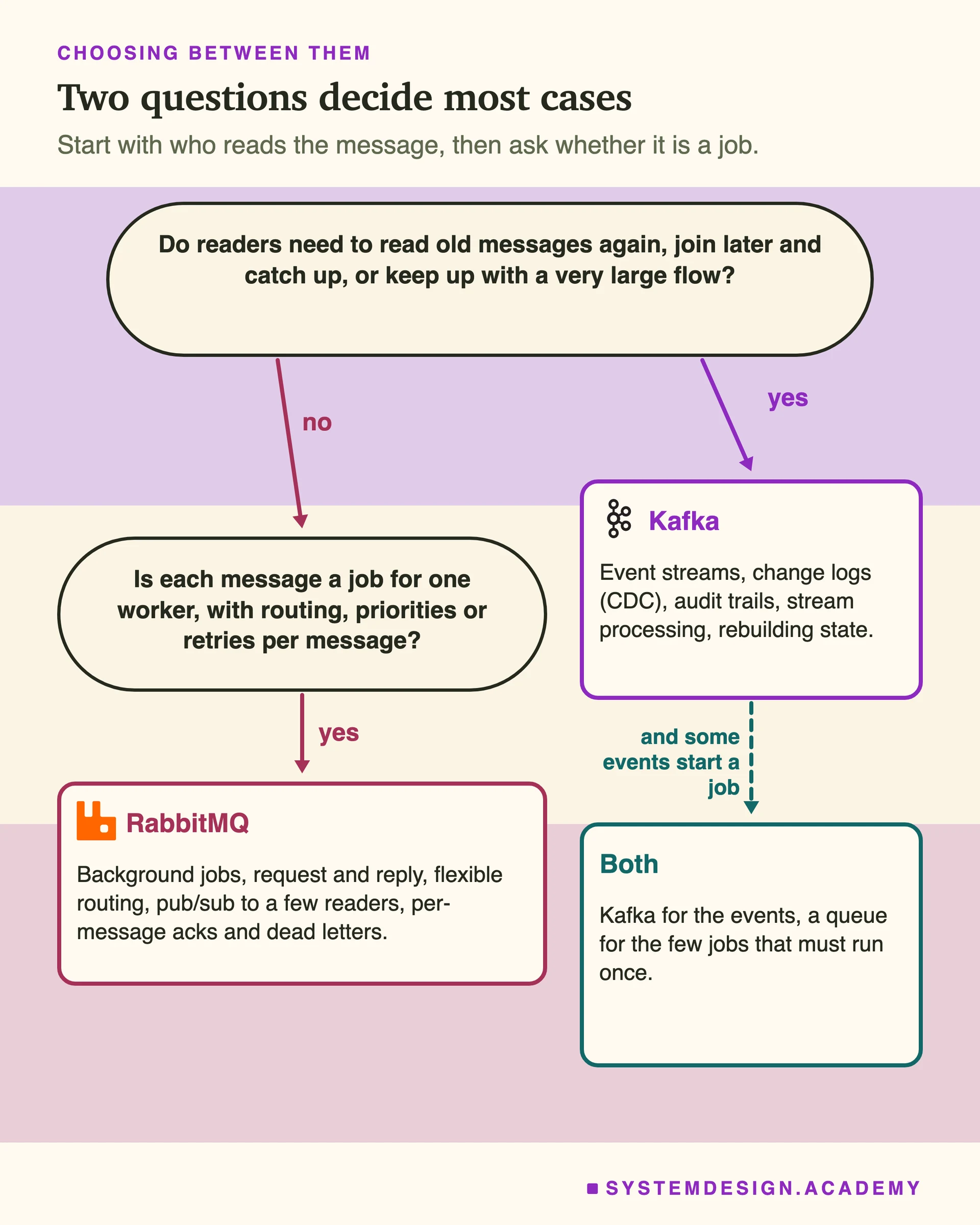
Two questions decide most casesStart with who reads the message and whether you need its history. Then ask whether it is a job. If the answer to both is yes, you probably want both systems.
How Kafka and RabbitMQ work inside
Three shapes, not two products
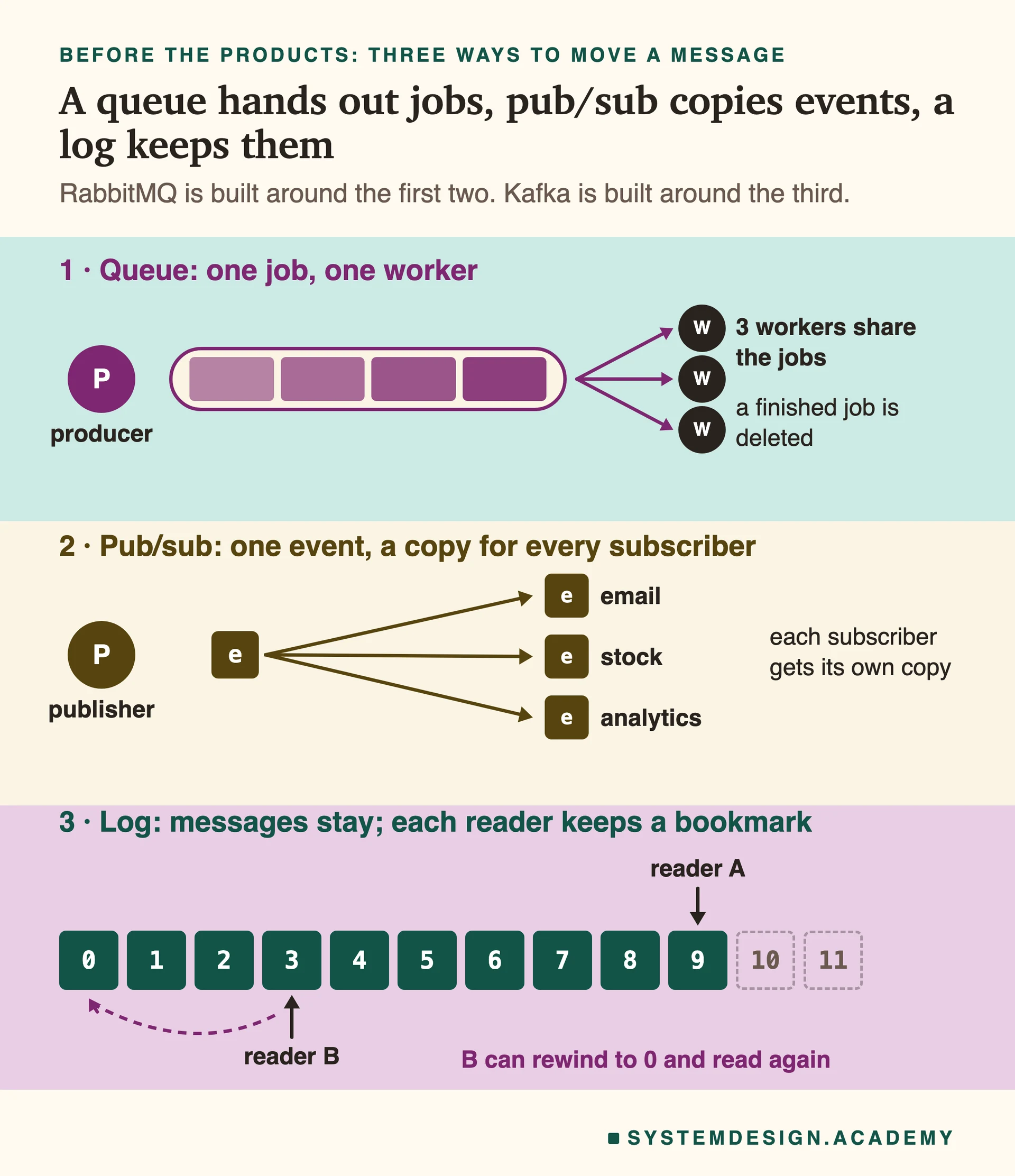
First, leave the product names aside. There are three common ways to move messages between programs, and every broker is built around one or two of them.
A message queue is a to-do list. A producer adds a job, and exactly one worker takes it and does it. Add more workers and they share the jobs. Resize this photo, send this email, make this PDF.
Publish and subscribe (pub/sub) is a broadcast. A producer sends one event, and every subscriber (every program that asked for these events) gets its own copy. A customer buys something: the email service sends a receipt, the shop's item count goes down, and the reporting team counts the sale.
An event log is a notebook you only add to. Producers write at the end. The log keeps messages for a set time, and each reader keeps its own place. A reader can go back and read again.
RabbitMQ is built around queues. It can also send a copy to many readers (pub/sub). Kafka is built around the log, and it can also act like the other two. Today each one can do a little of the other's job: RabbitMQ has streams, which are logs, and Kafka 4.2 made share groups ready for real use, and they work like a queue. But the main design of each product is the same as before, and that main design is what the rest of this page is about.
A queue, a broadcast and a logIn a queue, a job leaves when one worker takes it. In pub/sub, every subscriber gets a copy. In a log, nothing leaves when it is read, so readers can sit at different places and even go back.
How RabbitMQ routes a message
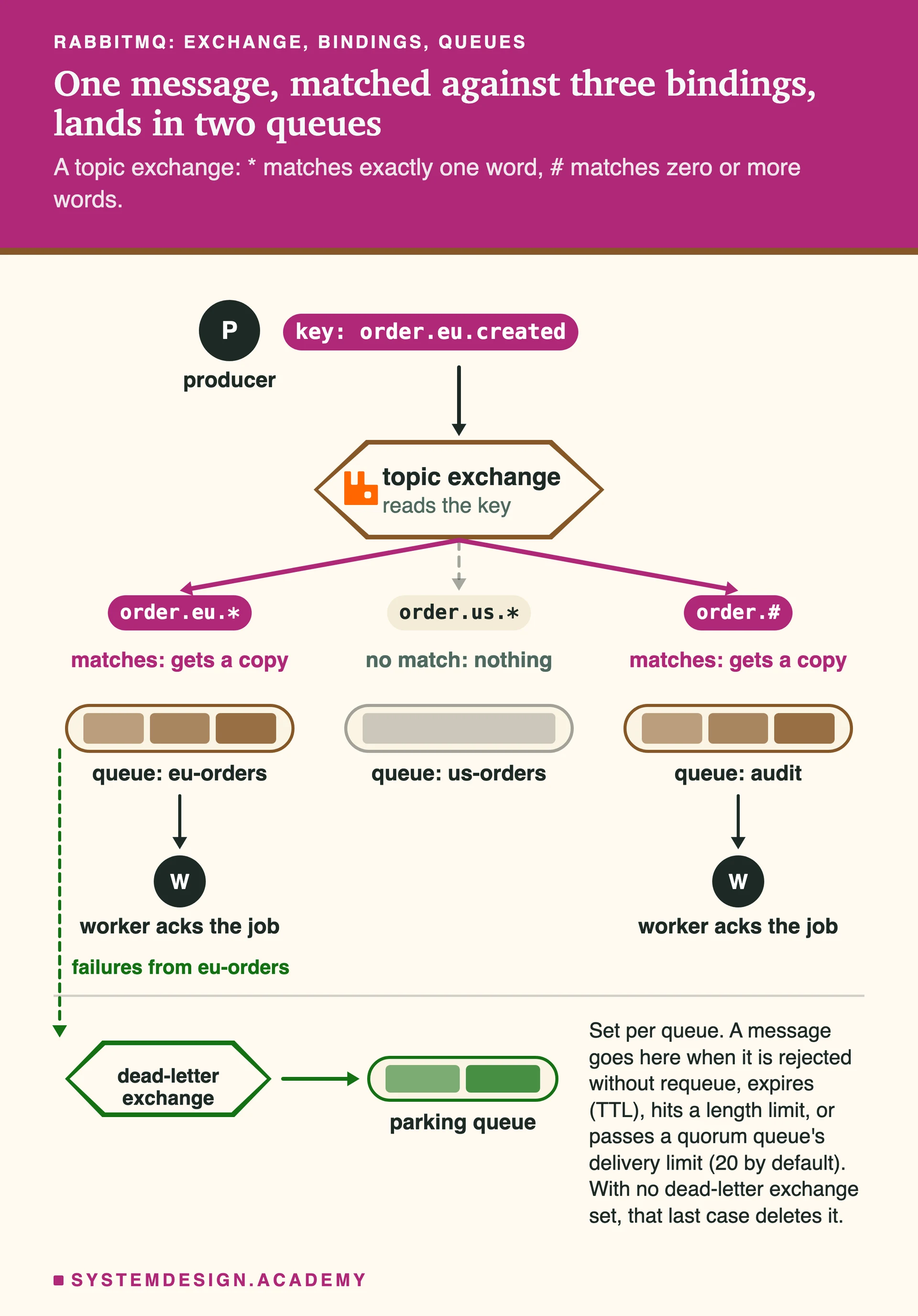
In RabbitMQ a producer never writes straight into a queue. It sends the message to an exchange, with a short label called a routing key, for example 'order.eu.created'. Bindings are rules that connect an exchange to queues. The exchange reads the key, checks the bindings, and puts a copy in every queue that matches.
There are four main kinds of exchange (RabbitMQ also has a few special ones, such as local random and modulus hash). A direct exchange sends to queues whose binding key is exactly the same as the routing key. A topic exchange matches patterns: * stands for exactly one word and # for zero or more words, so 'order.eu.*' catches 'order.eu.created' but not 'order.us.created'. A fanout exchange ignores the key and copies to every bound queue. A headers exchange looks at message headers instead of the key.
This is why RabbitMQ feels flexible. The producer does not know who reads. Someone can add a queue, bind it with a pattern, and start getting part of the messages without changing the producer's code.
RabbitMQ also gives you control over each single message. A worker acks each message when its job is done; until then, RabbitMQ keeps it and can give it to someone else. Prefetch, set with a command called basic.qos, limits how many unfinished messages one worker may hold, so a worker is never flooded. A message can have a time to live (TTL), after which it expires. A message that is rejected, expires or fails too many times can go to a dead-letter exchange, which puts it aside in a separate queue. RabbitMQ 4.3 also gave quorum queues strict priorities: 32 levels, and important messages always go first, so a steady flow of urgent work can stop the rest from ever being handled. It also added an optional delayed retry, where each new try waits a little longer.
One trap: if a message matches no binding, RabbitMQ drops it by default. Set the mandatory flag so the publisher is told, or give the exchange an alternate exchange that catches unmatched messages. Publisher confirms will not warn you, because they only say the broker received the message.
All of this is record keeping for every single message. It is what makes RabbitMQ good at jobs. It is also extra work, and that extra work limits how fast one queue can go.
Exchange, bindings, queues: one message, two copiesThe key order.eu.created matches two of the three bindings, so two queues get a copy. The producer knows nothing about these queues. Failed messages leave through the dead-letter exchange instead of blocking the queue.
How Kafka stores a message
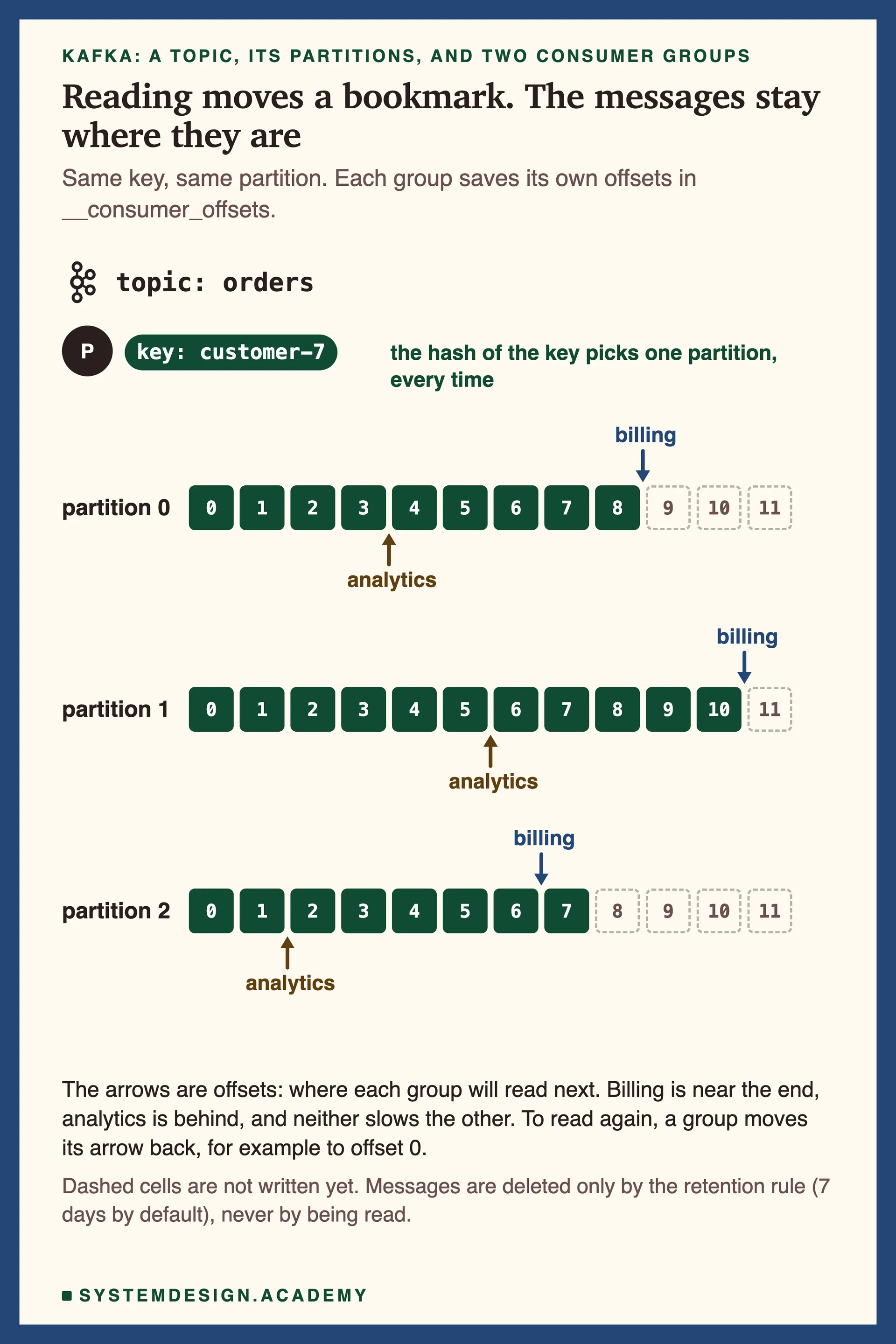
A Kafka topic is split into partitions. Each partition is a log: messages are only ever added at the end, and each one gets the next number, its offset.
Which partition does a message go to? If it has a key, the default partitioner hashes the key, so the same key always lands in the same partition. With no key, the producer fills one partition for a while and then moves on (the docs call it the sticky partition).
Reading does not delete anything. A consumer group, a team of readers working together, remembers how far it has read by saving its offset in an internal topic called __consumer_offsets. A second group keeps its own offset on the same data.
Kafka keeps the data, and each group keeps its own bookmark. Because of this, Kafka can do three things a queue cannot do. Many groups read the same messages, and none of them slows down another. A group can rewind and read again. A brand-new reader can start from the oldest message still kept and build its own copy of the history.
One topic, three partitions, two bookmarksEach consumer group owns its bookmarks. Billing is near the end, analytics is behind, and neither affects the other. Rewinding is just moving a bookmark.
Consumer groups, and the limit of one reader per partition
Inside one consumer group, each partition is read by exactly one member at a time. So the most readers a group can use is the number of partitions. A topic with 3 partitions can keep 3 readers busy. A fourth reader gets nothing. Our test below shows exactly this.
When a reader joins, leaves or stops responding, Kafka moves partitions between the members. This is called a rebalance. With the default assignor (range), which is the rule that decides which reader gets which partition, the whole group pauses and no member reads until the move is done. That pause is why teams watch rebalances closely. The cooperative assignor is also in the default list and moves fewer partitions, but it is only used once you remove range from the list. Since Kafka 4.0 there is a new way to rebalance, ready for general use (written up as KIP-848, a Kafka Improvement Proposal). It moves only the partitions that must move. The server supports it by default, but each reader must turn it on with the setting group.protocol=consumer; if it does not, Kafka 4.3 still uses the old way. The docs plan to make the new way the default in Kafka 5.0.
Kafka also has a second way to read: share groups, also called Queues for Kafka. They first appeared in Kafka 4.0 and became ready for real use in 4.2. In a share group, more readers than partitions can work at once, every message is acked on its own, and Kafka counts how many times a message was handed out (5 tries by default). It works on normal topics; Kafka did not add a separate queue object. Each message is locked to one reader for 30 seconds by default, so a slower job must renew its lock or the message goes to another reader. But you lose order: Kafka keeps the order only inside one batch of messages that a reader gets.
Order: inside a partition, never across
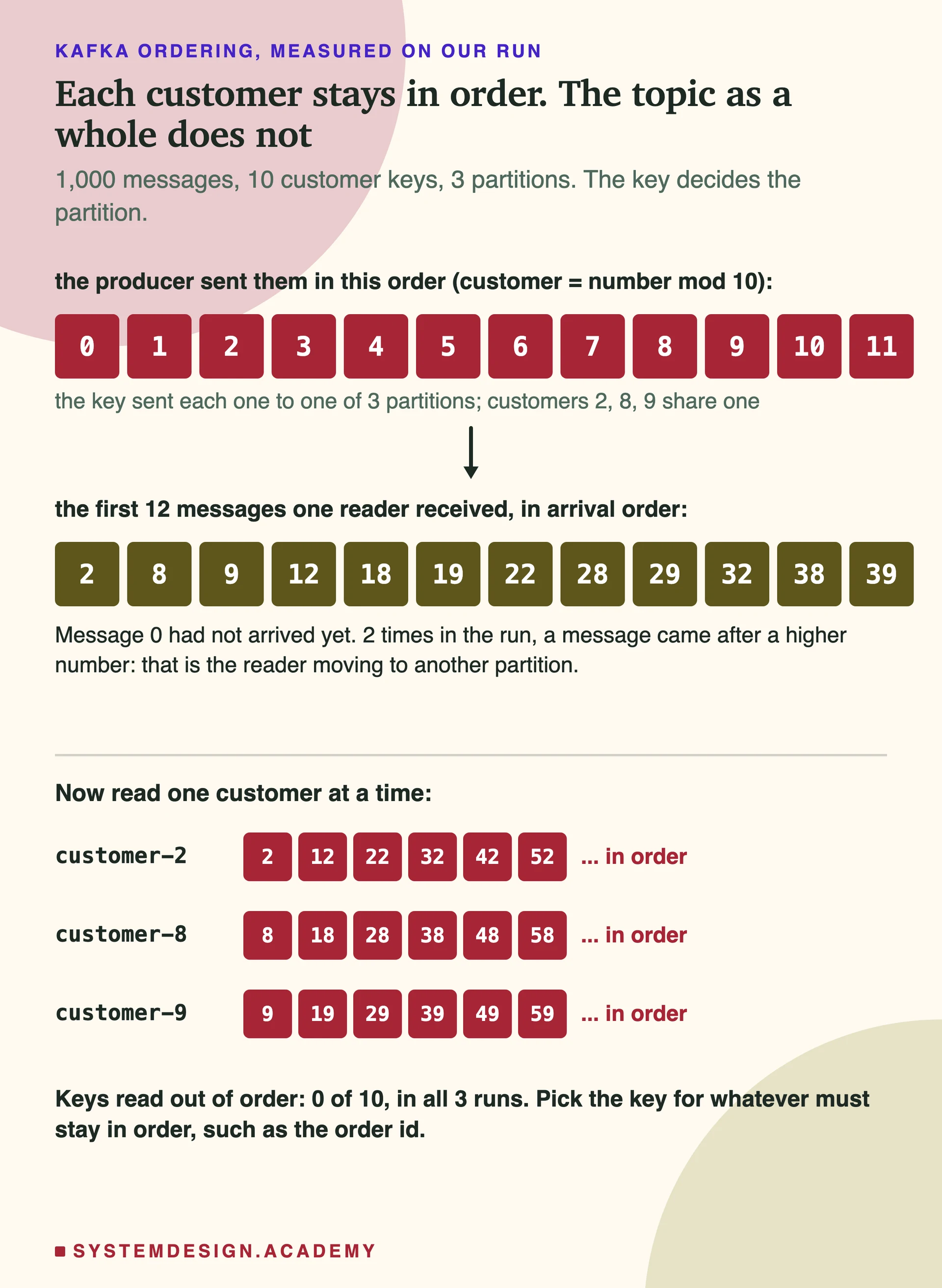
Kafka does not keep one order for a whole topic. It keeps order inside each partition. Because the same key always goes to the same partition, all messages for one customer or one order id are read in the order they were written. Pick the key to be the thing whose order matters.
What you do not get is order between keys in different partitions. In our test, the first messages a reader got were numbers 2, 8, 9, 12, 18, 19: all from the customers that hash to one partition, long before message 0 arrived from another partition. Every customer's own messages were still in order.
If you truly need one order for everything, you need one partition, and so one reader in a group. This is the cost: one order for everything means less work done at the same time.
Sometimes a producer sends a batch of messages again, because it did not hear back the first time. A setting called the idempotent producer (explained in the next part) makes sure that batch is not saved twice or in the wrong place. It is on by default (enable.idempotence=true) in current Kafka. One more thing: the partition comes from the key and the number of partitions, so adding partitions later sends many keys to a different partition. For a while, a key's old messages sit in one partition and its new ones in another, and a reader can see the new ones first. Choose the number of partitions at the start.
RabbitMQ queues are first in, first out, but with several workers, retries and requeues, messages can finish in a different order. If order matters per key there, use one worker per group of keys, or the single active consumer setting, which lets only one worker read a queue at a time.
Each key keeps its order. The topic as a whole does notRead down one partition and the order is exact. Read across partitions and messages arrive in whatever order the reader fetches them. This is what our test measured.
Delivery: losing a message or doing it twice
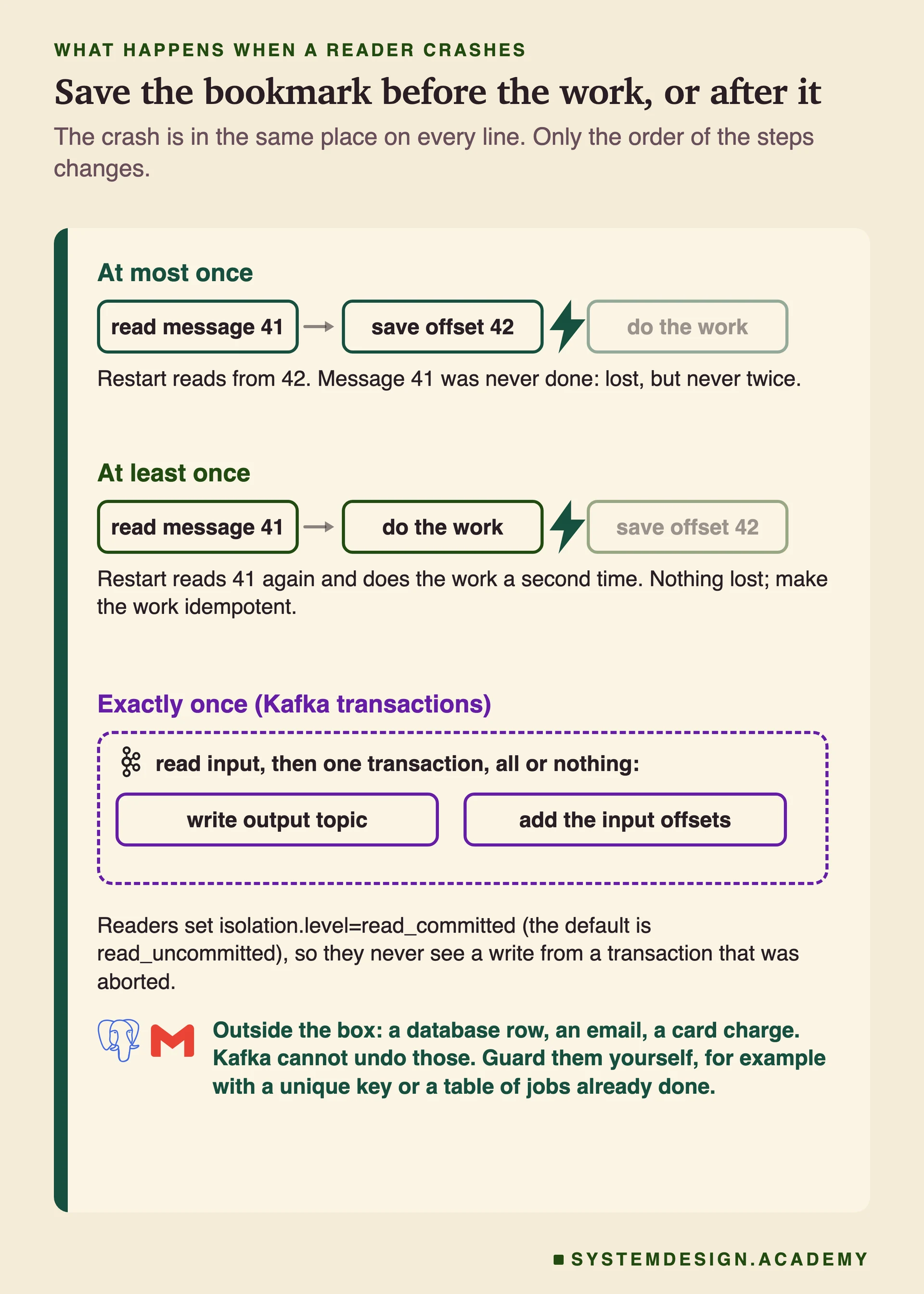
'Make it reliable' is a choice, not a single setting. The choice is about what happens if a reader crashes in the middle of a job. It depends on one thing: does the reader save its progress before or after it does the work?
At most once: save the bookmark first, then work. If it crashes after saving and before finishing, that message is lost. Nothing is ever done twice. This is fine for metrics (numbers that measure the system, like page views) where a small gap does not matter.
At least once: work first, then save. If it crashes after the work and before saving, the message comes again and is done twice. Nothing is lost. This is the usual choice, and it is safe when the work is idempotent. RabbitMQ works the same way: the ack is the 'save' step, so a worker acks after the job, and a message that was never acked is delivered again. One limit for long Kafka jobs: a reader that does not call poll() within max.poll.interval.ms (5 minutes by default) is treated as dead, and its partitions move to another reader.
Watch the Kafka default here. enable.auto.commit is true, so the consumer saves its offset on a timer (every 5 seconds) while you call poll(). If your code handles each message before the next poll(), that is at least once. If it hands messages to other threads and polls again, an offset can be saved before the work is done, and that is at most once.
Exactly once in Kafka needs two parts. The idempotent producer gives each producer an id and a sequence number, so the broker drops a duplicate send. A transaction is a group of steps where either all of them happen or none of them do. In Kafka, a program reads some messages, then one transaction writes its results to other topics and saves the bookmark of what it read. Readers must set isolation.level=read_committed (the default is read_uncommitted) to skip aborted writes.
The limit that is easy to miss: this is exactly once from Kafka to Kafka. A row written to Postgres or an email sent is outside the transaction, and Kafka cannot undo it. For those, the writer on the other side must be idempotent.
Save before the work, or after itThe crash point is the same in each line. Only the order of 'save' and 'work' changes, and that decides between a lost message and a repeated one. Kafka's exactly-once box stops at Kafka's own edge.
Keeping copies: Kafka's ISR and RabbitMQ's quorum queues
Both systems copy data to other servers so one broken server does not lose messages. They do it in two different ways, and the difference is a good one to understand for any distributed system.
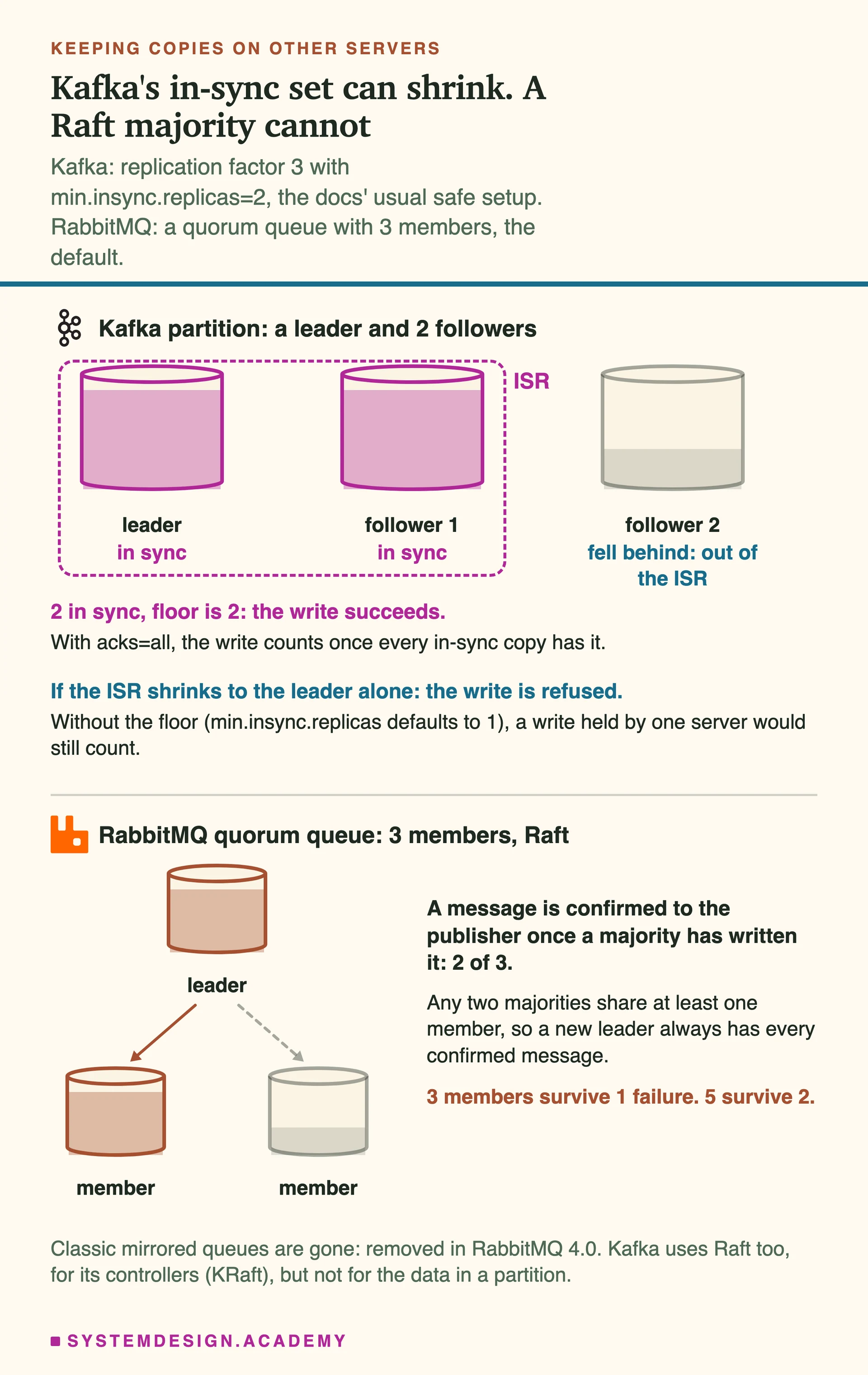
In Kafka, each partition has one leader (the copy that takes writes) and some followers that copy from it. The in-sync replica set (ISR) is the list of copies that have every message the leader has. With acks=all (a producer setting, and the default), a write counts only when every member of the ISR has it. The problem is that the ISR can shrink. If followers fall behind, it can shrink to the leader alone. So Kafka has a lower limit, a setting called min.insync.replicas. Its default is 1, which allows that. The docs' usual safe setup is 3 copies, min.insync.replicas=2 and acks=all. Then, if fewer than 2 copies are in sync, Kafka refuses the write instead of risking it.
Kafka also does not force each write onto the disk (fsync) before it answers; its design doc says doing that on every write would cost too much speed. It relies on the copies instead. So put the copies on different racks or availability zones (separate parts of a data center, with their own power), so one power cut cannot hit them all.
unclean.leader.election.enable decides what happens when no in-sync copy is left. It is false by default: Kafka waits rather than letting an out-of-date copy become leader and throw away writes it never got. That is choosing correct data over being available, in one setting.
RabbitMQ's quorum queues use Raft. A queue has members, 3 by default, one leader and the rest followers. A message is confirmed to the publisher only after a majority of members have written it: 2 of 3, or 3 of 5. Odd numbers are recommended: with 4 members, a split into 2 and 2 leaves no side with a majority.
Why is a majority safe? Take 3 servers, A, B and C. One majority is A and B. Another is B and C. Both include B. Any two majorities always share at least one server, so the majority that picks a new leader always includes a server that saw every confirmed write. Three members survive one failure, five survive two. Kafka uses this same idea for its controllers (KRaft), but for the data itself it uses the ISR, which you tune.
RabbitMQ's older mirrored queues (classic queues copied to other servers) are gone. They were removed in RabbitMQ 4.0, after three years of warnings, and quorum queues are the default choice for a replicated queue.
A set that can shrink, and a majority that cannotKafka's ISR follows whoever is caught up, so you set a floor with min.insync.replicas. Raft always needs a majority. Both can be safe. Kafka makes you choose the setting.
Keeping history, and reading it again
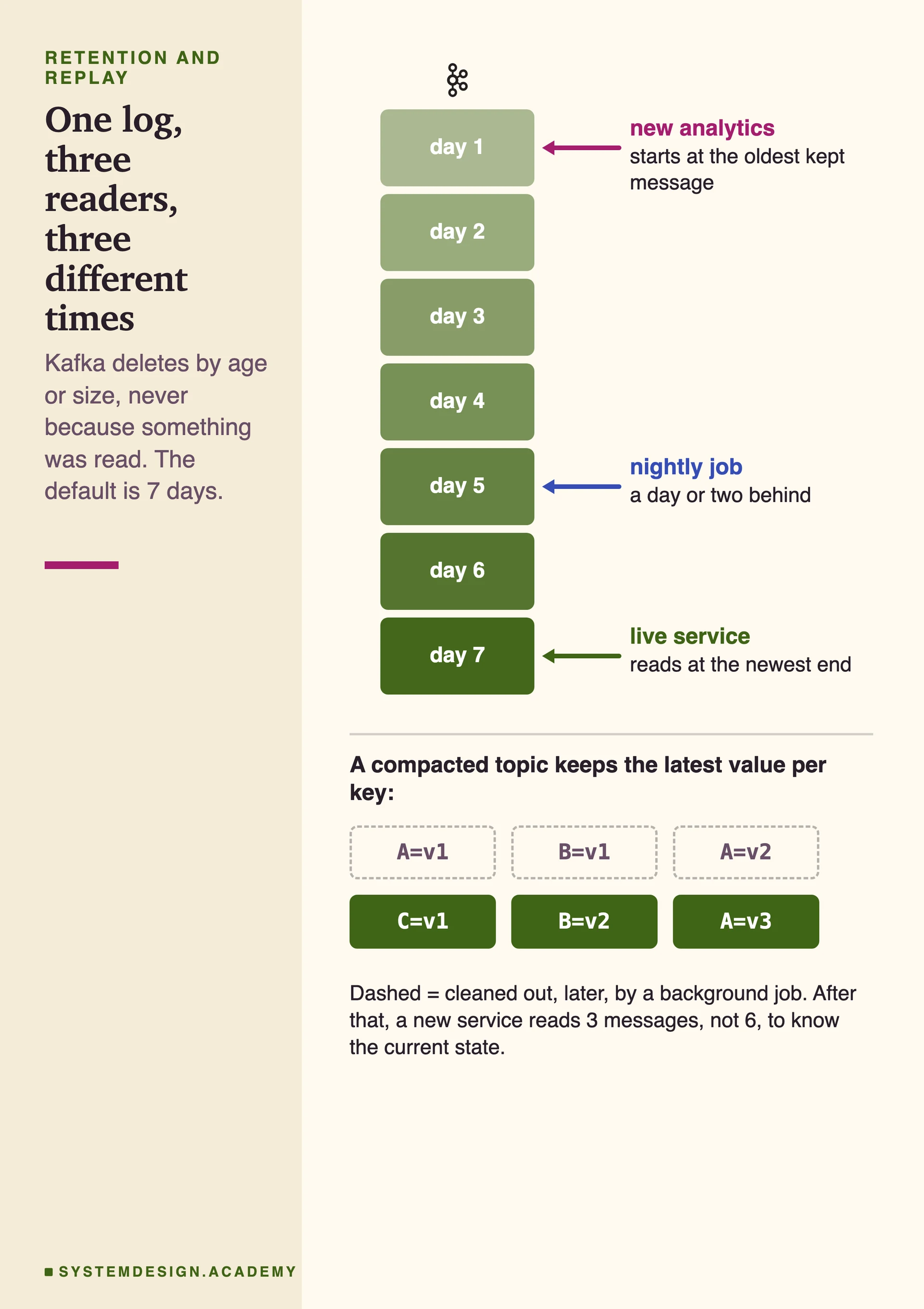
A Kafka message is deleted by a rule about age or size, never because someone read it. The default is 7 days and no size limit. So readers can sit at very different places: a live service at the end, a nightly job a day behind, a new service reading from the start.
This changes how you fix mistakes. Ship a bug that handled yesterday's events wrongly, fix it, move the group's offset back, and read the events again. The cost is disk: days of a busy topic take a lot of space. Tiered storage, which moves old parts of the log to cheaper storage, has been production-ready since Kafka 3.9. Kafka itself ships no production plugin for the remote store, and compacted topics are not supported there.
Log compaction is the other kind of retention. Kafka keeps at least the last value for each key and cleans out older ones. A compacted topic is like a table of the current state that you can always read from the start. Kafka's own __consumer_offsets works this way, and so do most 'rebuild the cache from Kafka' setups.
RabbitMQ streams keep a log too, and readers can start anywhere with x-stream-offset. One warning from the docs: a stream has no retention limit by default, so it grows until the disk is full unless you set max-age or max-length-bytes.
Three readers, one log, three different timesNobody waits for anybody. Each reader is a bookmark on the same history. Compaction keeps one latest value per key, so a new service can rebuild state without replaying every change.
Why Kafka can move more messages
Kafka is fast because it does very little work for each message. RabbitMQ does more work for each one: the routing decision, the per-message ack, the queue's state. That work gives flexibility, and it takes time.
Four design choices help Kafka. Writes only add to the end of a file. Writing in one long run like this is much faster than jumping around the disk. Producers send messages in batches, often compressed, so there are fewer requests. Kafka leans on the operating system's page cache (memory the OS uses to hold recently used file data) instead of its own cache. And for plain connections it uses sendfile, a 'zero-copy' call that moves bytes from that cache to the network without copying them into Kafka's memory. The docs add a catch: with TLS (encryption) turned on, sendfile is not used, because encryption happens in normal program memory.
How big is the difference in throughput (messages per second)? Neither project publishes a fair side-by-side speed test, and we did not run one: a speed test on one laptop does not show how a real cluster behaves. RabbitMQ's streams page explains why it built streams: 'No persistent queue types are able to deliver throughput that can compete with any of the existing log based messaging systems.' That sentence is about RabbitMQ's own older queue types. Its acknowledgements page adds that if throughput matters most, you should use streams, not a bigger prefetch.
Push, pull and the slow reader
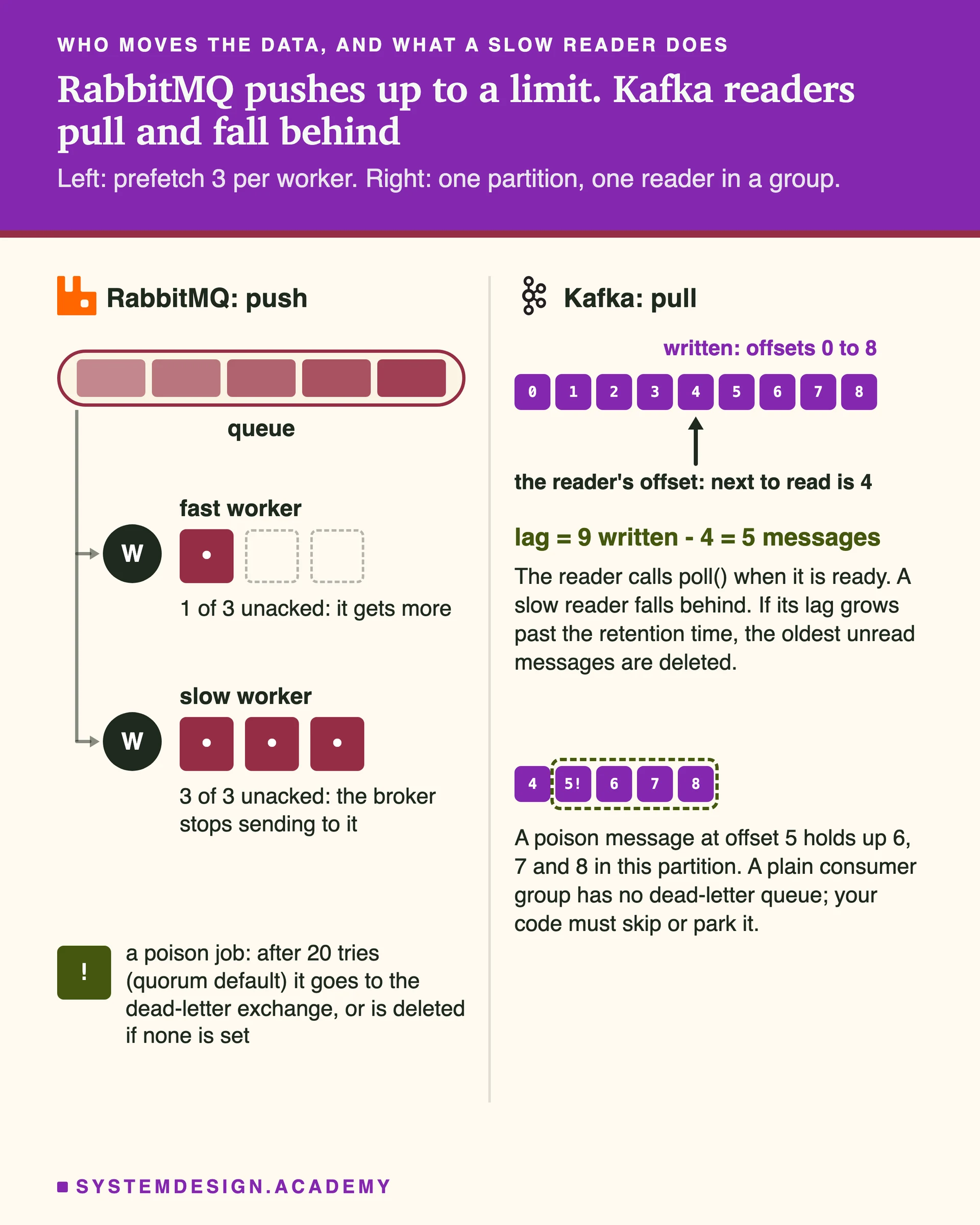
RabbitMQ pushes. A worker subscribes (basic.consume, which the docs recommend over polling with basic.get), and the broker sends messages as they arrive, up to the prefetch limit. When a worker holds too many unacked messages, the broker stops sending to it. A slow worker just gets less. If no worker keeps up, the queue grows, and TTL and dead-letter rules start to act.
Kafka readers pull. A reader calls poll() in a loop and fetches a batch when it is ready, with a 'long poll': the request waits for new data to arrive instead of asking again and again. A slow reader simply falls behind. The gap between the end of the log and its bookmark is called consumer lag, and it is the first number to watch on any Kafka system. There are two limits. If a reader falls further behind than the retention time, its unread messages are deleted before it gets to them. With the default auto.offset.reset=latest, it then jumps to the newest message without an error. And a reader far behind reads old data from disk, which adds load on the same brokers that serve everyone else.
Kafka's model has a weak spot. In a normal consumer group there is no ack for each message and no built-in dead-letter queue (Kafka Streams apps, a separate library, got one in 4.2). A poison message, one that makes the reader fail every time, stops every message behind it in that partition until your code skips it or puts it aside. RabbitMQ's per-message acks, rejects, requeues and dead-letter exchanges exist to solve exactly that, and quorum queues stop redelivering a message after 20 tries by default. Set a dead-letter exchange, because without it that message is deleted. Dead-lettering is at most once by default. For messages you cannot lose, set dead-letter-strategy=at-least-once and also overflow=reject-publish, or RabbitMQ quietly falls back to at most once. Note that in 4.3 a nack with requeue does not count toward the limit; a reject or a crash does. Kafka's share groups now bring per-message acks and a delivery count to Kafka too.
The broker pushes, or the reader pullsPush needs a limit so workers are not flooded, which is prefetch. Pull needs nothing, and a slow reader only falls behind. The price of pull in a plain consumer group is that one bad message can hold up its whole partition.
What each one costs to run
Both take work to run, and the person on call (the engineer who must fix problems at night) feels it.
Kafka used to need a second system, ZooKeeper, to keep track of the cluster. Kafka 4.0 (March 2025) removed it. Kafka now runs in KRaft mode: a small Raft group of controller servers, usually 3 or 5, keeps the cluster's metadata (which servers, topics and partitions exist), and a majority of them must be up. Teams still on ZooKeeper must first move to KRaft on a 3.x version (the project recommends 3.9), then upgrade to 4.x. You still plan partitions, disks, retention and consumer lag. Adding a broker does not move existing partitions to it; you move them yourself (partition reassignment). And you cannot reduce the number of partitions of a topic.
RabbitMQ is quick to start on one server and pleasant for task queues. Clusters need more care. When a node runs short of memory or disk, RabbitMQ raises an alarm and blocks every connection that publishes, not only the busy queue. Its queues work best when they stay short. Each queue has one leader on one server, so to go faster you spread work over many queues or use super streams (partitioned streams, since 3.11). Since RabbitMQ 4.3, the cluster's metadata lives only in Khepri, a store built on Raft, so a cluster needs more than half of its servers online to keep working. Quorum queues also need a majority of their members.
Managed services, where a cloud company runs the brokers for you (for example Amazon MSK for Kafka, or Amazon MQ for RabbitMQ), take much of this work away, and you pay for it. When someone says one is 'simpler', ask: simpler for whom, and at what size?
What changed in 2025 and 2026
Many comparisons online are a few years old. These are the changes that matter, each from the projects' own release notes.
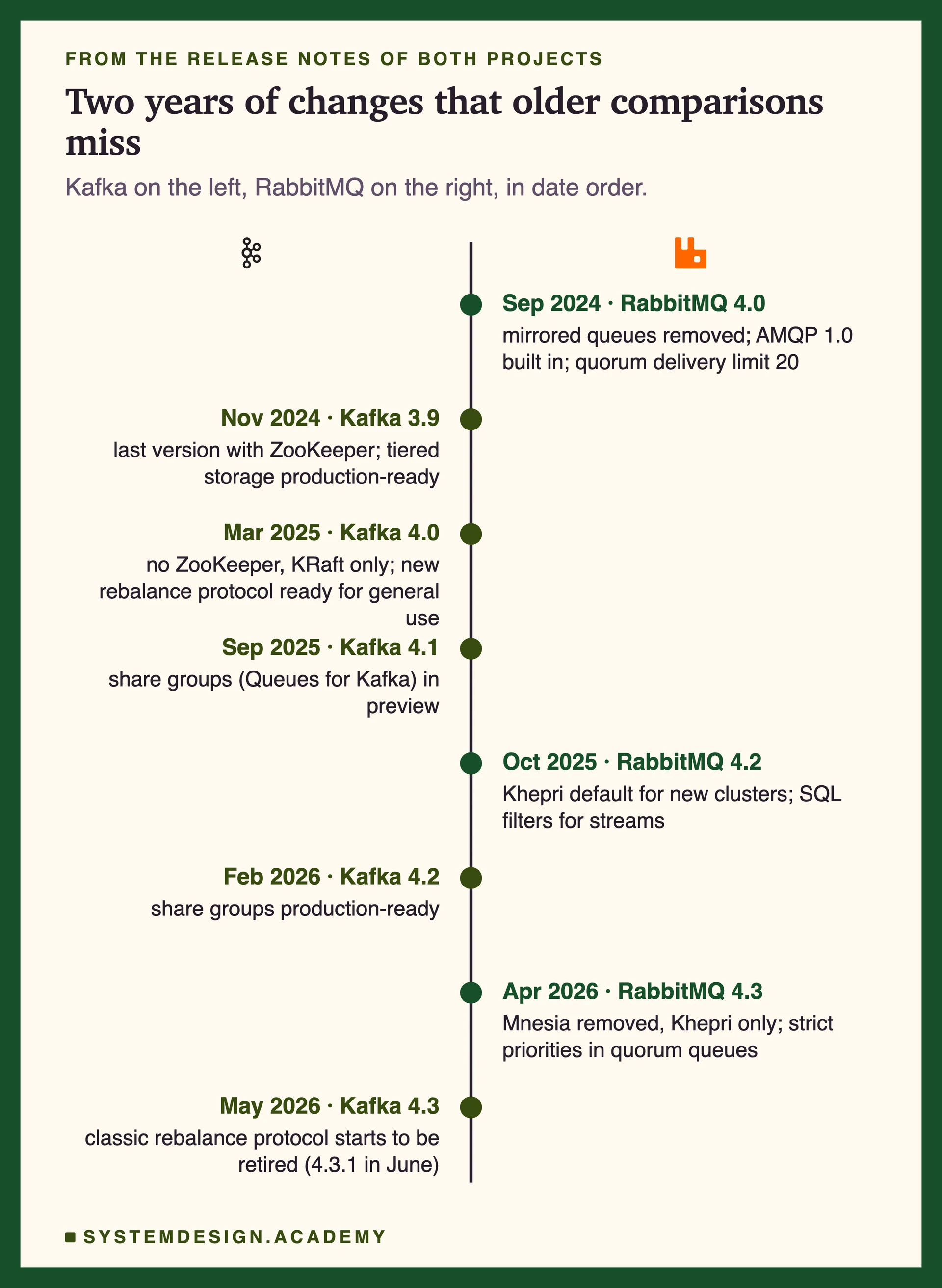
Kafka 4.0 (March 2025): no ZooKeeper at all, KRaft only, and the new rebalance protocol became generally available. Kafka 4.2 (February 2026): 'Kafka Queues (Share Groups) is now production-ready'. Kafka 4.3 (May 2026): the start of retiring the classic rebalance protocol in the consumer. Kafka 4.4 is not out yet; only release candidates exist.
RabbitMQ 4.0 (September 2024): classic mirrored queues removed, AMQP 1.0 built in, and quorum queues stop redelivering after 20 tries by default. RabbitMQ 4.2 (October 2025): Khepri is the default metadata store for new clusters, and streams gained SQL filter expressions. RabbitMQ 4.3 (April 2026): Mnesia removed, so Khepri is the only store, and quorum queues got strict priorities and delayed retries.
So each product now does a little of the other's job. Kafka can act like a work queue, and RabbitMQ streams act like a log. The main design has not changed: Kafka is still a log first, and RabbitMQ is still a router of queues first.
Two years of releases, from the release notesEach product borrowed a little from the other: Kafka gained queue-style reading, and RabbitMQ's streams already gave it a log. The main reason to pick each one is still the same.
we ran this, here is what happened
Hands-on: We read the same 1,000 messages twice, on both brokers
The biggest difference between the two is what happens to a message after someone reads it. We wanted to see it on a real machine, not only describe it.
We ran Kafka 4.3.1 (one server in KRaft mode) and RabbitMQ 4.3.6 in Docker on a Mac, and wrote one Python script. It sends 1,000 numbered messages, each with a customer name as its key (10 customers). Then it runs three tests. Test 1: read everything, then try to read it again, as the same reader and as a new one. Test 2: four readers share the work on a 3-partition Kafka topic, first as a normal consumer group, then as a share group, and on a RabbitMQ quorum queue. Test 3: check the order the messages came in.
Two settings matter. Each new Kafka group was told to start from the oldest message (auto.offset.reset=earliest, and share.auto.offset.reset=earliest for the share groups). Kafka's default is latest, which reads only messages that arrive after the group starts. And the producer used the same key hash as Kafka's Java client (murmur2), so each key lands where a Java program would put it.
We ran the script three times and recorded the terminal with asciinema, a tool that records a real terminal session. Every number below is from those runs. This is a test of behaviour (what is kept, who gets what, in which order), not a speed test.
Where it ran: Apple M4, macOS 15.6, Docker 29.7.2. Kafka 4.3.1 (apache/kafka:4.3.1, KRaft, one node) and RabbitMQ 4.3.6 (rabbitmq:4.3.6-management). Python 3.13 with confluent-kafka 2.15.1 and pika 1.4.4. Three runs on 6 October 2026.
    p = Producer({**KAFKA, "acks": "all", "partitioner": "murmur2_random"})

    c = Consumer({**KAFKA, "group.id": group, "auto.offset.reset": "earliest", "enable.auto.commit": True})
    if from_start:  # rewind: every partition back to offset 0
        def rewind(consumer, parts):
            for tp in parts:
                tp.offset = OFFSET_BEGINNING
            consumer.assign(parts)
        c.subscribe([topic], on_assign=rewind)

    billing = kafka_read_all(topic, f"billing-{RUN}")
    analytics = kafka_read_all(topic, f"analytics-{RUN}")
    billing_again = kafka_read_all(topic, f"billing-{RUN}", limit_s=5)
    billing_rewound = kafka_read_all(topic, f"billing-{RUN}", from_start=True)

    ch.queue_declare(queue, durable=True, arguments={"x-queue-type": "quorum"})
    ch.queue_declare(stream, durable=True, arguments={"x-queue-type": "stream"})
    before = rmq_depth(queue)
    first = rmq_read_all(queue)
    after = rmq_depth(queue)
    second = rmq_read_all(queue)

        cfg = ConfigEntry("share.auto.offset.reset", "earliest", incremental_operation=AlterConfigOpType.SET)
            c = ShareConsumer({**KAFKA, "group.id": sgroup})
            while not sstop.is_set():
                for m in c.poll(0.2) or []:
Five short pieces of scripts/labs/compare/kafka-rabbitmq/log_vs_queue.py, separated by blank lines and shortened only by removing lines: the producer settings, the rewind, the four reads of test 1, the RabbitMQ queue and stream, and the share group. Each message is a small JSON object with its number and its customer key.
real output
$ docker compose exec kafka /opt/kafka/bin/kafka-topics.sh --version
4.3.1
$ docker compose exec rabbitmq rabbitmqctl version
4.3.6
$ python log_vs_queue.py

== Test 1: read it, then read it again ==
kafka   billing read 1000 (1000 unique), new group analytics read 1000 (1000 unique)
kafka   billing asked again: 0 new, after rewinding to offset 0: 1000
rabbit  quorum queue held 1000, first reader got 1000, queue now holds 0, second reader got 0
rabbit  stream: first reader got 1000, second reader from offset first got 1000

== Test 2: four readers, three partitions ==
kafka   consumer group, steady stream: partitions per reader [[2], [1], [], [0]], messages per reader [300, 500, 0, 200]
%4|1791284045.867|SHARECONSUMER|rdkafka#consumer-15| [thrd:app]: The share consumer is in "Preview" and is not recommended for production use
%4|1791284045.867|SHARECONSUMER|rdkafka#consumer-16| [thrd:app]: The share consumer is in "Preview" and is not recommended for production use
%4|1791284045.867|SHARECONSUMER|rdkafka#consumer-17| [thrd:app]: The share consumer is in "Preview" and is not recommended for production use
%4|1791284045.867|SHARECONSUMER|rdkafka#consumer-18| [thrd:app]: The share consumer is in "Preview" and is not recommended for production use
kafka   share group, all at once: messages per reader [500, 200, 300, 0], unique 1000, repeats 0
%4|1791284056.271|SHARECONSUMER|rdkafka#consumer-22| [thrd:app]: The share consumer is in "Preview" and is not recommended for production use
%4|1791284056.271|SHARECONSUMER|rdkafka#consumer-23| [thrd:app]: The share consumer is in "Preview" and is not recommended for production use
%4|1791284056.271|SHARECONSUMER|rdkafka#consumer-24| [thrd:app]: The share consumer is in "Preview" and is not recommended for production use
%4|1791284056.271|SHARECONSUMER|rdkafka#consumer-25| [thrd:app]: The share consumer is in "Preview" and is not recommended for production use
kafka   share group, steady stream: messages per reader [300, 200, 199, 301], unique 1000, repeats 0
rabbit  quorum queue, steady stream: messages per reader [250, 250, 250, 250]

== Test 3: order ==
kafka   keys read out of order: 0 of 10
kafka   whole topic: the reader moved to another partition 2 times, and each move went back to older numbers
kafka   first 12 messages received: [2, 8, 9, 12, 18, 19, 22, 28, 29, 32, 38, 39]

wrote results.json (111.8 s)
Real output of run 1, unedited (run1-output.txt, from the asciinema recording run1.cast). The %4|...|SHARECONSUMER lines are the Python client's own warning. Runs 2 and 3 gave the same counts in tests 1 and 3. In test 2 the readers came in a different order, and the steady-stream share group again gave each reader about 200 to 300.
The results
What we measured
Kafka
RabbitMQ
A new consumer group, after the first one read all 1,000same in all 3 runs; the Kafka group started at the oldest message
1,000 (all different)
0 (the queue was empty)
The first reader rewinds and reads againa RabbitMQ stream gave 1,000 twice
1,000
not possible from a queue
4 readers, 3 partitions, normal consumer groupone Kafka reader got no partition; the split follows which keys share a partition
500, 300, 200 and 0
250 each (quorum queue)
4 readers, 3 partitions, Kafka share groupno message was handed out twice in any run
steady stream: about 200 to 300 each; all at once: one reader got 0
250 each (quorum queue)
Each customer's messages in order (Kafka)Kafka keeps order per partition
10 of 10 customers
not measured
Messages in the order they were sent, across the topicthe reader took one partition, then the next
No: 2, 8 and 9 arrived before 0
not measured
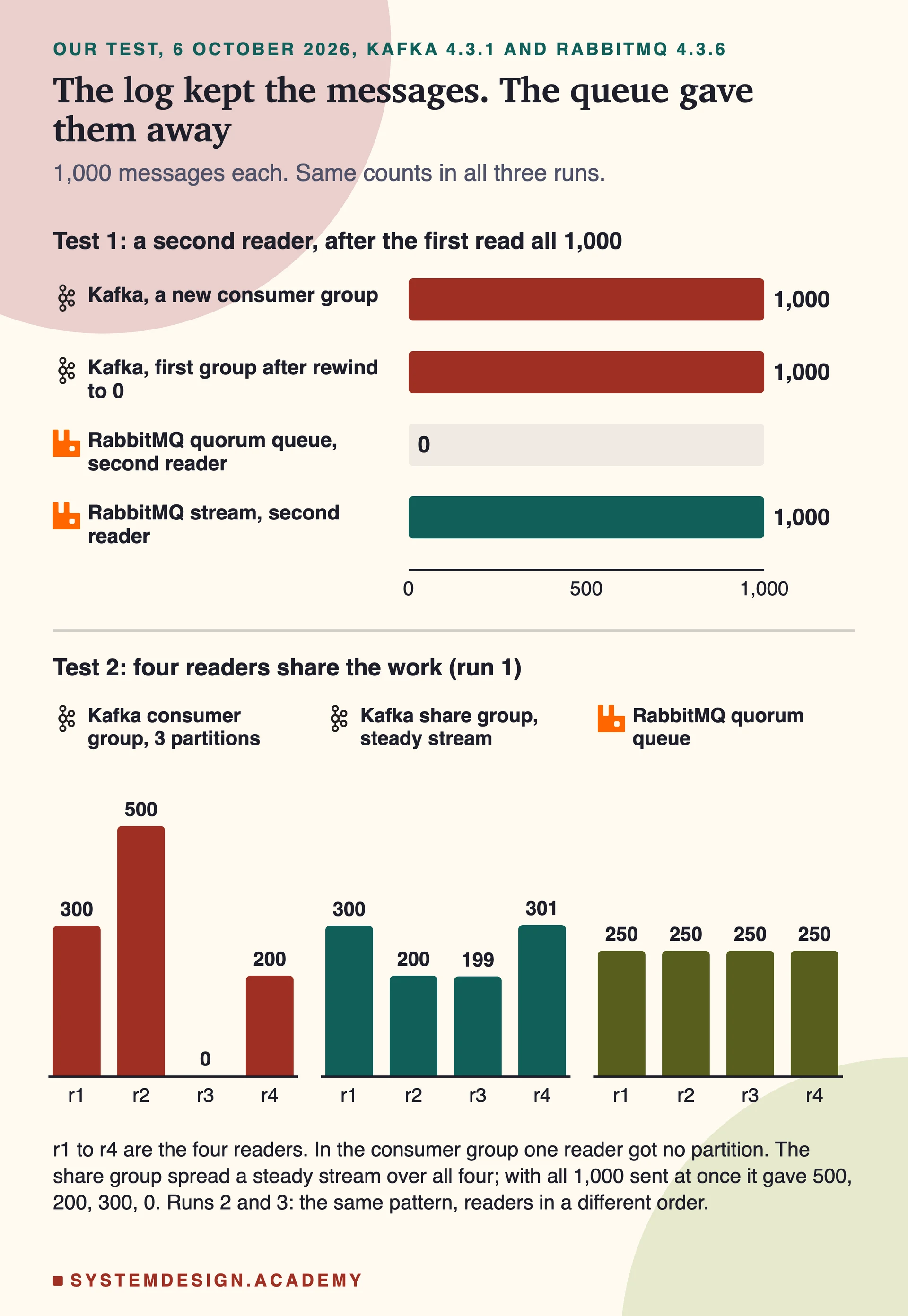
What our three runs measuredThe left chart is the whole page in one picture: the log kept the messages, the queue gave them away. The right charts show the partition limit: in a normal consumer group with three partitions, one Kafka reader got nothing. A share group spread a steady stream over all four readers.
What this shows
Kafka kept every message after it was read: a new group got all 1,000, and the first group got all 1,000 again after moving its bookmark to 0. The RabbitMQ quorum queue handed out 1,000 jobs and was then empty, so a second reader got nothing; that is what a queue is for. RabbitMQ's stream behaved like Kafka. In test 2, a normal Kafka consumer group with four readers and three partitions left one reader with no work. A share group fixed that when messages arrived as a steady stream (each reader got about 200 to 300), but when all 1,000 arrived at once, one reader still got none, because each partition's waiting messages went to one reader. Four RabbitMQ workers split the jobs evenly.
What this test does not show: One server for each broker, on one laptop, so this test says nothing about copies, failures or speed. With one Kafka server the topics had a single copy (replication factor 1), which you would never use in production. Every RabbitMQ job took the same 1 ms, so an even split there is what you would expect. The RabbitMQ stream was read over AMQP 0-9-1, not the stream protocol. The Python client printed a warning that its share consumer is a "Preview"; the broker side is production-ready since Kafka 4.2. The order checks use one producer and no failures, so they show the rule working, not every way it can break. The script is scripts/labs/compare/kafka-rabbitmq/log_vs_queue.py in our repository.
Common mistakes
"Kafka is a faster RabbitMQ."
They are built for different jobs. Kafka is a log for event streams and history. RabbitMQ is a router of queues for jobs. First decide which kind of work you have, then check speed.
"Kafka keeps my messages in order."
Only inside one partition. Make the key the thing whose messages must stay in sequence, such as a purchase id. Across partitions there is no order, as our test showed.
"Add more consumers to go faster."
In a Kafka consumer group, readers beyond the partition count sit idle (one of our four got 0 messages). Add partitions, or use a share group on Kafka 4.2 or later.
"Exactly once means my database never sees a duplicate."
Kafka's exactly-once covers Kafka topics and offsets. A database write or an email is outside it. Make that side idempotent, for example with a unique key.
"acks=all means three copies."
It means every copy that is up to date right now, and that can be only the leader. To be safe, use 3 copies and set min.insync.replicas=2, as the docs suggest. The default is 1.
"Use mirrored queues for high availability in RabbitMQ."
Classic mirrored queues were removed in RabbitMQ 4.0. Use quorum queues for replicated queues, or streams for a replicated log.
"A RabbitMQ stream cleans itself up."
Not by default. With no max-age or max-length-bytes, the docs say it grows until the disk runs out.
The common answer: both, each for its shapeKafka keeps the record of what happened, for everyone who needs it. The queue owns the few actions that must happen once, where per-message control matters most.
Questions people ask
What is the main difference between Kafka and RabbitMQ?
Kafka is a log: it keeps messages for a set time after they are read, so many groups can read them and read them again. RabbitMQ routes messages into queues and deletes each one once a worker acks it. In our test a new Kafka reader got all 1,000 messages again, and a second RabbitMQ reader got none.
Should I use Kafka or RabbitMQ?
Use Kafka when many systems need the same events, when you need history or replay, or for change logs and stream processing. Use RabbitMQ for background jobs, request and reply, flexible routing, priorities and per-message retries. Many teams use both: Kafka for events, a queue for jobs that must happen once.
Is Kafka faster than RabbitMQ?
For moving very large numbers of messages, Kafka's design does less work per message. RabbitMQ's own docs say its older queue types cannot match log-based systems on throughput, which is one reason RabbitMQ built streams. Neither project publishes a general benchmark, and speed also depends on message size, safety settings and hardware. Do not pick on speed alone.
Does Kafka still need ZooKeeper?
No. Kafka 4.0, released in March 2025, runs only in KRaft mode, where a small Raft group of controllers keeps the cluster's metadata. Kafka 3.9 was the last version that could run with ZooKeeper.
Can Kafka be used as a queue?
Yes, since Kafka 4.2 (February 2026) share groups are production-ready. Readers in a share group can outnumber partitions, each message is acked on its own and delivery attempts are counted. Order is only promised within one batch.
Can RabbitMQ replay messages like Kafka?
Yes, with streams. A RabbitMQ stream is an append-only log, and a reader can start anywhere with x-stream-offset. Normal queues cannot replay: once a message is acked it is gone. Set a retention limit on a stream, because by default it never deletes anything.
Does RabbitMQ keep message order?
A single queue is first in, first out. With several workers, prefetch and retries, jobs can finish in a different order. For strict order per key, use one active consumer per queue, or Kafka with the key as the partition key.
What happened to RabbitMQ mirrored queues?
They were removed in RabbitMQ 4.0 (September 2024) after three years of deprecation. The docs call quorum queues, which use Raft, the default choice for a replicated, highly available queue.
Lessons that go deeper
From the System Design course, in the order we would read them.
Kafka vs RabbitMQ is one row in a much bigger table. Our System Design course has 770 lessons on networks, databases, caching, scaling, messaging, security and reliability, each drawn step by step, so you can explain the trade-off in an interview and pick right at work. 18 lessons are free to read, with no card needed.
the hands-on parts are real runs, like this one
course 1
System Design Masterclass
From absolute beginner to principal engineer, drawn step by step.