vLLM Interview Questions, Answered With Numbers From a Real GPU
What do vLLM interview questions cover?
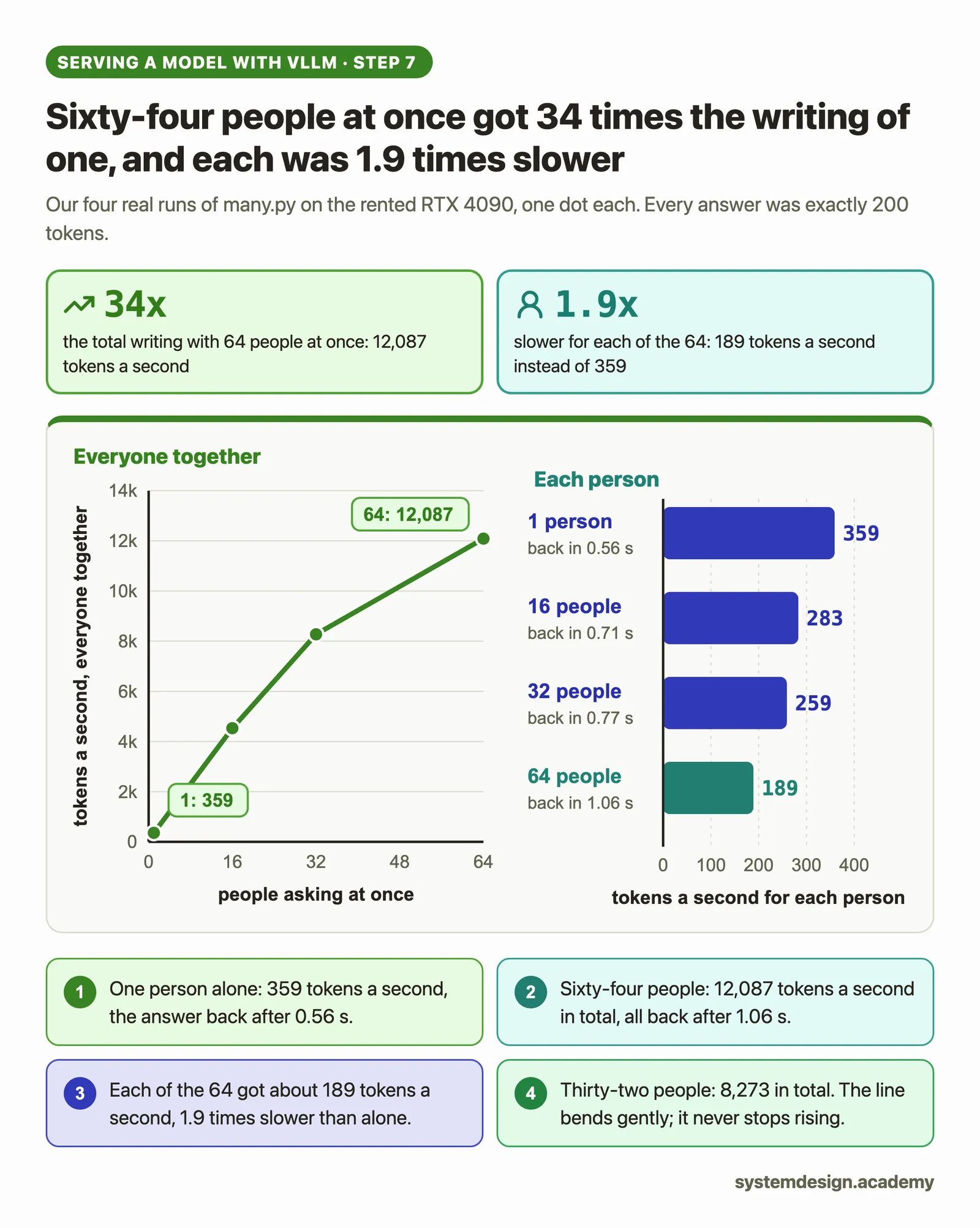
They cover what vLLM is (an open-source server that runs a language model for many people at once on GPUs, in OpenAI's API format), how it splits the GPU's memory between the weights and the KV cache, how PagedAttention and continuous batching keep that memory and the GPU busy, what happens when the cache is full, and the settings that move each number. On a rented RTX 4090, one person got 359 tokens a second and 64 people got 12,087 in total: be ready to explain why.
Save your progress and get the AI Engineering cheat sheet PDF
These are the 19 vLLM questions that come up in inference engineer, ML platform and AI infrastructure interviews. Each answer is short enough to say out loud, and most come with a number we measured ourselves on a rented RTX 4090, so you can answer the follow-up question too.

19 questions · 4 sections · answers from the course
These answers come from our course Hands-On Inference Engineering: Serve LLMs on GPUs with vLLM and SGLang: 43 lessons ready so far, each one run and measured on a rented NVIDIA GPU. The first lessons are free to read, with no card needed.
How to answer a vLLM question well
Start with the one-sentence idea, then name the setting that controls it and the number it moves. Interviewers listen for whether you know the trade: almost every vLLM setting buys speed for one person at the cost of the total, or room in memory at the cost of start-up time or answer quality. If you can say what you would measure to check, you sound like someone who has run it.
If this helped, the full hands-on course goes much deeper.
In the course you install vLLM on a rented RTX 4090, read its memory budget line by line, then change one setting at a time and measure what each one does to speed, memory and waiting time.
1. What vLLM is and how it is built
Interviewers usually start here, to see whether you know what vLLM actually does and what runs when you type vllm serve.
What is vLLM, and why would a team use it?
vLLM is open-source software that serves a language model to many people at once on GPUs. It answers in the same format as OpenAI's API, so an application written for OpenAI can call it after changing the address and the model's name.
Teams use it because it keeps the GPU busy with many conversations at the same time. Two ideas make that possible: PagedAttention, which stores each conversation's notes in small pages so memory is not wasted, and continuous batching, which lets requests join and leave the running batch at every step.
What we measured: On a rented RTX 4090 with Qwen3-0.6B, one request on its own got 359 tokens a second. Sixty-four requests at once got 12,087 tokens a second in total, about 189 each, and all 64 answers were back after 1.06 seconds.
Which processes does vLLM run, and what does each one do?
On a machine with one GPU it runs two. The API server is the vllm serve command: it speaks HTTP, turns the question into tokens with the model's chat template, and turns the answer's tokens back into text and streams them out. The engine core is the second process: it runs the scheduler and, on one GPU, the worker that runs the model.
Keeping tokenizing and streaming in the API server lets that work happen while the GPU is busy. With more GPUs, vLLM adds one worker process for each GPU.
What we measured: In our run on an RTX 4090, the API server held 1.37 GiB of the computer's memory and none of the GPU's, and the engine core held 22,186 MiB of the GPU.
Is vLLM compatible with the OpenAI API?
Yes. It answers on the same addresses, such as /v1/chat/completions and /v1/models, in the same format, and it returns the token counts in the usual usage field. The OpenAI Python library works once you point it at the vLLM server.
What we measured: In our run, the OpenAI library sent a 35-token question to Qwen3-0.6B on an RTX 4090 and got the first word back after 0.167 seconds.
Why does vLLM take minutes to start, and how do you make it faster?
Before its first answer it loads the weights, compiles the model, builds small GPU programs for your exact card, measures how much working memory it needs and records CUDA graphs, which are replays of whole series of GPU programs that save launch time on every later token. All of that makes later tokens faster.
The compiled code is saved to disk, so a second start on the same machine is much quicker. In production, download the model before starting, keep the cache folders on a disk that survives restarts, and start new servers a little before you need them. The flag --enforce-eager skips compiling and CUDA graphs for a fast start, and the server then writes more slowly.
What we measured: With Qwen3-8B on an RTX 4090, the first start with every cache deleted took 164 seconds and a warm start took 50. An --enforce-eager start was ready after 33 seconds but wrote 39.3 tokens a second for one person instead of 57.7, and 1,163 in total for 32 people instead of 1,577.
2. Memory: the budget every vLLM answer depends on
Almost every hard vLLM question comes back to GPU memory: what the weights take, what is left for the KV cache, and which setting moves which part.
Why does vLLM take almost all of the GPU's memory, and what does gpu-memory-utilization do?
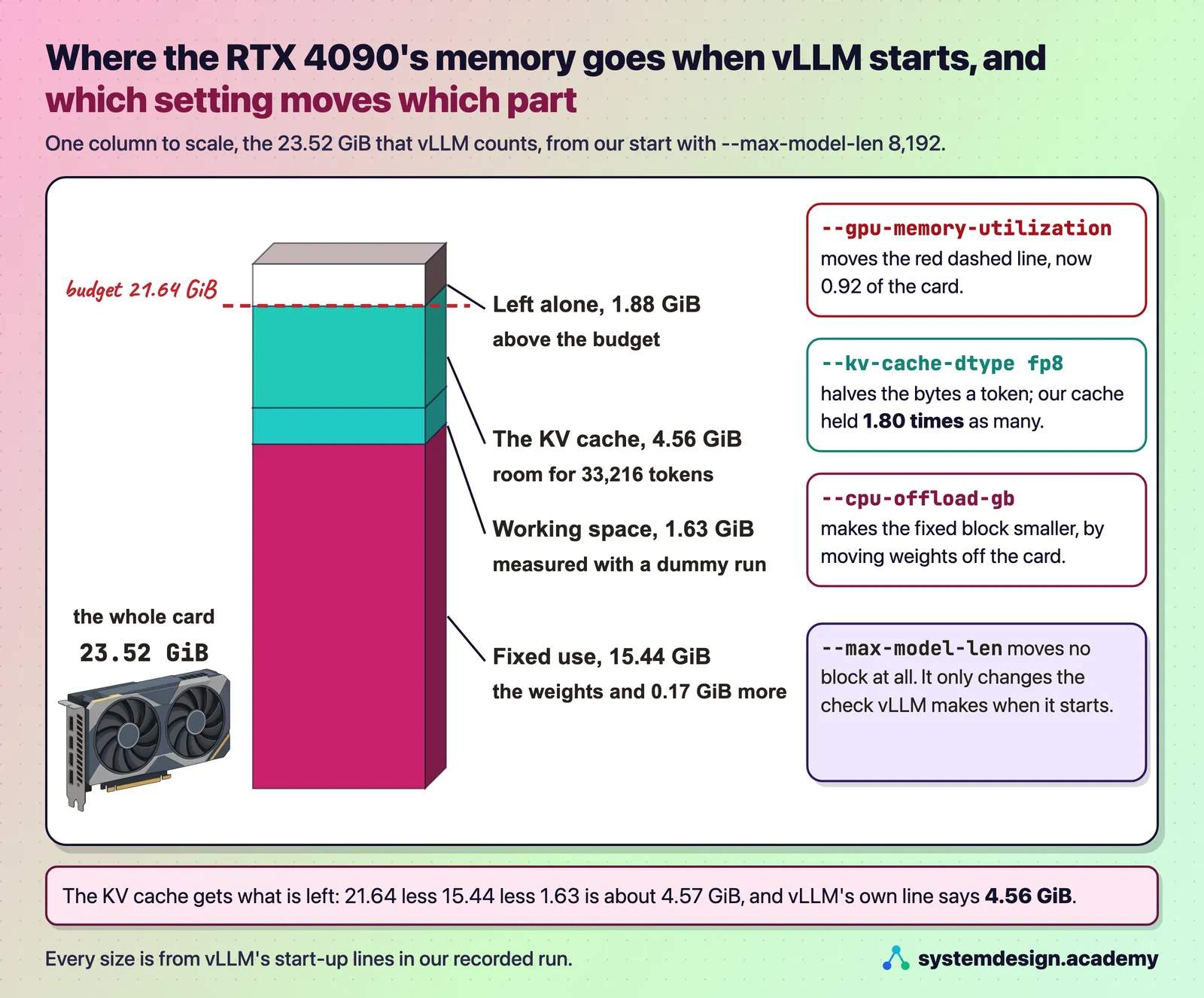
At start-up vLLM claims a fixed share of the card, 0.92 by default in vLLM 0.33, set by --gpu-memory-utilization. The weights and its working space come out of that share first, and everything left goes to the KV cache, the keys and values the model keeps for every token of every conversation. A bigger cache means more people served at once.
Because the weights take the same room whatever the share, a small change in the share is a large change in the cache. Lower it only when another program must share the card.
What we measured: On a 24 GB RTX 4090, Qwen3-0.6B's weights took 1.12 GiB and the cache got 19.43 GiB, room for 181,936 tokens. For Qwen3-8B, a share of 0.92 gave 33,216 tokens of cache and 0.80 gave 17,456 tokens, leaving 4.71 GiB of the card for something else.
How many users can one GPU serve with vLLM?
As many conversations as fit in its KV cache at the same moment. Divide the cache size vLLM prints at start-up by the tokens one of your conversations holds at its longest. If you have promised users a speed, the real number is lower, because each person slows down as the batch grows.
The log line Maximum concurrency is a worst case: how many conversations of the full allowed length would fit. It does not limit how many people vLLM serves.
What we measured: For Qwen3-8B in 16 bits on an RTX 4090, vLLM had 33,216 tokens of cache: about one conversation of 32,768 tokens, 8 of 4,000 or 16 of 2,000. Its log said Maximum concurrency 1.01x, yet the same server ran 64 conversations of about 340 tokens at once with the cache at most 66.8% full.
vLLM refuses to start with "KV cache is needed, which is larger than the available KV cache memory". What do you do?
The message means one conversation of the model's full allowed length would not fit in the cache left after the weights. vLLM checks this at start-up and refuses rather than fail later. The usual fix is a shorter --max-model-len. It leaves the cache the same size and only changes the check.
The other fixes make real room: raise the memory share, store the weights in fewer bits, or use a GPU with more memory.
What we measured: For Qwen3-8B on an RTX 4090, the full 40,960 tokens needed 5.62 GiB with 4.56 GiB available, and vLLM estimated 33,200 as the longest that would fit. With --max-model-len 8192 it started at once.
Does an fp8 KV cache double the number of tokens vLLM can hold?
Nearly. With --kv-cache-dtype fp8, each token's keys and values take one byte a number instead of two, so each token needs half the room. The numbers are kept more coarsely, so check the quality of the answers before you keep it.
What we measured: For Qwen3-8B the notes fell from 147,456 to 73,728 bytes a token. The cache held 59,856 tokens instead of 33,216, 1.80 times as many and not 2, because that start needed 0.45 GiB more working space.
When is CPU offloading in vLLM worth it?
Only when the model will not fit any other way and speed does not matter. --cpu-offload-gb keeps part of the weights in the computer's ordinary memory, which makes room on the GPU, but those weights must cross the PCIe link to the GPU for every token. On the RTX 4090 that link moves at most 32 GB a second each way, far slower than the card's own memory.
What we measured: Offloading 6.02 GiB of Qwen3-8B's weights grew the cache from 33,216 to 76,912 tokens, and one person's answer fell from 56.4 to 2.6 tokens a second.
If this helped, the full hands-on course goes much deeper.
In the course you install vLLM on a rented RTX 4090, read its memory budget line by line, then change one setting at a time and measure what each one does to speed, memory and waiting time.
3. The scheduler: who runs in each step
These questions test whether you understand what happens between two steps on the GPU, which is where most latency surprises come from.
What is PagedAttention, in one answer?
It is how vLLM stores each conversation's KV cache: in small pages of a fixed number of tokens, 16 by default, taken from a shared pool as the conversation grows. A block table records which pages belong to the conversation and in what order, so the pages can sit anywhere in memory and a conversation wastes at most part of its last page.
Without pages, a server must reserve room for the longest possible conversation for every request, and most of that room is never used.
What we measured: On our RTX 4090 with Qwen3-8B, vLLM made 2,076 pages of 2.25 MiB each, 33,216 tokens in all.
What is continuous batching in vLLM?
The scheduler decides afresh at every step which conversations to work on. A finished conversation leaves and a waiting one joins between any two steps, so the batch never waits for its slowest member. vLLM always works this way.
What we measured: The same 48 answers took 24.33 seconds in fixed waves of 12, made on purpose by the client, and 16.83 seconds with continuous batching, 12 at a time.
What do max-num-seqs and max-num-batched-tokens control?
--max-num-seqs is the most conversations that can run at once, like seats in a room. Requests beyond it wait in a queue even when memory is free. The default for the API server in vLLM 0.33 is 256, and 1,024 on H100-class cards of 70 GB or more.
--max-num-batched-tokens is the token budget of one step: one token for each conversation writing its answer, plus pieces of questions being read. The default is 2,048 on GPUs like the RTX 4090 and 8,192 for the API server on H100-class cards.
What we measured: Setting --max-num-seqs to 8 cut the time per token from 26.08 to 18.65 ms, but raised the mean wait for the first token from 0.99 to 17.35 seconds and cut throughput 5.1 times.
What is preemption in vLLM, and is it bad?
When a running conversation needs a new page and none is free, vLLM pauses the conversation that started last, frees its pages, puts it back at the front of the queue, and later reads its text again to rebuild its notes. The answer still comes back complete, only later.
A few preemptions at a traffic peak are normal. Preemptions all the time mean the server needs more KV cache or fewer people per GPU.
What we measured: With 160 people at once the cache reached 100.0% full, vLLM preempted 64 times and up to 62 requests waited. Every answer still came back complete, at 21.9 tokens a second each instead of 43.4 with 64 people.
Why do streaming answers pause when someone sends a very long prompt, and what fixes it?
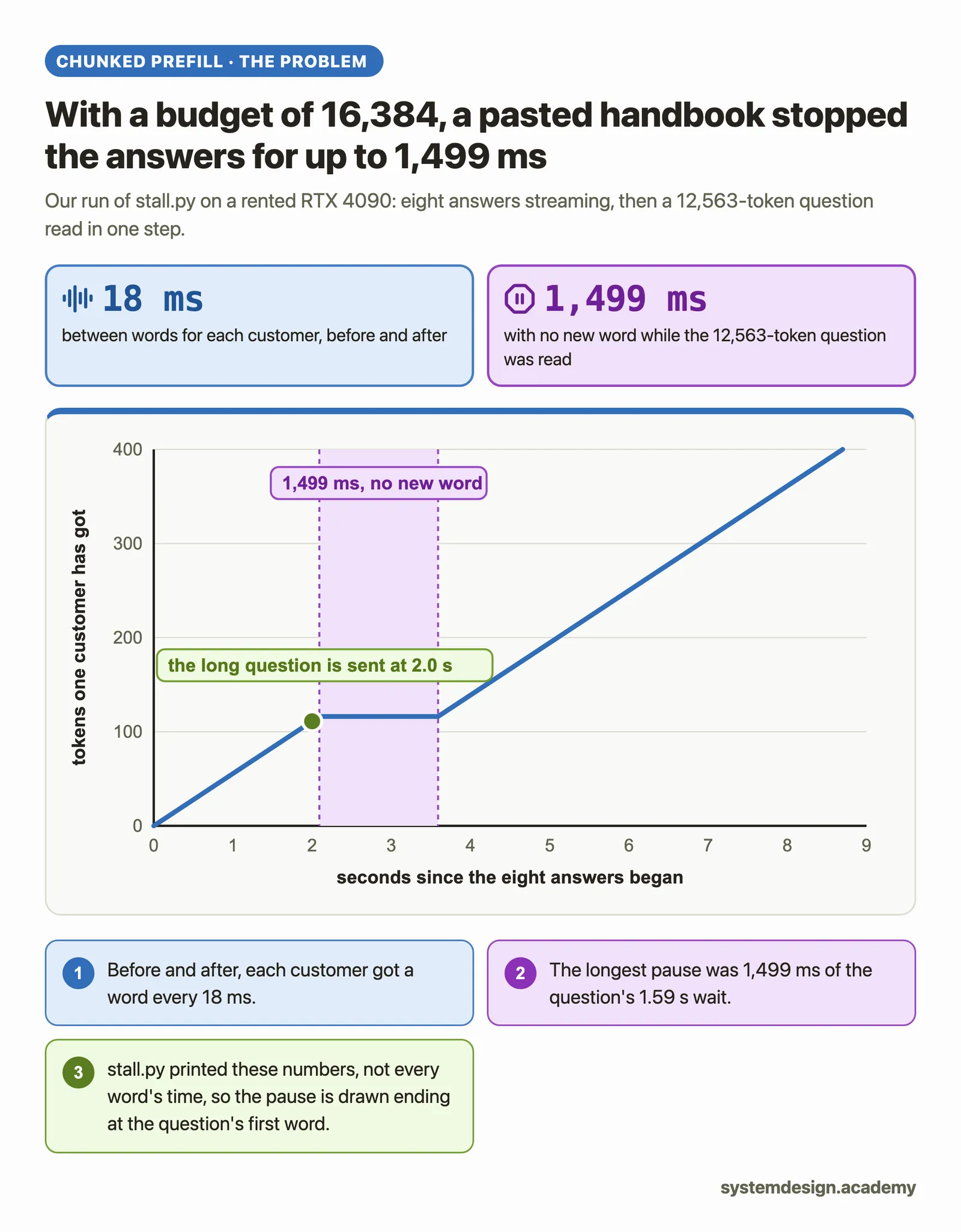
The model runs in steps, and a step cannot be interrupted. If one step reads a whole long prompt, every answer being written waits until that step ends. Chunked prefill, on by default in vLLM 0.33, reads a long prompt over several steps in pieces that fit beside the tokens being written for everyone else.
A bigger step budget reads long prompts in fewer steps, so their first word comes a little sooner, but everyone else's pauses grow. For a chat service, measure the pauses before raising it.
What we measured: A 12,563-token question was read in 7 pieces at the default budget, and the eight people being answered never paused for more than 300 ms. With a budget of 16,384 it was read in one step, its first word came only 70 ms sooner, and the others stopped for up to 1,499 ms.
What is prefix caching, and why might the hit rate be low?
vLLM keeps the KV cache pages of earlier requests and reuses them when a new request starts with exactly the same tokens, so that beginning is not read again. It is on by default in vLLM 0.33.
Matching starts at the first token and stops at the first page that differs, so anything that changes near the start, such as a timestamp, a request number or a user's name, ruins it. Put the parts that change at the end of the prompt.
What we measured: Eight questions behind the same 2,958-token beginning found 87% of their prompt tokens in the cache, and their first word came after about 46 ms instead of 326 ms. A clock time at the start of the system message cut the hit rate to 0%; the same line at the end gave 86%.
4. Measuring and tuning a vLLM server
Senior interviews ask how you would prove a change helped. These answers show the habits that make a number trustworthy.
How do you benchmark a vLLM server?
Use vllm bench serve, which ships with vLLM. Point it at the running server, choose a dataset (random with fixed input and output lengths is the simplest), the number of requests and, for a realistic test, a request rate. It reports throughput, time to first token, time per output token and inter-token latency, with medians and 99th percentiles.
Always check that failed requests is 0, and know which sampling settings it sent: in vLLM 0.33 it sends no temperature unless you add one.
Why must a vLLM load test use fresh prompts?
Because prefix caching keeps the notes of questions vLLM has already read. A test that sends the same questions again measures the cache, not the GPU. Give every run its own made-up questions and check that the vllm:prefix_cache_hits_total counter at /metrics stays at 0.
Why does throughput stop rising when you add more users?
Usually because the KV cache is full: the server pauses some people and works their notes out again later, which costs time and writes no new tokens. The arithmetic also stops being free once long questions are read in the same steps.
What we measured: With Qwen3-8B on an RTX 4090, going from 32 to 64 people raised the total by only 16%. vLLM paused requests 59 times at 64 people and never below, and the p99 wait for the first word reached 8.69 seconds.
What do the optimisation levels -O0 to -O3 change in vLLM?
They are presets for how much vLLM prepares before it opens. In vLLM 0.33.0, -O0 compiles nothing and records no CUDA graphs, -O1 compiles and records piecewise graphs only, -O2, the default, adds full graphs for writing steps, and -O3 is currently the same as -O2. Use -O0 while you try settings and the default for a server people use.
What we measured: With Qwen3-8B on an RTX 4090, -O0 was ready in 40 seconds and wrote 24% slower for one person after the first word.
Where to go next
If this helped, the full hands-on course goes much deeper.
In the course you install vLLM on a rented RTX 4090, read its memory budget line by line, then change one setting at a time and measure what each one does to speed, memory and waiting time.
Every number on this page comes from Hands-On Inference Engineering: Serve LLMs on GPUs with vLLM and SGLang, where you rent the GPU yourself, run each command and compare your numbers with ours. Start with the free introduction and the free lessons on prefill and decode and the KV cache. If you are also preparing for interviews, the two big courses together and the Inference Engineering interview pack are below.

These questions are a start. The interview asks more.
Get all 120 questions in the Inference Engineering pack
Each question has why it is asked, a full answer, what the interviewer listens for, the follow-ups, the common mistakes and a diagram (141 diagrams in all). A PDF you keep, junior to staff level.
Pay by UPI, cards or netbanking through Razorpay. Pay by card or PayPal, in US dollars. Download at once from My packs.