An AI SOC Analyst Course: Learn the Job in Your Own Lab, Then Build the Agents
Is there a hands-on AI SOC analyst course?
Yes. Hands-On AI SOC Analyst at systemdesign.academy is a self-paced course that teaches SOC work by hand on your own Wazuh security lab on AWS, then has you build AI agents that triage alerts while a person approves every action. It is in early access: 12 of 77 planned lessons are ready today, about 11 hours with 11 hands-on labs, and every later lesson is included.
Save your progress and get the AI Engineering cheat sheet PDF
This page explains what our AI SOC analyst course teaches, the lab you run, what is ready today and what is still being written, in 9 short answers. Every count on it is computed from the course's own lesson files.

9 questions · 4 sections · answers from the course
These answers come from our course Hands-On AI SOC Analyst: Build AI Agents for Security Operations: 12 lessons are ready to study today, about 11 hours of learning, with 11 hands-on labs, 8 of them in your own security lab on AWS, and more than 150 diagrams and real screenshots. New lessons are added as they are finished, and you get every one.
The short answer
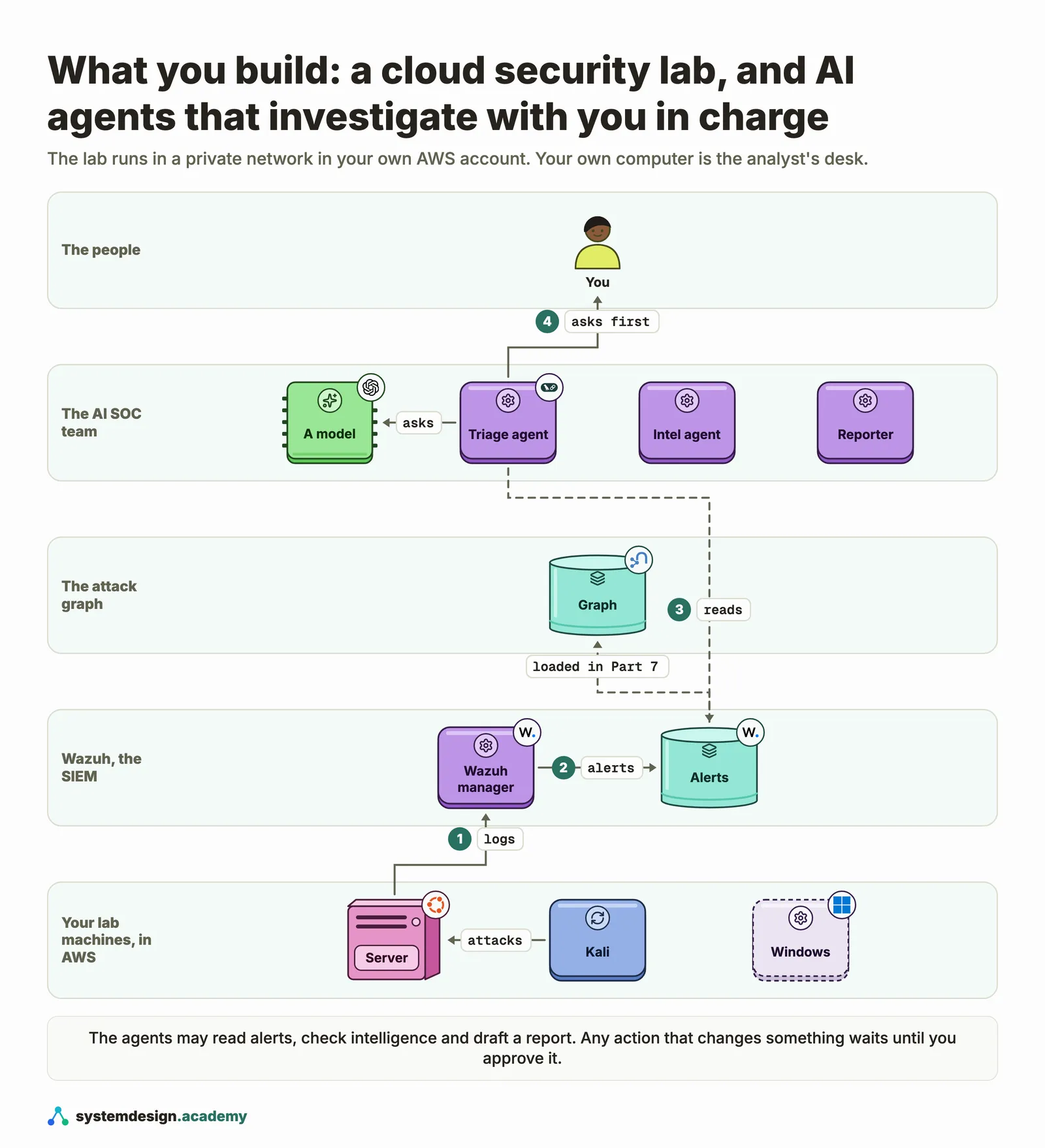
You learn the analyst's job by hand on your own cloud lab, then build AI agents that investigate while you decide. The opening lessons and Part 1 are ready today; the agent parts are still being written.
1. What this AI SOC analyst course teaches
The job first, then the AI agents, and who it is written for.
What does an AI SOC analyst course teach?
Ours teaches the work of a security operations centre analyst first, by hand, and then how to build AI agents that help with it. You learn what an alert and a log really are, how to triage an alert and write an incident ticket, how a SIEM turns logs into alerts, and how to write and test detection rules. Then you build agents that triage, enrich, hunt and draft reports, with a person approving every action that changes anything.
The course is Hands-On AI SOC Analyst at systemdesign.academy. It is planned as 77 lessons in a short "Start here" section and 9 parts, and it is in early access: 12 lessons are ready today.
Who is it for, and what should I know first?
People who want their first SOC analyst job and want to learn the work on real tools. Working SOC analysts who want to understand AI SOC tools from the inside and build and measure agents themselves. And software or DevOps engineers moving into security who want to see how detection and incident response really work.
You should be able to move around a terminal, read and change a short Python program, and sign in to an AWS account and paste a command. You do not need security experience: every security idea is explained from zero. You do not need AI experience either: Part 5 starts from what a language model really does.
How is this different from a video course?
There are no videos and no live sessions. It is a self-paced course of written lessons, each with a real problem from a shift, a diagram of the idea, a hands-on run on your own lab and a knowledge check. Every screenshot comes from a real run, and each lesson with code comes with a zip of that code.
The point of the format is that you do the work yourself. You read a real login log with grep, you check each alert against the log line it came from, and you keep the lab and the code.
2. The security lab you run on AWS
Where the hands-on work runs, and what you see in it.
Where do the labs run?
In your own security lab, built in your own AWS account by the free lesson "Before you start". It is five small machines in a private network: a Wazuh server, an Ubuntu practice server that gets attacked, an administrator's computer that does ordinary work, a Kali machine that attacks, and a small NAT machine. A Windows server with Sysmon can be added when a lesson needs it. You reach every machine through AWS Session Manager, with no open port to the internet, and one command removes the whole lab.
Today 11 ready lessons have a hands-on lab, 8 of them in your own security lab on AWS. Each lab lesson says up front what it runs and where.
What does a lab session look like?
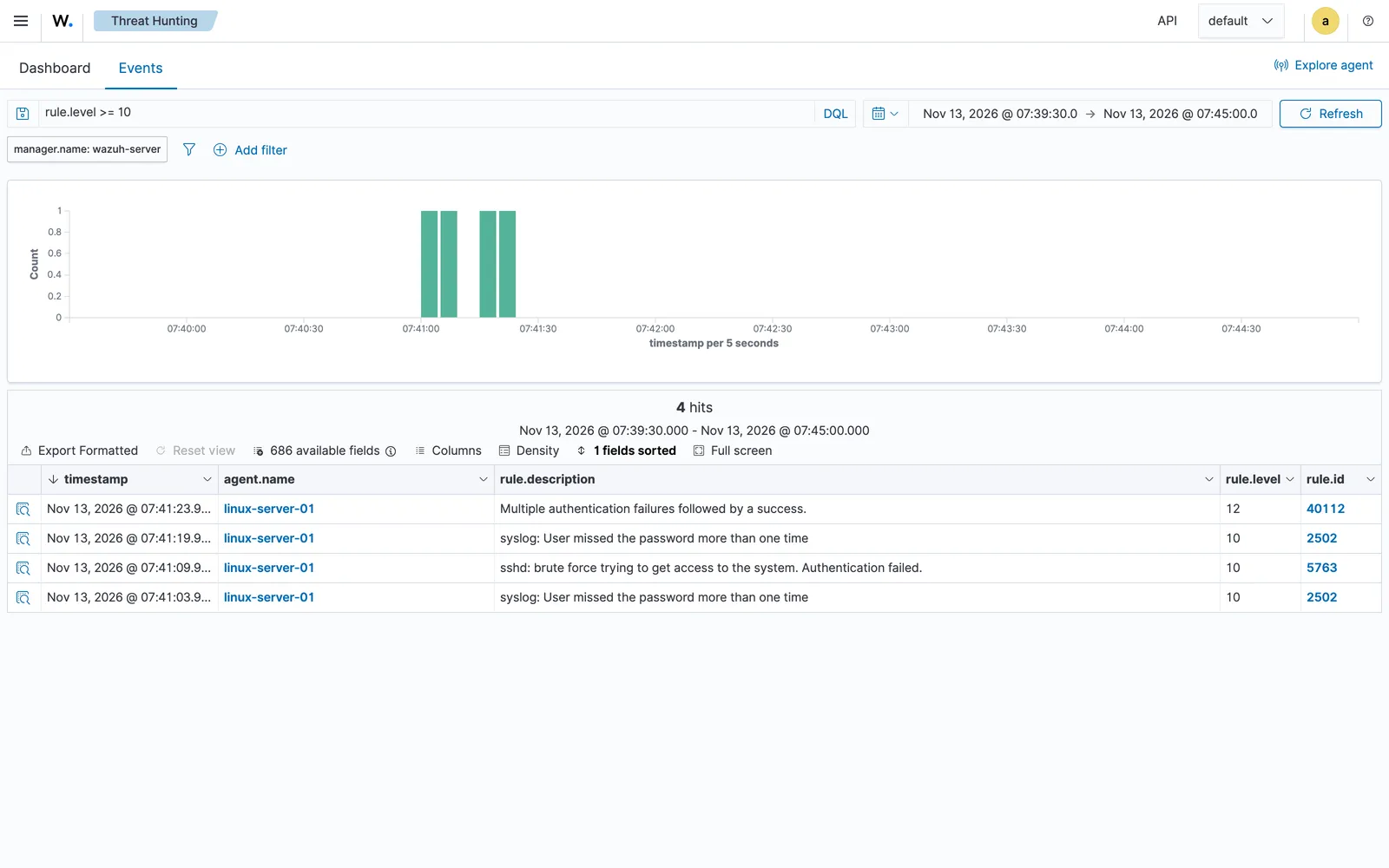
In the introduction, the Kali machine guesses passwords against the practice server. On our run of 13 November 2026 it tried 10 wrong passwords and then the right one in about 36 seconds, and Wazuh raised 17 alerts from the attacker's address. The screen above shows the highest of them.
In the lessons that follow you run that attack yourself, find it in the login log by hand, and check every alert Wazuh raised against the line it came from, so you know what an alert really claims before any tool or agent reads it for you.
3. What is ready today, and what is still the plan
The honest status, counted from the published lessons.
How much of the course is ready?
12 lessons are ready to study today, of 77 planned: about 11 hours of learning, with 11 hands-on labs, 8 of them on your AWS lab, and 185 diagrams and real screenshots. 8 of them are paid lessons, and the rest are free.
What is ready: the whole "Start here" section, Part 1, The SOC from zero (all 8 lessons), and the free lesson "What an AI agent is" from Part 5. Part 1 covers alerts and why most are noise, logs as evidence, Linux and Windows logs, how an attack unfolds, the triage routine and the incident ticket.
What is still being written?
In the plan: Wazuh hands-on, with your own detection rules; MITRE ATT&CK, Sigma rules and detections kept in Git; threat intelligence and hunting by hand; vulnerabilities and the software supply chain (CVE, CVSS, EPSS, KEV and SBOMs); AI agents from zero for analysts; a team of agents that triage, enrich, hunt and report with a person approving; attack graphs in Neo4j; and an honest evaluation, a red team against your own agents and a capstone.
We do not promise dates. Lessons are added as they are finished, and the contents page always shows which ones are ready.
Full walkthrough: The full contents, with each lesson's status
4. Trying it and buying it
How to check the course yourself, and what one payment includes.
Can I try the course before I pay?
Yes. 4 lessons are free: "Introduction: what this course builds", "Before you start", "What a security operations centre does all day" and "What an AI agent is". "Before you start" builds the full lab in your AWS account, so you can run the real attack and see real alerts before you decide.
Lesson: What a security operations centre does all day (free)
How does buying work?
You pay once and keep the course for life, with every lesson added to it later and the code zip for each lesson that has code. There is no subscription. It sells at an early-access price while the later parts are written, and that price rises once every part is out. The price for your country is in the box on this page and on the course page.
Full walkthrough: The course page, with the full contents and price
Where to go next
Everything on this page comes from Hands-On AI SOC Analyst: Build AI Agents for Security Operations. 12 lessons are ready to study today, about 11 hours of learning, with 11 hands-on labs, 8 of them in your own security lab on AWS, and more than 150 diagrams and real screenshots. New lessons are added as they are finished, and you get every one. Start with the free lessons before you decide.

These questions are a start. The interview asks more.
Get all 120 questions in the Agentic AI Engineering pack
Each question has why it is asked, a full answer, what the interviewer listens for, the follow-ups, the common mistakes and a diagram (153 diagrams in all). A PDF you keep, junior to staff level.
Pay by UPI, cards or netbanking through Razorpay. Pay by card or PayPal, in US dollars. Download at once from My packs.