Sources checked
System design, AI engineering and inference courses for engineers in Australia
The short answer
If you are a software engineer in Australia with a system design interview coming, start with the System Design course. If you want to build AI products, add AI Engineering, and if you serve language models on GPUs, take Hands-On Inference Engineering. All three are self-paced, so the time zone never gets in the way, and you pay once in US dollars by card or PayPal.
This page is for software engineers who work in Australia, or want to, whatever passport you hold. If you have a system design interview coming, want to move from ordinary software work into AI engineering, or run language models on GPUs, the courses here were written for you.
Below is how the design round works at employers that publish their process, a worked design built from Atlassian's own engineering writing, what each course teaches, and the prices in US dollars.
Written by Roni Das, who teaches the courses on this site. Jump to the prices.
Who this is for
Backend, full-stack and platform engineers in Sydney, Melbourne, Brisbane, Perth and Adelaide who have an interview coming up at a software company, a bank or a large global employer, and want a clear method for the design round.
Engineers who want to build AI products. Most AI work in ordinary companies is software engineering: an assistant that answers from company documents, an agent that files a ticket, a feature whose quality you can measure. That is what the AI Engineering course teaches.
Engineers who serve open language models on their own GPUs, or want to. Hands-On Inference Engineering shows on rented NVIDIA machines why one request is fast and another is slow, and what each choice costs.
It is not for someone who has never written code. The courses assume you can read and write a program in at least one language.
How the system design round works for engineers in Australia
We could not find an employer based in Australia that publishes exactly how its design round is run, so we will not guess. Below is what two large global employers publish, and what is useful to know locally. Each fact links to the page we read.
What large employers publish about their design interviews
Amazon's interview guide for mid-level software engineers (the level Amazon calls SDE II) says the final round is four interviews of 55 minutes each, and that you should expect at least one question on designing a software system.
Source: Amazon.jobs: SDE II interview prepThe same guide lists the objectives a good design should meet: practicality, accuracy, efficiency, reliability, optimisation and scalability. It also says a large part of each conversation is about how you have shown Amazon's Leadership Principles in past jobs.
Source: Amazon.jobs: SDE II interview prepWise, the money transfer company, says its system design interview lasts about an hour, and that what matters most is your reasoning: how you structure the problem and explain the trade-offs behind your choices.
Source: Wise: system design interviewsWise recommends joining its design interview by video, not just audio, and being ready to use an online whiteboard that both people can draw on.
Source: Wise: system design interviews
What is useful to know in Australia
Google lists offices in Melbourne and Sydney.
Source: Google: LocationsThe payments company Adyen lists Sydney among its offices.
Source: Adyen CareersAmazon Web Services runs two cloud regions in Australia: Sydney (ap-southeast-2) and Melbourne (ap-southeast-4), each with three availability zones.
Source: AWS documentation: RegionsThe Skills in Demand visa (subclass 482) has a Specialist Skills stream, and a holder can stay in Australia for up to 4 years.
Source: Department of Home Affairs: Skills in Demand visa, Specialist Skills streamAtlassian says it runs about four million Jira databases, one for each customer site, spread across about 3,000 PostgreSQL servers in 13 AWS regions worldwide.
Source: Atlassian engineering blog: migrating Jira's database platform to AWS AuroraCanva says that in 2025 its community grew to 260 million people using Canva every month.
Source: Canva newsroom: 2025 in review
Each source was read between 13 and 19 November 2026. Rules and thresholds change, so check the official page before you rely on a number.
What this means for your preparation
With two AWS regions in the country, questions about where data lives come up naturally. Be ready to say which parts of a system you would keep in one region, and what a second region adds in cost, latency and complexity.
Wise says what matters most is your reasoning, so think out loud. Ask what the system must do before you draw anything, start with a simple design, and explain each trade-off as you make it.
If your interviewer sits in another time zone, expect a video call with a shared whiteboard. Practise drawing while you talk, because it is harder than it sounds.
What about AI engineering interviews?
We could not find an employer in Australia that publishes the format of an AI engineering interview, so we will not describe one as if it were standard. What we can say is what the AI Engineering course prepares you to explain: how a model answers from your own documents and why that breaks as the documents grow, how an agent calls tools and why longer tasks fail more often, and how to measure whether an AI feature is good enough to ship. If an AI role you apply for also has a system design round, the System Design course prepares you for that part.
For the design round itself, step by step, read our complete guide to the system design interview.
A worked design from Australian engineering writing: how Jira Cloud finds your data
Think of a large apartment building with a concierge at the door. Every visitor says which flat they want, and the concierge looks it up and sends them to the right floor. Jira Cloud works the same way: every request first asks where this customer's data lives, then goes straight there.
Atlassian writes about this design in public, so we turned it into a practice question. The figure follows one request: it reaches an ingress service, a small cache on the same machine answers which database holds this customer, and an app server opens that customer's own PostgreSQL database. Because each customer has its own database, one customer's query cannot reach another customer's rows, and one customer can be backed up, moved or restored on their own.
We have no source that Atlassian asks this question in its interviews, and we do not claim it does. It is a strong practice question because it tests the ideas every design round asks about: caching, routing, isolation and recovery. Canva's walkthrough, linked below, is a different kind of problem: counting billions of events correctly so that people are paid the right amount.

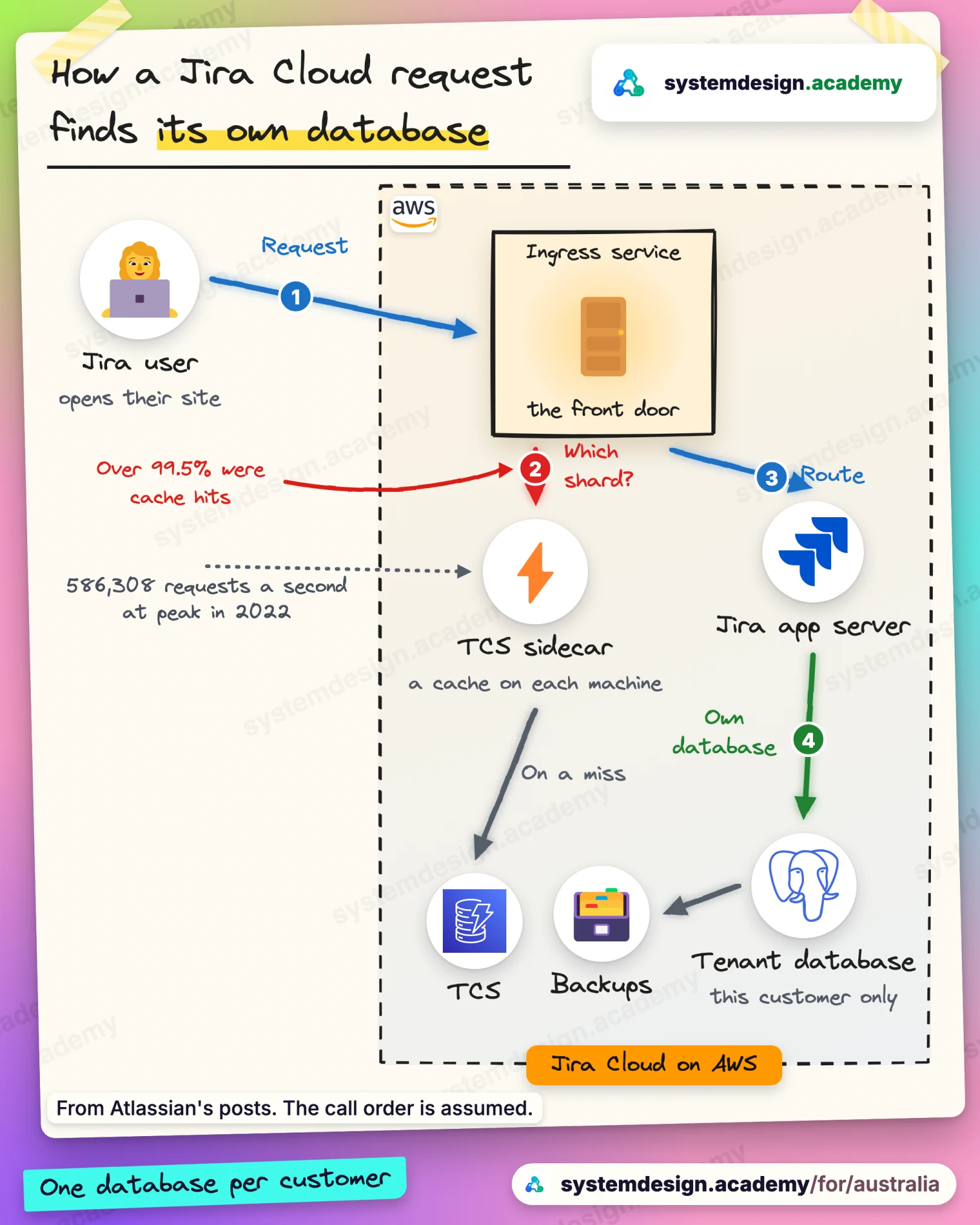
The numbers behind it, from the company's own pages
Atlassian says it spreads about four million Jira databases across about 3,000 PostgreSQL servers in 13 AWS regions worldwide.
Source: Atlassian engineering blog: migrating Jira's database platform to AWS AuroraCanva says it counts billions of content usages each month to pay its creators, and that moving the counting into a data warehouse cut the pipeline's delay from over a day to under an hour.
Source: Canva Engineering: Scaling to count billions
What the two main courses teach
Both are self-paced and written in plain English. You pay once and keep each course for life.
System Design
770 lessons, from how one request travels through a system to the trade-offs a staff engineer is asked to defend: caching, databases, queues, consistency, reliability and worked interview designs. The lessons draw each system step by step, and an AI tutor sits beside every lesson to answer questions.

AI Engineering
219 lessons on building products with large language models: prompting you can test, retrieval from your own documents, agents, evaluation, fine-tuning, serving and security. Every lesson has Python you can change and run in the browser, and 127 are built on a real lab run whose output you can inspect.

Four hands-on courses, open while they are being written
These four courses are still being written, and new lessons are added as they are finished. The count on each card is read from the course itself when this page is built, so it shows what you can study today. If you join early, you pay the lower price and get every new lesson as it is published.
- Early access: 30 lessons ready, about 21 hours, 29 hands-on labs
Hands-On AIOps on AWS: Build AI Agents for DevOps
Build AI agents that read your alerts, find the cause of an outage and propose the fix, on real AWS.

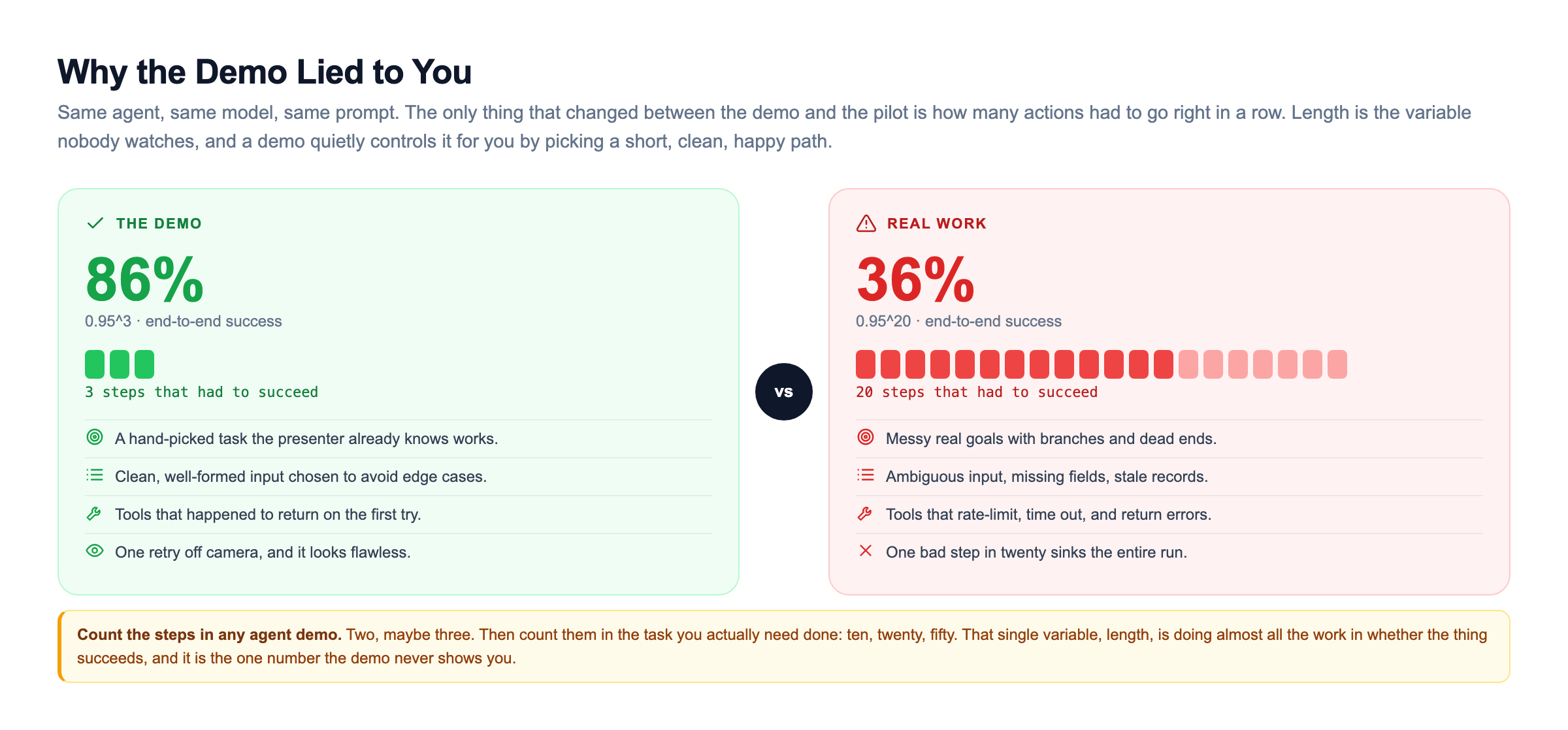
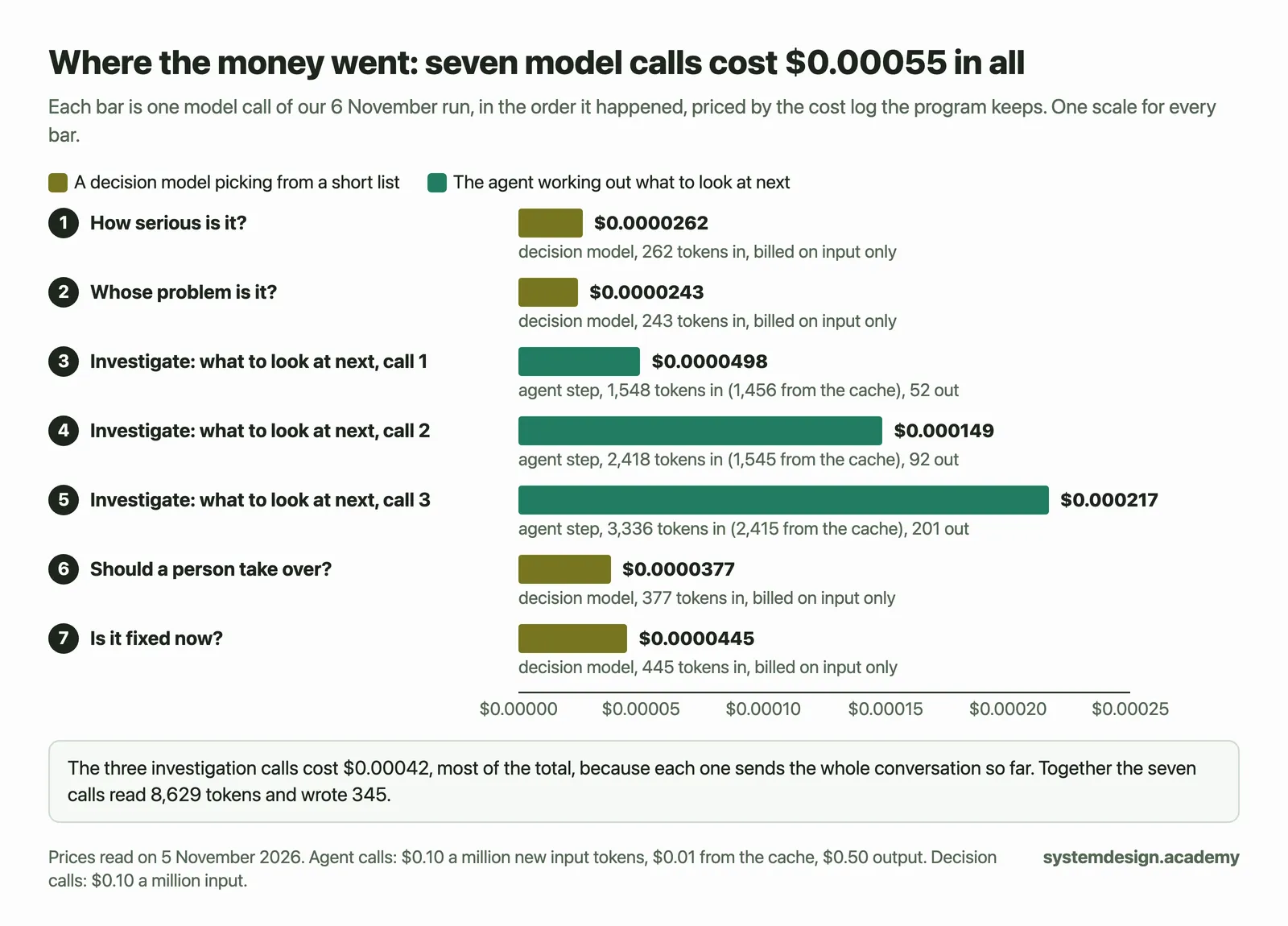
From the opening lesson of AIOps on AWS: one real run, priced from the cost log the program keeps. Open it full size. $100
The price rises to $177 when the course is complete.
- Early access: 43 lessons ready, about 40 hours, 37 hands-on labs
Hands-On Inference Engineering: Serve LLMs on GPUs with vLLM and SGLang
Serve open language models on rented NVIDIA GPUs and learn what makes them fast, slow or expensive.

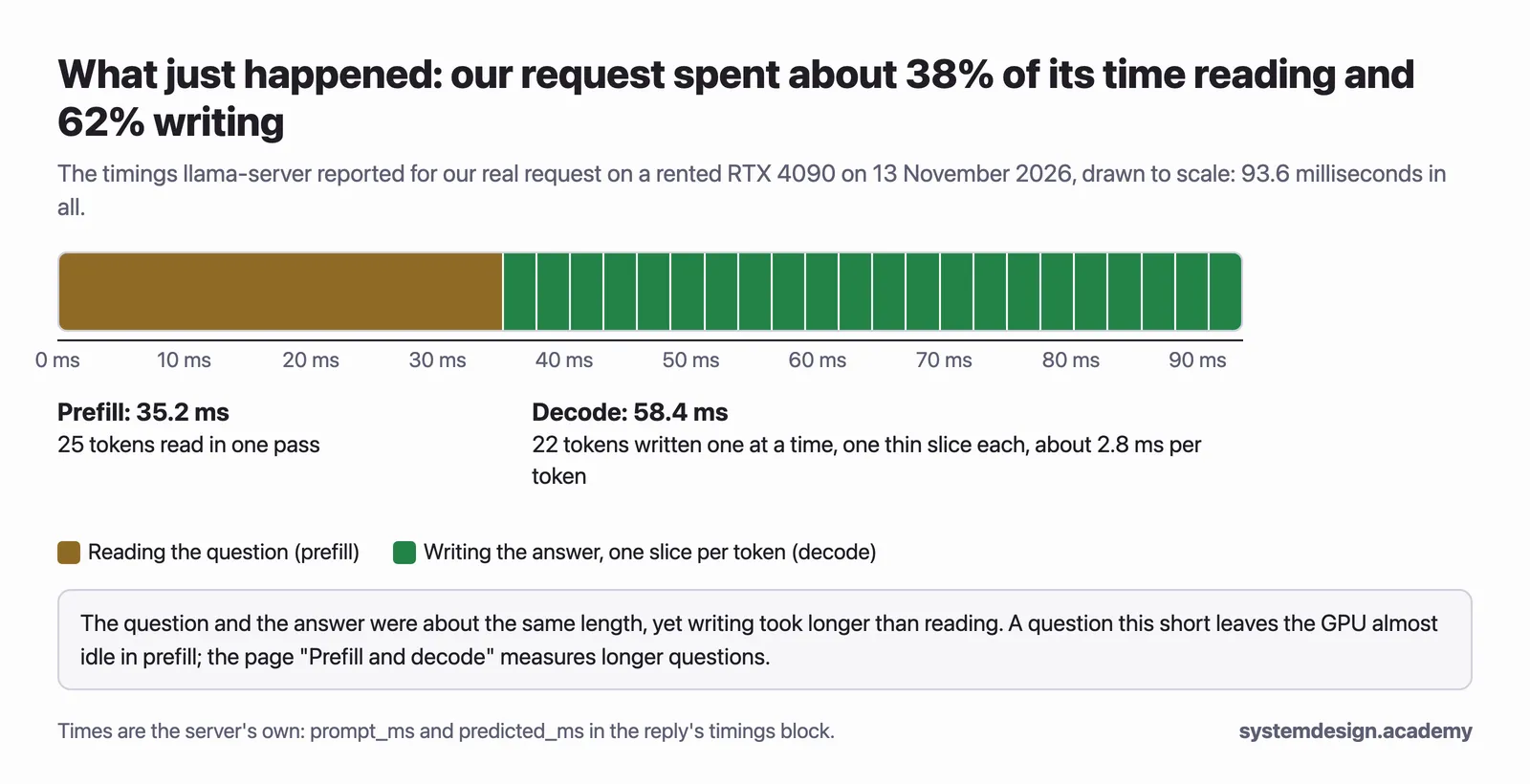
A real request, timed by the server, from the first lesson of the inference course. Open it full size. $99
The price rises to $249 when the course is complete.
- Early access: 12 lessons ready, about 11 hours, 11 hands-on labs
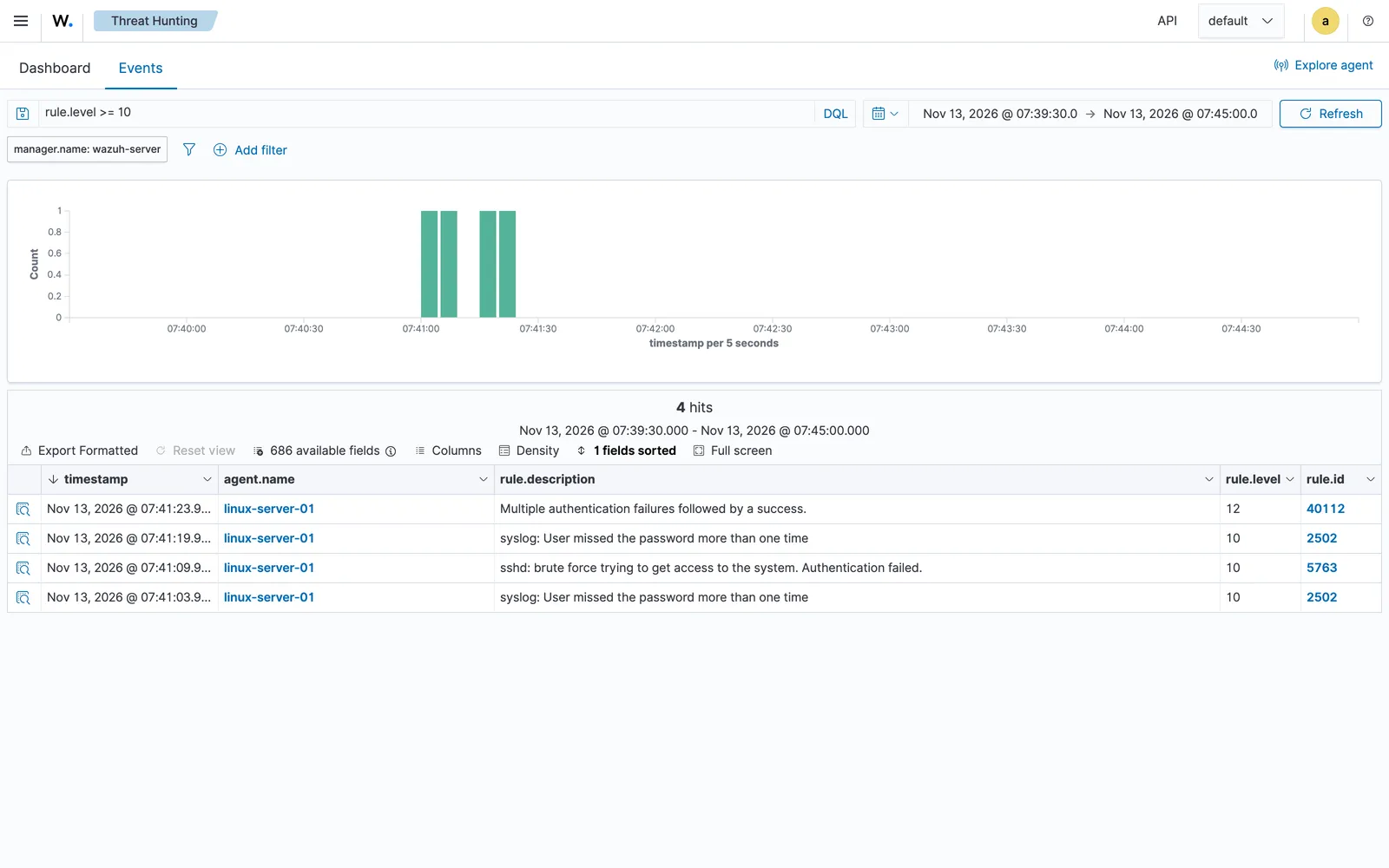
Hands-On AI SOC Analyst: Build AI Agents for Security Operations
Run a security lab in AWS: an attacker machine on Kali Linux, servers watched by the Wazuh security monitor, and AI that sorts the alerts by how serious they are.

A screenshot of the course's own Wazuh lab, taken on 13 November 2026. Open it full size. $100
The price rises to $177 when the course is complete.
- Early access: 8 lessons ready, about 6 hours, 4 hands-on labs
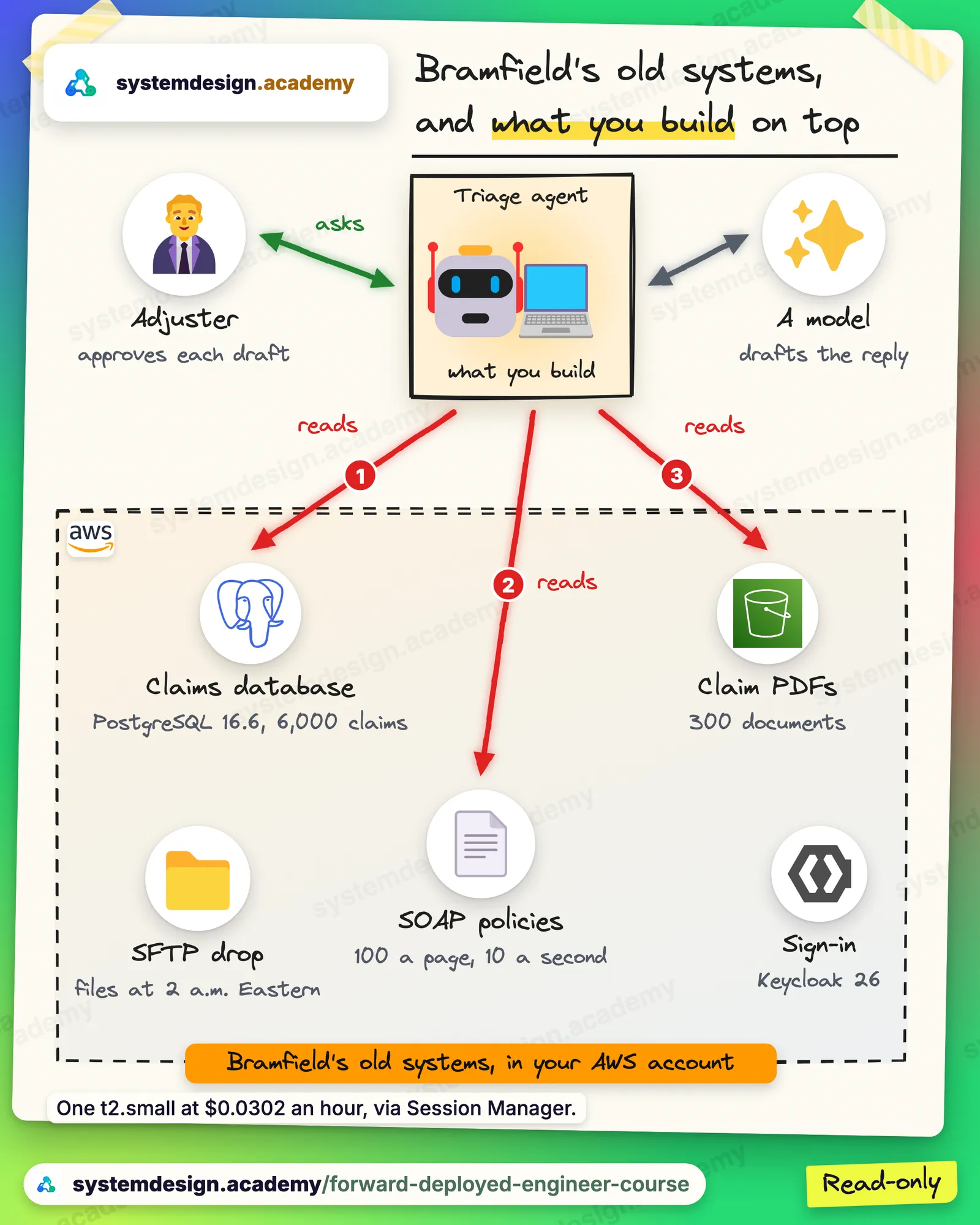
Become a Forward Deployed Engineer: Ship AI for Real Customers
Ship an AI system inside a customer's messy real systems, from the first meeting to the approved launch.

From the opening lesson of the Forward Deployed Engineer course. Open it full size. $149
The price rises to $249 when the course is complete.
Start free
These lessons and walkthroughs are free to read without an account. In all, 18 System Design lessons and 10 AI Engineering lessons are free.
- Latency: Where the time in one request goes, and why the slowest step decides the total.
- Cache invalidation: How to stop a cache from serving old data, a common interview topic.
- Design a URL shortener: A complete interview walkthrough of a common first practice question.
- Design a rate limiter: A complete walkthrough, with the algorithms compared.
- The RAG scale cliff: Why letting an AI answer from your own documents gets harder as the number of documents grows.
- Why evals are the job: How to measure whether an AI feature is good enough to ship, instead of trusting a gut feeling.
Free tools for engineers who run AI models on GPUs
If you serve language models yourself, these calculators help you size and price the hardware. Each one runs in your browser and shows every formula it uses.
- GPU Memory Calculator for LLMs: Pick a model, a number format and how many people use it. See the weights, the KV cache and the working space on each GPU, and how many GPUs it needs.
- LLM Latency and Throughput Estimator: Estimate the time to the first token, the time per token and the tokens a second for each person and in total, from a GPU's memory speed and compute.
- LLM Cost per Million Tokens Calculator: Turn a GPU's hourly price and its speed into the cost of a million tokens, and compare it with an API's price.
- KV Cache and PagedAttention Visualizer: Watch the same requests fill two GPUs' memory: one reserves the longest answer up front, the other takes small blocks as needed, like vLLM.
- Static and Continuous Batching Visualizer: See why continuous batching keeps a GPU busier than static batching, with the same twelve answers on a GPU with four places.
- Speculative Decoding Simulator: Set how often a draft model guesses right and how cheap a guess is, run rounds, and see the speed-up from the published formula.
The Saturday live class on your clock
AI Engineering Live is a separate live programme: one AI project built together over Saturday classes, with every class recorded. The times below are worked out from the class timetable for Australia.
| City | Class time on your clock | Best way to take it |
|---|---|---|
| Perth | Sat, 11:00 PM to 1:00 AM | Watch the recording |
| Adelaide | Sun, 1:30 AM to 3:30 AM | Watch the recording |
| Brisbane | Sun, 1:00 AM to 3:00 AM | Watch the recording |
| Sydney and Melbourne | Sun, 2:00 AM to 4:00 AM | Watch the recording |
Every class is recorded and posted after it ends, so you can also revise from the recording. The batch is already running. If you join now, you watch the earlier classes as recordings and join the next live class on Saturday, 21 November 2026. The last class is on Saturday, 6 February 2027.
Questions engineers in Australia ask
Is this for engineers of every nationality?
Yes. It is for every engineer in Australia, and for engineers elsewhere who are interviewing for a job there. The lessons are in plain English and the interviews they prepare you for are the same whatever your passport.
Can I pay from Australia?
Yes. You pay in US dollars, by card through Razorpay or by PayPal. Your bank converts the amount to Australian dollars at its own rate.
Does the course prepare me for Atlassian or Canva?
It prepares you for the kind of design round large software companies run, but neither company publishes its exact questions that we could find, so no course can honestly promise them. Both publish detailed engineering writing, and our Atlassian and Canva walkthroughs turn that writing into practice questions.
Do the time zones work from Australia?
The three self-paced courses have no fixed times, so they suit any time zone. The separate AI Engineering Live programme meets on Saturday evening in India, which is late Saturday night in Perth and the small hours of Sunday on the east coast, so most students in Australia watch the full recording. The table on this page shows the time in each city.
Should I start with System Design, AI Engineering or Inference?
If a design round is coming in the next month, start with System Design. If you want to move into AI work, start with AI Engineering and add System Design when a design round is near. Take Hands-On Inference Engineering if your job is serving models on GPUs, or will be.
Are the four hands-on courses finished?
No. They are open for early access, and new lessons are added as they are finished. Each card on this page shows how many lessons, hours of learning and hands-on labs are ready today, counted from the course itself.
Prices for engineers in Australia, in US dollars
You pay once for each course and keep it for life. There is no subscription. Pay by card or by PayPal.
The best value
Both courses together
Lifetime access to the System Design course and the AI Engineering course, in one payment.
$59
You save $11 against buying the two separately.
Get both coursesSystem Design course
The full self-paced course, from the basics to staff-level design, with lifetime access.
$35
AI Engineering course
The full self-paced course on Generative AI and agentic AI in production, with lifetime access.
$35
Interview prep packs
Question-and-answer packs for the week before an interview. One pack, or all nine together.
$20 a pack, $49 for all nine
System Design Interview Bootcamp
A self-paced bootcamp of recorded classes with drills, watched on this site whenever suits you.
$400
AI Engineering Live
A live class every Saturday, where we build one AI project together. The table above shows the time on your clock. Every class is recorded, so you can join now and catch up.
$400
You pay in US dollars, by Visa, Mastercard or Maestro card through Razorpay, or by PayPal. Your bank converts the amount to your own currency at its own rate. Live programmes are sold at the full fee in one payment. The four hands-on courses are priced on their cards above.
Longer local guides
For visas, a week-by-week study plan and more local detail, read: