System design interview guide
Atlassian System Design Interview: How Jira Cloud Isolates, Routes and Restores Millions of Tenants
Short answer
A good scenario to practise for an Atlassian system design interview is the tenant data layer of Jira Cloud. We have no public source that Atlassian asks it. The key idea: millions of customers share servers, yet each must be isolated, found fast and restorable alone. Jira gives each tenant its own Postgres database, about four million in all. The Tenant Context Service tells every request where its tenant's data lives, and a sidecar cache answers over 99.5% of lookups from memory. Atlassian's April 2022 outage shows the hard part. A script deleted 883 sites, and because backups were shared with other customers, some restores took up to 14 days. In this design, deletes are typed and soft first.
Two courses by the author of this page:
770 lessons · 18 free to read
₹1,111 in India · $35 elsewhere, once
Get System DesignYou own this course
219 lessons · 10 free to read
₹1,333 in India · $35 elsewhere, once
Get Generative AI and Agentic AIYou own this course
Save your progress and get the interview checklist PDF
In 2025 Atlassian wrote that Jira Cloud runs about four million Postgres databases, one for each tenant. They sit on about 3,000 database servers in 13 AWS regions. In 2022 its Tenant Context Service, which tells every request where a tenant's data lives, peaked at 586,308 requests a second. In April 2022 a maintenance script deleted 883 customer sites by mistake, and some customers were down for up to 14 days.
Designing Jira Cloud's data layer means serving millions of customers from shared machines. Each customer must see only its own data. Atlassian calls each customer's copy of its products a site, and each customer a tenant. Jira gives every tenant its own Postgres database, and packs up to about 4,000 of those databases onto one database cluster. A request must find the right database fast. So a lookup service called the Tenant Context Service (TCS) maps each tenant to its shard and database. A shard is one group of servers that holds a set of tenants. A small cache called a sidecar runs beside every app server and answers almost all lookups from memory. The hard part is the day something goes wrong for some tenants and not others. In April 2022 a script deleted 883 sites. The data stores were shared with other customers, so Atlassian could not roll a whole database server back. It had to pull each tenant's pieces out of backups. That took up to 14 days. A good answer designs for that restore from the start.

Where it shows up
A common type of question for backend, platform and site reliability roles at software-as-a-service companies, where many customers share one system. We have no public source that Atlassian uses this exact question. This guide is built from Atlassian's own engineering writing, so you can reason with real numbers.
Spec sheetAtlassian
- 01Tenant databases per server, average
- ~1,333
- 02Files on disk for one full cluster
- ~20 million
- 03Tenant lookups per second, average
- ~370,000
- 04Lookups that reach TCS itself, at peak
- under ~2,900 a second
worked through below, with the maths
Atlassian in its own numbers
Every figure below is quoted from Atlassian's own engineering writing. Tap a source to check it.
775
customers lost access when 883 sites were deleted by mistake in April 2022
Atlassian post-incident review, 202214 days
the longest outage for some of those customers
Atlassian post-incident review, 2022~4M
Jira databases, one per tenant, on about 3,000 Postgres servers in 13 AWS regions
Atlassian engineering blog, 2025~4,000
tenant databases on one database cluster, at most
Atlassian engineering blog, 2025586,308
peak requests a second served by TCS sidecars, the tenant lookup cache
Atlassian engineering blog, 202299.9999%
measured availability of the Tenant Context Service (six nines)
Atlassian engineering blog, 2022
Why this question is asked
Multi-tenancy tests four things at once. Can you choose how to separate customers' data, and say what each choice costs? Can you route every request to the right data without making a database call each time? Can you stop one large customer from slowing down its neighbours? And can you restore one customer without touching the others? The last one is where most answers stop. Atlassian's own 2022 outage shows why it matters. A candidate who draws one big shared database and says 'we take backups' has missed most of it.
What the interviewer asks
“How would you design the tenant data layer for Jira Cloud? Millions of companies share the same servers. Each must only ever see its own issues and projects. Every request must find the right data in about a millisecond. And you must be able to restore one customer's site to an earlier point without touching anyone else.”
Ask these back before you draw
- 1.How many tenants, and how unequal are they? (A few very large tenants change the design.)
- 2.Must a tenant's data stay in one geographic region, for example for a customer in Australia?
- 3.What are the recovery targets? How much data can a restore lose, and how long can a site be down?
- 4.Is restore for one tenant at a time, or must we plan for many tenants at once?
- 5.Who can delete a whole site, and is deletion permanent at once or delayed?
This page is the free part.
The course goes deeper on the Atlassian design
₹1,111 in India$35 everywhere elseonce, for the whole course
The System Design course covers the Atlassian design across a run of lessons, not one page. These 4 alone are about 102 minutes of step-by-step reading, every one with a quiz.
- Database Sharding
Splitting a database across multiple servers, the nuclear option for scaling writes, and the architecture behind Instagram, Uber, and YouTube.
- Soft Delete
At seventy percent deleted the table with its indexes was 161.9 MB against 33.5 for the same live rows. A unique constraint refused an address a long-deleted row still holds.
- Database Connection Pooling
PgBouncer, HikariCP, and why opening a new database connection per request is a recipe for disaster.
- Cache Invalidation
Careful per-row invalidation served more than twice the stale reads of doing nothing, because it raised the hit rate on the entries it cannot see.
all part of
System Design Masterclass
770 lessons · about 290 hours · 18 free to read
₹1,111in India, by UPI
$35everywhere else, by card or PayPal
It is really nice and good Please join the course
You own this course
Continue with Database Shardingpay once,
yours for life
Live from the course bench
Before you design Atlassian, try the questions it rests on.
Real interview questions, live diagrams and measured lab results, pulled at random from the lessons. A new set every time you come back.

01Requirements
Requirements
Always clarify these in the first 5 minutes of the interview. Do not start drawing boxes until both lists are agreed.
Functional requirements
- Each tenant's data is isolated: no request can read another tenant's issues, pages or users
- Every request is routed to the shard and database that hold its tenant's data
- A tenant can be moved between database servers, and between regions, with only a short pause
- A single tenant can be restored to a point in time without affecting any other tenant
- A whole site can be deleted only through a slow, reversible path (soft delete first)
- A tenant's data stays in the region, or realm, the customer chose
Non-functional requirements
- Tenant lookups are on every request, so they must be very fast: about 0.7 ms at P99 from the client in 2019
- The lookup path must be more available than the products that use it; Atlassian measured over 99.9999% in 2022
- One noisy tenant must not slow down the others on the same database server
- Recovery point objective (RPO), the most data a restore may lose: Atlassian's was one hour in 2022
- Recovery time objective (RTO), how long a restore may take: Atlassian says it missed its RTO in 2022
- Backups kept long enough to catch slow mistakes: Atlassian kept 30 days in 2022
02Scale estimates
Back-of-envelope scale estimates
Show your math. Pulling numbers from thin air signals you have not thought about the load.
Tenant databases per server, average
~1,333
Atlassian's 2025 post gives four million Jira databases on about 3,000 Postgres servers. 4,000,000 / 3,000 is about 1,333 a server on average, which Atlassian calls an instance. The same post says a cluster holds up to about 4,000. So the fleet is packed unevenly, and rebalancing matters.
Files on disk for one full cluster
~20 million
Atlassian wrote that a single Jira database needs about 5,000 files on disk. 4,000 databases x 5,000 files is about 20 million files on one cluster. This is our arithmetic on Atlassian's numbers. It is why database-per-tenant has a cost that a shared-table design does not.
Tenant lookups per second, average
~370,000
In 2022 TCS sidecars served up to 32 billion requests a day. 32,000,000,000 / 86,400 seconds is about 370,000 a second. Atlassian measured the peak at 586,308 a second.
Lookups that reach TCS itself, at peak
under ~2,900 a second
Atlassian says sidecar cache hit ratios generally exceed 99.5%. So at most 0.5% of 586,308, about 2,900 a second, miss the cache and go to the TCS service. This is our arithmetic. The cache turns a huge read load into a small one.
Tenant moves between servers
~1,000 a day
Atlassian's 2025 post says it moves about one thousand databases a day on average for rebalancing. During the Aurora migration its tool averaged 38,000 a day, with a peak near 90,000. Cutover, the pause while traffic switches, was under 3 minutes each during that migration.
Time to restore one deleted site
~12 to 48 hours
In the 2022 outage, Atlassian's first restore method took about 48 hours for a batch of sites. The faster second method took about 12 hours for a site. Atlassian wrote that with the first method alone, restoring every customer would have taken three weeks.
03Architecture
High-level architecture
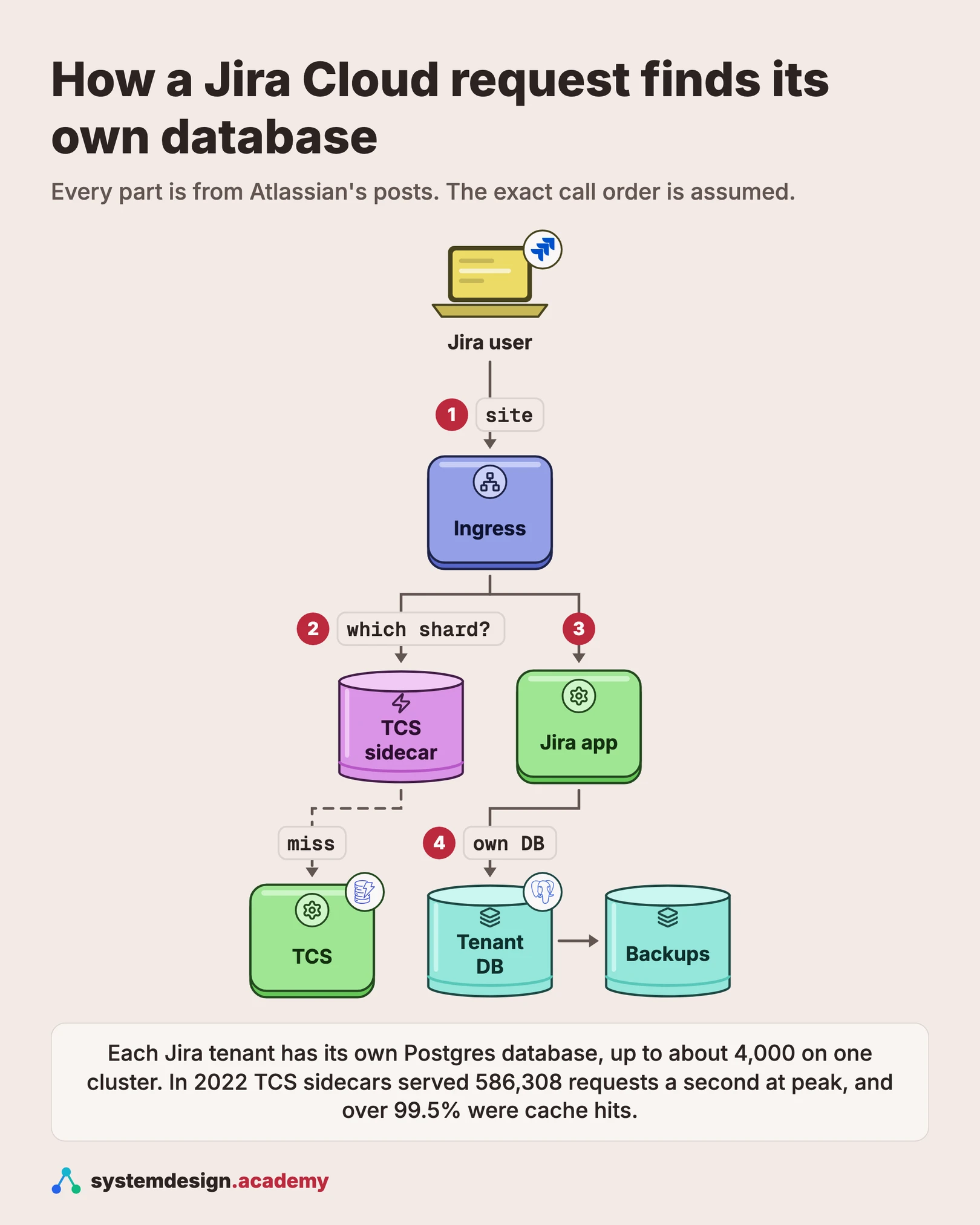
Draw one request from left to right, then draw the control plane above it. A user opens their site, for example a company's Jira address. The request reaches an ingress service, the front door that accepts all traffic. Atlassian wrote in 2019 that the ingress needs to know which Jira shard to talk to. So it asks for the tenant's metadata. That question goes first to a sidecar, a small cache process that runs on the same machine. The sidecar answers from memory more than 99.5% of the time. On a miss, it asks the Tenant Context Service (TCS). TCS keeps read-optimised views of tenant metadata in DynamoDB, a fast key-value database from AWS, in several regions. The request then reaches a Jira app server. The app server also looks up which database holds this tenant. It opens a connection to that tenant's own Postgres database on a shared database server. Above all this sits the Catalogue Service, the source of truth for which sites exist, their products and where their data lives. When a record changes, Catalogue Service sends it through AWS Kinesis, a data stream, to the TCS deployments in several regions. Databases are backed up with full and incremental backups, so they can be restored to a point in time within 30 days. In this design, the delete path is separate and slow: a site is first soft deleted, which means marked as deleted but kept, and purged only later.
In a real interview, sketch this on the whiteboard before diving into any single box.
04One request
What happens when a Jira user opens an issue, step by step
The ingress lookup, the sidecar and TCS are from Atlassian's 2019 and 2022 posts. The database per tenant is from its 2025 post. The exact order of calls is this guide's design, because Atlassian has not published it.
- 1
The user opens the site
The browser sends a request to the site's address. The ingress service receives it. It knows the site name, but not yet where that site's data lives.
- 2
Find the tenant
The ingress asks the sidecar on its own machine for this tenant's metadata. The metadata says which shard serves the tenant and which database holds its data. In Atlassian's 2022 numbers, over 99.5% of these lookups are answered from the sidecar's memory.
- 3
On a miss, ask TCS
If the sidecar does not have the record, it asks TCS. It sends the same question to two TCS servers at once, a chosen primary and a random second one, and uses the first answer. That way one slow or broken server does not slow the request.
- 4
Route to the app
The ingress forwards the request to a Jira app server in the right shard. In this design, the app server is stateless. It holds no tenant data of its own, so any server in the shard can take the request.
- 5
Open the tenant's own database
The app server connects to this tenant's Postgres database, one of thousands on a shared database server. In this design, each tenant has a fixed limit on its database connections, as Confluence does, so one busy tenant cannot use every connection.
- 6
Read, write and back up
The query runs only inside that tenant's database, so it cannot see another tenant's rows. The write is captured by the server's continuous backups. A restore can later return the database to any point within the retention window, which was 30 days in 2022.
05Components
Core components
Walk through each service. The interviewer wants to hear what each one owns, not just the names.
Ingress service
The front door for all traffic. Atlassian wrote in 2019 that it needs to know which Jira shard to talk to, so it asks for the tenant's metadata on every request. In this design it also checks that the tenant is active, not soft deleted, before it routes anything.
Catalogue Service (source of truth)
Holds the master record of every site: which products it has, its licences and where its data lives. Atlassian named it in 2019 as the one service that owns tenant data and handles updates. In the 2022 restore, Atlassian's faster method began by bringing back the Catalogue Service record.
Tenant Context Service (TCS)
The read side. TCS takes changes from the Catalogue Service through Kinesis and stores read-optimised views in DynamoDB, in several regions. This split of writes and reads is called CQRS, command query responsibility segregation. Atlassian measured TCS above 99.9999% availability in 2022.
TCS sidecar
A small cache that runs next to each app on the same machine. It answers lookups from memory, and Amazon SNS, a notification service, tells it when a record changes. In 2022 sidecars ran on up to 10,800 machines and served up to 32 billion requests a day.
Jira app servers (stateless)
Run the product code. In this design they keep no tenant data, so they can scale out with traffic. Confluence made the same move in Project Vertigo, started in 2015, from one server per customer to a stateless multi-tenant design.
Tenant databases (Postgres, one per tenant)
Atlassian's 2025 post says Jira has one database per tenant, about four million in total. They run on about 3,000 Amazon RDS for PostgreSQL or Aurora PostgreSQL instances, AWS's managed Postgres services, and a cluster holds up to about 4,000 databases. Very large tenants have run on Aurora for years, because they need more resources than an RDS instance can supply.
Backup and restore service
In 2022 Atlassian backed up its databases with full and incremental backups, kept for 30 days, so it could recover to a chosen point in time. In this design, a restore tool can rebuild one tenant's database, its Catalogue record and its identity data together, as one job.
06Data model
Data model
Pick the right store per table. Justify each choice with the access pattern, not by reflex.
site (Catalogue Service, source of truth)cloud_id (site identifier)site nameproducts and licencesrealm (allowed regions)shard and database location per productstate (active, soft deleted, purged)purge_afterAtlassian's posts name the Catalogue Service, the cloudId and metadata such as active products and licence counts. The state and purge_after fields are this design's: they make delete a two-step path. Keep old identifiers on restore. In 2022, reusing them removed over half the restore steps.
tenant_view (TCS, DynamoDB, one copy per region)key = cloud_id or site hostsharddatabase server and database nameproductsversionA denormalised, read-only copy built from Catalogue changes, which Atlassian calls read-optimised views. In this design the version number lets a sidecar ignore an update older than the one it holds.
tenant database (Postgres, one per tenant)database name = tenantprojectsissuescomments and attachments metadatausers and permissions as seen by this tenantEvery table lives inside the tenant's own database, so a query cannot cross tenants by mistake. Files such as attachments live elsewhere and must be restored with the database.
deletion_request (in this design)request_idtarget_type (app or site)target_idrequested_by, approved_bysoft_deleted_atpurge_afterrollback_planOur design, built on Atlassian's 2022 lessons. The target type is checked against the Catalogue, so an app deletion can never receive a site ID. Purge happens only after a delay, and every soft delete has a tested way back.
07Deep dives
Deep dives
These are the conversations the interviewer is steering you toward. Practice each one until you can talk through it without notes.
Choosing how to separate tenants
There are three common ways to separate customers. The first is shared tables: every tenant's rows sit in the same tables, with a tenant_id column on each row. It is cheap and simple, but one missing filter leaks data, and restoring one tenant means picking its rows out of every table. The second is a database per tenant on shared servers. The third is a whole stack per tenant, which is the most isolated and the most expensive. Atlassian's 2025 post says Jira chose the second: one Postgres database per tenant, which it calls an uncommon architecture. There are about four million of them. Confluence did the same. Its 2020 post says each shard has RDS for PostgreSQL servers and every tenant has a dedicated database on one. The price is overhead. Atlassian wrote that one Jira database needs about 5,000 files on disk. At up to about 4,000 databases on one cluster, that is about 20 million files, our arithmetic. In the interview, name all three choices and say which costs you accept.
The Tenant Context Service: one lookup on every request
Once tenants are spread over thousands of servers, every request must first ask where the data lives. Atlassian wrote in 2019 that its ingress needs to know which Jira shard to talk to, and Jira needs to know which database has the tenant's data. The answer comes from the Tenant Context Service. Atlassian split it in two, a pattern called CQRS. The Catalogue Service owns the true record and handles updates. Its changes flow through AWS Kinesis, a data stream, to separate TCS deployments in several regions. Each region stores read-optimised views in DynamoDB. In 2019 the goal was four to five nines of availability. By 2022 Atlassian measured over 99.9999%. This matters because Atlassian says TCS is called multiple times per request to any of its cloud services. Without a working lookup, a request cannot find its data. So treat it as the most important service in the design, not a detail.
The sidecar cache: fast, and still correct when records change
Calling a remote service many times per request is too slow, even at a few milliseconds. Atlassian's answer was a sidecar: a small process on the same machine as each app, answering on localhost from a long-lived memory cache. At first, clients cached for 30 seconds no matter what. Then Atlassian sent change notices through Amazon SNS, and the sidecar listened for them. With invalidation in place, the cache time could rise to over an hour. Updates still reached every node in a few seconds. In 2019 client-side P99 latency was about 0.7 ms. In 2022 sidecars served up to 32 billion requests a day, with cache hit ratios generally above 99.5%. On a miss, the sidecar sends the same request to two TCS servers at once, a primary and a random second one. It does not wait to find out that the first one is down. Sending the same request twice like this is called hedging. It costs a little extra load and removes most slow tails.
Noisy neighbours, rebalancing and moving tenants
When thousands of tenants share a server, one busy tenant can slow the rest. This is the noisy neighbour problem. Confluence's 2020 post gives two guards: a limit on database connections per tenant, and a limit on connections per tenant in each Java virtual machine. Jira's answer is also to move databases. Atlassian's 2025 post says it moves about one thousand Jira databases a day to rebalance the fleet, with little interruption. During its move to Aurora, cutover took under 3 minutes each. Very large tenants have run on Aurora for years, because they need more resources than an RDS instance can supply. In that project Atlassian moved the rest of the Jira fleet to Aurora too. Moves across regions are harder. Atlassian's 2021 data residency post says each customer's data has a realm, the set of AWS regions it may live in. A move copies everything first and calls delete only after all copying has finished. Its Issue Service moved even the largest tenants between regions in under 60 minutes.
The April 2022 outage: one script, 883 sites
Atlassian's post-incident review explains what happened. A team was removing an old standalone app, Insight - Asset Management, whose features were now built into Jira Service Management. The deletion script accepted both kinds of ID: given an app ID it deleted an app, and given a site ID it deleted the whole site. The team was given site IDs instead of app IDs. On 5 April 2022 the script ran from 07:38 to 08:01 UTC and deleted 883 sites, belonging to 775 customers. Over 99.6% of customers and users were not affected. But the same script also deleted each site's cloud URL and its admin contacts. Without a valid URL, a user could not file a technical support ticket. Some sites were down for up to 14 days, and all were restored by 18 April. Atlassian's fixes include blocking bulk site deletes, prohibiting deletion of an entire site, soft delete across all systems, and a tested rollback plan for every soft delete. The listing below shows the idea of a typed, two-step delete. It is an illustration, not Atlassian's code.
PURGE_DELAY = timedelta(days=14)  # our choice, not Atlassian's

def soft_delete(catalogue, target_type, target_id, now):
    record = catalogue.get(target_id)
    if record is None or record.type != target_type:
        raise ValueError(f"{target_id} is not a {target_type}")
    if record.type == "site":
        raise PermissionError("whole-site delete needs a separate approval")
    record.state = "soft_deleted"        # hidden, but nothing is erased
    record.purge_after = now + PURGE_DELAY
catalogue.save(record) # undo = set state back to activeRestoring one tenant from shared backups
Atlassian met its recovery point objective, the most data a restore may lose. Its RPO was one hour, and data loss was capped at five minutes before each deletion. It missed its recovery time objective, how long a restore may take. The reason is a lesson for every multi-tenant design. Each data store held data for many customers who were still using it. So Atlassian could not roll a whole store back in time. It had to extract each deleted tenant's pieces from backups and put them back, much of it by hand at first. A site was not one database. It also had identity data, product data, media, feature flags and third-party apps. The first method created a new site with a new cloudId, the site identifier, and took about 70 steps and about 48 hours per batch. The second method brought back the old Catalogue record and reused every old identifier. It needed over 30 steps, less than half the first method's, and about 12 hours per site. In this design, plan for this before you need it. Back up the tenant's metadata with its data, keep identifiers stable, script the whole restore as one job, and practise it on many tenants at once.
Common mistakes candidates make
Mistake one: putting every tenant in shared tables and trusting a tenant_id filter in every query. One forgotten filter leaks data, and restoring one tenant becomes hard. Name the choices and their costs, as Atlassian's database-per-tenant choice shows. Mistake two: calling a database to look up the tenant on every request. Use a read-optimised lookup service with a local cache, as Atlassian does with TCS and its sidecar. Mistake three: caching tenant locations with a fixed short timeout and no invalidation. When a tenant moves, requests go to the old server. Mistake four: saying 'we take backups' and stopping. Say what a restore of one tenant looks like when the backup also holds everyone else's data. Mistake five: one delete call that accepts any kind of ID and deletes at once. Use typed IDs, soft delete and a delay before purge. Mistake six: forgetting the people side. In 2022 the deleted data included the customers' own contact details. Keep a way to reach customers that does not depend on the system that failed.
08Trade-offs
Trade-offs to discuss
Every senior interviewer expects you to surface at least 3 of these. Pick the decisions, state the alternatives, and justify your choice.
Database per tenant vs shared tables with a tenant_id column
Shared tables need far fewer database objects and are simple to query across tenants. A database per tenant gives strong isolation, per-tenant moves and simpler per-tenant restore. Atlassian chose the database per tenant for Jira. The cost is overhead: about 5,000 files on disk for each database, and millions of databases to manage.
Separate write service and read service (CQRS) vs one tenant service
One service is simpler. Splitting the Catalogue Service, which takes writes, from TCS, which serves reads, lets the read side be copied to every region and tuned for speed. The cost is a short delay before a change reaches every reader, which Atlassian reported as a few seconds.
Long cache with invalidation vs short cache with a timeout
A 30-second timeout is easy but sends many requests to TCS and can still serve stale data for 30 seconds. A long cache with change notices, over an hour in Atlassian's case, cuts load and updates in seconds. The cost is a notice system that must be reliable, plus a timeout as a safety net.
Hedged requests on a cache miss vs retry after a timeout
Waiting for a timeout before retrying adds the timeout to every request that hits a bad server. Sending the request to two TCS servers at once, as Atlassian's sidecar does, hides one slow server. The cost is roughly double load on misses, which is small when over 99.5% of lookups are hits.
Soft delete with a delay vs immediate permanent delete
Immediate delete frees space and can feel tidier. Soft delete keeps the data for a while, so a mistake can be undone in minutes, not days. After 2022 Atlassian committed to soft delete across all systems. The cost is storage for the delay period and a purge job to run later.
Pack many tenants per server vs few
Packing up to about 4,000 databases on one cluster saves money. It also raises file counts, the reach of one server failure and the work of a restore. Atlassian rebalances about a thousand databases a day and runs its largest tenants on Aurora. Few tenants per server is safer but costs more.
Free PDF · 18 pages
Get the free System Design Interview Cheat Sheet
The interview in seven stages, the numbers worth knowing by heart, and twelve classic systems on one page each, every line linked to the lesson it comes from.
09Follow-ups
Follow-up questions to expect
After the main design, the interviewer usually picks one part and asks more. Here is what to say.
A customer deleted a project by mistake yesterday and wants it back. The database also holds today's work. What do you do?
In this design, never roll the live tenant database back, or today's work is lost. Restore a copy of the database server to a point just before the delete, in a separate place, and take only this tenant's database from it. Copy only the deleted project back into the live database. Because each tenant has its own database, what you copy holds no other customer's data. Atlassian's 2022 backups allowed point-in-time recovery within 30 days.
One very large tenant slows down everyone else on its database server. What are your options?
First, limit what one tenant can take: Confluence caps database connections per tenant and per Java virtual machine. Second, move tenants. Atlassian moves about a thousand Jira databases a day to rebalance, with minimal interruption. During its Aurora migration, each cutover took under 3 minutes. Third, give the largest tenants bigger servers. Atlassian runs its very large Jira tenants on Aurora, where it can use the writer and reader instances at the same time.
TCS is down in one region. What happens to requests?
Most requests do not notice. The sidecar on each machine keeps a long-lived cache, and over 99.5% of lookups were answered from it in 2022. Atlassian wrote that its clients avoid any noticeable difference during an outage of a parent TCS. On a miss, the sidecar already asks a primary and a random second TCS server at once. In this design, a sidecar keeps serving its last known value if no TCS server answers.
A customer wants its data kept in one region, for example Australia. How do you support that, and how do you move existing data?
Atlassian's 2021 post says each customer's data has a realm, which defines the AWS regions it may be stored in. Every service holding customer content is split into shards, and each tenant's shard is stored in one central system. To move a tenant, copy everything to the new region first. Delete from the old region only after all copying is done. Atlassian's Issue Service moved even its largest tenants between regions in under 60 minutes.
A bad script deletes 800 sites at once. How do you make restore fast?
Plan for many tenants, not one. Atlassian's 2022 review says its first restore method took about 48 hours per batch and would have taken three weeks for everyone. Its second method reused all the old identifiers and took about 12 hours per site, with over 30 steps. In this design, soft delete would avoid the restore entirely. Otherwise, automate the whole restore as one job and rehearse it at scale.
10In production
How Atlassian actually does it
Every fact about Atlassian on this page comes from Atlassian's own writing. The estimates and anything marked 'in this design' or 'assume' are ours. The April 2022 outage, its numbers, the two restore methods, the RPO, the 30-day backups and the soft delete commitments are from Atlassian's post-incident review. The database per tenant, the fleet size, the files per database and the rebalancing numbers are from the 2025 post on moving Jira's databases to Aurora. TCS, the Catalogue Service, Kinesis, the sidecar and the 0.7 ms latency are from the 2019 post on scaling low latency services. The six nines, 586,308 requests a second, 32 billion a day and the 99.5% hit ratio are from the 2022 post. Realms and cross-region moves are from the 2021 data residency post. Confluence's shards and connection limits are from the 2020 Confluence post. Atlassian has not published the exact call order of a request, its purge delay or its RTO value, so this page does not invent them.
Sources
- Atlassian: Post-incident review on the Atlassian outage of April 2022
- Atlassian: How would you migrate a database, without your users noticing? (Jira on Aurora, 2025)
- Atlassian Engineering: Our not-so-magic journey scaling low latency, multi-region services on AWS (2019)
- Atlassian Engineering: Atlassian critical services above six nines of availability (2022)
- Atlassian Engineering: How we build data residency for Atlassian cloud (2021)
- Atlassian: Scaling, rearchitecting, and decomposing Confluence Cloud (2020)
Lessons to study before this interview
If any of these topics are fuzzy, the interviewer will catch it. Each lesson is 15 to 60 minutes with diagrams, code, and a quiz.
Database Sharding
foundation / database fundamentals
Soft Delete
foundation / database fundamentals
Database Connection Pooling
foundation / database fundamentals
Cache Invalidation
foundation / caching strategies
Sidecar Container Pattern
intermediate / microservices architecture
Multi-Region Deployment
intermediate / data replication distribution
CQRS
advanced / distributed systems core
Point-in-Time Recovery
advanced / consistency models
RPO
advanced / reliability resilience
Disaster Recovery
advanced / reliability resilience
Bulkhead Pattern
advanced / reliability resilience
Capstone: Design a Multi-Region Deployment
capstone / capstone
System design interviews at companies in the US, UK, Canada and Singapore
41 walkthroughs of real systems at well-known companies, each built from that company's own engineering blog, talks or filings, with the numbers cited.
Banking, payments and trading
Commerce and delivery
Rides and maps
- Grab system design (Singapore)
- Uber system design
Feeds, social and messaging
Streaming and media
AI labs and big tech
Developer and collaboration tools
- GitHub system design
- Atlassian system design (this page) (Australia)
- Canva system design (Australia)
- Figma system design
- Datadog system design
- Dropbox system design
- Databricks system design
- Snowflake system design
- Zoom system design
11FAQ
Frequently asked questions
Go deeper
This guide is built on these 6 lessons. Each one teaches one piece of the Atlassian design above, step by step.
- Database ShardingSystem Design · database fundamentals · 35 min
- Soft DeleteSystem Design · database fundamentals · 24 min
- Database Connection PoolingSystem Design · database fundamentals · 18 min
- Cache InvalidationSystem Design · caching strategies · 25 minFree
- Sidecar Container PatternSystem Design · microservices architecture · 18 min
- Multi-Region DeploymentSystem Design · data replication distribution · 22 min
Practice with 770 system design lessons
Lifetime access for ₹1,111 in India or $35 elsewhere. Interactive diagrams, quizzes, and 20 capstone projects to practise on.

This one question is not enough for the interview.
Get all 200 questions in the System Design and Distributed Systems pack
Each question has why it is asked, a full answer, what the interviewer listens for, the follow-ups, the common mistakes and a diagram (268 diagrams in all). A PDF you keep, junior to staff level.
Pay by UPI, cards or netbanking through Razorpay. Pay by card or PayPal, in US dollars. Download at once from My packs.
NEWSystem Design Hands-On
Included in the System Design course: real systems, built live
Postgres Sharding: Complete Hands-On (PgBouncer + Citus). 2 h 36 min and 20 chapters: one PostgreSQL loaded until it breaks, then four shards behind a router you write, PgBouncer and Citus, with the 139-page slide deck. The first 15 minutes are free to watch.

Self-paced bootcamp · new class every week
System Design Interview Bootcamp
System design interview preparation in 14 recorded classes: the framework, estimation, the building blocks and 14 real designs, with two 1:1 mock interviews. Classes 1 to 4 are out, and its first 3 minutes are free.