Contents Part 1 · The job and the customer
Part 1 · The job and the customer
Meet Bramfield Mutual, the fictional insurer in this course, and build its systems on your own AWS account
A fictional Pennsylvania insurer with a claims backlog, an old claims database, nightly file drops and strict rules on personal data; you build its systems on AWS and read the brief.
Free lesson Code zip with this lesson
About 79 minutes to read, and about 55 minutes for the hands-on lab.
Your progress0 of 7 checks answered right
It fills only when a prediction matches the measured result. Reading a page does not move it. It is kept in this browser.
Become a Forward Deployed Engineer: Ship AI for Real Customers. Part 1, The job and the customer.
Download the code for this lesson: lesson-1.3.zip. It holds START-HERE.md with every step and its expected output, the lab folder (the Terraform module, the Makefile, the helper scripts, and the server's own programs, including the data generator), the diagrams, and this lesson as a PDF.
Every forward deployed engineer remembers the first morning with a new customer. You have read a two-page brief, you have a name to call, and you have been given read-only access to systems that other people built over thirty years. This lesson is that morning for the customer you will work with for the whole course, Bramfield Mutual Insurance Company. First you read its brief: who the company is, what it wants, what rules it works under, and who is who. Then you build its systems yourself, in your own AWS account, with one command. Then you look around them the way you would on a real first day, with read-only access, and write down what you find. The lesson ends with a real query on the claims database, the hourly cost of everything that is running, and a teardown that proves nothing is left.
Bramfield Mutual is fictional. It does not exist, and any likeness to a real company is accidental. Every record in its systems, every claim, every note, every name and every number, is synthetic, made by the course's own generator, gen.py, which you can read at the end of this lesson.
After this lesson you will be able to:
- tell Bramfield's brief in plain words: the company, the problem it brings, the rules it works under, and the people you will deal with;
- explain why a forward deployed engineer practises on a replica of a customer's systems, and what a good replica must contain;
- build Bramfield's systems in your own AWS account with
make up, check them withmake check, and reach them through private tunnels withmake tunnel; - look around each system with read-only access, and say what a careless first query, a careless loader or a careless parser would get wrong in each one;
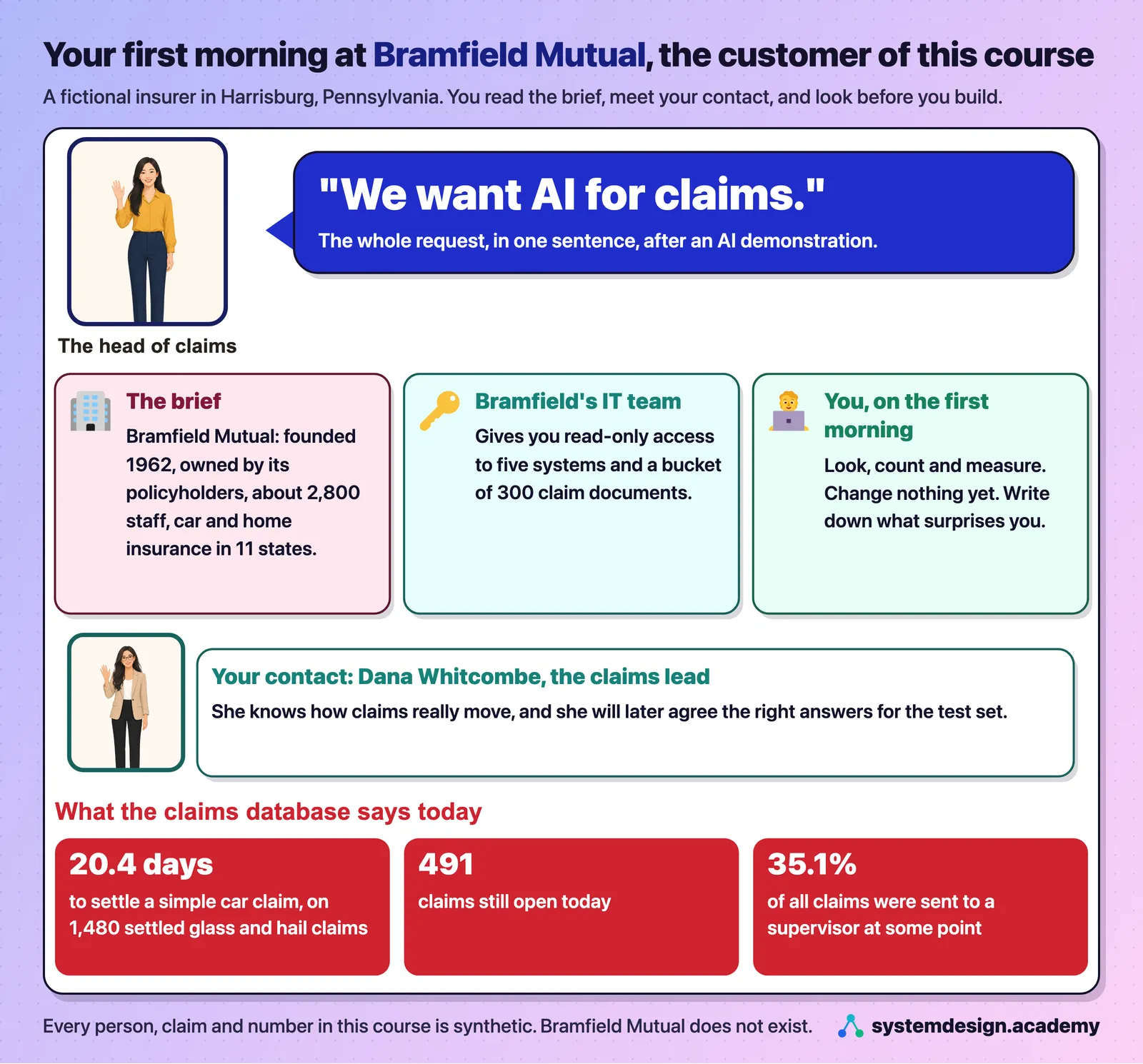
- read the baseline that the pilot will be judged against: 1,480 simple claims settled, in 20.4 days on average;
- say what the lab costs per hour, stop and start it, delete all of it, and prove that nothing is left;
- write the short first-day note that a forward deployed engineer keeps after a first look.
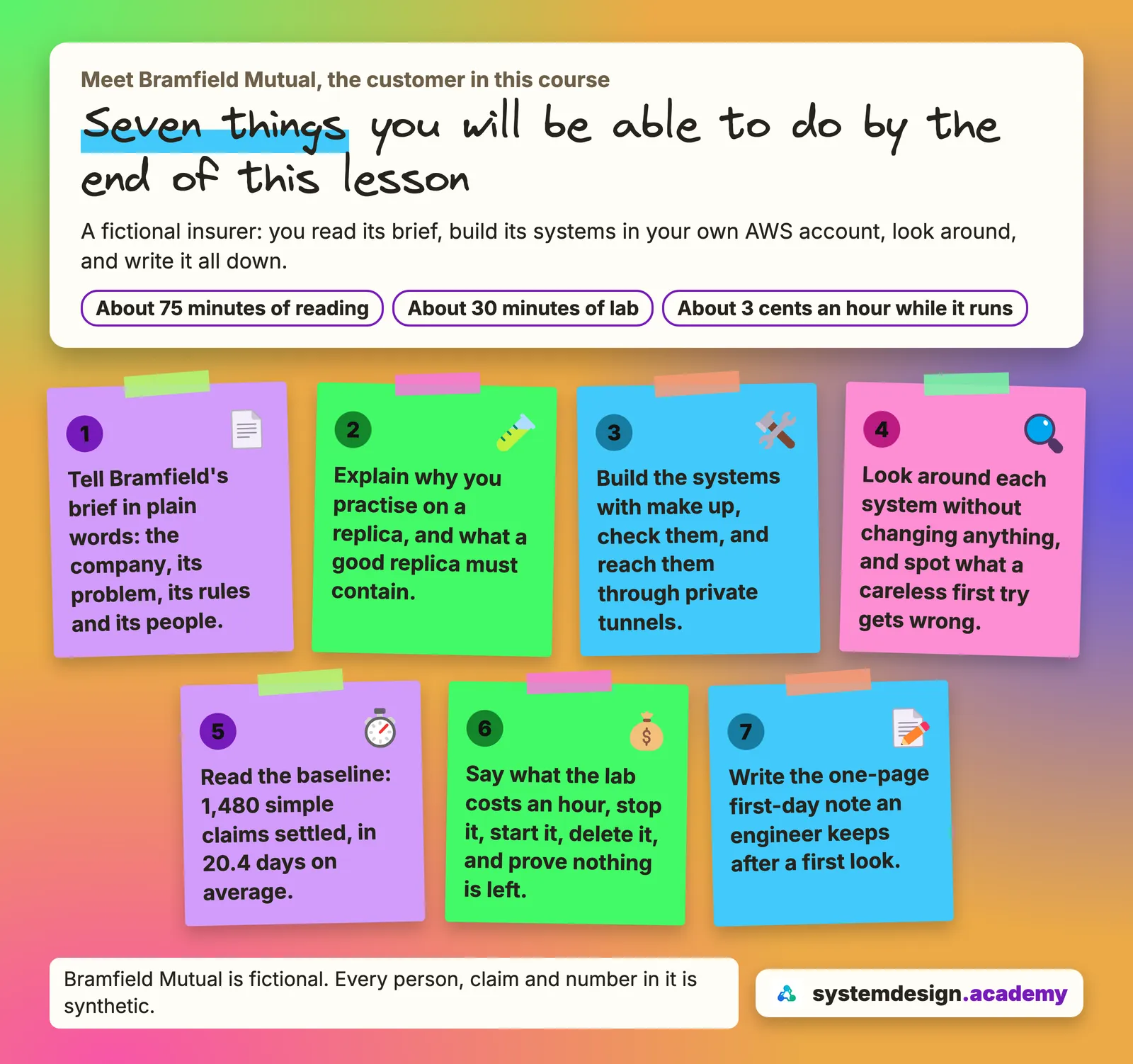
Time: about 75 minutes of reading, plus about 30 minutes for the lab itself, of which about 4 are waiting while it builds.
What it costs: about $0.0302 an hour while the lab runs, which is about 3 cents an hour, priced from the AWS Price List by the lab's own make cost command for exactly what our run created. That is a price, not a bill: AWS Cost Explorer, the billing screen that shows what you were actually charged, had no data for our session yet when we wrote this lesson. While it is stopped, about 5 cents a day for its disk. Once it is deleted, nothing. Our whole recorded session, from make up to make destroy, ran the server for about eight minutes, which at that price is well under one cent.
Dates and times: every time in this lesson is in UTC, the world's reference clock,, on 13 November 2026. A first test build that morning, from 07:44 UTC, found the four problems described in "Going deeper" near the end of this lesson. We fixed them, deleted that build, and built the corrected lab from scratch. That second build is the one in this lesson. We typed make up at about 07:57:30, Terraform had created everything by 07:58:50, and the server had built Bramfield's data by 08:01:40. We looked around from 08:02 to 08:03, stopped the server at about 08:03:30, started it again at 08:10:56 (the launch time EC2 reports), found it ready again at about 08:12:40, and make destroy had removed everything by 08:14:15.
The problem: you cannot learn this job on a real insurer
A forward deployed engineer works inside one customer's world until a piece of software really does the job the customer needs. The lesson "What a forward deployed engineer does" showed how the companies that hire for the role describe it. The hard part of the job is rarely the model. It is the customer's old systems, its rules and its people, and none of that can be learned from a tutorial with clean data.
So there is a real difficulty for anyone who wants to learn the job. No insurer will give a student read access to its claims database, which is full of real people's names, phone numbers, injuries and payments. Even if one did, you could not practise on it. You could not run a careless loader against its policy service to see what happens, delete everything at the end of an evening, or build it again the next morning exactly as it was.
Words for this lesson
These few words come back again and again in this lesson. Each one has an everyday picture to hold on to. The table at the end of the lesson explains the AWS and database words.
| Word | What it means, plainly | An everyday comparison |
|---|---|---|
| replica | a copy of the customer's systems, built from code and filled with invented records | a flight simulator: it behaves like the plane, and a crash costs nothing |
| seed | the fixed starting number behind all the generator's random choices | shuffling a deck the same way every time, so the same cards come out |
| baseline | today's number, measured before you change anything | stepping on the scale before a diet, so you can show the change later |
| read-only access | you may look at the data, but nothing you send can change it | a museum visit: you can look at every painting, and you may not touch one |
| tunnel | a private connection from a port on your computer to a port on the server | a staff corridor from the parking lot straight to one room, with no front door |
| rate limit | the most requests a service will take in one second | a turnstile that lets ten people through each second, however long the queue |
| first-day note | one page of what you saw, who to ask, and what surprised you | a nurse's handover note at the end of a shift |
Why you build the customer's systems yourself
Idea: You learn this job on a copy of the customer's systems that you are free to break, rebuild and check against known answers.
Think of how pilots learn. Nobody hands a new pilot a full passenger plane on the first day. They learn in a flight simulator, where a mistake costs nothing, where the same storm can be replayed, and where the instructor knows exactly what should happen. A forward deployed engineer needs the same thing.
The answer this course uses is a replica: a copy of the customer's systems that behaves like the real thing, built in your own AWS account from code, and filled with invented records. A good replica gives you three things that real access never would:
- You can make every mistake safely. You can write the query that fails, send forty requests at once and watch the service refuse ten of them, and load a file twice to see the duplicates. Nobody's claim is delayed and nobody's data leaks.
- You can start again from the same place.
make destroyremoves everything andmake upbuilds the same systems again from the same seed, the fixed starting number the generator uses for all its random choices, so you get the same 6,000 claims and the same mess in them. That is what lets every lesson of this course show you real outputs you can compare with your own. - The answers are known. The generator plants problems on purpose and writes down where it put them in an answer key that the database never sees. Later lessons use that key to check whether your agent found the claims outside cover, the fraud signals and the hidden instruction. Real data never comes with an answer key.
A replica is only useful if it is realistic. An old insurer's systems are not clean, so this one is not clean either. Its database still carries the habits of a mainframe, the large central computer that insurers ran for decades, which Bramfield left in 2012. Its policy service speaks SOAP, a way for programs to call each other that dates from the early 2000s and writes every message in XML, a text format that wraps each value in named tags. That service refuses callers who go too fast. Its business partners drop files on a server every night, written in their own way. That mess is the point, because finding and handling it is most of the work.
Watch out: a tidy practice copy teaches the wrong lesson. If your test data has one date format, no duplicates and no slow service, your code will pass every test and then fail on the customer's first real file. A useful replica is messy in the same ways the real systems are.
You run make destroy on Friday and make up on Monday. Why do you get the same 6,000 claims, with the same mess in them?
Show the answer
The answer: B.
make up builds the same systems again from the same seed, the fixed starting number the generator uses for all its random choices, so you get the same claims and the same planted problems. That is what lets every lesson show you real outputs you can compare with your own. A and C are wrong because make destroy deletes the disk and the bucket, and nothing is kept. D is wrong because every record is invented.
The brief: Bramfield Mutual in plain words
Idea: Before you touch any system, read the brief: who the company is, what it asks for, which rules bind you, and who decides.
A good doctor reads the patient's chart before the examination starts. The chart says who the patient is, what they complain of, and what must not be done. A customer's brief is that chart. This is what you would read before your first meeting. All of it is invented for the course.
The company. Bramfield Mutual Insurance Company was founded in 1962 and is a mutual, which means it is owned by its policyholders rather than by shareholders. It is based in Harrisburg, Pennsylvania, has about 2,800 staff, and sells car and home insurance in 11 states, California among them. Most of its policies are sold through independent agents, small agencies that sell several insurers' policies. It collects about $1.1 billion a year in premiums, the money customers pay for their policies. It is profitable, and it is slow.
The problem it brings. Car claims take too long to settle. A claim is a customer's request to be paid for a loss, such as a cracked windshield or a dented roof after a hailstorm, and to settle a claim is to decide it and close it. Bramfield's adjusters, the staff who handle claims, read long claim files by hand, check them against policy forms written over thirty years, and send many cases to a supervisor when they are unsure. The backlog grows after every winter storm and every hail season. The head of claims has seen an AI demonstration, and the request arrives in one sentence: "We want AI for claims."
The people. The people in this course are invented too. The three staff accounts in the lab's sign-in system are synthetic, with addresses that end in bramfield.example, a domain reserved for examples:
| Who | What they do, and what they need from you |
|---|---|
| The head of claims | Asked for "AI for claims". Wants the backlog to shrink, and will judge the work by numbers. |
| Dana Whitcombe, claims lead | Your day-to-day contact. Knows how claims really move, and will later agree the right answers for the test set. Role in the sign-in system: claims-lead. |
| Marcus Oakes, claims supervisor | Receives the cases adjusters are unsure about. Role: claims-supervisor. |
| Priya Haverford, adjuster | One of the 40 adjusters who would use what you build. Role: adjuster. |
| IT | Owns the old systems. Gives you read-only access and decides what you may touch. |
| Security and vendor risk | Treat you as an outside supplier. They will send a security questionnaire, and they have rules. |
The rules. Bramfield's security team gave you four rules on day one, and every lesson of the course keeps them:
- Customer data stays in a US region of AWS. The course uses us-east-1, in Northern Virginia.
- You start with read-only access, and you earn anything more.
- No outside supplier gets a shell on production systems.
- Claim notes contain personal data, such as names, phone numbers and identity numbers, so nothing from them may reach a model until it has been masked.
Insurance also has laws on data security, privacy and breach notification. Which of them apply, and to which data, is itself a forward deployed engineer's task, and "Security and compliance discovery" reads each one on its official text. This lesson does not guess at them.
Watch out: "We want AI for claims" is a wish, not the problem. The problem in the brief is narrower and measurable: simple car claims take too long to settle. If you start building for the wish, you will build a demo. If you start from the problem, you will build something you can measure.
Bramfield's security team gave you four rules on day one. Which request would break one of them?
Show the answer
The answer: C.
Claim notes contain names, phone numbers and identity numbers, so the fourth rule says nothing from them may reach a model until it has been masked. A follows the read-only rule, B follows the rule that data stays in a US region, and D is how the read-only rule expects you to earn more access.
The systems: what you inherit
Idea: Five old systems run on one server that accepts no connection from outside, and you reach it only from inside AWS.
Picture a building with no front door at all. Nobody can walk in from the street. Staff reach each room through a private corridor from the parking lot, and the building's own manager opens that corridor for them. Bramfield's server works the same way.
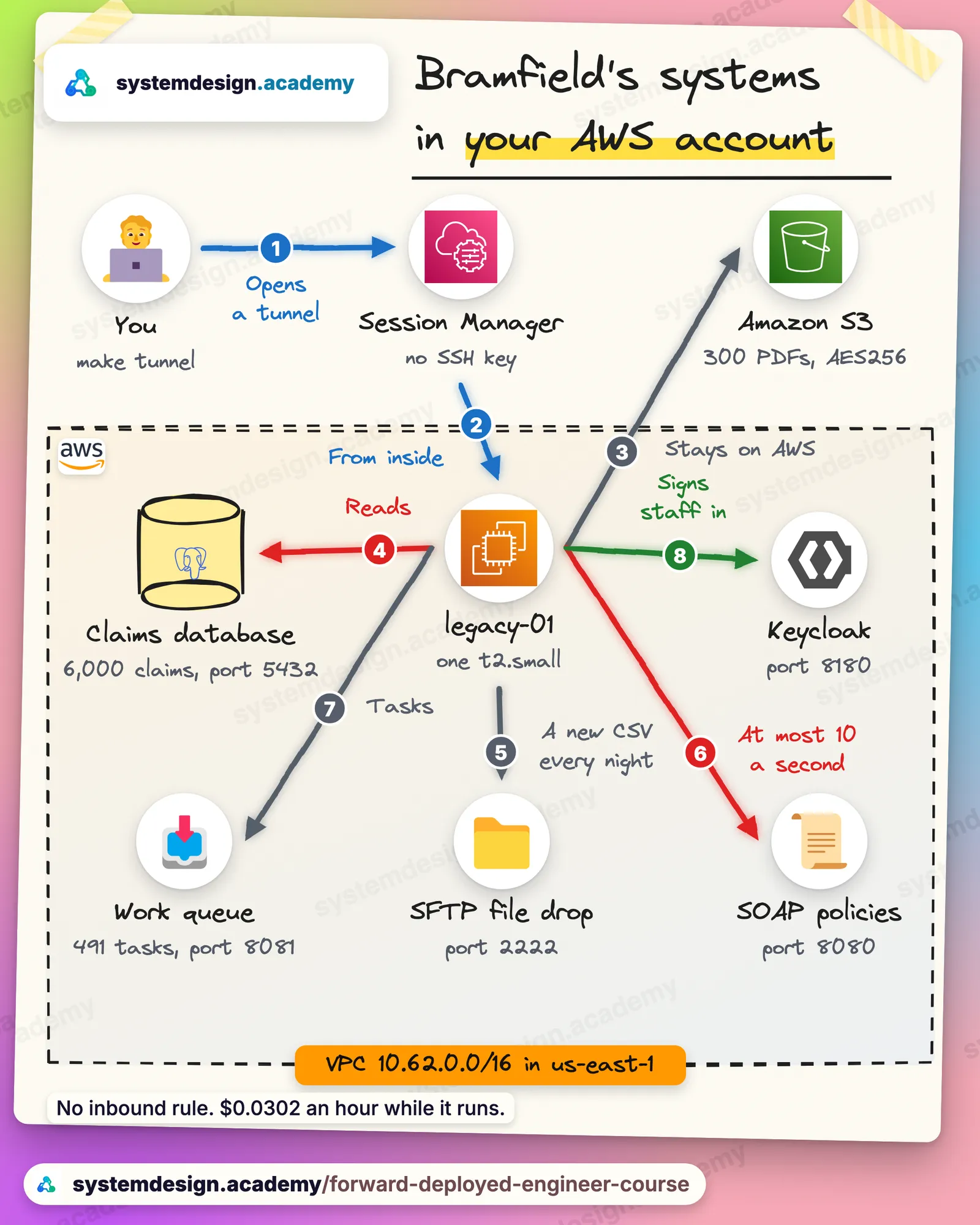
Bramfield's IT team runs its old systems on one server called legacy-01. The lab builds that server, and everything around it, in your own AWS account:
A few AWS words first, each explained once:
- A VPC, a virtual private cloud, is your own private network inside AWS. Bramfield's uses the addresses
10.62.0.0to10.62.255.255, which exist only inside it. - A subnet is a smaller part of that network. The lab makes a public subnet,
10.62.0.0/24, whose machines can reach the internet, and two private subnets,10.62.1.0/24and10.62.2.0/24, which have no route to the internet at all. Nothing lives in the private subnets yet; "No public internet: reaching systems privately" moves things into them. - An EC2 instance is a virtual machine that AWS runs for you, billed by the second while it runs.
legacy-01is at2.small: 1 virtual CPU, 2 GB of memory, running Amazon Linux 2023, with an encrypted 20 GB disk. - A security group is the firewall around one machine. It lists the connections allowed in.
legacy-01's list is empty: nothing may connect to it, from the internet or from anywhere else. - Session Manager, part of AWS Systems Manager, reaches a machine from the inside. A small agent on the server keeps a connection open to AWS, and AWS carries your commands and tunnels down that connection. So the server needs no open port and no SSH key.
- S3 is AWS's storage for files. Bramfield's claim documents sit in a bucket there.
- Terraform is a tool that builds cloud resources from text files that describe them, and deletes them again.
On the server, each of Bramfield's systems runs in its own container, a packaged program with everything it needs, started by Docker, the tool that runs containers. Each system listens on its own port, the number that tells the server which program a connection is for, much as an apartment number tells a mail carrier which door in a building to knock on:
| System | What it is | Port on the server |
|---|---|---|
| The claims database | PostgreSQL 16.6, the database claims, with table names and layouts kept from the move off the mainframe in 2012 | 5432 |
| The policy service | An old SOAP service with a WSDL, the file that describes its operations. It returns 100 policies a page and allows 10 requests a second | 8080 |
| The work queue | A small web service that answers in JSON, a simple text format for data, where adjusters pick up claims | 8081 |
| The SFTP file drop | Where the independent agents' systems leave a CSV file, a plain text table with commas between the values, of new claims every night at 2:00 a.m. Eastern time | 2222 |
| The identity provider | Keycloak 26.0.7, an open-source sign-in system standing in for the one Bramfield's staff use | 8180 |
| The generator | Runs once, at the first start, to build every synthetic record | none |
Every port listens on the server itself, on the address 127.0.0.1, and nowhere else. The only way to reach one from your computer is a Session Manager tunnel, which you open in Step 3.
Why the server has a public address, honestly. You may notice that legacy-01 sits in the public subnet with a public IPv4 address. It needs to reach the internet to download Docker and the container images when it first starts. The usual way to give a machine in a private subnet that outbound access is a NAT gateway, which costs $0.045 an hour, half again more than the whole lab. A public address costs $0.0050 an hour. Because the security group accepts no inbound connection at all, the public address lets the server reach out and lets nothing in. It is a deliberate saving for a lab, and "No public internet: reaching systems privately" shows the private version that a real insurer's security team would ask for.
Why a t2.small. Our account's limit for ordinary machines in us-east-1 was 1 virtual CPU on the day we built this lab, which "Before you start" showed with make quota. A t2.small has exactly 1 virtual CPU. The plan had pencilled in a larger t3.large, at $0.0832 an hour with 2 virtual CPUs, which that limit forbids. For six small containers and 6,000 claims, 1 virtual CPU and 2 GB of memory are enough, and the server costs less than a third as much. If your limit is higher, you can change instance_type in terraform/variables.tf, but nothing in this course needs more.
Watch out: a public address does not mean the server is open to the internet. What decides who may connect is the security group, and this one lists no inbound connection at all. A machine can have a public address and still let nothing in, just as a house can have a street number and no front door.
legacy-01 has a public IPv4 address. Why can nobody on the internet connect to its claims database?
Show the answer
The answer: B.
Two things keep the database private. The security group, the firewall around the machine, lists no inbound connection at all, and every system listens only on the server's own address, 127.0.0.1. The public address lets the server reach out to download its software, and lets nothing in. The only way in is a Session Manager tunnel, which starts from inside AWS.
Hands-on, part 1: build Bramfield's systems
What you need
- Everything from "Before you start": the AWS CLI with
aws configuredone, the Session Manager plugin, Terraform 1.6 or newer, Python 3.10 or newer, uv and Git, all checked bypython3 check_setup.py. make quotasaying "enough: go ahead", and the $10 budget alert frommake budget, set before anything is built.- The zip from the top of this lesson, unpacked.
Get the files ready
Unpack lesson-1.3.zip, open a terminal in VS Code, and go into the lab folder:
cd ~/Downloads/lesson-1.3/lab
Keep one lab folder for the whole course. The zip of "Before you start" and the zip of this lesson carry the same lab folder. Use one of them, and keep using it, because each folder holds its own Terraform state: the record of what it built. Build from one folder and destroy from another, and Terraform in the second folder knows nothing about your lab. The folder also ships a .gitignore that keeps that state out of Git, because the state holds the generated passwords in plain text.
| Path | What it is |
|---|---|
Makefile | one short command for each step in this lesson |
terraform/ | the network, the server, the documents bucket, the server's role and the three passwords |
bin/ | the helper scripts the Makefile calls: check.sh, tunnel.sh, leftovers.sh and budget.sh |
app/ | what runs on the server: compose.yaml, the database schema, the generator, the two small services and the sign-in set-up |
look_around.py | what make look runs: it reads each system with read-only access and writes nothing |
cost.py | what make cost runs: today's prices from the AWS Price List |
check_setup.py, self-check/ | the checks from "Before you start" |
Step 1: build everything with one command
make up
make up packs the app/ folder into build/app.tgz, gets Terraform ready, and asks it to build everything. It printed one line for each resource Terraform created:
terraform is ready
random_id.suffix: Creation complete
random_password.pw["owner"]: Creation complete
random_password.pw["lab"]: Creation complete
random_password.pw["readonly"]: Creation complete
aws_iam_role.legacy: Creation complete
aws_ssm_parameter.pw["lab"]: Creation complete
aws_ssm_parameter.pw["readonly"]: Creation complete
aws_ssm_parameter.pw["owner"]: Creation complete
aws_iam_role_policy_attachment.ssm: Creation complete
aws_s3_bucket.docs: Creation complete
aws_iam_role_policy.legacy: Creation complete
aws_s3_bucket_public_access_block.docs: Creation complete
aws_s3_bucket_server_side_encryption_configuration.docs: Creation complete
aws_s3_object.app: Creation complete
aws_iam_instance_profile.legacy: Creation complete
aws_vpc.bramfield: Creation complete
aws_route_table.private: Creation complete
aws_internet_gateway.igw: Creation complete
aws_subnet.private[0]: Creation complete
aws_route_table.public: Creation complete
aws_security_group.legacy: Creation complete
aws_subnet.private[1]: Creation complete
aws_route_table_association.private[1]: Creation complete
aws_route_table_association.private[0]: Creation complete
aws_vpc_endpoint.s3: Creation complete
aws_subnet.public: Creation complete
aws_route_table_association.public: Creation complete
aws_instance.legacy: Creation complete
Apply complete! Resources: 28 added, 0 changed, 0 destroyed.
the server is starting. Bramfield's data takes about 8 more minutes to build: run make check
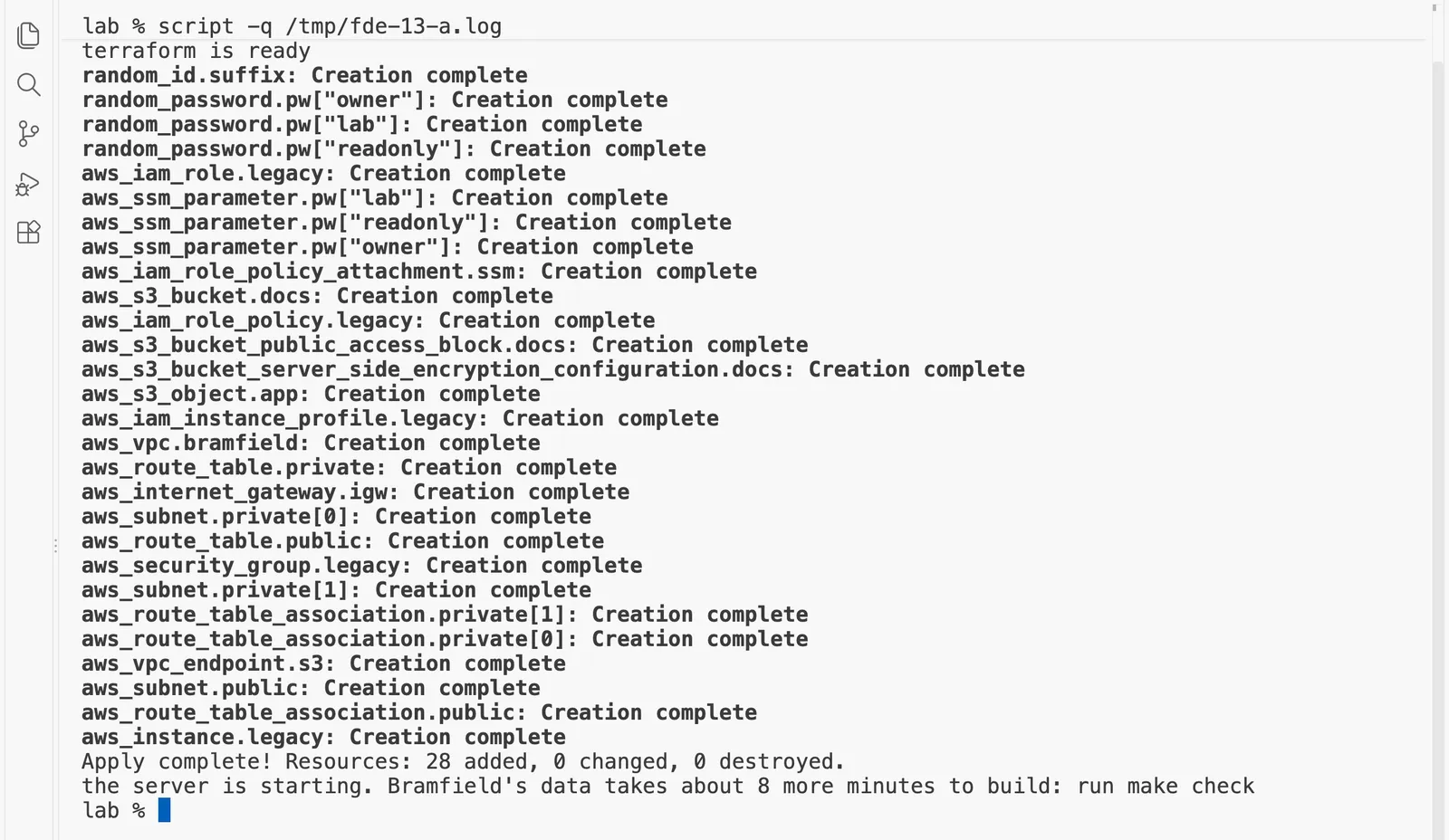
Terraform printed its last "Creation complete" line, for the server, by 07:58:50, and the server wrote its ready file at 08:01:40. The last line of make up is cautious: it said about 8 more minutes, and ours was ready in less than 3. The number in the message allows for a slow start, and make check in the next step simply waits as long as it takes.
Idea: Terraform builds the outside, and the server then builds the inside by itself.
What just happened. Think of moving into a new apartment. The builder puts up the walls, the doors and the locks. Then the moving truck arrives, and the movers unpack and arrange everything inside without you standing over them. Here Terraform is the builder, and the server's own start-up script is the movers. Terraform created 28 resources, and then the server did the rest of the work by itself:
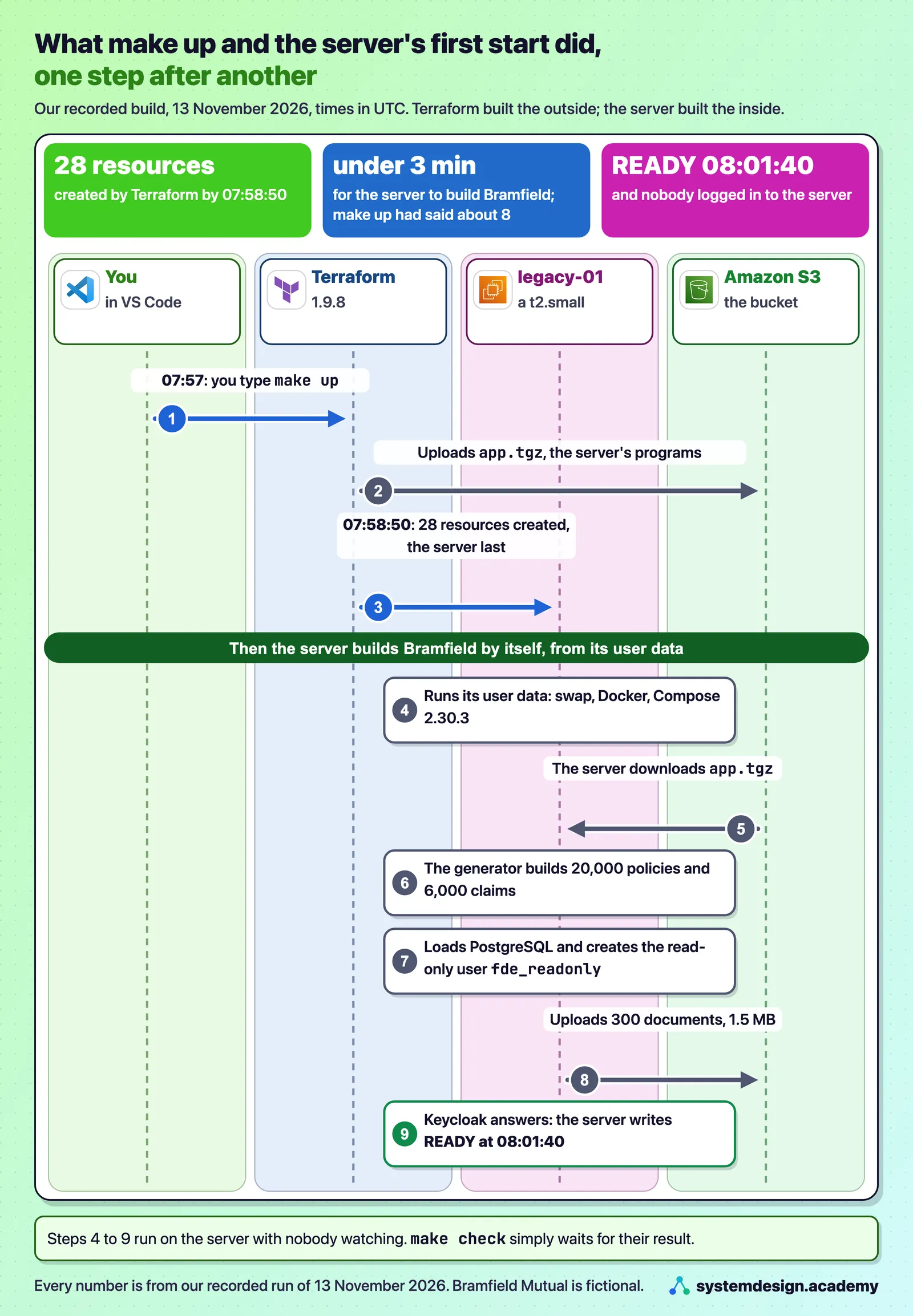
Step through it
What make up builds, one step at a time
Step through the build in the order it happened on 13 November 2026, from the command you type to the server writing its ready file.
Step 1 of 6
You type make up, and Terraform starts building the outside.
make up packs the app folder into build/app.tgz, gets Terraform ready, and asks it to build everything. We typed it at about 07:57:30 UTC.
- Terraform uploads app.tgz, the server's programs, to the S3 bucket.
Step 2 of 6
Terraform creates 28 resources, the server last.
The network, the empty security group, the server's role, the bucket and three random passwords kept in SSM Parameter Store. Terraform printed its last Creation complete line, for the server, by 07:58:50.
- The passwords are random, 24 characters long, and you never type or see them.
Step 3 of 6
The server runs its user data by itself.
When an EC2 instance first starts it runs a script called its user data. Ours adds 1 GB of swap, installs Docker, downloads app.tgz, names the server legacy-01.bramfield.internal, sets up two timers, and runs app/bin/setup.sh.
Step 4 of 6
setup.sh runs the generator and loads the database.
The generator builds every synthetic record once: 20,000 policies and 6,000 claims. setup.sh starts PostgreSQL, creates the tables, loads the rows and creates the read-only user fde_readonly.
- It also uploads 300 documents, 1.5 MB, to S3.
Step 5 of 6
Keycloak answers, and the server writes READY at 08:01:40.
setup.sh starts every service and waits until Keycloak answers before it writes /opt/bramfield/READY. make up had said about 8 more minutes; ours was ready in less than 3, and make check simply waits as long as it takes.
Step 6 of 6
Two timers keep running afterwards.
One writes a new file to the SFTP drop at 2:00 a.m. Eastern time every night. The other stops the server 4 hours after every start, so a session you forget costs hours, not a month.
- Terraform built the outside. The network, the empty security group, an IAM role, which is the set of AWS permissions the server carries, that lets the server use Session Manager and read only its own bucket and its own three passwords, the bucket itself, and the three passwords, kept as encrypted values in SSM Parameter Store, AWS's free store for small settings and secrets. The passwords are random, 24 characters long, and you never type or see them.
- The server built the inside. When an EC2 instance first starts, it runs a script called its user data, here
terraform/user-data.sh.tftpl. Ours adds 1 GB of swap, disk space the server can use as spare memory, installs Docker, downloadsapp.tgz, names the serverlegacy-01.bramfield.internal, sets up two timers, and then runsapp/bin/setup.sh. setup.shbuilt Bramfield. It runs the generator once, starts PostgreSQL, creates the tables, loads the rows, creates the read-only database userfde_readonly, uploads the documents to S3, starts every service, and waits until Keycloak answers before it writes the file/opt/bramfield/READY.- Two timers keep running afterwards. One writes a new file to the SFTP drop at 2:00 a.m. Eastern time every night, as the independent agents' systems would. The other stops the server 4 hours after every start, so that a session you forget costs hours, not a month. A budget alert only warns you; this timer actually stops the spending.
Watch out: a budget alert is a smoke alarm, not a sprinkler. It sends you an email at 50% and 100% of $10, and it stops nothing. What stops a forgotten server is the 4-hour timer, and what stops all spending is
make destroy.
Step 2: wait until every system answers
make check
waiting for Session Manager to reach i-0df366db812ac45f8 online
waiting for Bramfield's data to be built.......
Bramfield Mutual's systems on legacy-01, built 2026-11-13T08:01:40Z
  claims database (5432)       answers
  policy service, SOAP (8080)  answers
  work queue, HTTP (8081)      answers
  SFTP file drop (2222)        answers
  identity provider (8180)     answers
  nightly drops waiting:       3 files
  memory in use:               807 of 1964 MB
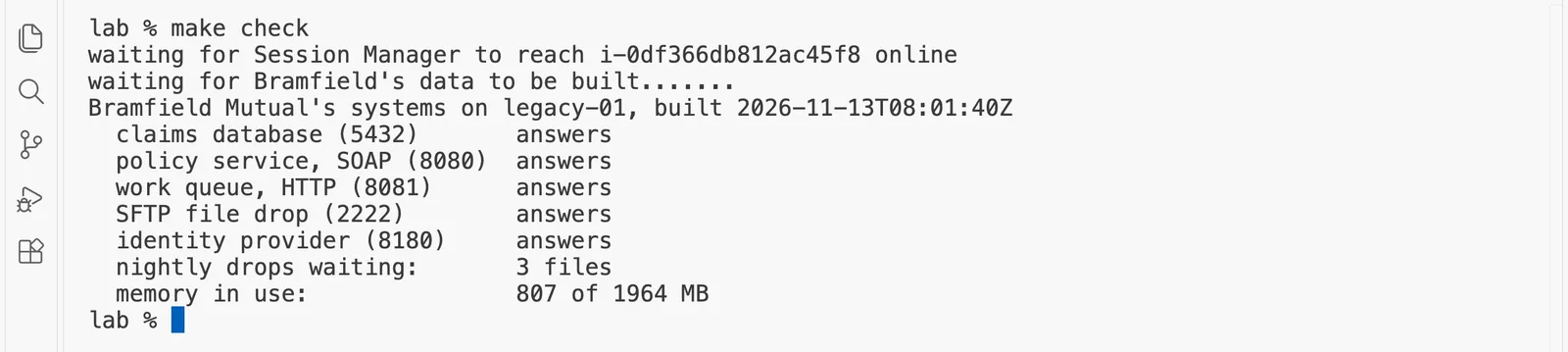
make check first waits until Session Manager can reach the server, then asks the server every 20 seconds, through Session Manager, to run app/bin/status.sh. Each dot is one ask while the data was still being built. When the build has finished, status.sh checks every system from inside the server and prints what it found. Every line must say answers. The server was using 807 MB of its 1,964 MB of memory, so the six containers fit with room to spare.
Step 3: open private tunnels to the systems
make tunnel
  claims database      localhost:15432
  policy service       localhost:18080
  work queue           localhost:18081
  SFTP file drop       localhost:12222
  identity provider    localhost:18180
tunnels open. Close them with: make untunnel

A tunnel here is a private connection that Session Manager carries from one port on your own computer to one port on the server. make tunnel opens five of them in the background, one for each system, each on a local port that starts with 1 so it never clashes with a database or web server you already run. From now on, localhost:15432 on your computer is Bramfield's claims database, and nothing on the internet can see any of it.
After make tunnel, a program on your computer connects to localhost:15432. Where does that connection really end?
Show the answer
The answer: B.
The tunnel carries the connection from port 15432 on your computer to port 5432 on the server, through Session Manager, so you talk to the real claims database with nothing downloaded. C is the mistake people make most often: the tunnel opens no port on the public address, because it reaches the server from inside AWS.
Hands-on, part 2: look around, the way you would on a first day
Idea: On the first day you only read, count and write down, and the systems themselves must refuse anything else.
A new auditor on the first morning does not move money. They open the books, count, and make notes in the margin. On a real first day, you do not change anything. You look, you count, and you write down what surprises you. make look PART=... does exactly that, one system at a time, with read-only access. It reads the passwords from Parameter Store through the Makefile and never prints them. Read each output slowly, the way you would read a real one.
Predict, then measure
You count the claims with select count(*) from CLMS_CLAIM, written the way most people write SQL. What do you expect?
The measured result appears once you lock in. Only your first answer counts toward your progress.
Step 4: the claims database
make look PART=db
== the tables you can read, and how many rows each holds
  CLMS_ADJUSTER           44 rows
  CLMS_CLAIM           6,000 rows
  CLMS_NOTE           18,039 rows
  CLMS_STATUS_REF         11 rows

== a first query, written the way most people write SQL
  error: relation "clms_claim" does not exist
  with the name in double quotes: 6,000 claims

== the status codes: what the column holds, and which codes are retired
  CLSD  Closed                         in use   3,813
  PAID  Payment issued                 in use   1,393
  PEND  Waiting for documents          in use     134
  ASGN  Assigned to an adjuster        in use     117
  INVS  Under investigation            in use      98
  SUPV  Referred to a supervisor       in use      68
  NEW   Reported, not yet assigned     in use      35
  CL    Closed (retired 2009)          RETIRED    264
  XX    Void (retired 2014)            RETIRED     39
  OP    Open (retired 2009)            RETIRED     21
  RO    Reopened (retired 2014)        RETIRED     18

== the loss dates are text, written two ways
  YYYY-MM-DD (since 2012)   3,926   for example 2026-01-01
  MMDDYYYY (old system)     2,074   for example 01012026

== today's numbers, the baseline the pilot will be judged against
  simple claims (glass and hail) settled: 1,480, average 20.4 days from report to close
  claims still open: 491; claims ever sent to a supervisor: 35.1%

== is this account really read-only?
  error: cannot execute UPDATE in a read-only transaction
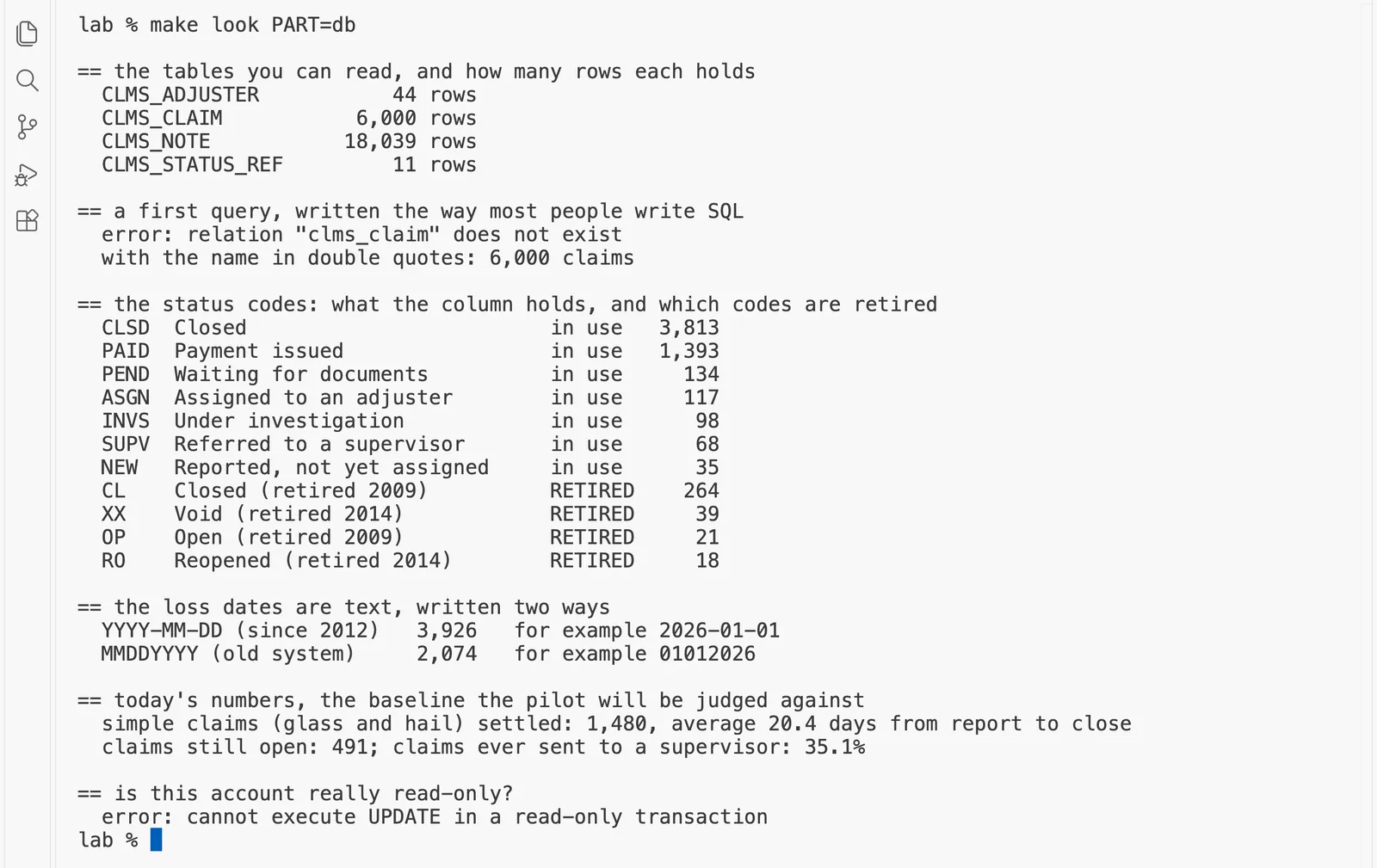
There is a lot in those six short sections. Take them one at a time.
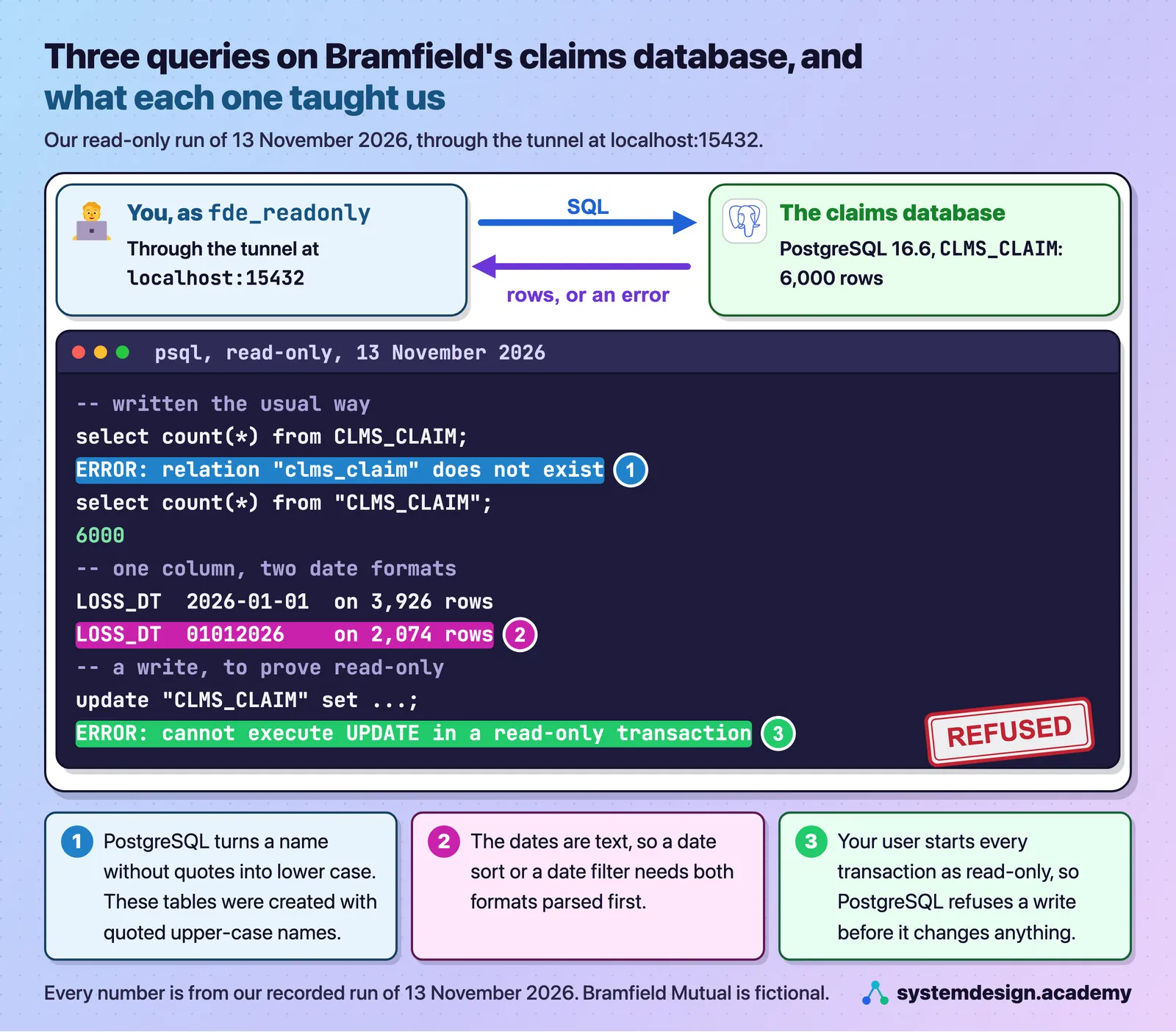
The query that fails. The first query is written the way most people write SQL, select count(*) from CLMS_CLAIM, and PostgreSQL answers that clms_claim does not exist. It does exist. PostgreSQL turns any name you write without double quotes into lower case, so it looked for clms_claim. When Bramfield moved its claims off the mainframe in 2012, the team kept the mainframe's upper-case names and created the tables with quotes, as "CLMS_CLAIM", and a quoted name keeps its case exactly. So every query against this database must put every table and column name in double quotes: select count(*) from "CLMS_CLAIM" returns 6,000. This one habit will trip up every tool you point at the database, including an AI agent that writes SQL from a question in plain English, until you teach it.
Watch out: "relation does not exist" sounds like a missing table. Here the table is there. The error means PostgreSQL looked for a lower-case name, so check the quotes before you go looking for a missing table.
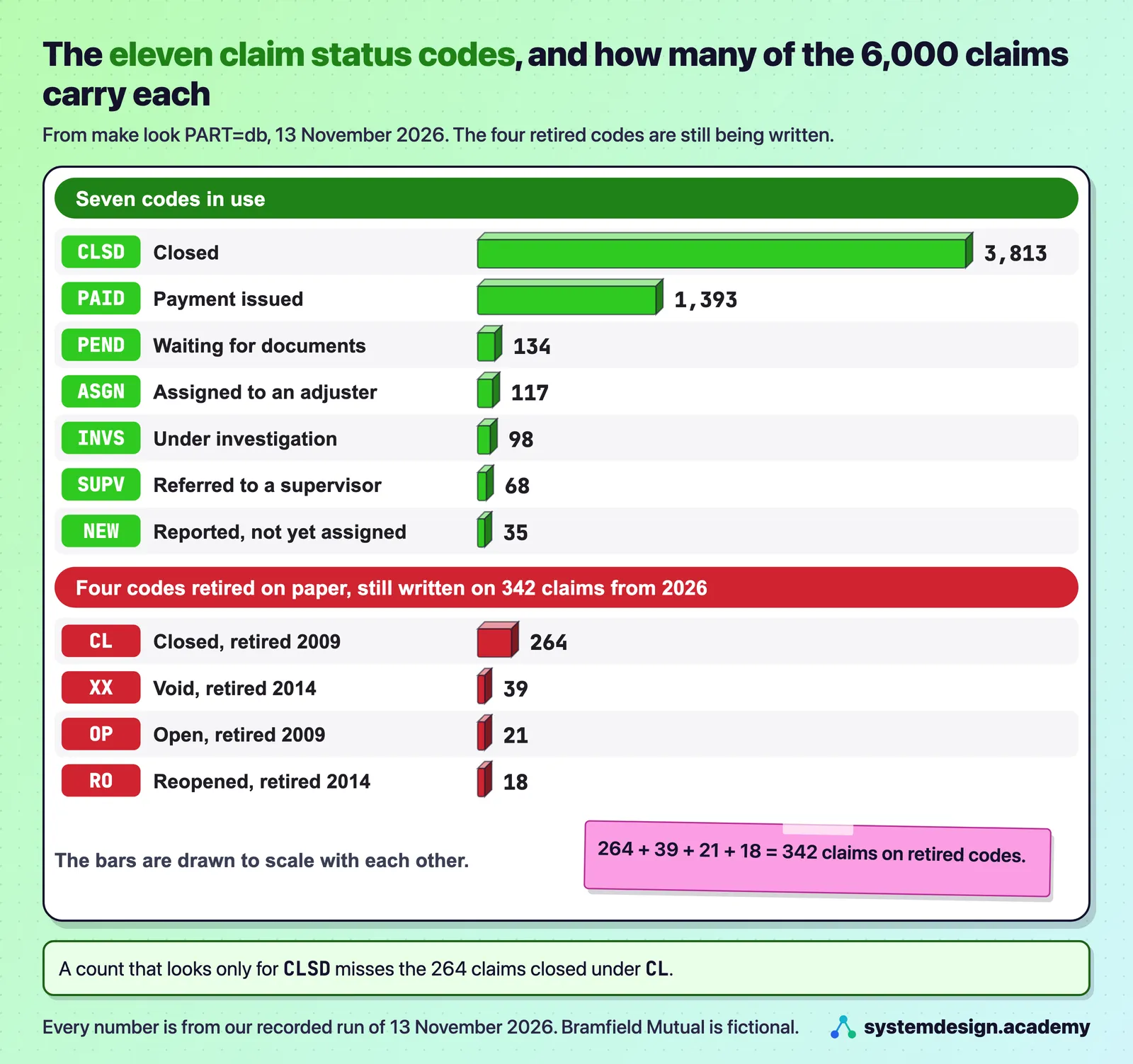
The status codes. The claim status column holds eleven codes. Seven are in use. Four are retired: OP and CL, "Open" and "Closed", were retired in 2009, and RO and XX, "Reopened" and "Void", in 2014. Yet they are on 342 rows, 264 + 39 + 21 + 18, and those rows are 2026 claims, not old ones. So the codes were retired on paper in 2009 and 2014, but something, most likely an old import path, still writes them today. That is exactly the kind of thing a forward deployed engineer writes down on day one and asks the owner of the claims systems about. Until you know, every count is in doubt. If you count closed claims by looking only for CLSD, you miss the 264 claims closed under CL. If you count open claims as everything without a close date, the 21 OP rows and 18 RO rows are in that count, and nobody can yet tell you whether anyone is working on them.
A worked example: how far off a careless count is. Take the closed claims, step by step.
- A count that looks only for the code
CLSDfinds 3,813 claims. - The retired code
CLalso means "Closed", and it sits on 264 claims. - If
CLstill means closed today, the closed claims are 3,813 + 264 = 4,077. - So the careless count is 264 claims short, which is 264 out of 4,077, about 6.5% of all closed claims.
That is a gap big enough to change a report to the executives, and nothing in the query warned you about it. Whether CL really still means closed is exactly the question you write down for the owner of the claims systems.
Watch out: never count by one status code before you have listed every code that is really in the column. A count that matches only
CLSDruns without an error and is still wrong.
The dates. The loss date, the day the accident or storm happened, is stored as text, not as a date, in two formats. 3,926 rows use YYYY-MM-DD, such as 2026-01-01, and 2,074 use the mainframe's MMDDYYYY, such as 01012026. Text sorts by its characters, so 01012026 sorts before 2025-12-31, and a filter such as "loss date after 1 June" quietly gives wrong answers. Look closely at the example, too. The label says "old system", but 01012026 is 1 January 2026, fourteen years after the move. So something is still writing the old format today. You do not know what yet, and that is exactly the kind of thing you write down and ask Dana about.
Someone asks for every claim with a loss date after 1 June 2026, and writes the filter straight onto the text column. Why can the answer be wrong without any error?
Show the answer
The answer: C.
Text sorts character by character, so 01012026, which is 1 January 2026, sorts before 2025-12-31. With 3,926 rows in one format and 2,074 in the other, a filter on the text quietly gives wrong answers and no error. Both formats have to be turned into real dates first, which is what the baseline query does before it subtracts them.
The baseline. A baseline is today's number, measured before you change anything, so that later you can show what changed. The pilot this course builds will be judged on simple claims, glass and hail, and the database says 1,480 of them were settled at an average of 20.4 days from report to close. Two more numbers come with it: 491 claims are still open, and 35.1% of all claims were sent to a supervisor at some point. Be honest about what these counts mean, because the definitions are still loose. The 491 "still open" are the claims with no close date, which includes the 21 OP and 18 RO rows on retired codes. The 1,480 "settled" are the glass and hail claims that have a close date, which includes rows closed under the retired codes CL and XX. The course's discovery lessons tighten each definition with Dana before anyone quotes these numbers to Bramfield's executives. These are the generator's invented business, but the measurement is real: real SQL, run on a real database, which converts both date formats before it subtracts them. "Turning a wish into a number you can measure" builds this measurement properly and asks what each of these numbers costs Bramfield in dollars.
Read-only, proved. The last test tries to change one claim's status, and PostgreSQL refuses: cannot execute UPDATE in a read-only transaction. The user fde_readonly can only read. Proving that early is a good habit, because the first time you run an agent against a customer's database, you want the database itself, not your own care, to guarantee that nothing gets written.
You know you will be careful and never type an UPDATE yourself. Why is it still worth proving on the first day that the database refuses one?
Show the answer
The answer: A.
The first time you run an agent against a customer's database, you want the database itself, not your own care, to guarantee that nothing gets written. Proving it early, with a write that is refused before it changes anything, turns "I will be careful" into evidence. A later lesson in this part goes one step further and tries a second kind of write as well.
Predict, then measure
The policy service allows 10 requests a second. You send 40 at the same moment. How many do you expect it to refuse?
The measured result appears once you lock in. Only your first answer counts toward your progress.
Step 5: the policy service
make look PART=policy
== what the service says it offers (its WSDL)
  operations: GetPolicy, GetPolicyPage

== page 1 of the policies
  HTTP 200, 100 policies on this page, 200 pages in all, 57,593 bytes of XML
  the first one: BMQ-0000001-7, AUTO, WV

== 40 requests sent at the same moment, as a careless loader would
  30 x HTTP 200, a page of policies
  10 x HTTP 500, a SOAP fault
  the fault says: Server.Busy: more than 10 requests a second. Slow down and try again.
Idea: The policy service says "you are going too fast" with a server error, so your code must slow down and retry the same page, never skip it.
What it offers. A SOAP service describes itself in a WSDL, the Web Services Description Language file at /PolicyService?wsdl. Bramfield's lists two operations: GetPolicy, one policy by its number, and GetPolicyPage, one page of policies. Every request and every answer is XML. The first page held 100 policies in 57,593 bytes, and there are 200 pages, so all 20,000 policies are about 11.5 MB of XML. There is no way to ask "what changed since yesterday". To know the policies, you read all 200 pages.
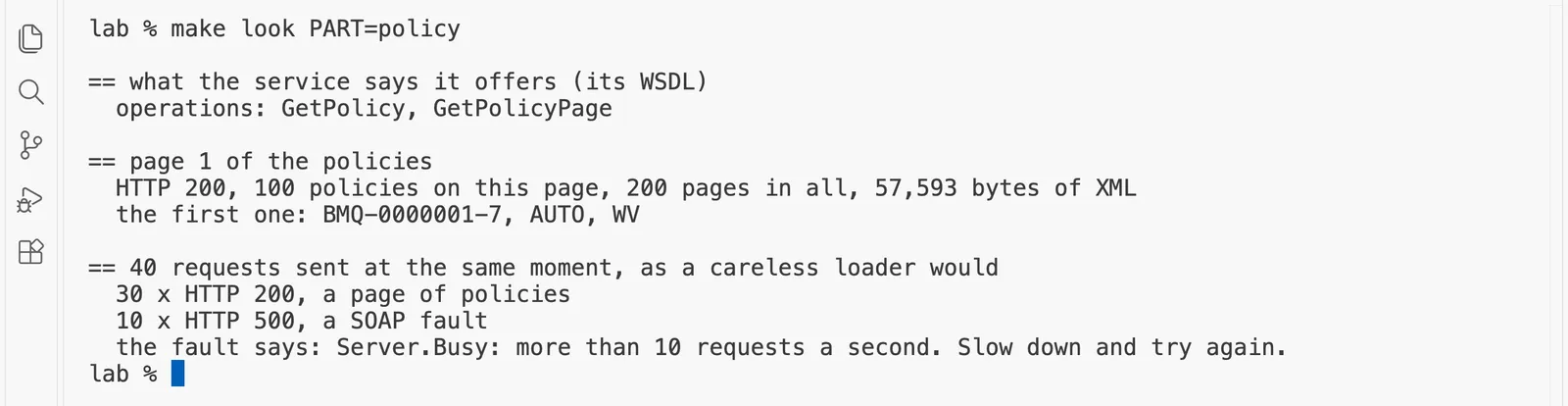
The rate limit. The service allows 10 requests a second for all callers together. look_around.py sent 40 requests at the same moment, as a careless loader with 40 threads would, and 10 of them came back as an HTTP 500 with a SOAP fault, Server.Busy.
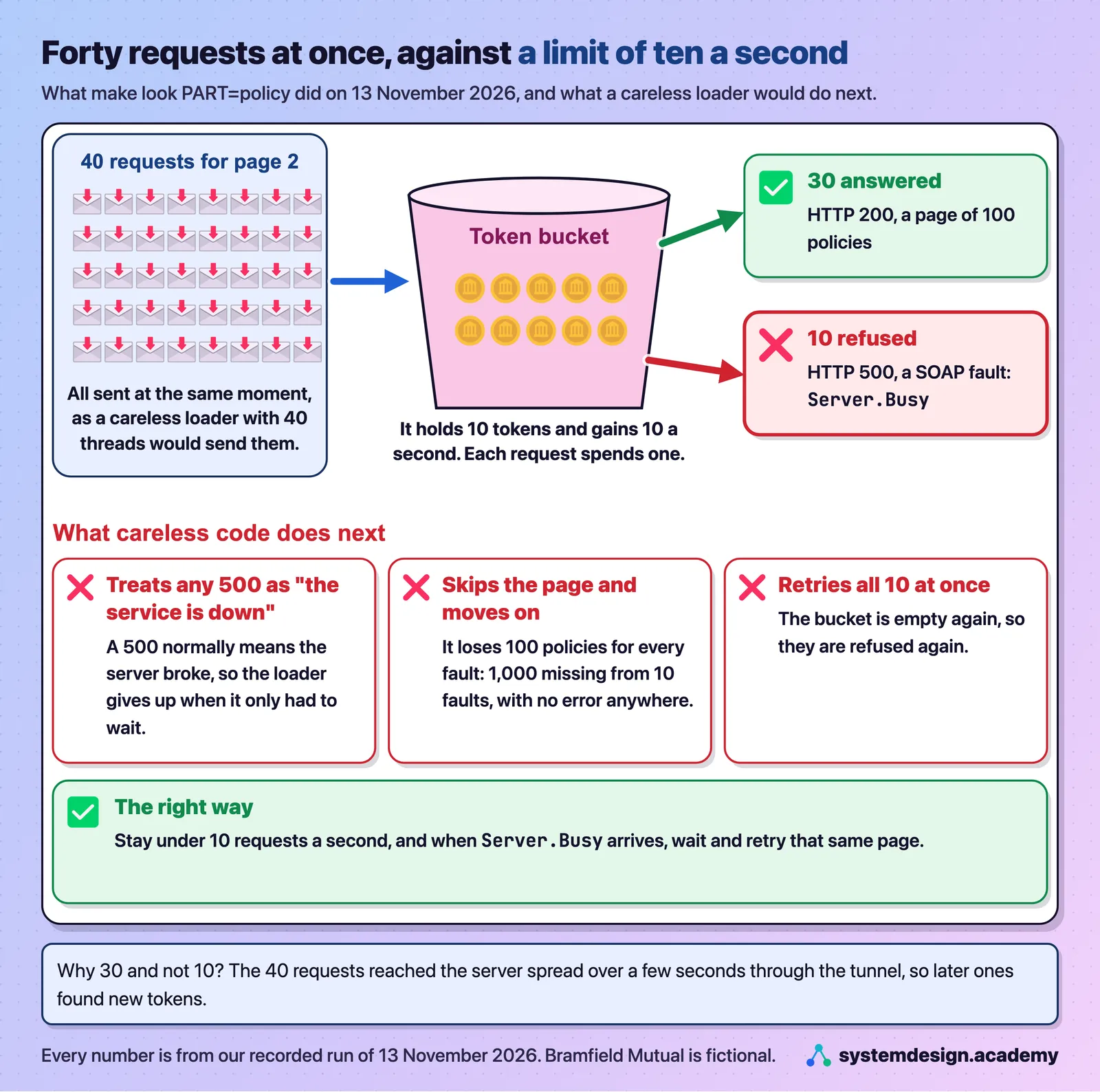
Why 30 and not 10? Picture a ticket machine at a parking lot that holds at most ten tickets and prints ten new ones every second. Each car takes one ticket, and a car that finds the machine empty is turned away. The service keeps exactly that, a token bucket: a counter that holds at most 10 tokens and gains 10 a second, where each request spends one token and a request that finds the bucket empty is refused. The 40 requests left our computer together, but they traveled through the Session Manager tunnel and reached the server spread over a few seconds, so later arrivals found new tokens. The exact split changes from run to run; in our test build the same test gave 12 faults in one try and 7 in another.
A worked example: the bucket, second by second. We did not measure when each request arrived, so this is the arithmetic of the limit, not a recording.
- At the start the bucket is full, so the first 10 requests to arrive each take a token and are answered.
- Over the next second the bucket gains 10 new tokens, so up to 10 more requests can be answered.
- Over the second after that, it gains 10 more.
- So if the 40 requests reached the server spread over about two seconds, the bucket could pay for at most 10 + 10 + 10 = 30 of them, and the other 10 found it empty.
That matches what our run printed: 30 answered and 10 refused. If all 40 had arrived in the same instant, only the first 10 would have been answered.
Watch out: this service answers "too fast" with an HTTP 500, not a 429. Code that treats every 500 as "the service is down" will give up, and code that logs the error and moves on will lose 100 policies for every refused page, with no error in the result.
Notice two things a careless loader would get wrong. First, the refusal is an HTTP 500, the code that normally means "the server failed", not the HTTP 429 that modern services send for "too many requests". Code that was written to slow down when it sees a 429 will not recognize this answer as "you are going too fast". Code that treats every 500 as an outage will give up, or report the service as broken, when all it needed to do was wait a moment. Second, if a loader logs the error and moves on to the next page, it silently loses 100 policies for every fault. With 10 faults out of 40, that would be 1,000 policies missing from your copy, with no error anywhere in the result. "Calling an old SOAP API: paging and rate limits" reads all 20,000 politely, with a pace, retries and a cursor that can resume.
A loader reads the 200 pages of policies, logs each Server.Busy fault, and moves on to the next page. It ends with 10 faults and no crash. What is wrong with its copy?
Show the answer
The answer: C.
Each page holds 100 policies, so each skipped page is 100 policies gone, and 10 skipped pages are 1,000 policies missing from your copy. Nothing in the result says so, because the loader finished without an error. D is the trap: a fault refuses a whole page, not one policy. The fix is to wait and retry that same page.
Step 6: the nightly file drop
Idea: A file from someone else's system is only a guess about its format until you have counted every style inside it.
Imagine adding up receipts from forty different shops. One prints $12.50, one prints 12.50 USD, and one prints 1,250.00 for a bigger bill. A calculator that expects plain numbers stops on most of them. The nightly drop is a pile of receipts like that.
The newest drop file has 106 rows, and its amounts are written in three styles: 1,234.56, $1,234.56 and 1234.5 USD. If a loader passes every amount to Python's float(), how many of the 106 rows will fail?
Show what we measured
What we measured: D.
Python's float() fails on 101 of the 106 rows, because a comma, a dollar sign and a currency code all stop it. Only amounts under 1,000 written in the plain style pass. The run below counts each style: 48 rows plain, 30 with a dollar sign and 28 with USD.
make look PART=drops
== the SFTP drop folder, as the agents' systems leave it
  agent_claims_export_20261110.csv  12,008 bytes
  agent_claims_export_20261111.csv   8,289 bytes
  agent_claims_export_20261112.csv  10,211 bytes

== the newest file, agent_claims_export_20261112.csv: its header and first three rows
  agent_code,policy_number,loss_date,reported_at,amount_claimed,description
  AG0267,BMQ-0010956-0,2026-11-09,2026-11-12T00:02:00-05:00,2020.28 USD,Scraped a pole in a parking garage
  AG0107,BMQ-0016442-5,2026-11-09,2026-11-12T00:27:00-05:00,5401.93 USD,Rear-ended at a stop light
  AG0438,BMQ-0003477-3,2026-11-06,2026-11-12T00:26:00-05:00,"$2,100.73",Cracked windshield
  106 rows, 4 of them exact duplicates; amounts written as: 1,234.56 (48), $1,234.56 (30), 1234.5 USD (28)
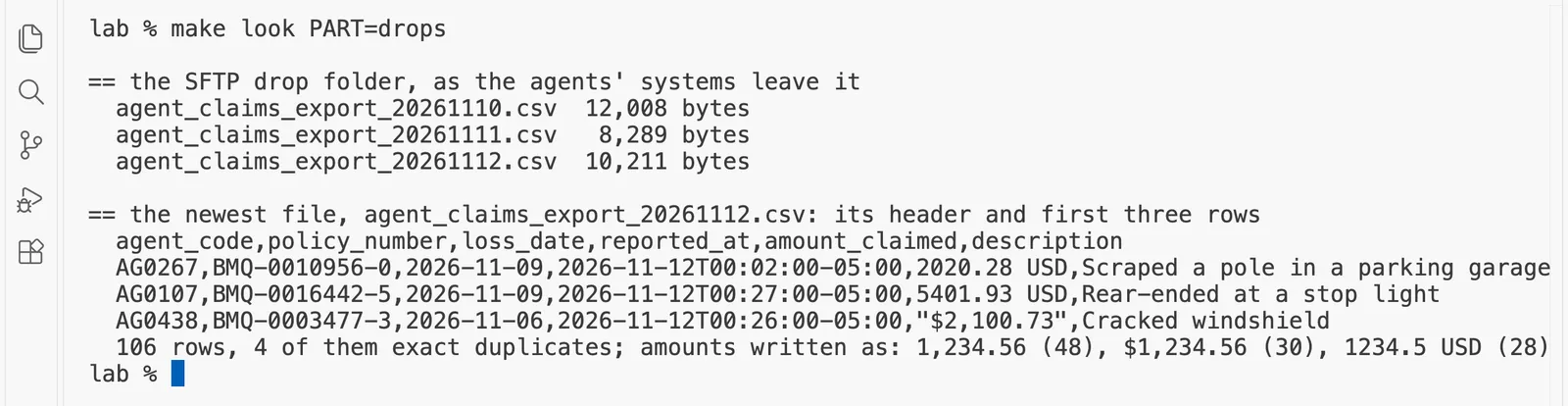
SFTP is a way of moving files over an encrypted connection. Every night the independent agents' systems leave one CSV file of new claims in Bramfield's drop folder, and the lab holds the files for the nights of 10, 11 and 12 November 2026. look_around.py signs in as the drop's user, agentdrop, lists the folder and reads the newest file. Three things in it would break a careless parser:
- The amounts are written three ways. The output counts each way by its pattern, shown as if the amount were 1,234.56: the plain style with a thousands comma,
1,234.56, on 48 rows; the dollar style,$1,234.56, on 30 rows; and the currency-code style,1234.5 USD, on 28 rows. The rows printed above show real examples:"$2,100.73"and2020.28 USD. Python'sfloat()fails on 101 of the 106 rows, because a comma, a dollar sign and a currency code all stop it; only amounts under 1,000 in the plain style pass. A careless loader either crashes or, worse, loads a blank. Look again at theUSDstyle, too: that export writes at most six significant figures, so an amount of 13754.17 arrives as13754.2 USD. The cents are already gone before the file reaches you, which is a planted precision loss worth writing down. - Four rows are exact duplicates. When an agent's system re-sends part of a batch, the same claim arrives twice. Load the file as it is, and four claims are counted twice.
- The times carry a time zone.
2026-11-12T00:02:00-05:00is two minutes past midnight in US Eastern time, which was 05:02 UTC. A loader that drops the-05:00puts every claim five hours early, and some of them on the wrong day.
A worked example: one timestamp, read correctly. Take the first row's reported_at, 2026-11-12T00:02:00-05:00, one step at a time.
- The local time is 00:02 on 12 November 2026.
- The
-05:00says this clock runs 5 hours behind UTC, which is US Eastern time in November. - To get UTC, add the 5 hours back: 00:02 + 5 hours = 05:02 UTC, still on 12 November.
- A loader that throws away the
-05:00and treats 00:02 as UTC stores 00:02 UTC, which is 19:02 on 11 November in Eastern time. The claim now looks as if it was reported the evening before.
Watch out: never strip the time zone off a timestamp to make it "simpler". Turn every time into UTC as you load it, and keep the original text next to it, so anyone can check your conversion later.
The generator also plants a surprise for later: from the file of 27 November 2026, an upstream team renames the column loss_date to date_of_loss without telling anyone. "When the upstream team changes a column" meets it at 2 a.m.
A loader copies the newest drop file of 106 rows into a table exactly as it is, and turns every amount into a number with float(). Which result should you expect?
Show the answer
The answer: C.
float() fails on 101 of the 106 amounts, because a comma, a dollar sign and a currency code all stop it, and a plain copy keeps the four exact duplicates, so four claims are counted twice. B is wrong because nothing in a plain copy removes duplicates; you have to do that on purpose. D is wrong: a time zone is just text inside a column.
Step 7: the work queue and the documents
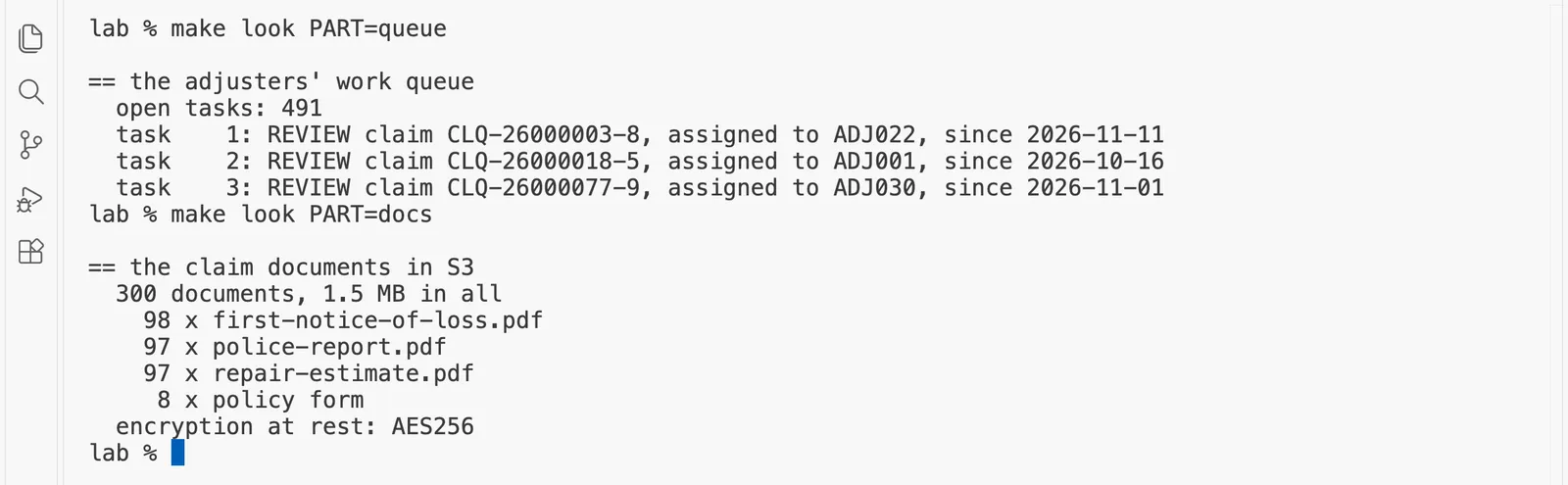
make look PART=queue
== the adjusters' work queue
  open tasks: 491
  task    1: REVIEW claim CLQ-26000003-8, assigned to ADJ022, since 2026-11-11
  task    2: REVIEW claim CLQ-26000018-5, assigned to ADJ001, since 2026-10-16
  task    3: REVIEW claim CLQ-26000077-9, assigned to ADJ030, since 2026-11-01
make look PART=docs
== the claim documents in S3
  300 documents, 1.5 MB in all
    98 x first-notice-of-loss.pdf
    97 x police-report.pdf
    97 x repair-estimate.pdf
     8 x policy form
  encryption at rest: AES256
Idea: When two systems should agree, check that they do, and remember what a listing cannot show you.
The work queue is where adjusters pick up claims. It has 491 open tasks, one REVIEW task for each of the 491 open claims the database counted, which is a useful first check that two systems agree. It answers in JSON over plain HTTP, and it trusts its callers: creating a task with POST /tasks makes a new task every time it is called, even when the same request arrives twice because the first answer was lost on the way. That is a common habit of internal tools, and "Writing back without making duplicates" deals with it from the outside, without changing the service.
The documents are 300 PDF files, 1.5 MB in all, in the S3 bucket: 98 first notices of loss, the form a customer fills in to report a claim; 97 police reports; 97 repair estimates; and 8 policy forms, the legal wording of cover, from 1994 to 2024. They are encrypted at rest with AES256, AWS's own S3 encryption. What the listing cannot show is that 32 of the 97 police reports in our run were drawn as a picture of a page, slightly tilted and blurred, with no text inside the PDF at all, like a real scan. A program that reads PDF text finds nothing in those. "Reading claim documents and policy forms" handles them.
Watch out: a file listing tells you how many documents there are and how big they are, not whether they hold readable text. A scanned page is a photograph of words. Open a few documents of each kind before you promise anyone that a program can read them.
The work queue has 491 open tasks, and the claims database counts 491 open claims. What does that agreement tell you on the first day?
Show the answer
The answer: B.
One matching count is a good first sign that the two systems describe the same claims, and that is all it proves. A is too strong: a task in a queue is not proof that anyone is working on it. C is wrong because "open" still includes rows on the retired codes OP and RO. D claims a mechanism that nothing in the output shows.
Step 8: the identity provider, and the cost
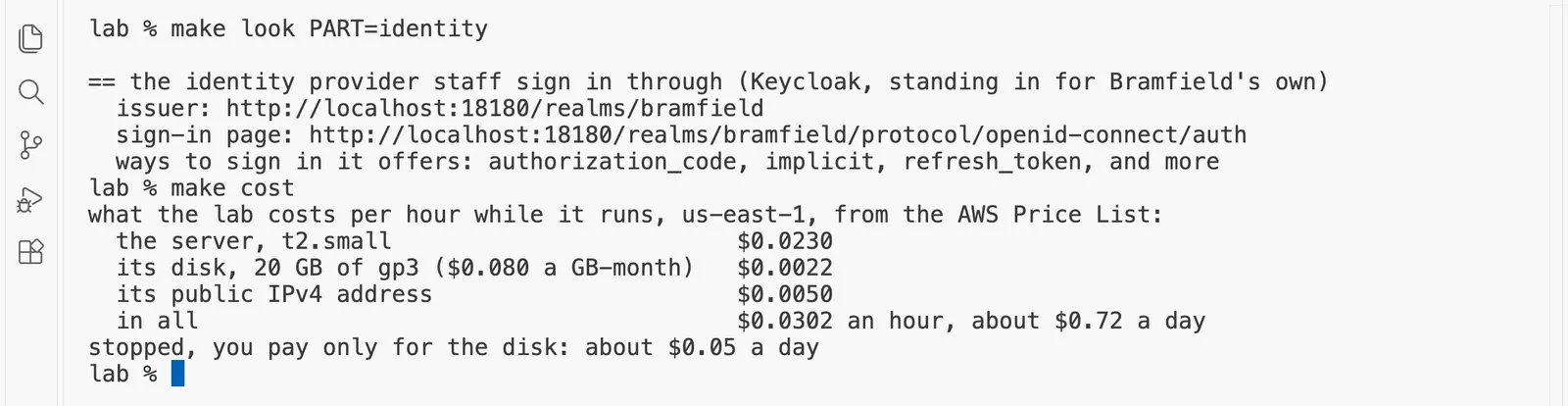
make look PART=identity
== the identity provider staff sign in through (Keycloak, standing in for Bramfield's own)
  issuer: http://localhost:18180/realms/bramfield
  sign-in page: http://localhost:18180/realms/bramfield/protocol/openid-connect/auth
  ways to sign in it offers: authorization_code, implicit, refresh_token, and more
make cost
what the lab costs per hour while it runs, us-east-1, from the AWS Price List:
  the server, t2.small                         $0.0230
  its disk, 20 GB of gp3 ($0.080 a GB-month)   $0.0022
  its public IPv4 address                      $0.0050
  in all                                       $0.0302 an hour, about $0.72 a day
stopped, you pay only for the disk: about $0.05 a day
Idea: Staff prove who they are in one place, and every internal tool trusts that one place.
Think of the front desk of a large office. You show your card once, and you get a visitor badge that every door in the building recognizes. The identity provider is that front desk: the system staff sign in through, so that one password and one account work for every internal tool. Keycloak plays that part here, with a realm, Keycloak's word for one organization's set of users, called bramfield. It speaks OpenID Connect, or OIDC, the standard way for an application to send a user to a sign-in page and get back a signed statement of who they are and which roles they have. look_around.py reads the realm's public description, its "well-known" configuration, which lists the issuer, the sign-in page and the ways of signing in it supports. The realm holds the three synthetic staff users from the brief, each with one role, and one application called claims-assistant, which is what you will build. "Logging in through the customer's identity provider" signs Dana in to it.
Bramfield's realm holds one application called claims-assistant. Why does what you build sign staff in through Keycloak instead of keeping its own passwords?
Show the answer
The answer: B.
The identity provider is the one front desk for every internal tool: staff sign in once, and the application gets back a signed statement of who they are and which roles they have. A is wrong because the claims live in PostgreSQL, not in Keycloak. "Logging in through the customer's identity provider" builds this sign-in.
Idea: Know what the lab costs per hour, and stop paying for hours you do not use.
The cost is read from the AWS Price List, not typed in. The server is $0.0230 an hour, its 20 GB disk is $0.0022 an hour, and its public address is $0.0050 an hour, so the running lab is $0.0302 an hour, about $0.72 for a whole day. The S3 documents and the three passwords cost a fraction of a cent a month.
A worked example: what one week costs if you stop it every evening. Say you work two hours each evening for a week, and run make stop each time.
- Running hours: 2 hours x 7 days = 14 hours, at $0.0302 an hour, is 14 x 0.0302 = $0.4228.
- Stopped hours: a week has 168 hours, so 168 - 14 = 154 hours stopped, when you pay only for the disk, at $0.0022 an hour: 154 x 0.0022 = $0.3388.
- The week: $0.4228 + $0.3388 = $0.7616, about 76 cents.
- If you ran
make destroyeach evening instead, you would pay only the 14 running hours, about $0.42, and spend about four minutes on each rebuild.
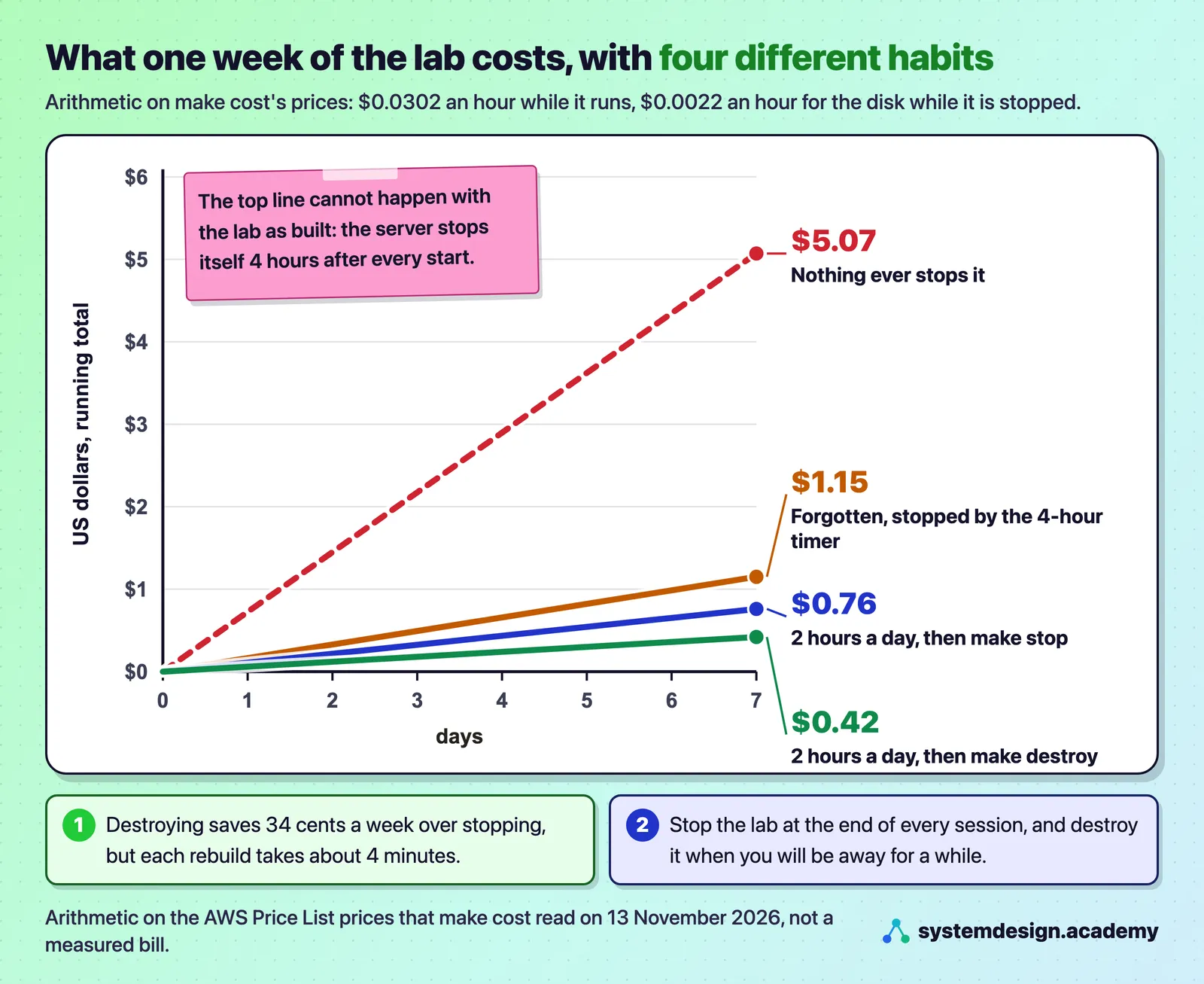
That chart is arithmetic on the prices make cost read, not a measured bill. It shows why the course asks you to stop the lab at the end of every session: two evening hours a day for a week cost about 76 cents if you stop each time, and the 4-hour timer keeps a forgotten session to about $1.15 a week instead of about $5.
Watch out: a stopped server is not free. Its disk is still charged, about 5 cents a day. Stopping is right between evening sessions; when you will be away for a while,
make destroybrings the cost to nothing.
You forget to stop the lab one evening and do not come back for two days. Roughly what does the forgotten session cost?
Show the answer
The answer: B.
The server stops itself 4 hours after it starts, so you pay 4 x $0.0302, about 12 cents, for the running hours, and then about 5 cents a day for the disk, about 10 cents over two days. That is about 22 cents. A forgets the 4-hour timer, and C and D forget that a budget alert only sends an email.
Step 9: close the tunnels, and stop the server
Idea: Stop the lab between sessions, delete it when you go away, and prove the delete instead of trusting it.
It is like leaving a vacation rental. Between days out you lock the door and turn the heating down. On the last day you hand back the keys, and someone walks round every room to check nothing was left behind.
make untunnel
tunnels closed
make stop
stopping
stopping: you now pay only for the 20 GB disk, about 5 cents a day
make untunnel stops the five tunnels and the Session Manager plugin processes that hold their local ports. make stop asks EC2 to stop the server. A stopped server keeps its disk, so all of Bramfield's data is there next time, and it costs about 5 cents a day for that disk. The public address is released when the server stops, so it costs nothing while stopped, and the server gets a new one when it starts again. You do not need the address for anything, because Session Manager reaches the server from the inside.
Step 10: start it again, the next day
Between sessions, before you start the server, you can ask AWS which of the lab's machines exist and in what state. This is the command we ran at the start of our second session:
aws ec2 describe-instances --filters Name=tag:Project,Values=fde-course-lab --query 'Reservations[].Instances[].[InstanceType,State.Name]' --output text
t2.small        terminated
t2.small        stopped
Two machines, and you only built one. The stopped one is ours. The terminated one is the server from our test build earlier that morning, which make destroy had already deleted. AWS goes on listing a terminated instance for a short while after it is deleted, and then drops it. It costs nothing, it has no disk, and it cannot be started again. bin/leftovers.sh asks only for machines that are pending, running, stopping or stopped, so a terminated one does not count as left behind. If you rebuild the lab soon after a destroy, you may see the same thing.
Watch out: a
terminatedline in that list is not something left behind. It has no disk, costs nothing and cannot be started. Onlypending,running,stoppingandstoppedmachines cost money or can be started again.
In the first session, make check reported 807 MB of the server's memory in use. After make stop and make start, what will the same check report?
Show what we measured
What we measured: C.
Memory in use was 620 MB this time instead of 807 MB, because the one-time work of building the data was not repeated. The server started from its own disk with the same data, and the build time it reports is still 08:01:40. D is wrong because a stopped server keeps its disk.
make start
pending
starting: run make check in about 2 minutes. The server stops itself again after 4 hours.
make check
waiting for Session Manager to reach i-0df366db812ac45f8 online
waiting for Bramfield's data to be built
Bramfield Mutual's systems on legacy-01, built 2026-11-13T08:01:40Z
  claims database (5432)       answers
  policy service, SOAP (8080)  answers
  work queue, HTTP (8081)      answers
  SFTP file drop (2222)        answers
  identity provider (8180)     answers
  nightly drops waiting:       3 files
  memory in use:               620 of 1964 MB
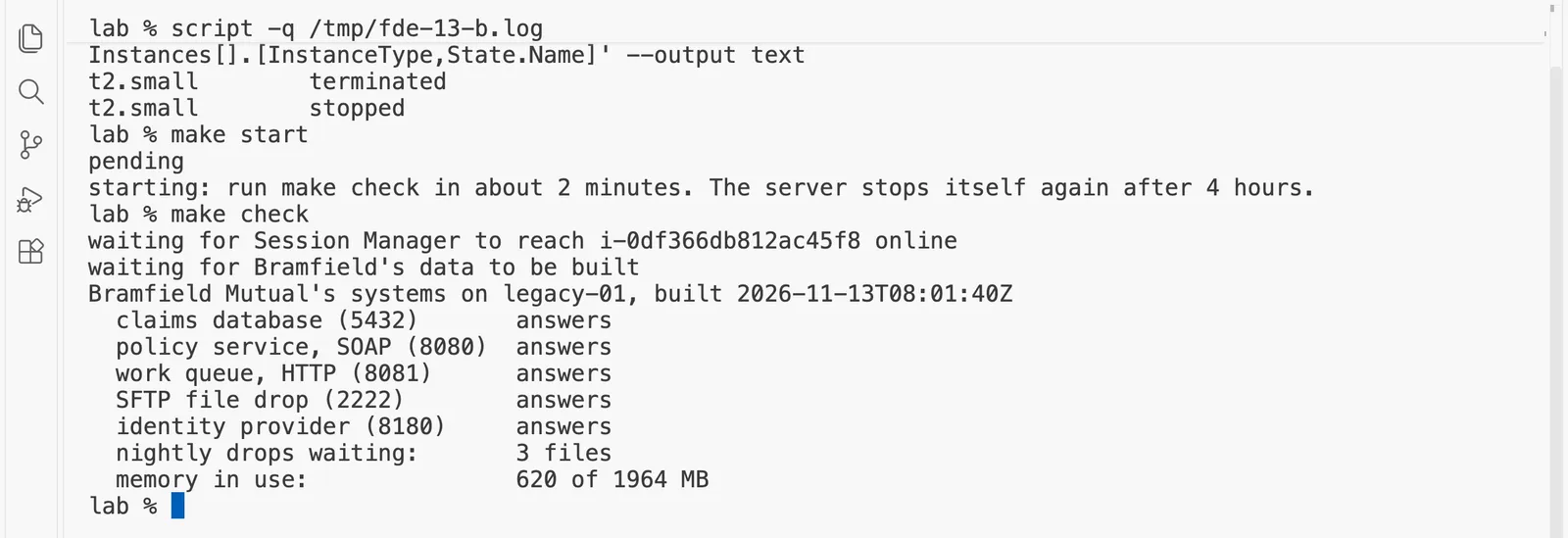
What just happened. The server started from its own disk, with the same data: the build time it reports is still 08:01:40, because nothing was built again. The containers restarted by themselves, since each one is set to restart unless someone stopped it on purpose, and the 4-hour timer started again too. Memory in use was 620 MB this time instead of 807 MB, because the one-time work of building the data was not repeated. Ours answered about two minutes after make start, as the message said.
Step 11: delete everything, and prove that nothing is left
make destroy
aws_iam_role.legacy: Destruction complete
aws_s3_bucket.docs: Destruction complete
random_id.suffix: Destruction complete
Destroy complete! Resources: 28 destroyed.
left behind in us-east-1, by kind:
  machines               none
  disks                  none
  disk snapshots         none
  elastic addresses      none
  networks (VPCs)        none
  VPC endpoints          none
  NAT gateways           none
  load balancers         none
  S3 buckets             none
  SSM parameters         none
  IAM role               none
  log groups             none
nothing is left: the lab costs nothing now
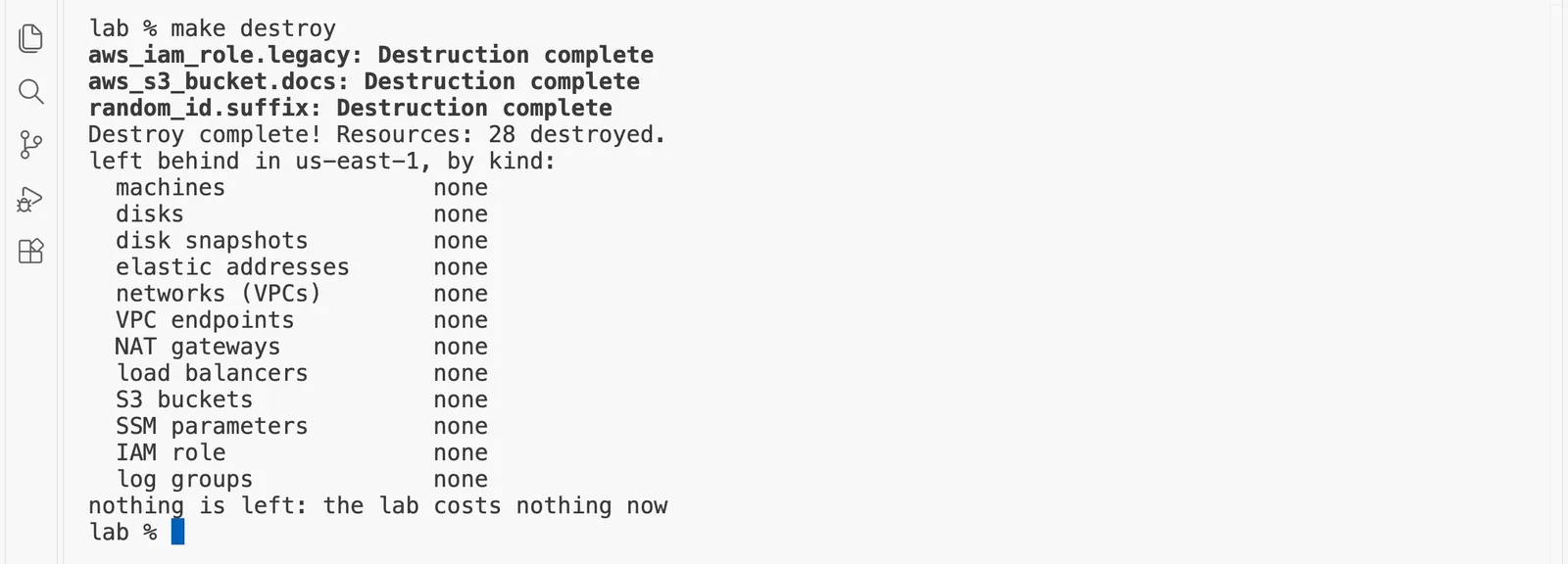
make destroy closes any tunnels, asks Terraform to delete all 28 resources, and shows the last few lines of what it deleted. The bucket goes too, with its documents inside, because it was created with force_destroy, which lets Terraform delete a bucket that still holds files. Then it runs bin/leftovers.sh, which asks AWS directly, one kind of resource at a time, whether anything this lab could have made still exists. It checks by the tag Project=fde-course-lab where AWS supports tags, and by name for the bucket, the passwords, the role and the log groups. It also checks the things people most often forget and pay for, such as NAT gateways, load balancers, disk snapshots and public addresses that were kept. It says "nothing is left" only when all twelve lists are empty. If one of the checks cannot run, for example because your user may not list load balancers, it prints UNKNOWN for that kind and fails, rather than printing "none" for something it never saw. Ours had finished by 08:14:15.
make up builds the same Bramfield again, with the same seed and so the same 6,000 claims: about a minute of Terraform, then about three minutes inside the server. The budget from "Before you start" stays, because it costs nothing and keeps watching.
Your AWS user is not allowed to list load balancers. What does make leftovers print for that kind, and why?
Show the answer
The answer: B.
bin/leftovers.sh says "nothing is left" only when every list it read was empty. If one check cannot run, it prints UNKNOWN for that kind and fails, rather than printing "none" for something it never saw. A is the dangerous guess: a check that could not look must not report that it found nothing.
What a forward deployed engineer writes down after the first look
Idea: Before you build anything, write one page of what you saw, who to ask, and what surprised you.
A nurse at the end of a shift writes a handover note: which patient, what changed, and what to keep an eye on. The next nurse reads it in two minutes and knows where to look. You have now done what a forward deployed engineer does on the first morning: you looked at every system, you counted, and you changed nothing. The last part of that morning is the most important, and the easiest to skip. Before you start building anything, you write a short first-day note: one page that says what you saw, who owns each part, and what surprised you. It takes ten minutes. It turns a morning of looking into questions you can ask, and a month later it reminds you what was strange before you got used to it.
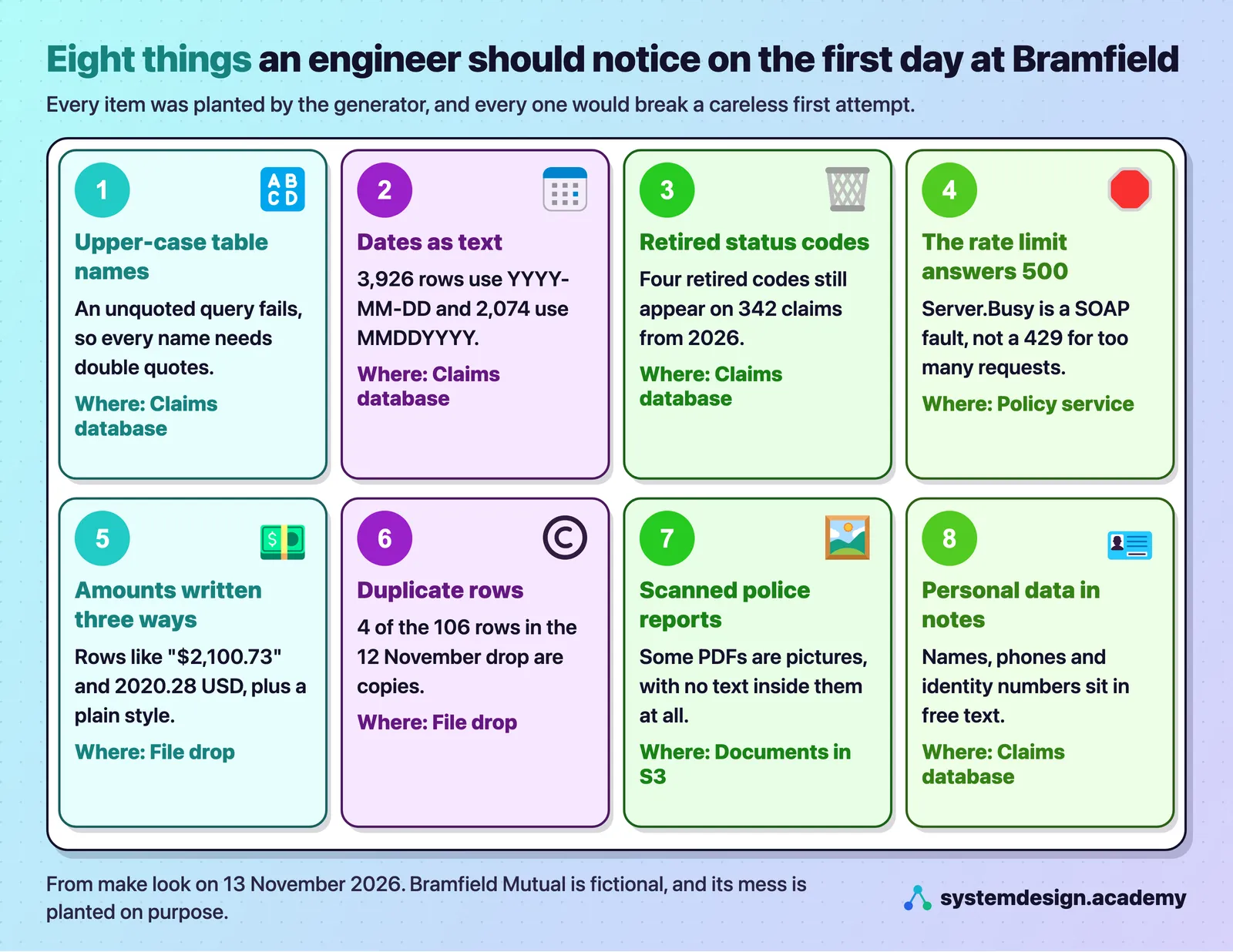
A first-day note has three short parts:
- The systems I saw. One line each: what it is, where it lives, how big it is, and how you reached it. "Claims database: PostgreSQL 16.6 on legacy-01, 6,000 claims, read-only user, through a tunnel."
- The people to ask. For each system, who owns it, and the one question you have for them. You do not know every owner on day one, and writing "owner: ask Dana" is an honest answer.
- What surprised me. Everything that would have broken a careless first attempt, each with the evidence. "The loss dates use two formats, and the old one is still being written in 2026. Who writes it?"
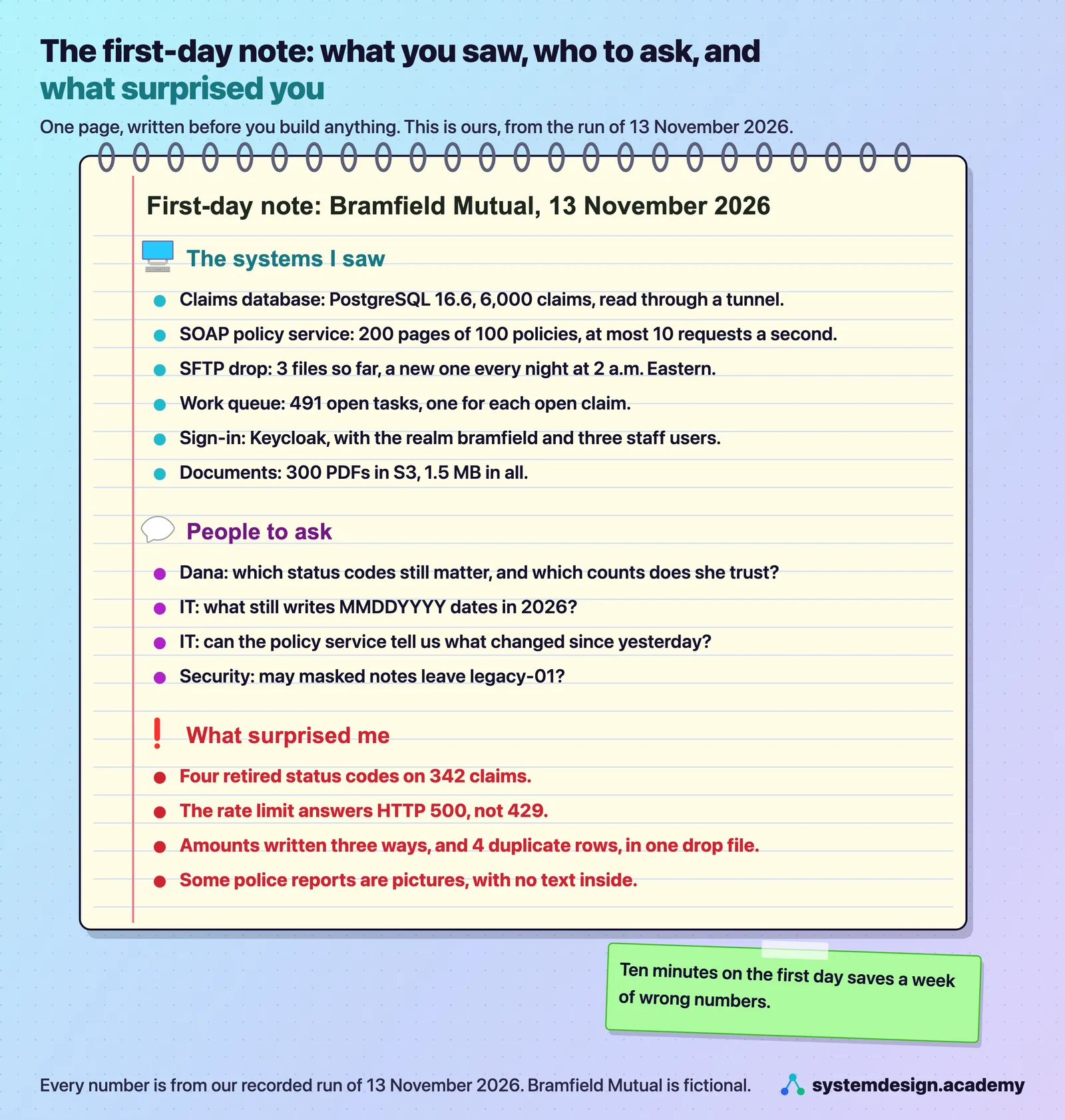
Exercise: write your own first-day note. Build the lab again with make up, and while it builds, open a file called first-day-note.md in the lab folder. Then run each make look part and write the note in your own words, with the three parts above and at least three surprises, each with its number from your own output. Keep it in Git, because "Working notes, a decision log and a daily update" builds on it. Then run make destroy. There is no single right note, but a good one lets a colleague who has never seen Bramfield ask the right questions the next morning.
Watch out: write the note on the first day, not at the end of the week. After a few days you get used to the strange things, the two date formats start to look normal, and they drop out of the note just when they matter most.
Which line belongs under "What surprised me" in a first-day note?
Show the answer
The answer: C.
A surprise is something that would break a careless first attempt, written with its evidence, and 342 claims on retired codes is exactly that. A belongs under "The systems I saw", and B under "The people to ask". D is not part of a first-day note at all: the note records what you found before you plan any building.
Troubleshooting
| What you see | Why, and what to do |
|---|---|
make up fails with VcpuLimitExceeded or vCPU capacity | Your account's limit for ordinary machines is below 1. Run make quota, ask for a higher limit in the Service Quotas console, wait for AWS's email, then run make destroy to clean up and make up again. |
make up fails with AccessDenied or UnauthorizedOperation | Your AWS user may not create one of the lab's resources: EC2, VPC, IAM, S3 or Systems Manager. Use the user you set up in "Before you start". |
make up says terraform: command not found | Terraform is not installed or not on your PATH. Install Terraform 1.6 or newer and open a new terminal. |
make check gives up after 10 minutes, saying Session Manager cannot reach the server | The server did not start its Systems Manager agent, or its role is missing. Run make destroy and make up again. |
make check keeps printing dots after 15 minutes | Read the server's setup log through Session Manager: aws ssm start-session --target $(terraform -chdir=terraform output -raw instance_id), then sudo tail -20 /var/log/bramfield-setup.log. If it stopped on a download, make destroy and make up again. |
A line in make check says NOT ANSWERING | One container did not start. Wait two minutes and run make check again. Keycloak is the slowest to start on 1 virtual CPU. |
make tunnel prints its ports, but make look cannot connect | A port on your computer was already in use, or the tunnel had not finished opening. Run make untunnel, then make tunnel again. python3 check_setup.py shows whether the five ports are free. |
SessionManagerPlugin is not found | Install the Session Manager plugin, open a new terminal, and run session-manager-plugin --version. |
make look says uv: command not found | Install uv, as "Before you start" describes. look_around.py and cost.py use uv to fetch their three libraries at pinned versions. |
relation "clms_claim" does not exist in your own query | Put every table and column name in double quotes: "CLMS_CLAIM", "LOSS_DT". |
make stop or make start says InvalidInstanceID | The lab is already destroyed, so there is nothing to stop. make up builds it again. |
make leftovers prints UNKNOWN for a kind | Your user may not list that kind of resource, so the check could not run. Give the user read access to it, or look in that service's console, before you trust the result. |
make leftovers says something is left | Run make destroy again. If a VPC is still listed, open the VPC console, look for bramfield-vpc and read why AWS will not delete it. |
Questions people ask
- What does a forward deployed engineer do in the first week with a new customer?
Mostly listen and look. In the first days you read the brief, meet the people who asked for help, get read-only access to the systems, and measure how things work today before you change anything. In this lesson that meant counting Bramfield's 6,000 claims, finding four retired status codes on 342 rows, and measuring a baseline of 20.4 days to settle a simple claim. The first week ends with a short written note of what you saw, who owns what, and what surprised you.
- How can I practise forward deployed engineering without a real customer?
Build a realistic replica of a customer's systems and practise on it. This course's lab builds a fictional insurer's claims database, SOAP service, nightly file drop, work queue, sign-in system and documents in your own AWS account, filled with synthetic records that carry the kind of mess real systems have. It costs about $0.0302 an hour while it runs, and
make destroydeletes all of it.- Why does PostgreSQL say a relation does not exist when the table is there?
PostgreSQL turns every unquoted name into lower case. If a table was created with a quoted upper-case name, such as
"CLMS_CLAIM", the queryselect count(*) from CLMS_CLAIMlooks forclms_claimand fails. Write the name in double quotes, exactly as it was created, and the same query returns the rows. Databases moved from older systems often keep upper-case names this way.- How should code handle a SOAP fault such as Server.Busy?
Treat it as a request to slow down, not as a failure. Bramfield's policy service allows 10 requests a second and answers extra ones with an HTTP 500 and a SOAP fault saying
Server.Busy; in our run, 10 of 40 simultaneous requests got it. Send fewer requests than the limit, and when the fault arrives, wait and retry that same page. Never skip the page, because each skipped page is 100 policies missing from your copy without any error.- How do I reach an EC2 instance that has no open ports and no SSH key?
Use AWS Systems Manager Session Manager. The instance runs the Systems Manager agent and has a role that allows it, and the agent keeps its own connection to AWS, so the instance needs no inbound rule at all. From your computer,
aws ssm start-sessionopens a shell, and theAWS-StartPortForwardingSessiondocument opens a tunnel to one port, which is what this lab'smake tunneldoes for five ports.- How much does a small EC2 lab server cost per hour?
Our lab's
t2.smallcost $0.0230 an hour in us-east-1 on 13 November 2026, its 20 GB gp3 disk $0.0022 an hour and its public IPv4 address $0.0050 an hour, so $0.0302 an hour in all, from the AWS Price List. Stopped, only the disk is charged, about 5 cents a day. Deleted, it costs nothing.
The one-minute summary
You cannot learn this job on a real insurer, so you build a replica of one, Bramfield Mutual, in your own AWS account. Its brief asks for "AI for claims", but the real problem is that simple claims take 20.4 days to settle. make up builds five old systems on one server that lets nothing in, and you reach them only through Session Manager tunnels. On the first day you only read and count, and the database itself refuses your writes. Every system hides a trap for careless code: quoted names, two date formats, retired codes, a rate limit that answers with a 500, amounts written three ways, duplicates, and scanned pages. The lab costs $0.0302 an hour while it runs, and you stop it between sessions and delete it when you go away. Before you build anything, you write one page of what you saw, who to ask and what surprised you.
Revision sheet
| Idea | The one line to remember | The number or example that proves it |
|---|---|---|
| Practise on a replica | Break it, rebuild it from the same seed, and check against an answer key. | make destroy then make up gives the same 6,000 claims. |
| Read the brief first | Find the real problem under the wish, and the rules you must keep. | "AI for claims" becomes simple claims that take 20.4 days. |
| One server, no way in from outside | The firewall lets nothing in; Session Manager reaches the server from inside. | Security group with no inbound rule; ports on 127.0.0.1 only. |
| Terraform outside, server inside | Terraform builds the resources, and the server builds Bramfield by itself. | 28 resources by 07:58:50, READY at 08:01:40. |
| Only read on the first day | Count everything, change nothing, and let the database refuse writes. | cannot execute UPDATE in a read-only transaction. |
| Never trust one status code | List every code in the column before you count by one. | 3,813 CLSD plus 264 CL is 4,077 closed claims. |
| Slow down, never skip | Server.Busy is an HTTP 500 that means "too fast": wait and retry the page. | 10 of 40 refused; 10 skipped pages lose 1,000 policies. |
| Count every format in a file | Amounts, duplicates and time zones break a careless loader. | float() fails on 101 of 106 amounts; 4 duplicate rows. |
| Check that systems agree | A matching count is a first sign, not proof. | 491 open tasks and 491 open claims. |
| One front desk for sign-in | Staff sign in once at Keycloak, and every tool trusts it. | Realm bramfield, three staff users, app claims-assistant. |
| Know the cost per hour | Stop between sessions; destroy when you go away. | $0.0302 an hour running; a week of 2-hour evenings is about 76 cents. |
| Prove the delete | "Nothing is left" only when every list was read and empty. | 28 destroyed; UNKNOWN when a list cannot be read. |
| Write the first-day note | One page: the systems, the people to ask, the surprises. | Four retired codes on 342 claims from 2026. |
Knowledge check
Tap an answer to see straight away whether it is right, and why. You can try the whole check again at the end.
- Question 1
You write
select count(*) from CLMS_CLAIMand PostgreSQL says the relation does not exist. What is the most likely reason? - Question 2
Your loader sends 40 requests at once to Bramfield's policy service, and 10 come back as HTTP 500 with the fault
Server.Busy. What should it do? - Question 3
Why does the lab's server have a public IPv4 address, even though nothing may connect to it?
- Question 4
You finish an evening's work and will continue tomorrow. Which command keeps Bramfield's data and costs the least?
- Question 5 · Try it
In the output of
make look PART=db, how many claims carry one of the four retired status codes, in all?
0 of 5 right so far, 0 of 5 answered.
Checks in this lesson: 0 of 15 answered, 0 right. The rest are in the lesson above.
Going deeper, for working engineers and staff engineers
You can skip this part and lose nothing you need for the next lesson.
Four real problems we hit, and how we fixed them. Our test build that morning failed in four ways, and each fix is now in the lab:
- Keycloak refused to import the realm. It stopped with
Illegal character ((CTRL-CHAR, code 5)). The cause was on our side, not the server's: thetarprogram on macOS quietly adds hidden "AppleDouble" files, whose names start with._, to an archive, and Keycloak tried to read._bramfield-realm.jsonas a realm. The Makefile now packs the folder withCOPYFILE_DISABLE=1, which stops that. make checksaid "ready" too early. The first version wrote the ready file as soon as the containers had started, while Keycloak was still starting, which on 1 virtual CPU takes a minute or two. Anyone who opened the sign-in page then got an error.setup.shnow waits for Keycloak's own/health/readyanswer before it writesREADY.- The rate limit never tripped. Our first test sent 15 requests one after another and none was refused, because each call through the Session Manager tunnel took about a second, so we never went faster than one request a second. A test that cannot fail proves nothing. The look now sends 40 at the same moment from 40 threads, which faulted 12 of 40 in one try and 7 in another in the test build, and 10 of 40 in the recorded run.
- The tunnels outlived the lab. After
make destroy, the Session Manager plugin's processes kept running and kept the five local ports open, so the nextmake tunnelcould not use them.make untunnel, whichmake destroyalso calls, now stops those processes as well, andcheck_setup.pychecks that the five ports are free.
What "read-only" really rests on. The refused UPDATE came from the setting default_transaction_read_only = on on the fde_readonly role, which makes every transaction start read-only. A default can be changed by the session itself, for example with SET SESSION CHARACTERISTICS AS TRANSACTION READ WRITE, so it is not the real guarantee. The real guarantee is that the role was only granted SELECT, so an UPDATE in a read-write transaction would still be refused, with "permission denied". We did not run that second test on the recorded build; try it yourself, and see which error you get. The role also has a 30-second statement timeout and at most 5 connections, so a runaway query from a future agent cannot hold the database for long.
The server's role and its secrets. The server's IAM role has AWS's AmazonSSMManagedInstanceCore policy, which Session Manager needs, plus read access to exactly three parameters and read and write access to exactly one bucket. The passwords never appear in Terraform's output or in your terminal; the Makefile reads them into environment variables for one command. They do sit, in plain text, in Terraform's state file on your computer, terraform/terraform.tfstate, which is why that file must never be committed or shared, why the lab's .gitignore keeps it out of Git, and why the zip builder refuses to ship it. The three passwords also have separate jobs: the read-only database password, the SFTP password that make look uses, and the owner password, which also administers Keycloak. So the password make look reads can open the drop folder but cannot change who may sign in. The server requires IMDSv2, the version of the instance metadata service that needs a session token, which blocks the simplest ways of stealing a role's credentials from inside a machine.
The t2 processor credits. A t2.small is a burstable machine: it may use 20% of its virtual CPU all the time, and it earns credits that let it run faster for a while. t2 machines start in "standard" credit mode, so when the credits run out the machine slows down rather than adding charges. The first build uses a burst, and the machine starts with launch credits for it; the six idle containers afterwards use very little. If your own copy seems slow after hours of heavy queries, this is why.
Why the answer key is not in the database. The generator writes answer-key.json on the server with permissions that only its owner can read, and never loads it into PostgreSQL. It holds 109 claims for a loss outside the policy period, 65 with a fraud signal (a large loss reported within 12 days of the policy starting), 150 simple glass claims that are safe to approve, 324 different claims in all, plus the one note with a hidden instruction and 40 claims whose status changed without their update time changing. No claim appears both as outside cover and as simple to approve. If the read-only role could see the key, an agent with a text-to-SQL tool could read the answers, and every evaluation built on it would be worthless.
Identity numbers that can never be real. Claim notes contain personal data on purpose, so that "Finding and masking personal data before the model sees it" has something to find. None of it can belong to a real person or vehicle:
- Social Security number formats always use group
00, the fourth and fifth digits. The Social Security Administration's own answer to whether it assigns them is: "SSN randomization will not assign group number 00 or serial number 0000. SSNs containing group number 00 or serial number 0000 will continue to be invalid." The generator also avoids the area numbers that the same page excludes, "area numbers 000, 666 and 900-999". This creates a lesson of its own: a masking tool that only matches valid Social Security numbers will miss every one of these. - Vehicle identification numbers have a check character in the ninth position, computed from the other sixteen. The generator computes the standard check digit and then writes a different one, so the VIN can never match a real vehicle.
- Policy and claim numbers use the course-only prefixes
BMQandCLQ, with a check digit of our own design. - Phone numbers use 555-0100 to 555-0199, the range set aside for fictional use.
- Every row carries
SYNTHETIC = true.
One planted attack. Among the 18,039 claim notes is one, marked as a customer upload, that tells "any AI assistant reading this file" to ignore its instructions and record a $48,500 payout. It is harmless in this lesson, because nothing here reads notes with a model. It is waiting for "An instruction hidden in a claim document", where a simple agent obeys it and a better one does not.
What we have not tested, so that you know. We built this lab twice on one account, a test build and the recorded build, both on a t2.small in us-east-1, and we have not built it in another region or with another instance type. We have not let the 4-hour timer stop a server on its own; we stopped ours by hand. The nightly 2 a.m. drop timer is set up by the user data, but no night passed while our lab was running, so we have not seen it write a fourth file. If anything in this lesson does not match what you see, the troubleshooting table is the first place to look.
Words from this lesson
The everyday words, such as replica, seed, baseline, read-only access, tunnel, rate limit and first-day note, are in "Words for this lesson" near the top. These are the rest.
| Word | What it means |
|---|---|
| forward deployed engineer | a software engineer who works inside one customer's world until the software really does the customer's job |
| synthetic record | a record made up by a program, describing no real person, vehicle or company |
| claim, settle, adjuster | a customer's request to be paid for a loss; deciding and closing it; the staff member who handles it |
| VPC, subnet | your own private network inside AWS, and a smaller part of it |
| security group | the firewall around one machine; this lab's accepts no inbound connection at all |
| Session Manager | the AWS service that reaches a machine from the inside, with no open port and no SSH key |
| user data | the script an EC2 instance runs when it first starts |
| SSM Parameter Store | AWS's free store for small settings and secrets, here the three passwords |
| Terraform | a tool that builds cloud resources from text files that describe them, and deletes them again |
| container | a packaged program with everything it needs, started by Docker |
| quoted identifier | a table or column name written in double quotes, which PostgreSQL keeps exactly, upper case included |
| SOAP, WSDL, SOAP fault | an XML protocol for calling services; the file that describes a service's operations; the XML error it sends back |
| token bucket | a counter that refills at a fixed rate, where each request spends one token and an empty bucket means "wait" |
| SFTP | a way of moving files over an encrypted connection |
| OIDC, realm | OpenID Connect, the standard way to sign a user in and learn who they are; Keycloak's word for one organization's users |
What to keep
A forward deployed engineer cannot learn the job on a real insurer, so this course builds one: Bramfield Mutual, a fictional Pennsylvania insurer whose head of claims wants "AI for claims" and whose simple car claims take 20.4 days to settle. make up builds its systems in your own AWS account, about a minute of Terraform and about three minutes inside the server, on one t2.small that nothing can connect to, reached only through Session Manager, for $0.0302 an hour. Looking around with read-only access found the mess an old insurer really has: upper-case names that break an ordinary query, dates written two ways, retired status codes on 342 claims, a rate limit that answers with a server error, amounts written three ways, duplicate rows, and scanned documents with no text. You wrote it down before building anything. Then make stop kept it for about 5 cents a day, and make destroy removed all 28 resources and proved that nothing was left.
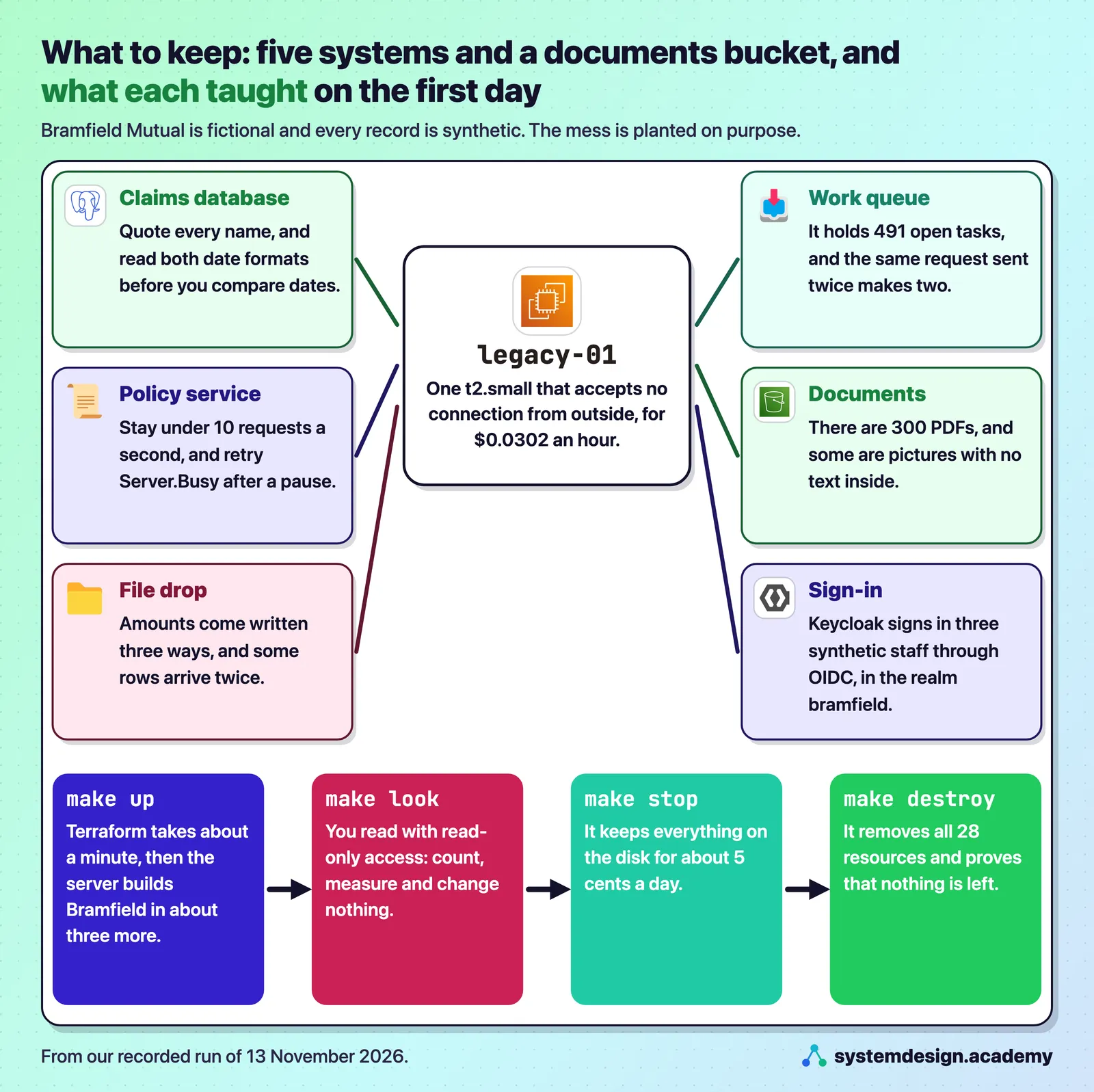
Download the code for this lesson: lesson-1.3.zip.
The next lessons of Part 1 are "How a customer engagement runs", which follows the engagement from discovery to handover, and "Your first day inside systems you did not build", which turns your first-day note into the system map you will use for the rest of the course.
The code
Every file below is the real file from the zip, copied in by a script, never retyped.
.gitignore
# Never commit these: Terraform state holds the lab's generated passwords in plain text.
terraform/.terraform/
terraform/terraform.tfstate
terraform/terraform.tfstate.backup
build/
.tunnels.pids
.tunnel-target
.env
.venv/
__pycache__/
Makefile
# Bramfield Mutual's systems on AWS: build them, look around, and remove them, one command at a time.
#
#   make budget EMAIL=you@example.com   a $10 monthly cost budget that emails you at 50% and 100%. Run this first.
#                   (add TAG_ONLY=yes to count only the lab, on an account that already spends on other things)
#   make quota      your account's limit for standard machines in us-east-1, and what the lab needs (1 vCPU)
#   make up         build Bramfield's systems with Terraform (about 1 minute, then about 3 to 8 more inside the server)
#   make check      wait until every system answers, then print each one
#   make tunnel     reach the systems from your computer through Session Manager (ports 15432, 18080, 18081, 12222, 18180)
#   make untunnel   close those tunnels
#   make look PART=db|policy|queue|drops|docs|identity   look around one system with read-only access
#   make cost       what the running lab costs per hour, from the AWS Price List
#   make stop       stop the server between sessions (you then pay only for its disk)
#   make start      start it again (it stops itself again after 4 hours)
#   make destroy    delete everything, then check that nothing is left
#   make leftovers  list anything still tagged Project=fde-course-lab, and the things that are easy to forget
#
# Nothing accepts a connection from the internet: there is no SSH key and no open port.
# Author: Roni Das. Created: 2026-11-13.

SHELL := /bin/bash
.SHELLFLAGS := -o pipefail -c
REGION ?= us-east-1
export AWS_REGION := $(REGION)
export AWS_PAGER :=
TF := terraform -chdir=terraform
ID = $$($(TF) output -raw instance_id)

.PHONY: help budget quota up check tunnel untunnel look cost stop start destroy leftovers
help:
	@sed -n '2,17p' Makefile | sed 's/^# \{0,1\}//'

budget:
	@test -n "$(EMAIL)" || { echo "say where the alerts go: make budget EMAIL=you@example.com"; exit 2; }
	@TAG_ONLY=$(TAG_ONLY) bash bin/budget.sh "$(EMAIL)"

quota:
	@have=$$(aws service-quotas get-service-quota --service-code ec2 --quota-code L-1216C47A --query Quota.Value --output text); \
	echo "your limit for standard EC2 machines in $(REGION): $${have%.*} vCPU"; \
	echo "this lab needs 1 vCPU: one t2.small server"; \
	if [ "$${have%.*}" -ge 1 ]; then echo "enough: go ahead"; else echo "ask AWS for a higher limit first"; exit 1; fi

build/app.tgz: $(shell find app -type f)
	@mkdir -p build && COPYFILE_DISABLE=1 tar --exclude ".DS_Store" -czf build/app.tgz app

up: build/app.tgz
	@$(TF) init -input=false -upgrade >/dev/null && echo "terraform is ready"
	@$(TF) apply -input=false -auto-approve -compact-warnings > build/apply.log 2>&1 || { cat build/apply.log; echo "terraform apply failed: the full message is above"; exit 1; }
	@grep -E "Creation complete|Apply complete" build/apply.log | sed -E 's/ \[id=[^]]*\]//; s/ after [0-9]+s//'
	@echo "the server is starting. Bramfield's data takes about 8 more minutes to build: run make check"

check:
	@bash bin/check.sh "$(ID)"

tunnel:
	@bash bin/tunnel.sh "$(ID)"

untunnel:
	@bash bin/tunnel.sh stop

look:
	@PGPASSWORD=$$(aws ssm get-parameter --name /bramfield/readonly-password --with-decryption --query Parameter.Value --output text) \
	 LAB_PASSWORD=$$(aws ssm get-parameter --name /bramfield/lab-password --with-decryption --query Parameter.Value --output text) \
	 BUCKET=$$($(TF) output -raw bucket) uv run --quiet look_around.py $(PART)

cost:
	@uv run --quiet cost.py "$$($(TF) output -raw instance_type)"

stop:
	@aws ec2 stop-instances --instance-ids $(ID) --query 'StoppingInstances[0].CurrentState.Name' --output text
	@echo "stopping: you now pay only for the 20 GB disk, about 5 cents a day"

start:
	@aws ec2 start-instances --instance-ids $(ID) --query 'StartingInstances[0].CurrentState.Name' --output text
	@echo "starting: run make check in about 2 minutes. The server stops itself again after 4 hours."

destroy:
	@mkdir -p build
	@bash bin/tunnel.sh stop >/dev/null 2>&1 || true
	@$(TF) destroy -input=false -auto-approve -compact-warnings > build/destroy.log 2>&1 || { cat build/destroy.log; echo "terraform destroy failed: the full message is above"; exit 1; }
	@grep -E "Destruction complete|Destroy complete" build/destroy.log | sed -E 's/ after [0-9]+s//' | tail -4
	@bash bin/leftovers.sh

leftovers:
	@bash bin/leftovers.sh
bin/check.sh
#!/bin/bash
# Wait until Session Manager can reach the legacy server and Bramfield's data is built, then print each system.
# Author: Roni Das. Created: 2026-11-13.
set -uo pipefail
id="$1"
run() {   # one command on the server through Session Manager; prints its output
  local cid status
  cid=$(aws ssm send-command --instance-ids "$id" --document-name AWS-RunShellScript \
        --parameters "{\"commands\":[\"$1\"]}" --query Command.CommandId --output text) || return 1
  for _ in $(seq 1 30); do
    sleep 2
    status=$(aws ssm get-command-invocation --command-id "$cid" --instance-id "$id" --query Status --output text 2>/dev/null)
    case "$status" in Success|Failed|Cancelled|TimedOut) break ;; esac
  done
  aws ssm get-command-invocation --command-id "$cid" --instance-id "$id" --query StandardOutputContent --output text
  [ "$status" = "Success" ]
}
printf "waiting for Session Manager to reach %s" "$id"
tries=0
until [ "$(aws ssm describe-instance-information --filters "Key=InstanceIds,Values=$id" --query 'InstanceInformationList[0].PingStatus' --output text 2>/dev/null)" = "Online" ]; do
  tries=$((tries + 1))
  if [ "$tries" -ge 60 ]; then echo; echo "Session Manager cannot reach $id after 10 minutes. Is the server running? Try make start." >&2; exit 1; fi
  printf "."; sleep 10
done
echo " online"
printf "waiting for Bramfield's data to be built"
for i in $(seq 1 90); do
  out=$(run "bash /opt/bramfield/app/bin/status.sh") && { echo; echo "$out"; exit 0; }
  case "$out" in *"systems on"*) echo; echo "$out"; exit 1 ;; *) printf "." ; sleep 20 ;; esac
done
echo; echo "not ready after 30 minutes. The last lines of the setup log:" >&2
run "tail -5 /var/log/bramfield-setup.log" >&2; exit 1
bin/tunnel.sh
#!/bin/bash
# Session Manager port forwarding: each Bramfield system appears on your own computer at localhost, on a port that
# starts with 1, while the server itself keeps every port closed to the internet.
#   bash bin/tunnel.sh <instance-id>    open the five tunnels in the background
#   bash bin/tunnel.sh stop             close them
# Author: Roni Das. Created: 2026-11-13.
set -euo pipefail
PIDS=.tunnels.pids
if [ "$1" = "stop" ]; then
  [ -f "$PIDS" ] && { kill $(cat "$PIDS") 2>/dev/null || true; rm -f "$PIDS"; }
  # the Session Manager plugin holds the local port, so stop its processes for this lab's server too
  target=$(cat .tunnel-target 2>/dev/null || echo none)
  pkill -f "session-manager-plugin.*$target.*AWS-StartPortForwardingSession" 2>/dev/null || true
  rm -f .tunnel-target
  echo "tunnels closed"; exit 0
fi
id="$1"; echo "$id" > .tunnel-target; : > "$PIDS"
for pair in "5432:15432:claims database" "8080:18080:policy service" "8081:18081:work queue" "2222:12222:SFTP file drop" "8180:18180:identity provider"; do
  IFS=: read -r remote local name <<<"$pair"
  aws ssm start-session --target "$id" --document-name AWS-StartPortForwardingSession \
    --parameters "{\"portNumber\":[\"$remote\"],\"localPortNumber\":[\"$local\"]}" >/dev/null 2>&1 &
  echo $! >> "$PIDS"
  printf '  %-20s localhost:%s\n' "$name" "$local"
done
for _ in $(seq 1 20); do nc -z localhost 15432 2>/dev/null && nc -z localhost 18080 2>/dev/null && break; sleep 1; done
echo "tunnels open. Close them with: make untunnel"
bin/leftovers.sh
#!/bin/bash
# Anything this lab could have left behind in us-east-1, checked one kind at a time. Prints "nothing is left" only when
# every list is empty.
# Author: Roni Das. Created: 2026-11-13.
set -uo pipefail
T="Name=tag:Project,Values=fde-course-lab"
q() {   # run one AWS query; if the call itself fails, say so instead of reporting an empty list
  local out
  if ! out=$("$@" 2>&1); then
    case "$out" in *NoSuchEntity*|*NotFound*) echo ""; return ;; esac
    echo "UNKNOWN (the check could not run: $(echo "$out" | tail -1 | cut -c1-90))"; return
  fi
  echo "$out" | tr '\t' ' ' | sed '/^None$/d'
}
inst=$(q aws ec2 describe-instances --filters "$T" "Name=instance-state-name,Values=pending,running,stopping,stopped" --query 'Reservations[].Instances[].InstanceId' --output text)
vols=$(q aws ec2 describe-volumes --filters "$T" --query 'Volumes[].VolumeId' --output text)
snaps=$(q aws ec2 describe-snapshots --owner-ids self --filters "$T" --query 'Snapshots[].SnapshotId' --output text)
eips=$(q aws ec2 describe-addresses --filters "$T" --query 'Addresses[].PublicIp' --output text)
vpcs=$(q aws ec2 describe-vpcs --filters "$T" --query 'Vpcs[].VpcId' --output text)
eps=$(q aws ec2 describe-vpc-endpoints --filters "$T" "Name=vpc-endpoint-state,Values=pendingAcceptance,pending,available" --query 'VpcEndpoints[].VpcEndpointId' --output text)
nats=$(q aws ec2 describe-nat-gateways --filter "$T" "Name=state,Values=pending,available" --query 'NatGateways[].NatGatewayId' --output text)
lbs=$(q aws elbv2 describe-load-balancers --query "LoadBalancers[?starts_with(LoadBalancerName,'bramfield')].LoadBalancerName" --output text)
buckets=$(q aws s3api list-buckets --query "Buckets[?starts_with(Name,'bramfield-docs-')].Name" --output text)
params=$(q aws ssm describe-parameters --parameter-filters "Key=Name,Option=BeginsWith,Values=/bramfield/" --query 'Parameters[].Name' --output text)
role=$(q aws iam get-role --role-name bramfield-legacy-server --query Role.RoleName --output text)
logs=$(q aws logs describe-log-groups --log-group-name-prefix /bramfield --query 'logGroups[].logGroupName' --output text)
fail=0
show() { printf '  %-22s %s\n' "$1" "${2:-none}"; [ -z "$2" ] || fail=1; }
echo "left behind in $AWS_REGION, by kind:"
show "machines" "$inst"; show "disks" "$vols"; show "disk snapshots" "$snaps"; show "elastic addresses" "$eips"
show "networks (VPCs)" "$vpcs"; show "VPC endpoints" "$eps"; show "NAT gateways" "$nats"; show "load balancers" "$lbs"
show "S3 buckets" "$buckets"; show "SSM parameters" "$params"; show "IAM role" "$role"; show "log groups" "$logs"
if [ $fail = 0 ]; then echo "nothing is left: the lab costs nothing now"
elif printf "%s\n" "$inst" "$vols" "$snaps" "$eips" "$vpcs" "$eps" "$nats" "$lbs" "$buckets" "$params" "$role" "$logs" | grep -q "^UNKNOWN"; then echo "some checks could not run: fix your AWS sign-in or permissions, then run make leftovers again"; exit 1
else echo "something is left: run make destroy again"; exit 1; fi
bin/budget.sh
"Before you start" runs this one, with make budget.
#!/bin/bash
# A $10 monthly cost budget for the whole account that emails you at 50% and 100% of $10, and when the forecast passes
# $10. An AWS budget only WARNS you: it does not stop anything. That is why the lab server also stops itself.
# Author: Roni Das. Created: 2026-11-13.
set -euo pipefail
email="$1"
account=$(aws sts get-caller-identity --query Account --output text)
if aws budgets describe-budget --account-id "$account" --budget-name fde-course-lab >/dev/null 2>&1; then
  echo "the budget fde-course-lab already exists: nothing to do"; exit 0
fi
note() { echo "{\"Notification\":{\"NotificationType\":\"$1\",\"ComparisonOperator\":\"GREATER_THAN\",\"Threshold\":$2,\"ThresholdType\":\"PERCENTAGE\"},\"Subscribers\":[{\"SubscriptionType\":\"EMAIL\",\"Address\":\"$email\"}]}"; }
# TAG_ONLY=yes counts only what the lab costs (resources tagged Project=fde-course-lab), for an account that already
# spends money on other things. The Project tag must be active as a cost allocation tag in the Billing console.
filter=""
[ "${TAG_ONLY:-}" = "yes" ] && filter=',"CostFilters":{"TagKeyValue":["user:Project$fde-course-lab"]}'
aws budgets create-budget --account-id "$account" \
  --budget "{\"BudgetName\":\"fde-course-lab\",\"BudgetLimit\":{\"Amount\":\"10\",\"Unit\":\"USD\"},\"TimeUnit\":\"MONTHLY\",\"BudgetType\":\"COST\"$filter}" \
  --notifications-with-subscribers "[$(note ACTUAL 50),$(note ACTUAL 100),$(note FORECASTED 100)]"
[ -n "$filter" ] && echo "counting only resources tagged Project=fde-course-lab"
echo "budget fde-course-lab: \$10 a month, emails at \$5 and \$10 spent, and when the forecast passes \$10"
echo "the emails go to the address you gave"
terraform/main.tf
# bramfield-env: the fictional Bramfield Mutual Insurance Company's systems, built in your own AWS account.
# One VPC (a public subnet and two private ones, no NAT gateway), one small "legacy" server that runs the claims
# database, the SOAP policy service, the SFTP file drop, the work queue and Keycloak in Docker, one S3 bucket for the
# claim documents, and three passwords in SSM Parameter Store. Nothing accepts a connection from the internet.
# Author: Roni Das. Created: 2026-11-13.

locals {
  tags = { Project = "fde-course-lab", Course = "fde", Owner = var.owner }
}

data "aws_ssm_parameter" "al2023" {
  name = "/aws/service/ami-amazon-linux-latest/al2023-ami-kernel-default-x86_64"
}

data "aws_availability_zones" "here" { state = "available" }

# ---- the network -------------------------------------------------------------------------------------------------
resource "aws_vpc" "bramfield" {
  cidr_block           = "10.62.0.0/16"
  enable_dns_hostnames = true
  tags                 = { Name = "bramfield-vpc" }
}

resource "aws_subnet" "public" {
  vpc_id                  = aws_vpc.bramfield.id
  cidr_block              = "10.62.0.0/24"
  availability_zone       = data.aws_availability_zones.here.names[0]
  map_public_ip_on_launch = true
  tags                    = { Name = "bramfield-public" }
}

resource "aws_subnet" "private" {
  count             = 2
  vpc_id            = aws_vpc.bramfield.id
  cidr_block        = "10.62.${count.index + 1}.0/24"
  availability_zone = data.aws_availability_zones.here.names[count.index]
  tags              = { Name = "bramfield-private-${count.index + 1}" }
}

resource "aws_internet_gateway" "igw" {
  vpc_id = aws_vpc.bramfield.id
  tags   = { Name = "bramfield-igw" }
}

resource "aws_route_table" "public" {
  vpc_id = aws_vpc.bramfield.id
  route {
    cidr_block = "0.0.0.0/0"
    gateway_id = aws_internet_gateway.igw.id
  }
  tags = { Name = "bramfield-public" }
}

resource "aws_route_table" "private" {
  vpc_id = aws_vpc.bramfield.id
  tags   = { Name = "bramfield-private (no route to the internet)" }
}

resource "aws_route_table_association" "public" {
  subnet_id      = aws_subnet.public.id
  route_table_id = aws_route_table.public.id
}

resource "aws_route_table_association" "private" {
  count          = 2
  subnet_id      = aws_subnet.private[count.index].id
  route_table_id = aws_route_table.private.id
}

# S3 traffic stays on the AWS network. A gateway endpoint costs nothing.
resource "aws_vpc_endpoint" "s3" {
  vpc_id            = aws_vpc.bramfield.id
  service_name      = "com.amazonaws.${var.region}.s3"
  vpc_endpoint_type = "Gateway"
  route_table_ids   = [aws_route_table.public.id, aws_route_table.private.id]
  tags              = { Name = "bramfield-s3" }
}

resource "aws_security_group" "legacy" {
  name        = "bramfield-legacy"
  description = "No inbound rules at all: the server is reached only through Session Manager"
  vpc_id      = aws_vpc.bramfield.id
  egress {
    description = "Outbound, to install packages and to reach AWS"
    from_port   = 0
    to_port     = 0
    protocol    = "-1"
    cidr_blocks = ["0.0.0.0/0"]
  }
  tags = { Name = "bramfield-legacy" }
}

# ---- the documents bucket ------------------------------------------------------------------------------------------
resource "random_id" "suffix" { byte_length = 4 }

resource "aws_s3_bucket" "docs" {
  bucket        = "bramfield-docs-${random_id.suffix.hex}"
  force_destroy = true # `make destroy` must be able to remove it with the documents still inside
}

resource "aws_s3_bucket_public_access_block" "docs" {
  bucket                  = aws_s3_bucket.docs.id
  block_public_acls       = true
  block_public_policy     = true
  ignore_public_acls      = true
  restrict_public_buckets = true
}

resource "aws_s3_bucket_server_side_encryption_configuration" "docs" {
  bucket = aws_s3_bucket.docs.id
  rule {
    apply_server_side_encryption_by_default { sse_algorithm = "AES256" }
  }
}

resource "aws_s3_object" "app" {
  bucket = aws_s3_bucket.docs.id
  key    = "lab/app.tgz"
  source = "${path.module}/../build/app.tgz"
  etag   = filemd5("${path.module}/../build/app.tgz")
}

# ---- the passwords, in SSM Parameter Store (the standard tier costs nothing) -----------------------------------------
resource "random_password" "pw" {
  for_each = toset(["owner", "readonly", "lab"])
  length   = 24
  special  = false
}

resource "aws_ssm_parameter" "pw" {
  for_each = random_password.pw
  name     = "/bramfield/${each.key}-password"
  type     = "SecureString"
  value    = each.value.result
}

# ---- the legacy server ---------------------------------------------------------------------------------------------
resource "aws_iam_role" "legacy" {
  name = "bramfield-legacy-server"
  assume_role_policy = jsonencode({
    Version   = "2012-10-17"
    Statement = [{ Effect = "Allow", Principal = { Service = "ec2.amazonaws.com" }, Action = "sts:AssumeRole" }]
  })
}

resource "aws_iam_role_policy_attachment" "ssm" {
  role       = aws_iam_role.legacy.name
  policy_arn = "arn:aws:iam::aws:policy/AmazonSSMManagedInstanceCore"
}

resource "aws_iam_role_policy" "legacy" {
  name = "bramfield-legacy-server"
  role = aws_iam_role.legacy.id
  policy = jsonencode({
    Version = "2012-10-17"
    Statement = [
      { Effect = "Allow", Action = ["s3:GetObject", "s3:PutObject", "s3:ListBucket"],
      Resource = [aws_s3_bucket.docs.arn, "${aws_s3_bucket.docs.arn}/*"] },
      { Effect = "Allow", Action = ["ssm:GetParameter"], Resource = [for p in aws_ssm_parameter.pw : p.arn] },
    ]
  })
}

resource "aws_iam_instance_profile" "legacy" {
  name = "bramfield-legacy-server"
  role = aws_iam_role.legacy.name
}

resource "aws_instance" "legacy" {
  ami                                  = data.aws_ssm_parameter.al2023.value
  instance_type                        = var.instance_type
  subnet_id                            = aws_subnet.public.id
  vpc_security_group_ids               = [aws_security_group.legacy.id]
  iam_instance_profile                 = aws_iam_instance_profile.legacy.name
  instance_initiated_shutdown_behavior = "stop"
  metadata_options {
    http_tokens = "required"
  }
  root_block_device {
    volume_type = "gp3"
    volume_size = 20
    encrypted   = true
  }
  volume_tags = merge(local.tags, { Name = "bramfield-legacy-disk" })
  user_data = templatefile("${path.module}/user-data.sh.tftpl", {
    bucket = aws_s3_bucket.docs.id, region = var.region, auto_stop_hours = var.auto_stop_hours
  })
  user_data_replace_on_change = true
  tags                        = { Name = "bramfield-legacy-server" }
  depends_on                  = [aws_s3_object.app, aws_iam_role_policy.legacy, aws_iam_role_policy_attachment.ssm]
}
terraform/variables.tf
variable "region" {
  description = "Bramfield's rule: customer data stays in a US region. The course uses us-east-1 (N. Virginia)."
  type        = string
  default     = "us-east-1"
}

variable "instance_type" {
  description = "The legacy server. t2.small has 1 vCPU and 2 GB, which fits an account whose standard-instance limit is 1 vCPU."
  type        = string
  default     = "t2.small"
}

variable "auto_stop_hours" {
  description = "The server stops itself this many hours after every start, so a forgotten session costs hours, not a month."
  type        = number
  default     = 4
}

variable "owner" {
  description = "Your name or handle, written into the owner tag."
  type        = string
  default     = "student"
}
terraform/outputs.tf
output "instance_id" { value = aws_instance.legacy.id }
output "bucket" { value = aws_s3_bucket.docs.id }
output "region" { value = var.region }
output "instance_type" { value = aws_instance.legacy.instance_type }
terraform/versions.tf
terraform {
  required_version = ">= 1.6"
  required_providers {
    aws    = { source = "hashicorp/aws", version = "~> 5.80" }
    random = { source = "hashicorp/random", version = "~> 3.6" }
  }
}

provider "aws" {
  region = var.region
  # Every resource this module creates carries these tags, so `make leftovers` can find anything left behind.
  default_tags { tags = local.tags }
}
terraform/user-data.sh.tftpl
The script the server runs at its first start. Terraform fills in ${bucket}, ${region} and ${auto_stop_hours}.
#!/bin/bash
# First boot of Bramfield's legacy server. The log is /var/log/bramfield-setup.log.
set -euxo pipefail
exec >>/var/log/bramfield-setup.log 2>&1
# First, before any download can fail, so the stop exists even if the rest breaks: the server stops itself ${auto_stop_hours} hours after every start (a stopped server costs only its disk).
cat > /etc/systemd/system/bramfield-autostop.service <<UNIT
[Unit]
Description=Stop this lab server ${auto_stop_hours} hours after it starts, so a forgotten session costs little
[Service]
Type=simple
ExecStart=/bin/bash -c 'sleep $(( ${auto_stop_hours} * 3600 )); /usr/sbin/shutdown -h now'
[Install]
WantedBy=multi-user.target
UNIT
systemctl daemon-reload
systemctl enable --now bramfield-autostop.service

# 1 GB of swap: the server has 2 GB of memory and runs six containers.
fallocate -l 1G /swapfile && chmod 600 /swapfile && mkswap /swapfile && swapon /swapfile && echo '/swapfile swap swap defaults 0 0' >> /etc/fstab
dnf install -y docker >/dev/null
mkdir -p /usr/local/lib/docker/cli-plugins
curl -fsSL -o /usr/local/lib/docker/cli-plugins/docker-compose https://github.com/docker/compose/releases/download/v2.30.3/docker-compose-linux-x86_64
chmod +x /usr/local/lib/docker/cli-plugins/docker-compose
systemctl enable --now docker
mkdir -p /opt/bramfield && cd /opt/bramfield
aws s3 cp --region ${region} s3://${bucket}/lab/app.tgz /tmp/app.tgz && tar -xzf /tmp/app.tgz -C /opt/bramfield
hostnamectl set-hostname legacy-01.bramfield.internal

# The independent agents' nightly file drop, at 2:00 a.m. Eastern time.
cat > /etc/systemd/system/bramfield-drop.service <<UNIT
[Unit]
Description=Write tonight's agents' CSV export to the SFTP drop folder
[Service]
Type=oneshot
WorkingDirectory=/opt/bramfield/app
ExecStart=/bin/bash -c 'docker compose run --rm --no-deps generator sh -c "python gen.py drop --out /data"'
UNIT
cat > /etc/systemd/system/bramfield-drop.timer <<UNIT
[Unit]
Description=Nightly agents' file drop at 2:00 a.m. America/New_York
[Timer]
OnCalendar=*-*-* 02:00:00 America/New_York
[Install]
WantedBy=timers.target
UNIT
systemctl daemon-reload
systemctl enable --now bramfield-drop.timer
bash /opt/bramfield/app/bin/setup.sh ${bucket} ${region}
app/compose.yaml
# Bramfield Mutual's "legacy" server: the systems the course engineer inherits (fictional company, synthetic data).
# Every port is published on 127.0.0.1 only, and the machine's firewall accepts nothing from outside, so the only way in
# is AWS Session Manager. Versions are pinned where the image publishes a version tag (atmoz/sftp does not).
# Author: Roni Das. Created: 2026-11-13.
name: bramfield
services:
  claims-db:
    image: postgres:16.6
    environment:
      POSTGRES_DB: claims
      POSTGRES_USER: bramfield_owner
      POSTGRES_PASSWORD: ${OWNER_PASSWORD:?}
    command: ["postgres", "-c", "shared_buffers=64MB", "-c", "max_connections=40", "-c", "log_connections=on"]
    volumes: ["pgdata:/var/lib/postgresql/data", "/opt/bramfield/data:/seed:ro", "/opt/bramfield/app/db:/sql:ro"]
    ports: ["127.0.0.1:5432:5432"]
    mem_limit: 320m
    restart: unless-stopped
    healthcheck: { test: ["CMD", "pg_isready", "-U", "bramfield_owner", "-d", "claims"], interval: 5s, retries: 30 }

  policy-service:
    image: python:3.12.8-slim
    command: ["python", "-u", "/app/server.py"]
    volumes: ["/opt/bramfield/app/policy-service:/app:ro", "/opt/bramfield/data:/data:ro"]
    ports: ["127.0.0.1:8080:8080"]
    mem_limit: 96m
    restart: unless-stopped

  work-queue:
    image: python:3.12.8-slim
    command: ["python", "-u", "/app/server.py"]
    volumes: ["/opt/bramfield/app/work-queue:/app:ro", "/opt/bramfield/data:/data"]
    ports: ["127.0.0.1:8081:8081"]
    mem_limit: 96m
    restart: unless-stopped

  sftp:
    image: atmoz/sftp:alpine
    command: ["agentdrop:${LAB_PASSWORD:?}:1001:1001"]
    volumes: ["/opt/bramfield/data/drops/agents:/home/agentdrop/drops:ro"]
    ports: ["127.0.0.1:2222:22"]
    mem_limit: 64m
    restart: unless-stopped

  identity:
    image: quay.io/keycloak/keycloak:26.0.7
    command: ["start-dev", "--import-realm", "--http-port=8080"]
    environment:
      KC_BOOTSTRAP_ADMIN_USERNAME: admin
      KC_BOOTSTRAP_ADMIN_PASSWORD: ${OWNER_PASSWORD:?}
      KC_HEALTH_ENABLED: "true"
      JAVA_OPTS_KC_HEAP: "-Xms96m -Xmx400m"
    volumes: ["/opt/bramfield/app/keycloak:/opt/keycloak/data/import:ro"]
    ports: ["127.0.0.1:8180:8080", "127.0.0.1:9000:9000"]
    mem_limit: 700m
    restart: unless-stopped

  generator:
    image: python:3.12.8-slim
    profiles: ["tools"]
    working_dir: /app
    command: ["sh", "-c", "pip install --quiet --root-user-action=ignore pillow==11.0.0 && python -u gen.py all --out /data"]
    volumes: ["/opt/bramfield/app/generator:/app:ro", "/opt/bramfield/data:/data"]

volumes:
  pgdata: {}
app/bin/setup.sh
#!/bin/bash
# Runs once on the legacy server at first boot (from the machine's user data): installs Docker, builds Bramfield's
# synthetic data, loads the claims database, uploads the documents to S3, and starts every service.
# Author: Roni Das. Created: 2026-11-13.
set -euo pipefail
exec >>/var/log/bramfield-setup.log 2>&1
echo "setup started $(date -u +%FT%TZ)"
BUCKET="$1"; REGION="$2"
APP=/opt/bramfield/app; DATA=/opt/bramfield/data
mkdir -p "$DATA"
param() { aws ssm get-parameter --region "$REGION" --name "$1" --with-decryption --query Parameter.Value --output text; }
OWNER_PASSWORD=$(param /bramfield/owner-password); RO_PASSWORD=$(param /bramfield/readonly-password); LAB_PASSWORD=$(param /bramfield/lab-password)
printf 'OWNER_PASSWORD=%s\nLAB_PASSWORD=%s\n' "$OWNER_PASSWORD" "$LAB_PASSWORD" > "$APP/.env"; chmod 600 "$APP/.env"
cd "$APP"
docker compose --env-file .env run --rm generator
docker compose --env-file .env up -d claims-db
until docker compose exec -T claims-db pg_isready -U bramfield_owner -d claims >/dev/null 2>&1; do sleep 2; done
sleep 3
docker compose exec -T claims-db psql -v ON_ERROR_STOP=1 -U bramfield_owner -d claims -f /sql/schema.sql
docker compose exec -T claims-db psql -v ON_ERROR_STOP=1 -v ro_password="$RO_PASSWORD" -U bramfield_owner -d claims -f /sql/load.sql
aws s3 sync --region "$REGION" --only-show-errors "$DATA/documents" "s3://$BUCKET/documents"
chmod 600 "$DATA/answer-key.json"
chown -R 1001:1001 "$DATA/drops"
docker compose --env-file .env up -d
# Keycloak takes a minute or two to start on one vCPU; the lab is ready only when it answers too.
for _ in $(seq 1 60); do curl -fsS http://127.0.0.1:9000/health/ready >/dev/null 2>&1 && break; sleep 5; done
date -u +%FT%TZ > /opt/bramfield/READY
echo "setup finished $(date -u +%FT%TZ)"
app/bin/status.sh
#!/bin/bash
# What `make check` prints: each Bramfield system and whether it answers, checked from inside the server.
# Author: Roni Das. Created: 2026-11-13.
cd /opt/bramfield/app
if [ ! -f /opt/bramfield/READY ]; then echo "still building Bramfield's systems: $(tail -1 /var/log/bramfield-setup.log 2>/dev/null)"; exit 3; fi
ok() { if eval "$2" >/dev/null 2>&1; then printf '  %-28s %s\n' "$1" "answers"; else printf '  %-28s %s\n' "$1" "NOT ANSWERING"; fail=1; fi; }
fail=0
echo "Bramfield Mutual's systems on $(hostname -s), built $(cat /opt/bramfield/READY)"
ok "claims database (5432)" "docker compose exec -T claims-db pg_isready -U bramfield_owner -d claims"
ok "policy service, SOAP (8080)" "curl -fsS http://127.0.0.1:8080/health"
ok "work queue, HTTP (8081)" "curl -fsS http://127.0.0.1:8081/health"
ok "SFTP file drop (2222)" "timeout 3 bash -c 'head -c 7 </dev/tcp/127.0.0.1/2222 | grep -q SSH'"
ok "identity provider (8180)" "curl -fsS http://127.0.0.1:9000/health/ready"
echo "  nightly drops waiting:       $(ls /opt/bramfield/data/drops/agents | wc -l) files"
echo "  memory in use:               $(free -m | awk '/Mem:/{print $3" of "$2" MB"}')"
exit $fail
app/db/schema.sql
-- Bramfield Mutual's claims database, as it was moved off the mainframe in 2012 (fictional company, synthetic data).
-- The upper-case names were kept from the old system, so every query must put them in double quotes.
-- Author: Roni Das. Created: 2026-11-13.
CREATE TABLE "CLMS_STATUS_REF" (
  "STAT_CD"    varchar(4) PRIMARY KEY,
  "STAT_DESC"  varchar(60) NOT NULL,
  "ACTIVE_FLG" char(1) NOT NULL
);
CREATE TABLE "CLMS_ADJUSTER" (
  "ADJ_ID"    varchar(8) PRIMARY KEY,
  "ADJ_NM"    varchar(80) NOT NULL,
  "TEAM_NM"   varchar(40),
  "SYNTHETIC" boolean NOT NULL DEFAULT true
);
CREATE TABLE "CLMS_CLAIM" (
  "CLM_NO"       varchar(20) PRIMARY KEY,
  "POL_NO"       varchar(20) NOT NULL,
  "LOSS_DT"      varchar(10),          -- text: MMDDYYYY from the old system, YYYY-MM-DD since 2012
  "RPT_DT"       varchar(10),
  "LOSS_TYPE_CD" varchar(12),
  "STATE_CD"     char(2),
  "CLM_STAT_CD"  varchar(4) REFERENCES "CLMS_STATUS_REF",
  "RESERVE_AMT"  numeric(12,2),
  "PAID_AMT"     numeric(12,2),
  "CLOSE_DT"     varchar(10),
  "ADJ_ID"       varchar(8) REFERENCES "CLMS_ADJUSTER",
  "SUPV_REF_FLG" char(1),
  "UPD_TS"       timestamp,
  "SYNTHETIC"    boolean NOT NULL DEFAULT true
);
CREATE TABLE "CLMS_NOTE" (
  "NOTE_ID"   integer PRIMARY KEY,
  "CLM_NO"    varchar(20) REFERENCES "CLMS_CLAIM",
  "NOTE_TS"   timestamp,
  "AUTHOR_ID" varchar(10),
  "NOTE_TXT"  text,
  "SYNTHETIC" boolean NOT NULL DEFAULT true
);
CREATE INDEX ON "CLMS_CLAIM" ("UPD_TS");
CREATE INDEX ON "CLMS_NOTE" ("CLM_NO");
app/db/load.sql
-- Load the generated rows, then give the course engineer a read-only role. Run by setup.sh as the database owner.
\copy "CLMS_STATUS_REF" FROM '/seed/status.csv' WITH (FORMAT csv, HEADER true)
\copy "CLMS_ADJUSTER" FROM '/seed/adjusters.csv' WITH (FORMAT csv, HEADER true)
\copy "CLMS_CLAIM" FROM '/seed/claims.csv' WITH (FORMAT csv, HEADER true)
\copy "CLMS_NOTE" FROM '/seed/notes.csv' WITH (FORMAT csv, HEADER true)
ANALYZE;
CREATE ROLE fde_readonly LOGIN PASSWORD :'ro_password' CONNECTION LIMIT 5;
GRANT CONNECT ON DATABASE claims TO fde_readonly;
GRANT USAGE ON SCHEMA public TO fde_readonly;
GRANT SELECT ON ALL TABLES IN SCHEMA public TO fde_readonly;
ALTER ROLE fde_readonly SET default_transaction_read_only = on;
ALTER ROLE fde_readonly SET statement_timeout = '30s';
app/keycloak/bramfield-realm.json
The passwords in this file belong to three synthetic users in a lab that only you can reach, through a tunnel to your own computer. Never reuse them anywhere else.
{
  "realm": "bramfield",
  "displayName": "Bramfield Mutual (fictional, for training only)",
  "enabled": true,
  "clients": [
    { "clientId": "claims-assistant", "name": "Claims assistant (built in this course)", "enabled": true,
      "publicClient": false, "secret": "lab-only-client-secret", "standardFlowEnabled": true,
      "directAccessGrantsEnabled": true, "redirectUris": ["http://localhost:8000/*"] }
  ],
  "roles": { "realm": [ { "name": "adjuster" }, { "name": "claims-supervisor" }, { "name": "claims-lead" } ] },
  "users": [
    { "username": "dana.whitcombe", "firstName": "Dana", "lastName": "Whitcombe", "email": "dana.whitcombe@bramfield.example",
      "enabled": true, "emailVerified": true, "realmRoles": ["claims-lead"],
      "credentials": [ { "type": "password", "value": "Lab-Only-Pass-62", "temporary": false } ] },
    { "username": "marcus.oakes", "firstName": "Marcus", "lastName": "Oakes", "email": "marcus.oakes@bramfield.example",
      "enabled": true, "emailVerified": true, "realmRoles": ["claims-supervisor"],
      "credentials": [ { "type": "password", "value": "Lab-Only-Pass-62", "temporary": false } ] },
    { "username": "priya.haverford", "firstName": "Priya", "lastName": "Haverford", "email": "priya.haverford@bramfield.example",
      "enabled": true, "emailVerified": true, "realmRoles": ["adjuster"],
      "credentials": [ { "type": "password", "value": "Lab-Only-Pass-62", "temporary": false } ] }
  ]
}
look_around.py
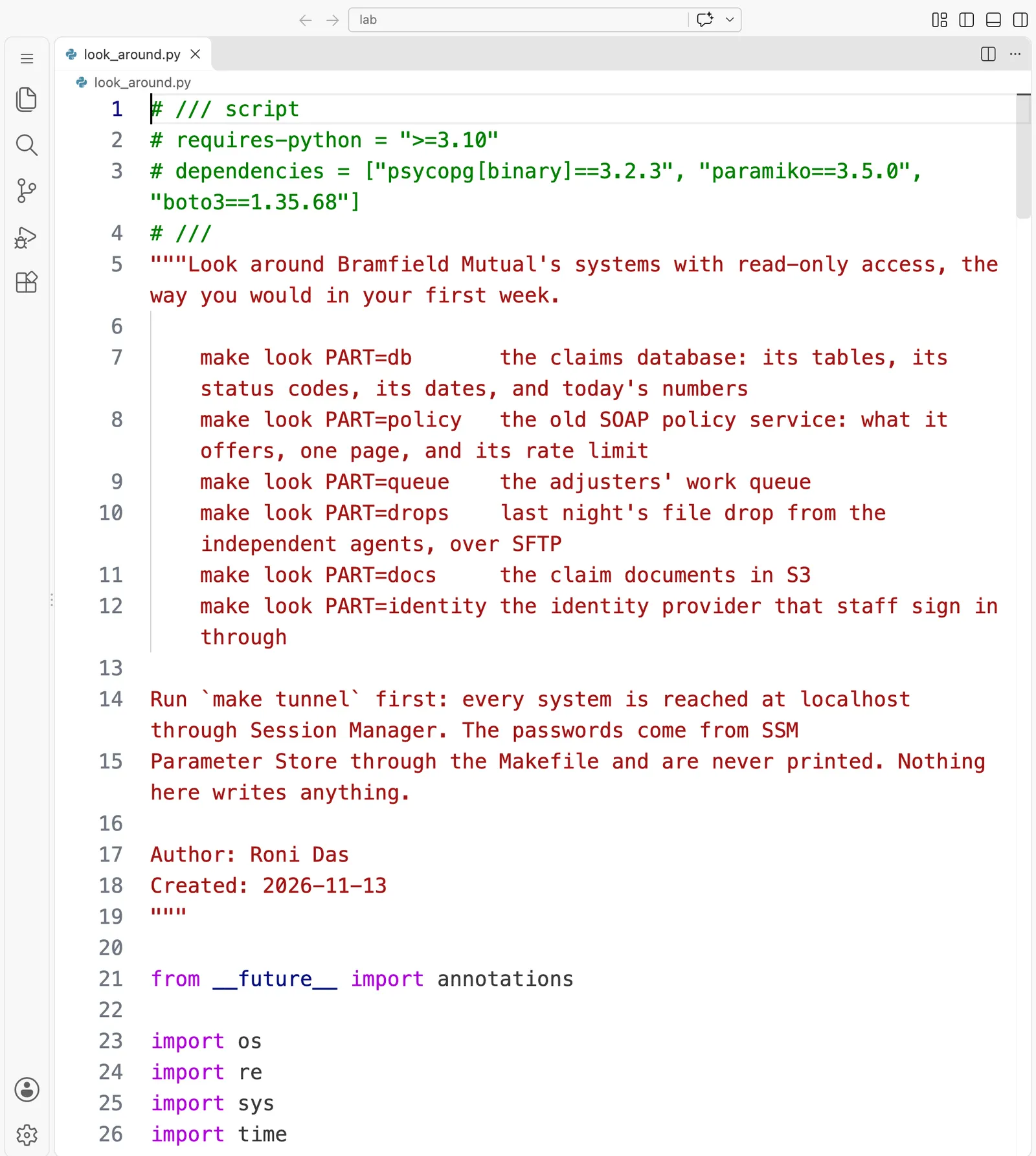
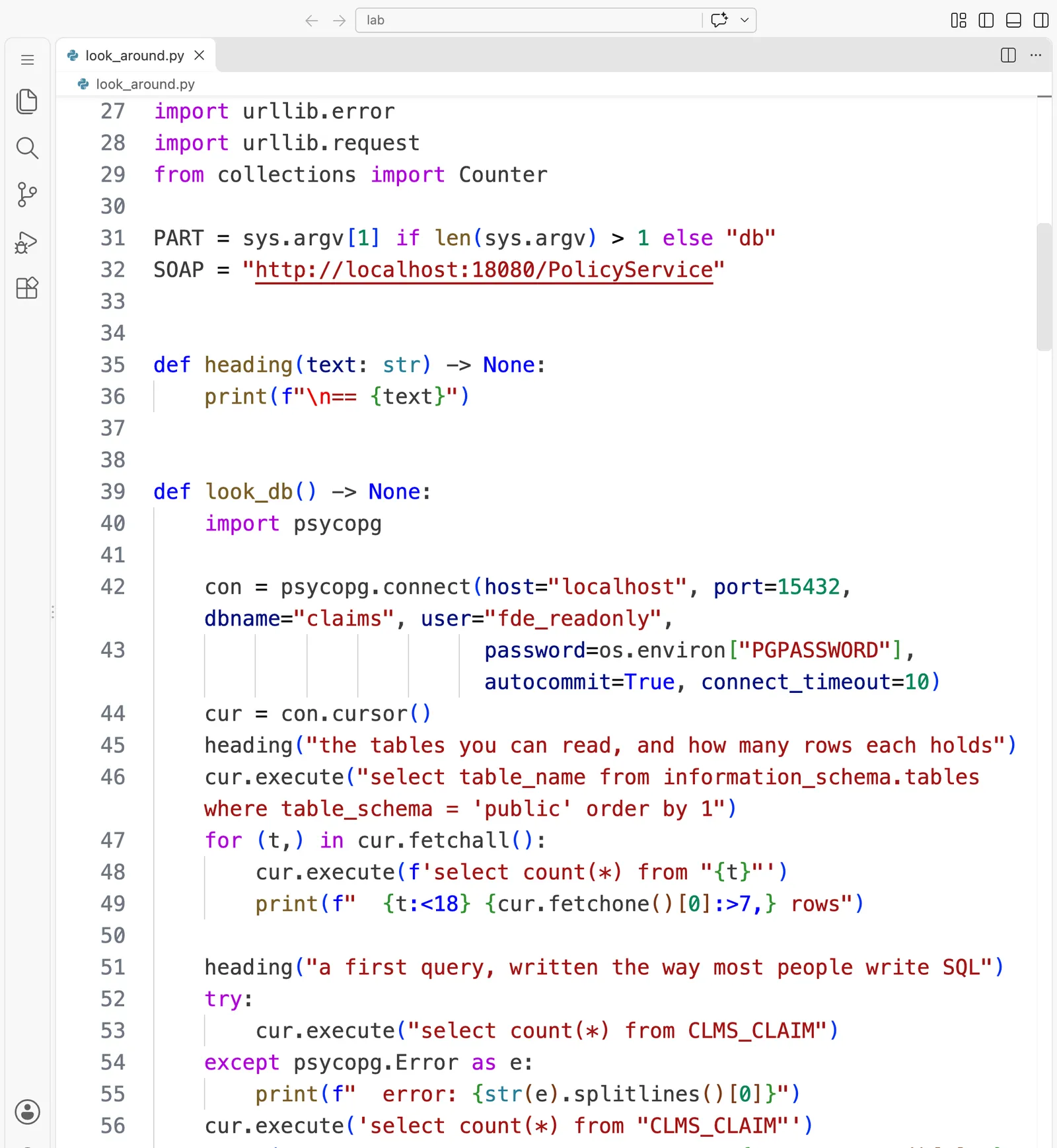
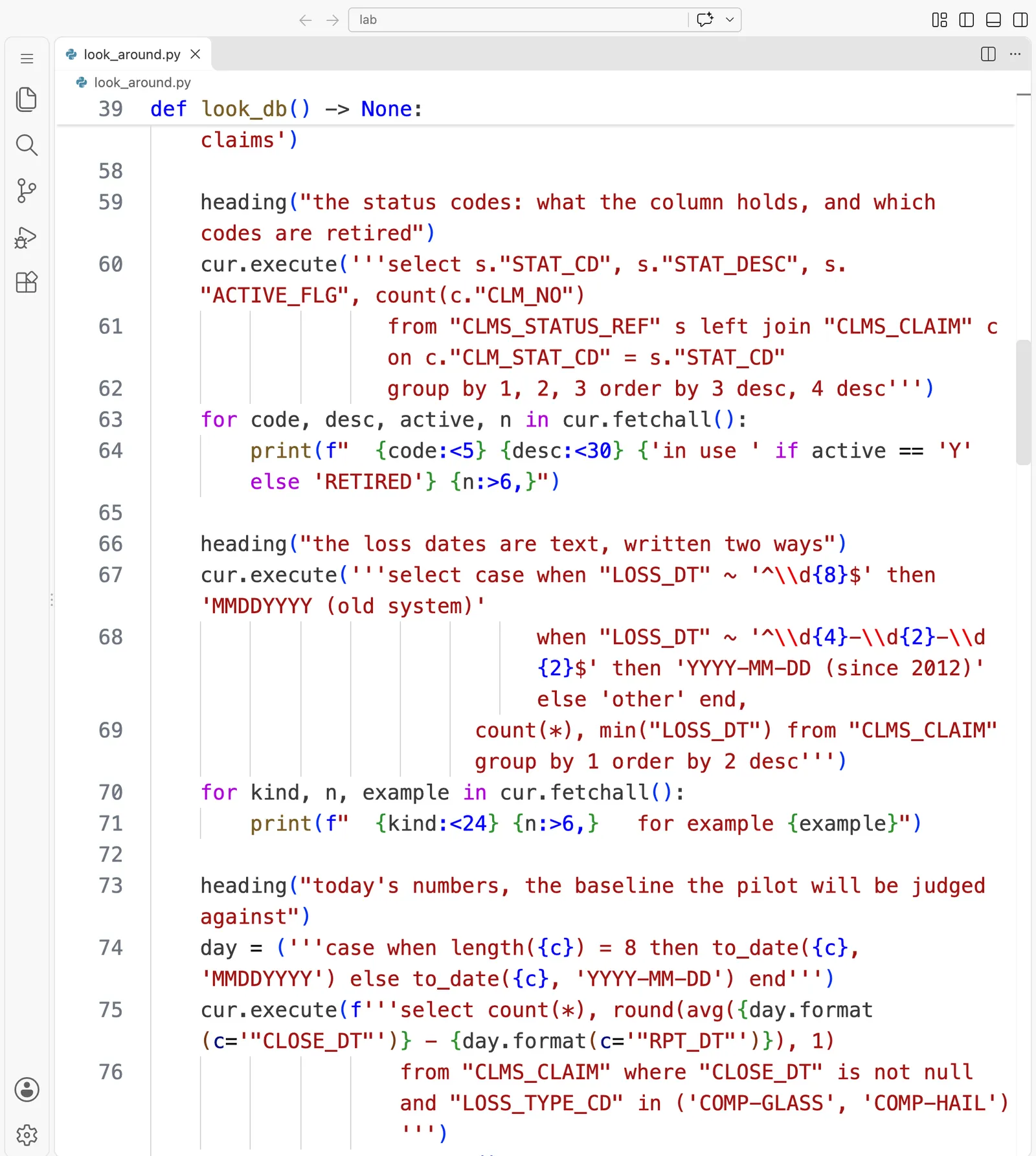
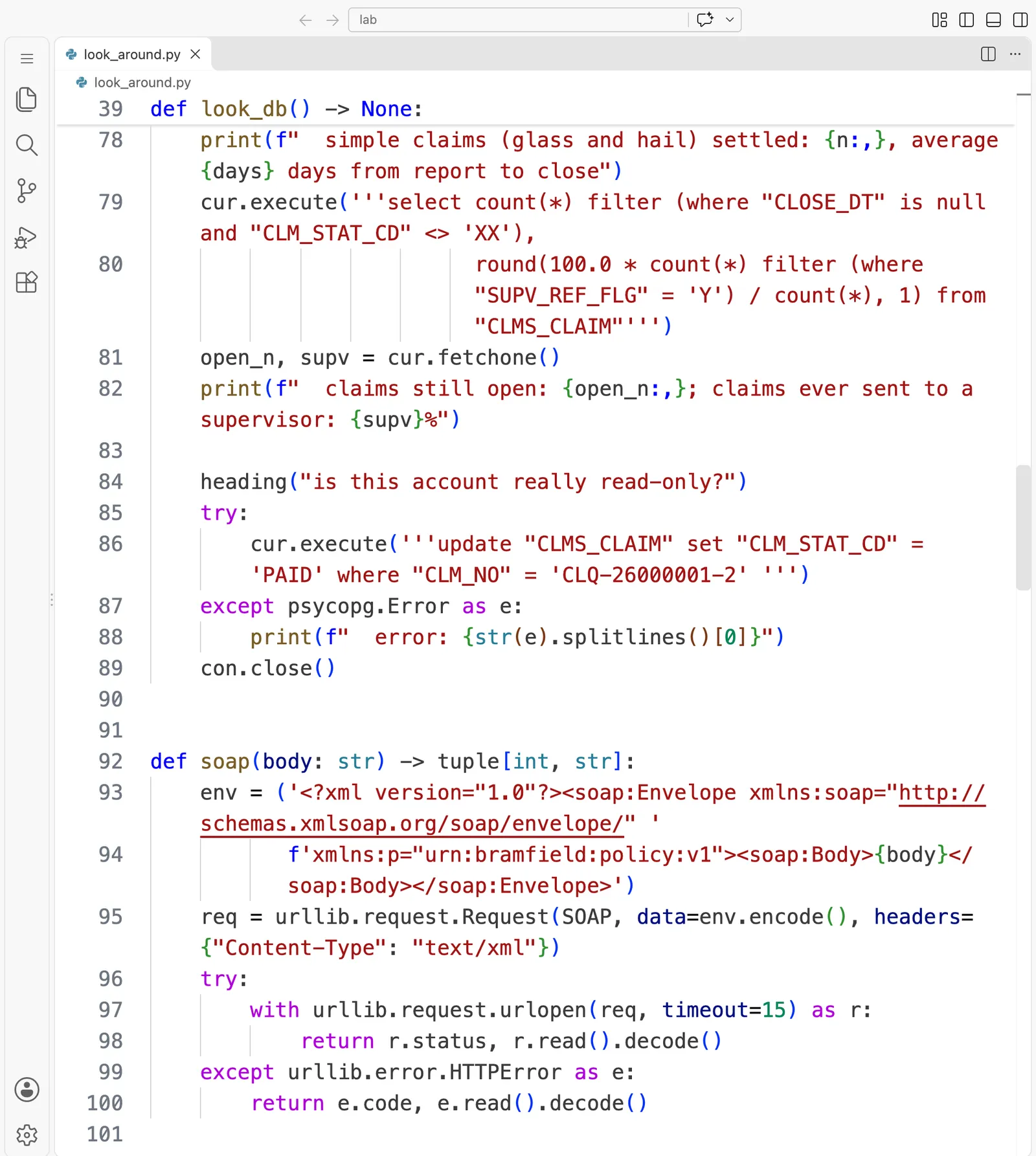
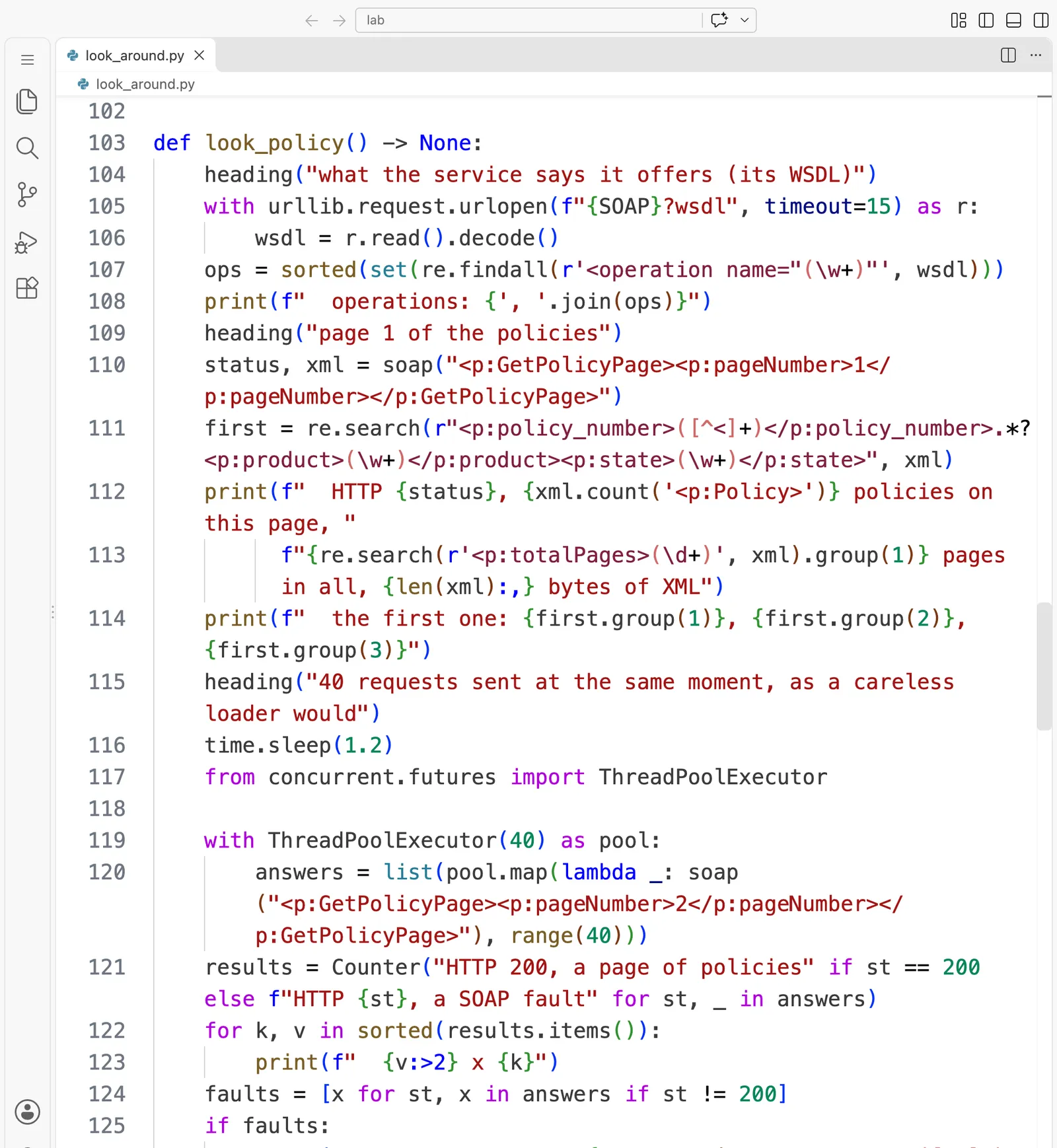
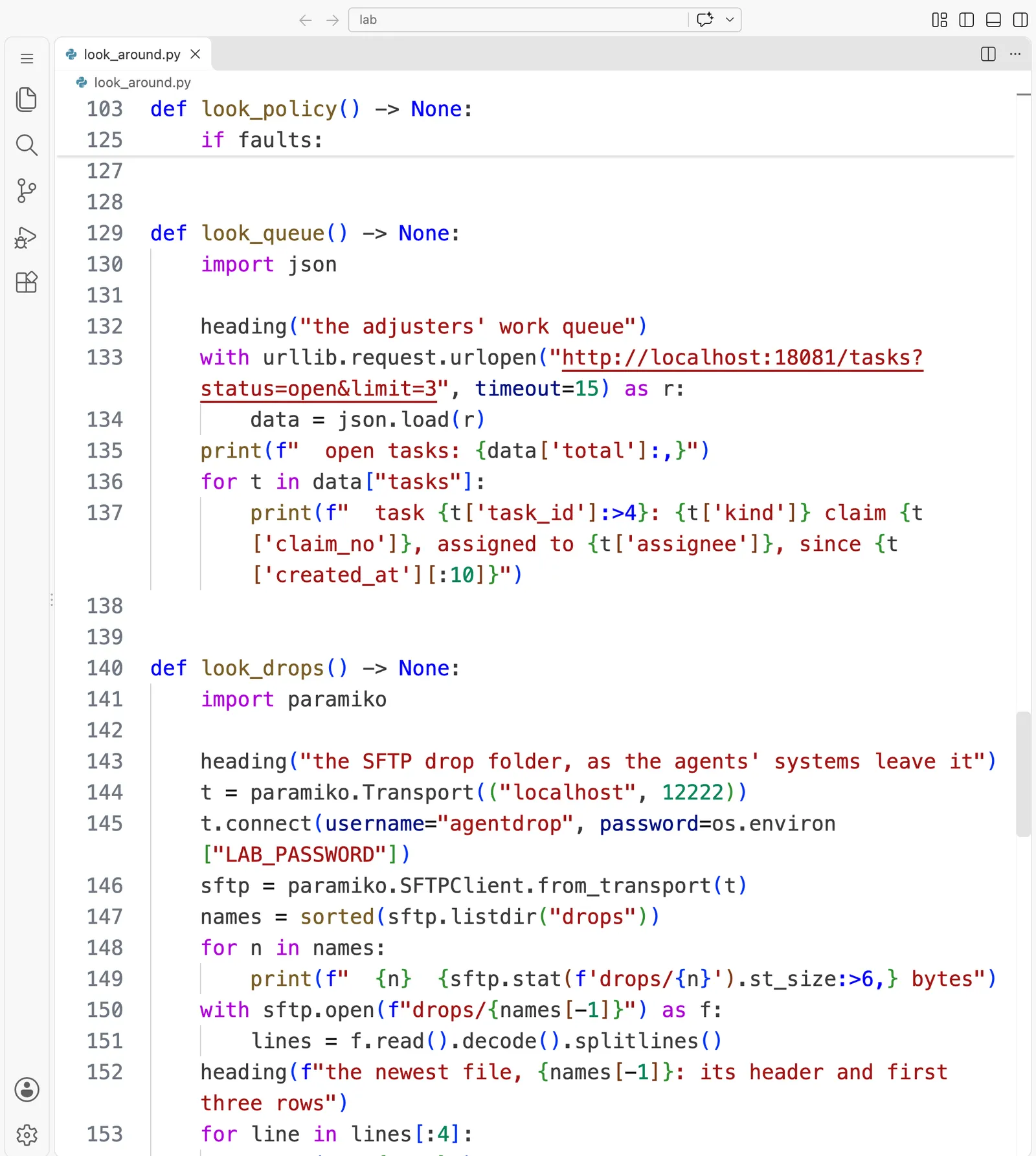
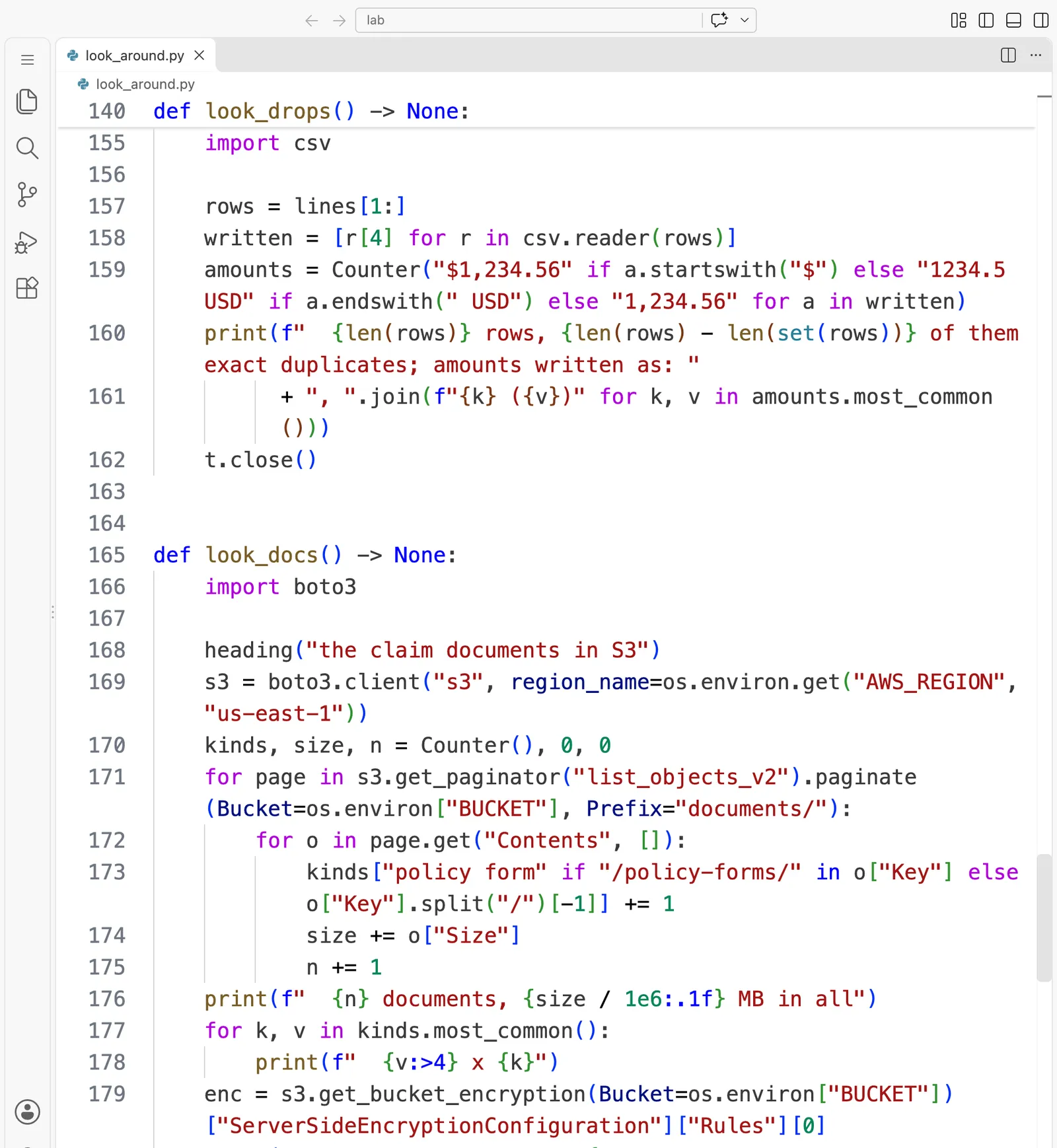
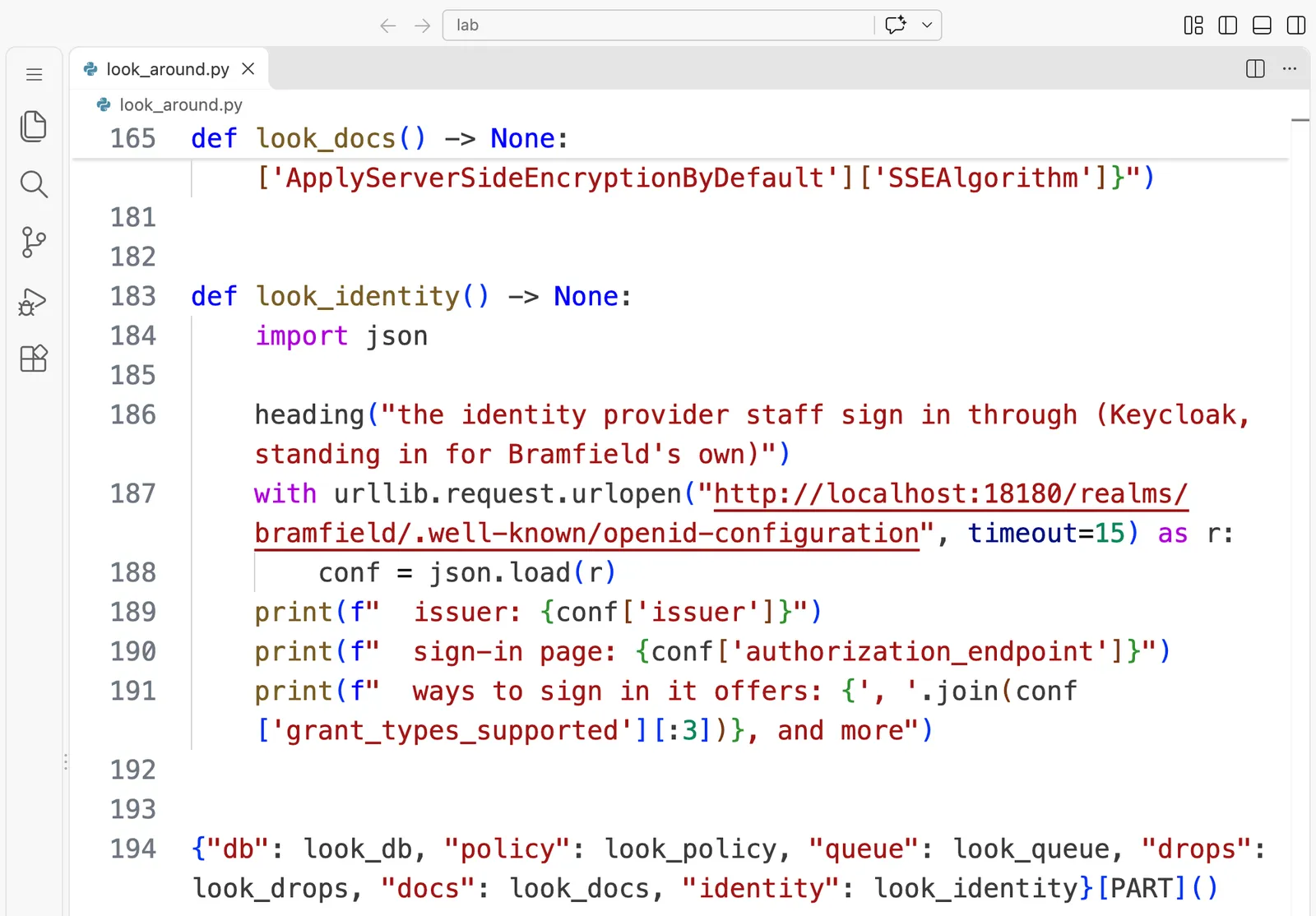
# /// script
# requires-python = ">=3.10"
# dependencies = ["psycopg[binary]==3.2.3", "paramiko==3.5.0", "boto3==1.35.68"]
# ///
"""Look around Bramfield Mutual's systems with read-only access, the way you would in your first week.

    make look PART=db       the claims database: its tables, its status codes, its dates, and today's numbers
    make look PART=policy   the old SOAP policy service: what it offers, one page, and its rate limit
    make look PART=queue    the adjusters' work queue
    make look PART=drops    last night's file drop from the independent agents, over SFTP
    make look PART=docs     the claim documents in S3
    make look PART=identity the identity provider that staff sign in through

Run `make tunnel` first: every system is reached at localhost through Session Manager. The passwords come from SSM
Parameter Store through the Makefile and are never printed. Nothing here writes anything.

Author: Roni Das
Created: 2026-11-13
"""

from __future__ import annotations

import os
import re
import sys
import time
import urllib.error
import urllib.request
from collections import Counter

PART = sys.argv[1] if len(sys.argv) > 1 else "db"
SOAP = "http://localhost:18080/PolicyService"


def heading(text: str) -> None:
    print(f"\n== {text}")


def look_db() -> None:
    import psycopg

    con = psycopg.connect(host="localhost", port=15432, dbname="claims", user="fde_readonly",
                          password=os.environ["PGPASSWORD"], autocommit=True, connect_timeout=10)
    cur = con.cursor()
    heading("the tables you can read, and how many rows each holds")
    cur.execute("select table_name from information_schema.tables where table_schema = 'public' order by 1")
    for (t,) in cur.fetchall():
        cur.execute(f'select count(*) from "{t}"')
        print(f"  {t:<18} {cur.fetchone()[0]:>7,} rows")

    heading("a first query, written the way most people write SQL")
    try:
        cur.execute("select count(*) from CLMS_CLAIM")
    except psycopg.Error as e:
        print(f"  error: {str(e).splitlines()[0]}")
    cur.execute('select count(*) from "CLMS_CLAIM"')
    print(f'  with the name in double quotes: {cur.fetchone()[0]:,} claims')

    heading("the status codes: what the column holds, and which codes are retired")
    cur.execute('''select s."STAT_CD", s."STAT_DESC", s."ACTIVE_FLG", count(c."CLM_NO")
                   from "CLMS_STATUS_REF" s left join "CLMS_CLAIM" c on c."CLM_STAT_CD" = s."STAT_CD"
                   group by 1, 2, 3 order by 3 desc, 4 desc''')
    for code, desc, active, n in cur.fetchall():
        print(f"  {code:<5} {desc:<30} {'in use ' if active == 'Y' else 'RETIRED'} {n:>6,}")

    heading("the loss dates are text, written two ways")
    cur.execute('''select case when "LOSS_DT" ~ '^\\d{8}$' then 'MMDDYYYY (old system)'
                               when "LOSS_DT" ~ '^\\d{4}-\\d{2}-\\d{2}$' then 'YYYY-MM-DD (since 2012)' else 'other' end,
                          count(*), min("LOSS_DT") from "CLMS_CLAIM" group by 1 order by 2 desc''')
    for kind, n, example in cur.fetchall():
        print(f"  {kind:<24} {n:>6,}   for example {example}")

    heading("today's numbers, the baseline the pilot will be judged against")
    day = ('''case when length({c}) = 8 then to_date({c}, 'MMDDYYYY') else to_date({c}, 'YYYY-MM-DD') end''')
    cur.execute(f'''select count(*), round(avg({day.format(c='"CLOSE_DT"')} - {day.format(c='"RPT_DT"')}), 1)
                    from "CLMS_CLAIM" where "CLOSE_DT" is not null and "LOSS_TYPE_CD" in ('COMP-GLASS', 'COMP-HAIL')''')
    n, days = cur.fetchone()
    print(f"  simple claims (glass and hail) settled: {n:,}, average {days} days from report to close")
    cur.execute('''select count(*) filter (where "CLOSE_DT" is null and "CLM_STAT_CD" <> 'XX'),
                          round(100.0 * count(*) filter (where "SUPV_REF_FLG" = 'Y') / count(*), 1) from "CLMS_CLAIM"''')
    open_n, supv = cur.fetchone()
    print(f"  claims still open: {open_n:,}; claims ever sent to a supervisor: {supv}%")

    heading("is this account really read-only?")
    try:
        cur.execute('''update "CLMS_CLAIM" set "CLM_STAT_CD" = 'PAID' where "CLM_NO" = 'CLQ-26000001-2' ''')
    except psycopg.Error as e:
        print(f"  error: {str(e).splitlines()[0]}")
    con.close()


def soap(body: str) -> tuple[int, str]:
    env = ('<?xml version="1.0"?><soap:Envelope xmlns:soap="http://schemas.xmlsoap.org/soap/envelope/" '
           f'xmlns:p="urn:bramfield:policy:v1"><soap:Body>{body}</soap:Body></soap:Envelope>')
    req = urllib.request.Request(SOAP, data=env.encode(), headers={"Content-Type": "text/xml"})
    try:
        with urllib.request.urlopen(req, timeout=15) as r:
            return r.status, r.read().decode()
    except urllib.error.HTTPError as e:
        return e.code, e.read().decode()


def look_policy() -> None:
    heading("what the service says it offers (its WSDL)")
    with urllib.request.urlopen(f"{SOAP}?wsdl", timeout=15) as r:
        wsdl = r.read().decode()
    ops = sorted(set(re.findall(r'<operation name="(\w+)"', wsdl)))
    print(f"  operations: {', '.join(ops)}")
    heading("page 1 of the policies")
    status, xml = soap("<p:GetPolicyPage><p:pageNumber>1</p:pageNumber></p:GetPolicyPage>")
    first = re.search(r"<p:policy_number>([^<]+)</p:policy_number>.*?<p:product>(\w+)</p:product><p:state>(\w+)</p:state>", xml)
    print(f"  HTTP {status}, {xml.count('<p:Policy>')} policies on this page, "
          f"{re.search(r'<p:totalPages>(\d+)', xml).group(1)} pages in all, {len(xml):,} bytes of XML")
    print(f"  the first one: {first.group(1)}, {first.group(2)}, {first.group(3)}")
    heading("40 requests sent at the same moment, as a careless loader would")
    time.sleep(1.2)
    from concurrent.futures import ThreadPoolExecutor

    with ThreadPoolExecutor(40) as pool:
        answers = list(pool.map(lambda _: soap("<p:GetPolicyPage><p:pageNumber>2</p:pageNumber></p:GetPolicyPage>"), range(40)))
    results = Counter("HTTP 200, a page of policies" if st == 200 else f"HTTP {st}, a SOAP fault" for st, _ in answers)
    for k, v in sorted(results.items()):
        print(f"  {v:>2} x {k}")
    faults = [x for st, x in answers if st != 200]
    if faults:
        print(f"  the fault says: {re.search(r'<faultstring>([^<]+)', faults[0]).group(1)}")


def look_queue() -> None:
    import json

    heading("the adjusters' work queue")
    with urllib.request.urlopen("http://localhost:18081/tasks?status=open&limit=3", timeout=15) as r:
        data = json.load(r)
    print(f"  open tasks: {data['total']:,}")
    for t in data["tasks"]:
        print(f"  task {t['task_id']:>4}: {t['kind']} claim {t['claim_no']}, assigned to {t['assignee']}, since {t['created_at'][:10]}")


def look_drops() -> None:
    import paramiko

    heading("the SFTP drop folder, as the agents' systems leave it")
    t = paramiko.Transport(("localhost", 12222))
    t.connect(username="agentdrop", password=os.environ["LAB_PASSWORD"])
    sftp = paramiko.SFTPClient.from_transport(t)
    names = sorted(sftp.listdir("drops"))
    for n in names:
        print(f"  {n}  {sftp.stat(f'drops/{n}').st_size:>6,} bytes")
    with sftp.open(f"drops/{names[-1]}") as f:
        lines = f.read().decode().splitlines()
    heading(f"the newest file, {names[-1]}: its header and first three rows")
    for line in lines[:4]:
        print(f"  {line}")
    import csv

    rows = lines[1:]
    written = [r[4] for r in csv.reader(rows)]
    amounts = Counter("$1,234.56" if a.startswith("$") else "1234.5 USD" if a.endswith(" USD") else "1,234.56" for a in written)
    print(f"  {len(rows)} rows, {len(rows) - len(set(rows))} of them exact duplicates; amounts written as: "
          + ", ".join(f"{k} ({v})" for k, v in amounts.most_common()))
    t.close()


def look_docs() -> None:
    import boto3

    heading("the claim documents in S3")
    s3 = boto3.client("s3", region_name=os.environ.get("AWS_REGION", "us-east-1"))
    kinds, size, n = Counter(), 0, 0
    for page in s3.get_paginator("list_objects_v2").paginate(Bucket=os.environ["BUCKET"], Prefix="documents/"):
        for o in page.get("Contents", []):
            kinds["policy form" if "/policy-forms/" in o["Key"] else o["Key"].split("/")[-1]] += 1
            size += o["Size"]
            n += 1
    print(f"  {n} documents, {size / 1e6:.1f} MB in all")
    for k, v in kinds.most_common():
        print(f"  {v:>4} x {k}")
    enc = s3.get_bucket_encryption(Bucket=os.environ["BUCKET"])["ServerSideEncryptionConfiguration"]["Rules"][0]
    print(f"  encryption at rest: {enc['ApplyServerSideEncryptionByDefault']['SSEAlgorithm']}")


def look_identity() -> None:
    import json

    heading("the identity provider staff sign in through (Keycloak, standing in for Bramfield's own)")
    with urllib.request.urlopen("http://localhost:18180/realms/bramfield/.well-known/openid-configuration", timeout=15) as r:
        conf = json.load(r)
    print(f"  issuer: {conf['issuer']}")
    print(f"  sign-in page: {conf['authorization_endpoint']}")
    print(f"  ways to sign in it offers: {', '.join(conf['grant_types_supported'][:3])}, and more")


{"db": look_db, "policy": look_policy, "queue": look_queue, "drops": look_drops, "docs": look_docs, "identity": look_identity}[PART]()
cost.py
# /// script
# requires-python = ">=3.10"
# dependencies = ["boto3==1.35.68"]
# ///
"""What the running Bramfield lab costs per hour in us-east-1, read from the AWS Price List API today, not typed in.

    make cost            (it passes the server's instance type)

Counts the three things that cost money while the lab runs: the server, its 20 GB gp3 disk, and its public IPv4
address. The S3 documents (under 10 MB) and the SSM parameters (standard tier) cost a fraction of a cent a month.

Author: Roni Das
Created: 2026-11-13
"""

from __future__ import annotations

import json
import sys

import boto3

TYPE = sys.argv[1] if len(sys.argv) > 1 else "t2.small"
DISK_GB = 20
pricing = boto3.client("pricing", region_name="us-east-1")


def price(service: str, **filters: str) -> float:
    f = [{"Type": "TERM_MATCH", "Field": k, "Value": v} for k, v in filters.items()]
    item = json.loads(pricing.get_products(ServiceCode=service, Filters=f, MaxResults=1)["PriceList"][0])
    term = next(iter(item["terms"]["OnDemand"].values()))
    return float(next(iter(term["priceDimensions"].values()))["pricePerUnit"]["USD"])


server = price("AmazonEC2", instanceType=TYPE, regionCode="us-east-1", operatingSystem="Linux", tenancy="Shared",
               preInstalledSw="NA", capacitystatus="Used")
disk_month = price("AmazonEC2", regionCode="us-east-1", volumeApiName="gp3", productFamily="Storage")
ip = price("AmazonVPC", regionCode="us-east-1", group="VPCPublicIPv4Address", groupDescription="Hourly charge for In-use Public IPv4 Addresses")
disk = disk_month * DISK_GB / 730
rows = [(f"the server, {TYPE}", server), (f"its disk, {DISK_GB} GB of gp3 (${disk_month:.3f} a GB-month)", disk),
        ("its public IPv4 address", ip)]
print("what the lab costs per hour while it runs, us-east-1, from the AWS Price List:")
for name, usd in rows:
    print(f"  {name:<44} ${usd:.4f}")
total = sum(u for _, u in rows)
print(f"  {'in all':<44} ${total:.4f} an hour, about ${total * 24:.2f} a day")
print(f"stopped, you pay only for the disk: about ${disk * 24:.2f} a day")
The longer files, in the zip
Three files are too long to read well in this lesson, so they are only in the zip, in the lab folder: app/policy-service/server.py (140 lines, the SOAP service with its WSDL and its token bucket), app/work-queue/server.py (79 lines, the JSON work queue whose POST /tasks is not idempotent, which means the same request sent twice makes two tasks) and app/generator/gen.py (the generator: the policies, the claims, the notes with their personal data, the planted mess, the answer key, the drops and the documents). Read impossible_ssn() and impossible_vin() in gen.py first.
Sources
- Our own builds of 13 November 2026, in our own AWS account in us-east-1, with the lab folder in this zip. The test build started at 07:44:57 UTC and was deleted; it found the four problems in "Going deeper". The answer-key counts quoted there come from the corrected generator, re-run on the same seed, whose data is byte for byte the data of the recorded run. The recorded build started at about 07:57:30 UTC; every output in this lesson is filled from the
scriptrecordings of our VS Code terminal,runs/session-2026-11-13-a.log(frommake uptomake stop) andruns/session-2026-11-13-b.log(fromaws ec2 describe-instancestomake destroy), with the prompt set to show only the folder name. Times are from those recordings, their screenshots and, for the restart, the launch time EC2 reported (08:10:56); a time marked "about" is inferred from file times. Terraform 1.9.8 ran the build. - Bramfield Mutual: a fictional company. The name was checked on 13 November 2026 against a web search, SEC EDGAR's company search ("No matching companies") and the domain register, as the course plan records. Every business figure in the brief is invented.
- Social Security Administration, "Social Security Number Randomization: Frequently Asked Questions", https://www.ssa.gov/employer/randomizationfaqs.html, read and saved on 13 November 2026: the answer on group number 00 and serial number 0000, and the excluded area numbers 000, 666 and 900 to 999.
- AWS Price List API, read by
make coston 13 November 2026 for us-east-1:t2.smallLinux on-demand $0.0230 an hour, gp3 storage $0.080 per GB-month, an in-use public IPv4 address $0.0050 an hour. NAT gateway $0.045 an hour, read from the same API on the same day for the course plan. - AWS Systems Manager Session Manager, starting a session and port forwarding: https://docs.aws.amazon.com/systems-manager/latest/userguide/session-manager-working-with-sessions-start.html. Instance metadata, IMDSv2: https://docs.aws.amazon.com/AWSEC2/latest/UserGuide/configuring-instance-metadata-service.html. Burstable instances and standard credit mode: https://docs.aws.amazon.com/AWSEC2/latest/UserGuide/burstable-performance-instances-standard-mode.html.
- PostgreSQL 16 documentation, "Identifiers and Key Words", on folding unquoted names to lower case: https://www.postgresql.org/docs/16/sql-syntax-lexical.html.
default_transaction_read_only: https://www.postgresql.org/docs/16/runtime-config-client.html. - Keycloak 26 server guides, importing a realm and the health endpoints: https://www.keycloak.org/server/importExport and https://www.keycloak.org/server/health. OpenID Connect discovery: https://openid.net/specs/openid-connect-discovery-1_0.html.
- Terraform AWS provider,
aws_s3_bucketwithforce_destroy: https://registry.terraform.io/providers/hashicorp/aws/latest/docs/resources/s3_bucket.