LLM Inference Course: What You Run on a Real GPU, Lesson by Lesson
Is there a hands-on LLM inference course?
Yes. Hands-On Inference Engineering by System Design Masterclass at systemdesign.academy is a self-paced course of interactive text lessons, not videos, where you rent an NVIDIA GPU on RunPod, serve open models with llama.cpp and vLLM, and measure the speed and the cost yourself. 43 of 81 planned lessons are out today, about 40 hours, with 37 hands-on labs, 14 reference lessons on vLLM's settings and a GPU serving game. 4 lessons are free.
Save your progress and get the AI Engineering cheat sheet PDF
This page walks through what you actually run in our LLM inference course, lesson by lesson, with the number each lesson measured on a rented GPU, in 11 short answers. It also says plainly which parts are still being written.

11 questions · 4 sections · answers from the course
These answers come from our course Hands-On Inference Engineering: Serve LLMs on GPUs with vLLM and SGLang: 43 lessons ready so far, each one run and measured on a rented NVIDIA GPU. The first lessons are free to read, with no card needed.
The short answer
Judge an LLM inference course by what you run and measure. In this one you rent a GPU, serve real models with vLLM, change one setting at a time and compare your numbers with ours. The free lessons include real GPU labs, so you can check before you pay.
1. What this LLM inference course is
The short version first, then who it suits and how it is taught.
Whose LLM inference course does this page describe?
This page is written by System Design Masterclass at systemdesign.academy, about our own course, Hands-On Inference Engineering. It teaches you to serve open large language models, such as Qwen3, on a GPU you rent by the hour, and to measure how fast and how costly each answer is. 43 of the 81 planned lessons are out today, about 40 hours of learning, with 37 hands-on labs on rented RunPod machines, 36 of them with an NVIDIA GPU, more than 1000 diagrams and real screenshots, and 14 reference lessons that explain vLLM's settings one by one.
Everything on this page is counted from the lessons themselves. We do not rank other courses here; the honest comparison is on a separate page.
Is it a video course?
No. It is a self-paced course of interactive text lessons. Each lesson explains one idea in plain words with diagrams, then gives you a hands-on part you run yourself on a rented GPU, with the exact commands, the code, and the real output from our own run so you can compare. Each lesson ends with a knowledge check, and some lessons ask you to predict a number before the run shows it, then score your guess.
Beside the lessons is The Serving Desk, a game where each level is a customer ticket: a model, how many people use it, and a speed and budget to keep. You predict one number first, then choose the GPU, the number format and the number of copies, and the course's own maths scores your plan. The first levels are free to play.
Who is this LLM inference course for?
It suits backend, platform and ML engineers who are asked to run a model themselves instead of calling an outside API, and engineers moving into an inference engineer role. It assumes you can read simple Python, use a terminal and know the Git basics. It does not assume any AI, GPU or maths knowledge beyond school level: Part 1 starts from what a model is.
If you only want a model on your own laptop for yourself, the local LLM guide is a better start. This course is about serving a model on a real GPU to many people at once.
Lesson: Before you start, with a five-minute self-check (free)
2. What you run on the GPU, lesson by lesson
Each answer names a published lesson and the number our own run measured. You repeat the same run and compare.
What do I run first?
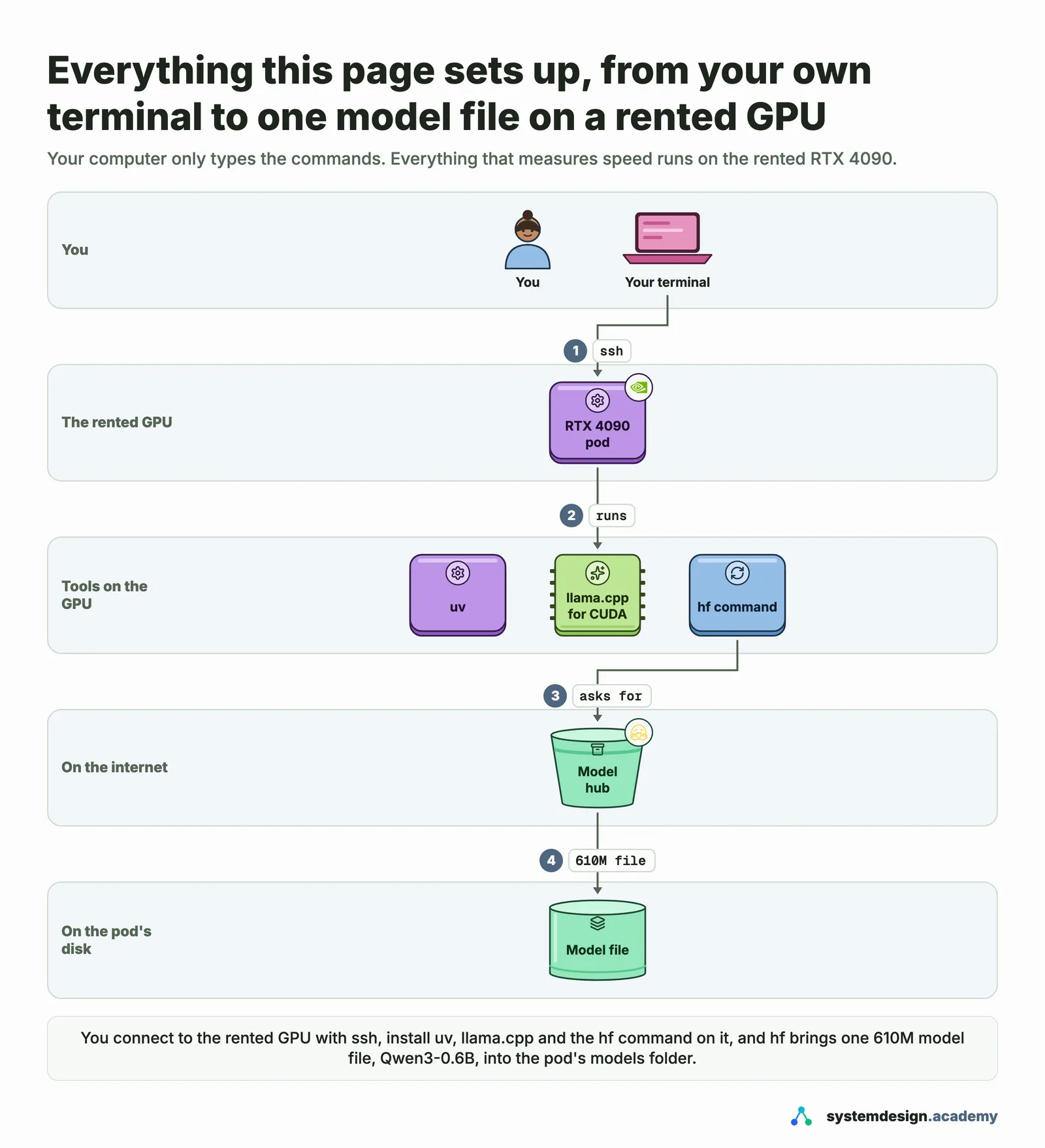
In the free lesson "Before you start" you rent an NVIDIA RTX 4090 on RunPod, connect to it with ssh, install llama.cpp and the Hugging Face hf command, download a small model, ask it your first question and switch the GPU off. Part 1 then times one answer from Qwen3-8B with llama.cpp, from the download to the last word.
By the end of Part 1 you serve a model with vLLM and call it with the OpenAI Python library. In our run of that lesson, 64 people asking at once on one RTX 4090 got 12,087 tokens a second in total, about 189 each.
What does the course measure about one request?
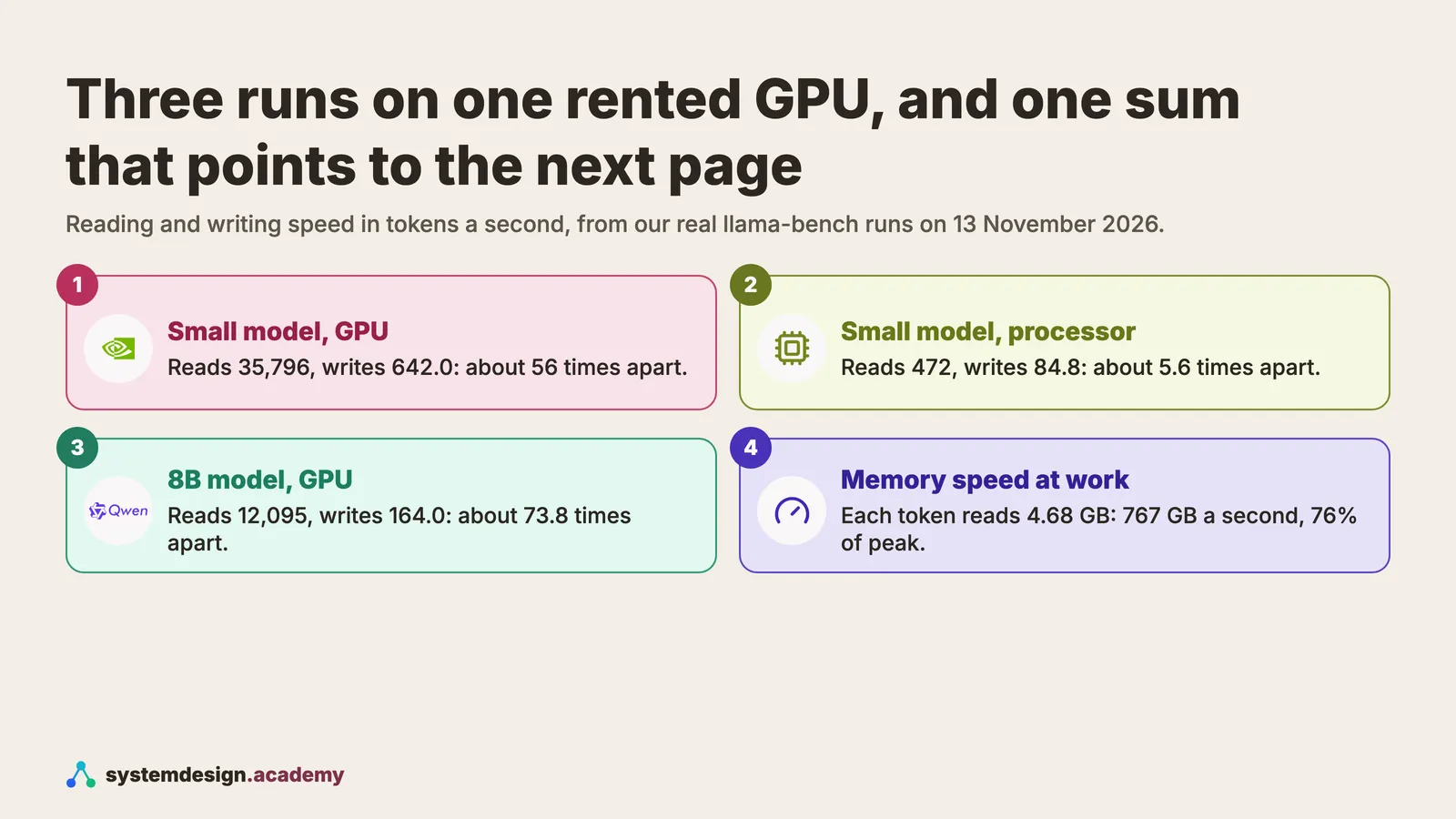
Part 2 splits a request into its two halves. Prefill reads the whole question at once; decode writes the answer one token at a time. In the free lesson on them, the same rented GPU read a prompt about 56 times faster per token than it wrote the answer, and the chart above shows the three runs behind that number.
The free KV cache lesson works out, from the model's own config file, how much memory each token of a conversation needs. For Qwen3-8B on a 24 GB card the weights took 15.27 GiB and vLLM left room for 33,216 tokens of conversation.
Does it cover batching and the cost of an answer?
Yes. In the batching lesson, 32 people at once wrote 20 times as much as one person while each kept about 70% of their own speed. At 64 people the KV cache ran out, vLLM paused requests, and 1 in 100 people waited almost 9 seconds for the first word.
The cost lesson turns a GPU's hourly price and a measured writing speed into the cost of one answer. Serving 32 people at once got 13.5 times as many tokens out of the same paid hour as serving one person, so each answer cost that much less.
How deep does it go into vLLM?
Part 3, "vLLM in depth", follows one request through vLLM's processes, then changes one setting at a time and measures what it does: PagedAttention, the scheduler, chunked prefill, prefix caching, memory settings, sampling, LoRA adapters, start-up time and running vLLM as a real service.
Two examples from our runs. With prefix caching, questions that shared a 3,000-token handbook waited about 46 milliseconds for the first word instead of 326. Storing the KV cache in 8 bits gave room for 1.80 times as many tokens on the same card.
What about quantization, SGLang and many GPUs?
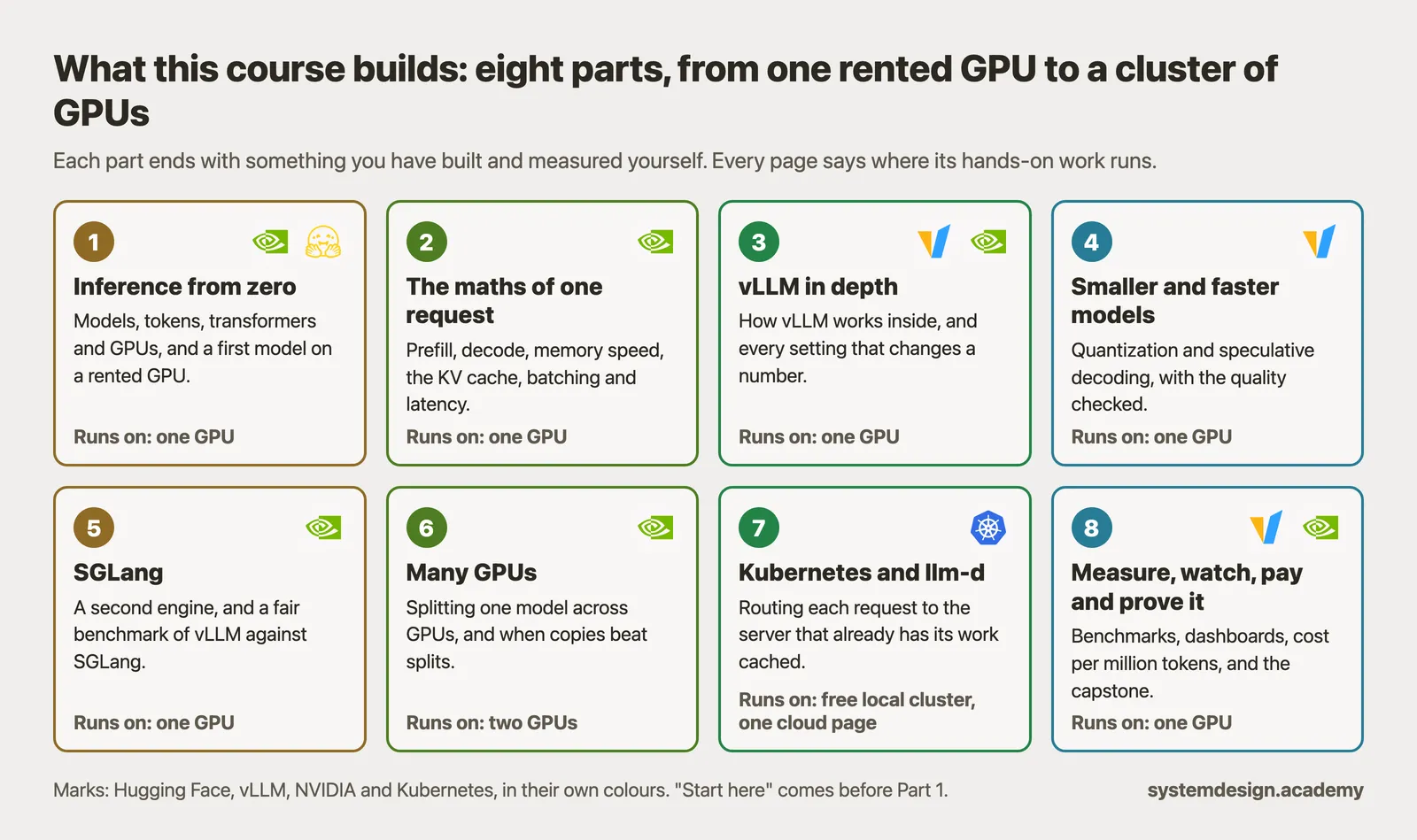
Those are in the later parts. Lessons still being written there include "A fair vLLM and SGLang benchmark", "Tensor parallelism", "Routing by what each server has cached" and "Cost per million tokens". They are part of the plan shown below, and every one is included in the course when it comes out.
Until then, the 14 reference lessons already explain every vLLM setting for quantization, speculative decoding and splitting a model across GPUs, with each setting's default and when an engineer changes it.
3. How this page fits with the others
Three related pages answer different questions. This one is about the hands-on course itself.
Where do I learn what LLM inference is, before I take a course?
The guide to LLM inference explains the idea in plain words: the two halves of a request, the KV cache, batching and the speed numbers, with figures from the same GPU runs. It is free and has no lab. This course is where you run those things yourself and change the settings.
4. Trying it and buying it
How to check the course yourself before you pay.
Can I try the LLM inference course before I pay?
Yes. 4 lessons are free: "Introduction: what this course builds", "Before you start", "Prefill and decode" and "The KV cache". 3 of them have a full hands-on lab on the GPU, so you can rent the GPU, run the commands and compare your numbers with ours before you decide. The first levels of The Serving Desk game are free too.
You pay RunPod for the GPU time yourself, with credit you add in advance. In our runs a Part 2 lab took 5 to 9 minutes on the GPU, about 7 to 13 US cents each at the secure cloud rate, and every lab ends by switching the GPU off.
How does buying work, and is the course finished?
You pay once and keep the course for life, including every lesson added later. There is no subscription. The price for your country is in the box on this page and on the course page. The course is in early access: 43 of the 81 planned lessons are out today, and new lessons are added as they are finished.
Full walkthrough: The course page, with the price for your country
Where to go next
Every number on this page comes from Hands-On Inference Engineering: Serve LLMs on GPUs with vLLM and SGLang, where you rent the GPU yourself, run each command and compare your numbers with ours. Start with the free introduction and the free lessons on prefill and decode and the KV cache. If you are also preparing for interviews, the two big courses together and the Inference Engineering interview pack are below.

These questions are a start. The interview asks more.
Get all 120 questions in the Inference Engineering pack
Each question has why it is asked, a full answer, what the interviewer listens for, the follow-ups, the common mistakes and a diagram (141 diagrams in all). A PDF you keep, junior to staff level.
Pay by UPI, cards or netbanking through Razorpay. Pay by card or PayPal, in US dollars. Download at once from My packs.