vLLM vs TensorRT-LLM: Which Is Faster, and Which to Choose
Is TensorRT-LLM faster than vLLM?
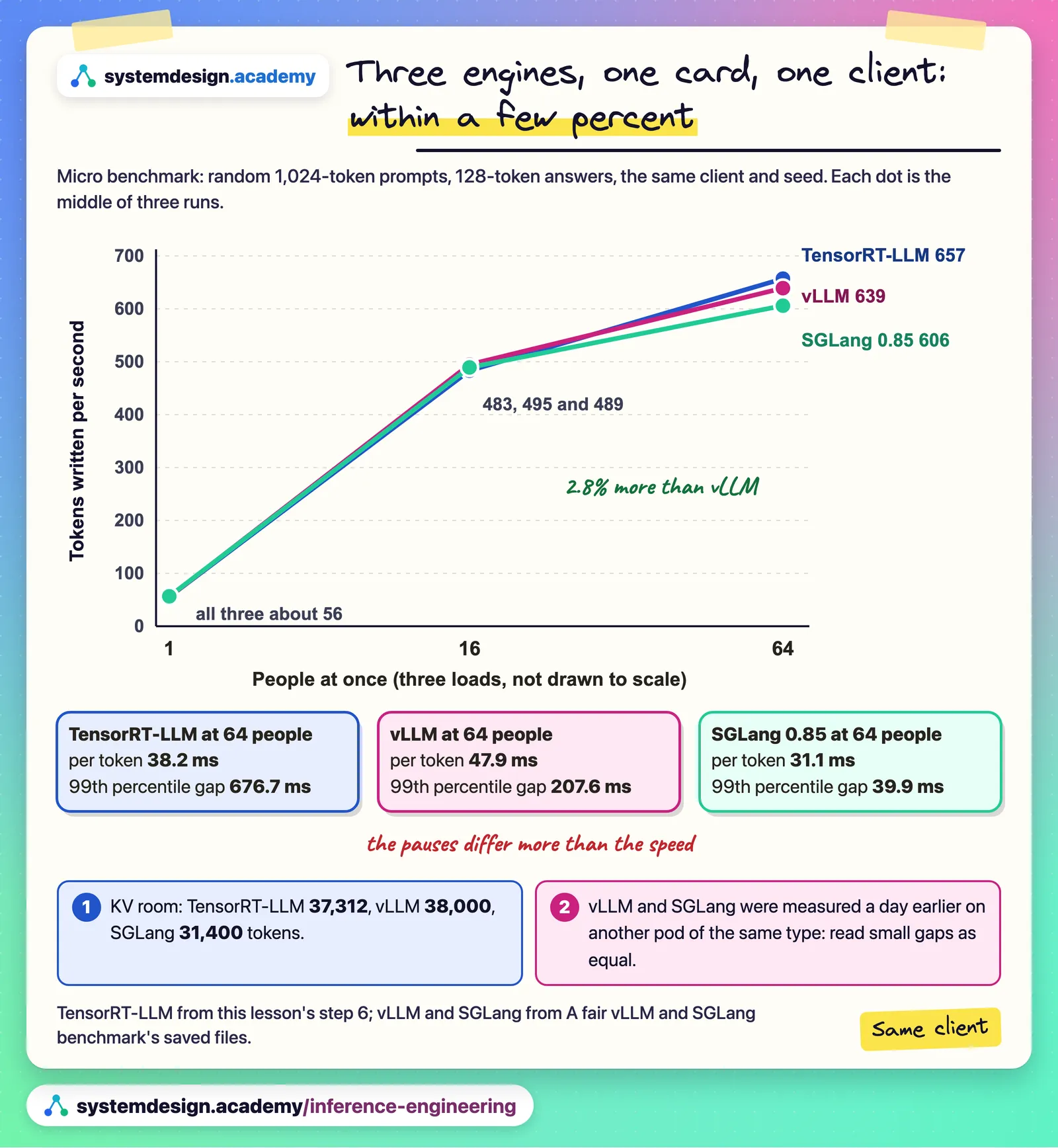
On one RTX 4090 with Qwen3-8B, not by a margin that matters: with the same benchmark and similar KV cache memory, TensorRT-LLM 1.2.1 wrote 657 tokens a second for 64 people at once and vLLM 0.33.0 wrote 639, and both wrote 56 for one person. The real differences were setup effort and pauses: trtllm-serve reads whole prompts in one step by default, so its rare pauses between words were longer. TensorRT-LLM may pull ahead on large NVIDIA data-centre GPUs and very large models, so measure on your own hardware.
Save your progress and get the AI Engineering cheat sheet PDF
This guide compares vLLM with TensorRT-LLM, NVIDIA's own serving engine, in 14 questions. Every number comes from Hands-On Inference Engineering, where we served Qwen3-8B on a rented RTX 4090 with both engines and measured them with the same client, prompts and seed. We also say plainly what one card cannot show.

14 questions · 4 sections · answers from the course
These answers come from our course Hands-On Inference Engineering: Serve LLMs on GPUs with vLLM and SGLang: 54 lessons ready so far, each one run and measured on a rented NVIDIA GPU. The first lessons are free to read, with no card needed.
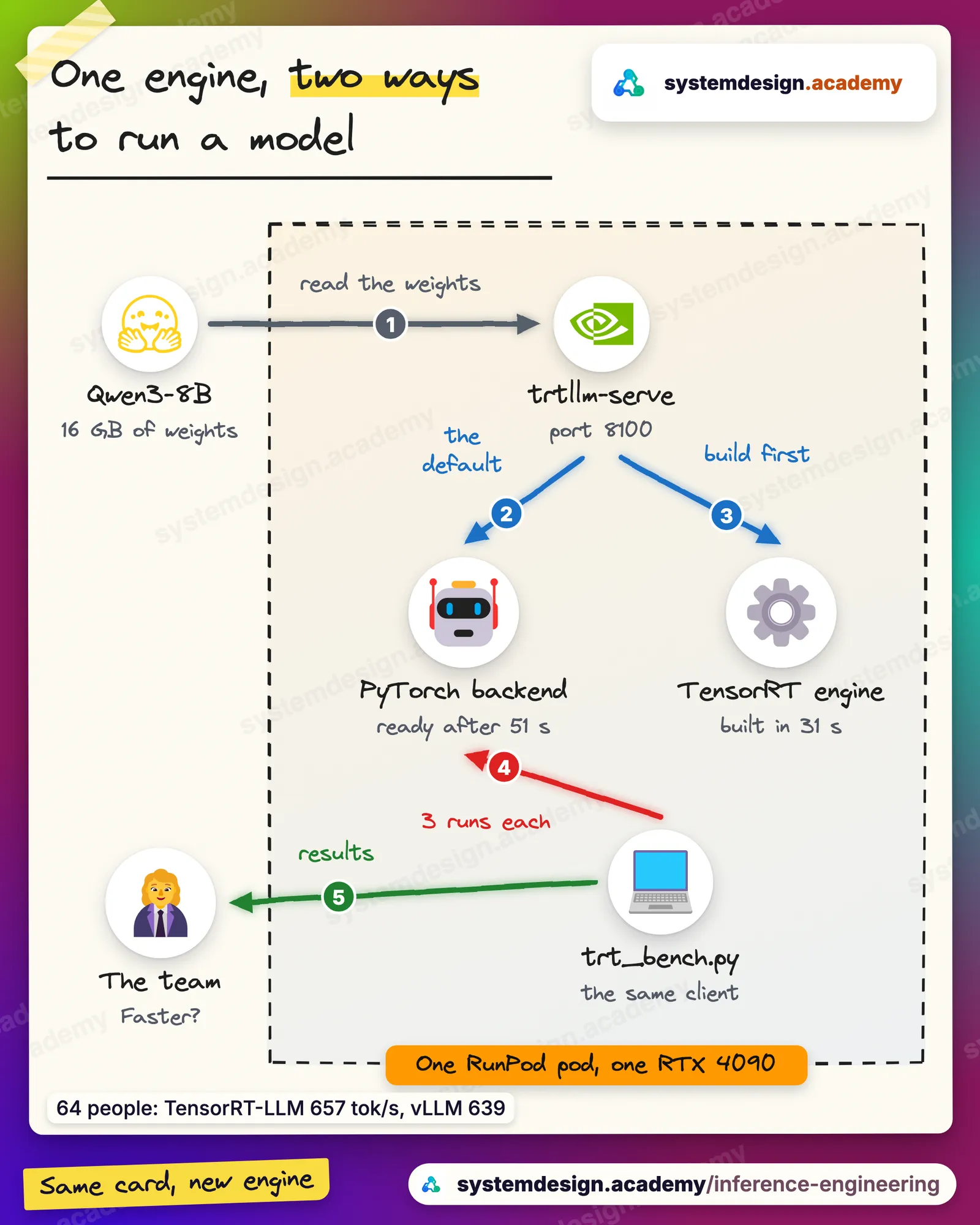
The short version
On a single card with a mid-sized model, vLLM and TensorRT-LLM write at about the same speed, and vLLM is far easier to install and monitor. TensorRT-LLM is worth a test when your fleet is large NVIDIA data-centre GPUs running very large or FP8 and FP4 models. Whichever you test, match the KV cache memory, use one client for both, run everything three times, and compare the slow end of the gaps between words as well as total tokens a second.
If this helped, the full hands-on course goes much deeper.
In the course you install TensorRT-LLM, vLLM and SGLang on the same rented GPU yourself, avoid the four install traps, and run the same fair benchmark on all three.
1. The short answer
vLLM and TensorRT-LLM are both open-source engines that serve language models on GPUs. vLLM runs on many kinds of hardware and is the most common default. TensorRT-LLM is NVIDIA's own engine and runs only on NVIDIA GPUs.
What are vLLM and TensorRT-LLM?
Both are model servers: programs that load a language model onto a GPU, keep it in memory and answer many people's requests at the same time. Both batch requests as they arrive and leave, keep the model's notes for every token (the KV cache) in blocks, and offer an OpenAI-compatible server, so the OpenAI Python library can talk to either.
vLLM came out of the University of California, Berkeley, with the paper that introduced PagedAttention. TensorRT-LLM is made by NVIDIA, the company that makes the GPU, and its own server is called trtllm-serve. The course measured vLLM 0.33.0 and TensorRT-LLM 1.2.1.
Is TensorRT-LLM faster than vLLM?
Not by a margin that matters on the card we tested. With Qwen3-8B on one RTX 4090, the same benchmark client, the same prompts and seed, and similar memory for the KV cache, TensorRT-LLM 1.2.1 wrote 657 tokens a second for 64 people at once against vLLM 0.33.0's 639. For one person both wrote 56 tokens a second.
2.8% is inside the noise between two servers on two pods a day apart, so the honest reading is "about the same". NVIDIA's record numbers come from large data-centre GPUs, very large models and tuned settings, which one 24 GB card with an 8-billion-parameter model cannot test. If that is your hardware, measure there.
What we measured: Qwen3-8B, one RTX 4090, middle of three runs: 64 people, TensorRT-LLM 657 tokens/s, vLLM 639, SGLang 606; 1 person, 56, 56 and 57.
Can I switch from vLLM to TensorRT-LLM without changing my code?
The client side, mostly yes: trtllm-serve answers on OpenAI-style addresses such as /v1/chat/completions, as vLLM does. What changes is everything on the server: the install, the start command, the settings file, the names of the settings, and the monitoring.
Monitoring is the one that surprises people. In TensorRT-LLM 1.2.1 the /metrics address returns a JSON list of step statistics, and only when enable_iter_perf_stats is switched on; vLLM's /metrics returns Prometheus metrics. Plan your dashboards before you plan a switch.
2. What we measured on one RTX 4090
Lesson 5.7 of the course ran TensorRT-LLM with the same client, prompts and seed as the vLLM and SGLang runs before it: random 1,024-token prompts, 128-token answers, at 1, 16 and 64 people, three runs of everything.
How did vLLM and TensorRT-LLM compare at 1, 16 and 64 people?
At 1 person, both wrote 56 tokens a second, with the first word after 110 ms on vLLM and 102 ms on TensorRT-LLM, and about 17.2 ms per token on both. At 16 people, vLLM wrote 495 tokens a second and TensorRT-LLM 483. At 64 people, vLLM wrote 639 and TensorRT-LLM 657.
The memory for the KV cache was close but not equal: 38,000 tokens on vLLM at its defaults and 37,312 on TensorRT-LLM with its memory share set to 0.85. That match matters more than anything else in a comparison, because an engine with less room for notes queues people and looks slow for that reason alone.
What we measured: Middle of three runs on one RTX 4090: 16 people, vLLM 495 tokens/s, TensorRT-LLM 483; KV cache 38,000 and 37,312 tokens.
Where do vLLM and TensorRT-LLM really differ?
In how they mix reading new prompts with writing answers. When everybody is simply writing, a step costs about the same in both: the middle gap between words at 64 people was 26.2 ms on vLLM and 25.1 ms on TensorRT-LLM. The slow end tells them apart. TensorRT-LLM's 99th percentile gap at 64 people was 676.7 ms; vLLM's was 207.6 ms.
The reason is a default. trtllm-serve has chunked prefill switched off, so a newcomer's whole prompt is read in one step while every other stream waits; at 64 people several prompts arrive together and one step can read about 5,684 tokens. vLLM reads prompts in pieces of up to 2,048 tokens, so its pauses are more frequent and shorter. That is also why vLLM's time per token was higher, 47.9 ms against 38.2 ms.
What we measured: 64 people: gap between words, middle 26.2 ms (vLLM) and 25.1 ms (TensorRT-LLM); 99th percentile 207.6 ms and 676.7 ms; time per token 47.9 ms and 38.2 ms.
Which engine gives the first word sooner?
vLLM, at the loads where people queue. At 16 people the middle wait for the first word was 598 ms on vLLM and 1,121 ms on TensorRT-LLM; at 64 people it was 6,846 ms and 7,558 ms.
It is not memory: all 16 people's requests fitted in TensorRT-LLM's cache. Our best reading is how whole prompts are read. Sixteen prompts of 1,024 tokens do not fit one 8,192-token step, so they are read in groups, and requests that start together finish together and send their replacements together. That fits the numbers but is not proven, because the per-request timings were not saved.
What we measured: Middle first word: 16 people, vLLM 598 ms, TensorRT-LLM 1,121 ms; 64 people, 6,846 ms and 7,558 ms.
What does this comparison not show?
It is one card, one model and one start of each server. The vLLM numbers were recorded on 19 November on another pod with the same card type, versions and model; the TensorRT-LLM numbers on 20 November. Three runs within one start moved by less than 1%, but we have no measurement of the difference between pods, so a few percent either way means the same.
It also does not test what NVIDIA's engine is built to win at: FP8 and FP4 on Hopper and Blackwell GPUs, very large mixture-of-experts models, and serving across many GPUs and machines. On those, measure your own model on your own hardware before you trust anyone's chart, ours included.
If this helped, the full hands-on course goes much deeper.
In the course you install TensorRT-LLM, vLLM and SGLang on the same rented GPU yourself, avoid the four install traps, and run the same fair benchmark on all three.
3. How TensorRT-LLM works, next to vLLM
Three things about TensorRT-LLM catch people who know vLLM: it has two ways to run a model, its settings file wins over the command line, and Triton is a different product.
What is the difference between the TensorRT engine and the PyTorch backend?
TensorRT-LLM can run a model in two ways. The older way builds a TensorRT engine: a file compiled and tuned for one GPU model and fixed limits, such as the largest batch. The newer way, the default since TensorRT-LLM 1.0, runs the model's PyTorch code with NVIDIA's fast kernels and builds nothing ahead of time. Both share the same scheduler, KV cache manager and server.
On our RTX 4090, the PyTorch backend was ready after 51 seconds. The engine path was ready after 79 seconds, 31 of them building the engine, and the build used about 45 GB of the computer's own memory. An engine built for an RTX 4090 will not load on an H100, so a team that keeps engines keeps one per GPU model and per set of limits. Start with the PyTorch backend, as NVIDIA's own documentation does.
What we measured: TensorRT-LLM 1.2.1, Qwen3-8B, RTX 4090: PyTorch backend ready after 51 s; engine path ready after 79 s, 31 s of it building.
How do TensorRT-LLM's settings differ from vLLM's?
trtllm-serve takes a few settings as flags and the rest from a YAML file. In TensorRT-LLM the file wins: if the file says a memory share of 0.85 and you type 0.95 on the command line, 0.85 is used. vLLM does the opposite, so a flag typed on the command line wins over its config file. That difference catches people who know vLLM well.
Memory is set differently too. vLLM's --gpu-memory-utilization is a share of the whole GPU (0.92 by default in vLLM 0.33). TensorRT-LLM's free_gpu_memory_fraction is a share of the memory still free after the weights and working space (0.9 by default), and its KV cache blocks hold 32 tokens against vLLM's 16. Read the memory lines in each log after every start.
How does TensorRT-LLM decide how big the KV cache is?
In the PyTorch backend it loads the weights, runs a short profiling pass, and works out how many tokens of notes fit in the share of free memory you allowed. On our start the log showed 6.84 GiB free and a share of 0.85, which allows 5.82 GiB; the profiling pass came to 37,333 tokens, which need 5.13 GiB, and the smaller of the two won.
One token of Qwen3-8B's notes takes 36 layers times 8 key-value heads times 128 values times 2 (keys and values) times 2 bytes: 147,456 bytes. In whole blocks of 32 tokens that gave 1,166 blocks, 37,312 tokens, exactly what the log printed.
What we measured: trtllm-serve log, RTX 4090: 6.84 GiB free, share 0.85, 1,166 blocks of 32 tokens = 37,312 tokens of KV cache.
Is Triton Inference Server the same thing as TensorRT-LLM?
No. Triton is NVIDIA's general model server. It loads models from a folder called a model repository and runs each one through a backend, such as TensorRT-LLM, ONNX Runtime, PyTorch or Python, adding the same HTTP and gRPC interfaces, metrics and pipelines of several models. TensorRT-LLM is one of the engines Triton can run.
You do not need Triton to use TensorRT-LLM: trtllm-serve is its own OpenAI-compatible server. Triton earns its place when you serve several different models behind one service. For one chat model it adds a second product to learn without adding speed.
4. Choosing between vLLM and TensorRT-LLM
If you have to decide today, these questions settle it faster than a vendor chart.
How hard is TensorRT-LLM to set up compared with vLLM?
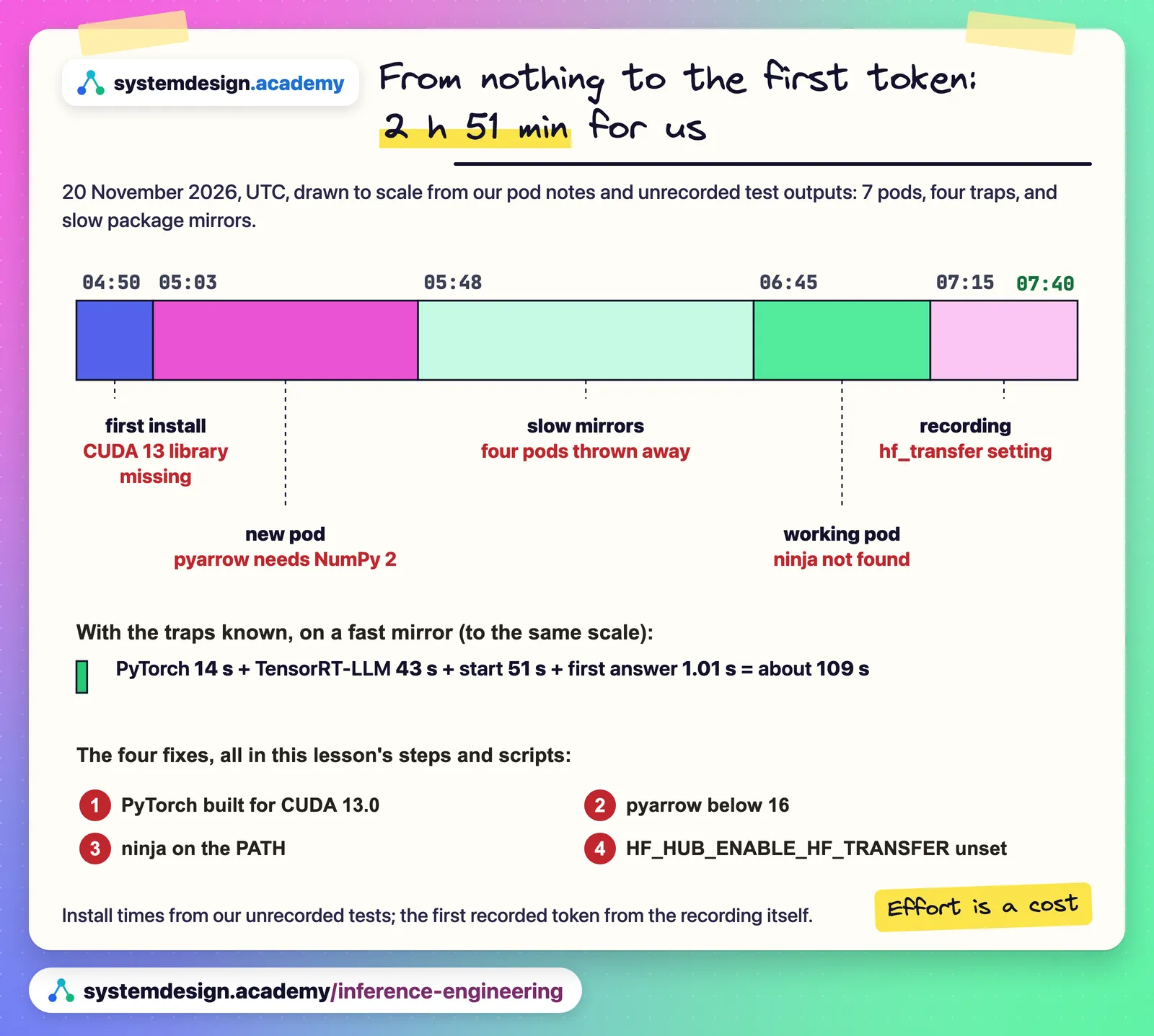
Harder, and the effort is part of the cost. Our first TensorRT-LLM 1.2.1 install took 2 hours 51 minutes from an empty environment to the first token, across seven rented pods, almost all of it lost to four traps and slow package mirrors: it needs PyTorch built for CUDA 13.0, pyarrow pinned below 16, ninja on the PATH, and one RunPod download setting switched off.
With the traps known and a fast mirror, the same path took about two minutes: PyTorch in 14 seconds, TensorRT-LLM in 43, the start in 51 and the first answer in 1.01 seconds. vLLM was one install command.
What we measured: 20 Nov 2026: first install to first token 2 h 51 min across 7 pods; with the traps known about 2 minutes.
When is TensorRT-LLM worth trying?
When you run large NVIDIA data-centre GPUs, very large models, FP8 or FP4 weights on Hopper or Blackwell, or a fleet of identical GPUs where a model rarely changes. Those are the cases NVIDIA tunes it for, and none of them is a single 24 GB card.
If you do run it, start with the PyTorch backend, switch chunked prefill on if streams must stay smooth, keep block reuse (its prefix cache) on in production, write every setting in the YAML file, and monitor with the Prometheus address rather than a test client that keeps calling /metrics, which changed our single-person result by a fifth.
When is vLLM the better choice?
For most teams most of the time: when you want one install command, the widest set of supported models and hardware, Prometheus metrics out of the box, settings documented one by one, and a large community. On our card and model it was as fast as TensorRT-LLM, so a migration would have cost the team days for no measured gain.
The course's recommendation for its own example company was exactly that: stay on vLLM, and measure again if the hardware ever moves to large data-centre GPUs.
Where to go next
If this helped, the full hands-on course goes much deeper.
In the course you install TensorRT-LLM, vLLM and SGLang on the same rented GPU yourself, avoid the four install traps, and run the same fair benchmark on all three.
Every number on this page comes from Hands-On Inference Engineering: Serve LLMs on GPUs with vLLM and SGLang, where you rent the GPU yourself, run each command and compare your numbers with ours. Start with the free introduction and the free lessons on prefill and decode and the KV cache. If you are also preparing for interviews, the two big courses together and the Inference Engineering interview pack are below.

These questions are a start. The interview asks more.
Get all 120 questions in the Inference Engineering pack
Each question has why it is asked, a full answer, what the interviewer listens for, the follow-ups, the common mistakes and a diagram (141 diagrams in all). A PDF you keep, junior to staff level.
Pay by UPI, cards or netbanking through Razorpay. Pay by card or PayPal, in US dollars. Download at once from My packs.