System design interview guide
Microsoft System Design Interview Questions: Design Azure Cosmos DB Partitioning
Short answer
To prepare for a Microsoft system design interview, practice designing how Azure Cosmos DB splits and copies data. We have no public source that Microsoft asks this question. The core idea is the partition key. Cosmos DB hashes each item's key value, and all items with the same value form a logical partition of up to 20 GB. The hash range is spread evenly across physical partitions, each up to 50 GB and 10,000 request units a second, and each a set of at least four replicas. Every region holds a full copy. A write commits on three of four local replicas, and you pick one of five consistency levels, from strong to eventual.
Want the same problem on Amazon's database, built from the Dynamo paper? Read the DynamoDB system design guide
Two courses by the author of this page:
770 lessons · 18 free to read
₹1,111 in India · $35 elsewhere, once
Get System DesignYou own this course
219 lessons · 10 free to read
₹1,333 in India · $35 elsewhere, once
Get Generative AI and Agentic AIYou own this course
Save your progress and get the interview checklist PDF
Azure Cosmos DB is Microsoft's globally distributed database. Microsoft's documentation, as updated in 2026, gives the hard numbers. One partition key value can hold up to 20 GB. One physical partition, a slice of the database on its own group of servers, can serve up to 10,000 request units a second. A request unit is Cosmos DB's measure of work. Every physical partition has at least four copies in each region. The docs promise reads and writes under 10 milliseconds at the 99th percentile, except writes under strong consistency across several regions. Microsoft's service level agreement (October 2026) commits to 99.99% availability in one region, and 99.999% across several regions: for reads, and for writes too when every region accepts writes.
Designing Azure Cosmos DB's partitioning is about one choice: the partition key. Every item has one. Cosmos DB hashes the key's value, and all items with the same value form a logical partition. That partition always lives on one physical partition, a group of at least four replicas in each region. Microsoft's docs set the limits: 20 GB per logical partition, and 50 GB and 10,000 request units a second per physical partition. A request unit is the database's measure of work; reading one 1 KB item costs one. Each region holds a full copy, and you pick one of five consistency levels, from strong to eventual. So a good key spreads both data and traffic evenly.

Where it shows up
Designing a globally distributed database is a classic system design question for backend, storage and cloud platform roles. It also appears as design a key-value store, design a multi-region database or design a sharded document store. We have no public source that Microsoft uses this exact question in its interviews. This guide is built from Microsoft's own documentation and papers on Azure Cosmos DB, so you can reason with real limits.
Spec sheetMicrosoft (Azure Cosmos DB)
- 01Example workload, in this design
- 200 GB
- 02Request units a second, estimated
- ~80,000
- 03Physical partitions, at least
- 8 (14 at creation)
- 04Throughput per physical partition
- ~5,700 RU/s
worked through below, with the maths
Microsoft (Azure Cosmos DB) in its own numbers
Every figure below is quoted from Microsoft (Azure Cosmos DB)'s own engineering writing. Tap a source to check it.
20 GB
maximum data in one logical partition (one partition key value)
Microsoft Learn, partitioning overview, updated 202610,000 RU/s
maximum throughput of one physical partition
Microsoft Learn, partitioning overview, updated 202650 GB
maximum data in one physical partition
Microsoft Learn, partitioning overview, updated 20264
replicas at least, for every physical partition
Microsoft Learn, partitioning overview, updated 2026< 10 ms
read and write latency at the 99th percentile, items up to 1 KB (not strong writes across regions)
Microsoft Online Services SLA, October 202699.999%
availability SLA across several regions (reads; writes too when every region accepts writes)
Microsoft Online Services SLA, October 2026
Why this question is asked
This question tests whether you understand what a partition key really decides. It decides where data lives, how much traffic one customer can send, which queries are cheap and what a transaction can touch. It also tests whether you can explain consistency in plain words. Strong consistency costs latency across regions. Weaker levels cost surprises when two programs read each other's writes. The interviewer wants numbers: how big a partition can grow, how much traffic it can take, and what happens when one key is far busier than the rest. A candidate who says shard by hash and stops there has missed the point. Open like this: 'I will design the database itself, not an app on top of it. First I will fix the unit of scale, which is the partition key. Then I will size partitions from two limits, storage and throughput, add replicas inside a region and copies across regions, and let the customer choose how fresh reads must be.' Then spend 45 minutes like this: requirements and the partition key (10), logical and physical partitions with the limits (10), replicas, quorums and consistency (10), global distribution and conflicts (10), and failure and cost (5).
What the interviewer asks
“Design the partitioning and global distribution of a document database like Azure Cosmos DB. Customers store JSON items in containers. The database must spread each container across many servers, keep copies in several regions, and let customers choose how fresh their reads must be.”
Ask these back before you draw
- 1.Which API? (Start with the API for NoSQL, Cosmos DB's own JSON document interface, which Microsoft documents most fully.)
- 2.Do customers buy capacity up front, or pay per request? (Cosmos DB offers provisioned, autoscale and serverless modes; start with provisioned.)
- 3.One write region or many? (Start with one write region and several read regions, then add multi-region writes.)
- 4.Which consistency levels must we offer? (Cosmos DB offers five: strong, bounded staleness, session, consistent prefix and eventual.)
- 5.What may a transaction touch? (In Cosmos DB, only the items in one logical partition.)
This page is the free part.
The course goes deeper on the Microsoft (Azure Cosmos DB) design
₹1,111 in India$35 everywhere elseonce, for the whole course
The System Design course covers the Microsoft design across a run of lessons, not one page. These 4 alone are about 103 minutes of step-by-step reading, every one with a quiz.
- Data Partitioning
Data partitioning splits a large dataset across many machines. Hash, range and directory partitioning compared, consistent hashing, and when to partition.
- Hash Partitioning
Using hash functions to distribute rows evenly across partitions, the antidote to hotspots and skewed data.
- Database Sharding
Splitting a database across multiple servers, the nuclear option for scaling writes, and the architecture behind Instagram, Uber, and YouTube.
- Range Partitioning
Partitioning by contiguous value ranges, the go-to strategy for time-series data, logs, and anything with a natural ordering.
all part of
System Design Masterclass
770 lessons · about 290 hours · 18 free to read
₹1,111in India, by UPI
$35everywhere else, by card or PayPal
It is really nice and good Please join the course
You own this course
Continue with Data Partitioningpay once,
yours for life
Live from the course bench
Before you design Microsoft, try the questions it rests on.
Real interview questions, live diagrams and measured lab results, pulled at random from the lessons. A new set every time you come back.

01Requirements
Requirements
Always clarify these in the first 5 minutes of the interview. Do not start drawing boxes until both lists are agreed.
Functional requirements
- Store JSON items in containers, each item with an ID and a partition key value
- Read one item by ID and partition key, and run queries over a container
- Run transactions over several items, as long as they share one partition key value
- Grow a container's storage and throughput with no downtime, by splitting partitions
- Let customers add or remove regions at any time, with each region holding a full copy
- Offer five consistency levels, with a default per account and an override per read request
- Optionally accept writes in every region, and resolve conflicting writes
Non-functional requirements
- Reads and writes under 10 milliseconds at the 99th percentile, as Microsoft's docs state, except strong writes across several regions
- Availability as Microsoft's October 2026 SLA states it: 99.99% in one region, 99.995% in one region with availability zones, 99.999% for reads across several regions, and 99.999% for reads and writes when every region accepts writes
- Predictable cost: the same operation on the same data always costs the same request units
- Isolation between customers: one busy customer must not slow down another
- Survive a failed server, a failed availability zone and a failed region
- Rate-limit cleanly when a customer goes over the throughput they bought
02Scale estimates
Back-of-envelope scale estimates
Show your math. Pulling numbers from thin air signals you have not thought about the load.
Example workload, in this design
200 GB
Assume a user profile container for 200 million users with about 1 KB per profile, partitioned by user ID. 200 million x 1 KB is about 200 GB. These are our numbers for practice, not Microsoft's.
Request units a second, estimated
~80,000
Microsoft's docs say reading one 1 KB item by ID and partition key costs 1 request unit. Assume 40,000 reads a second: 40,000 RU/s. For writes, Microsoft's own scaling guide assumes 10 RU for a 1 KB write; writes cost more partly because every item is indexed by default. Assume 4,000 writes a second x 10 RU = 40,000 RU/s. Total: about 80,000 RU/s. In practice, read the real cost from the request charge header.
Physical partitions, at least
8 (14 at creation)
One physical partition holds up to 50 GB and serves up to 10,000 RU/s. Storage needs 200 / 50 = 4. Throughput needs 80,000 / 10,000 = 8. Throughput decides the floor. But Microsoft's scaling guide (2026) says a container created with manual throughput starts at about 6,000 RU/s per physical partition, so 80,000 / 6,000 = 13.3, which rounds up to 14 at creation. A later increase that needs new partitions runs in the background and typically takes 4 to 6 hours.
Throughput per physical partition
~5,700 RU/s
Microsoft's docs say provisioned throughput divides evenly among physical partitions. 80,000 / 14 is about 5,700 RU/s each. So the hash range on one physical partition, and every user in it, shares about 5,700 RU/s. If a few very busy users hash into the same range, that partition is rate-limited while the others have room.
Three regions
240,000 RU/s, 12+ copies
Microsoft's docs say the throughput you set is provisioned in every region: R x N in total. 80,000 x 3 regions = 240,000 RU/s worldwide. The docs also say an account in N regions has at least N x 4 copies of the data: at least 12 here.
If every read is strong
~120,000 RU/s
Microsoft's docs say strong and bounded staleness reads cost about twice as many request units, because they read two replicas. 40,000 x 2 + 40,000 = 120,000 RU/s, which needs at least 12 physical partitions by the 10,000 RU/s limit.
Replicas this one container adds, provider side
168
14 physical partitions x 4 replicas x 3 regions = 168 replicas. Microsoft writes that each machine hosts hundreds of replicas, so this container uses a small slice of many machines. That is why, for the people who build the database, placing replicas across fault domains matters more than counting machines.
03Architecture
High-level architecture
Start with the customer's view. An account holds databases, and a database holds containers. A container is the unit of distribution and scale. Every item in a container carries a partition key value, such as a user ID. In each region, Cosmos DB hashes that value. All items with the same value form one logical partition. The range of hash values is split evenly across physical partitions. A physical partition is the real unit of storage: a replica set, a group of at least four replicas spread across fault domains, each running a copy of the database engine. A fault domain is a group of machines that can fail together. One replica, the leader (Microsoft's connectivity page calls it the primary), takes the writes; the others, the followers, copy them and serve reads where possible. When data or throughput grows, Cosmos DB splits a physical partition in two. The customer sees only a new map. Inside, half the data must move to a new replica set while the partition stays online, and Microsoft's docs say applications can always ingest or query data during a split. A logical partition is never split across physical partitions. Now add regions. Each region holds every partition of the container. The same physical partition in every region forms a partition-set, which replicates writes between regions. Microsoft describes a two-level, nested consensus: one level inside each replica set, one across the partition-set. The consistency level you choose decides how many replicas a read and a write must reach.
In a real interview, sketch this on the whiteboard before diving into any single box.
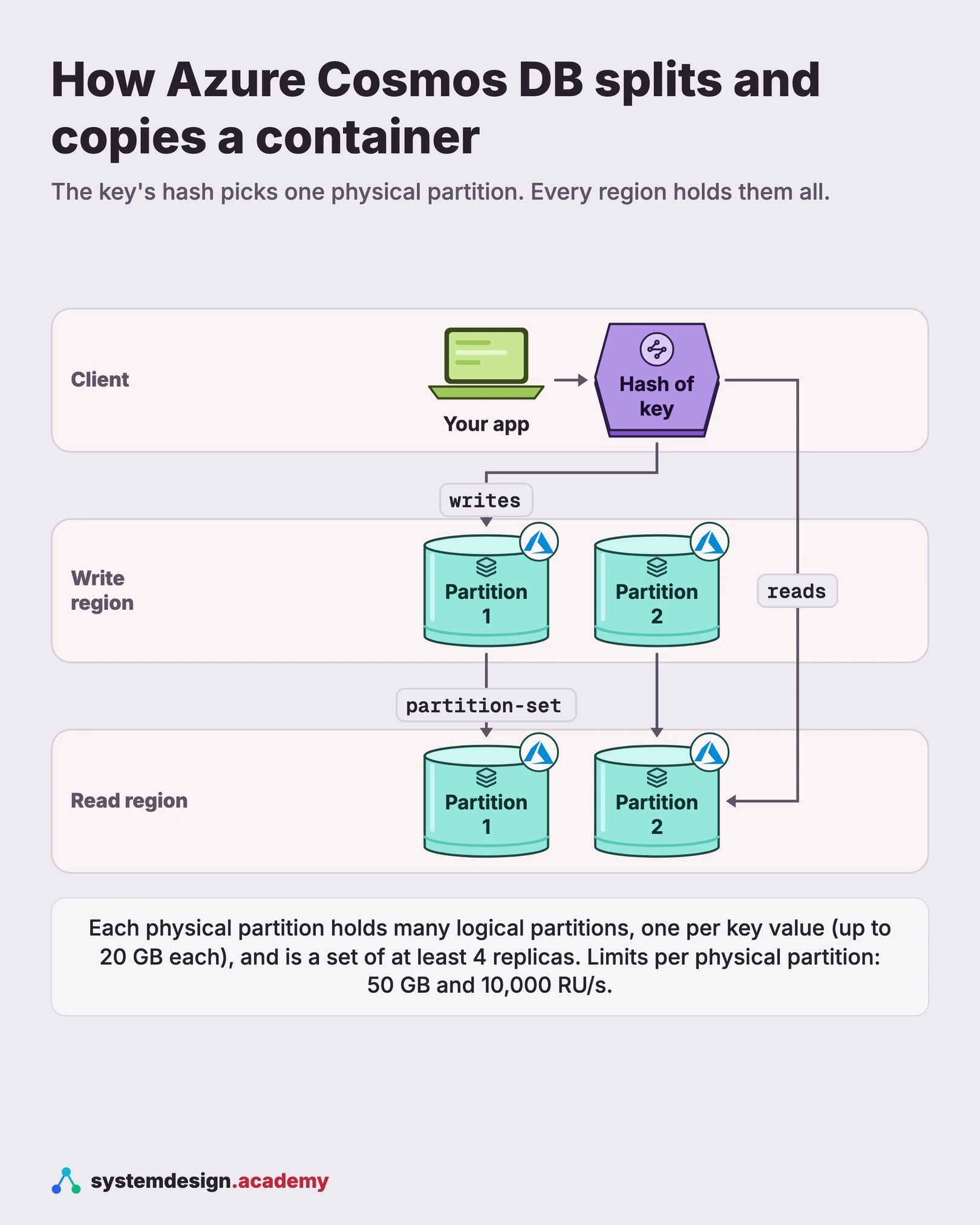
04One request
What happens when you write one item to Cosmos DB, step by step
Every step follows Microsoft's documentation. The routing in step 3 is from Microsoft's SDK connectivity modes page (2026), for direct mode.
- 1
The item names its partition
Your app writes an item with an ID and a partition key value, for example userId "Andrew". The partition key path, such as /userId, was fixed when the container was created and cannot change.
- 2
The key is hashed
Cosmos DB hashes the partition key value. The hash decides the logical partition. The hash range is split evenly across the container's physical partitions, so the hash also decides the physical partition.
- 3
The request reaches the primary
In direct mode, Microsoft's docs say the SDK fetches the container's partition key definition and the replicas' network addresses from a gateway node, and caches them. Writes always go to the primary replica of the right physical partition. If replicas move, the SDK refreshes its routing information. In gateway mode, a gateway node does this routing for the client.
- 4
A local majority commits it
For every level weaker than strong, the docs say the write is committed on at least three of the four replicas in the region before it is acknowledged. For strong, Microsoft's docs say the write must also be committed in every region. With three or more regions, a dynamic quorum can drop a slow or unresponsive region, as long as a majority of regions remains.
- 5
Other regions catch up
For levels weaker than strong, the write is copied to the other regions asynchronously. Under session consistency, the client also gets a session token back, so its next reads can see its own write.
05Components
Core components
Walk through each service. The interviewer wants to hear what each one owns, not just the names.
Partition key and logical partitions
The partition key is a property on every item, chosen when the container is created. All items with the same value form a logical partition. Microsoft's docs say a logical partition can hold up to 20 GB and is the scope of a transaction. There is no limit on how many logical partitions a container has.
Physical partitions
The internal unit Cosmos DB manages for you. One or more logical partitions map to one physical partition. Each holds up to 50 GB and serves up to 10,000 RU/s. When a container grows, Cosmos DB splits physical partitions, and the docs say a split does not affect availability.
Replica sets
Each physical partition is a set of replicas, at least four, each running an instance of the database engine. Microsoft writes that the machines in a cluster are typically spread across 10 to 20 fault domains, a fault domain being a group of machines that can fail together. Each machine hosts hundreds of replicas.
Partition-sets
The same physical partition, one copy in each region, grouped to manage the same set of keys. Microsoft calls it a geographically spread "super replica-set". It is how a partition's writes travel between regions.
Request units and admission control
Every operation is charged in request units, which cover CPU, IO and memory. Customers provision RU/s; if a second's operations go over it, Cosmos DB returns error 429, request rate too large. Microsoft's docs say rate limiting and back-pressure run through the whole stack, from admission control, the check that decides whether to accept a request, to every IO path. Back-pressure slows senders down when the system is full.
Consistency levels and session tokens
Five levels: strong, bounded staleness, session, consistent prefix and eventual. Under session, the client gets a token after every write and sends it with its reads. Microsoft's docs say session tokens are bound to one partition.
Conflict resolution for multi-region writes
When every region accepts writes, two regions can change the same item at once. Cosmos DB offers last-write-wins, by default on the system timestamp, or a custom merge stored procedure. If the merge procedure is missing or throws an error, the conflict goes to a conflicts feed for the app to handle.
06Data model
Data model
Pick the right store per table. Justify each choice with the access pattern, not by reflex.
item (in a container)id (unique within its logical partition)partition key value (e.g. userId)JSON body (up to 2 MB)_ts (system timestamp)From Microsoft's docs: the partition key and the ID together identify an item. A partition key value can be up to 2,048 bytes, or 101 bytes if large partition keys are not enabled. Partition key values cannot be changed in place; to move an item you create a new one and delete the old one, and those two steps are not atomic.
partition map (in this design)container_idhash_range_lowhash_range_highphysical_partition_idreplica addresses per regionMicrosoft's docs say the key space of hashes is split evenly across physical partitions, and that the SDK caches the routing information from a gateway node and refreshes it when replicas move. The exact fields here are this design's.
session token (held by the client; fields in this design)physical partitionversion the client has seenMicrosoft's docs say session tokens are partition-bound and act as a minimum version barrier: a replica serves a read only if it has data at least that new. A client that never wrote to a partition holds no token for it, so its reads there behave like eventual reads.
conflicts feed (multi-region writes; fields in this design)item idpartition keyconflicting versionsoperation type (insert, replace, delete)Microsoft's docs list three conflict types: insert, replace and delete. With last-write-wins, a delete always beats an insert or a replace. With the custom policy, if the merge procedure is missing or throws an error at runtime, the conflict is written here for the app to fix.
07Deep dives
Deep dives
These are the conversations the interviewer is steering you toward. Practice each one until you can talk through it without notes.
Logical and physical partitions: the two-level map
Microsoft's docs describe partitioning in two levels, and this is the heart of the answer. Level one is logical. All items with the same partition key value belong to one logical partition. If user ID is the key and there are 1,000 users, there are 1,000 logical partitions. Level two is physical. Cosmos DB hashes each partition key value and allocates the space of hash values evenly across physical partitions. A small container may have one physical partition holding many logical ones. As data or throughput grows, Cosmos DB splits a physical partition. After a split, every logical partition still sits whole on one physical partition. Only the map changes. That is why the limits stack up the way they do. A physical partition serves up to 10,000 RU/s, so one logical partition can never go faster than that. A logical partition holds up to 20 GB, and a physical one up to 50 GB. In an interview, say why the design keeps a logical partition whole. It is the scope of a transaction. Microsoft's docs say you can update items in one logical partition in a transaction with snapshot isolation, meaning every read inside the transaction sees the data as it was when the transaction began. Stored procedures, small programs that run inside the database, run inside one logical partition only. The sketch below shows how a client could route a request. It is an illustration, not Microsoft's code.
import bisect, hashlib

def hash_key(pk_value: str) -> int:          # in this design; Cosmos DB's hash is internal
    return int.from_bytes(hashlib.sha256(pk_value.encode()).digest()[:8], "big")

def route(pk_value, ranges):                 # ranges: sorted [(low_hash, partition_id)]
    h = hash_key(pk_value)
    lows = [low for low, _ in ranges]
    return ranges[bisect.bisect_right(lows, h) - 1][1]

# A split adds one (low_hash, new_id) entry. Keys outside that range do not move,
# and every item with the same pk_value still lands on one partition.Splitting a partition and placing replicas
This is the part a storage interviewer will push on. Microsoft has published the outside of a split. Its scaling guide (2026) says a parent partition splits into two children, that applications can always ingest or query data during a split, and that the SDKs route requests to the right physical partition on their own. It also shows a trap: raise throughput from 20,000 to 30,000 RU/s on two partitions and only one splits. Each of the three partitions still gets 10,000 RU/s, but one holds twice the data of the others. Microsoft has not published how a split works inside, so the rest of this section is this design's. First, build a new replica set of four replicas and copy a snapshot of half the hash range into it. Next, stream the writes that arrived during the copy, in log order, until the new set is only a few writes behind. Then, for a moment, the old leader stops accepting writes for that half of the range, the last writes are copied over, and the partition map gets a new version number. A client that sends a request with an old map version gets a 'partition moved' answer, refreshes the map and retries, so no write lands in two places. Placement is the other half of the job. Microsoft writes that each machine hosts hundreds of replicas and that machines are spread over 10 to 20 fault domains. In this design, the four replicas of a partition always sit in four different fault domains. A leader is never placed on a machine that already carries too many leaders, because Microsoft's docs say a leader does more work than a follower. When one machine runs hot, the placement service moves a follower away first, because moving a follower does not interrupt writes.
Request units: one currency for CPU, IO and memory
A shared database needs a fair way to charge for work. Cosmos DB uses the request unit. Microsoft's docs say it abstracts CPU, IOPS (disk reads and writes a second) and memory into one number. Reading one item of about 1 KB by its ID and partition key costs 1 RU. Larger items, more indexed properties, queries and stored procedures cost more. Writes cost more than reads partly because every item is indexed by default; indexing fewer properties lowers the write cost. Strong and bounded staleness reads cost about twice as much, because they read two replicas. The docs also say the charge is deterministic: the same query on the same data always costs the same. That lets a customer plan capacity. Customers choose a mode. Provisioned throughput is set in steps of 100 RU/s, with a floor of 400 RU/s for a container with manual throughput. Autoscale moves between 10% and 100% of a maximum the customer sets. Serverless bills for what was used and runs in one region only. Raising provisioned throughput is instant while the current partitions can carry it; past that, Cosmos DB must split partitions, which Microsoft's scaling guide says typically takes 4 to 6 hours. Every second, the budget resets. If a second's operations use more than the budget, Cosmos DB returns error 429, request rate too large. Microsoft's docs say the SDKs retry 429s automatically, typically up to nine times. They also say that 1 to 5% of requests getting a 429 is a healthy sign the throughput is being used fully, as long as latency is fine. A 2015 paper by Microsoft and Microsoft Research on Azure DocumentDB gives the reason for all this. Cosmos DB's Azure resource type is still named Microsoft.DocumentDB. The paper says DocumentDB used an abstract rate based currency called a Request Unit, and that each replica is designed to operate within a fixed budget of system resources in terms of RU per second.
Choosing the partition key, and the hot partition
Microsoft's docs give clear rules for the key. It should have a value that never changes, because the key cannot be updated in place. It should have high cardinality, meaning many distinct values. It should spread request units and storage evenly. And for read-heavy containers, it should be the property most queries filter on with an equality filter. A query that does not include the key must ask every physical partition. The docs say that costs an extra 2 to 3 RU for each physical partition. The danger is the hot partition. Throughput is divided evenly among physical partitions, so one busy key value cannot borrow from quiet ones. The docs give two examples. An IoT container partitioned by date sends all of today's writes to one partition. A multitenant container partitioned by tenant ID gets a hot partition when one tenant has 100,000 users and most have under 10. The fixes, from Microsoft's docs: a synthetic key that joins two properties, such as customer ID plus order date. A hierarchical partition key with up to three levels, such as tenant, then user, then session, so one tenant can grow past 20 GB. Or a global secondary index, a second copy of the data under a different key, which the docs say is eventually consistent with the source. Each fix has a cost, and saying which one you would pick for this workload is the point.
Replica sets and quorums: why a strong read costs twice as much
Inside one region, each physical partition is a replica set of four replicas in normal operation. Microsoft's docs say that within a region, a write is always replicated to a local majority: three replicas out of four, whatever the consistency level. Reads then differ. Session, consistent prefix and eventual reads go to a single replica. Strong and bounded staleness reads go to two replicas, which the docs call a local minority quorum. The reason two is enough is general quorum arithmetic, not a Microsoft quote. A write reached 3 of 4 replicas and a read asks 2 of 4. Since 3 + 2 is more than 4, at least one replica in the read holds the latest write. Reading two replicas instead of one is why these reads cost about twice the request units, and why read throughput for the same RU/s is half. Microsoft's docs also explain how the load is spread. The leader does more work than the followers on a write, so it gets a bigger share of the machine. Reads go to follower replicas where possible, and the leader is contacted for a read only when required. And the membership of a replica set changes as replicas fail and recover, so the protocol resizes its read and write quorums as it goes.
Five consistency levels, and the session token mistake
Microsoft's docs list five levels, strongest first. Strong is linearizable: every read returns the latest committed write. Bounded staleness lets reads lag by at most K versions or T seconds; for multi-region accounts the minimum is 100,000 writes or 300 seconds. Session guarantees read-your-writes within one client session. Consistent prefix means a reader never sees part of a multi-item transaction. Microsoft's docs add that single-item writes under consistent prefix behave like eventual consistency. Eventual makes no ordering promise. The docs say session is the most widely used level. It works through a token. After each write, the server returns a session token. The client caches it and sends it with its reads. A replica that is behind the token does not answer; the client tries another replica or region. Here is the trap. A 2022 paper by Microsoft, Microsoft Research and the University of British Columbia studied an outage in another Azure service that used Cosmos DB. One server wrote an item, and a second server, now in another region, failed to read it. The paper found the account used session consistency, but the two servers did not share session tokens. Without a shared token, the second server was only guaranteed eventual reads. The paper says the outage impacted thousands of subscriptions over 28 days. In an interview, say clearly: session consistency is per session. If two services must see each other's writes, pass the token, or use a stronger level.
Global distribution: partition-sets, failover and data loss
Microsoft's docs say each region holds all the data partitions of a container. An account in N regions has at least N x 4 copies. Throughput is provisioned in every region, so setting R RU/s on a three-region account gives 3R in total. Microsoft describes how writes cross regions. The same physical partition in every region forms a partition-set. Inside each replica set there is one level of consensus, and across the partition-set there is a second level that orders every committed write. With one write region, the others serve reads. Strong consistency waits for every region, so the docs give its write latency as twice the round trip between the two farthest regions, plus 10 milliseconds at the 99th percentile. Strong is blocked by default for regions more than 5,000 miles apart. With three or more regions, a dynamic quorum, a rule that lets the system count only the regions that are still answering, can take slow or unresponsive regions out of the quorum to keep strong writes going: one region in a three or four region account, up to two in a five region account. Failure needs numbers too. For session, consistent prefix and eventual with more than one region, the docs give a recovery point objective under 15 minutes. That is the window of recent writes you could lose if a region is lost. With strong, it is zero. If Microsoft has to fail over the write region itself, the docs warn it can take one hour or more, and unreplicated writes could be lost. For single write region accounts, per-partition automatic failover moves only the affected partitions to another region.
Multi-region writes and conflicts
Microsoft's docs say an account can accept writes in every region. That gives low write latency everywhere, and Microsoft's SLA covers reads and writes at 99.999% for such accounts. The price is conflicts. Two regions can insert an item with the same ID, replace the same item, or one can delete while another updates. Cosmos DB tracks causality with encoded vector clocks and detects conflicts with version vectors. A vector clock is a list of counters, one per writer, that shows which writes came before which. A version vector is a list of counters per item that shows two versions were changed independently. Microsoft writes that the design was inspired by epidemic algorithms, where servers pass updates on to each other like gossip, and by the Bayou system. You choose a policy per container. Last-write-wins keeps the version with the highest system timestamp, or a custom number you name in the API for NoSQL. A delete always wins over an insert or a replace. Say the cost of last-write-wins out loud. If two regions each add 1 to the same counter at the same time, one of the two changes disappears, and no error is raised. For data like that, in this design, either send every write for that item to one home region, or use the custom policy. It runs your merge stored procedure, exactly once, on the server, and a merge can add the two changes together. If the procedure is missing or throws an error, the conflict goes to the conflicts feed. Two rules to say out loud. Strong consistency is not allowed with multiple write regions, because the docs explain that no distributed system can give zero data loss and zero recovery time at once, and strong writes would still wait for every region. And bounded staleness with multiple write regions is called an anti-pattern: apps should read and write in their own region.
Common mistakes candidates make
The first mistake is choosing a low-cardinality key, like status, country or date. It looks tidy but sends most traffic to a few partitions. Say instead: a key with many values that most queries filter on, and a synthetic or hierarchical key when one tenant can grow huge. The second mistake is thinking total throughput is shared freely. It is split evenly across physical partitions, and one logical partition can never exceed 10,000 RU/s. The third mistake is treating session consistency as global. It is per client session and per partition; two services that must agree have to share the token. The fourth mistake is asking for strong consistency with multi-region writes. Cosmos DB does not allow it, and it would not make writes faster anyway. The fifth mistake is forgetting the bill. More regions multiply provisioned throughput, and strong reads cost about twice as much. The time plan for 45 minutes is in the opening section of this guide.
08Trade-offs
Trade-offs to discuss
Every senior interviewer expects you to surface at least 3 of these. Pick the decisions, state the alternatives, and justify your choice.
Hash partitioning vs range partitioning
Microsoft's docs say Cosmos DB hashes the partition key and spreads the hash space evenly across physical partitions. Hashing spreads writes well, even when key values arrive in increasing order, like new order IDs. The cost is that a range scan over keys, like all users from A to C, must visit every partition. Range partitioning keeps neighbors together and makes scans cheap, but when keys arrive in order, all new keys land on one hot partition.
Transactions only inside one logical partition
Keeping a transaction inside one logical partition means it runs on one replica set, with no coordination across servers. That keeps writes fast and partitions independent. The cost is that the data model must put items that change together under one partition key value, and that one value is capped at 20 GB and 10,000 RU/s.
Request units vs raw servers
Selling request units lets many customers share machines safely, because every operation has a known, repeatable cost and admission control can say no. The cost is a new unit customers must learn, and 429 errors when they go over. Microsoft's docs treat a small rate of 429s as normal.
Strong vs session consistency across regions
Strong gives every reader the latest write, and zero data loss on a region failure. The cost, from Microsoft's docs: write latency of twice the round trip to the farthest region plus 10 ms, and reads at twice the RU. Session gives read-your-writes for one client at roughly eventual cost. The risk is two programs that do not share tokens.
One write region vs multi-region writes
One write region keeps a single order of writes and allows every consistency level. Multi-region writes give low write latency in every region and higher availability. The cost is conflict resolution and no strong consistency. Last-write-wins silently drops one of two concurrent changes, so data like counters or carts needs a home region or a merge procedure.
Fixed partition key vs changing it later
Microsoft's docs say a container's partition key cannot be changed in place; you copy the data to a new container. In this design's reading, that fixed choice is what lets the hash map stay stable. The cost is that a wrong key is expensive to fix. Microsoft's docs offer global secondary indexes for a second query pattern.
Free PDF · 18 pages
Get the free System Design Interview Cheat Sheet
The interview in seven stages, the numbers worth knowing by heart, and twelve classic systems on one page each, every line linked to the lesson it comes from.
09Follow-ups
Follow-up questions to expect
After the main design, the interviewer usually picks one part and asks more. Here is what to say.
One customer in a multitenant container is a hundred times busier than the rest. What do you do?
Partitioning by tenant ID makes that tenant a hot partition, capped at 10,000 RU/s and 20 GB, and writes for that tenant fail once it is full. Microsoft's docs suggest a hierarchical partition key: tenant ID first, then user ID. Then one tenant's data can spread over several physical partitions, and queries for that tenant still go only to the partitions that hold it. The key cannot be changed in place, so on a live system you create a new container with the new key and copy the data across. That is why this choice belongs on day one.
Your app sees 429 errors. Is the database broken?
Not necessarily. Microsoft's docs say 1 to 5% of requests getting a 429 is healthy if latency is fine, and the SDKs retry up to about nine times. If the rate is high, check for a hot partition first, because throughput is split evenly across physical partitions.
A service writes an item, and a worker in another region cannot find it. Why?
Under session consistency, only a client holding the session token is guaranteed to read its own write. A different service without that token gets eventual reads. A 2022 paper by Microsoft and others traced an Azure outage to exactly this. Pass the token, or use a stronger level.
Why can't you have strong consistency with writes in every region?
Microsoft's docs say a distributed system cannot give zero data loss and zero recovery time at the same time. Strong writes would also have to commit in every region, so they would be no faster than with one write region. Cosmos DB does not allow the combination.
The profile container grows from 200 GB to 1 TB with the same traffic. What changes?
Cosmos DB splits physical partitions as data grows. By our arithmetic, 1,000 GB at 50 GB each needs at least 20. Microsoft's docs say a split does not affect availability and each logical partition stays whole. The catch is throughput. Provisioned throughput is divided evenly among physical partitions, so the same 80,000 RU/s over 20 partitions gives each one 4,000 RU/s instead of about 5,700. A busy key range that was fine before can start getting 429 errors with no change in traffic.
Two regions update the same shopping cart at the same moment. What happens?
With last-write-wins, the version with the higher timestamp wins and the other change is lost without an error. Microsoft's docs offer a custom merge stored procedure for this case. In this design, the cart's merge procedure would combine the items from both versions, and any conflict it cannot resolve goes to the conflicts feed.
10In production
How Microsoft (Azure Cosmos DB) actually does it
Every fact about Azure Cosmos DB on this page comes from Microsoft's own writing. The example workload, the split and placement steps, the routing sketch and the partition map fields are ours, marked 'in this design', 'assume' or 'our arithmetic'. The 10 RU write cost is the assumption Microsoft's own scaling guide uses. The quorum overlap argument is general distributed systems reasoning. The partition limits, hashing and splits are from Microsoft Learn's partitioning overview, updated May 2026. Request units and their factors are from the request units page, and the 400 RU/s floor and other limits from the service quotas page. The five consistency levels, the quorum table, latency and recovery point numbers are from the consistency levels page. Replica sets, partition-sets, nested consensus, vector clocks and the Bayou influence are from the global distribution under the hood page. Conflicts are from the conflict resolution page, and failover from the reliability page, updated May 2026. SDK routing is from the connectivity modes page, and the 6,000 RU/s starting rule, the 4 to 6 hour scale-up and the uneven split from the scaling best practices page. The availability and latency commitments are from Microsoft's Service Level Agreement for Online Services, October 2026. The 429 troubleshooting page was updated in May 2026, and the pages without a later date showed April 2026. The resource governance quote is from a 2015 VLDB paper by Microsoft and Microsoft Research about DocumentDB. The session token outage is from a 2022 paper by Microsoft, Microsoft Research and the University of British Columbia. Documentation changes, so say the year when you quote a number.
Sources
- Microsoft Learn: Partitioning and horizontal scaling in Azure Cosmos DB (updated 2026)
- Microsoft Learn: Request Units in Azure Cosmos DB (updated 2026)
- Microsoft Learn: Consistency level choices in Azure Cosmos DB (updated 2026)
- Microsoft Learn: Global distribution with Azure Cosmos DB, under the hood (updated 2026)
- Microsoft Learn: Distribute data globally with Azure Cosmos DB (updated 2026)
- Microsoft Learn: Azure Cosmos DB service quotas and default limits (updated 2026)
- Microsoft Learn: Conflict types and resolution policies (updated 2026)
- Microsoft Learn: Reliability in Azure Cosmos DB (updated 2026)
- Microsoft Learn: Hierarchical partition keys (updated 2026)
- Microsoft Learn: Troubleshoot request rate too large (429) errors (updated 2026)
- Microsoft Learn: Autoscale throughput (updated 2026)
- Microsoft Learn: Azure Cosmos DB SQL SDK connectivity modes (updated 2026)
- Microsoft Learn: Best practices for scaling provisioned throughput (updated 2026)
- Microsoft: Service Level Agreement for Microsoft Online Services, Azure Cosmos DB section (October 2026)
- Shukla et al., Schema-Agnostic Indexing with Azure DocumentDB, VLDB 2015 (Microsoft, Microsoft Research)
- Hackett, Rowe and Kuppe, Understanding Inconsistency in Azure Cosmos DB with TLA+ (2022)
Lessons to study before this interview
If any of these topics are fuzzy, the interviewer will catch it. Each lesson is 15 to 60 minutes with diagrams, code, and a quiz.
Data Partitioning
intermediate / data replication distribution
Hash Partitioning
foundation / database fundamentals
Database Sharding
foundation / database fundamentals
Range Partitioning
foundation / database fundamentals
Consistent Hashing
intermediate / data replication distribution
Quorum in Distributed Systems
advanced / distributed systems core
Data Consistency Models
advanced / consistency models
Read-Your-Writes
advanced / consistency models
Linearizability
advanced / consistency models
Vector Clocks
advanced / distributed systems core
Conflict Resolution in Replicated Databases
advanced / consistency models
Geo-Replication
intermediate / data replication distribution
Global Tables
intermediate / database types storage
Replication Lag
intermediate / data replication distribution
Rate Limiting
intermediate / api design protocols
Capstone: Design a Key-Value Store
capstone / capstone
Capstone: Design a Multi-Region Deployment
capstone / capstone
System design interviews at companies in the US, UK, Canada and Singapore
41 walkthroughs of real systems at well-known companies, each built from that company's own engineering blog, talks or filings, with the numbers cited.
Banking, payments and trading
Commerce and delivery
Rides and maps
- Grab system design (Singapore)
- Uber system design
Feeds, social and messaging
Streaming and media
AI labs and big tech
- Anthropic system design
- OpenAI system design
- ChatGPT system design
- Google system design
- Microsoft system design (this page)
Developer and collaboration tools
11FAQ
Frequently asked questions
Go deeper
This guide is built on these 6 lessons. Each one teaches one piece of the Microsoft (Azure Cosmos DB) design above, step by step.
- Data PartitioningSystem Design · data replication distribution · 18 min
- Hash PartitioningSystem Design · database fundamentals · 25 min
- Database ShardingSystem Design · database fundamentals · 35 min
- Range PartitioningSystem Design · database fundamentals · 25 min
- Consistent HashingSystem Design · data replication distribution · 25 min
- Quorum in Distributed SystemsSystem Design · distributed systems core · 55 min
Practice with 770 system design lessons
Lifetime access for ₹1,111 in India or $35 elsewhere. Interactive diagrams, quizzes, and 20 capstone projects to practise on.

This one question is not enough for the interview.
Get all 200 questions in the System Design and Distributed Systems pack
Each question has why it is asked, a full answer, what the interviewer listens for, the follow-ups, the common mistakes and a diagram (268 diagrams in all). A PDF you keep, junior to staff level.
Pay by UPI, cards or netbanking through Razorpay. Pay by card or PayPal, in US dollars. Download at once from My packs.
NEWSystem Design Hands-On
Included in the System Design course: real systems, built live
Postgres Sharding: Complete Hands-On (PgBouncer + Citus). 2 h 36 min and 20 chapters: one PostgreSQL loaded until it breaks, then four shards behind a router you write, PgBouncer and Citus, with the 139-page slide deck. The first 15 minutes are free to watch.

Self-paced bootcamp · new class every week
System Design Interview Bootcamp
System design interview preparation in 14 recorded classes: the framework, estimation, the building blocks and 14 real designs, with two 1:1 mock interviews. Classes 1 to 4 are out, and its first 3 minutes are free.