System design interview guide
GitHub System Design Interview: How to Store a Billion Git Repositories
Short answer
A strong scenario to practice for a GitHub system design interview is Git storage: how a billion repositories are stored and served. The key idea is to keep several full copies of every repository and let them vote on each push. In October 2026 GitHub wrote that its system, Spokes, kept five copies of most repositories, two in Azure. Reads go to the closest copy that is up to date. A push goes through a proxy to every copy and commits only if a majority agree, using a three-phase commit. Issues and pull requests live separately in MySQL. We have no public source that GitHub asks this exact question.
Want a file storage design built for files rather than Git history? Read the Dropbox system design guide
Two courses by the author of this page:
770 lessons · 18 free to read
₹1,111 in India · $35 elsewhere, once
Get System DesignYou own this course
219 lessons · 10 free to read
₹1,333 in India · $35 elsewhere, once
Get Generative AI and Agentic AIYou own this course
Save your progress and get the interview checklist PDF
In October 2026 GitHub wrote that its Git storage serves a billion repositories. Its storage system, Spokes, keeps a full copy of most repositories on five servers. Spokes answers well over 100 billion operations a day. Pushes grew almost five times in a year, to 3.35 billion a month, and GitHub links that growth to AI coding agents. A push only counts when a majority of the copies agree on it.
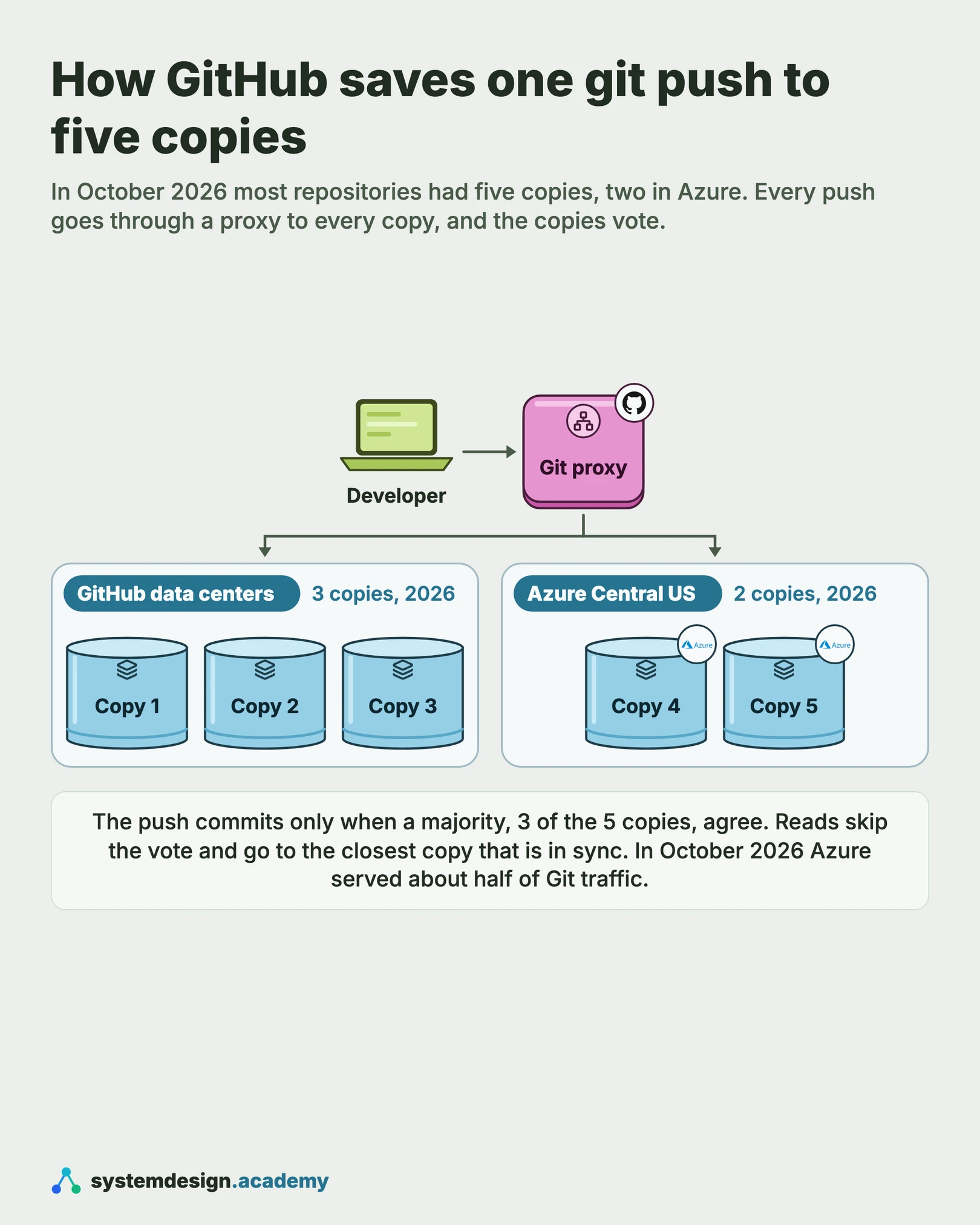
Designing GitHub's Git storage is about keeping many full copies of every repository in step. A repository is a project's files plus its whole history. In 2016 GitHub built Spokes to keep three copies of each repository, in different racks, the cabinets that share power and a network switch. In October 2026 most repositories had five copies, two of them in Microsoft Azure. Reads go to the closest copy that is up to date. A push goes through a proxy to every copy. It commits only if a majority agree, using a three-phase commit, a way for servers to agree on one change in three rounds. Issues and pull requests live separately in MySQL.

Where it shows up
Storing and serving files at scale is a common system design topic for backend, storage and infrastructure roles. It also appears as design GitHub, design a code hosting service, design Dropbox or design a distributed file system. We have no public source that GitHub uses this exact question in its interviews. This guide is built from GitHub's own engineering blog, so you can reason with real numbers.
Spec sheetGitHub
- 01Repositories
- 1 billion
- 02Pushes a second, estimated
- ~1,300 average, ~3,900 peak
- 03Storage operations a second, estimated
- ~1.2M
- 04Disk for all the copies, estimated
- ~50 PB
worked through below, with the maths
GitHub in its own numbers
Every figure below is quoted from GitHub's own engineering writing. Tap a source to check it.
1 billion
repositories served by GitHub's Git storage
GitHub engineering blog, October 20265
copies of most repositories, two of them in Azure
GitHub engineering blog, October 2026100B+
Spokes operations a day
GitHub engineering blog, October 20263.35B
pushes a month, up 4.9 times in a year
GitHub engineering blog, October 2026100 to 1,000
reads for every write
GitHub engineering blog, October 202624h 11m
of degraded service after a 43-second network cut
GitHub incident analysis, 2018
Why this question is asked
This question tests whether you can replicate data without losing writes or serving stale data. A Git push is not just bytes. It moves branch pointers, and two people can push to the same branch at the same moment. The interviewer wants to hear how copies agree, what counts as a committed write, and how reads find a copy that is up to date. They also want to know what happens when a server, a rack or a whole data center fails. A candidate who says "store it in S3" and stops has skipped the hard part: the branch update that every copy must agree on.
What the interviewer asks
“Design the storage behind a code hosting site like GitHub. Users clone, fetch and push Git repositories. Every repository must survive the loss of a server, and pushes must never be lost or applied twice. Reads must stay fast for users around the world. A good opening line: 'I will split this into two stores. Git data, the files and branches, needs several full copies that agree on every push. Metadata, like issues and pull requests, goes in a normal database. I will start with the numbers, then the read path, then the push.' Then spend 45 minutes like this: requirements and numbers (5), the read path and routing (10), the push and the vote (10), placement, checksums and repair (10), then failure and growth (10).”
Ask these back before you draw
- 1.Is this only the Git data, or also issues and pull requests? (Start with the Git data. In 2018 GitHub wrote that it keeps non-Git metadata in MySQL.)
- 2.How many repositories, and how many pushes? (In October 2026 GitHub wrote a billion repositories and 3.35 billion pushes a month.)
- 3.How many reads for each write? (In 2026 GitHub wrote that most repositories see somewhere between 100 and 1,000.)
- 4.How many copies of each repository, and in how many places? (Three in 2016. Five by default in 2026.)
- 5.What may fail: one server, a rack, or a whole data center?
This page is the free part.
The course goes deeper on the GitHub design
₹1,111 in India$35 everywhere elseonce, for the whole course
The System Design course covers the GitHub design across a run of lessons, not one page. These 4 alone are about 145 minutes of step-by-step reading, 1 of them with code you run in the browser, all with a quiz.
- Quorum in Distributed Systems
What is quorum in system design? How read and write quorums work, why R + W > N, sloppy quorums, hinted handoff and quorum vs consensus, with a lab.
- Three-Phase Commit
Adding a pre-commit phase to eliminate 2PC's blocking problem, theoretically clean, practically abandoned.
- Two-Phase Commit
How two-phase commit makes a distributed transaction all-or-nothing, and why it blocks if the coordinator crashes. Includes a 2PC coordinator in code.
- Synchronous Replication
Synchronous replication waits for a replica to confirm each write, so no data is lost on failover. Compares sync, semi-sync and async replication.
all part of
System Design Masterclass
770 lessons · about 290 hours · 18 free to read
₹1,111in India, by UPI
$35everywhere else, by card or PayPal
It is really nice and good Please join the course
You own this course
Continue with Quorum in Distributed Systemspay once,
yours for life
Live from the course bench
Before you design GitHub, try the questions it rests on.
Real interview questions, live diagrams and measured lab results, pulled at random from the lessons. A new set every time you come back.

01Requirements
Requirements
Always clarify these in the first 5 minutes of the interview. Do not start drawing boxes until both lists are agreed.
Functional requirements
- Clone and fetch: send a repository's history to a user
- Push: accept new commits and move branch pointers safely
- Reject a push that would overwrite someone else's push to the same branch
- Route each request to a server that holds an up-to-date copy
- Notice a failed or out-of-date copy and make a new one
- Keep issues, pull requests and other metadata in a separate database
Non-functional requirements
- Durable: a push that was accepted is never lost
- Available: one server, or one whole rack, can fail and every repository stays readable and writable
- Consistent: all copies of a repository hold the same references (branches, tags and others) after each push
- Fast reads: reads far outnumber writes, so they go to the closest up-to-date copy
- A few hundred milliseconds for a branch update, even across a continent (GitHub's 2017 budget)
- Scale out: add servers and copies without stopping service
02Scale estimates
Back-of-envelope scale estimates
Show your math. Pulling numbers from thin air signals you have not thought about the load.
Repositories
1 billion
GitHub's own number, October 2026. For comparison, GitHub wrote over 35 million in April 2016 and nearly 70 million in 2017. GitHub's Octoverse 2025 report counted 630 million repositories for September 2024 to August 2025. The two numbers come from different reports and may not count the same things, so do not read them as growth. Most repositories are small and rarely pushed. A few are huge and very busy.
Pushes a second, estimated
~1,300 average, ~3,900 peak
GitHub wrote 3.35 billion pushes a month in October 2026. A month is about 2.6 million seconds. 3.35 billion / 2.6 million is about 1,300 pushes a second on average. Assume the busiest hour runs at 3 times the average. That is our assumption, not GitHub's number. It gives about 3,900 a second across all repositories.
Storage operations a second, estimated
~1.2M
GitHub wrote in October 2026 that Spokes handles well over 100 billion operations a day. 100 billion / 86,400 seconds is about 1.2 million a second. Most of these are reads, since GitHub wrote there are 100 to 1,000 reads for every write.
Disk for all the copies, estimated
~50 PB
GitHub has not published its total storage. Assume an average repository takes 10 MB on disk. That is our assumption. 1 billion x 10 MB is about 10 petabytes for one copy. With five copies of each, that is about 50 petabytes. Say the assumption out loud, because one large monorepo can be many gigabytes on its own. Also ask whether forks share storage. In this design, a fork shares the objects of the repository it came from, so a million forks of one project do not cost a million full copies.
Copies that must agree on a push
3 of 5
A write commits when a majority of copies agree. In 2016 GitHub wrote that a write needs 2 of 3 copies, and that with four or five copies, three are required. In 2026 most repositories have five copies, so a push needs 3. So up to two copies can be down or slow and pushes still work.
Cost of one branch update to a far copy, estimated
~100 ms+
In 2017 GitHub wrote that a write costs four round trips to the distant copies. In 2026 it wrote that a round trip to its Azure copies, about 1,000 miles away, takes around 25 ms. If the four round trips still applied, 4 x 25 ms is about 100 ms of network time alone. That is our arithmetic. If updates to one branch must happen one after another, at about 100 ms each that branch takes about 10 updates a second. GitHub wrote in November 2026 that its busiest repositories receive at most dozens of writes in a single second, which is why it is building a faster path for ref updates.
03Architecture
High-level architecture
Start with the user. A clone, fetch or push arrives at GitHub's front end. The request needs to reach a server that holds the repository. Those servers are called fileservers, and in 2016 GitHub wrote that they keep repositories on fast local SSDs. Spokes is the system that decides which fileservers hold each repository and keeps their copies in step. In 2016 Spokes kept at least three copies, in different racks. In October 2026 GitHub wrote that most repositories have five copies, two of them in Microsoft Azure's Central US region. For a read, a routing lookup returns a short list of up-to-date copies in order of preference. The read goes to the closest one. For a push, a proxy, a server that sits in front of the copies, passes the update on to every copy. The copies vote, using a three-phase commit, and the push counts only if a majority agree. After each update, every copy computes a checksum of its references, a short fingerprint, as an extra check that the copies match. A background process keeps checking that each repository has enough healthy copies, and makes new ones if not. Everything that is not Git data, such as issues, pull requests and accounts, lives separately in MySQL.
In a real interview, sketch this on the whiteboard before diving into any single box.
04One request
What happens when you push to GitHub, step by step
Steps 1, 3, 4 and 5 follow GitHub's posts from 2016 and 2017. GitHub has not published the inside of step 2, who runs the vote in step 4, or what happens when a checksum does not match in step 5, so those parts are this design's. Step 6 follows the 2016 posts on repair.
- 1
The push arrives
You run git push. The request reaches GitHub's front end, which needs to find the servers that hold your repository.
- 2
Find the copies
In this design, the front end asks a routing service. It returns the list of fileservers that hold an up-to-date copy. GitHub's 2016 post describes a routing query that returns about three copies in order of preference.
- 3
The proxy sends the push to every copy
Every push goes through a proxy, which copies it to each fileserver that holds the repository. Each copy takes a lock, a marker that stops any other push changing those branches at the same moment, and checks that their old values are what the push expected.
- 4
The copies vote
A coordinator runs a three-phase commit. In this design, the proxy is the coordinator. The push is committed only if a majority of copies agree. If they do not, it is rolled back on every copy.
- 5
Check the checksums
Each copy computes a checksum of all its references and their values, as an extra check. If two copies have the same checksum, they hold the same logical contents. In this design, a copy that does not match is marked unhealthy and repaired.
- 6
Repair in the background
Spokes regularly checks that every repository has the copies it should. If one is missing or unhealthy, it makes a new copy from a healthy one.
05Components
Core components
Walk through each service. The interviewer wants to hear what each one owns, not just the names.
Fileservers
The servers that hold the repositories. In 2016 GitHub wrote that they store repositories on fast local SSDs, and that each fileserver handles a hundred or more incoming requests a second. Each one holds a full copy of many repositories, not a piece of each.
Spokes (first called DGit)
GitHub's system for keeping copies of each repository in step, introduced in 2016. It works at the Git level, not the disk level, so it copies Git data rather than disk blocks. In 2026 GitHub wrote that it is also a single API that internal services use to read and change repository data.
Routing lookup
Answers the question: which fileservers hold this repository, and which are up to date? In 2016 it returned not one server but a list of about three, sorted in preference order. If the first copy fails a read, the request tries the next one. How GitHub stores this map is not published.
Write proxy
Every push goes through a proxy that sends it to every copy, as GitHub described in 2017. GitHub's post says a coordinator tells each copy to commit or roll back. In this design, the proxy is also the coordinator and runs the vote.
Three-phase commit and the majority lock
A way for several servers to agree on one change, in three rounds: ask every server if it can commit, tell them all to get ready, then tell them to commit. GitHub wrote in 2017 that it uses this protocol and also uses the copies as a distributed lock, so that updates are applied in the same order on every copy. In 2016 it wrote that each write takes an exclusive lock on a majority of copies. In October 2026 it wrote that each write holds a lock on the whole repository until it commits, and that it is changing this to one lock per reference. Why three phases, not two? In two-phase commit, if the coordinator dies after asking everyone to get ready, the copies can be stuck holding locks, unsure whether to commit. The extra round lets the copies finish the decision without the coordinator. The price is one more round trip on every write.
Spokes checksum
A fingerprint of a repository's references (branches, tags and others), computed on every copy after every update. GitHub defines it as the exclusive-or (XOR) of the hash of each reference name and value pair. A hash is a short fingerprint computed from the data. If two copies have the same checksum, they hold the same logical contents.
Repair process
In 2016 GitHub wrote that Spokes checks periodically that every repository has the copies it should, and creates more if not. In 2026 it called these background systems sweepers, which handle placement, repair and rebalancing. Because copies are spread over many servers, every remaining server can be a source and a destination. That makes repair fast.
MySQL for metadata
Issues, pull requests and other data that is not Git data live in MySQL clusters, as GitHub wrote in 2018. In 2021 it wrote about splitting its main cluster, mysql1, into several clusters by group of tables, using Vitess for some of them.
06Data model
Data model
Pick the right store per table. Justify each choice with the access pattern, not by reflex.
repository_routes (in this design)repo_idreplicas[] (fileserver, rack, data center)healthy (per copy)checksum (per copy, after the last write)preference orderThe map the routing lookup reads. GitHub's 2016 post says the lookup returns a list of up-to-date copies in preference order, and that copies are in different racks. The field names and layout here are ours. It is small and read on every request, so it caches well.
refs (inside each copy of a repository)refname (e.g. refs/heads/main)value (the commit id it points to)This is Git's own model. A ref, or reference, is a named pointer to a commit. A branch is a ref. A push moves one or more refs from an old value to a new value. This is the part every copy must agree on. The commits and files themselves are added, not changed, so they need far less coordination.
Git objects (inside each copy)object id (a hash of its content)type (commit, tree, blob)contentGit stores every file version, folder listing and commit as an object named by the hash of its content. The same content always has the same name. So writing an object twice does no harm. Objects are usually packed together into pack files, single compressed files that hold many objects.
repair_queue (in this design)repo_idreason (missing copy, failed vote, bad checksum)source copytarget fileserverstatusIn this design, a row for each repository that has fewer healthy copies than it should. GitHub's 2016 post says copies that lose a vote are marked unhealthy until they are repaired. The table itself is ours.
07Deep dives
Deep dives
These are the conversations the interviewer is steering you toward. Practice each one until you can talk through it without notes.
Why copy Git data, not disks
Before 2016, GitHub organized its fileservers in pairs. Each active fileserver had a dedicated, online spare, connected by a cross-over cable. GitHub wrote that each disk had four copies: two on the main fileserver, using RAID, which keeps the same data on more than one disk in one machine, and two on the spare. That protects the disk, but it ties every repository to one pair of machines. In 2016 GitHub introduced DGit, short for distributed Git, later renamed Spokes. It does replication at the application layer, rather than at the disk layer. Each repository is stored on three servers chosen independently. Because Git already knows how to copy a repository from one place to another, Spokes can move one repository at a time. When a server dies, the repositories it held are copied again from their other copies, spread over every remaining server. GitHub called this healing, and wrote that it is fast because it runs from many servers to many servers. In April 2016, 58% of repositories were already on DGit. In an interview, say this choice out loud: you copy the unit the user cares about, the repository, not the disk under it.
Reads: find the closest copy that is up to date
Reads far outnumber writes. In 2017 GitHub wrote about 100 reads for every write. In 2026 it wrote somewhere between 100 and 1,000. So reads must be cheap. In 2016 a routing query returned not one server, but a list of about three up-to-date copies, sorted in preference order. If a read fails on the first copy, it usually tries the others in the list. In 2017 GitHub wrote that Spokes routes reads to the closest copy that is in sync. In 2026 it wrote that Spokes prefers a copy in the same region and availability zone. In this design, a copy that misses a vote is marked out of date in the routing map before the push is acknowledged to the user. So the very next fetch cannot be sent to it. Only after repair, when its checksum matches the others, does it go back into the list. Detecting a dead server is harder than it sounds. A slow network can look like a dead server. In 2016 GitHub wrote that Spokes only marks a node offline if three requests fail in a row. It does not remove the node from the list. It moves it to the end of the preference order. That way one bad moment does not take a copy out of service, and a truly dead server stops getting traffic quickly. Not every read is cheap, though. For a clone, a Git server has to work out which objects the user needs and pack them into one file, which takes CPU time and memory. In this design, packs for popular repositories are cached, so thousands of identical clones reuse one pack. This is how Git servers work in general; the GitHub posts cited here do not describe GitHub's own caching.
Writes: a proxy, a vote and a three-phase commit
A push changes refs, the named pointers like main. If two people push to main at the same moment, only one may win, and every copy must agree on which. In 2016 GitHub wrote that every write takes an exclusive lock on a majority of copies, and that every write is treated as an election. In 2017 it described the steps. Every push goes through a proxy, which sends it to every copy. On each copy, Git first takes the local locks on the refs being changed. It checks that each ref's old value is what the push expected and that the new value is valid. A coordinator then runs the three-phase commit protocol across the copies. In this design, the proxy is the coordinator. If everything is fine, the change is committed. Otherwise it is rolled back in its entirety. GitHub wrote that this costs four round trips to the distant copies. In 2026 GitHub added an important detail. A majority is enough to commit, but the vote waits for every healthy copy to respond, up to a timeout. So a copy that is slow without being dead still slows every push, and the slowest healthy copy sets the speed of every write. The timeout is what stops one sick copy from blocking writes forever. GitHub also wrote that the part of a push that truly needs agreement is the reference update itself. So in this design, the new commits and files are sent to every copy first, and only the ref update goes through the vote. The sketch below shows the majority rule. It is an illustration, not GitHub's code.
def push(copies, ref, old, new):
    locked = [c for c in copies if c.lock_and_check(ref, old)]  # phase 1
    if len(locked) <= len(copies) // 2:                  # no majority
        for c in locked: c.abort(ref)
        return "rejected"
    ready = [c for c in locked if c.prepare_commit(ref, new)]  # phase 2
    if len(ready) <= len(copies) // 2:
        for c in locked: c.abort(ref)
        return "rejected"
    for c in ready: c.commit(ref, new)                   # phase 3
    for c in copies:
        if c not in ready: c.mark_unhealthy()            # repair later
return "accepted"The Spokes checksum: prove two copies are the same
How do you know five copies of a repository really hold the same references, without comparing everything? GitHub's 2017 post defines a Spokes checksum. It is the exclusive-or (XOR) of the hash of each (refname, value) pair, covering every reference, such as branches and tags, plus a few other things. XOR is a bit operation where applying the same value twice cancels it out. That makes the checksum cheap to update. When one ref changes, you XOR out the hash of the old pair and XOR in the hash of the new pair: new_checksum = old_checksum XOR hash(refname, oldvalue) XOR hash(refname, newvalue). You never need to read every ref again. GitHub wrote that if two copies have the same checksum, they definitely hold the same logical contents. It computes the checksum for every copy after every update, as an extra check that they are all in sync. In an interview, this is a strong detail. It turns "are the copies consistent?" into one number per copy.
Placement and repair: racks as failure zones
Where you put the copies matters as much as how many there are. In 2016 GitHub wrote that Spokes keeps at least three copies of every repository, wiki and gist, and that those copies are in different racks. No repository has two copies in the same rack. A rack usually shares power and a network switch, so it can fail as one unit. GitHub treats each rack as an availability zone, a group of machines that can fail together. That lets it take a whole rack out of service for maintenance: new reads stop going to the rack, running reads such as long clones finish, servers are rebooted up to five at a time, and then GitHub moves on to the next rack. Spokes also checks periodically that every repository has the desired number of copies. If not, it makes more. A copy that ends up on the losing side of a vote is marked unhealthy until it is repaired. GitHub wrote that disagreements are exceptional. Out of many millions of writes a day, a few dozen end with a vote that is not unanimous, and the lagging copy almost always recovers within a minute or two. So repair has to be automatic, because it happens every day, even though it is rare. In this design, a repair queue holds these repositories. A new copy is built in two steps. First it copies the repository from a healthy copy while pushes continue. Then it briefly takes the repository's lock, catches up on the refs that changed in the meantime, and checks that its checksum matches. Only then does it join the vote and the read list.
Stretching across a continent, then into Azure
Early Spokes needed the copies fairly close together. In 2017 GitHub wrote that early versions of Spokes needed low-latency links between the proxy and every copy, so the copies had to sit relatively close to each other. The older disk-level system, DRBD, had been even more sensitive to latency. To put copies in other data centers, GitHub overlapped work with the time spent waiting on the network and made Git reference updates faster. A network round trip across the continental US takes something like 60 to 80 milliseconds. GitHub wanted to support at least a few updates per second in a single repository. That gave a budget of a few hundred milliseconds per update. Even with all of these optimizations, GitHub wrote, a reference update still cost about a third of a second. It also wrote that it planned a more advanced consensus algorithm to cut the number of round trips. GitHub also wrote that the change must not slow down reads, which outnumbered writes by about 100 to 1. In October 2026 GitHub wrote that most repositories now have five copies, and two of the five are in Azure. The first copy of a repository landed in Azure's Central US region in August 2025. It is about 1,000 miles from GitHub's data centers, so each round trip takes around 25 ms. Azure serves about half of Git traffic. The three and two split is a moment in a migration, so quote it with its date. The lesson for the interview: every extra place you copy to makes reads closer and failures safer, but makes every write wait longer.
The ceiling: why GitHub is separating storage from compute
In October 2026 GitHub wrote about the limits of the design above. Every copy takes part in every write, so a push is only as fast as the slowest copy in its set. Each write also holds a lock on the whole repository until it commits, so pushes to one repository wait for each other. The copies on disk are the source of truth, so adding read capacity means adding another durable copy. Losing a copy reduces read capacity, and losing quorum stops writes entirely. Quorum means the majority needed to commit. Meanwhile, AI coding agents changed the traffic. Pushes grew 4.9 times in a year, from 0.69 billion to 3.35 billion a month. GitHub wrote that the busiest repository saw roughly a billion requests in August 2026. As a first step, GitHub wrote in October 2026 that it is changing the quorum from one lock for the whole repository to one per reference, so pushes to different branches no longer wait for each other. In internal testing that gave 3 to 4 times higher throughput. The bigger answer is to decouple storage from compute. In the new design GitHub described in November 2026, Git objects live in Azure Blob Storage, a durable object store, and references live in a small quorum service called Ref-CAS. Servers that answer requests become disposable workers whose local disk is only a cache. In Ref-CAS, each ref update is a compare-and-swap committed by a quorum. Compare-and-swap means: change the value only if it still equals what I expected. GitHub wrote that in internal tests it supported 5,000 agents sending 7,200 pushes a second to one repository. In November 2026 it was in a limited private preview. In an interview, this is the natural next step to offer: only ref updates need agreement, so keep the agreement small and put the bytes in object storage.
The other database: issues and pull requests in MySQL
Git data is only half of GitHub. Issues, pull requests, accounts and permissions are not Git data. In 2018 GitHub wrote that it keeps this non-Git metadata in MySQL clusters, each with up to dozens of read replicas. A read replica is a copy of the database that serves reads. In 2021 GitHub wrote about partitioning its main cluster, called mysql1. In 2019 mysql1 answered 950,000 queries a second on average: 900,000 on replicas and 50,000 on the primary. GitHub grouped tables that are used together into schema domains. Linters, automated checks in development and tests plus a sampled check in production, flagged any query or transaction that crossed two domains. Then it moved whole domains to their own clusters, some on Vitess, a scaling layer on top of MySQL. With one custom write cutover, it moved 130 of its busiest tables at once. By 2021 all the clusters together answered 1,200,000 queries a second, and load on the database hosts that once held mysql1 had dropped by 50%. In an interview, keep the two stores apart. Git data is files and refs. Metadata is rows. They scale in different ways.
October 2018: what 43 seconds can do to a database
On 21 October 2018 at 22:52 UTC, routine maintenance to replace failing 100G optical equipment cut the link between GitHub's US East Coast network hub and its primary East Coast data center. Connectivity came back in 43 seconds. But GitHub uses Orchestrator to manage its MySQL cluster layout and to fail over automatically. Orchestrator is built on Raft, a consensus protocol. During the cut, the Orchestrator nodes that could still reach each other started failing over clusters to send writes to the US West Coast data center. A brief set of East Coast writes had not yet reached the West Coast. So GitHub could not simply fail back without losing them. Applications on the East Coast also struggled with the extra latency of writing across the country. Restoring multiple terabytes of backup data took hours. The result was 24 hours and 11 minutes of degraded service. Webhook delivery (messages GitHub sends to other services when something happens) and GitHub Pages builds (the websites GitHub hosts) were paused, with over five million webhook events and 80 thousand Pages builds queued. GitHub wrote that ultimately no user data was lost, though a few seconds of database writes still needed manual reconciliation when it published the analysis. The first technical change GitHub listed: configure Orchestrator so it cannot promote database primaries across regional boundaries. The lesson: automatic failover across regions can do more harm than a short outage.
Common mistakes candidates make
The first mistake is saying "put the repositories in S3" and stopping. Object storage holds the bytes well, but a push must also move a branch atomically, and two pushes to main must not both win. Say instead: only the ref update needs agreement, so run a majority vote or a compare-and-swap for it. The second mistake is replicating with one primary and async copies. If the primary dies, the last pushes are gone. Say instead: a push is accepted only when a majority of copies hold it. The third mistake is putting all copies close together without saying why, or far apart without counting the round trips. Every far copy adds network time to every write. The fourth mistake is ignoring repair. Copies drift: GitHub wrote in 2016 that a few dozen of many millions of daily writes end in a vote that is not unanimous. Say how you detect a bad copy, with a checksum, and how you rebuild it. The fifth mistake is mixing Git data and metadata in one store. Spend 45 minutes like this: requirements and numbers (5), the read path and routing (10), the push and the vote (10), placement, checksums and repair (10), then failure and growth: a data center cut and agent-scale traffic (10).
08Trade-offs
Trade-offs to discuss
Every senior interviewer expects you to surface at least 3 of these. Pick the decisions, state the alternatives, and justify your choice.
Replicate at the Git level vs at the disk level
Disk-level copies, like GitHub's old pairs with RAID, are simple and need no knowledge of Git. But they tie each repository to one pair of machines. Git-level copies let each repository live on its own set of servers, move one repository at a time, and repair from many servers at once. The cost is that the storage system must understand Git refs and locks.
A majority vote vs one primary with async copies
One primary is simpler and writes are faster. But if it dies, recent pushes that had not reached the copies are lost. A majority vote means every accepted push is on most copies. The cost is that a push waits for its copies to answer. GitHub wrote in 2026 that Spokes waits for every healthy copy, up to a timeout, so the slowest healthy copy sets the speed of every write. Losing the majority stops writes.
Three copies vs five
Three copies survive one failure and keep writes cheap. Five copies survive two failures and give more places to serve reads, including a second cloud. GitHub moved from at least three in 2016 to five by default by 2026. The cost is more disk and a larger set for every write to wait on.
Copies close together vs spread across data centers
Close copies make writes fast. Copies in other data centers, or in Azure, survive the loss of a site and put reads near users. GitHub wrote in 2017 that a cross-country ref update still cost about a third of a second. Pick the spread from the failures you must survive.
Full copies on local disk vs durable object storage with caches
Full local copies give fast reads and simple recovery. But read capacity and durability are tied together: to add reads you add a full durable copy. In 2026 GitHub described a new design in which Git objects live in Azure Blob Storage and references live in a small quorum service, Ref-CAS, with workers whose disks are only a cache. The cost is a new system to build, and reads that miss the cache must fetch from object storage.
Three-phase commit with a lock vs a consensus log such as Raft
Three-phase commit fits Git well: each copy already has Git's own ref locks, and there is no separate log to keep. A consensus log such as Raft keeps one ordered list of changes, survives a failed coordinator by electing a new leader, and usually needs fewer round trips per write. In 2017 GitHub wrote that it planned a more advanced consensus algorithm to reduce round trips. In 2026 its new Ref-CAS service commits each ref update by quorum.
Far copies that vote vs far copies that only follow
A far copy that votes makes every write wait for its round trip, but it can help form a majority if a site is lost. A far copy that only follows adds no write delay, but it may be a little behind and cannot help form a majority. GitHub wrote in 2017 that GitHub Enterprise geo-replicas are configured as non-voting, so pushes keep working when they are unreachable.
Automatic cross-region database failover vs staying in one region
Automatic failover sounds safer. GitHub's 2018 incident shows the risk: a 43-second cut moved MySQL writes across the country, and some writes had not been copied. The first technical change GitHub listed afterwards was to stop primaries being promoted across regional boundaries.
Free PDF · 18 pages
Get the free System Design Interview Cheat Sheet
The interview in seven stages, the numbers worth knowing by heart, and twelve classic systems on one page each, every line linked to the lesson it comes from.
09Follow-ups
Follow-up questions to expect
After the main design, the interviewer usually picks one part and asks more. Here is what to say.
Two people push to main at the same moment. What happens?
Both pushes go through the proxy. Each copy locks main and checks its old value. In this design, the first push to win a majority of locks commits. The second one finds main has moved, so its old value no longer matches, and it is rejected. The user sees a normal "fetch first" error and pushes again.
One copy is down during a push. Does the push fail?
No, as long as a majority agree. With five copies, three are enough. The copy that missed the push is marked unhealthy. Spokes's regular check then sees the repository is short of healthy copies and makes a new one from a healthy copy.
How do you know two copies are really the same?
Compare their Spokes checksums. GitHub defines it as the XOR of the hash of every reference name and value pair. It covers every reference, such as branches and tags. It is updated cheaply after each push, and if two copies have the same checksum they hold the same logical contents.
One repository gets thousands of pushes a second from AI agents. What breaks?
Every push must win a vote. GitHub wrote in 2026 that the vote waits for every healthy copy to answer, up to a timeout, even though three of five are enough to commit, and that each write holds a lock on the whole repository until it commits. So one slow but healthy copy slows every push, and pushes to one repository wait for each other. GitHub also wrote that its busiest repositories get at most dozens of writes a second. Its fixes: one lock per reference instead of per repository, then Git objects in object storage and a small quorum service, Ref-CAS, for ref updates. Only the ref update needs agreement.
The proxy crashes in the middle of a push. Some copies have committed and some have not. What happens?
GitHub has not published its recovery steps, so this is this design's answer. The copies that were told to get ready know the push was about to commit, because that is what the extra phase in three-phase commit is for. A new coordinator asks the copies what state they are in. If any copy has committed, or a majority are ready, it finishes the commit on the rest. If none got that far, it rolls back. Then the checksums show which copies disagree, and any copy that still differs is marked unhealthy and repaired. The user may see an error even though the push landed, so a retry must be safe: pushing the same commits again finds the branch already at the new value.
The site holding three of the five copies goes offline. Can users still push?
Not with a simple majority rule. Two of five is not a majority, so writes stop, though reads can still be served from the two remaining copies. GitHub has not published how its copies are spread over its own data centers. In this design, no single site holds three copies. Spread them as 2, 2 and 1 over three places, so that losing any one place still leaves three.
A network cut splits your two data centers for 40 seconds. Should the database fail over?
Be careful. In GitHub's 2018 incident, a 43-second cut caused MySQL to fail over across the country, and some writes had not been copied. Recovery took 24 hours and 11 minutes. In this design, failover stays inside one region, and a short cut is waited out.
10In production
How GitHub actually does it
Every fact about GitHub on this page comes from GitHub's own blog, github.blog. The estimates and anything marked 'in this design' or 'assume' are ours. General facts about Git, such as refs and content-addressed objects, are how Git works for everyone. DGit, three copies, fileserver pairs and healing are from the April 2016 post Introducing DGit. The rename to Spokes, the majority lock, the routing list, racks and repair are from the September 2016 post Building resilience in Spokes. DRBD, the older disk-level system, is named in the 2017 post. The proxy, the three-phase commit, the four round trips and the checksum are from the 2017 post Stretching Spokes. The 43-second cut and the 24 hours and 11 minutes are from GitHub's October 2018 incident analysis. The mysql1 numbers, schema domains and Vitess are from the 2021 post on partitioning. Five copies, Azure, 100 billion operations a day and the growth in pushes are from GitHub's October 2026 posts. Ref-CAS and the 7,200 pushes a second test are from November 2026. Older posts describe the system at that date, so say the year when you quote a number.
Sources
- GitHub: Introducing DGit (April 2016)
- GitHub: Building resilience in Spokes (September 2016)
- GitHub: Stretching Spokes (2017)
- GitHub: October 21 post-incident analysis (2018)
- GitHub: Partitioning GitHub's relational databases to handle scale (2021)
- GitHub: Octoverse 2025
- GitHub: Building Git infrastructure for agent-scale development (October 2026)
- GitHub: The bridge to agent-scale Git infrastructure (October 2026)
- GitHub: Inside GitHub's new Git storage architecture (November 2026)
Lessons to study before this interview
If any of these topics are fuzzy, the interviewer will catch it. Each lesson is 15 to 60 minutes with diagrams, code, and a quiz.
Quorum in Distributed Systems
advanced / distributed systems core
Three-Phase Commit
advanced / distributed systems core
Two-Phase Commit
advanced / distributed systems core
Synchronous Replication
intermediate / data replication distribution
Geo-Replication
intermediate / data replication distribution
Anti-Entropy
advanced / distributed systems core
Network Partitioning
advanced / distributed systems core
Database Failover
advanced / reliability resilience
Database Replication
foundation / database fundamentals
Vertical Partitioning
foundation / database fundamentals
Blob Storage
intermediate / database types storage
Capstone: Design a File Storage System like Dropbox
capstone / capstone
System design interviews at companies in the US, UK, Canada and Singapore
41 walkthroughs of real systems at well-known companies, each built from that company's own engineering blog, talks or filings, with the numbers cited.
Banking, payments and trading
Commerce and delivery
Rides and maps
- Grab system design (Singapore)
- Uber system design
Feeds, social and messaging
Streaming and media
AI labs and big tech
Developer and collaboration tools
- GitHub system design (this page)
- Atlassian system design (Australia)
- Canva system design (Australia)
- Figma system design
- Datadog system design
- Dropbox system design
- Databricks system design
- Snowflake system design
- Zoom system design
11FAQ
Frequently asked questions
Go deeper
This guide is built on these 6 lessons. Each one teaches one piece of the GitHub design above, step by step.
- Quorum in Distributed SystemsSystem Design · distributed systems core · 55 min
- Three-Phase CommitSystem Design · distributed systems core · 34 min
- Two-Phase CommitSystem Design · distributed systems core · 40 min
- Synchronous ReplicationSystem Design · data replication distribution · 16 min
- Geo-ReplicationSystem Design · data replication distribution · 18 min
- Anti-EntropySystem Design · distributed systems core · 42 min
Practice with 770 system design lessons
Lifetime access for ₹1,111 in India or $35 elsewhere. Interactive diagrams, quizzes, and 20 capstone projects to practise on.

This one question is not enough for the interview.
Get all 200 questions in the System Design and Distributed Systems pack
Each question has why it is asked, a full answer, what the interviewer listens for, the follow-ups, the common mistakes and a diagram (268 diagrams in all). A PDF you keep, junior to staff level.
Pay by UPI, cards or netbanking through Razorpay. Pay by card or PayPal, in US dollars. Download at once from My packs.
NEWSystem Design Hands-On
Included in the System Design course: real systems, built live
Postgres Sharding: Complete Hands-On (PgBouncer + Citus). 2 h 36 min and 20 chapters: one PostgreSQL loaded until it breaks, then four shards behind a router you write, PgBouncer and Citus, with the 139-page slide deck. The first 15 minutes are free to watch.

Self-paced bootcamp · new class every week
System Design Interview Bootcamp
System design interview preparation in 14 recorded classes: the framework, estimation, the building blocks and 14 real designs, with two 1:1 mock interviews. Classes 1 to 4 are out, and its first 3 minutes are free.