System design interview guide
Figma System Design: How Real-Time Multiplayer Editing Works (Interview Guide)
Short answer
A good scenario to practise for a Figma system design interview is real-time multiplayer editing. Many people change one design file at once. We have no public source that Figma asks it. The key idea is that one server process owns each open file and decides the order of every edit. Browsers apply edits at once and send them over a WebSocket, a connection that stays open. For each property of each object, the last value to reach the server wins. Figma chose this over operational transformation, which Google Docs uses for text. A design file is a tree of objects. Layer order uses fractional indexing. In 2022, 95% of changes reached a journal in DynamoDB within about 600 ms. The whole file was saved to S3 every 30 to 60 seconds.
Asked about collaborative text editing instead, where operational transformation is the right tool? See the Google Docs system design guide
Two courses by the author of this page:
770 lessons · 18 free to read
₹1,111 in India · $35 elsewhere, once
Get System DesignYou own this course
219 lessons · 10 free to read
₹1,333 in India · $35 elsewhere, once
Get Generative AI and Agentic AIYou own this course
Save your progress and get the interview checklist PDF
Figma's multiplayer journal received more than 2.2 billion changes a day in 2022. It saved 95% of them within about 600 milliseconds. Each open file lives in one server process, and that process decides the order of every edit.
Designing Figma's multiplayer editing is about one rule: the server owns each open file. Every editor's browser holds a copy and applies its own edits at once. It sends them over a WebSocket, a connection that stays open both ways. In 2019 Figma described this design. The server keeps the file in memory and puts the edits in order. When two people change the same property of the same object, the last value to reach the server wins. Figma chose this over operational transformation, the method Google Docs uses for text. A design file is a tree of objects, not a long string. In 2022, 95% of edits were saved to a journal within about 600 ms. The whole file was saved every 30 to 60 seconds. Comments, teams and permissions live in Postgres and sync through a separate system called LiveGraph.

Where it shows up
A common type of question for backend and infrastructure roles that build collaborative tools. Similar questions are design a collaborative whiteboard or design real-time multiplayer editing. We have no public source that Figma, or any named company, uses this exact question. This guide is built from Figma's own engineering blog, so you can reason with real numbers and real choices.
Spec sheetFigma
- 01Changes per second, estimated
- ~25,000
- 02Updates from one person dragging
- 30 per second
- 03Client updates per journal write, estimated
- ~15
- 04Work at risk if a server crashes
- 60 s to under 1 s
worked through below, with the maths
Figma in its own numbers
Every figure below is quoted from Figma's own engineering writing. Tap a source to check it.
2.2B+
changes received by the multiplayer journal per day
Figma blog, 202295%
of edits saved to the journal within about 600 ms
Figma blog, 202230-60 s
between full saves (checkpoints) of a file to S3
Figma blog, 202233 ms
how often a client sends updates (30 per second)
Figma blog, 202210x+
faster serialization (turning the file into bytes) after moving to Rust
Figma blog, 201833%
shorter load times for the slowest 5% of page loads, with dynamic page loading
Figma blog, 2024
Why this question is asked
This question tests whether you can pick the simplest design that is still correct. Many candidates reach for operational transformation because Google Docs uses it. Figma looked at it and said no. A design file is a tree of objects with properties, and that needs a different answer. The interviewer wants to hear how edits are ordered and what happens in a conflict. They want to know how the tree stays a tree. They want to know how no work is lost when a server crashes. They also want you to separate the live canvas from slower data, such as comments and permissions.
What the interviewer asks
“Design real-time multiplayer editing for a design tool like Figma. Several people open the same file in their browsers. Each one moves, resizes, recolours and reorders shapes. Everyone sees everyone else's changes within a moment, and nobody's work is lost.”
Ask these back before you draw
- 1.Is this the design canvas only, or also comments, teams and permissions? (Start with the canvas; mention the rest at the end.)
- 2.Must two people be able to type in the same text box at the same moment, like Google Docs? (Figma's answer was no.)
- 3.Must editing work offline, and for how long?
- 4.How much work may we lose if a server crashes? One minute? One second?
- 5.How big can one file get, and how many people edit one file at once?
This page is the free part.
The course goes deeper on the Figma design
₹1,111 in India$35 everywhere elseonce, for the whole course
The System Design course covers the Figma design across a run of lessons, not one page. These 4 alone are about 94 minutes of step-by-step reading, every one with a quiz.
- WebSockets
Full-duplex, persistent connections, how the real-time web actually works.
- CRDTs
Conflict-free Replicated Data Types, data structures that merge automatically without coordination.
- Operational Transformation
Real-time collaborative editing, how Google Docs lets multiple people type simultaneously.
- Write-Ahead Logging
Write changes to a sequential log before applying them, the foundation of database crash recovery.
all part of
System Design Masterclass
770 lessons · about 290 hours · 18 free to read
₹1,111in India, by UPI
$35everywhere else, by card or PayPal
It is really nice and good Please join the course
You own this course
Continue with WebSocketspay once,
yours for life
Live from the course bench
Before you design Figma, try the questions it rests on.
Real interview questions, live diagrams and measured lab results, pulled at random from the lessons. A new set every time you come back.

01Requirements
Requirements
Always clarify these in the first 5 minutes of the interview. Do not start drawing boxes until both lists are agreed.
Functional requirements
- Open a file and see the current design, then see other people's edits as they happen
- Change any property of any object: position, size, colour, text and so on
- Create, delete and reorder objects, and move them into other frames or groups
- Keep editing while offline, then catch up when the connection comes back
- Undo and redo your own work without wiping out what others did
- Comments, teams and permissions update live too, but through a separate system
Non-functional requirements
- Your own edits appear instantly: the client never waits for the server to draw them
- Everyone ends with the same file. Two clients may never stay different forever
- Very little lost work when a server crashes. Figma's goal was under one second
- File data copied to another AWS region within 30 minutes
- Large files must still load quickly, and one huge file must not slow down other files
- Deploying new server code must not cause a burst of writes or lost edits
02Scale estimates
Back-of-envelope scale estimates
Show your math. Pulling numbers from thin air signals you have not thought about the load.
Changes per second, estimated
~25,000
Figma's 2022 post says the journal received more than 2.2 billion changes a day. 2.2 billion divided by 86,400 seconds is about 25,000 changes a second on average. Peaks are higher, and this number has grown since 2022.
Updates from one person dragging
30 per second
Figma's 2022 post says clients send updates every 33 ms, which is 30 a second. Assume 10 people in one file. The server forwards each update to the other 9. So one drag means about 270 messages a second going out.
Client updates per journal write, estimated
~15
Figma's 2022 post pictures journal writes as every 0.5 seconds, instead of every 60. Take that as our assumption. 0.5 seconds divided by 33 ms is about 15 client updates folded into one write. Batching is safe because the last value of each property wins.
Work at risk if a server crashes
60 s to under 1 s
With checkpoints alone, Figma could lose up to 60 seconds of work. With the journal, its goal was under one second. That is the reason the journal exists.
Memory: the property map, from Figma's 2025 post
60%+
Figma's 2025 post says each object's property map took more than 60% of a file's memory on the server. Objects hold about 60 of fewer than 200 possible properties. This matters because the server keeps every open file in memory. Memory per file decides how many files one machine holds.
03Architecture
High-level architecture
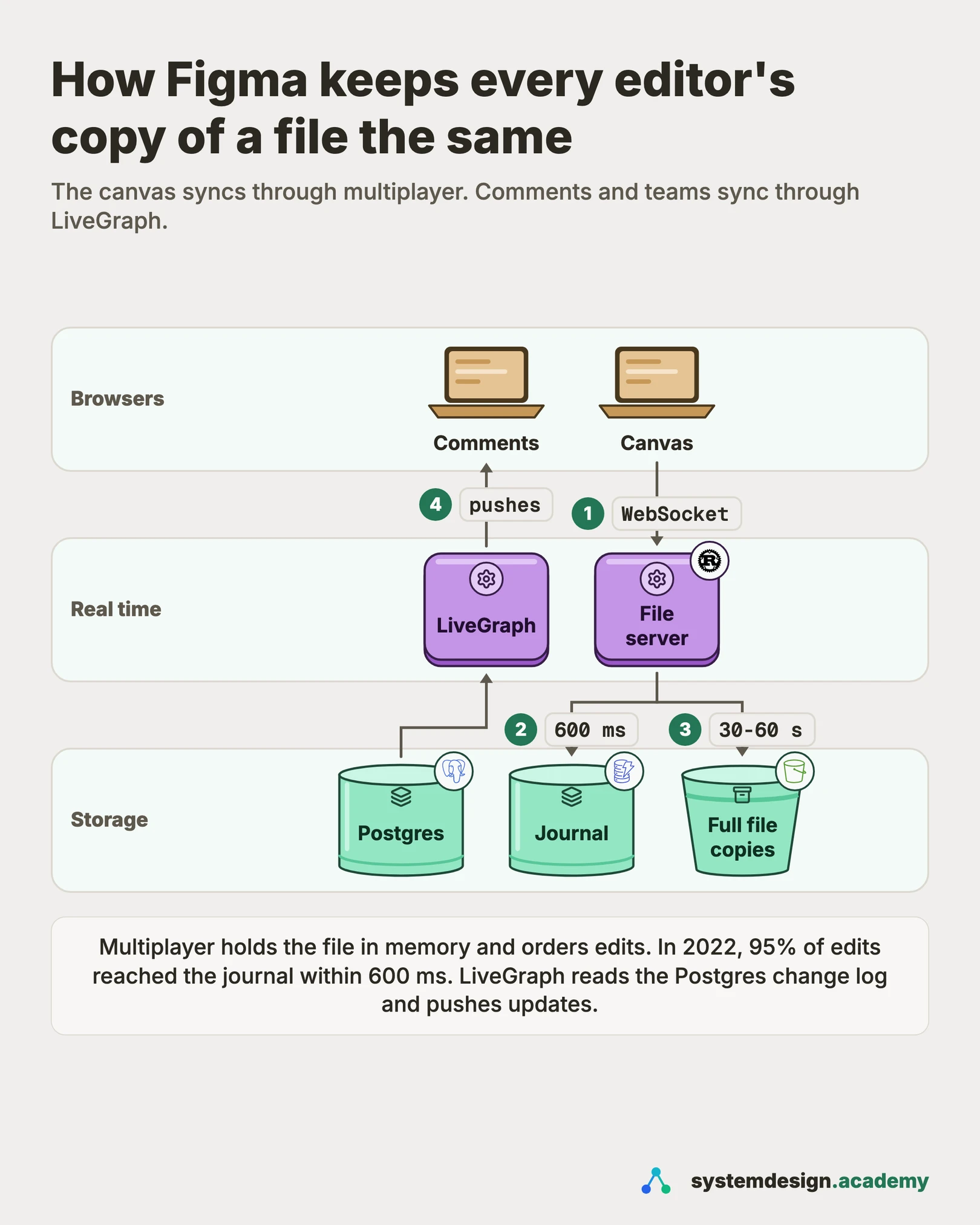
Draw two paths. The canvas path is the multiplayer service. When you open a file, your browser downloads a copy of it. Then it opens a WebSocket to the one server process that owns this file. Everyone editing the same file connects to that same process. The process keeps the whole file in memory. It is the authority: it checks each change, puts changes in order and settles conflicts. It then sends each accepted change to every other connected browser. In the background it writes small batches of changes to a journal. The journal is a log kept in DynamoDB, Amazon's managed key-value database. Figma's own example is a write roughly every half second. Every 30 to 60 seconds it also saves the whole file, compressed, to S3, Amazon's file storage service. That full save is called a checkpoint. The second path is for everything that is not the canvas: comments, users, teams, projects and permissions. That data lives in Postgres. A service called LiveGraph reads Postgres's change stream and pushes updates to the browsers that are looking at that data. This is Figma's design as described in its posts from 2019 to 2024.
In a real interview, sketch this on the whiteboard before diving into any single box.
04One request
What happens when you move a shape, step by step
Each step restates Figma's own description from its 2019 and 2022 posts. The routing in step 1 is our assumption; Figma has not published it.
- 1
Open the file
Your browser downloads a copy of the file and opens a WebSocket to the multiplayer process that holds it. In this design we assume a lookup tells it which process that is. Figma only says every client of one file must reach the same process.
- 2
Apply locally first
You drag a rectangle. Your browser changes its x and y properties at once and draws them. It does not wait for the server.
- 3
Send the change
The browser sends the new property values over the WebSocket. While you drag, it sends updates about every 33 ms.
- 4
The server orders and checks it
The multiplayer process applies the change to its copy in memory. If someone else changed the same property first, your value simply replaces it, because yours arrived later. It rejects changes that would break the tree, such as a cycle of parents.
- 5
Broadcast and acknowledge
The server sends the accepted change to every other browser on the file and confirms it to yours. Other browsers draw it.
- 6
Make it durable
The server gives the change a sequence number and adds it to the journal in DynamoDB, in batches. In 2022, 95% of changes were saved within about 600 ms. The whole file is checkpointed to S3 every 30 to 60 seconds.
05Components
Core components
Walk through each service. The interviewer wants to hear what each one owns, not just the names.
Browser client
Holds a full copy of the file and draws it. It applies your edits at once and sends them to the server. It ignores incoming server values for any property you have changed but the server has not yet confirmed. It also creates object IDs on its own, using its client ID, so creating objects works offline.
Multiplayer service (one process per file)
The authority for each open file. It keeps the file in memory, orders all changes, settles conflicts, rejects invalid trees and broadcasts accepted changes. Since 2018 the heavy work runs in Rust, one child process per document. A Node.js process in front handles the network.
Journal (DynamoDB)
A write-ahead log of changes for each file: a list of changes saved so they can be replayed later. Every change gets a sequence number, which is an integer that goes up by one per file. After a crash, the server loads the last checkpoint and replays journal entries with higher numbers.
Checkpoints (S3)
The whole file, encoded in a binary format, compressed and uploaded to S3 every 30 to 60 seconds. Figma meets its 30-minute cross-region goal this way: every journal change is checkpointed to S3 within 30 minutes. The journal itself is not copied to another region.
File lock table (DynamoDB)
Makes sure only one multiplayer process writes a file's journal. The process writes a (lock UUID, file key) row to take ownership. A UUID is a random unique ID. Each journal write only succeeds if that lock still matches.
QueryGraph
An in-memory graph of which objects depend on which, for example an instance on its component. It lets the server send only the page a user opened, plus whatever that page depends on.
Postgres and LiveGraph
Postgres stores metadata such as comments, files, teams and permissions. LiveGraph lets the frontend subscribe to queries written in GraphQL, a query language for APIs. Figma's 2021 post says it reads Postgres's write-ahead log and pushes new results when the data changes. In 2024 Figma rebuilt it in Go, with a cache and invalidators that each follow one database's change stream.
06Data model
Data model
Pick the right store per table. Justify each choice with the access pattern, not by reflex.
file (in the multiplayer process's memory)object_idpropertyvalueFigma describes a file as a two-level map: Map<ObjectID, Map<Property, Value>>. You can also picture it as rows of (object ID, property, value). A new feature usually just means a new property. The tree is stored inside this map: each object has a parent property.
object property: parent_indexparent_object_idposition (fraction between 0 and 1, stored as a string)The link to the parent and the position among siblings are one property, so they always change together. Siblings are sorted by position. Moving an object is one property change, so it keeps its identity and its other edits.
journal_entries (DynamoDB)file_keystart_sequence_numberend_sequence_numberchanges (batched)Figma published the start and end sequence numbers; the other fields are our assumption. One entry holds a batch of changes. Replaying an entry that overlaps the checkpoint is still safe, because the last value written for each property wins.
file_locks (DynamoDB)file_keylock_uuidTaken by the process that owns the file. Journal writes are conditional on this lock, so two processes can never write two different histories for one file.
checkpoints (S3)file_keysequence_numbercompressed binary blobEach checkpoint records the sequence number it includes. Recovery starts from the newest checkpoint and replays the journal from there.
07Deep dives
Deep dives
These are the conversations the interviewer is steering you toward. Practice each one until you can talk through it without notes.
Why Figma did not use operational transformation
Operational transformation, or OT, is the method Google Docs uses for text. Each edit is an operation at a position in the text, such as insert x at 0. When two edits cross, the server shifts one past the other so both still make sense. Figma wrote in 2019 that OT was overkill for a design tool. OT is very good for long text, but it is hard to build correctly. Figma said it leads to a combinatorial explosion of possible states. Its 2017 post adds a second cost. With OT, every new kind of operation must be transformed past every other kind, so the work grows quadratically. Figma took ideas from CRDTs instead. A CRDT is a conflict-free replicated data type. It ends up the same on every copy, whatever order the updates arrive in. But Figma does not use true CRDTs. CRDTs are built for systems with no central authority, and that costs memory and speed. Figma has a central server, so it can drop that cost. The interview point: Google Docs edits one long string, and it uses OT for that. Text CRDTs are the other common choice for text. Figma edits a tree of objects, so a server that owns the order is enough.
Last writer wins, one property at a time
Figma described this rule in 2019. The server remembers the latest value any client sent for each property of each object. Two people changing different properties of one rectangle never conflict. One changes the colour, the other the width, and both changes stay. A conflict only happens when two people change the same property of the same object. Then the file keeps the value that reached the server last. This is like a last-writer-wins register, a single value where the newest write wins. It needs no timestamps, because the server's arrival order is the order. The cost is clear in text. Figma's example: the text is B, one person changes it to AB and another to BC. The result is AB or BC, never ABC. Figma accepted that because it is a design tool, not a text editor. The client also needs one rule to stop values from flickering back. It applies its own edit at once. Until the server confirms it, the client ignores incoming server values for that same property. Its own pending value is the best guess of what the final value will be.
pending = {}  # (object_id, prop) -> number of my unconfirmed sends

def local_edit(obj, prop, value):
    doc[obj][prop] = value                 # draw it now
    pending[(obj, prop)] = pending.get((obj, prop), 0) + 1
    send(obj, prop, value)

def on_server_change(obj, prop, value, is_my_ack):
    key = (obj, prop)
    if is_my_ack:
        pending[key] -= 1                  # one of mine is confirmed
    elif pending.get(key, 0) > 0:
        return                             # mine is newer: skip it
    else:
doc[obj][prop] = valueKeeping the tree a tree: parent links and fractional indexing
Figma's 2019 post describes the file as a tree, like the HTML DOM. A document holds pages, and pages hold frames, groups and shapes. Moving an object to another parent is the hard case. Figma does not delete and recreate the object, because a new ID would drop other people's edits to it. Instead, each child stores a link to its parent as one of its properties. Two people can then move the same object at once without making two copies. But two moves can make a loop: one person puts A inside B while another puts B inside A. The server rejects any parent change that would make a cycle. A client can briefly see such a loop before the rejection arrives. Figma hides those objects until the server's answer puts them back. The order of children uses fractional indexing. Each child has a position, a fraction between 0 and 1. To insert between two siblings, take the average of their positions. Figma's 2017 post says it stores these as strings in base 95, using 95 printable characters as digits. So precision never runs out. If two people insert at the same spot at once, they would get the same position. The server prevents this by giving the second insert a new, unique position. The parent link and the position are one property, so they always change together.
from fractions import Fraction

def between(lo=Fraction(0), hi=Fraction(1)):
    return (lo + hi) / 2   # 0 and 1 themselves are never used

layers = {"A": Fraction(1, 4), "B": Fraction(1, 2)}
layers["C"] = between(layers["A"], layers["B"])   # 3/8, lands between A and B
print(sorted(layers, key=layers.get)) # ['A', 'C', 'B']One process per file, and the move to Rust
Figma's multiplayer server launched in TypeScript. Each document lived on one worker, and each worker served many documents. The problem, Figma wrote in 2018, was that one slow operation locked up the whole worker. Encoding a very large file could take a long time, and every other file on that worker stalled with it. For a while, Figma moved the worst files to a separate pool of heavy workers by hand. The real fix was to move the performance-sensitive part into Rust. In 2018 a Node.js process still handled the network. It starts one Rust child process per document and talks to it over standard input and output. Rust uses so little memory that one process per document became affordable. Figma reported serialization, turning the file in memory into bytes, over 10 times faster. Memory still matters at this scale. In 2025 Figma found that each object's property map used more than 60% of a file's memory on the server. It replaced a B-tree map, a sorted tree structure, with a flat sorted list. Objects hold only about 60 properties on average. Memory for large files fell by almost 25%.
Not losing work: checkpoints plus a journal
The multiplayer process keeps the file in memory, which is fast but not durable. At first, Figma saved the whole file to S3 every 30 to 60 seconds, a checkpoint. A crash could lose up to 60 seconds of work. Deploys were also painful: every open file closed at once, so every file needed a checkpoint at once. In 2022 Figma described its new journal, a write-ahead log in DynamoDB. Each change gets a sequence number. Every checkpoint records the sequence number it includes. After a crash, the server loads the latest checkpoint and replays journal entries with higher numbers. Writes are batched, so one entry covers a range of numbers. Overlap with the checkpoint is harmless, because the last value of each property wins. To stop two processes from writing two histories for one file, a process must hold a lock row in DynamoDB. Each journal write is conditional on that lock. Figma ran the journal in a dark launch first. That means running new code in production without users relying on it. On a sample of checkpoints, it checked that replaying the journal rebuilt the checkpoint byte for byte. That passed about 400,000 times in a row before the rollout.
Loading big files: send only the page you opened
Large files used to load in full, every page at once. In 2024 Figma described dynamic page loading. The server sends the page you opened and only what that page depends on. A dependency can cross pages. An instance, a linked copy of a component, needs its main component, which may live on another page. Styles and variables are the same. Figma tracks these links in QueryGraph, an in-memory graph inside the multiplayer service. Editing adds a harder case, called a write dependency. If you change a component, every instance of it must update, even on pages you have not loaded. So the server sends those too. It also only forwards other people's edits that are reachable from what each user has loaded. Figma tested this in a shadow mode first. The server computed what a user would have loaded and reported any edit outside it. The slowest file loads got 33% faster. Browsers held 70% fewer objects in memory. 33% fewer users hit out-of-memory errors.
Everything that is not the canvas: Postgres, LiveGraph and sharding
Comments, users, teams, projects and permissions are not in the multiplayer system. Figma's 2019 post says they live in Postgres and sync through a separate system. That system is LiveGraph. The frontend subscribes to a query, and LiveGraph keeps the result up to date. It does not poll. In 2021 it read Postgres's write-ahead log, the database's own record of every change. Kafka, a message log, spread that stream across servers. The stream was about 10,000 writes a second. In 2024 Figma rebuilt LiveGraph in Go around a cache and invalidators that follow each database. The database underneath grew too. Figma wrote in 2023 that database traffic grows about 3 times a year. In 2020, a single large database on RDS, Amazon's managed database service, reached more than 65% CPU at peak traffic. Figma first split groups of tables into their own databases, which is vertical partitioning. By 2024 it was sharding single tables, which means splitting one table's rows across many databases. The keys were ones such as UserID, FileID or OrgID. Routing uses a hash of the key so data spreads evenly. A Go service called DBProxy parses each query and sends it to the right shard. Its first sharded table moved in September 2023, with ten seconds of partial availability on the primaries.
Common mistakes candidates make
The first mistake is to say OT straight away because Google Docs uses it. Here it is the wrong tool. A design file is a tree of objects with properties, and most edits change one property. Say instead that a central server orders edits and the last value per property wins. Then explain why text inside one box is the exception. The second mistake is to make the client wait for the server before drawing. That makes dragging feel slow. Say the client applies edits at once and ignores server values for properties it has not had confirmed yet. The third mistake is to model a move as delete plus insert. That gives the object a new identity and loses other people's edits to it. Say the parent is a property of the child, and the server rejects cycles. The fourth mistake is to write every edit straight to a database. At 30 updates a second per dragging user, most of those writes are wasted. Only the last value of each property matters. Batching keeps the last value and drops the rest. Say the file lives in memory, a journal records batches within a second, and checkpoints save the whole file. The last mistake is putting comments and permissions into the multiplayer server. Keep them in a normal database with its own live sync.
08Trade-offs
Trade-offs to discuss
Every senior interviewer expects you to surface at least 3 of these. Pick the decisions, state the alternatives, and justify your choice.
Central server orders edits vs a peer-to-peer CRDT
A true CRDT works with no central authority, but it costs memory and speed to carry the extra metadata. Figma already runs a server for every file, so the server's arrival order can settle conflicts. The cost is that a file has one owner process, which must be found, kept healthy and handed over safely.
Last writer wins per property vs OT
Last writer wins is simple to build, test and reason about, and adding a feature is just adding a property. You give up merging two people's typing in the same text box: the result is one person's text, never both. For a design tool, Figma decided that was acceptable.
Fractional indexing vs OT for the order of layers
Reordering is common in a layer-based tool, and with fractional indexing it changes one value. Figma lists the downsides. Positions can grow longer over time. Items inserted at the same spot by two people can interleave. Figma says neither matters much for design layers. Normal use never makes positions too long. If interleaved layers look odd, the user can reorder them by hand.
Journal plus checkpoints vs checkpoints only
Checkpoints alone are simple, but a crash can lose up to a minute and deploys cause a burst of writes. A journal adds a second store, sequence numbers and a lock. In return, data loss drops to under a second. Deploys only need to flush the journal. That takes under a second at the 99th percentile, meaning 99 cases out of 100.
DynamoDB for the journal vs Postgres
Figma already ran Postgres heavily. It chose DynamoDB because the journal's write volume needed a database that scales out. In 2022 its Postgres did not yet. It also skipped DynamoDB global tables because its estimate put the cost at 6 times higher. Cross-region safety came from checkpointing to S3 within 30 minutes instead.
Separate systems for the canvas and for metadata
The canvas needs speed, offline editing and per-property conflicts. In this design we reason that comments and permissions need relational queries and access rules. Figma's 2019 post says the two have separate implementations because of different trade-offs in performance, offline availability and security.
Free PDF · 18 pages
Get the free System Design Interview Cheat Sheet
The interview in seven stages, the numbers worth knowing by heart, and twelve classic systems on one page each, every line linked to the lesson it comes from.
09Follow-ups
Follow-up questions to expect
After the main design, the interviewer usually picks one part and asks more. Here is what to say.
Two people type in the same text box at the same moment. What happens?
In Figma's design as described in its 2019 post, the text is one property. So the last value to reach the server wins. Say the text is B. One person types AB while another types BC. The result is AB or BC, never ABC. If the interviewer wants merging, use OT or a text CRDT such as Yjs or RGA inside that one property. Then explain the extra cost.
The multiplayer server for a file crashes. How much work is lost?
Figma has not published how a new owner is chosen. In this design we assume another process takes the file's lock in DynamoDB. Every journal write must match the current lock. So the old process can no longer write, even if it is still alive. The new owner loads the newest checkpoint from S3, then replays journal entries with higher sequence numbers. In 2022 Figma saved 95% of changes to the journal within about 600 ms. Its goal was under one second of loss. Figma writes the journal asynchronously, after the server accepts an edit. So a confirmed edit can still be lost in that last second. Figma has not published how clients recover from a crash. In this design they reconnect, download a fresh copy and reapply unconfirmed edits. Figma describes the same steps for coming back online.
Someone edits offline for an hour. How do they rejoin?
Figma's 2019 post explains it. The client downloads a fresh copy of the file and reapplies its offline edits on top. Then it syncs over a new WebSocket. Objects it created offline keep their IDs, because each ID includes the client's own unique ID. Conflicts are settled the usual way: the last value per property to reach the server wins.
How do you show other people's cursors?
Figma has not published how cursors are sent. In this design we assume cursor positions travel on the same WebSocket as short-lived messages. The server forwards them to the other people on the file. It never writes them to the journal, because a lost cursor position does not matter.
How does undo work when others are editing too?
Figma's rule: if you undo a lot, copy something, and redo back to the present, the file must not change. So when you undo, Figma writes the current values into the redo history, including other people's edits. A redo does the same for the undo history. Redo then puts back exactly what your undo removed, and undo followed by redo leaves the file unchanged. When you delete an object, its properties live in your undo buffer, not on the server.
10In production
How Figma actually does it
Every fact about Figma on this page comes from Figma's own writing. The estimates and anything marked 'in this design' or 'assume' are ours. The multiplayer model is from the 2019 post by Evan Wallace. That covers the server per document, last-writer-wins, parent links, cycles and undo. Fractional indexing is from his 2017 post. The Rust rewrite and one process per document are from 2018. The journal, checkpoints, the DynamoDB lock and the 2.2 billion changes a day are from the 2022 reliability post. Dynamic page loading and QueryGraph are from 2024. The property-map memory work is from 2025. LiveGraph is described in 2021 and 2024 posts. The database story is in the 2023 post on vertical partitioning and the 2024 post on horizontal sharding. Older posts describe the system at that date, so say the year when you quote a number.
Sources
- Figma blog: How Figma's multiplayer technology works (2019)
- Figma blog: Realtime editing of ordered sequences (2017)
- Figma blog: Rust in production at Figma (2018)
- Figma blog: Making multiplayer more reliable (2022)
- Figma blog: Speeding up file load times, one page at a time (2024)
- Figma blog: Supporting faster file load times with memory optimizations in Rust (2025)
- Figma blog: GraphQL, meet LiveGraph (2021)
- Figma blog: Keeping it 100(x) with real-time data at scale (2024)
- Figma blog: The growing pains of database architecture (2023)
- Figma blog: How Figma's databases team lived to tell the scale (2024)
Lessons to study before this interview
If any of these topics are fuzzy, the interviewer will catch it. Each lesson is 15 to 60 minutes with diagrams, code, and a quiz.
WebSockets
intermediate / messaging event systems
CRDTs
advanced / consistency models
Operational Transformation
advanced / consistency models
Write-Ahead Logging
advanced / consistency models
Checkpointing
advanced / consistency models
Sticky Sessions
foundation / load balancing proxies
Change Data Capture (CDC)
intermediate / data replication distribution
Vertical Partitioning
foundation / database fundamentals
Database Sharding
foundation / database fundamentals
Capstone: Design a Chat System
capstone / capstone
System design interviews at companies in the US, UK, Canada and Singapore
41 walkthroughs of real systems at well-known companies, each built from that company's own engineering blog, talks or filings, with the numbers cited.
Banking, payments and trading
Commerce and delivery
Rides and maps
- Grab system design (Singapore)
- Uber system design
Feeds, social and messaging
Streaming and media
AI labs and big tech
Developer and collaboration tools
- GitHub system design
- Atlassian system design (Australia)
- Canva system design (Australia)
- Figma system design (this page)
- Datadog system design
- Dropbox system design
- Databricks system design
- Snowflake system design
- Zoom system design
11FAQ
Frequently asked questions
Go deeper
This guide is built on these 6 lessons. Each one teaches one piece of the Figma design above, step by step.
- WebSocketsSystem Design · messaging event systems · 22 min
- CRDTsSystem Design · consistency models · 25 min
- Operational TransformationSystem Design · consistency models · 30 min
- Write-Ahead LoggingSystem Design · consistency models · 17 min
- CheckpointingSystem Design · consistency models · 30 min
- Sticky SessionsSystem Design · load balancing proxies · 18 min
Practice with 770 system design lessons
Lifetime access for ₹1,111 in India or $35 elsewhere. Interactive diagrams, quizzes, and 20 capstone projects to practise on.

This one question is not enough for the interview.
Get all 200 questions in the System Design and Distributed Systems pack
Each question has why it is asked, a full answer, what the interviewer listens for, the follow-ups, the common mistakes and a diagram (268 diagrams in all). A PDF you keep, junior to staff level.
Pay by UPI, cards or netbanking through Razorpay. Pay by card or PayPal, in US dollars. Download at once from My packs.
NEWSystem Design Hands-On
Included in the System Design course: real systems, built live
Postgres Sharding: Complete Hands-On (PgBouncer + Citus). 2 h 36 min and 20 chapters: one PostgreSQL loaded until it breaks, then four shards behind a router you write, PgBouncer and Citus, with the 139-page slide deck. The first 15 minutes are free to watch.

Self-paced bootcamp · new class every week
System Design Interview Bootcamp
System design interview preparation in 14 recorded classes: the framework, estimation, the building blocks and 14 real designs, with two 1:1 mock interviews. Classes 1 to 4 are out, and its first 3 minutes are free.