System design interview guide
LinkedIn System Design Interview: How to Design the LinkedIn Feed
Short answer
A good scenario to practise for a LinkedIn system design interview is the feed of posts from your network. We have no public source that LinkedIn asks it. The key idea is that LinkedIn builds your feed when you open the app, not when someone posts. Each post is stored once, in its author's timeline, and ranked when you read it. This is called fan-out on read. Posts reach an index called FollowFeed through Kafka, a durable event log, split into 720 partitions. When you open the app, a broker asks the index nodes that hold your network's timelines. Together the nodes filter and score tens of thousands of posts where they are stored. Each returns its best few. The broker merges them, and a second ranking pass mixes in jobs, ads and suggested posts. LinkedIn reported in 2016 that 99 out of 100 mobile feed requests finished in about 140 ms or less.
Two courses by the author of this page:
770 lessons · 18 free to read
₹1,111 in India · $35 elsewhere, once
Get System DesignYou own this course
219 lessons · 10 free to read
₹1,333 in India · $35 elsewhere, once
Get Generative AI and Agentic AIYou own this course
Save your progress and get the interview checklist PDF
LinkedIn's March 2026 engineering post says its feed serves more than 1.3 billion professionals. In 2019 its Kafka clusters handled more than 7 trillion messages a day. In 2016 LinkedIn said its feed index, FollowFeed, ranked tens of thousands of posts, likes and comments for each request. That year, 99 out of 100 mobile feed requests finished in about 140 milliseconds or less. Engineers call that the p99 latency.
Designing the LinkedIn feed is mostly one decision. Do you build the feed when the post is written, or when the member opens the app? LinkedIn chose the second, called fan-out on read. Every post is stored once, in its author's timeline. When you open the app, a service gathers the timelines of everyone you follow. It then filters and scores thousands of posts on the machines that hold them, and returns the best few. Posts reach those machines through Kafka, a durable event log. A second ranking pass then merges these posts with jobs, ads and suggested content. The interview tests whether you can defend that choice with numbers.

Where it shows up
A common type of question for backend, infrastructure and machine learning roles at companies with a social or professional feed. It is a version of the common design-a-news-feed question. We have no public source that LinkedIn uses this exact question. This guide is built from LinkedIn's own engineering writing, so you can reason with real numbers.
Spec sheetLinkedIn
- 01Professionals the feed serves (March 2026)
- 1.3B+
- 02Fan-out on write for one big author, estimated
- 30,000+ writes per post
- 03Scoring work per feed request, estimated
- under ~1 CPU-second (upper bound)
- 04Kafka traffic, estimated average
- ~81M messages/s
worked through below, with the maths
LinkedIn in its own numbers
Every figure below is quoted from LinkedIn's own engineering writing. Tap a source to check it.
1.3B+
professionals served by the LinkedIn feed
LinkedIn Engineering, 20267 trillion+
Kafka messages a day, on 100+ clusters and 4,000+ Kafka servers (brokers)
LinkedIn Engineering, 201962x
more data with fan-out on write than fan-out on read, in LinkedIn's test
FollowFeed post, 2016~140 ms
FollowFeed p99 latency for the mobile feed, 5x faster than before
FollowFeed post, 2016720
partitions in the FollowFeed index, chosen to divide evenly many ways
FollowFeed post, 201680%+
of feed updates came from FollowFeed in 2019
LinkedIn Engineering, 2019
Why this question is asked
The feed question checks three things. First, can you choose between fan-out on write and fan-out on read, and say why for this product? Second, can you keep a ranked read fast when it touches thousands of records? Third, do you know how events move between services without one slow service blocking the rest? LinkedIn adds a twist that a generic news feed does not have. Its ranking changes often. LinkedIn wrote in 2016 that it routinely ran several A/B tests of ranking models at the same time. An A/B test shows two versions to different groups of members and compares the results. A design that bakes the ranking into stored feeds makes that slow.
What the interviewer asks
“Design the LinkedIn home feed. A member opens the app and sees posts, likes and comments from people and companies they follow, ranked by relevance. Focus on how a post gets to the feed. Then show how the feed is built when the member opens the app.”
Ask these back before you draw
- 1.Is the feed ranked or in time order? (Ranked. Members see the most relevant posts first.)
- 2.Only posts from my network, or also suggested posts, jobs and ads? (Start with the network; add other sources in a second ranking pass.)
- 3.How big can one member's network get? (LinkedIn caps direct connections at 30,000. Its help page gives no limit for followers.)
- 4.How fresh must a new post be? (Seconds to minutes is fine. The feed may be eventually consistent: every reader sees the post after a short delay.)
- 5.Must we support many ranking experiments at once? (Yes. This changes the storage design.)
This page is the free part.
The course goes deeper on the LinkedIn design
₹1,111 in India$35 everywhere elseonce, for the whole course
The System Design course covers the LinkedIn design across a run of lessons, not one page. These 4 alone are about 95 minutes of step-by-step reading, every one with a quiz.
- Fan-Out/Fan-In
The fan-out/fan-in pattern splits work across parallel workers and combines the results. Includes a search across shards example and a sequence view.
- Pub/Sub Pattern
One publisher, many subscribers, the pattern that powers event-driven systems at scale.
- Event-Driven Architecture
Build systems where everything reacts to events, the architecture powering Netflix, Uber, and LinkedIn at massive scale.
- Hash Partitioning
Using hash functions to distribute rows evenly across partitions, the antidote to hotspots and skewed data.
all part of
System Design Masterclass
770 lessons · about 290 hours · 18 free to read
₹1,111in India, by UPI
$35everywhere else, by card or PayPal
It is really nice and good Please join the course
You own this course
Continue with Fan-Out/Fan-Inpay once,
yours for life
Live from the course bench
Before you design LinkedIn, try the questions it rests on.
Real interview questions, live diagrams and measured lab results, pulled at random from the lessons. A new set every time you come back.

01Requirements
Requirements
Always clarify these in the first 5 minutes of the interview. Do not start drawing boxes until both lists are agreed.
Functional requirements
- A member can post, like, comment and reshare
- A member follows people, companies and schools, and connects with other members
- Opening the app shows a ranked feed of activity from that network
- The feed can also mix in jobs, suggested posts and sponsored posts
- The same post never appears twice on one page, and near-duplicates are thinned out
- Scrolling loads the next page of the feed without repeating the last one
- Privacy and country rules decide who may see a post
- Ranking models can be changed and A/B tested without rebuilding stored data
Non-functional requirements
- Low tail latency on the feed request: LinkedIn reported about 140 ms at p99 for the mobile feed in 2016
- Horizontal scaling for both writes and reads
- Eventual consistency is fine: a new post may take a short time to appear
- Each data center can serve any member's feed from local data
- A slow or failed machine must not slow down the whole request
- Cheap to run per request: LinkedIn's FollowFeed cut capital cost by 50% compared with Sensei, its older system (2016)
02Scale estimates
Back-of-envelope scale estimates
Show your math. Pulling numbers from thin air signals you have not thought about the load.
Professionals the feed serves (March 2026)
1.3B+
LinkedIn's own figure in its March 2026 feed post. Its About page lists more than 1.4 billion members. In 2016 the FollowFeed post said members grew from 200 million to over 400 million in three years.
Fan-out on write for one big author, estimated
30,000+ writes per post
LinkedIn caps first-degree connections, the people you are directly connected to, at 30,000. Followers are counted separately, and the help page gives no limit for them. Suppose every post is copied into each reader's stored feed. Then one post from a member at the cap needs at least 30,000 writes. LinkedIn measured the whole effect in 2016: 62 times more data than storing each post once.
Scoring work per feed request, estimated
under ~1 CPU-second (upper bound)
In 2016 LinkedIn said FollowFeed ranked tens of thousands of records per request. Each took about 50 microseconds at p99. Assume 20,000 records. 20,000 x 50 µs = 1 second of compute. That is an upper bound, because most records score faster than the p99. It is still why scoring is split across many index nodes in parallel. Over an assumed 40 nodes it is at most about 25 ms each, before using several cores on each node.
Kafka traffic, estimated average
~81M messages/s
LinkedIn's 2019 figure is more than 7 trillion messages a day across all uses, not only the feed. 7 trillion / 86,400 seconds is about 81 million messages per second, averaged over a day.
Feed requests per second
not published
LinkedIn has not published its feed request rate. In an interview, state your own assumption out loud. For example, take daily users times a few opens a day, and size the index from it.
03Architecture
High-level architecture
Draw a write path and a read path that meet in one index. On the write path, a member posts, likes or comments. Each of these becomes an event in a Kafka stream. Kafka is a durable log that many services can read at their own pace. A small service called the Partitioner reads that stream. It re-publishes each event into a second Kafka topic with 720 partitions, split by the entity that owns the timeline. Index nodes read the partitions they own. Each node stores timelines in RocksDB, an embedded key-value store on local SSD. A timeline is the list of recent posts by or about one entity, such as a member or a company. On the read path, the app calls a mid-tier feed service. LinkedIn's 2016 post simply calls it the midtier; a 2014 post calls LinkedIn's feed-blending service Feed-Mixer. It asks the FollowFeed broker for the viewer's network. The broker sends one request to each index node that holds a needed timeline. Every node filters and scores its own posts and returns its best few. The broker merges them and removes near-duplicates. The mid-tier then runs a second ranking pass that also mixes in jobs, ads and suggested posts.
In a real interview, sketch this on the whiteboard before diving into any single box.
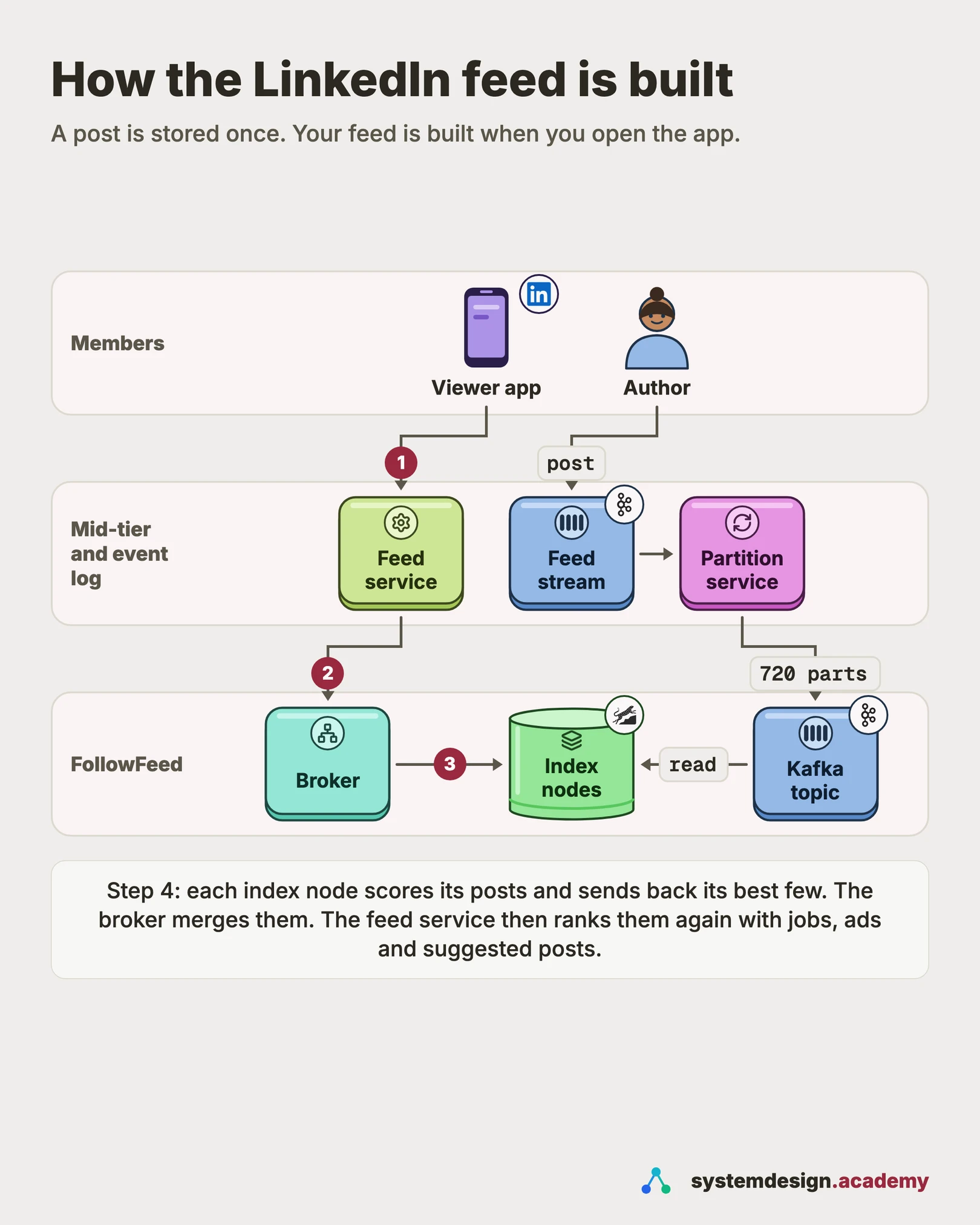
04One request
What happens when you open the LinkedIn feed, step by step
This is the read path from LinkedIn's 2016 FollowFeed post. The second ranking pass is from its 2015 and 2019 posts. The write path has already put each post into its author's timeline.
- 1
The app asks for a feed
The member opens the app. It calls the mid-tier feed service, which knows who the viewer is and what they follow.
- 2
The mid-tier asks FollowFeed
It sends the broker the entities the viewer follows and the filter rules. It also sends how many posts it wants and viewer data, such as privacy settings.
- 3
The broker fans out
The broker turns each entity into a timeline key. It applies the same partition function as the write path, so it knows which index nodes hold each key. It sends one request to each.
- 4
Index nodes filter and score
Each node reads the timelines from its cache or RocksDB. It drops posts the viewer may not see, scores the rest with the ranking model and returns its top results.
- 5
The broker merges
The broker removes duplicates and posts that are too alike, sorts by score and returns the best candidates.
- 6
The second pass ranks the page
The mid-tier combines these with other sources, such as jobs and sponsored posts. A heavier model ranks the combined list. A final step adjusts it for diversity, and the app shows it.
05Components
Core components
Walk through each service. The interviewer wants to hear what each one owns, not just the names.
Kafka feed stream
Every share, like and comment, by members and by companies or schools, lands in one Kafka stream. Kafka keeps events in order within each partition and lets many consumers read the same events. LinkedIn first built Kafka in-house and later open-sourced it.
Partitioner
Reads the feed stream and re-publishes each event into a second Kafka topic, split the same way as the index. Its 720 partitions match the index's partitions one to one, so a node only reads the partitions it owns.
FollowFeed index nodes
Store timelines in RocksDB and keep a cache of decoded records in memory. They filter by privacy, country and content type. Then they score candidates with the ranking model, on the same machine as the data.
FollowFeed broker
The fan-out service. It maps timeline keys to partitions and partitions to nodes, sends the requests and merges the answers. It also removes near-duplicates and sends a backup request when a node is slow. This broker is not the same thing as a Kafka broker, which is a Kafka server.
Mid-tier feed service
Calls FollowFeed and other candidate sources, runs the second ranking pass and returns the page to the app. LinkedIn's 2014 post describes its feed-blending service, Feed-Mixer, mixing many kinds of updates into one feed.
First and second pass rankers
A first pass ranker is a source that picks its own top candidates fast, for example network activity or jobs. The second pass ranker combines all of them and scores them with a richer model. In 2019 FollowFeed was the largest first pass ranker.
Social graph
Answers who a member follows and is connected to. LinkedIn built LIquid, its own graph database, partly because second-degree networks are too big to store ahead of time.
06Data model
Data model
Pick the right store per table. Justify each choice with the access pattern, not by reflex.
timeline (FollowFeed, RocksDB)key: (entity_id, content_type)value: list of content records, newest firststored as linked blobs: entityId_head -> ... -> entityId_0One timeline per entity and content type, as LinkedIn described in 2016. Hundreds of millions of timelines, split over 720 partitions. A blob is split when it grows past a size limit, so each update is a small read-modify-write.
content_record (event in the feed stream)record_idactor_id (member, company, school)verb (share, like, comment)object_idcreated_atprivacy / geo flagsSerialised with Avro, as FollowFeed was in 2016. Avro is a compact binary format for records. Each index node keeps a schema registry. It stores every past version of the record layout, so old records stay readable.
relevance_features (per entity and per post)entity_id or record_idfeature vector valuesupdated_atIngested from a separate Kafka stream and stored next to the timelines, so scoring never calls another service. Viewer features arrive inside the request.
follows / connections (graph)member_idfollowed entity_idedge type (connection, follow)created_atRead once per feed request to build the list of timelines. In this design it lives in the graph service, not in FollowFeed.
07Deep dives
Deep dives
These are the conversations the interviewer is steering you toward. Practice each one until you can talk through it without notes.
Fan-out on write or fan-out on read: LinkedIn chose read
Fan-out on write means copying each new post into the stored feed of every reader. Reading is then one quick lookup. Fan-out on read means storing each post once, under its author, and assembling the feed when someone asks. LinkedIn wrote in 2016 that it tested both and chose fan-out on read. It gave two reasons. First, the copies made the data 62 times larger in its experiments. Second, a stored feed must be kept in ranked order. A new ranking model would mean re-sorting every stored feed, which LinkedIn called grandfathering. That is heavy disk work and slows down A/B tests. With fan-out on read, the score is computed fresh on each request, so a new model is live at once. The cost is a heavier read, and the rest of the design exists to make that read fast.
Move the ranking to the data, not the data to the ranking
A ranked feed needs a lot of candidates. Pulling thousands of records over the network to one ranking server would be slow. So FollowFeed runs the ranking on the index nodes that store the timelines. LinkedIn said in 2016 that FollowFeed ranked tens of thousands of records per request and scored millions per second. To make each score cheap, it generated optimised Java code for each model. That took about 50 microseconds at p99 per record, 15 times faster than its earlier scoring library. In 2019 LinkedIn added that features for each post are stored beside the post on the index node. Viewer features travel inside the request. So scoring never waits on another service. Each node returns only its best few, and the network carries a small answer.
720 partitions and one partition function for both paths
In 2016 LinkedIn split the index into 720 partitions, many more than there are machines. Each node holds several. When the cluster grows, whole partitions move to new nodes and nothing is split. LinkedIn chose 720 because it divides evenly into many cluster sizes: 40, 45, 60, 80 or 360 nodes, for example. The key idea is that the write path and the read path use the same partition function. The Partitioner uses it to place each event, and the broker uses it to find each timeline. Replicas are easy too. A new replica is first loaded from the latest backup of those partitions. It then reads the same Kafka partitions from the saved offset until it catches up. All replicas serve reads.
import hashlib

NUM_PARTITIONS = 720  # divides by 40, 45, 60, 80, 360 ...

def partition(entity_id: str) -> int:
    # stable hash: the same answer in every process and on every machine
    digest = hashlib.md5(entity_id.encode()).digest()
    return int.from_bytes(digest[:8], "big") % NUM_PARTITIONS

# write path: the Partitioner re-publishes the event
producer.send("feed-by-partition", event, partition=partition(event.actor_id))

# read path: the broker groups the viewer's timelines by partition
by_part = {}
for entity_id in followed_entity_ids:
by_part.setdefault(partition(entity_id), []).append(entity_id)Timelines in RocksDB with a cache in front
Each index node stores timelines in RocksDB, an embedded key-value store tuned for SSDs. In 2016 LinkedIn stored a timeline as a chain of small blobs, newest first. A new post goes into the head blob. When a blob passes a size limit, a new blob starts, so updates stay small. LinkedIn found that decoding records was the main bottleneck of a read. So each node keeps a cache of decoded records in memory, using Guava, an open source Java library. LinkedIn used two caches. A fat cache holds timelines that have posts. A skinny cache holds keys for entities with no recent posts. In this design's reading, a key with no posts then costs no disk read each time. LinkedIn only says that sizing the two caches well gave the right caching and eviction.
The tail latency problem: hedge, do not wait
The broker must wait for every index node it asked. So the slowest node sets the latency of the whole feed. This is called the tail latency problem. LinkedIn wrote in 2016 that the broker fires duplicate requests to 1, 2 or 3 replicas. These replicas hold the same partitions. It waits a short time before each duplicate. The first answer wins and the others are cancelled. LinkedIn's load balancer, D2, also dropped requests to a node whose health score fell too low. Sending a backup copy of a slow request like this is called a hedged request. LinkedIn also tuned the nodes heavily: garbage collection, locking, TCP settings and RocksDB configuration. The result in 2016: about 140 ms at p99 for the mobile feed. That was five times faster than Sensei, the search-based system it replaced. The time for 90 out of 100 page loads (the p90) dropped by 150 ms.
Two-pass ranking, and what LinkedIn changed in 2026
LinkedIn's feed has long had two passes. LinkedIn wrote in 2015 that first pass rankers each pick top candidates from their own inventory. Examples are network activity, jobs, news and sponsored posts. A second pass ranker scores the combined list with a richer model, and a re-ranker adjusts it for diversity. In 2019 more than 80% of feed updates came from FollowFeed. In March 2026 LinkedIn described a large change. It replaced several separate retrieval sources with one system. A fine-tuned large language model (LLM) turns members and posts into embeddings, which are lists of numbers that capture meaning. A nearest-neighbour search on GPUs finds the top candidate posts in under 50 ms, from millions of posts. A new ranking model then reads more than a thousand of the member's past interactions as a sequence. LinkedIn has not published how FollowFeed and the mid-tier fit around this new system today. In an interview, describe the two-pass idea and say that candidate sources can change.
Kafka as the backbone: why events, not direct calls
When a member posts, several systems may care. In this design the feed index, notifications, search and analytics all read the same event. If the posting service called each of them directly, one slow consumer would slow posting down. With Kafka, the posting service writes one event and moves on. Each consumer reads at its own speed and keeps its own position, called an offset. In 2019 LinkedIn ran more than 100 Kafka clusters with more than 4,000 brokers. Here a broker means a Kafka server, not the FollowFeed broker. Those clusters held 7 million partitions and handled more than 7 trillion messages a day. In 2016 FollowFeed also backed up its Kafka offsets with its data. After a restore, a node resumes from the right offset and catches up. Every data center ingested an aggregated stream, so it held every timeline locally.
Common mistakes candidates make
The first mistake is choosing fan-out on write because a famous company did. It fails here for two reasons. LinkedIn's ranking changes often, and the copies were 62 times larger in LinkedIn's own test. Say instead: store once, rank on read, and spend the effort on making the read fast. The second mistake is ranking in one central service after fetching every candidate. That moves tens of thousands of records over the network per request. Say instead: score on the nodes that hold the data, and return only each node's top few. The third mistake is forgetting the tail. A request that waits for many nodes is as slow as the slowest one. Mention backup requests to replicas. The fourth mistake is ignoring privacy. Who may see a post is part of the filter, not an afterthought. The last mistake is quoting numbers without a year. Say LinkedIn reported about 140 ms at p99 in 2016, not that LinkedIn is 140 ms today.
How to spend 45 minutes on this question
Spend about five minutes on questions and numbers. Ask what the feed shows, how fresh it must be, and how large a network can get. Then sketch the API in this design. GET /feed?cursor=...&count=20 returns ranked items and a next cursor. POST /posts creates a post. Spend ten minutes drawing the write path and then the read path. Spend most of the remaining time on two deep dives. The first is fan-out on read with scoring on the data nodes. The second is tail latency and backup requests. Keep five minutes for failures and follow-ups. Use plain names such as feed index, broker and feed service. Mention FollowFeed only as LinkedIn's published design, so you show you have read it without leaning on it.
08Trade-offs
Trade-offs to discuss
Every senior interviewer expects you to surface at least 3 of these. Pick the decisions, state the alternatives, and justify your choice.
Fan-out on read vs fan-out on write
Fan-out on write gives the cheapest read, but each post is copied many times. Every ranking change means rewriting stored feeds. LinkedIn measured 62 times more data in 2016 and chose fan-out on read. The price is a heavier read, paid for with partitioning, caching and ranking on the data nodes. A product with time-ordered feeds and few ranking changes could choose the other way.
Ranking on index nodes vs in a separate ranking service
Ranking where the data lives avoids moving thousands of records per request. The cost is that index nodes carry model code and features, so deploying a model touches a stateful system. In 2019 LinkedIn packaged models as separate data packs, which cut model deployment from 3 days to 30 minutes.
Many small partitions vs one partition per machine
With 720 partitions, the cluster can grow by moving whole partitions, and routing never changes. The cost is more bookkeeping per node. One partition per machine is simpler until the day you must split one, which changes routing on both paths.
Eventual consistency vs a synchronous write to the index
Writing through Kafka means a new post appears after a short delay. In return, posting never waits on the index. Replicas are easy to add, and a node can rebuild from a backup plus the log. For a feed, a post that appears a moment later does no harm.
Every timeline in every data center vs only local members' data
A member's network spans the world and keeps changing. In 2016 LinkedIn chose to store all timelines in all data centers, so any feed can be built locally. The cost is storing everything several times. The gain is that no feed request crosses data centers.
Two ranking passes vs one big model
A first pass over each source must be fast, so it uses a lighter model. The second pass scores far fewer candidates, so it can afford more features. Separate sources also let different teams work in parallel, which LinkedIn listed as a reason in 2015.
Free PDF · 18 pages
Get the free System Design Interview Cheat Sheet
The interview in seven stages, the numbers worth knowing by heart, and twelve classic systems on one page each, every line linked to the lesson it comes from.
09Follow-ups
Follow-up questions to expect
After the main design, the interviewer usually picks one part and asks more. Here is what to say.
A member with 30,000 connections posts. What happens on the write path?
Nothing grows with their audience. The post becomes one event in Kafka and lands in one timeline on one partition. The large audience only matters at read time, when each viewer's request includes that author's timeline. This is the main win of fan-out on read for big accounts.
A viewer follows 30,000 people and companies. Is their feed request a problem?
It can be, because the read cost grows with what the viewer follows. In this design, cap how many timelines one request reads, for example the most active or most engaged-with entities. Read only recent records from each. The broker already groups timelines by partition, so 30,000 keys become at most 720 partition reads across the cluster. LinkedIn has not published how it caps this, so present it as your own choice.
One author's post goes viral. Does that timeline become a hot spot?
Yes, every viewer's request reads it. Three things absorb that load. All replicas serve reads. Each node keeps decoded records in a memory cache. And the broker sends backup requests when a node is slow. If one partition set is still too hot, add replicas for it. LinkedIn wrote in 2016 that adding replicas for a partition set is easy.
The ranking team wants to test a new model on 5% of members. What changes?
Mostly the request. With fan-out on read, the score is computed on every request. So the broker passes a model choice for that viewer. In 2016 LinkedIn tied FollowFeed to XLNT, its A/B testing platform, and ran several models at once. The model must first be shipped to every index node. In 2019 LinkedIn moved models into separate data packs, which cut deployment from 3 days to 30 minutes. If the model needs a new feature for each post, that feature must be ingested beside the timelines first. Stored feeds never need re-sorting.
How does page 2 of the feed work?
In this design, each response carries a cursor: the lowest score or timestamp already returned. The next request sends it back, so the feed continues where it stopped. Remembering which posts a member has already seen across sessions needs its own store. LinkedIn has not published how it does this.
10In production
How LinkedIn actually does it
Every fact about LinkedIn on this page comes from LinkedIn's own writing. The estimates and anything marked 'in this design' or 'assume' are ours. The fan-out choice, the 62x figure and the 720 partitions are from the 2016 FollowFeed post. So are the RocksDB timelines, the caches, hedged requests and the 140 ms result. First and second pass ranking is from the 2015 post on feed relevance. The 80% share, local features and the faster model deployment are from the 2019 post on community-focused feed optimisation. Feed-Mixer is from a 2014 post on the publishing platform. The 1.3 billion figure and the LLM retrieval and ranking system are from the March 2026 post. Kafka's scale is from the 2019 post on 7 trillion messages a day. Second-degree network sizes are from the 2020 LIquid post. Older posts describe the system at that date. LinkedIn has changed parts since, so say the year when you quote a number.
Sources
- LinkedIn Engineering: FollowFeed, LinkedIn's Feed Made Faster and Smarter (2016)
- LinkedIn Engineering: Making Your Feed More Relevant, Part I (2015)
- LinkedIn Engineering: Community-focused Feed optimization (2019)
- LinkedIn Engineering: Maximizing Our Publishing Platform Reach with Network Distribution (2014)
- LinkedIn Engineering: Engineering the next generation of LinkedIn's Feed (2026)
- LinkedIn Engineering: How LinkedIn customizes Apache Kafka for 7 trillion messages per day (2019)
- LinkedIn Engineering: LIquid, the soul of a new graph database, Part 1 (2020)
- LinkedIn Help: the 30,000 connection limit
- LinkedIn: About us (member count)
Lessons to study before this interview
If any of these topics are fuzzy, the interviewer will catch it. Each lesson is 15 to 60 minutes with diagrams, code, and a quiz.
Fan-Out/Fan-In
intermediate / messaging event systems
Pub/Sub Pattern
intermediate / messaging event systems
Event-Driven Architecture
intermediate / messaging event systems
Hash Partitioning
foundation / database fundamentals
Data Partitioning
intermediate / data replication distribution
LSM Trees
intermediate / database types storage
Cache Eviction Policies
foundation / caching strategies
Graph Databases
intermediate / database types storage
Stream Processing
advanced / stream batch processing
A/B Testing Infrastructure
intermediate / devops cicd
Design Twitter/X Feed
capstone / capstone
System design interviews at companies in the US, UK, Canada and Singapore
41 walkthroughs of real systems at well-known companies, each built from that company's own engineering blog, talks or filings, with the numbers cited.
Banking, payments and trading
Commerce and delivery
Rides and maps
- Grab system design (Singapore)
- Uber system design
Feeds, social and messaging
Streaming and media
AI labs and big tech
Developer and collaboration tools
11FAQ
Frequently asked questions
Go deeper
This guide is built on these 6 lessons. Each one teaches one piece of the LinkedIn design above, step by step.
- Fan-Out/Fan-InSystem Design · messaging event systems · 20 min
- Pub/Sub PatternSystem Design · messaging event systems · 22 min
- Event-Driven ArchitectureSystem Design · messaging event systems · 28 min
- Hash PartitioningSystem Design · database fundamentals · 25 min
- Data PartitioningSystem Design · data replication distribution · 18 min
- LSM TreesSystem Design · database types storage · 25 min
Practice with 770 system design lessons
Lifetime access for ₹1,111 in India or $35 elsewhere. Interactive diagrams, quizzes, and 20 capstone projects to practise on.

This one question is not enough for the interview.
Get all 200 questions in the System Design and Distributed Systems pack
Each question has why it is asked, a full answer, what the interviewer listens for, the follow-ups, the common mistakes and a diagram (268 diagrams in all). A PDF you keep, junior to staff level.
Pay by UPI, cards or netbanking through Razorpay. Pay by card or PayPal, in US dollars. Download at once from My packs.
NEWSystem Design Hands-On
Included in the System Design course: real systems, built live
Postgres Sharding: Complete Hands-On (PgBouncer + Citus). 2 h 36 min and 20 chapters: one PostgreSQL loaded until it breaks, then four shards behind a router you write, PgBouncer and Citus, with the 139-page slide deck. The first 15 minutes are free to watch.

Self-paced bootcamp · new class every week
System Design Interview Bootcamp
System design interview preparation in 14 recorded classes: the framework, estimation, the building blocks and 14 real designs, with two 1:1 mock interviews. Classes 1 to 4 are out, and its first 3 minutes are free.