May we use cookies so Meta, Google, LinkedIn and ChatGPT see your visit and we learn which ads work? PrivacyMay we use cookies to see which pages help, and let Meta, Google, LinkedIn and ChatGPT see your visit, so we know which of our ads work? That way we spend less on ads that do not work. We do not sell your data, and the site works the same if you decline. You can change your answer at any time under Cookie settings at the foot of the page. Privacy policy
Loading...
System Design and AI Engineering, by Roni Das. 989 interactive lessons in two courses.: 770 in System Design and 219 in AI Engineering.
Inkling 2 Mini explained: the open model that runs its middle layers three times, on a 24 GB Mac
Thinking Machines Lab released Inkling 2 Mini on 20 November 2026, an open-weight model under Apache 2.0 that runs its middle 12 layers three times for every token. That trick lets a 20 GB file run 48 layers of computation per token. We ran a 3-bit version on a 24 GB Apple M4 Mac and measured what it costs in speed and memory, including the one setting that, on our Mac, decided whether a long chat stayed on the GPU.
This explainer covers one piece of news. The AI Engineering course teaches how systems like this work, step by step.
Every lesson in both courses has an AI tutor beside it. It reads the same lesson you are reading and answers your questions from it. Try the tutor
The looped layer stack, from the model's own config.json
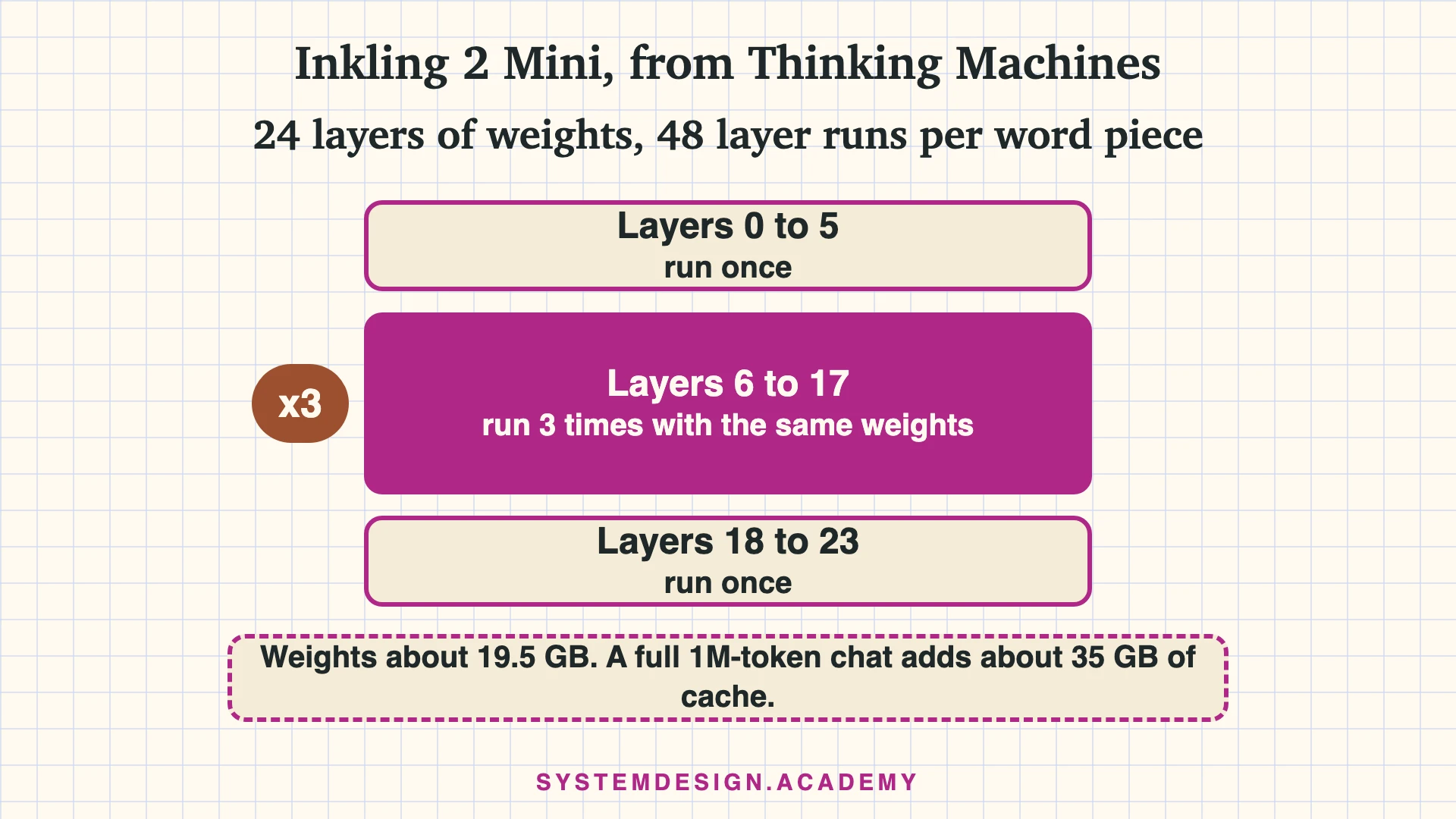
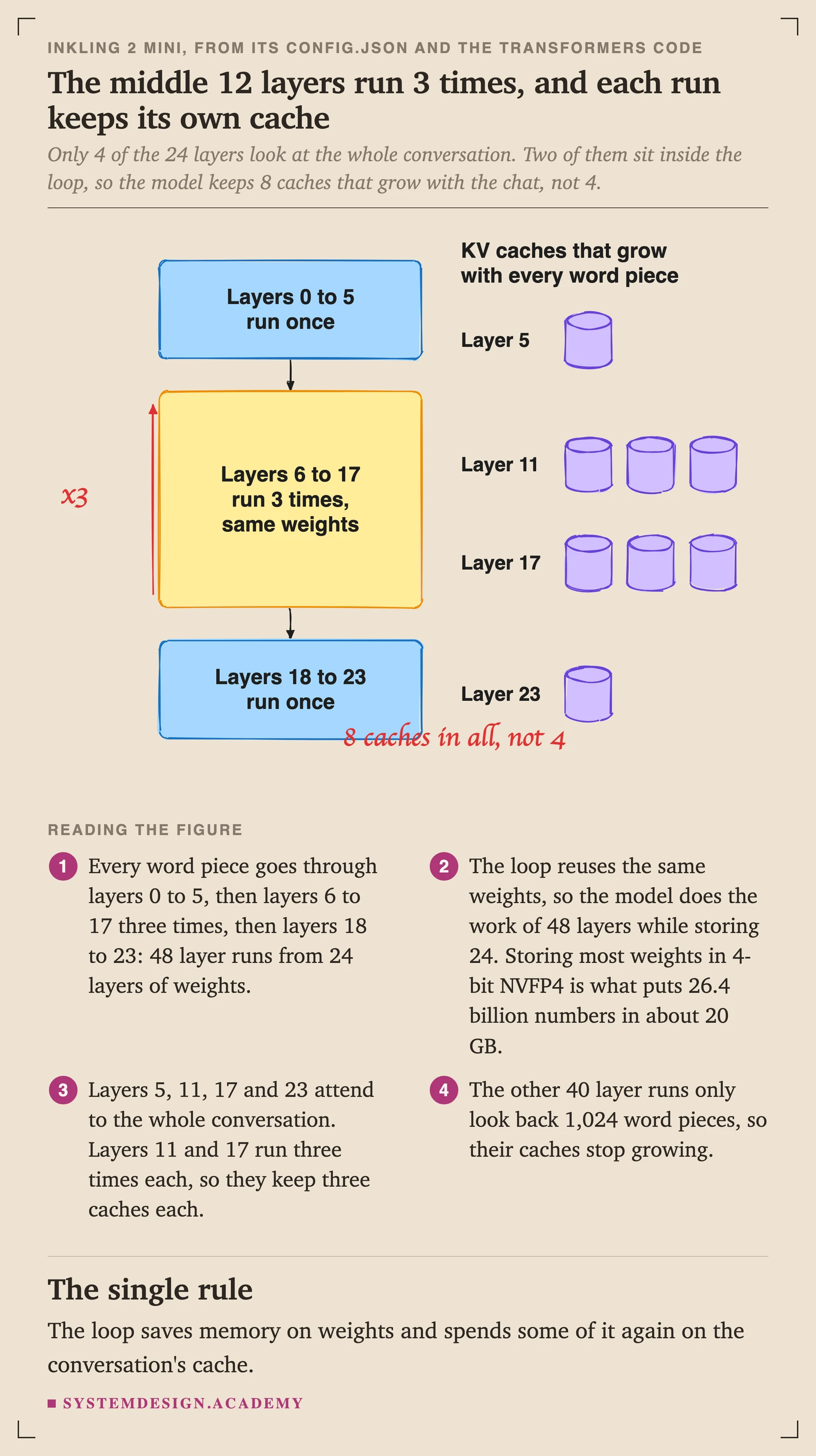
Every token passes through the middle 12 layers three times. The weights are stored once, so the file stays near 20 GB, but each pass keeps its own working memory for the conversation.
1Inkling 2 Mini has 26.4 billion parameters, 3.4 billion active per token, and runs its middle 12 of 24 layers three times: 48 layer runs from 24 layers of weights.
2It is open-weight under Apache 2.0, takes text and images, reads up to 1M tokens, and ships as one checkpoint of about 20 GB in NVFP4 and MXFP8.
3Because the looped layers keep a cache per pass, 8 caches grow with the conversation, not 4. A 128K-token chat adds about 4.5 GB (4.2 GiB); the full 1M window about 35 GB.
4On our 24 GB M4 Mac, a 3-bit community file wrote 6.2 tokens a second in llama-bench. At 128K context, llama.cpp's default batch did not fit on the GPU; a smaller batch (-ub 128) made it fit.
5Setting reasoning effort to none still produced reasoning in our two small tests, as the model card warns.
Released
20 Nov 2026
Made by
Thinking Machines Lab
Size
26.4B total, 3.4B active
Licence
Apache 2.0
Context
up to 1M tokens
Our Mac run
6.2 tokens/s, M4 24 GB
This page is the free part.
The course goes deeper on how much memory a model really needs and how to serve it
₹1,333 in India/$35 everywhere elseonce, for the whole course
The Generative AI and Agentic AI course covers how much memory a model really needs and how to serve it across a run of lessons, not one page. These 4 alone are about 223 minutes of step-by-step reading, every one with code you run in the browser, all with a quiz.
A model name is a spec sheet written in shorthand. Learn to decode publisher, family, version, parameter count, mixture-of-experts markers, post-training suffixes and numeric formats, and to predict from the name alone whether a model will fit on your GPU.
80 min · diagrams · code you run · quizfree to read now
The same Qwen2.5 3B model stored three ways and measured on a laptop: 6.18 GB at 16 bits per weight, 3.29 GB at 8.5 and 1.93 GB at about 5. The 8-bit file kept the 16-bit file's top next word on 24 of 24 prompts and got the same 33 of 40 sums right; the 5-bit file kept 19 of 24, all 5 changes on near ties. Writing speed went from 11.1 to 18.3 to 28.4 tokens a second, while reading barely changed.
Every Ollama reply reports how long the model spent loading, reading the prompt and writing the answer. Measured on a laptop with qwen2.5:3b over 35 calls in a shuffled order: the median reading speed was 194 tokens a second and the median writing speed 30. Even the slowest reading of any call was faster than the fastest writing of any call. A long reply costs far more time than a long prompt.
Measured with Ollama and qwen2.5:3b: a prompt of about 5,900 tokens sent with a 4,096-token window was cut to 2,050 tokens, the first 4 and the last 2,046, with no error in the reply. A code placed at the start was found 0 times in 5; at the end, 5 in 5. At three window sizes the kept part was exactly half the window plus 2. Without num_ctx, this laptop's window was 4,096.
“The middle 12 layers run three times with shared weights, giving 48 layer applications per token from 24 layers of weights.”
Inkling 2 Mini model card, Hugging Face, 20 November 2026
Inkling 2 Mini is a language model from Thinking Machines Lab, the company founded by Mira Murati, released on 20 November 2026. You can download the weights from Hugging Face under the Apache 2.0 licence, which allows commercial use, or try it on Tinker, Thinking Machines' hosted platform for running and fine-tuning models. It reads text and images and writes text, with a context window of up to 1 million tokens.
It is a mixture-of-experts model: 26.4 billion parameters in total, but each token is routed to 8 of 128 experts per layer, so only 3.4 billion are used for any one token. Its unusual part is the loop. The middle layers run three times for every token, so Thinking Machines counts 5.4 billion effective active parameters per token.
Thinking Machines compares it mainly with Qwen3.8-27B. In its own table it scores 48.2% on DeepSWE v1.1 against 42.2%, 79.2% on SWE-bench Verified (bash only) against 77.8%, and 82.7% on MCP Atlas against 77.3%, while Qwen is ahead on Terminal Bench v2.1, 73.0% against 71.6%. The company notes that evaluation setups vary by model, so treat these as its claims, not a neutral test.
2
How does the loop work, and why does it matter for memory?
A normal transformer passes each token through every layer once. Inkling 2 Mini has 24 layers, in four blocks of six. Layers 0 to 5 run once, then layers 6 to 17 run three times with the same weights, then layers 18 to 23 run once. Each later pass starts again from where layer 5 left off and receives a summary from the pass before. The model does the work of 48 layers while storing only 24. Thinking Machines says running the middle block again gave bigger gains than looping the last 12 layers, on 27 of 28 evaluations.
The file stays small for a second reason: the expert weights in 20 of the 24 layers are stored in NVFP4, a 4-bit number format, and the last 4 layers in MXFP8, an 8-bit one. Thinking Machines says the model was trained in these formats, so, by its account, nothing is lost in conversion. That is how 26.4 billion parameters fit in about 20 GB.
The loop has a cost that the parameter count does not show. A model keeps a KV cache: the keys and values of every earlier token, so it does not recompute them. In the reference code in Hugging Face transformers, each pass of the loop keeps its own copy of the cache for the looped layers. Only 4 of the 24 layers (5, 11, 17 and 23) look at the whole conversation; the rest look back only 1,024 tokens. But layers 11 and 17 are inside the loop, so they run three times each. The result is 8 caches that grow with every token, not 4.
$ python3 scripts/labs/inkling-2-mini/kv_bill.py
layers of weights        24
layer runs per token     48  (layers 6-17 run 3 times)
global-attention layers  [5, 11, 17, 23] -> 8 caches that grow with context
sliding-window caches    40, each capped at 1024 tokens

   context  global caches  sliding caches     total  if no looping
    32,768        1.00 GiB         0.16 GiB   1.16 GiB       0.58 GiB
   131,072        4.00 GiB         0.16 GiB   4.16 GiB       2.08 GiB
 1,048,576       32.00 GiB         0.16 GiB  32.16 GiB      16.08 GiB
Our calculator, which reads only the model's config.json. Output trimmed to three rows.
The middle 12 layers run 3 times, and each run keeps its own cache
Each growing cache costs 4,096 bytes per token at 16 bits (8 key-value heads of 128 numbers, keys and values). Eight of them make 32 KiB per token, twice what the same model without the loop would need.
Want to work out, before you buy a machine, how much memory a model and its conversations will need?Start with Generative AI and Agentic AI.
start here
Generative AI and Agentic AI Engineering
How a model turns into memory: weights and quantization, the KV cache per token, batch size and context length, and how to read a model's config to predict whether it fits.
219 lessons in 17 chapters: RAG, AI agents, evals, fine-tuning and serving
No heavy maths, everything taught step by step from the basics
127 lessons built on a lab that really ran
An AI tutor beside every lesson that answers and draws
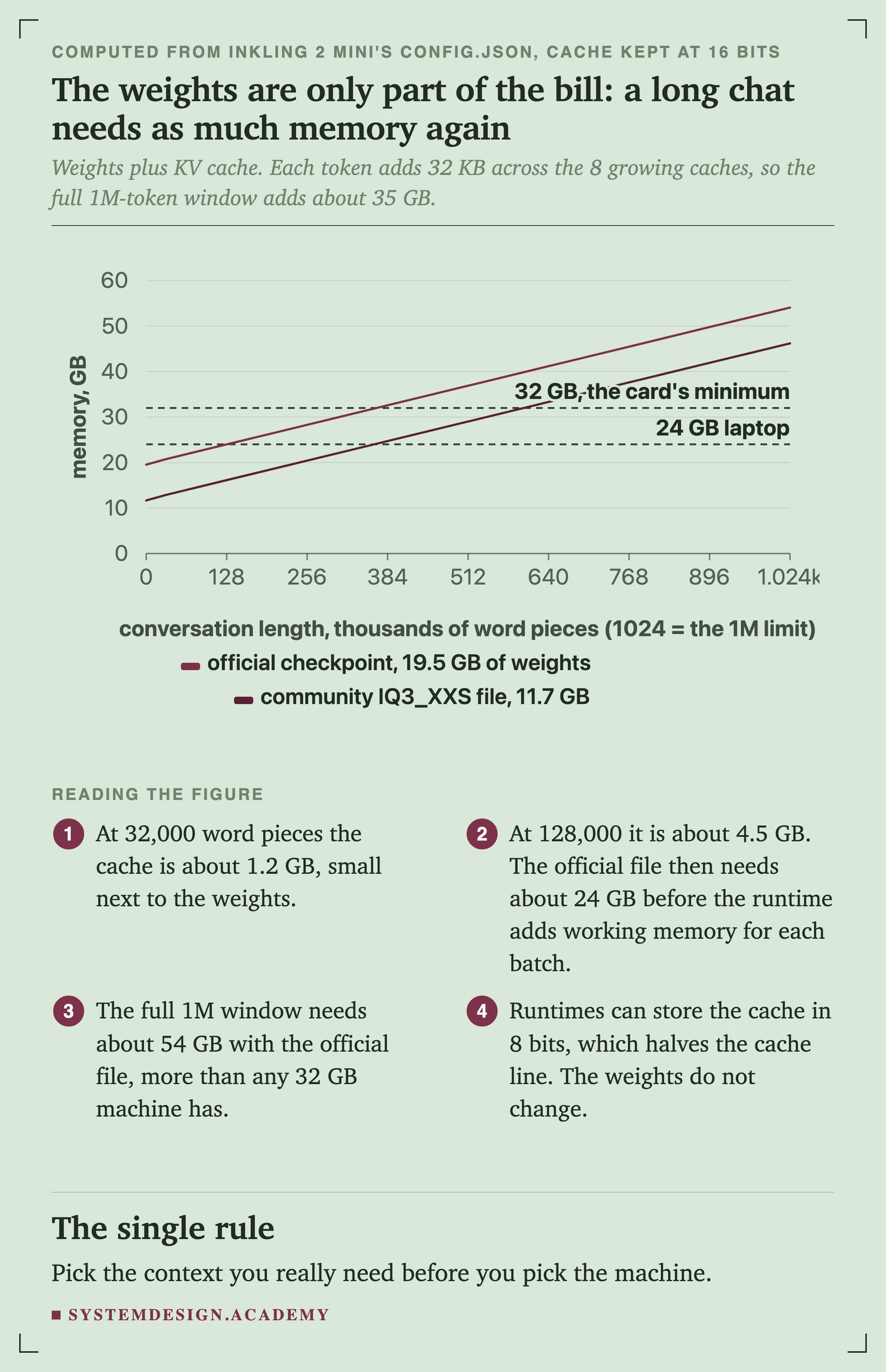
Thinking Machines lists one NVIDIA DGX Spark, Apple silicon with 32 GB or more, or a GPU with 32 GB or more of memory. It does not say how long a conversation that allows. The chart shows why the context you choose matters as much as the machine.
With the official checkpoint (19.5 GB by its file index), a 32,000-token conversation adds about 1.2 GB of cache, which is small. A 128,000-token conversation adds about 4.5 GB, so weights and cache alone are about 24 GB. The runtime also needs working memory to process each batch of prompt tokens, which on our Mac was 3 to 13 GiB at this length, so on a 32 GB machine plan for a smaller batch. The full 1 million tokens would add about 35 GB of cache at 16 bits, more than any 32 GB machine has. Runtimes that store the cache in 8 bits halve that line.
Community quantizations shrink the weights further. Unsloth publishes GGUF files (the model format llama.cpp and Ollama read) from 7.8 GB (UD-IQ1_S) to 22.9 GB (UD-Q8_K_XL) and reports how often each one picks the same top token as its 8-bit file: 94.7% for the 11.7 GB UD-IQ3_XXS and 98.0% for the 17.6 GB UD-Q4_K_XL. Those numbers are Unsloth's own, measured against its 8-bit file rather than the original weights.
The weights are a fixed cost. The cache grows by about 32 KiB for every token in the conversation, so a long chat can need as much memory again as the model itself.
Both courses together: ₹1,999 in India / $59 elsewhere, lifetime access.
System Design and AI Engineering in one payment. Bought one by one: ₹1,111 + ₹1,333 = ₹2,444, so you save ₹445.Bought one by one: $35 + $35 = $70, so you save $11.
We ran Inkling 2 Mini on a 24 GB Mac: what happened?
The official checkpoint is about 20 GB, too big for a 24 GB Mac once macOS takes its share, so we used Unsloth's 11.7 GB UD-IQ3_XXS file, a roughly 3-bit version, from its Mainline_Support folder (where the files are named .gguf_file) with llama.cpp release b12627, which includes Inkling support merged on 20 and 21 November. The machine is a MacBook Air with an Apple M4 and 24 GB of memory, of which Metal, Apple's GPU interface, lets the GPU use 16 GiB. llama.cpp reports memory in GiB (1 GiB is 1.074 GB), so this section does too.
Speed first. llama-bench measured about 40 tokens a second reading a 512-token prompt (39.7 to 41.1 across two sessions) and 6.2 tokens a second writing, with either a 512 or a 128-token batch. Real chat requests through llama-server were slower end to end, about 3 to 5 tokens a second; that time includes reading the templated prompt and the server's own overhead, and we did not break it down further. On every run that fit on the GPU, llama.cpp kept 3.8 GiB of the weights in CPU buffers; we did not test what limits the writing speed, and memory bandwidth and the 48 layer runs per token are other candidates. Commenters on Hacker News, not verified by us, reported about 10 tokens a second on a 32 GB M1 Pro at 4 bits and about 150 on an RTX 3090.
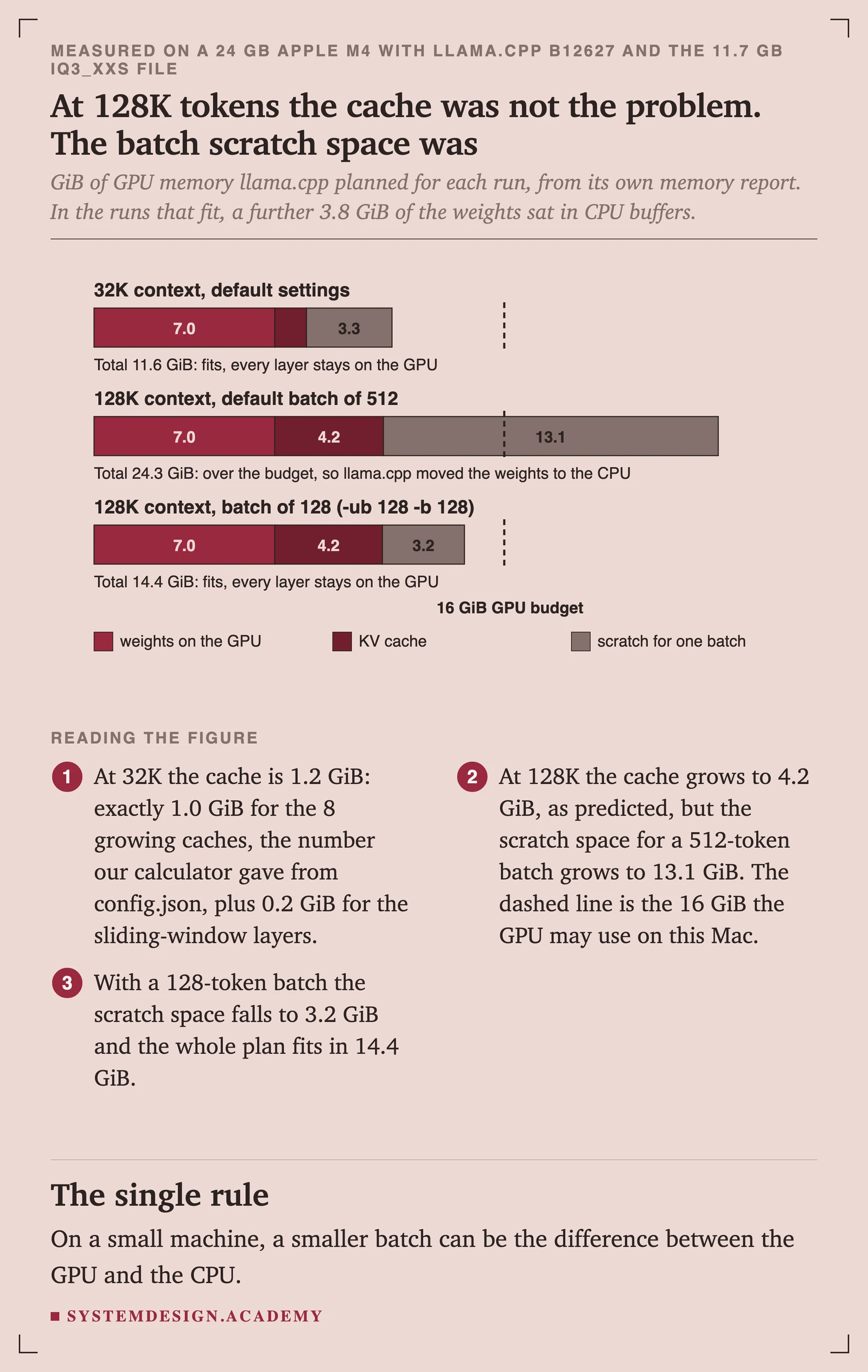
Then memory. At 32,768 tokens llama.cpp allocated exactly 1,024 MiB of KV cache in 8 layers, plus 240 MiB for the 40 sliding-window layer runs (llama.cpp keeps the 1,024-token window plus one batch, so a little more than our calculator's 0.16 GiB). That is the 8 growing caches our calculator predicted from config.json, so llama.cpp keeps a cache per loop pass too. Everything fit on the GPU, 11.6 GiB in all.
At 131,072 tokens the cache grew to 4.2 GiB, as predicted, but that was not what broke. With its default batch of 512 tokens, llama.cpp planned a 13.1 GiB compute buffer, the scratch space it reserves to process one batch of prompt tokens, 24.3 GiB in all against 16 GiB available. It moved every layer to the CPU. In a 2-token test, writing ran at 1.2 tokens a second, against 1.9 with every layer on the GPU in the same test; such short tests are rough, so treat the gap as a direction. With -ub 128 -b 128 (process the prompt 128 tokens at a time instead of 512) the compute buffer fell to 3.2 GiB, the whole plan fit in 14.4 GiB, and every layer stayed on the GPU. The likely price, which we did not measure, is slower reading of very long prompts; on a 512-token prompt llama-bench read at the same speed with either batch. At 262,144 tokens the default plan needed 40.7 GiB. We did not try a smaller batch there, but weights on the GPU (7.0 GiB) plus cache (8.2 GiB) already take 15.3 of the 16 GiB.
One more test, on reasoning. The chat template takes a reasoning_effort from none to max, and defaults to 0.9 (high) if you send nothing. We asked two small arithmetic questions at different efforts. Both answers were right every time, and even at none the model wrote 326 and 555 characters of reasoning first. On the harder question it wrote almost the same amount of reasoning at none and at high (555 and 559 characters); the high answer was longer because it showed its working. One run per setting is not enough to say how effort changes cost, but it matches the model card: setting effort to its minimum does not fully turn reasoning off, so budget for it.
What we measured: Apple M4, 24 GB, llama.cpp b12627, UD-IQ3_XXS (11.7 GB): about 40 tokens/s prompt, 6.2 tokens/s writing. KV cache 1.2 GiB at 32K and 4.2 GiB at 128K: the 8 growing caches exactly as computed from config.json, plus the sliding-window layers. 128K with the default batch: 24.3 GiB planned, all layers moved to the CPU. 128K with -ub 128: 14.4 GiB, all on the GPU. Real chat requests: about 3 to 5 tokens a second end to end.
# 128K context on a 24 GB Mac: shrink the batch so the scratch space fits
./llama-server -m Inkling-2-Mini-UD-IQ3_XXS.gguf_file --jinja \
  -c 131072 -ub 128 -b 128 --port 18777

# reasoning effort goes through the chat template
curl -s 127.0.0.1:18777/v1/chat/completions -d '{
  "messages": [{"role": "user", "content": "..."}],
  "chat_template_kwargs": {"reasoning_effort": "low"}
}'
Run by us on 23 November 2026 with llama.cpp b12627. The context and batch values are the ones measured above.
What llama.cpp planned on our 24 GB M4
The cache matched the config. The surprise was the scratch space for a batch, which grew with the context and pushed the default 128K run off the GPU.
Thinking Machines is unusually direct about these. From the model card and the announcement:
Facts. Knowledge and factual accuracy are weaker than the larger Inkling 2 Small. The announcement says looping does not let the weights store more facts, so the model leans on search and tools.
Reasoning loops. It can repeat itself while reasoning. The card recommends limits on output tokens and agent turns.
Agents. Agentic reliability is lower, and it may take destructive actions without asking. Put confirmations in front of anything that deletes or sends.
Chat and constraints. The announcement says it is not the strongest small model for multi-turn chat or instructions with many constraints, and gives 50.0% on the MultiChallenge chat test.
Chinese. Chinese output can show clipped phrasing and mixed languages.
A word on very small community files. A repository claiming Inkling 2 Mini in 5.4 GB of memory reached the Hacker News front page (item 50591853); the top comments pointed out that its headline claim did not apply to this model and recommended the mainstream quantizations instead. Check any quant's quality numbers before you trust it.
6
What does Inkling 2 Mini mean for engineers?
It shows another way to get more out of a small file: run the same layers again instead of adding new ones. That makes the download and the weight memory small, but it does not make the model free to run. The compute per token is that of 48 layers, and the conversation's memory grows with the loop.
The practical lesson from our run is to size a machine from the config, not the parameter count. Read the layer count, which layers see the whole context, how many times they run and the cache size per token, then add the scratch space your runtime plans for a batch. On a small machine, the batch setting decided whether a 128K chat ran on the GPU or crawled on the CPU.
Want to work out, before you buy a machine, how much memory a model and its conversations will need?Start with Generative AI and Agentic AI.
start here
Generative AI and Agentic AI Engineering
How a model turns into memory: weights and quantization, the KV cache per token, batch size and context length, and how to read a model's config to predict whether it fits.
219 lessons in 17 chapters: RAG, AI agents, evals, fine-tuning and serving
No heavy maths, everything taught step by step from the basics
127 lessons built on a lab that really ran
An AI tutor beside every lesson that answers and draws
Both courses together: ₹1,999 in India / $59 elsewhere, lifetime access.
System Design and AI Engineering in one payment. Bought one by one: ₹1,111 + ₹1,333 = ₹2,444, so you save ₹445.Bought one by one: $35 + $35 = $70, so you save $11.
What would it take to put how much memory a model really needs and how to serve it into production?
A demo works once. Production has to work every time, under load and on bad input. The lessons below cover what that takes, starting with "Reading a Model Name: What 27B, FP8, A3B and Instruct Actually Mean".
The lessons that teach the next part
A model name is a spec sheet written in shorthand. Learn to decode publisher, family, version, parameter count, mixture-of-experts markers, post-training suffixes and numeric formats, and to predict from the name alone whether a model will fit on your GPU.
The same Qwen2.5 3B model stored three ways and measured on a laptop: 6.18 GB at 16 bits per weight, 3.29 GB at 8.5 and 1.93 GB at about 5. The 8-bit file kept the 16-bit file's top next word on 24 of 24 prompts and got the same 33 of 40 sums right; the 5-bit file kept 19 of 24, all 5 changes on near ties. Writing speed went from 11.1 to 18.3 to 28.4 tokens a second, while reading barely changed.
Every Ollama reply reports how long the model spent loading, reading the prompt and writing the answer. Measured on a laptop with qwen2.5:3b over 35 calls in a shuffled order: the median reading speed was 194 tokens a second and the median writing speed 30. Even the slowest reading of any call was faster than the fastest writing of any call. A long reply costs far more time than a long prompt.
Measured with Ollama and qwen2.5:3b: a prompt of about 5,900 tokens sent with a 4,096-token window was cut to 2,050 tokens, the first 4 and the last 2,046, with no error in the reply. A code placed at the start was found 0 times in 5; at the end, 5 in 5. At three window sizes the kept part was exactly half the window plus 2. Without num_ctx, this laptop's window was 4,096.
Inkling 2 Mini is an open-weight language model from Thinking Machines Lab, released on 20 November 2026 under Apache 2.0. It has 26.4 billion parameters with 3.4 billion active per token, reads text and images, supports up to 1 million tokens of context, and runs its middle 12 layers three times for every token.
What is a looped transformer?
A looped transformer runs some of its layers more than once for each token, reusing the same weights. Inkling 2 Mini runs layers 6 to 17 three times, so each token goes through 48 layer runs while the file stores only 24 layers.
How much memory does Inkling 2 Mini need?
The official checkpoint is about 20 GB, and Thinking Machines recommends 32 GB or more. The runtime also needs working memory per batch. The KV cache adds about 1.2 GB for a 32,000-token chat, about 4.5 GB for 128,000 tokens and about 35 GB for the full 1 million at 16 bits. Community GGUF files range from 7.8 GB to 22.9 GB.
Can Inkling 2 Mini run on a 24 GB Mac?
Yes, with a quantized file. We ran Unsloth's 11.7 GB UD-IQ3_XXS file with llama.cpp b12627 on an Apple M4 with 24 GB: about 40 tokens a second reading and 6.2 writing in llama-bench, about 3 to 5 end to end in real chat requests. At 128K context the default batch did not fit on the GPU; adding -ub 128 -b 128 made it fit in 14.4 GiB.
Is Inkling 2 Mini free for commercial use?
The weights are released under the Apache 2.0 licence, which allows commercial use, together with Thinking Machines' acceptable use policy. Thinking Machines also offers inference on its Tinker platform; the announcement gives no price.
How do I turn off reasoning in Inkling 2 Mini?
You cannot fully. The chat template takes reasoning_effort from none to max and defaults to high. The model card says the minimum does not fully disable reasoning, and in our tests effort none still produced a few hundred characters of reasoning before the answer.
Which runtimes support Inkling 2 Mini?
Thinking Machines lists Hugging Face Transformers, SGLang, vLLM, TokenSpeed, NVIDIA Dynamo, Unsloth and llama.cpp for GGUF files, and Ollama and Exo on Apple silicon. llama.cpp support was merged on 20 November 2026, with a fix on 21 November.
Sources
What this explainer is based on, so you can check it.
This explainer sits on top of our AI Engineering course: 219 lessons on RAG, evals, agents, serving, security and MLOps, many built around a real experiment. 10 lessons are free to read, with no card needed.
course 2
Generative AI and Agentic AI Engineering
Build RAG apps, AI agents and LLM systems. No heavy maths, taught from the basics, with labs on real models.
219 interactive lessons
RAG, AI agents, evals and fine-tuning
Serving, pipelines, feature stores and monitoring
Step-by-step diagrams and quizzes
Lifetime access and all future lessons
Sold on its own, or with System Design in one payment
Get all 150 questions in the GenAI and LLM Engineering pack
Each question has why it is asked, a full answer, what the interviewer listens for, the follow-ups, the common mistakes and a diagram (173 diagrams in all). A PDF you keep, junior to staff level.